



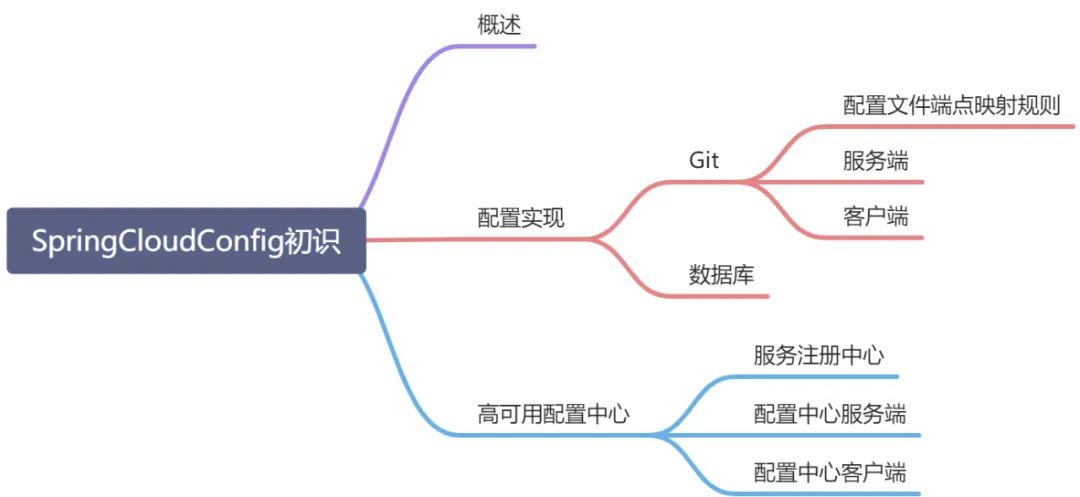
概述
Spring Cloud Config是一个支持微服务和分布式集中化提供配置的项目。微服务系统中的服务实例可能非常多,如果逐个更新配置,运维成本非常大。为了简化配置的复杂性,产生了集中化管理配置的概念,通过集中化配置中心统一配置微服务系统中涉及到的服务实例。
在Config中,分为服务端和客户端两个部分:
服务端:集中化配置中心,是一个独立的服务实例,也可以将其注册到Eureka服务治理中心。集中管理各个微服务实例的配置,读取对应的配置文件,提供给客户端作为配置。Config提供的默认方案是从Git仓库读取配置文件,还提供了从本地文件、SVN、数据库等多种方案供用户选择。
客户端:具体的微服务实例,通过读取Config服务端,获取对应服务实例的配置信息。
配置实现
Git
在Gitee上新建仓库并添加配置文件,如下表:
| 仓库地址 | xxxxxx |
| 文件名称 | 文件内容 |
| config-default.properties | message=default-version1.0 |
| config-test.properties | message=test-version1.0 |
| config-dev.properties | message=dev-version1.0 |
| config-production.properties | message=production-version1.0 |
新建分支config-version2.0用于测试,文件名称保持一致,文件内容将1.0改为2.0。
配置文件端点映射规则
/{application}/{profile}[/{label}]/{application}-{profile}.yml/{label}/{application}-{profile}.yml/{application}-{profile}.properties/{label}/{application}-{profile}.properties
application:微服务应用名称;profile:运行环境;label:git仓库分支名称,[]表示可选参数(默认master分支下的对应配置文件)。
服务端
服务端依赖
<dependency><groupId>org.springframework.cloud</groupId><artifactId>spring-cloud-config-server</artifactId></dependency>
服务端配置文件(application.yml)
spring:cloud:config:server:git:uri: gitUriusername: 用户名password: 密码search-paths: 配置文件查找路径#应用名称application:name: config-server#配置中心应用端口server:port: 4001
服务端应用入口
@SpringBootApplication@EnableConfigServerpublic class ConfigServerApplication {public static void main(String[] args) {SpringApplication.run(ConfigServerApplication.class, args);}}
通过配置文件端点映射规则描述,访问localhost:4001/config/dev/config-version2.0,响应结果如下
{"name":"config","profiles":["dev"],"label":"config-version2.0","version":"ab5a8b47a2a54a874f488f0c644a3b06a9936e23","state":null,"propertySources":[{"name":"https://gitee.com/99967706/spring-cloud-config-repo/config-dev.properties","source":{"message":"dev-version2.0"}}]}
访问http://localhost:4001/config/dev/,响应结果如下
{"name":"config","profiles":["dev"],"label":null,"version":"19d91d633933d8974ebd14988c2e922326ef4847","state":null,"propertySources":[{"name":"https://gitee.com/99967706/spring-cloud-config-repo/config-dev.properties","source":{"message":"dev-version1.0"}}]}
http://localhost:4001/config-version2.0/config-dev.properties,响应结果如下:
message: dev-version2.0
客户端
客户端依赖
<dependency><groupId>org.springframework.boot</groupId><artifactId>spring-boot-starter-web</artifactId></dependency><dependency><groupId>org.springframework.cloud</groupId><artifactId>spring-cloud-starter-config</artifactId></dependency>
客户端配置文件(bootstrap.yml)
spring:#应用名称application:name: configcloud:config:#ConfigServer应用URIuri: ConfigServerURI#git仓库分支label: master#是否允许快速失败fail-fast: false#当前运行环境(与profiles配置内容二选一)#profile: dev#当前运行环境profiles:active: dev#ConfigClient应用端口server:port: 4002
应用名称需要与git中的微服务名称一致,运行环境配置内容与git仓库{profile}内容一致。
bootstrap.yml:程序引导时执行,加载顺序早于application.yml。
客户端应用入口
@SpringBootApplicationpublic class ConfigClientApplication {public static void main(String[] args) {SpringApplication.run(ConfigClientApplication.class, args);}}
控制器
@RestControllerpublic class ConfigClientController {//自动注入配置文件key对应的内容@Value("${message}")private String message=null;@GetMapping("/message")public String getVersionMessage(){return this.message;}}
本示例为通过请求配置中心(ConfigServer)读取master分支下的config-dev配置文件内容。
数据库
数据库脚本
DROP TABLE IF EXISTS `t_config`;CREATE TABLE `t_config` (`id` int(11) NOT NULL AUTO_INCREMENT COMMENT '编号',`property_name` varchar(512) DEFAULT NULL COMMENT '属性键',`property_value` varchar(512) DEFAULT NULL COMMENT '属性值',`application_name` varchar(256) DEFAULT NULL COMMENT '应用名',`version` varchar(64) DEFAULT NULL COMMENT '版本',`branch` varchar(64) DEFAULT NULL COMMENT '分支',`profile_Info` varchar(32) DEFAULT NULL COMMENT '运行环境',PRIMARY KEY (`id`)) ENGINE=InnoDB AUTO_INCREMENT=9 DEFAULT CHARSET=utf8;INSERT INTO `t_config` VALUES ('1', 'message', 'mysql-default-version1.0', 'mysql-config', '1.0', 'master', 'mysqlDefault');INSERT INTO `t_config` VALUES ('2', 'message', 'mysql-dev-version1.0', 'mysql-config', '1.0', 'master', 'mysqlDev');INSERT INTO `t_config` VALUES ('3', 'message', 'mysql-test-version1.0', 'mysql-config', '1.0', 'master', 'mysqlTest');INSERT INTO `t_config` VALUES ('4', 'message', 'mysql-production-version1.0', 'mysql-config', '1.0', 'master', 'mysqlProduction');INSERT INTO `t_config` VALUES ('5', 'message', 'mysql-production-version2.0', 'mysql-config', '2.0', 'config-version2.0', 'mysqlProduction');INSERT INTO `t_config` VALUES ('6', 'message', 'mysql-default-version2.0', 'mysql-config', '2.0', 'config-version2.0', 'mysqlDefault');INSERT INTO `t_config` VALUES ('7', 'message', 'mysql-dev-version2.0', 'mysql-config', '2.0', 'config-version2.0', 'mysqDdev');INSERT INTO `t_config` VALUES ('8', 'message', 'mysql-test-version2.0', 'mysql-config', '2.0', 'config-version2.0', 'mysqlTest');
项目依赖(ConfigServer)
<dependency><groupId>mysql</groupId><artifactId>mysql-connector-java</artifactId></dependency><!--数据库访问依赖--><dependency><groupId>org.springframework.boot</groupId><artifactId>spring-boot-starter-jdbc</artifactId></dependency>
配置文件(application.yml)
spring:cloud:config:server:jdbc:sql: select property_name,property_value from t_config where application_name=? and profile_Info=? and branch=?application:name: config-serverprofiles:active: jdbc #必须设置为jdbc方式,否则从Git拉取配置信息datasource:url: jdbc:mysql://localhost:3306/config_db?useUnicode=true&characterEncoding=UTF-8&serverTimezone=Asia/Shanghaiusername: rootpassword: xxxxxxserver:port: 4001
注意执行SQL语句的参数(分别为服务名、运行环境、分支名,对应客户端的应用名、运行环境、分支名)和顺序。
高可用配置中心
上述配置中心的使用过程中,均通过服务配置中心的方式进行组件调用,无法利用服务发现组件的优势。此处将对服务注册中心与配置中心结合使用进行说明。
服务注册中心
项目依赖
<dependency><groupId>org.springframework.cloud</groupId><artifactId>spring-cloud-starter-netflix-eureka-server</artifactId></dependency><dependency><groupId>org.springframework.boot</groupId><artifactId>spring-boot-starter-web</artifactId></dependency>
配置文件(application.yml)
server:port: 4003eureka:client:register-with-eureka: false #不向服务注册中心注册自己fetch-registry: false #是否去服务注册中心同步服务实例列表serviceUrl:defaultZone: http://localhost:${server.port}/eureka/
服务注册中心入口使用@EnableEurekaServer启用服务注册中心。
配置中心服务端
添加项目依赖(ConfigServer)
<!--Eureka客户端依赖--><dependency><groupId>org.springframework.cloud</groupId><artifactId>spring-cloud-starter-netflix-eureka-client</artifactId></dependency>
配置文件
spring:cloud:config:fail-fast: falseserver:git:uri: https://gitee.com/99967706/spring-cloud-config-repousername: xxxxxxpassword: xxxxxxapplication:name: config-serverserver:port: 4001eureka:client:serviceUrl:default-zone: http://localhost:4003/eureka/
配置中心服务端程序入口添加@EnabledEurekaClient启用Eureka客户端。
配置中心客户端
添加项目依赖(ConfigClient)
<!--Eureka客户端依赖--><dependency><groupId>org.springframework.cloud</groupId><artifactId>spring-cloud-starter-netflix-eureka-client</artifactId></dependency>
配置文件(bootstrap.yml)
spring:application:name: config #与git仓库配置文件的application内容一致cloud:config:label: master #与git仓库配置文件的label内容一致fail-fast: falseprofile: default #与git仓库配置文件的profile内容一致discovery:enabled: trueserviceId: config-server #与配置中心服务端应用名一致server:port: 4002eureka:client:serviceUrl:defaultZone: https://localhost:4003/eureka/
配置中心客户端程序入口使用@EnabledEurekaClient启用Eureka客户端。
依次启动注册中心->配置中心服务端->客户端,访问localhost:4003/message,响应结果如下:
message: default-version2.0
说明成功通过服务注册中心拉取master分支下的config-default配置文件内容。只需要将配置中心服务端(Config Server)多实例部署,即可实现配置中心高可用。
