




欢迎关注路条编程的公众号,通过学习 CSS 层叠样式表基础知识这一系列文章,你将会逐步掌握 CSS 进行样式设置的基础知识。
今天我们要介绍的内容是导入外部字体。通过 CSS 对页面元素内文本内容进行字体设置,除了指定大多数操作系统上常见的字体外,我们还可以指定非标准的、自定义的 web 免费字体,以便在我们的网站上页面使用,达到美化页面的目的。现在互联网上有许多网页字体的来源,由于使用版权的问题,我们一般使用网上免费的字体,本次示例教程使用阿里巴巴普惠体进行配置。
阿里巴巴普惠体是阿里巴巴发布的字体,它将开放商业授权给所有个人和商家,让所有用户可以免费使用。你可以通过引用字体的 URL 或本地文件在 CSS 中使用。本次示例我们通过引用本地文件方式引入字体。现在让我们开始进行阿里巴巴普惠体引入工作吧。
首先从网址 https://alibabafont.taobao.com/wow/alibabafont/act/alifont 下载最新版本的字体文件,将对应的文件放至示例 fonts 目录下。在 style.css 中增加字体引用代码如下:
@font-face {font-family: 'AlibabaPuHuiTi-Heavy';src: url('../fonts/Alibaba-PuHuiTi-Heavy.otf');font-weight: 800;font-style: normal;}
<style type="text/css">.text-puhuiti-heavy {font-family: AlibabaPuHuiTi-Heavy;color: white;}</style>
<style type="text/css">.text-puhuiti-heavy {font-family: AlibabaPuHuiTi-Heavy STFangsong;color: white;}</style>
<style type="text/css">.text-antiquewhite {font-family: Arial, STFangsong;}</style>
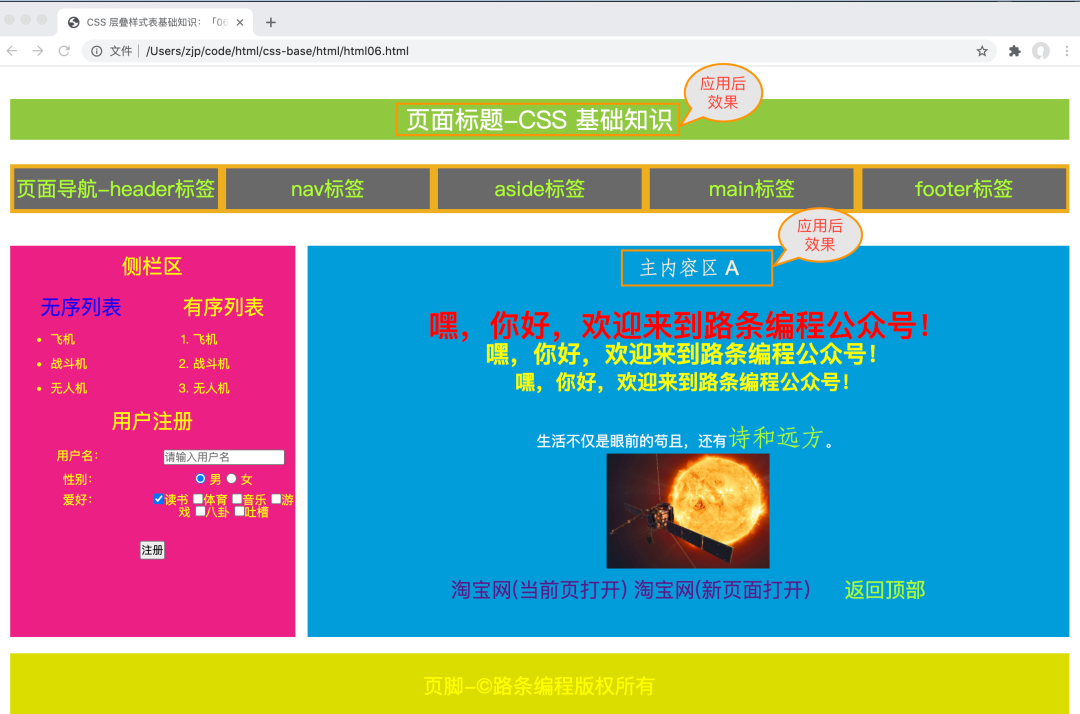
<!DOCTYPE html><html><!--注释 页头 --><head><meta charset="utf-8"><!--注释 页头标题 --><title> CSS 层叠样式表基础知识:「06」导入外部字体进行页面元素美化 </title><link rel="stylesheet" type="text/css" href="./css/style.css"><style type="text/css">.font-px-30 {font-size:30px;font-family: STFangsong;color:greenyellow;}.life {line-height: 30px;font-size:18px;}.text-puhuiti-heavy {font-family: AlibabaPuHuiTi-Heavy;color: white;}.text-antiquewhite {color: antiquewhite;font-family: Arial, STFangsong}h2 {color: red;}#pageBody {color: yellow;}</style></head><body id="pageBody"><span id="pageTop" name="pageTop"></span><div class="layout"><!--页面标题--><header class="header puhuiti-heavy">页面标题-CSS 基础知识</header><!--页面导航--><nav class="nav"><ul class="menu"><li><a href="#">页面导航-header标签</a></li><li><a href="#">nav标签</a></li><li><a href="#">aside标签</a></li><li><a href="#">main标签</a></li><li><a href="#">footer标签</a></li></ul></nav><article class="content"><!--侧栏区--><aside class="aside"><p >侧栏区</p><div class="row"><div><p style="color: blue;" >无序列表</p><ul><li>飞机</li><li>战斗机</li><li>无人机</li></ul></div><div><p>有序列表</p><ol><li>飞机</li><li>战斗机</li><li>无人机</li></ol></div></div><p>用户注册</p><form action="#" method="post"><div class="row mt-10"><span class="item">用户名:</span><span class="item"><input type="text" value="" placeholder="请输入用户名" required="required" ></span></div><div class="row mt-10"><span class="item">性别:</span><span class="item"><label for="male"><input type="radio" value="male" id="male" placeholder="男" name="sex" required="required" checked="checked"> 男 </label><label for="female"><input type="radio" name="sex" value="female" id="female" placeholder="女" required="required" > 女 </label></span></div><div class="row mt-10"><span class="item">爱好:</span><span class="item"><label for="dushu"><input type="checkbox" name="hobby" value="dushu" id="dushu" checked="checked">读书</label><label for="tiyu"><input type="checkbox" name="hobby" value="tiyu" id="tiyu" >体育</label><label for="yinyue"><input type="checkbox" name="hobby" value="yinyue" id="yinyue">音乐</label><label for="youxi"><input type="checkbox" name="hobby" value="youxi" id="youxi">游戏</label><label for="bagua"><input type="checkbox" name="hobby" value="bagua" id="bagua">八卦</label><label for="tucao"><input type="checkbox" name="hobby" value="tucao" id="tucao">吐槽</label></span></div><div class="mt-10"><input type="submit" value="注册" ></div></form></aside><!--主内容区--><main class="main"><p class="text-antiquewhite"> 主内容区 A </p><p> </p><!-- <h1>嘿,你好,欢迎来到路条编程公众号!</h1> --><h2>嘿,你好,欢迎来到路条编程公众号!</h2><h3>嘿,你好,欢迎来到路条编程公众号!</h3><h4>嘿,你好,欢迎来到路条编程公众号!</h4><br><!--<h5>嘿,你好,欢迎来到路条编程公众号!</h5><h6>嘿,你好,欢迎来到路条编程公众号!</h6>--><p class="life">生活不仅是眼前的苟且,还有<a href="https://baike.baidu.com/item/%E8%AF%97%E5%92%8C%E8%BF%9C%E6%96%B9/19483889" target="_blank" class="font-px-30">诗和远方</a>。</p><a href="#"><img src="https://mmbiz.qpic.cn/mmbiz_jpg/iciaYydulQQ938RSBlZICkZcFgBDbnN9LicG0Vib2H8iarZsgmPeCibyg4fhEcFcHlicO3EyH2ds6Qrc4NFyA8BbPohuQ/0?wx_fmt=jpeg" alt="迄今为止拍摄到的最接近太阳的照片" width="200" title="迄今为止拍摄到的最接近太阳的照片"></a><br/><a href="https://www.taobao.com" >淘宝网(当前页打开)</a> <a href="https://www.taobao.com" target="_blank">淘宝网(新页面打开)</a> <a href="#pageTop">返回顶部</a></main><div class="clears"></div></article><!--页脚--><footer class="footer">页脚-©路条编程版权所有</footer><div class="clears"></div></div></body></html>
今天就讲到这里,如果有问题需要咨询,大家可以直接留言或扫下方二维码加入学习社群,我们会尽力为你解答。


作者:路条编程(转载请获本公众号授权,并注明作者与出处)
文章转载自路条编程,如果涉嫌侵权,请发送邮件至:contact@modb.pro进行举报,并提供相关证据,一经查实,墨天轮将立刻删除相关内容。
