




有话要说
结合到我们这次21天日更挑战,Linux常用命令就在那搁着,你可能也清楚都有啥,但是通过这种方式,让其存在各种不确定性,你可能永远不知道我下一个要挑战什么命令,处处充满无限可能。同时,也排除你对熟悉的命令一晃而过,让你时刻保持期待!时刻保持新鲜!
1. 命令简介
netstat 命令是一个监控 TCP/IP 网络的工具,常用于监听端口状态、协议等网络相关信息。所以,利用这个命令,我们可以检验端口的网络连接情况,方便我们排查网络问题。
2. 英文含义
netstat : 命令、网络状态、显示网络状态、网络、看网络状态、
3. 语法格式
netstat [参数]
4. 选项说明
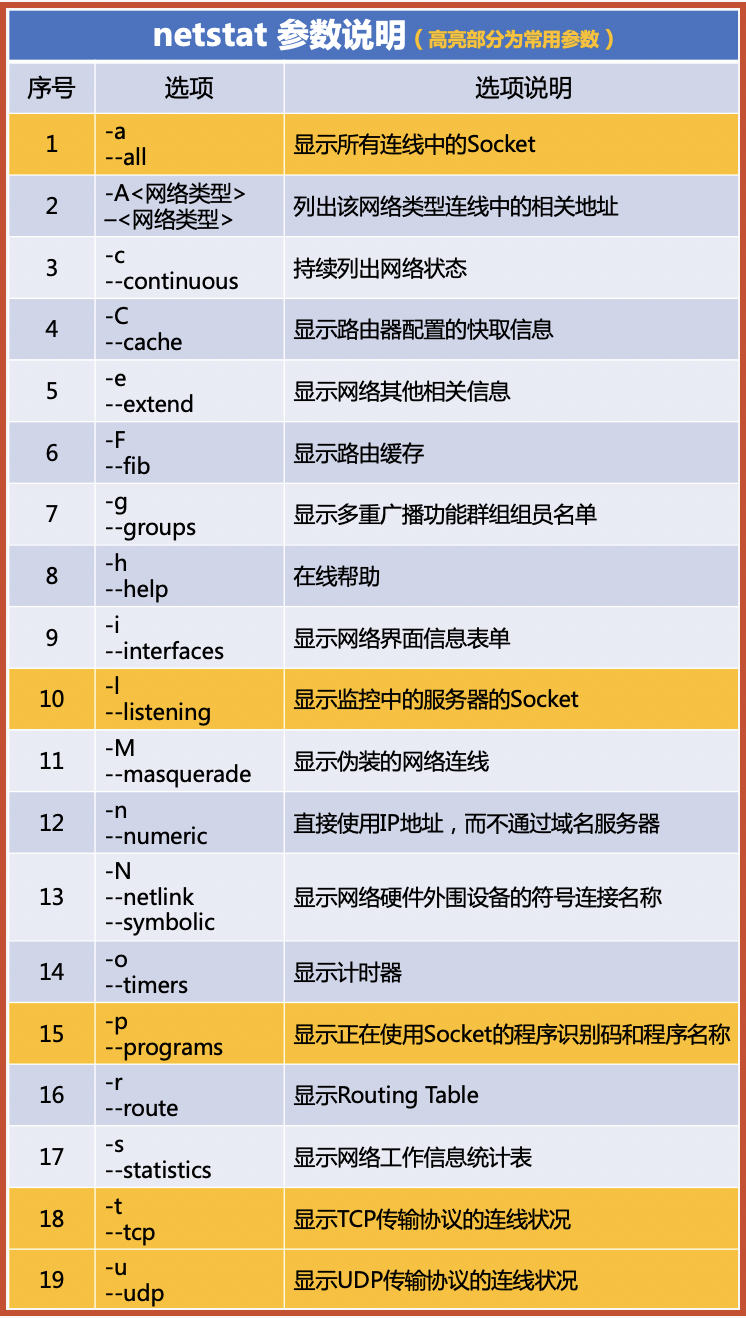
5. 示例说明
-a或--all:列出所有连接
[root@iZ ~]# netstat -a
Active Internet connections (servers and established)
Proto Recv-Q Send-Q Local Address           Foreign Address         State
tcp        0      0 0.0.0.0:cslistener      0.0.0.0:*               LISTEN
tcp        0      0 0.0.0.0:mysql           0.0.0.0:*               LISTEN
tcp        0      0 0.0.0.0:ssh             0.0.0.0:*               LISTEN
tcp        0      0 0.0.0.0:ddi-tcp-1       0.0.0.0:*               LISTEN
tcp        0      0 localhost:smtp          0.0.0.0:*               LISTEN
.....
-t或--tcp:列出TCP协议连接
[root@iZ ~]# netstat -t
Active Internet connections (w/o servers)
Proto Recv-Q Send-Q Local Address           Foreign Address         State
tcp        0      0 iZbp1d8rn0652:ddi-tcp-1 xxx.xxx.xxx.xxx:15270   ESTABLISHED
....
-u或--udp:列出UDP协议连接
[root@iZ ~]# netstat -u
Active Internet connections (w/o servers)
Proto Recv-Q Send-Q Local Address           Foreign Address         State
udp        0      0 iZbp1d8rn0652ia3:bootpc _gateway:bootps         ESTABLISHED
-p或--programs:查看进程信息
[root@iZ ~]# netstat -p
Active Internet connections (w/o servers)
Proto Recv-Q Send-Q Local Address           Foreign Address         State       PID/Program name
tcp        0      0 iZbp1d8rn0652:ddi-tcp-1 xxx.xxx.xxx.xxx:15270   ESTABLISHED 1114/python
tcp        0      0 iZbp1d8rn0652:ddi-tcp-1 xxx.xxx.xxx.xxx:57814   ESTABLISHED 1114/python
tcp        0      0 iZbp1d8rn0652:ddi-tcp-1 xxx.xxx.xxx.xxx:39232   ESTABLISHED 1114/python
tcp        0      0 iZbp1d8rn0652:ddi-tcp-1 xxx.xxx.xxx.xxx:60722 ESTABLISHED 1114/python
tcp        0    216 iZbp1d8rn0652ia3bzz:ssh xxx.xxx.xxx.xxx:53336   ESTABLISHED 3172853/sshd: root
tcp        0      0 iZbp1d8rn0652ia3b:35110 xxx.xxx.xxx.xxx:http      ESTABLISHED 2479501/AliYunDun
....
netstat -tunlp:查看各种信息(经常使用)
[root@iZb ~]# netstat -tunlp
Active Internet connections (only servers)
Proto Recv-Q Send-Q Local Address           Foreign Address         State       PID/Program name
tcp        0      0 0.0.0.0:9000            0.0.0.0:*               LISTEN      3164815/docker-prox
tcp        0      0 0.0.0.0:3306            0.0.0.0:*               LISTEN      1685847/docker-prox
tcp        0      0 0.0.0.0:22              0.0.0.0:*               LISTEN      2611795/sshd
tcp        0      0 0.0.0.0:8888            0.0.0.0:*               LISTEN      1114/python
tcp        0      0 127.0.0.1:25            0.0.0.0:*               LISTEN      2590759/master
tcp6       0      0 :::9000                 :::*                    LISTEN      3164821/docker-prox
tcp6       0      0 :::3306                 :::*                    LISTEN      1685853/docker-prox
tcp6       0      0 :::80                   :::*                    LISTEN      92555/httpd
tcp6       0      0 :::888                  :::*                    LISTEN      92555/httpd
tcp6       0      0 ::1:25                  :::*                    LISTEN      2590759/master
udp        0      0 127.0.0.1:323           0.0.0.0:*                           2590788/chronyd
udp6       0      0 ::1:323                 :::*                                2590788/chronyd
netstat -tunlp | grep 3306:查看3306端口使用情况
[root@iZbp1d8rn0652ia3bzzmioZ ~]# netstat -tunlp |grep 3306
tcp        0      0 0.0.0.0:3306            0.0.0.0:*               LISTEN      1685847/docker-prox
tcp6       0      0 :::3306                 :::*                    LISTEN      1685853/docker-prox
好了,今天的学习就到这里!欢迎大家评论区参与交流与讨论,更好的学习与进步!原创不易,欢迎收藏与转发支持!

系列推荐
文章转载自胖邰,如果涉嫌侵权,请发送邮件至:contact@modb.pro进行举报,并提供相关证据,一经查实,墨天轮将立刻删除相关内容。
