openGauss导入数据练习
1.通过INSERT语句直接写入数据
omm=# CREATE TABLE reason_t1
omm-# (
r_reason_sk integer,
omm(# omm(# r_reason_id character(16),
omm(# r_reason_desc character(100)
omm(# );
CREATE TABLE
omm=# insert into reason_t1 values(1, 'AAAAAAAABAAAAAAA', 'reason1');
INSERT 0 1
–没有数值的字段将被填充为字段的缺省值
omm=# insert into reason_t1 values(1, 'AAAAAAAABAAAAAAA');
INSERT 0 1
–明确字段为缺省值
omm=# insert into reason_t1 values(1, 'AAAAAAAABAAAAAAA', DEFAULT);
INSERT 0 1
–明确整行为缺省值
omm=# insert into reason_t1 DEFAULT VALUES;
INSERT 0 1
omm=# select * from reason_t1;
r_reason_sk | r_reason_id | r_reason_desc
-------------+------------------+---------------------------------------------------------------------------------------------
---------
1 | AAAAAAAABAAAAAAA | reason1
1 | AAAAAAAABAAAAAAA |
1 | AAAAAAAABAAAAAAA |
| |
(4 rows)
–指定表插入数据到当前表
omm=# CREATE TABLE reason_t2
omm-# (
omm(# r_reason_sk integer,
omm(# r_reason_id character(16),
omm(# r_reason_desc character(100)
omm(# );
CREATE TABLE
–将查询结果作为插入的数据
omm=# INSERT INTO reason_t2 SELECT * FROM reason_t1;
INSERT 0 4
omm=# select * from reason_t2;
r_reason_sk | r_reason_id | r_reason_desc
-------------+------------------+----------------------------------------------------------
1 | AAAAAAAABAAAAAAA | reason1
1 | AAAAAAAABAAAAAAA |
1 | AAAAAAAABAAAAAAA |
| |
(4 rows)
2.使用合并方式更新和插入数据
–创建源表products,并插入数据
omm=# CREATE TABLE products
omm-# ( product_id INTEGER,
omm(# product_name VARCHAR2(60),
omm(# category VARCHAR2(60)
omm(# );
CREATE TABLE
omm=# INSERT INTO products VALUES
omm-# (1502, 'olympus camera', 'electrncs'),
omm-# (1601, 'lamaze', 'toys'),
omm-# (1666, 'harry potter', 'toys'),
omm-# (1700, 'wait interface', 'books');
INSERT 0 4
–创建目标表newproducts,并插入数据
omm=# CREATE TABLE newproducts
omm-# ( product_id INTEGER,
omm(# product_name VARCHAR2(60),
omm(# category VARCHAR2(60)
omm(# );
CREATE TABLE
omm=# INSERT INTO newproducts VALUES
omm-# (1501, 'vivitar 35mm', 'electrncs'),
omm-# (1502, 'olympus ', 'electrncs'),
omm-# omm-# (1600, 'play gym', 'toys'),
(1601, 'lamaze', 'toys'),
omm-# (1666, 'harry potter', 'dvd');
INSERT 0 5
–使用MERGE INTO 语句将源表products的数据合并至目标表newproducts
omm=# MERGE INTO newproducts np
omm-# USING products p
omm-# ON (np.product_id = p.product_id )
omm-# WHEN MATCHED THEN
omm-# UPDATE SET np.product_name = p.product_name, np.category = p.category
omm-# WHEN NOT MATCHED THEN
omm-# INSERT VALUES (p.product_id, p.product_name, p.category) ;
MERGE 4
–查询合并后的目标表newproducts。
omm=# SELECT * FROM newproducts
omm-# ;
product_id | product_name | category
------------+----------------+-----------
1501 | vivitar 35mm | electrncs
1600 | play gym | toys
1502 | olympus camera | electrncs
1601 | lamaze | toys
omm=# 1666 | harry potter | toys
1700 | wait interface | books
(6 rows)
3.使用COPY实现表和文件间的拷贝
–将表数据输出到stdout
omm=# copy reason_t1 to stdout;
1 AAAAAAAABAAAAAAA reason1
1 AAAAAAAABAAAAAAA \N
1 AAAAAAAABAAAAAAA \N
\N \N \N
–将表数据拷贝到文件
omm=# copy reason_t1 to '/home/omm/reason.dat';
COPY 4
omm=# CREATE TABLE reason_t3 (LIKE reason_t1);
CREATE TABLE
–将数据从文件拷贝到表
omm=# copy reason_t3 from '/home/omm/reason.dat';
COPY 4
omm=# select * from reason_t3;
r_reason_sk | r_reason_id | r_reason_desc
-------------+------------------+---------------------------------------------------------------------------------------------
---------
1 | AAAAAAAABAAAAAAA | reason1
1 | AAAAAAAABAAAAAAA |
1 | AAAAAAAABAAAAAAA |
| |
(4 rows)
课程作业
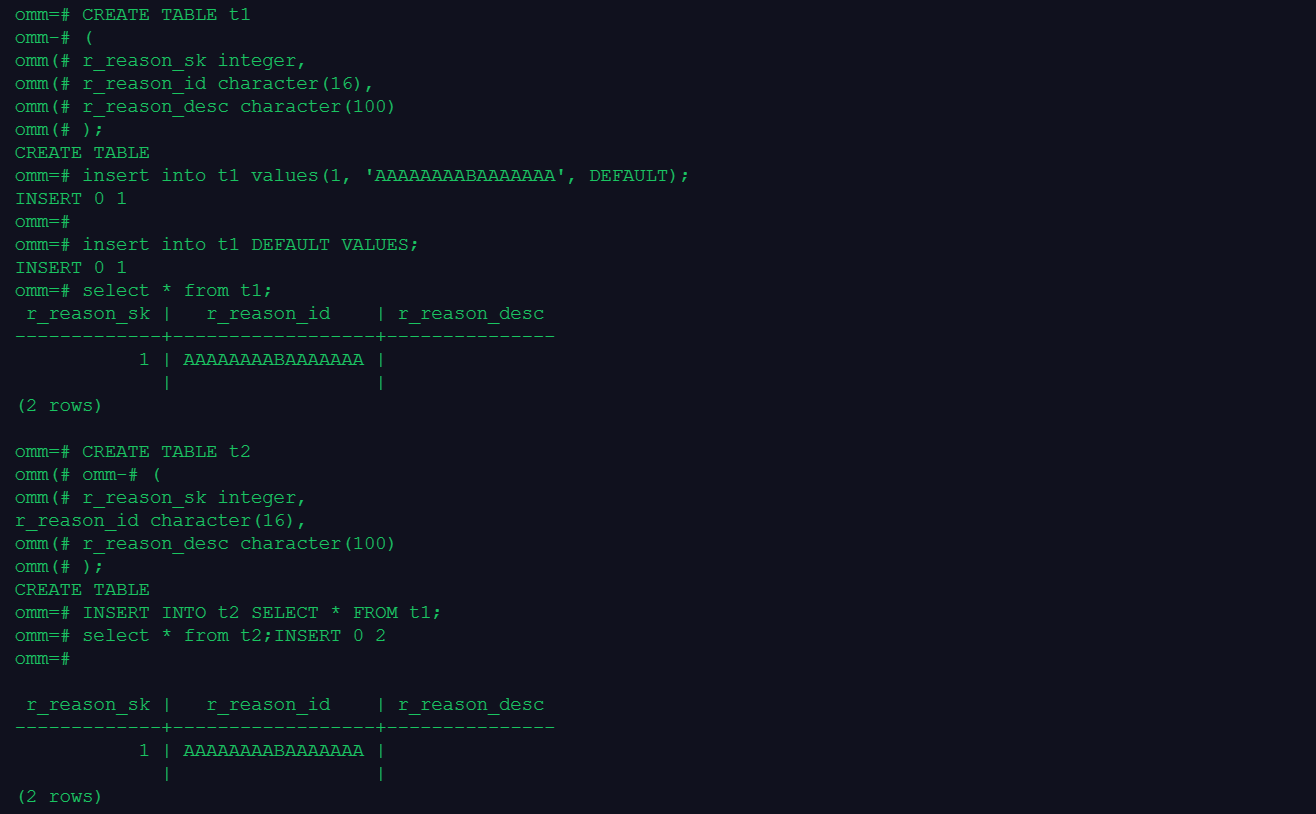
1.创建表1并在表中插入数据,分别指定字段和整行为缺省值
omm=# CREATE TABLE t1
omm-# (
omm(# r_reason_sk integer,
omm(# r_reason_id character(16),
omm(# r_reason_desc character(100)
omm(# );
CREATE TABLE
omm=# insert into t1 values(1, 'AAAAAAAABAAAAAAA', DEFAULT);
INSERT 0 1
omm=#
omm=# insert into t1 DEFAULT VALUES;
INSERT 0 1
omm=# select * from t1;
r_reason_sk | r_reason_id | r_reason_desc
-------------+------------------+---------------
1 | AAAAAAAABAAAAAAA |
| |
(2 rows)
2.创建表2并将表1的数据全部导入表2中
omm=# CREATE TABLE t2
omm(# omm-# (
omm(# r_reason_sk integer,
r_reason_id character(16),
omm(# r_reason_desc character(100)
omm(# );
CREATE TABLE
omm=# INSERT INTO t2 SELECT * FROM t1;
omm=# select * from t2;INSERT 0 2
omm=#
r_reason_sk | r_reason_id | r_reason_desc
-------------+------------------+---------------
1 | AAAAAAAABAAAAAAA |
| |
(2 rows)
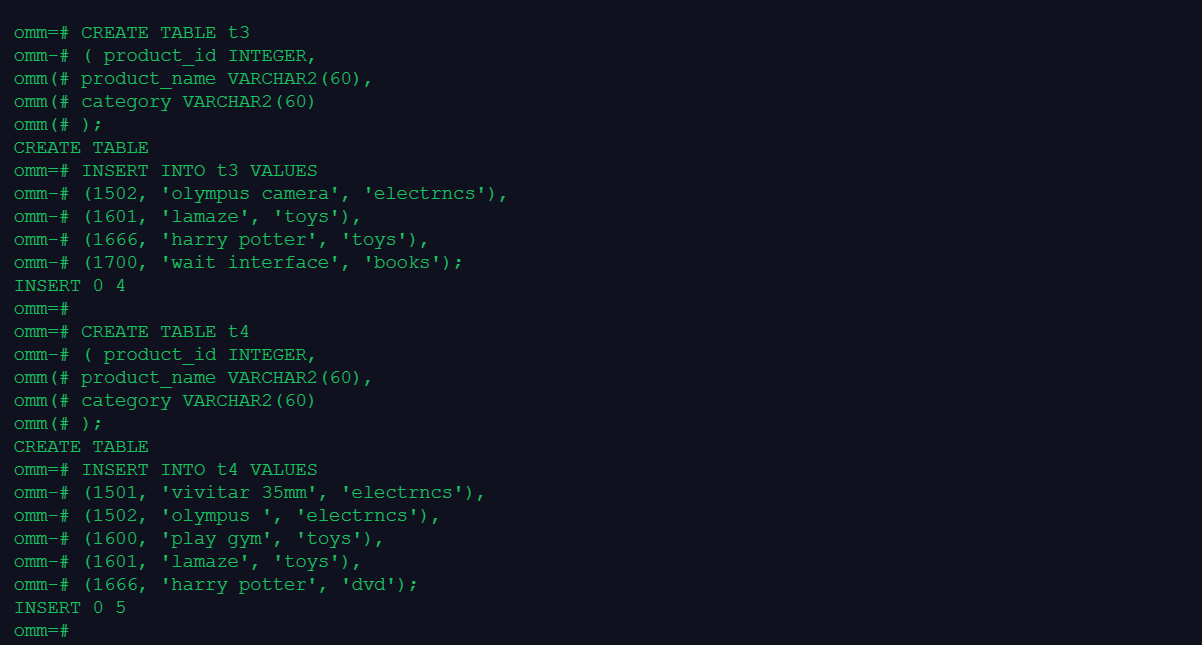
3.创建表3和表4,并合并两个表的数据到表3
omm=# CREATE TABLE t3
omm-# ( product_id INTEGER,
omm(# product_name VARCHAR2(60),
omm(# category VARCHAR2(60)
omm(# );
CREATE TABLE
omm=# INSERT INTO t3 VALUES
omm-# (1502, 'olympus camera', 'electrncs'),
omm-# (1601, 'lamaze', 'toys'),
omm-# (1666, 'harry potter', 'toys'),
omm-# (1700, 'wait interface', 'books');
INSERT 0 4
omm=#
omm=# CREATE TABLE t4
omm-# ( product_id INTEGER,
omm(# product_name VARCHAR2(60),
omm(# category VARCHAR2(60)
omm(# );
CREATE TABLE
omm=# INSERT INTO t4 VALUES
omm-# (1501, 'vivitar 35mm', 'electrncs'),
omm-# (1502, 'olympus ', 'electrncs'),
omm-# (1600, 'play gym', 'toys'),
omm-# (1601, 'lamaze', 'toys'),
omm-# (1666, 'harry potter', 'dvd');
INSERT 0 5
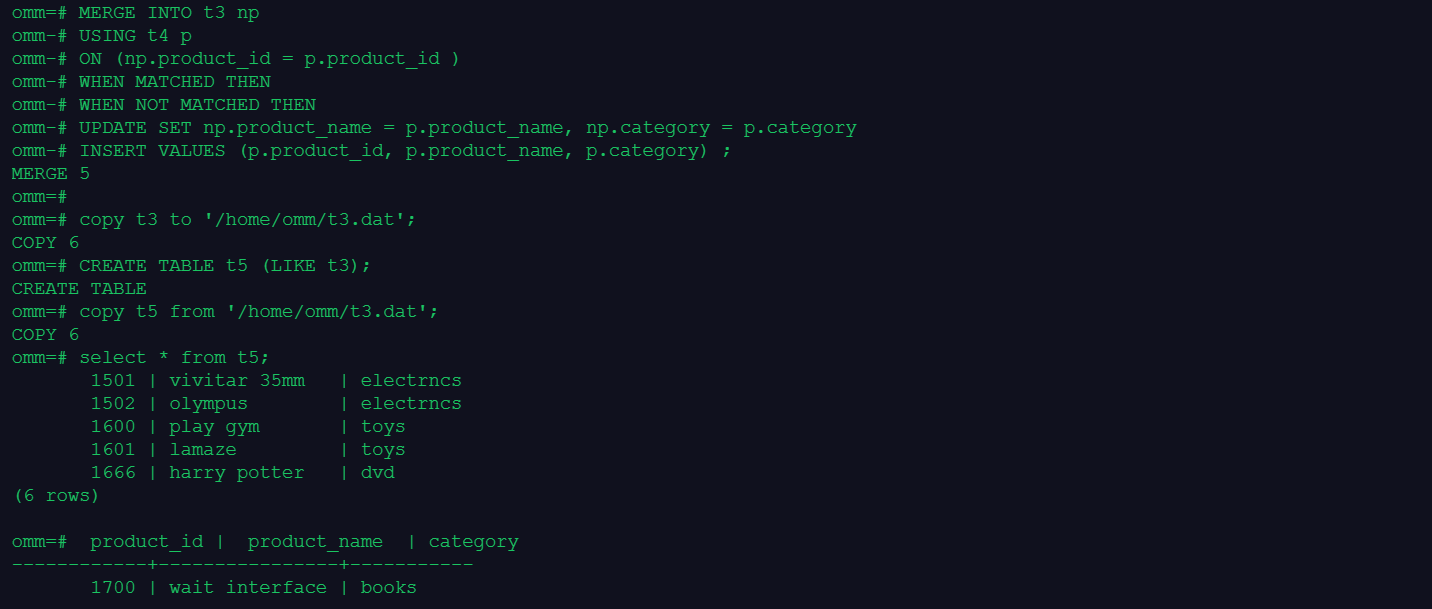
omm=#
omm=# MERGE INTO t3 np
omm-# USING t4 p
omm-# ON (np.product_id = p.product_id )
omm-# WHEN MATCHED THEN
omm-# WHEN NOT MATCHED THEN
omm-# UPDATE SET np.product_name = p.product_name, np.category = p.category
omm-# INSERT VALUES (p.product_id, p.product_name, p.category) ;
MERGE 5
4.将表3的数据输出到文件,再将文件中的数据导入到表5
omm=# copy t3 to '/home/omm/t3.dat';
COPY 6
omm=# CREATE TABLE t5 (LIKE t3);
CREATE TABLE
omm=# copy t5 from '/home/omm/t3.dat';
COPY 6
omm=# select * from t5;
1501 | vivitar 35mm | electrncs
1502 | olympus | electrncs
1600 | play gym | toys
1601 | lamaze | toys
1666 | harry potter | dvd
(6 rows)
omm=# product_id | product_name | category
------------+----------------+-----------
1700 | wait interface | books
操作截图: