



爬取网站:https://www.buxiuse.com/

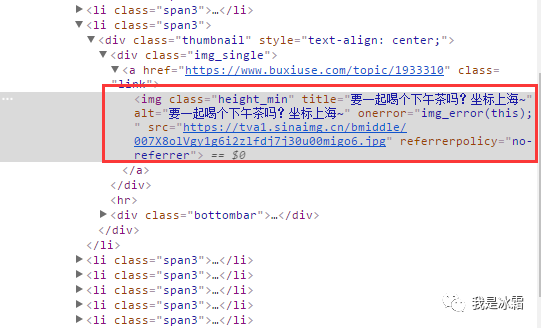
1. 分析网页元素
2. 爬取过程
先贴出完整代码,再进行分析
# -*- coding:utf-8 -*-import requestsfrom requests.exceptions import RequestExceptionfrom bs4 import BeautifulSoupimport bs4import osdef get_html(url, header=None):"""请求初始url"""response = requests.get(url, headers=header)try:if response.status_code == 200:# print(response.status_code)# print(response.text)return response.textreturn Noneexcept RequestException:print("请求失败")return Nonedef parse_html(html, list_data):"""提取img的名称和图片url,并将名称和图片地址以字典形式返回"""soup = BeautifulSoup(html, 'html.parser')img = soup.find_all('img')for t in img:if isinstance(t, bs4.element.Tag):# print(t)name = t.get('alt')img_src = t.get('src')list_data.append([name, img_src])dict_data = dict(list_data)return dict_datadef get_image_content(url):"""请求图片url,返回二进制内容"""print("正在下载", url)try:r = requests.get(url)if r.status_code == 200:return r.contentreturn Noneexcept RequestException:return Nonedef main(num=None, depth=None):base_url = 'https://www.dbmeinv.com/index.htm?'for i in range(1, depth):url = base_url + 'cid=' + str(num) + '&' + 'pager_offset=' + str(i)# print(url)header = {'Accept': 'text/html,application/xhtml+xml,application/xml;q = 0.9, image/webp,image/apng,*/*;q=''0.8','Accept-Encoding': 'gzip,deflate,br','Accept-Language': 'zh-CN,zh;q=0.9,en;q=0.8','Cache-Control': 'max-age=0','Connection': 'keep-alive','Host': 'www.dbmeinv.com','Upgrade-Insecure-Requests': '1','User-Agent': 'Mozilla/5.0(WindowsNT6.1;Win64;x64) AppleWebKit/537.36(KHTML, likeGecko) Chrome/''70.0.3538.102Safari/537.36 '}list_data = []html = get_html(url)# print(html)dictdata = parse_html(html, list_data)# print(list_data)# print(dict(list_data))# print(data)# for url in data.values():# download_image(url)root_dir = os.path.dirname(os.path.abspath('.'))save_path = root_dir + '/pics/'for t in dictdata.items():file_path = '{0}/{1}.{2}'.format(save_path, t[0], 'jpg')if not os.path.exists(file_path): # 判断是否存在文件,不存在则爬取with open(file_path, 'wb') as f:f.write(get_image_content(t[1]))f.close()print('文件保存成功')if __name__ == '__main__':# t = main(2)# print(t) # 这样打印之所以为None,是因为main函数中没有任何内容返回出来,尴尬了。。。main(2, 10)
(1)构造url
大胸妹首页url为:
https://www.buxiuse.com/?cid=2
翻到下一页后,变为:
https://www.buxiuse.com/?cid=2&page=2
可以看到有2个参数cid和page
所在在主函数中,定义了2个参数,
一个表示“大胸妹”对应的cid值,
一个表示翻页
def main(num=None, depth=None):base_url = 'https://www.buxiuse.com/?'for i in range(1, depth):url = base_url + 'cid=' + str(num) + '&' + 'page=' + str(i)
(2)分析parse_html()方法
这个方法用来提取图片的title和src,使用的是BeautifulSoup;
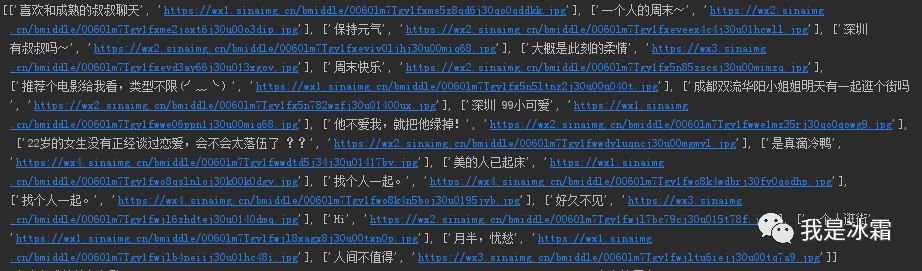
传入2个参数,一个是初始url的返回内容,另外定义一个list_data这里表示一个列表,
会把提取到的title和src,以[title:src]的形式追加到list_data中;
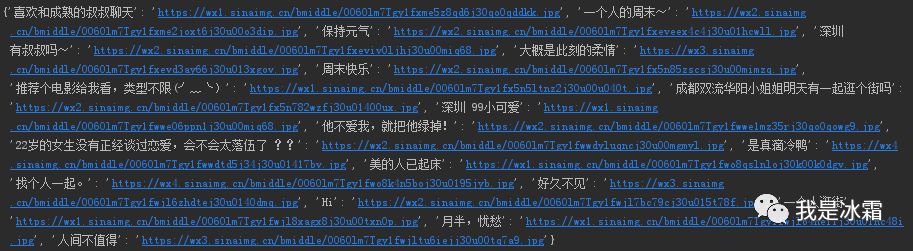
然后再把list_data转换为字典返回出去,
这样就得到了一个以title为键,以src为值的字典。
后面可以通过迭代这个字典,在保存图片时,使用图片的title作为图片名称
(3)下载图片
根据parse_html()方法得到图片url后,还需要进一步请求图片url,并将返回的二进制内容以jpg的格式进行保存
首先定义一个get_image_content()方法,
它与get_html()方法一样,不过是返回的二进制内容
然后就是主函数中构造图片保存的形式了:因为parse_html()方法返回了dict_data,
它是以title为键,以src为值的字典,

所以可以通过迭代这个字典,
分别提取字典的键作为图片名称,
提取字典值作为图片url进行请求,
如下:
root_dir = os.path.dirname(os.path.abspath('.'))save_path = root_dir + '/pics/'for t in dictdata.items():file_path = '{0}/{1}.{2}'.format(save_path, t[0], 'jpg')if not os.path.exists(file_path): # 判断是否存在文件,不存在则爬取with open(file_path, 'wb') as f:f.write(get_image_content(t[1]))f.close()print('文件保存成功')t[0]表示每个键值对的键,即图片的title;t[1]表示每个键值对的值,即图片的url
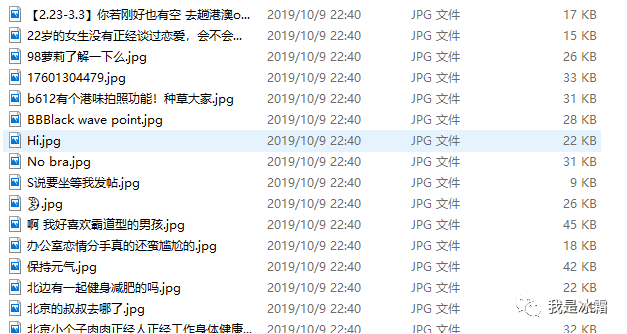
运行程序,下载下来如下图片
补充:用正则提取数据
import reimport requestsimport osfrom requests.exceptions import RequestExceptionr = requests.get('https://www.buxiuse.com/?cid=2')# print(r.status_code)html = r.text# print(r.text)# print(html)name_pattern = re.compile(r'<img class="height_min".*?title="(.*?)"', re.S)src_pattern = re.compile(r'<img class="height_min".*?src="(.*?.jpg)"', re.S)name = name_pattern.findall(html) # 提取titlesrc = src_pattern.findall(html) # 提取srcdata = [name,src]# print(name)# print(src)d=[]for i in range(len(name)):# print(name[i])# print(src[i])d.append([name[i], src[i]])dictdata = dict(d)for i in dictdata.items():print(i)def get_content(url):try:r = requests.get(url)if r.status_code == 200:return r.contentreturn Noneexcept RequestException:return Noneroot_dir = os.path.dirname(os.path.abspath('.'))save_path = root_dir + '/pics/'for t in dictdata.items():file_path = '{0}/{1}.{2}'.format(save_path, t[0], 'jpg')if not os.path.exists(file_path): # 判断是否存在文件,不存在则爬取with open(file_path, 'wb') as f:f.write(get_content(t[1]))f.close()print('文件保存成功')
PS
文章转载自冰霜blog,如果涉嫌侵权,请发送邮件至:contact@modb.pro进行举报,并提供相关证据,一经查实,墨天轮将立刻删除相关内容。
