



小程序开发中的一些总结
最近重新学习前端,又开始接触小程序基础开发。好久没写公众号了,今天就写一些最近开发过程中的总结,也算是做个笔记。可能在各位大佬眼里有些简单,哈哈。
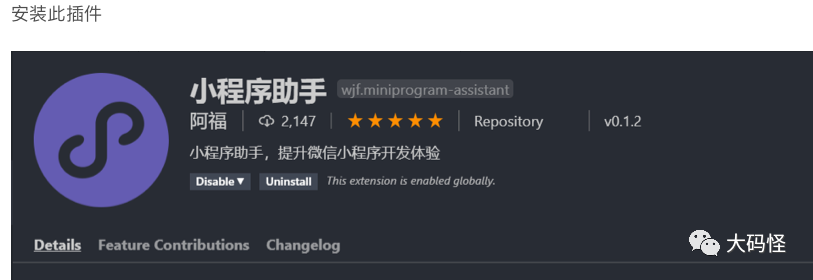
一. 解决VS Code中小程序的wxml文件的注释是双斜杠的问题
安装小程序助手插件,再重启VS Code即可。
二. vscode安装easy less
使用less语法自动生成css或wxss文件。
插件安装Easy LESS插件。 
在settings.json中添加如下 "less.compile"
"less.compile": {
        "compress": false,//是否压缩
        "sourceMap": false,//是否生成map文件,有了这个可以在调试台看到less行数
        "out": true, // 是否输出css文件,false为不输出
        "outExt": ".css", // 输出文件的后缀 可改成 .wxss
       }
三. vscode如何自动格式化代码
安装插件 Prettier-Code formatter 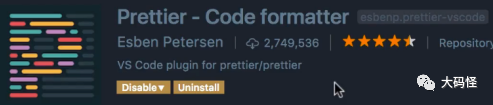
在settings.json中添加如下 "editor.formatOnSave": true 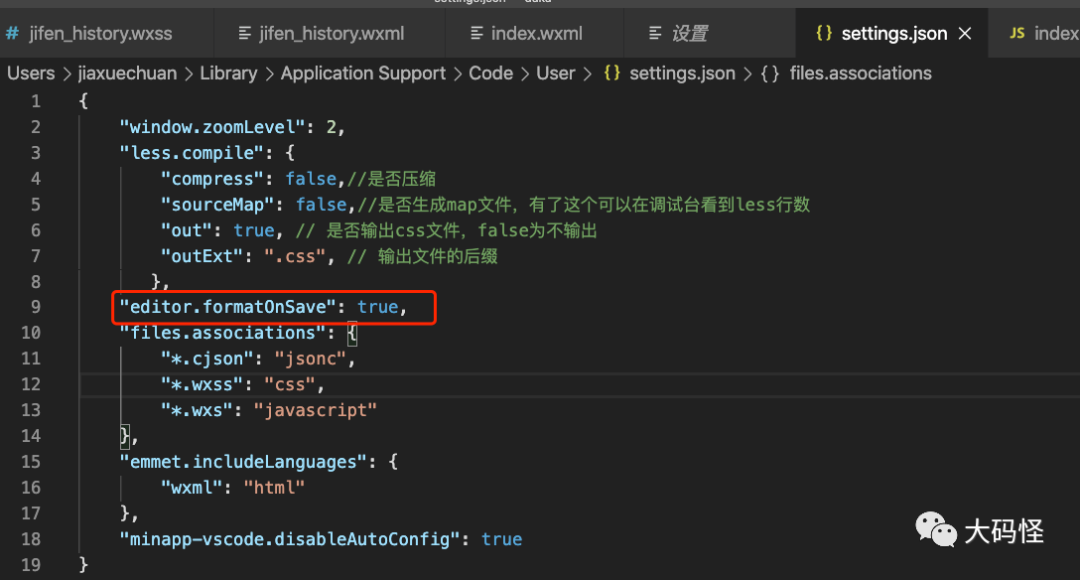
四. 小程序标签绑定点击事件
.wxml文件
<view bindtap="changeInputSizeUp">123</view>
.wxss文件
changeInputSizeUp: function() {
 do something
}
五. 弹窗时 禁止背景页面滑动操作
弹框标签添加 catchtouchmove="return"
<view wx:if="{{isShowConfirm}}" catchtouchmove="return">
六. 输入框标签聚焦或键盘输入时触发
bindinput 键盘输入时触发 bindfocus 输入框聚焦时触发
<textarea maxlength="70" bindinput='setValue' data-name='stuEidtName'></textarea>
七. 日期选择器
.wxml文件
<view class="section">
  <view class="section__title">日期选择器</view>
  <picker mode="date" value="{{date}}" start="2015-09-01" end="2017-09-01" bindchange="bindDateChange">
    <view class="picker">
      当前选择: {{date}}
    </view>
  </picker>
</view>
.js文件
bindDateChange: function(e) {
    console.log('picker发送选择改变,携带值为', e.detail.value)
    this.setData({
      date: e.detail.value
    })
  },
八. 文本超出显示省略号
display: -webkit-box;
-webkit-box-orient: vertical;
-webkit-line-clamp: 3;  // 第几行显示省略号
overflow: hidden;
九. 小程序下拉刷新之后停止下拉框的显示
加载完数据后添加 wx.stopPullDownRefresh()
onPullDownRefresh: function () {
    this.loadTodoList();
    wx.stopPullDownRefresh();
  },
十. 给后端服务器发送http请求,支持es7的async await
根目录下创建 request/index.js
// index.js文件
// 同时发送异步代码的次数
let ajaxTimes = 0;

export const request = (params) => {
  ajaxTimes++;
  // 显示加载中loading 效果
  wx.showLoading({
    title: "加载中",
    mask: true,
  });

  return new Promise((resolve, reject) => {
    wx.request({
      ...params,
      success: (result) => {
        resolve(result.data);
      },
      fail: (err) => {
        reject(err);
      },
      complete: () => {
        ajaxTimes--;
        if (ajaxTimes === 0) {
          //  关闭正在等待的图标
          wx.hideLoading();
        }
      },
    });
  });
};
根目录下创建 lib/runtime/runtime.js
将 https://github.com/facebook/regenerator/blob/5703a79746fffc152600fdcef46ba9230671025a/packages/regenerator-runtime/runtime.js
的代码拷到自己的 runtime.js里
需要使用async语法的页面js导入, 哪个页面使用就哪个页面导入
import { request } from "../../request/index.js";
import regeneratorRuntime from "../../lib/runtime/runtime";

async loadTodoList() {
    var that = this;
    var url = "http://127.0.0.1:8000/api/add"
    const result = await request({
      url: url,
      data: this.SubmitParams,
      method: "post",
      header: {
        "Content-Type": "application/x-www-form-urlencoded",
      },
    });

    if (result.code == 0) {
      pass
    } else {
      pass
    }
  },
十一. 监听用户下拉操作
内置的onPullDownRefresh方法
// 监听用户下拉操作
  onPullDownRefresh: function () {
    // 1 重置数组
    this.setData({
      todo_show: [],
    });
    // 2 重置页码
    this.SubmitParams.page_num = 1;
    // 3 发送请求
    this.loadTodoList();
    wx.stopPullDownRefresh();
  },
十二. 页面上拉触底事件的处理函数,如加载下一页
内置的onReachBottom方法
  // 先定义http的请求参数
  SubmitParams: {
    // "key": this.data.key_value,
    status: 3,
    page_size: 10,
    page_num: 1,
  },

  // 总页数
  totalPages: 1,


  /**
   * 页面上拉触底事件的处理函数
   */
  onReachBottom: function () {
    //  1 判断还有没有下一页数据
    // console.log(this.SubmitParams.page_num, this.totalPages);
    if (this.SubmitParams.page_num >= this.totalPages) {
      // 没有下一页数据
      //  console.log('%c'+"没有下一页数据","color:red;font-size:100px;background-image:linear-gradient(to right,#0094ff,pink)");
      wx.showToast({ title: "没有下一页数据" });
    } else {
      // 还有下一页数据
      //  console.log('%c'+"有下一页数据","color:red;font-size:100px;background-image:linear-gradient(to right,#0094ff,pink)");
      this.SubmitParams.page_num++;
      this.loadTodoList();
    }
  }
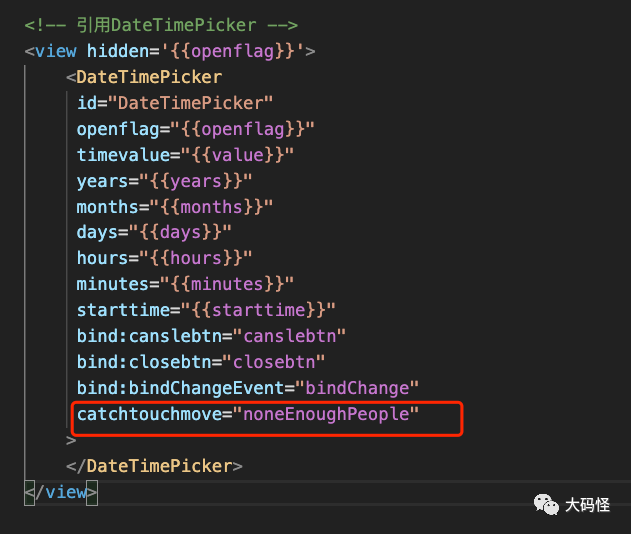
十三. 出现遮罩层后禁止背景页面上下拉动
在遮罩层的标签中添加 catchtouchmove="noneEnoughPeople"
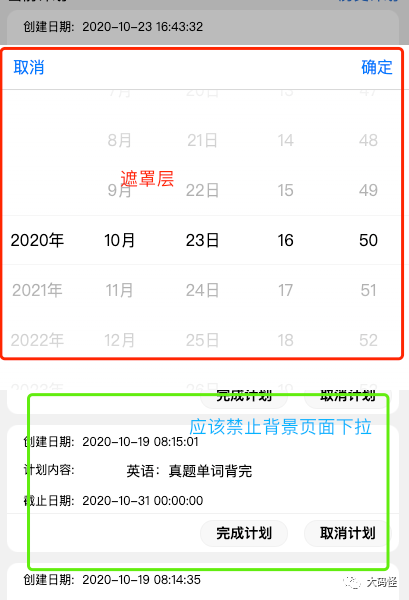
注意:在开发平台上可能不起效果,在手机上测试会起作用
十四. button透明,放到图片或view等标签下面,这样点击图片或标签就能触发button事件
.login_btn
就是button按钮,放到了.user_icon
标签下面了
// less语法
.user_icon {
        position: relative;
        width: 120rpx;
        height: 120rpx;
        border-radius: 50%;
        .login_btn {
          position: absolute;
          top: 0;
          left: 0;
          width: 120rpx;
          height: 120rpx;
          border-radius: 50%;
          opacity: 0;
        }
十五. 下面的标签,部分压住上面的标签
如下图红色部分的实现

// 下面的白色标签 要绝对定位 然后 top指定为负数
.user_content {
  position: relative;
  .user_business_info_wrap {
    position: absolute;
    left: 50%;
    transform: translateX(-50%);
    top: -40rpx;
    width: 94.6%;
    height: 100rpx;
    background-color: #ffffff;
  }
}
十六. async a()函数,在别的函数b()里需要同步调用,禁止异步
给b变成async,然后在调用a前await一下
async a() {
 ......
}

async b() {
  // 如果不添加await a() 和 other执行顺序不定 会出现问题
 await a();
 do other......
}
文章转载自大码怪,如果涉嫌侵权,请发送邮件至:contact@modb.pro进行举报,并提供相关证据,一经查实,墨天轮将立刻删除相关内容。
