




一、导入模块
1%matplotlib inline
2import numpy as np
3import matplotlib.pyplot as plt
4import gdal
5import cmaps
二、读取数据(方法一)
1ds = gdal.Open('/home/kesci/input/DEM2203/dem_1km.tif')
2dem = ds.ReadAsArray()
3dem
1array([[-32768, -32768, -32768, ..., -32768, -32768, -32768],
2       [-32768, -32768, -32768, ..., -32768, -32768, -32768],
3       [-32768, -32768, -32768, ..., -32768, -32768, -32768],
4       ...,
5       [-32768, -32768, -32768, ..., -32768, -32768, -32768],
6       [-32768, -32768, -32768, ..., -32768, -32768, -32768],
7       [-32768, -32768, -32768, ..., -32768, -32768, -32768]], dtype=int16)
检查行数和列数
1nrows  =  ds.RasterXSize
2ncols  =  ds.RasterYSize
3print('行数;{}\n列数:{}'.format(nrows,ncols))
输出:
1行数;8882
2列数:5043
三、读取数据(方法二)
1band = ds.GetRasterBand(1)
2dem = band.ReadAsArray(0, 0,nrows, ncols)
3dem
输出:
1array([[-32768, -32768, -32768, ..., -32768, -32768, -32768],
2       [-32768, -32768, -32768, ..., -32768, -32768, -32768],
3       [-32768, -32768, -32768, ..., -32768, -32768, -32768],
4       ...,
5       [-32768, -32768, -32768, ..., -32768, -32768, -32768],
6       [-32768, -32768, -32768, ..., -32768, -32768, -32768],
7       [-32768, -32768, -32768, ..., -32768, -32768, -32768]], dtype=int16)
打印dem shape
1dem.shape
输出:
1(5043, 8882)
四、缺失值掩膜
掩膜代码:
1masked_dem = np.ma.masked_equal(dem, -32768)
2masked_dem
输出:
 1masked_array(
 2  data=[[--, --, --, ..., --, --, --],
 3        [--, --, --, ..., --, --, --],
 4        [--, --, --, ..., --, --, --],
 5        ...,
 6        [--, --, --, ..., --, --, --],
 7        [--, --, --, ..., --, --, --],
 8        [--, --, --, ..., --, --, --]],
 9  mask=[[ True,  True,  True, ...,  True,  True,  True],
10        [ True,  True,  True, ...,  True,  True,  True],
11        [ True,  True,  True, ...,  True,  True,  True],
12        ...,
13        [ True,  True,  True, ...,  True,  True,  True],
14        [ True,  True,  True, ...,  True,  True,  True],
15        [ True,  True,  True, ...,  True,  True,  True]],
16  fill_value=-32768,
17  dtype=int16)
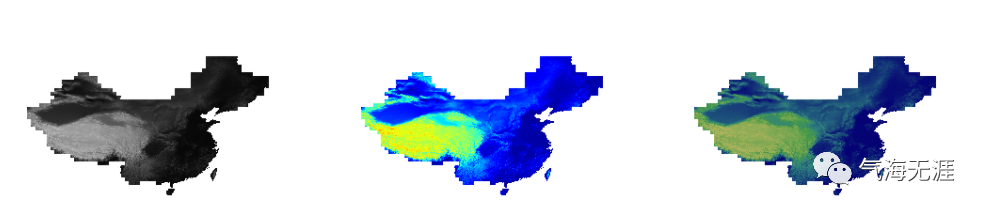
五、绘制快视图
1fig, ([ax1, ax2, ax3]) = plt.subplots(1, 3, figsize=(18, 6))
2ax1.imshow(masked_dem,cmap = plt.cm.gray)
3ax1.set_axis_off()
4ax2.imshow(masked_dem,cmap = plt.cm.jet)
5ax2.set_axis_off()
6ax3.imshow(masked_dem,cmap = plt.cm.gist_earth)
7ax3.set_axis_off()
六、查看地理坐标属性
1gt = ds.GetGeoTransform()
2gt
输出:
1(66.39631807062933,
2 0.008062025005123128,
3 0.0,
4 55.56392411034749,
5 0.0,
6 -0.008062025005123128)
1xres = gt[1]
2yres = gt[5]
3xmin = gt[0] + xres * 0.5
4xmax = gt[0] + (xres * ds.RasterXSize) - xres * 0.5
5ymin = gt[3] + (yres * ds.RasterYSize) + yres * 0.5
6ymax = gt[3] - yres * 0.5
7lons, lats = np.mgrid[xmin:xmax+xres:xres, ymax+yres:ymin:yres]
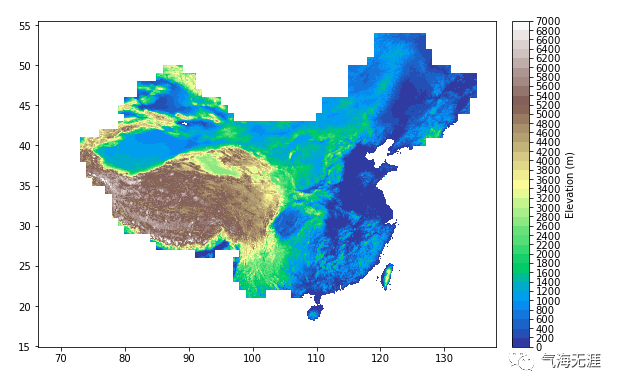
七、绘制地形渲染图
绘图代码1:
1plt.figure(figsize=(10,6))
2levels = np.linspace(0,7000,36)
3ticks = np.linspace(0,7000,36)
4cs = plt.contourf(lons, lats, masked_dem.T, levels=levels, cmap=cmaps.MPL_terrain)
5plt.colorbar(cs, pad=0.03, ticks=ticks, label='Elevation (m)')
6plt.show()
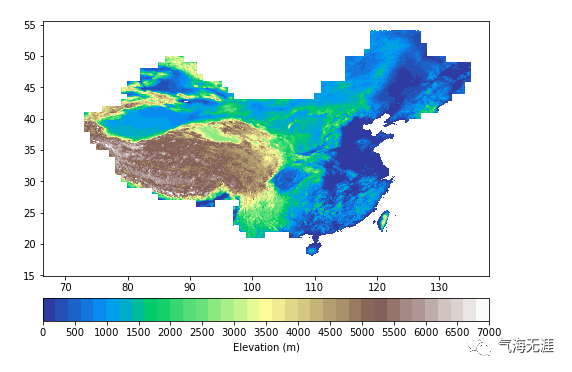
绘图代码2:
1plt.figure(figsize=(8,6))
2levels = np.linspace(0,7000,36)
3ticks = np.linspace(0,7000,15)
4cs = plt.contourf(lons, lats, masked_dem.T, levels=levels, cmap=cmaps.MPL_terrain)
5plt.colorbar(cs, orientation='horizontal', pad=0.07, ticks=ticks, label='Elevation (m)')
6plt.show()
有问题可以到QQ群里进行讨论,我们在那边等大家。
QQ群号:854684131
文章转载自气海无涯,如果涉嫌侵权,请发送邮件至:contact@modb.pro进行举报,并提供相关证据,一经查实,墨天轮将立刻删除相关内容。
