



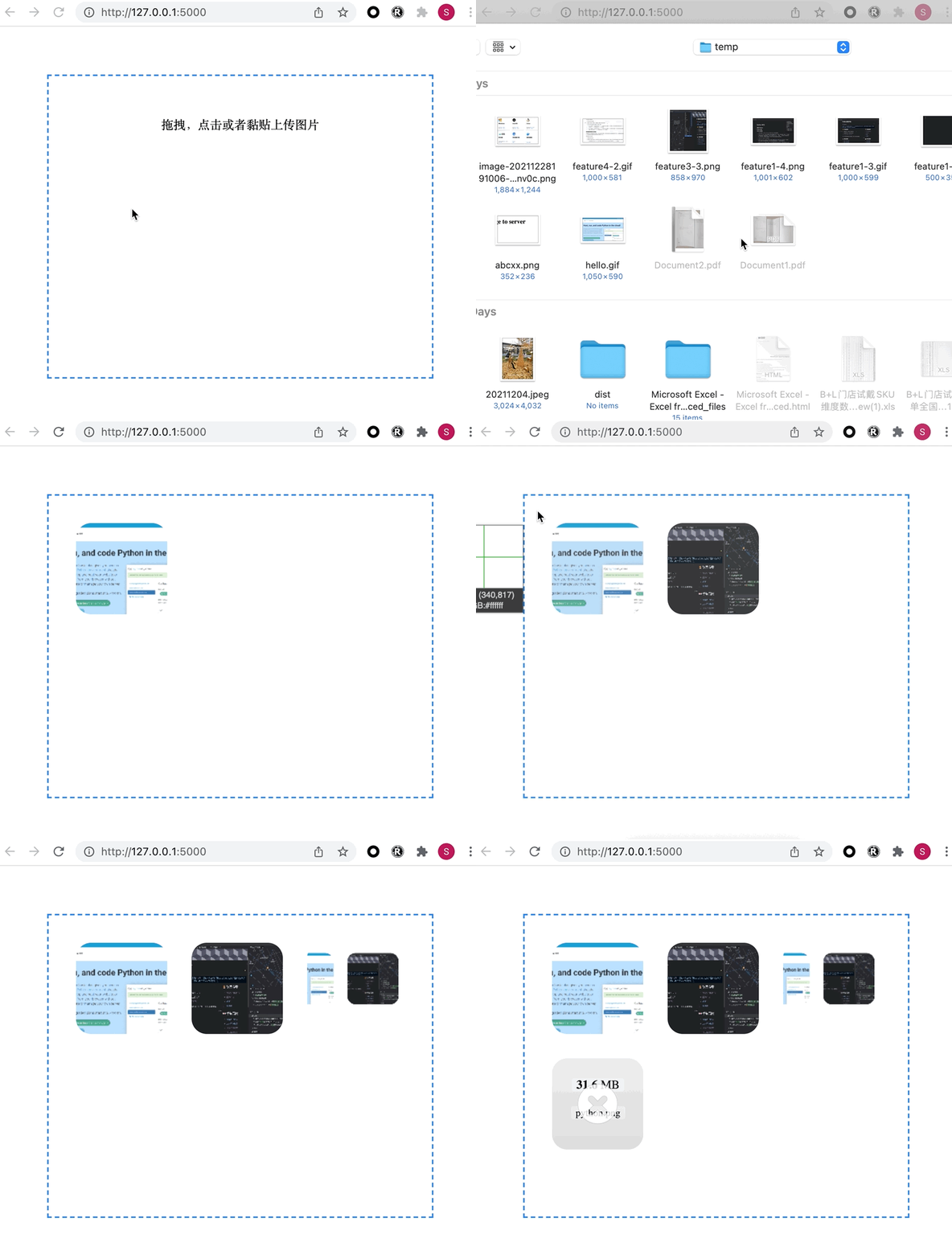
Dropzone 是一个简单的 JavaScript 库,可帮助您向 Web 表单添加文件拖放功能。它是网络上最受欢迎的拖放库之一,被数百万人使用。
有很多配置选项,因此 Dropzone 可以用于各种情况。
Dropzone 的一些亮点是:
界面漂亮 图像缩略图预览。只需注册回调 thumbnail(file, data)
并在您喜欢的任何地方显示图像进度条 支持瑞纳屏(Retina) 多个文件和同步上传 支持大文件 分块上传(单个文件可以在多个 HTTP 请求中分块上传) 完整的主题。Dropzone 的外观和感觉只是默认的主题。你可以通过重写默认的事件监听器来定义所有内容。 浏览器图像大小调整(在将图像上传到您的服务器之前) 经过良好测试
本文只是通过一个简单的 Flask 应用来展示 Dropzone 的强大和简单,顺便增加了黏贴的支持。
废话不多说,直接上代码。
index.html
<!DOCTYPE html>
<html lang="en">
<head>
  <meta charset="UTF-8">
  <title>Dropzone Demo</title>
  <link rel="stylesheet" href="https://unpkg.com/dropzone@5/dist/min/dropzone.min.css" type="text/css" />
  <style>
    .dropzone {
      border: 2px dashed #0087F7;
      margin: 10%;
      min-height: 400px;
    }
  </style>
</head>
<body>
  <div id="myDropzone" class="dropzone"></div>
  <script src="https://unpkg.com/dropzone@5/dist/min/dropzone.min.js"></script>
  <script>
   // Dropzone 选项配置
    Dropzone.options.myDropzone = {
      init: function () {
        // redirect after queue complete
        // upload queue when button click
        // custom init code
      },
      // click upload options
      uploadMultiple: false,
      parallelUploads: 2,
      paramName: "file", // The name that will be used to transfer the file
      maxFilesize: 3, // MB
      acceptedFiles: "image/*",
      maxFiles: 30,
      dictDefaultMessage: `拖拽,点击或者黏贴上传图片`, // message display on drop area

    };
    //初始化Dropzone,绑定id为myDropzone的div, 服务端为/
    var myDropzone = new Dropzone("div#myDropzone", { url: "/"});
  </script>
</body>
<script>
//给Dropzone增加黏贴事件监控
  const target = document.querySelector('#myDropzone');
  // Handle the `paste` event
  target.addEventListener('paste', function (evt) {
    // Get the data of clipboard
    const data = evt.clipboardData.items;
    const items = [].slice.call(data).filter(function (item) {
      // Filter the image items only
      return item.type.indexOf('image') !== -1;
    });
    if (items.length === 0) {
      return;
    }
    const item = items[0];
    const file = item.getAsFile();
    myDropzone.addFile(item.getAsFile())
  });
</script>
</html>
app.py
import os

from flask import Flask, render_template, request
basedir = os.path.abspath(os.path.dirname(__file__))
app = Flask(__name__)

app.config.update(
    UPLOADED_PATH=os.path.join(basedir, 'uploads'),
)

@app.route('/', methods=['POST', 'GET'])
def upload():
    if request.method == 'POST':
        f = request.files.get('file')
        file_path = os.path.join(app.config['UPLOADED_PATH'], f.filename)
        f.save(file_path)
    return render_template('index.html')


if __name__ == '__main__':
    app.run(debug=True)
写在后面
我会持续发布些 Flask 学习心得,之前也写了些 Flask 的文章,有兴趣的可以去看看。
另外本人承接软件开发,数据分析、机器学习方面的业务,欢迎来骚扰。
欢迎关注公众号

有兴趣加群讨论数据挖掘和分析的朋友可以加我微信(witwall),暗号:入群

也欢迎投稿!
文章转载自alitrack,如果涉嫌侵权,请发送邮件至:contact@modb.pro进行举报,并提供相关证据,一经查实,墨天轮将立刻删除相关内容。
