



Gateway负载均衡及集群搭建
注:本文写的是Gateway
的负载均衡及集群的搭建,Gateway
的使用不在本文中介绍。
Gateway-负载均衡
负载均衡,英文名称为Load Balance,其含义就是指将负载(工作任务)进行平衡、分摊到多个操作单元上进行运行,例如FTP服务器、Web服务器、企业核心应用服务器和其它主要任务服务器等,从而协同完成工作任务。
准备
Nacos:1.3.1 JDK版本:1.8 系统:Win10
一、创建Gateway项目
这里不在详细说明Gateway
的创建。最简单的方式就是使用IDEA
的Spring Initializr
创建,只需勾选几下就可以了。
<?xml version="1.0" encoding="UTF-8"?>
<project xmlns="http://maven.apache.org/POM/4.0.0" xmlns:xsi="http://www.w3.org/2001/XMLSchema-instance"
         xsi:schemaLocation="http://maven.apache.org/POM/4.0.0 https://maven.apache.org/xsd/maven-4.0.0.xsd">
    <modelVersion>4.0.0</modelVersion>
    <parent>
        <groupId>org.springframework.boot</groupId>
        <artifactId>spring-boot-starter-parent</artifactId>
        <version>2.2.11.RELEASE</version>
        <relativePath/> <!-- lookup parent from repository -->
    </parent>
    <groupId>cn.yanghuisen</groupId>
    <artifactId>gateway-1</artifactId>
    <version>0.0.1-SNAPSHOT</version>
    <name>gateway-1</name>
    <description>Demo project for Spring Boot</description>

    <properties>
        <java.version>1.8</java.version>
        <spring-cloud-alibaba.version>2.2.1.RELEASE</spring-cloud-alibaba.version>
        <spring-cloud.version>Hoxton.SR9</spring-cloud.version>
    </properties>

    <dependencies>
        <dependency>
            <groupId>com.alibaba.cloud</groupId>
            <artifactId>spring-cloud-starter-alibaba-nacos-discovery</artifactId>
        </dependency>
        <dependency>
            <groupId>org.springframework.cloud</groupId>
            <artifactId>spring-cloud-starter-gateway</artifactId>
        </dependency>

        <dependency>
            <groupId>org.springframework.boot</groupId>
            <artifactId>spring-boot-starter-test</artifactId>
            <scope>test</scope>
            <exclusions>
                <exclusion>
                    <groupId>org.junit.vintage</groupId>
                    <artifactId>junit-vintage-engine</artifactId>
                </exclusion>
            </exclusions>
        </dependency>
    </dependencies>

    <dependencyManagement>
        <dependencies>
            <dependency>
                <groupId>org.springframework.cloud</groupId>
                <artifactId>spring-cloud-dependencies</artifactId>
                <version>${spring-cloud.version}</version>
                <type>pom</type>
                <scope>import</scope>
            </dependency>
            <dependency>
                <groupId>com.alibaba.cloud</groupId>
                <artifactId>spring-cloud-alibaba-dependencies</artifactId>
                <version>${spring-cloud-alibaba.version}</version>
                <type>pom</type>
                <scope>import</scope>
            </dependency>
        </dependencies>
    </dependencyManagement>

    <build>
        <plugins>
            <plugin>
                <groupId>org.springframework.boot</groupId>
                <artifactId>spring-boot-maven-plugin</artifactId>
            </plugin>
        </plugins>
    </build>

</project>
Gateway:网关,本文章中用到的重要依赖
Nacos:注册中心,Gateway结合Nacos实现请求转发
二、Application.yml配置文件
项目创建完毕后就要进行项目的配置了,否则只添加依赖没有任何用
server:
  port: 5000
spring:
  application:
    name: GATEWAY-1
  cloud:
    nacos:
      discovery:
        server-addr: 127.0.0.1:8848,127.0.0.1:8849,127.0.0.1:8850   #Nacos集群地址
    gateway:
      routes:
        - id: nacos-demo
          uri: lb://NACOS-DEMO  # lb表示当前的注册中心,后面是服务名
          predicates:
            - Path=/**            # 根据请求路径匹配
三、负载均衡
因为是Gateway
结合Nacos
使用的,而Nacos
自带Ribbon
负载均衡依赖,所以Gateway
默认就开启了负载均衡,默认负载均衡策略就是轮询,如果要修改策略只需要配置一下即可
# 服务名
NACOS-DEMO:
  ribbon:
    # 指定负载均衡策略类名
    NFLoadBalancerRuleClassName: com.netflix.loadbalancer.RandomRule
    # Provider服务列表,多个服务之间使用,分隔
    # listOfServers: http://localhost:8088,http://localhost:8888
listOfServers
可以去掉,会从注册中心获取服务地址
这样负载均衡就配置好了
FAQ
1)、服务熔断
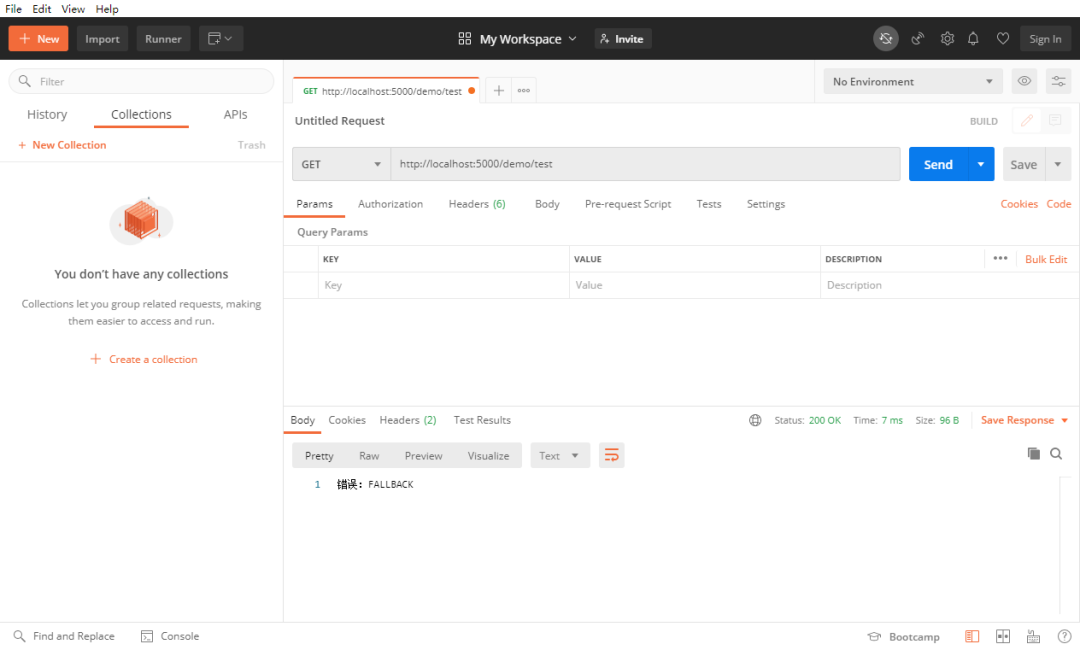
如果服务停止运行了,在通过
Gateway
请求转发时,就会报错,这时我们就要进行服务熔断,从而保证请求不会报错
1、添加依赖
需要结合Hystrix
进行服务熔断,所以需要添加Hystrix
的依赖
<!-- https://mvnrepository.com/artifact/org.springframework.cloud/spring-cloud-starter-netflix-hystrix -->
<dependency>
    <groupId>org.springframework.cloud</groupId>
    <artifactId>spring-cloud-starter-netflix-hystrix</artifactId>
</dependency>
2、创建服务熔断的请求接口
当服务熔断时Gateway
会把请求转发到这个请求接口上
package cn.yanghuisen.gateway1.controller;

import org.springframework.web.bind.annotation.RequestMapping;
import org.springframework.web.bind.annotation.RestController;

/**
 * @author Y
 * @date 2020/11/15 16:59
 * @desc 服务熔断
 */
@RestController
public class FallBackController {

    @RequestMapping("/fallback")
    public String fallback(){
        return "错误:FALLBACK";
    }
}
3、修改转发配置
gateway:
  routes:
    - id: nacos-demo
      uri: lb://NACOS-DEMO  # lb表示当前的注册中心,后面是服务名
      predicates:
        - Path=/**          # 根据请求路径匹配
      filters:
        - name: Hystrix     # 服务熔断
          args:
            name: fallback
            fallbackUri: forward:/fallback
fallbackUri
:会把请求转发到/fallback
上
4、服务熔断测试
首先停止后端服务,然后访问URLhttp://localhost:5000/demo/test[1]
Gateway-集群搭建
Gateway
自己是不能搭建集群的,所以需要配合Nginx
实现集群的搭建及负载均衡。集群搭建很简单, Gateway
项目自己不用做改动。
准备:
Nginx:1.19.4 多个Gateway项目(身边没有多余的电脑,我这里是通过修改端口的方法,同时跑两个Gateway)
Nginx下载地址:http://nginx.org/en/download.html[2]
一、Nginx的负载均衡配置
上面说了,因为Gateway
自身不能进行集群的搭建及负载均衡,所以需要在Nginx
上进行负载均衡,转发到多个不同的Gateway
上
修改Nginx
下的conf
下的nginx.conf
文件,配置Nginx
的反向代理,通过Nginx
的反向代理实现负载均衡的配置
# 负载均衡,默认是轮询策略
upstream backserver {
    server localhost:5000;
    server localhost:5001;
}
server {
        # 监听端口
        listen       80;
        server_name  localhost;

        # 根目录
        location / {
            proxy_pass http://backserver;
        }
    }
二、启动Nginx
启动:Nginx
的启动很简单,只要双击Nginx
下的nginx.exe
启动即可,或者在Nginx下通过命令行start nginx
启动
停止:Nginx下命令行nginx -s stop
停止nginx
到此集群搭建完毕
参考资料
http://localhost:5000/demo/test: http://localhost:5000/demo/test
[2]http://nginx.org/en/download.html: http://nginx.org/en/download.html
