



Table of Contents
- Preface
- Tracking ip by trigger - scenario 1
- Tracking ip by trigger - scenario 2
- Tracking ip by trigger - scenario 3
- Reference Stuff
Preface
I've glanced at the some group chatting messages from WeChat when leaving my office the day before yesterday, the OP asked for the help sending two number of screenshots of an AWR report to the window of WeChat. The first and foremost, top 1 wait event library cache lock (occupied 73% DB time) attract my attention. And then we noticed that there is connection managment call elapsed time occupied the maximum % of DB Time in the section Time Model Statistics.
The urgent case makes me recall the analogical issue once I had encountered in middle of last year. So I suspect it's most probable that several application servers are frequently using invalid username/password to connect his oracle database. Hence I'll introduce a very simple PL/SQL code snippet to describe the total three scenarios for tracking ip by trigger in this blog post. Ok, let's get started.
Tracking ip by trigger - scenario 1
You'll find out the value of column client_info on view v$session is NULL in many cases and it looks like to have no a real column name to record an ip address from remote server. As well-known as, oracle usually stays client_info nullable unless we create a trigger to acquire the ip on the SYS schema, e.g. a bit easy PL/SQL code is as follows.
PROMPT ===================================================================
PROMPT                           ** SCENARIO 1 **
PROMPT  Showing the value (ip address) of column client_info on v$session
PROMPT  by creating a trigger execute dbms_application.set_client_info()
RPOMPT  when meeting a condition - after you logon on oracle database.
PROMPT ===================================================================

-- Running on SYS schema.

CREATE OR REPLACE TRIGGER login_trigger
AFTER LOGON ON database
BEGIN
  DBMS_APPLICATION_INFO.SET_CLIENT_INFO(SYS_CONTEXT('USERENV', 'IP_ADDRESS'));
END;
/
Note: Here's a comparison before and after creating the prior trigger we use a SQL to check machine, client_info and count(*) by machine.
SQL> SET LINESIZE 200
SQL> SET PAGESIZE 200
SQL> COLUMN machine     FORMAT a20
SQL> COLUMN client_info FORMAT a15
SQL> SELECT machine
 2         , client_info
 3         , count(*)
 4  FROM v$session
 5  WHERE username IS NOT NULL
 6  AND username <> 'SYS'
 7  GROUP BY machine
 8           , client_info
 9  ORDER BY count(*) DESC
10  /

MACHINE              CLIENT_INFO       COUNT(*)
-------------------- --------------- ----------
xxxxxxxx                                      2
yyyyyyyy                                      1
zzzzzzzz                                      1
aaaaaaaa                                      1
bbbbbbbb                                      1
cccccccc                                      1

6 rows selected.
SQL> SET LINESIZE 200
SQL> SET PAGESIZE 200
SQL> COLUMN machine FORMAT a20
SQL> COLUMN client_info FORMAT a15
SQL> SELECT machine
2 , client_info
3 , count(*)
4 FROM v$session
5 WHERE username IS NOT NULL
6 AND username <> 'SYS'
7 GROUP BY machine
8 , client_info
9 ORDER BY count(*) DESC
10 /
MACHINE CLIENT_INFO COUNT(*)
-------------------- --------------- ----------
xxxxxxxx xx.xxx.x.xxx 2
yyyyyyyy xx.xxx.x.xxx 1
zzzzzzzz xx.xxx.x.xx 1
aaaaaaaa xx.xxx.x.xxx 1
bbbbbbbb xx.xxx.x.xxx 1
cccccccc xx.xxx.x.xxx 1
6 rows selected.Tracking ip by trigger - scenario 2
The scenario 2 is pretty weird but Jonathan Lewis pointed out the best answer to my thread on ODC, here I quoted his suggestion as below.
If there's no difference in the hosts or DNS or any other name resolution setup in the two systems then there's some other source of difference.
I wonder if the paramerer _system_trigger_enabled has been set to false on one system (it was a temporary requirement during upgrades in some version of Oracle) and if that might make a difference.
(Note - this would still leave some triggers reporting "enabled" but they would not fire - and maybe it simply stops any trigger owned by SYS from firing: I've never tested what its effect is.)
Regards
Jonathan Lewis
Yep, by coincidence my former colleague leaves me a pit or put a hidden (potential) mine into my oracle database thus I took a few time troubleshooting it. In the mean time Connor McDonald advises me on AskTOM to look into a litter older content on ALERT log file. Next I've found out the root cause finally. The following is some screenshots and the response of Connor.
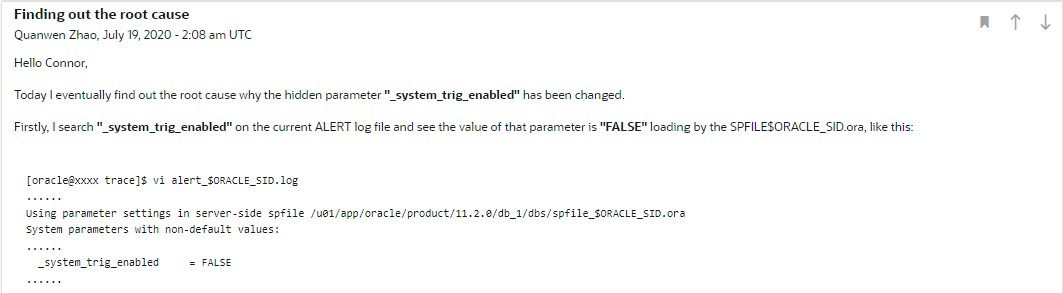
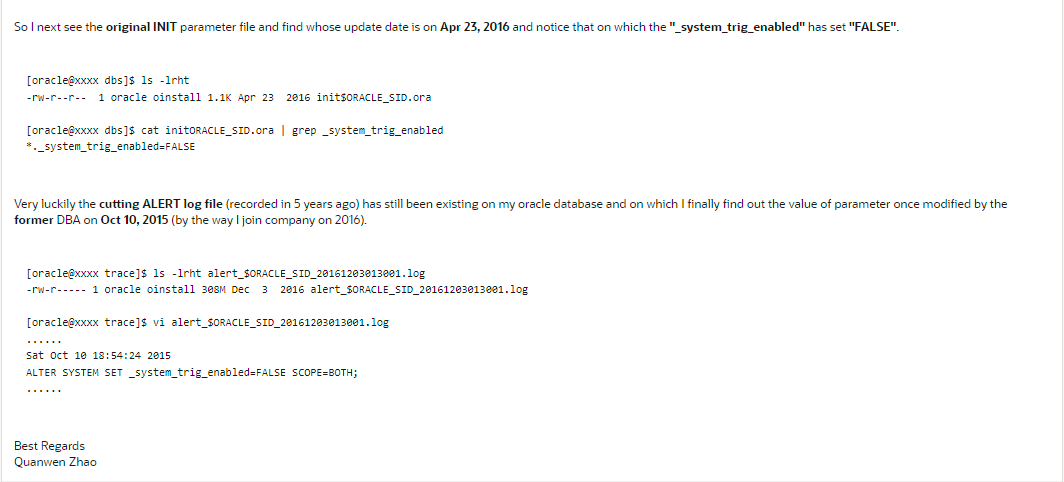

So my simple SQL code is like this.
PROMPT ===================================================================
PROMPT                           ** SCENARIO 2 **
PROMPT  Showing the value (ip address) of column client_info on v$session
PROMPT  based on scenario 1, if the hidden parameter _system_trig_enabled
RPOMPT  is FALSE, whatever, you never get the real ip address. Yes, it's
PROMPT  TRUE (default value) unless you changed it before.
PROMPT ===================================================================

-- Running on SYS schema.

ALTER SYSTEM SET _system_trig_enabled=TRUE SCOPE=BOTH;Tracking ip by trigger - scenario 3
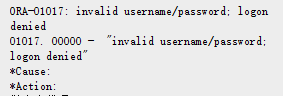
In this section I'll be talking about the special and useful scenario immediately identifying the IP ADDRESSES of servers that are using an incorrect password to connect oracle database, you know, oracle will report an error ORA-01017: invalid username/password; logon denied. Such as,
[oracle@test ~]$ sqlplus test/luanqibazao3721

SQL*Plus: Release 19.0.0.0.0 - Production on Fri Jan 7 10:11:36 2022
Version 19.3.0.0.0

Copyright (c) 1982, 2019, Oracle.  All rights reserved.

ERROR:
ORA-01017: invalid username/password; logon denied


Enter user-name:
In this case we can create a SYSTEM TRIGGER (in database level) on the SYS schema in order to instantly capture those IP ADDRESSES in ALERT log file furthermore let us discover them. Here's a bit logger PL/SQL code achieving this requirement.
PROMPT ======================================================================
PROMPT                           ** SCENARIO 3 **
PROMPT  Showing the real ip address of server connecting an invalid password
PROMPT  of oracle database in ALERT log file in order to track which servers
RPOMPT  encountered this issue so far.
PROMPT ======================================================================

-- Running on SYS schema.

CREATE OR REPLACE TRIGGER logon_denied_to_alert
AFTER SERVERERROR ON database
DECLARE
  message    VARCHAR2(120);
  ip         VARCHAR2(15);
  v_os_user  VARCHAR2(80);
  v_module   VARCHAR2(50);
  v_action   VARCHAR2(50);
  v_pid      VARCHAR2(10);
  v_sid      NUMBER;
  v_username VARCHAR2(50);
  v_suser    VARCHAR2(50);
BEGIN
  IF (ORA_IS_SERVERERROR(1017)) THEN
    IF UPPER(SYS_CONTEXT('USERENV', 'NETWORK_PROTOCOL')) = 'TCP' THEN
      ip := SYS_CONTEXT('USERENV', 'IP_ADDRESS');
    ELSE
      SELECT DISTINCT sid INTO v_sid FROM SYS.V_$MYSTAT;
      SELECT p.spid INTO v_pid FROM v$process p, v$session v WHERE p.addr = v.paddr AND v.sid = v_sid;
    END IF;
    v_os_user := SYS_CONTEXT('USERENV', 'OS_USER');
    v_username := SYS_CONTEXT('USERENV', 'CURRENT_USER');
    v_suser := SYS_CONTEXT('USERENV','SESSION_USER');
    DBMS_APPLICATION_INFO.READ_MODULE(v_module, v_action);
    message := TO_CHAR(SYSDATE, 'Dy Mon dd HH24:MI:SS YYYY')
               || ' logon denied from '
               || v_username
               || ' '
               || v_suser
               || ' '
               || NVL(ip, v_pid)
               || ' '
               || v_os_user
               || ' with '
               || v_module
               || ' '
               || v_action;
    SYS.DBMS_SYSTEM.KSDWRT(2, message);
  END IF;
END;
/
Then we use a demo (using Oracle SQL Develooper to test) to test whether or not it takes effect for the previous PL/SQL code. For instnace, my test outcome is good. Due to the serurity reason I mask the ip in the following screenshot.

That's all of the content in this blog. BTW eventually my friend uses my PL/SQL code to solve his issue. Thanks for taking your precious and expensive time reading it. Leaving some comment is always welcome and really hope to give me some feedback or point out my fault if I occasionally make some mistake.
