



DMDB 数据库启停
1. Linux 服务方式
安装 DM 数据库后,在/etc/rc.d/init.d 中有名称为 DmService 开头的文件,文件全名为 DmService+实例名(例:如果实例名为 DMSERVER,则相对应的服务文件为DmServiceDMSERVER ) 。 以 实 例 名 为 DMSERVER 为 例 , 在 终 端 输入./DmServiceDMSERVER start 或者
service DmServiceDMSERVER start 即可启动 DM 数据库。
2. Linux 服务方式
进入/etc/rc.d/init.d ,以实 例名为 DMSERVER 为例, 在命令行工具 中输
入./DmServiceDMSERVER stop 即可关闭 DM 数据库。
DMDB 数据库启停底层操作
format: ./dmserver [ini_file_path] [-noconsole] [mount] [path=ini_file_path] [dcr_ini=dcr_path]
example:
./dmserver path=/opt/dmdbms/bin/dm.ini
./dmserver /opt/dmdbms/bin/dm.ini
Keyword             Explanation
--------------------------------------------------------------------------------
path                the absolute path of dm.ini or the current directory
dcr_ini             the absolute path of dmdcr.ini or the current directory
-noconsole          start in service mode
mount               start in mount status
help                print help information
# A function to stop a program.
kill_cur_prog() {
        get_pid
        if [ "x$pid" = "x" ]
        then
                return 0
        fi
        if [ "x$DCR_INI_PARAM" = "x" ]
        then
                kill $pid
        else
                kill -2 $pid
        fi
        RETURN_CODE=$?
        if [ $RETURN_CODE -ne 0 ]
        then
                return 1
        fi
        while [ "x$pid" != "x" ]
        do
                sleep 5
                get_pid
                if [ "x$pid" = "x" ]
                then
                        return 0
                fi
                KILL_PROG_WAIT_TIME=`expr $KILL_PROG_WAIT_TIME - 5`
                if [ $KILL_PROG_WAIT_TIME -le 0 ]
                then
                        if [ "$WAIT_OUTTIME_KILL_9" = "true" ]
                        then
                                kill -9 $pid
                        else
                                echo "kill the process(pid:$pid) had timeout!" > "$SERVICE_LOG_FILE"
                                return 1
                        fi
                fi
        done
        return 0
}
DMDB 数据库几种状态
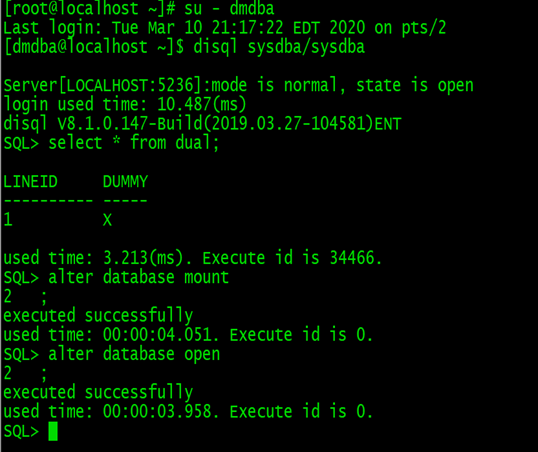
1.配置状态(MOUNT): 不允许访问数据库对象,只能进行控制文件维护、归档配置、数据库模式修改等操作;
2.打开状态(OPEN): 不能进行控制文件维护、归档配置等操作,可以访问数据库对象,对外提供正常的数据库服务;
3.挂起状态(SUSPEND):与 OPEN 状态的唯一区别就是,限制磁盘写入功能;一旦修改了数据页,触发 REDO 日志、数据页刷盘,当前用户将被挂起。
OPEN 状态与 MOUNT 和 SUSPEND 能相互转换,但是 MOUNT 和 SUSPEND 之间不能相互转换。
最后修改时间:2020-04-06 17:16:06
「喜欢这篇文章,您的关注和赞赏是给作者最好的鼓励」
关注作者
【版权声明】本文为墨天轮用户原创内容,转载时必须标注文章的来源(墨天轮),文章链接,文章作者等基本信息,否则作者和墨天轮有权追究责任。如果您发现墨天轮中有涉嫌抄袭或者侵权的内容,欢迎发送邮件至:contact@modb.pro进行举报,并提供相关证据,一经查实,墨天轮将立刻删除相关内容。
