



KubeSphere离线无网络环境部署

KubeSphere 是 GitHub 上的一个开源项目,是成千上万名社区用户的聚集地。很多用户都在使用 KubeSphere 运行工作负载。对于在 Linux 上的安装,KubeSphere 既可以部署在云端,也可以部署在本地环境中,例如 AWS EC2、Azure VM 和裸机等。
KubeSphere 为用户提供轻量级安装程序 KubeKey(该程序支持安装 Kubernetes、KubeSphere 及相关插件),安装过程简单而友好。KubeKey 不仅能帮助用户在线创建集群,还能作为离线安装解决方案。
前期准备所需包
#前期准备所需包root@hello:~# wget https://github.com/kubesphere/kubekey/releases/download/v1.2.1/kubekey-v1.2.1-linux-amd64.tar.gzroot@hello:~# tar xvf kubekey-v1.2.1-linux-amd64.tar.gzroot@hello:~# ls kkkkroot@hello:~#root@hello:~# curl -L -O https://github.com/kubesphere/ks-installer/releases/download/v3.2.1/images-list.txtroot@hello:~# curl -L -O https://github.com/kubesphere/ks-installer/releases/download/v3.2.1/offline-installation-tool.shroot@hello:~# chmod +x offline-installation-tool.shroot@hello:~# export KKZONE=cnroot@hello:~# ./offline-installation-tool.sh -broot@hello:~# ./offline-installation-tool.sh -s -l images-list.txt -d ./kubesphere-imagesroot@hello:~# curl -L -o /root/kubekey/v1.21.5/amd64/docker-20.10.8.tgz https://download.docker.com/linux/static/stable/x86_64/docker-20.10.8.tgzroot@hello:~# curl -L -o /root/kubekey/v1.21.5/amd64/crictl-v1.22.0-linux-amd64.tar.gz https://github.com/kubernetes-sigs/cri-tools/releases/download/v1.22.0/crictl-v1.22.0-linux-amd64.tar.gz
离线环境安装
#创建证书,注意“Common Name” 需要写域名root@cby:~# mkdir -p certsroot@cby:~# openssl req \> -newkey rsa:4096 -nodes -sha256 -keyout certs/domain.key \> -x509 -days 36500 -out certs/domain.crtGenerating a RSA private key............++++.......++++writing new private key to 'certs/domain.key'-----You are about to be asked to enter information that will be incorporatedinto your certificate request.What you are about to enter is what is called a Distinguished Name or a DN.There are quite a few fields but you can leave some blankFor some fields there will be a default value,If you enter '.', the field will be left blank.-----Country Name (2 letter code) [AU]:State or Province Name (full name) [Some-State]:Locality Name (eg, city) []:Organization Name (eg, company) [Internet Widgits Pty Ltd]:Organizational Unit Name (eg, section) []:Common Name (e.g. server FQDN or YOUR name) []:dockerhub.kubekey.localEmail Address []:root@cby:~#
安装docker
#安装dockerroot@cby:~#root@cby:~/package# lltotal 94776drwxr-xr-x 2 root root 4096 Jan 12 07:17 ./drwx------ 7 root root 4096 Jan 12 07:16 ../-rw-r--r-- 1 root root 23703726 Jan 12 07:17 containerd.io_1.4.12-1_amd64.deb-rw-r--r-- 1 root root 21234738 Jan 12 07:16 docker-ce_5%3a20.10.12~3-0~ubuntu-focal_amd64.deb-rw-r--r-- 1 root root 40652850 Jan 12 07:16 docker-ce-cli_5%3a20.10.12~3-0~ubuntu-focal_amd64.deb-rw-r--r-- 1 root root 7921036 Jan 12 07:16 docker-ce-rootless-extras_5%3a20.10.12~3-0~ubuntu-focal_amd64.deb-rw-r--r-- 1 root root 3517780 Jan 12 07:16 docker-scan-plugin_0.12.0~ubuntu-focal_amd64.debroot@cby:~/package#root@cby:~/package# apt install ./*
部署镜像仓库
# 导入镜像root@cby:~/cby# docker load -i registry.tar# 启动 Docker 仓库root@cby:~# docker run -d --restart=always --name registry -v "$(pwd)"/certs:/certs -v /mnt/registry:/var/lib/registry -e REGISTRY_HTTP_ADDR=0.0.0.0:443 -e REGISTRY_HTTP_TLS_CERTIFICATE=/certs/domain.crt -e REGISTRY_HTTP_TLS_KEY=/certs/domain.key -p 443:443 registry:2#配置仓库#在 /etc/hosts 中添加一个条目root@cby:~# vim /etc/hostsroot@cby:~# cat /etc/hosts3.7.191.234 dockerhub.kubekey.local#配置免证书root@cby:~# mkdir -p /etc/docker/certs.d/dockerhub.kubekey.localroot@cby:~# cp certs/domain.crt /etc/docker/certs.d/dockerhub.kubekey.local/ca.crtroot@cby:~##配置免验证root@cby:~# cat /etc/docker/daemon.json{"insecure-registries":["https://dockerhub.kubekey.local"]}#重载配置,并重启root@cby:~# systemctl daemon-reloadroot@cby:~# systemctl restart docker
部署 KubeSphere 和 kubernetes
注意添加字段“privateRegistry”
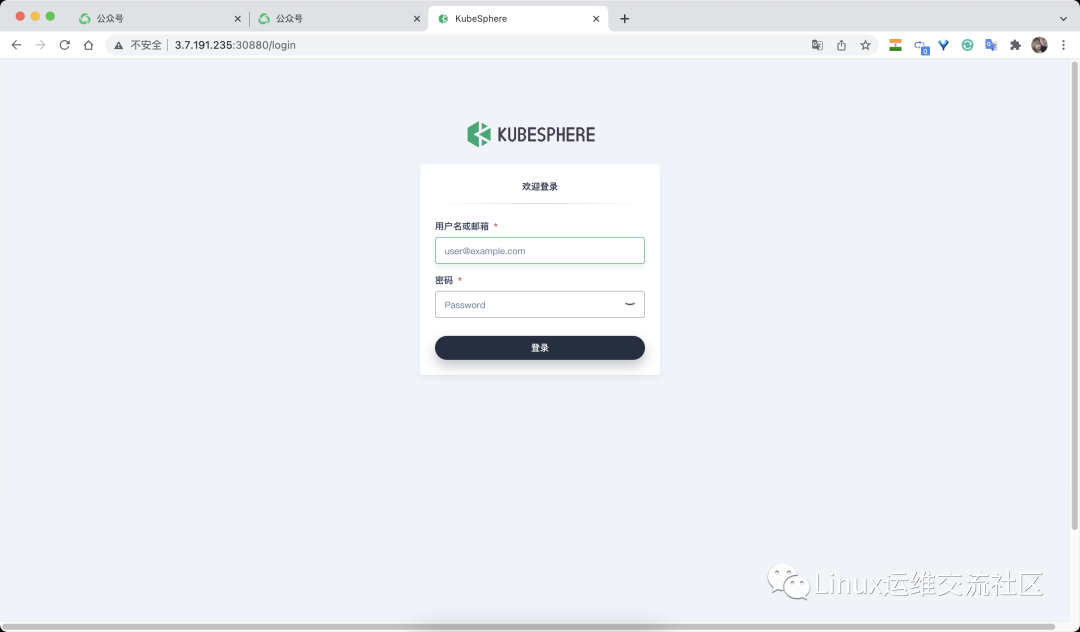
#添加执行权限root@cby:~#root@cby:~# chmod +x kkroot@cby:~# chmod +x offline-installation-tool.sh#推送镜像到私有仓库root@cby:~# ./offline-installation-tool.sh -l images-list.txt -d ./kubesphere-images -r dockerhub.kubekey.localroot@cby:~# apt install conntrackroot@cby:~# ./kk create config --with-kubernetes v1.21.5 --with-kubesphere v3.2.1 -f config-sample.yamlroot@cby:~#root@cby:~# vim config-sample.yamlroot@cby:~# cat config-sample.yamlapiVersion: kubekey.kubesphere.io/v1alpha1kind: Clustermetadata:name: samplespec:hosts:- {name: master, address: 3.7.191.234, internalAddress: 3.7.191.234, user: root, password: Cby23..}- {name: node1, address: 3.7.191.235, internalAddress: 3.7.191.235, user: root, password: Cby23..}- {name: node2, address: 3.7.191.238, internalAddress: 3.7.191.238, user: root, password: Cby23..}roleGroups:etcd:- mastermaster:- node1worker:- node1- node2controlPlaneEndpoint:##Internal loadbalancer for apiservers#internalLoadbalancer: haproxydomain: lb.kubesphere.localaddress: ""port: 6443kubernetes:version: v1.21.5clusterName: cluster.localnetwork:plugin: calicokubePodsCIDR: 10.233.64.0/18kubeServiceCIDR: 10.233.0.0/18registry:registryMirrors: []insecureRegistries: []privateRegistry: dockerhub.kubekey.localaddons: []---apiVersion: installer.kubesphere.io/v1alpha1kind: ClusterConfigurationmetadata:name: ks-installernamespace: kubesphere-systemlabels:version: v3.2.1spec:persistence:storageClass: ""authentication:jwtSecret: ""local_registry: ""# dev_tag: ""etcd:monitoring: falseendpointIps: localhostport: 2379tlsEnable: truecommon:core:console:enableMultiLogin: trueport: 30880type: NodePort# apiserver:# resources: {}# controllerManager:# resources: {}redis:enabled: falsevolumeSize: 2Giopenldap:enabled: falsevolumeSize: 2Giminio:volumeSize: 20Gimonitoring:# type: externalendpoint: http://prometheus-operated.kubesphere-monitoring-system.svc:9090GPUMonitoring:enabled: falsegpu:kinds:- resourceName: "nvidia.com/gpu"resourceType: "GPU"default: truees:# master:# volumeSize: 4Gi# replicas: 1# resources: {}# data:# volumeSize: 20Gi# replicas: 1# resources: {}logMaxAge: 7elkPrefix: logstashbasicAuth:enabled: falseusername: ""password: ""externalElasticsearchHost: ""externalElasticsearchPort: ""alerting:enabled: false# thanosruler:# replicas: 1# resources: {}auditing:enabled: false# operator:# resources: {}# webhook:# resources: {}devops:enabled: falsejenkinsMemoryLim: 2GijenkinsMemoryReq: 1500MijenkinsVolumeSize: 8GijenkinsJavaOpts_Xms: 512mjenkinsJavaOpts_Xmx: 512mjenkinsJavaOpts_MaxRAM: 2gevents:enabled: false# operator:# resources: {}# exporter:# resources: {}# ruler:# enabled: true# replicas: 2# resources: {}logging:enabled: falsecontainerruntime: dockerlogsidecar:enabled: truereplicas: 2# resources: {}metrics_server:enabled: falsemonitoring:storageClass: ""# kube_rbac_proxy:# resources: {}# kube_state_metrics:# resources: {}# prometheus:# replicas: 1# volumeSize: 20Gi# resources: {}# operator:# resources: {}# adapter:# resources: {}# node_exporter:# resources: {}# alertmanager:# replicas: 1# resources: {}# notification_manager:# resources: {}# operator:# resources: {}# proxy:# resources: {}gpu:nvidia_dcgm_exporter:enabled: false# resources: {}multicluster:clusterRole: nonenetwork:networkpolicy:enabled: falseippool:type: nonetopology:type: noneopenpitrix:store:enabled: falseservicemesh:enabled: falsekubeedge:enabled: falsecloudCore:nodeSelector: {"node-role.kubernetes.io/worker": ""}tolerations: []cloudhubPort: "10000"cloudhubQuicPort: "10001"cloudhubHttpsPort: "10002"cloudstreamPort: "10003"tunnelPort: "10004"cloudHub:advertiseAddress:- ""nodeLimit: "100"service:cloudhubNodePort: "30000"cloudhubQuicNodePort: "30001"cloudhubHttpsNodePort: "30002"cloudstreamNodePort: "30003"tunnelNodePort: "30004"edgeWatcher:nodeSelector: {"node-role.kubernetes.io/worker": ""}tolerations: []edgeWatcherAgent:nodeSelector: {"node-role.kubernetes.io/worker": ""}tolerations: []root@cby:~#root@cby:~#root@cby:~#root@cby:~# ./kk create cluster -f config-sample.yaml----略######################################################## Welcome to KubeSphere! ########################################################Console: http://3.7.191.235:30880Account: adminPassword: P@88w0rdNOTES:1. After you log into the console, please check themonitoring status of service components in"Cluster Management". If any service is notready, please wait patiently until all componentsare up and running.2. Please change the default password after login.#####################################################https://kubesphere.io 2022-01-12 09:42:36#####################################################INFO[09:42:45 UTC] Installation is complete.Please check the result using the command:kubectl logs -n kubesphere-system $(kubectl get pod -n kubesphere-system -l app=ks-install -o jsonpath='{.items[0].metadata.name}') -froot@cby:~#

https://www.oiox.cn/
https://www.chenby.cn/
https://cby-chen.github.io/
https://weibo.com/u/5982474121
https://blog.csdn.net/qq_33921750
https://my.oschina.net/u/3981543
https://www.zhihu.com/people/chen-bu-yun-2
https://segmentfault.com/u/hppyvyv6/articles
https://juejin.cn/user/3315782802482007
https://space.bilibili.com/352476552/article
https://cloud.tencent.com/developer/column/93230
https://www.jianshu.com/u/0f894314ae2c
https://www.toutiao.com/c/user/token/MS4wLjABAAAAeqOrhjsoRZSj7iBJbjLJyMwYT5D0mLOgCoo4pEmpr4A/
CSDN、GitHub、知乎、开源中国、思否、掘金、简书、腾讯云、哔哩哔哩、今日头条、新浪微博、个人博客、全网可搜《小陈运维》
