



OceanBase Docker安装体验:https://www.xmmup.com/oceanbase-dockeranzhuangtiyan.html
手动部署 OceanBase 单副本集群:https://www.xmmup.com/shoudongbushu-oceanbase-danfubenjiqun.html
说明
相关连接:
https://open.oceanbase.com/blog/10900159
https://open.oceanbase.com/answer/detail?id=13700696
练习目的
本次练习目的掌握 OceanBase 集群的手动部署技能,理解进程的相关目录、集群初始化、OBProxy和 OB 集群关系等。
练习条件
有笔记本或服务器,内存至少12G 。
练习内容
请记录并分享下列内容:
(必选)手动部署一个 OB 单副本集群,包括一个 OBProxy 节点。
(必选)创建一个业务租户、一个业务数据库,以及一些表等。
(可选)如果单台服务器内存有32G,或者有三台服务器,改为部署一个 OB 三副本集群,包括一个 OBProxy 节点。
(可选)如果有三台服务器并且服务器内存有 32 G,可以单服务器内启动 2 个节点,实现 1-1-1 扩容到 2-2-2 。
软件下载
下载地址:https://open.oceanbase.com/softwareCenter/community
从https://www.oceanbase.com/softwareCenter/community
下载3个软件,分别是obproxy-3.2.0-1.el7.x86_64.rpm
、oceanbase-ce-3.1.1-4.el7.x86_64.rpm
、oceanbase-ce-libs-3.1.1-4.el7.x86_64.rpm
。
1wget https://mdn.alipayobjects.com/ob_portal/afts/file/A*4VfBRbz_ncIAAAAAAAAAAAAADmF2AQ?af_fileName=oceanbase-ce-3.1.2-10000392021123010.el7.x86_64.rpm
2wget https://mdn.alipayobjects.com/ob_portal/afts/file/A*obcATbEfH_QAAAAAAAAAAAAADmF2AQ?af_fileName=oceanbase-ce-libs-3.1.2-10000392021123010.el7.x86_64.rpm
3wget https://mdn.alipayobjects.com/ob_portal/afts/file/A*mMziSJneiZcAAAAAAAAAAAAADmF2AQ?af_fileName=obproxy-3.2.0-1.el7.x86_64.rpm
手动部署一个 OB 三副本集群(在同一个节点)
环境准备
 1docker rm -f lhrob312
 2docker run -d --name lhrob312 -h lhrob312 \
 3  -p 12881-12889:2881-2889 \
 4  -v /sys/fs/cgroup:/sys/fs/cgroup \
 5  --privileged=true lhrbest/lhrcentos76:8.5 \
 6  /usr/sbin/init
 7
 8docker exec -it lhrob312 bash
 9
10
11-- 创建用户
12useradd admin
13echo "admin:lhr" | chpasswd
14
15chown -R admin:admin /home/admin
16
17
18echo "admin       ALL=(ALL)       NOPASSWD: ALL" >> /etc/sudoers
19
20
21-- 安装OB软件
22rpm -ivh *.rpm
23
24echo "export PATH=$PATH:/home/admin/oceanbase/bin:/home/admin/obproxy-3.2.0/bin" >> /home/admin/.bash_profile
25echo "export LD_LIBRARY_PATH=$LD_LIBRARY_PATH:/home/admin/oceanbase/lib/" >> /home/admin/.bash_profile
26source  /home/admin/.bash_profile
27
28
29-- 安装OB和MySQL客户端
30yum install -y yum-utils
31yum-config-manager --add-repo https://mirrors.aliyun.com/oceanbase/OceanBase.repo
32yum install -y obclient mariadb mariadb-libs mariadb-devel
安装过程:
 1[root@lhrob312 soft]# ll -h
 2total 55M
 3-rw-r--r-- 1 root root 7.9M Nov  5 09:10 obproxy-3.2.0-1.el7.x86_64.rpm
 4-rw-r--r-- 1 root root  47M Dec 31 17:57 oceanbase-ce-3.1.2-10000392021123010.el7.x86_64.rpm
 5-rw-r--r-- 1 root root 156K Dec 31 19:40 oceanbase-ce-libs-3.1.2-10000392021123010.el7.x86_64.rpm
 6
 7[root@lhrob312 soft]# useradd admin
 8[root@lhrob312 soft]# echo "admin:lhr" | chpasswd
 9[root@lhrob312 soft]#
10[root@lhrob312 soft]# chown -R admin:admin /home/admin
11[root@lhrob312 soft]# echo "admin       ALL=(ALL)       NOPASSWD: ALL" >> /etc/sudoers
12[root@lhrob312 soft]#
13[root@lhrob312 soft]#
14[root@lhrob312 soft]# rpm -ivh *.rpm
15warning: obproxy-3.2.0-1.el7.x86_64.rpm: Header V4 RSA/SHA1 Signature, key ID e9b4a7aa: NOKEY
16Preparing...                          ################################# [100%]
17Updating / installing...
18   1:oceanbase-ce-libs-3.1.2-100003920################################# [ 33%]
19   2:oceanbase-ce-3.1.2-10000392021123################################# [ 67%]
20   3:obproxy-3.2.0-1.el7              ################################# [100%]
21
22[root@lhrob312 soft]# echo "export PATH=$PATH:/home/admin/oceanbase/bin:/home/admin/obproxy-3.2.0/bin" >> /home/admin/.bash_profile
23[root@lhrob312 soft]# echo "export LD_LIBRARY_PATH=$LD_LIBRARY_PATH:/home/admin/oceanbase/lib/" >> /home/admin/.bash_profile
24[root@lhrob312 soft]# source  /home/admin/.bash_profile
25[root@lhrob312 soft]#
26[root@lhrob312 soft]# rpm -ql oceanbase-ce
27/home/admin/oceanbase/bin
28/home/admin/oceanbase/bin/import_time_zone_info.py
29/home/admin/oceanbase/bin/observer
30/home/admin/oceanbase/etc
31/home/admin/oceanbase/etc/oceanbase_upgrade_dep.yml
32/home/admin/oceanbase/etc/priv_checker.py
33/home/admin/oceanbase/etc/timezone_V1.log
34/home/admin/oceanbase/etc/upgrade_checker.py
35/home/admin/oceanbase/etc/upgrade_cluster_health_checker.py
36/home/admin/oceanbase/etc/upgrade_post.py
37/home/admin/oceanbase/etc/upgrade_post_checker.py
38/home/admin/oceanbase/etc/upgrade_pre.py
39/home/admin/oceanbase/etc/upgrade_rolling_post.py
40/home/admin/oceanbase/etc/upgrade_rolling_pre.py
41[root@lhrob312 soft]# rpm -ql oceanbase-ce-libs
42/home/admin/oceanbase/lib
43/home/admin/oceanbase/lib/libaio.so
44/home/admin/oceanbase/lib/libaio.so.1
45/home/admin/oceanbase/lib/libaio.so.1.0.1
46/home/admin/oceanbase/lib/libmariadb.so
47/home/admin/oceanbase/lib/libmariadb.so.3
48[root@lhrob312 soft]# rpm -ql obproxy
49/home/admin/obproxy-3.2.0/bin
50/home/admin/obproxy-3.2.0/bin/obproxy
51/home/admin/obproxy-3.2.0/bin/obproxyd.sh
52[root@lhrob312 ~]# chown -R admin:admin /home/admin
配置启动OB并初始化
 1su - admin
 2rm -rf /home/admin/oceanbase/store1 /home/admin/oceanbase/store2 /home/admin/oceanbase/store3
 3mkdir -p /home/admin/oceanbase/store1/sstable
 4mkdir -p /home/admin/oceanbase/store2/sstable
 5mkdir -p /home/admin/oceanbase/store3/sstable
 6
 7cd /home/admin/oceanbase/store1 && /home/admin/oceanbase/bin/observer -r "127.0.0.1:2882:2881;127.0.0.1:3882:3881;127.0.0.1:4882:4881" -o "__min_full_resource_pool_memory=268435456,memory_limit=8G,system_memory=4G,stack_size=512K,cpu_count=16,cache_wash_threshold=1G,workers_per_cpu_quota=10,schema_history_expire_time=1d,net_thread_count=4,major_freeze_duty_time=Disable,minor_freeze_times=10,enable_separate_sys_clog=0,enable_merge_by_turn=False,datafile_size=5G,enable_syslog_wf=False,enable_syslog_recycle=True,max_syslog_file_count=4" -z zone1 -p 2881 -P 2882 -c 20220108 -n ob1 -d /home/admin/oceanbase/store1 -i lo -l ERROR
 8cd /home/admin/oceanbase/store2 && /home/admin/oceanbase/bin/observer -r "127.0.0.1:2882:2881;127.0.0.1:3882:3881;127.0.0.1:4882:4881" -o "__min_full_resource_pool_memory=268435456,memory_limit=8G,system_memory=4G,stack_size=512K,cpu_count=16,cache_wash_threshold=1G,workers_per_cpu_quota=10,schema_history_expire_time=1d,net_thread_count=4,major_freeze_duty_time=Disable,minor_freeze_times=10,enable_separate_sys_clog=0,enable_merge_by_turn=False,datafile_size=5G,enable_syslog_wf=False,enable_syslog_recycle=True,max_syslog_file_count=4" -z zone2 -p 3881 -P 3882 -c 20220108 -n ob2 -d /home/admin/oceanbase/store2 -i lo -l ERROR
 9cd /home/admin/oceanbase/store3 && /home/admin/oceanbase/bin/observer -r "127.0.0.1:2882:2881;127.0.0.1:3882:3881;127.0.0.1:4882:4881" -o "__min_full_resource_pool_memory=268435456,memory_limit=8G,system_memory=4G,stack_size=512K,cpu_count=16,cache_wash_threshold=1G,workers_per_cpu_quota=10,schema_history_expire_time=1d,net_thread_count=4,major_freeze_duty_time=Disable,minor_freeze_times=10,enable_separate_sys_clog=0,enable_merge_by_turn=False,datafile_size=5G,enable_syslog_wf=False,enable_syslog_recycle=True,max_syslog_file_count=4" -z zone3 -p 4881 -P 4882 -c 20220108 -n ob3 -d /home/admin/oceanbase/store3 -i lo -l ERROR
10
11#以上命令中指定的参数作用可参考obd自动部署过程yaml文件的说明,请移步 https://gitee.com/oceanbase/obdeploy/tree/master/example
12
13
14# 查看进程信息
15ps -ef |grep observer
16netstat -tulnp | grep 88
17
18
19
20-- bootstrap集群(初始化集群)
21mysql -h127.1 -uroot -P2881 -p -c -A  # 默认空密码
22
23set session ob_query_timeout=1000000000;
24alter system bootstrap ZONE 'zone1' SERVER '127.0.0.1:2882',ZONE 'zone2' SERVER '127.0.0.1:3882',ZONE 'zone3' SERVER '127.0.0.1:4882';
25
26
27# 修改root密码
28alter user root identified by 'lhr';
29create user proxyro identified by 'lhr';
30grant select on *.* to proxyro;
31
32create database lhrdb;
33
34-- 查询
35mysql -h127.1 -uroot -P2881 -plhr -c -A -e "show databases;"
36mysql -h127.1 -uroot -P3881 -plhr -c -A -e "show databases;"
37mysql -h127.1 -uroot -P4881 -plhr -c -A -e "show databases;"
过程:
  1[root@lhrob312 ~]# su - admin
  2Last login: Sat Jan  8 17:32:26 CST 2022 on pts/0
  3[admin@lhrob312 ~]$
  4[admin@lhrob312 ~]$ rm -rf /home/admin/oceanbase/store1 /home/admin/oceanbase/store2 /home/admin/oceanbase/store3
  5[admin@lhrob312 ~]$ mkdir -p /home/admin/oceanbase/store1/sstable
  6[admin@lhrob312 ~]$ mkdir -p /home/admin/oceanbase/store2/sstable
  7[admin@lhrob312 ~]$ mkdir -p /home/admin/oceanbase/store3/sstable
  8[admin@lhrob312 ~]$
  9[admin@lhrob312 ~]$ cd /home/admin/oceanbase/store1 && /home/admin/oceanbase/bin/observer -r "127.0.0.1:2882:2881;127.0.0.1:3882:3881;127.0.0.1:4882:4881" -o "__min_full_resource_pool_memory=268435456,memory_limit=8G,system_memory=4G,stack_size=512K,cpu_count=16,cache_wash_threshold=1G,workers_per_cpu_quota=10,schema_history_expire_time=1d,net_thread_count=4,major_freeze_duty_time=Disable,minor_freeze_times=10,enable_separate_sys_clog=0,enable_merge_by_turn=False,datafile_size=5G,enable_syslog_wf=False,enable_syslog_recycle=True,max_syslog_file_count=4" -z zone1 -p 2881 -P 2882 -c 20220108 -n ob1 -d /home/admin/oceanbase/store1 -i lo -l ERROR
 10/home/admin/oceanbase/bin/observer -r 127.0.0.1:2882:2881;127.0.0.1:3882:3881;127.0.0.1:4882:4881 -o __min_full_resource_pool_memory=268435456,memory_limit=8G,system_memory=4G,stack_size=512K,cpu_count=16,cache_wash_threshold=1G,workers_per_cpu_quota=10,schema_history_expire_time=1d,net_thread_count=4,major_freeze_duty_time=Disable,minor_freeze_times=10,enable_separate_sys_clog=0,enable_merge_by_turn=False,datafile_size=5G,enable_syslog_wf=False,enable_syslog_recycle=True,max_syslog_file_count=4 -z zone1 -p 2881 -P 2882 -c 20220108 -n ob1 -d /home/admin/oceanbase/store1 -i lo -l ERROR
 11rs list: 127.0.0.1:2882:2881;127.0.0.1:3882:3881;127.0.0.1:4882:4881
 12optstr: __min_full_resource_pool_memory=268435456,memory_limit=8G,system_memory=4G,stack_size=512K,cpu_count=16,cache_wash_threshold=1G,workers_per_cpu_quota=10,schema_history_expire_time=1d,net_thread_count=4,major_freeze_duty_time=Disable,minor_freeze_times=10,enable_separate_sys_clog=0,enable_merge_by_turn=False,datafile_size=5G,enable_syslog_wf=False,enable_syslog_recycle=True,max_syslog_file_count=4
 13zone: zone1
 14mysql port: 2881
 15rpc port: 2882
 16cluster id: 20220108
 17appname: ob1
 18data_dir: /home/admin/oceanbase/store1
 19devname: lo
 20log level: ERROR
 21[admin@lhrob312 store1]$ cd /home/admin/oceanbase/store2 && /home/admin/oceanbase/bin/observer -r "127.0.0.1:2882:2881;127.0.0.1:3882:3881;127.0.0.1:4882:4881" -o "__min_full_resource_pool_memory=268435456,memory_limit=8G,system_memory=4G,stack_size=512K,cpu_count=16,cache_wash_threshold=1G,workers_per_cpu_quota=10,schema_history_expire_time=1d,net_thread_count=4,major_freeze_duty_time=Disable,minor_freeze_times=10,enable_separate_sys_clog=0,enable_merge_by_turn=False,datafile_size=5G,enable_syslog_wf=False,enable_syslog_recycle=True,max_syslog_file_count=4" -z zone2 -p 3881 -P 3882 -c 20220108 -n ob2 -d /home/admin/oceanbase/store2 -i lo -l ERROR
 22/home/admin/oceanbase/bin/observer -r 127.0.0.1:2882:2881;127.0.0.1:3882:3881;127.0.0.1:4882:4881 -o __min_full_resource_pool_memory=268435456,memory_limit=8G,system_memory=4G,stack_size=512K,cpu_count=16,cache_wash_threshold=1G,workers_per_cpu_quota=10,schema_history_expire_time=1d,net_thread_count=4,major_freeze_duty_time=Disable,minor_freeze_times=10,enable_separate_sys_clog=0,enable_merge_by_turn=False,datafile_size=5G,enable_syslog_wf=False,enable_syslog_recycle=True,max_syslog_file_count=4 -z zone2 -p 3881 -P 3882 -c 20220108 -n ob2 -d /home/admin/oceanbase/store2 -i lo -l ERROR
 23rs list: 127.0.0.1:2882:2881;127.0.0.1:3882:3881;127.0.0.1:4882:4881
 24optstr: __min_full_resource_pool_memory=268435456,memory_limit=8G,system_memory=4G,stack_size=512K,cpu_count=16,cache_wash_threshold=1G,workers_per_cpu_quota=10,schema_history_expire_time=1d,net_thread_count=4,major_freeze_duty_time=Disable,minor_freeze_times=10,enable_separate_sys_clog=0,enable_merge_by_turn=False,datafile_size=5G,enable_syslog_wf=False,enable_syslog_recycle=True,max_syslog_file_count=4
 25zone: zone2
 26mysql port: 3881
 27rpc port: 3882
 28cluster id: 20220108
 29appname: ob2
 30data_dir: /home/admin/oceanbase/store2
 31devname: lo
 32log level: ERROR
 33[admin@lhrob312 store2]$ cd /home/admin/oceanbase/store3 && /home/admin/oceanbase/bin/observer -r "127.0.0.1:2882:2881;127.0.0.1:3882:3881;127.0.0.1:4882:4881" -o "__min_full_resource_pool_memory=268435456,memory_limit=8G,system_memory=4G,stack_size=512K,cpu_count=16,cache_wash_threshold=1G,workers_per_cpu_quota=10,schema_history_expire_time=1d,net_thread_count=4,major_freeze_duty_time=Disable,minor_freeze_times=10,enable_separate_sys_clog=0,enable_merge_by_turn=False,datafile_size=5G,enable_syslog_wf=False,enable_syslog_recycle=True,max_syslog_file_count=4" -z zone3 -p 4881 -P 4882 -c 20220108 -n ob3 -d /home/admin/oceanbase/store3 -i lo -l ERROR
 34/home/admin/oceanbase/bin/observer -r 127.0.0.1:2882:2881;127.0.0.1:3882:3881;127.0.0.1:4882:4881 -o __min_full_resource_pool_memory=268435456,memory_limit=8G,system_memory=4G,stack_size=512K,cpu_count=16,cache_wash_threshold=1G,workers_per_cpu_quota=10,schema_history_expire_time=1d,net_thread_count=4,major_freeze_duty_time=Disable,minor_freeze_times=10,enable_separate_sys_clog=0,enable_merge_by_turn=False,datafile_size=5G,enable_syslog_wf=False,enable_syslog_recycle=True,max_syslog_file_count=4 -z zone3 -p 4881 -P 4882 -c 20220108 -n ob3 -d /home/admin/oceanbase/store3 -i lo -l ERROR
 35rs list: 127.0.0.1:2882:2881;127.0.0.1:3882:3881;127.0.0.1:4882:4881
 36optstr: __min_full_resource_pool_memory=268435456,memory_limit=8G,system_memory=4G,stack_size=512K,cpu_count=16,cache_wash_threshold=1G,workers_per_cpu_quota=10,schema_history_expire_time=1d,net_thread_count=4,major_freeze_duty_time=Disable,minor_freeze_times=10,enable_separate_sys_clog=0,enable_merge_by_turn=False,datafile_size=5G,enable_syslog_wf=False,enable_syslog_recycle=True,max_syslog_file_count=4
 37zone: zone3
 38mysql port: 4881
 39rpc port: 4882
 40cluster id: 20220108
 41appname: ob3
 42data_dir: /home/admin/oceanbase/store3
 43devname: lo
 44log level: ERROR
 45[admin@lhrob312 store3]$
 46[admin@lhrob312 store3]$ ps -ef |grep observer
 47netstat -tulnp | grep 288admin     6016     0 99 17:34 ?        00:00:14 /home/admin/oceanbase/bin/observer -r 127.0.0.1:2882:2881;127.0.0.1:3882:3881;127.0.0.1:4882:4881 -o __min_full_resource_pool_memory=268435456,memory_limit=8G,system_memory=4G,stack_size=512K,cpu_count=16,cache_wash_threshold=1G,workers_per_cpu_quota=10,schema_history_expire_time=1d,net_thread_count=4,major_freeze_duty_time=Disable,minor_freeze_times=10,enable_separate_sys_clog=0,enable_merge_by_turn=False,datafile_size=5G,enable_syslog_wf=False,enable_syslog_recycle=True,max_syslog_file_count=4 -z zone1 -p 2881 -P 2882 -c 20220108 -n ob1 -d /home/admin/oceanbase/store1 -i lo -l ERROR
 48admin     6066     0 99 17:34 ?        00:00:13 /home/admin/oceanbase/bin/observer -r 127.0.0.1:2882:2881;127.0.0.1:3882:3881;127.0.0.1:4882:4881 -o __min_full_resource_pool_memory=268435456,memory_limit=8G,system_memory=4G,stack_size=512K,cpu_count=16,cache_wash_threshold=1G,workers_per_cpu_quota=10,schema_history_expire_time=1d,net_thread_count=4,major_freeze_duty_time=Disable,minor_freeze_times=10,enable_separate_sys_clog=0,enable_merge_by_turn=False,datafile_size=5G,enable_syslog_wf=False,enable_syslog_recycle=True,max_syslog_file_count=4 -z zone2 -p 3881 -P 3882 -c 20220108 -n ob2 -d /home/admin/oceanbase/store2 -i lo -l ERROR
 49admin     6137     0 99 17:34 ?        00:00:12 /home/admin/oceanbase/bin/observer -r 127.0.0.1:2882:2881;127.0.0.1:3882:3881;127.0.0.1:4882:4881 -o __min_full_resource_pool_memory=268435456,memory_limit=8G,system_memory=4G,stack_size=512K,cpu_count=16,cache_wash_threshold=1G,workers_per_cpu_quota=10,schema_history_expire_time=1d,net_thread_count=4,major_freeze_duty_time=Disable,minor_freeze_times=10,enable_separate_sys_clog=0,enable_merge_by_turn=False,datafile_size=5G,enable_syslog_wf=False,enable_syslog_recycle=True,max_syslog_file_count=4 -z zone3 -p 4881 -P 4882 -c 20220108 -n ob3 -d /home/admin/oceanbase/store3 -i lo -l ERROR
 50admin     7751  5933  0 17:34 pts/0    00:00:00 grep --color=auto observer
 51
 52[admin@lhrob312 store3]$ netstat -tulnp | grep 88
 53(Not all processes could be identified, non-owned process info
 54 will not be shown, you would have to be root to see it all.)
 55tcp        0      0 0.0.0.0:3882            0.0.0.0:*               LISTEN      6066/observer
 56tcp        0      0 0.0.0.0:4881            0.0.0.0:*               LISTEN      6137/observer
 57tcp        0      0 0.0.0.0:4882            0.0.0.0:*               LISTEN      6137/observer
 58tcp        0      0 0.0.0.0:2881            0.0.0.0:*               LISTEN      6016/observer
 59tcp        0      0 0.0.0.0:2882            0.0.0.0:*               LISTEN      6016/observer
 60tcp        0      0 0.0.0.0:3881            0.0.0.0:*               LISTEN      6066/observer
 61[admin@lhrob312 store3]$
 62[admin@lhrob312 store3]$ mysql -h127.1 -uroot -P2881 -p -c -A
 63Enter password:
 64Welcome to the MariaDB monitor.  Commands end with ; or \g.
 65Your MySQL connection id is 3221225472
 66Server version: 5.7.25 OceanBase 3.1.2 (r10000392021123010-d4ace121deae5b81d8f0b40afbc4c02705b7fc1d) (Built Dec 30 2021 02:47:29)
 67
 68Copyright (c) 2000, 2018, Oracle, MariaDB Corporation Ab and others.
 69
 70Type 'help;' or '\h' for help. Type '\c' to clear the current input statement.
 71
 72MySQL [(none)]> set session ob_query_timeout=1000000000;
 73Query OK, 0 rows affected (0.01 sec)
 74
 75MySQL [(none)]>
 76MySQL [(none)]> alter system bootstrap ZONE 'zone1' SERVER '127.0.0.1:2882',ZONE 'zone2' SERVER '127.0.0.1:3882',ZONE 'zone3' SERVER '127.0.0.1:4882';
 77
 78Query OK, 0 rows affected (5 min 22.88 sec)
 79
 80MySQL [(none)]> show databases;
 81+--------------------+
 82| Database           |
 83+--------------------+
 84| oceanbase          |
 85| information_schema |
 86| mysql              |
 87| SYS                |
 88| LBACSYS            |
 89| ORAAUDITOR         |
 90| test               |
 91+--------------------+
 927 rows in set (0.10 sec)
 93
 94MySQL [(none)]> create database lhrdb;
 95Query OK, 1 row affected (0.56 sec)
 96
 97MySQL [(none)]> exit
 98Bye
 99
100[admin@lhrob312 store3]$ mysql -h127.1 -uroot -P3881 -plhr -c -A -e "show databases;"
101+--------------------+
102| Database           |
103+--------------------+
104| oceanbase          |
105| information_schema |
106| mysql              |
107| SYS                |
108| LBACSYS            |
109| ORAAUDITOR         |
110| test               |
111| lhrdb              |
112+--------------------+
113[admin@lhrob312 store3]$ mysql -h127.1 -uroot -P4881 -plhr -c -A -e "show databases;"
114+--------------------+
115| Database           |
116+--------------------+
117| oceanbase          |
118| information_schema |
119| mysql              |
120| SYS                |
121| LBACSYS            |
122| ORAAUDITOR         |
123| test               |
124| lhrdb              |
125+--------------------+
126[admin@lhrob312 store3]$ mysql -h127.1 -uroot -P2881 -plhr -c -A -e "show databases;"
127+--------------------+
128| Database           |
129+--------------------+
130| oceanbase          |
131| information_schema |
132| mysql              |
133| SYS                |
134| LBACSYS            |
135| ORAAUDITOR         |
136| test               |
137| lhrdb              |
138+--------------------+
139[admin@lhrob312 store3]$ mysql -h127.1 -uroot -P2881 -plhr -c -A
140Welcome to the MariaDB monitor.  Commands end with ; or \g.
141Your MySQL connection id is 3221503548
142Server version: 5.7.25 OceanBase 3.1.2 (r10000392021123010-d4ace121deae5b81d8f0b40afbc4c02705b7fc1d) (Built Dec 30 2021 02:47:29)
143
144Copyright (c) 2000, 2018, Oracle, MariaDB Corporation Ab and others.
145
146Type 'help;' or '\h' for help. Type '\c' to clear the current input statement.
147
148MySQL [(none)]>
149MySQL [(none)]> select * from oceanbase.__all_server;
150+----------------------------+----------------------------+-----------+----------+----+-------+------------+-----------------+--------+-----------------------+----------------------------------------------------------------------------------------+-----------+--------------------+--------------+----------------+-------------------+
151| gmt_create                 | gmt_modified               | svr_ip    | svr_port | id | zone  | inner_port | with_rootserver | status | block_migrate_in_time | build_version                                                                          | stop_time | start_service_time | first_sessid | with_partition | last_offline_time |
152+----------------------------+----------------------------+-----------+----------+----+-------+------------+-----------------+--------+-----------------------+----------------------------------------------------------------------------------------+-----------+--------------------+--------------+----------------+-------------------+
153| 2022-01-08 17:36:09.238917 | 2022-01-08 17:40:30.082117 | 127.0.0.1 |     2882 |  1 | zone1 |       2881 |               1 | active |                     0 | 3.1.2_10000392021123010-d4ace121deae5b81d8f0b40afbc4c02705b7fc1d(Dec 30 2021 02:47:29) |         0 |   1641634820217902 |            0 |              1 |                 0 |
154| 2022-01-08 17:36:09.264192 | 2022-01-08 17:40:30.487088 | 127.0.0.1 |     3882 |  2 | zone2 |       3881 |               0 | active |                     0 | 3.1.2_10000392021123010-d4ace121deae5b81d8f0b40afbc4c02705b7fc1d(Dec 30 2021 02:47:29) |         0 |   1641634826295983 |            0 |              1 |                 0 |
155| 2022-01-08 17:36:10.138615 | 2022-01-08 17:40:30.187890 | 127.0.0.1 |     4882 |  3 | zone3 |       4881 |               0 | active |                     0 | 3.1.2_10000392021123010-d4ace121deae5b81d8f0b40afbc4c02705b7fc1d(Dec 30 2021 02:47:29) |         0 |   1641634826513439 |            0 |              1 |                 0 |
156+----------------------------+----------------------------+-----------+----------+----+-------+------------+-----------------+--------+-----------------------+----------------------------------------------------------------------------------------+-----------+--------------------+--------------+----------------+-------------------+
1573 rows in set (0.14 sec)
配置obproxy
https://open.oceanbase.com/articles/1100243
obproxy跟OB集群通信是使用sys租户内的一个内部账户proxyro。这个账户需要创建。
obproxy启动后,默认用 root@proxysys 登录,密码为空。需要改密码(通过proxy参数obproxy_sys_password指定)。
obproxy启动后,还需要修改proxyro的密码(通过proxy参数observer_sys_password指定),设置为跟OB集群里创建的proxyro密码一致才能链接那个OB集群。
 1-- 启动obproxy,其中-c 对应集群的名称,和前面的observer的启动参数对应。
 2cd /home/admin/obproxy-3.2.0/ && /home/admin/obproxy-3.2.0/bin/obproxy -r "127.0.0.1:2881;127.0.0.1:3881;127.0.0.1:4881" -p 2883 -o "enable_strict_kernel_release=false,enable_cluster_checkout=false,enable_metadb_used=false" -c 20220108
 3
 4netstat -ntlp | grep obproxy
 5netstat -ntlp | grep 88
 6ps -ef|grep ob
 7
 8-- 通过obproxy登录,初始密码为空
 9mysql -h127.1 -uroot@proxysys -P2883 -p
10alter proxyconfig set obproxy_sys_password='lhr';
11alter proxyconfig set observer_sys_password='lhr';
12show proxyconfig like '%sys_password%';
13
14
15mysql -h127.1 -uroot@sys -P2883 -plhr -c -A oceanbase
16mysql -uroot@sys -plhr -h192.168.66.35 -P12883
17
18select * from oceanbase.__all_server;
19show full processlist;
执行过程:
 1[admin@lhrob312 ~]$ cd /home/admin/obproxy-3.2.0/ && /home/admin/obproxy-3.2.0/bin/obproxy -r "127.0.0.1:2881;127.0.0.1:3881;127.0.0.1:4881" -p 2883 -o "enable_strict_kernel_release=false,enable_cluster_checkout=false,enable_metadb_used=false" -c 20220108
 2/home/admin/obproxy-3.2.0/bin/obproxy -r 127.0.0.1:2881;127.0.0.1:3881;127.0.0.1:4881 -p 2883 -o enable_strict_kernel_release=false,enable_cluster_checkout=false,enable_metadb_used=false -c 20220108
 3rs list: 127.0.0.1:2881
 4listen port: 2883
 5optstr: enable_strict_kernel_release=false,enable_cluster_checkout=false,enable_metadb_used=false
 6cluster_name: 20220108
 7[admin@lhrob312 obproxy-3.2.0]$
 8[admin@lhrob312 obproxy-3.2.0]$ netstat -ntlp | grep obproxy
 9(Not all processes could be identified, non-owned process info
10 will not be shown, you would have to be root to see it all.)
11tcp        0      0 0.0.0.0:2883            0.0.0.0:*               LISTEN      8574/obproxy
12tcp        0      0 0.0.0.0:2884            0.0.0.0:*               LISTEN      8574/obproxy
13[admin@lhrob312 obproxy-3.2.0]$ ps -ef|grep ob
14admin     6016     0 99 17:34 ?        00:34:34 /home/admin/oceanbase/bin/observer -r 127.0.0.1:2882:2881;127.0.0.1:3882:3881;127.0.0.1:4882:4881 -o __min_full_resource_pool_memory=268435456,memory_limit=8G,system_memory=4G,stack_size=512K,cpu_count=16,cache_wash_threshold=1G,workers_per_cpu_quota=10,schema_history_expire_time=1d,net_thread_count=4,major_freeze_duty_time=Disable,minor_freeze_times=10,enable_separate_sys_clog=0,enable_merge_by_turn=False,datafile_size=5G,enable_syslog_wf=False,enable_syslog_recycle=True,max_syslog_file_count=4 -z zone1 -p 2881 -P 2882 -c 20220108 -n ob1 -d /home/admin/oceanbase/store1 -i lo -l ERROR
15admin     6066     0 99 17:34 ?        00:30:42 /home/admin/oceanbase/bin/observer -r 127.0.0.1:2882:2881;127.0.0.1:3882:3881;127.0.0.1:4882:4881 -o __min_full_resource_pool_memory=268435456,memory_limit=8G,system_memory=4G,stack_size=512K,cpu_count=16,cache_wash_threshold=1G,workers_per_cpu_quota=10,schema_history_expire_time=1d,net_thread_count=4,major_freeze_duty_time=Disable,minor_freeze_times=10,enable_separate_sys_clog=0,enable_merge_by_turn=False,datafile_size=5G,enable_syslog_wf=False,enable_syslog_recycle=True,max_syslog_file_count=4 -z zone2 -p 3881 -P 3882 -c 20220108 -n ob2 -d /home/admin/oceanbase/store2 -i lo -l ERROR
16admin     6137     0 99 17:34 ?        00:30:38 /home/admin/oceanbase/bin/observer -r 127.0.0.1:2882:2881;127.0.0.1:3882:3881;127.0.0.1:4882:4881 -o __min_full_resource_pool_memory=268435456,memory_limit=8G,system_memory=4G,stack_size=512K,cpu_count=16,cache_wash_threshold=1G,workers_per_cpu_quota=10,schema_history_expire_time=1d,net_thread_count=4,major_freeze_duty_time=Disable,minor_freeze_times=10,enable_separate_sys_clog=0,enable_merge_by_turn=False,datafile_size=5G,enable_syslog_wf=False,enable_syslog_recycle=True,max_syslog_file_count=4 -z zone3 -p 4881 -P 4882 -c 20220108 -n ob3 -d /home/admin/oceanbase/store3 -i lo -l ERROR
17admin     8574     0  5 17:50 ?        00:00:01 /home/admin/obproxy-3.2.0/bin/obproxy -r 127.0.0.1:2881;127.0.0.1:3881;127.0.0.1:4881 -p 2883 -o enable_strict_kernel_release=false,enable_cluster_checkout=false,enable_metadb_used=false -c 20220108
18admin     8627  5933  0 17:50 pts/0    00:00:00 grep --color=auto ob
19[admin@lhrob312 obproxy-3.2.0]$ netstat -ntlp | grep 88
20(Not all processes could be identified, non-owned process info
21 will not be shown, you would have to be root to see it all.)
22tcp        0      0 0.0.0.0:3882            0.0.0.0:*               LISTEN      6066/observer
23tcp        0      0 0.0.0.0:4881            0.0.0.0:*               LISTEN      6137/observer
24tcp        0      0 0.0.0.0:4882            0.0.0.0:*               LISTEN      6137/observer
25tcp        0      0 0.0.0.0:2881            0.0.0.0:*               LISTEN      6016/observer
26tcp        0      0 0.0.0.0:2882            0.0.0.0:*               LISTEN      6016/observer
27tcp        0      0 0.0.0.0:2883            0.0.0.0:*               LISTEN      8574/obproxy
28tcp        0      0 0.0.0.0:2884            0.0.0.0:*               LISTEN      8574/obproxy
29tcp        0      0 0.0.0.0:3881            0.0.0.0:*               LISTEN      6066/observer
30
31
32[admin@lhrob312 ~]$ mysql -h127.1 -uroot@proxysys -P2883 -p
33Enter password:
34Welcome to the MariaDB monitor.  Commands end with ; or \g.
35Your MySQL connection id is 5
36Server version: 5.6.25
37
38Copyright (c) 2000, 2018, Oracle, MariaDB Corporation Ab and others.
39
40Type 'help;' or '\h' for help. Type '\c' to clear the current input statement.
41
42MySQL [(none)]>
43MySQL [(none)]> show proxyconfig like '%sys_password%';
44+------------------------+-------+--------------------------------+-------------+---------------+
45| name                   | value | info                           | need_reboot | visible_level |
46+------------------------+-------+--------------------------------+-------------+---------------+
47| observer_sys_password1 |       | password for observer sys user | false       | SYS           |
48| observer_sys_password  |       | password for observer sys user | false       | SYS           |
49| obproxy_sys_password   |       | password for obproxy sys user  | false       | SYS           |
50+------------------------+-------+--------------------------------+-------------+---------------+
513 rows in set (0.00 sec)
52
53MySQL [(none)]> alter proxyconfig set obproxy_sys_password='lhr';
54Query OK, 0 rows affected (0.01 sec)
55
56MySQL [(none)]> alter proxyconfig set observer_sys_password='lhr';
57Query OK, 0 rows affected (0.03 sec)
58
59MySQL [(none)]> show proxyconfig like '%sys_password%';
60+------------------------+------------------------------------------+--------------------------------+-------------+---------------+
61| name                   | value                                    | info                           | need_reboot | visible_level |
62+------------------------+------------------------------------------+--------------------------------+-------------+---------------+
63| observer_sys_password1 |                                          | password for observer sys user | false       | SYS           |
64| observer_sys_password  | 6095142f4b755fb18e0ca1edc3fa38fe0bdc78b9 | password for observer sys user | false       | SYS           |
65| obproxy_sys_password   | 6095142f4b755fb18e0ca1edc3fa38fe0bdc78b9 | password for obproxy sys user  | false       | SYS           |
66+------------------------+------------------------------------------+--------------------------------+-------------+---------------+
673 rows in set (0.01 sec)
68
69[admin@lhrob312 ~]$ mysql -h127.1 -uroot@sys -P2883 -plhr -A oceanbase
70Welcome to the MariaDB monitor.  Commands end with ; or \g.
71Your MySQL connection id is 7
72Server version: 5.6.25 OceanBase 3.1.2 (r10000392021123010-d4ace121deae5b81d8f0b40afbc4c02705b7fc1d) (Built Dec 30 2021 02:47:29)
73
74Copyright (c) 2000, 2018, Oracle, MariaDB Corporation Ab and others.
75
76Type 'help;' or '\h' for help. Type '\c' to clear the current input statement.
77
78MySQL [oceanbase]>
79MySQL [oceanbase]> select * from oceanbase.__all_server;
80+----------------------------+----------------------------+-----------+----------+----+-------+------------+-----------------+--------+-----------------------+----------------------------------------------------------------------------------------+-----------+--------------------+--------------+----------------+-------------------+
81| gmt_create                 | gmt_modified               | svr_ip    | svr_port | id | zone  | inner_port | with_rootserver | status | block_migrate_in_time | build_version                                                                          | stop_time | start_service_time | first_sessid | with_partition | last_offline_time |
82+----------------------------+----------------------------+-----------+----------+----+-------+------------+-----------------+--------+-----------------------+----------------------------------------------------------------------------------------+-----------+--------------------+--------------+----------------+-------------------+
83| 2022-01-08 17:36:09.238917 | 2022-01-08 17:40:30.082117 | 127.0.0.1 |     2882 |  1 | zone1 |       2881 |               1 | active |                     0 | 3.1.2_10000392021123010-d4ace121deae5b81d8f0b40afbc4c02705b7fc1d(Dec 30 2021 02:47:29) |         0 |   1641634820217902 |            0 |              1 |                 0 |
84| 2022-01-08 17:36:09.264192 | 2022-01-08 17:40:30.487088 | 127.0.0.1 |     3882 |  2 | zone2 |       3881 |               0 | active |                     0 | 3.1.2_10000392021123010-d4ace121deae5b81d8f0b40afbc4c02705b7fc1d(Dec 30 2021 02:47:29) |         0 |   1641634826295983 |            0 |              1 |                 0 |
85| 2022-01-08 17:36:10.138615 | 2022-01-08 17:40:30.187890 | 127.0.0.1 |     4882 |  3 | zone3 |       4881 |               0 | active |                     0 | 3.1.2_10000392021123010-d4ace121deae5b81d8f0b40afbc4c02705b7fc1d(Dec 30 2021 02:47:29) |         0 |   1641634826513439 |            0 |              1 |                 0 |
86+----------------------------+----------------------------+-----------+----------+----+-------+------------+-----------------+--------+-----------------------+----------------------------------------------------------------------------------------+-----------+--------------------+--------------+----------------+-------------------+
873 rows in set (0.05 sec)
登录ob数据库并创建租户
1mysql -uroot@sys -plhr -h192.168.66.35 -P12883
2CREATE resource unit S4C1G max_cpu=4, min_cpu=4, max_memory='1G', min_memory='1G', max_iops=10000, min_iops=1000, max_session_num=1000000, max_disk_size='1024G';
3CREATE resource pool my_pool unit = 'S4C1G', unit_num = 1;
4create tenant obmysql resource_pool_list=('my_pool'), primary_zone='RANDOM',comment 'mysql tenant/instance', charset='utf8' set ob_tcp_invited_nodes='%', ob_compatibility_mode='mysql';
5
6-- 密码为空
7mysql -uroot@obmysql -p -h192.168.66.35 -P12883
过程:
 1C:\Users\lhrxxt>mysql -uroot@sys -plhr -h192.168.66.35 -P12883
 2mysql: [Warning] Using a password on the command line interface can be insecure.
 3Welcome to the MySQL monitor.  Commands end with ; or \g.
 4Your MySQL connection id is 262145
 5Server version: 5.6.25 OceanBase 3.1.2 (r10000392021123010-d4ace121deae5b81d8f0b40afbc4c02705b7fc1d) (Built Dec 30 2021 02:47:29)
 6
 7Copyright (c) 2000, 2020, Oracle and/or its affiliates. All rights reserved.
 8
 9Oracle is a registered trademark of Oracle Corporation and/or its
10affiliates. Other names may be trademarks of their respective
11owners.
12
13Type 'help;' or '\h' for help. Type '\c' to clear the current input statement.
14
15MySQL [(none)]> show databases;
16+--------------------+
17| Database           |
18+--------------------+
19| oceanbase          |
20| information_schema |
21| mysql              |
22| SYS                |
23| LBACSYS            |
24| ORAAUDITOR         |
25| test               |
26| lhrdb              |
27+--------------------+
288 rows in set (0.25 sec)
29
30MySQL [(none)]>
31MySQL [(none)]> select * from oceanbase.__all_server;
32+----------------------------+----------------------------+-----------+----------+----+-------+------------+-----------------+--------+-----------------------+----------------------------------------------------------------------------------------+-----------+--------------------+--------------+----------------+-------------------+
33| gmt_create                 | gmt_modified               | svr_ip    | svr_port | id | zone  | inner_port | with_rootserver | status | block_migrate_in_time | build_version                                                                          | stop_time | start_service_time | first_sessid | with_partition | last_offline_time |
34+----------------------------+----------------------------+-----------+----------+----+-------+------------+-----------------+--------+-----------------------+----------------------------------------------------------------------------------------+-----------+--------------------+--------------+----------------+-------------------+
35| 2022-01-08 17:36:09.238917 | 2022-01-08 17:40:30.082117 | 127.0.0.1 |     2882 |  1 | zone1 |       2881 |               1 | active |                     0 | 3.1.2_10000392021123010-d4ace121deae5b81d8f0b40afbc4c02705b7fc1d(Dec 30 2021 02:47:29) |         0 |   1641634820217902 |            0 |              1 |                 0 |
36| 2022-01-08 17:36:09.264192 | 2022-01-08 17:40:30.487088 | 127.0.0.1 |     3882 |  2 | zone2 |       3881 |               0 | active |                     0 | 3.1.2_10000392021123010-d4ace121deae5b81d8f0b40afbc4c02705b7fc1d(Dec 30 2021 02:47:29) |         0 |   1641634826295983 |            0 |              1 |                 0 |
37| 2022-01-08 17:36:10.138615 | 2022-01-08 17:40:30.187890 | 127.0.0.1 |     4882 |  3 | zone3 |       4881 |               0 | active |                     0 | 3.1.2_10000392021123010-d4ace121deae5b81d8f0b40afbc4c02705b7fc1d(Dec 30 2021 02:47:29) |         0 |   1641634826513439 |            0 |              1 |                 0 |
38+----------------------------+----------------------------+-----------+----------+----+-------+------------+-----------------+--------+-----------------------+----------------------------------------------------------------------------------------+-----------+--------------------+--------------+----------------+-------------------+
393 rows in set (0.07 sec)
创建资源单元、资源池、租户
 1MySQL [oceanbase]> CREATE resource unit S4C1G max_cpu=4, min_cpu=4, max_memory='1G', min_memory='1G', max_iops=10000, min_iops=1000, max_session_num=1000000, max_disk_size='1024G';
 2Query OK, 0 rows affected (0.006 sec)
 3
 4MySQL [oceanbase]> CREATE resource pool my_pool unit = 'S4C1G', unit_num = 1;
 5Query OK, 0 rows affected (0.011 sec)
 6
 7MySQL [oceanbase]> create tenant obmysql resource_pool_list=('my_pool'), primary_zone='RANDOM',comment 'mysql tenant/instance', charset='utf8' set ob_tcp_invited_nodes='%', ob_compatibility_mode='mysql';
 8Query OK, 0 rows affected (37.21 sec)
 9
10MySQL [oceanbase]>
登录obmysql tenant并创建数据库及表等
 1C:\Users\lhrxxt>mysql -uroot@obmysql -p -h192.168.66.35 -P12883
 2Enter password:
 3Welcome to the MySQL monitor.  Commands end with ; or \g.
 4Your MySQL connection id is 262147
 5Server version: 5.6.25 OceanBase 3.1.2 (r10000392021123010-d4ace121deae5b81d8f0b40afbc4c02705b7fc1d) (Built Dec 30 2021 02:47:29)
 6
 7Copyright (c) 2000, 2020, Oracle and/or its affiliates. All rights reserved.
 8
 9Oracle is a registered trademark of Oracle Corporation and/or its
10affiliates. Other names may be trademarks of their respective
11owners.
12
13Type 'help;' or '\h' for help. Type '\c' to clear the current input statement.
14
15MySQL [(none)]> show databases;
16+--------------------+
17| Database           |
18+--------------------+
19| oceanbase          |
20| information_schema |
21| mysql              |
22| test               |
23+--------------------+
244 rows in set (0.14 sec)
25
26MySQL [test]> create database lhrdb charset utf8mb4;
27Query OK, 1 row affected (0.168 sec)
28
29MySQL [test]> use lhrdb;
30Database changed
31
32MySQL [lhrdb]> source /tmp/mysql_employees.sql
33Query OK, 0 rows affected (0.001 sec)
34
35Query OK, 0 rows affected (0.001 sec)
36
37Query OK, 0 rows affected (0.001 sec)
38
39Query OK, 0 rows affected (0.001 sec)
40
41Query OK, 0 rows affected (0.001 sec)
42
43Query OK, 0 rows affected, 1 warning (0.004 sec)
44
45Query OK, 0 rows affected (0.001 sec)
46
47Query OK, 0 rows affected (0.001 sec)
48
49Query OK, 0 rows affected (0.001 sec)
50
51.....
52MySQL [lhrdb]> show tables;
53+-----------------+
54| Tables_in_lhrdb |
55+-----------------+
56| departments     |
57| job_grades      |
58| jobs            |
59| late            |
60| locations       |
61+-----------------+
625 rows in set (0.018 sec)
63MySQL [lhrdb]> select * from jobs;
64+------------+---------------------------------+------------+------------+
65| job_id     | job_title                       | min_salary | max_salary |
66+------------+---------------------------------+------------+------------+
67| AC_ACCOUNT | Public Accountant               |       4200 |       9000 |
68| AC_MGR     | Accounting Manager              |       8200 |      16000 |
69| AD_ASST    | Administration Assistant        |       3000 |       6000 |
70| AD_PRES    | President                       |      20000 |      40000 |
71| AD_VP      | Administration Vice President   |      15000 |      30000 |
72| FI_ACCOUNT | Accountant                      |       4200 |       9000 |
73| FI_MGR     | Finance Manager                 |       8200 |      16000 |
74| HR_REP     | Human Resources Representative  |       4000 |       9000 |
75| IT_PROG    | Programmer                      |       4000 |      10000 |
76| MK_MAN     | Marketing Manager               |       9000 |      15000 |
77| MK_REP     | Marketing Representative        |       4000 |       9000 |
78| PR_REP     | Public Relations Representative |       4500 |      10500 |
79| PU_CLERK   | Purchasing Clerk                |       2500 |       5500 |
80| PU_MAN     | Purchasing Manager              |       8000 |      15000 |
81| SA_MAN     | Sales Manager                   |      10000 |      20000 |
82| SA_REP     | Sales Representative            |       6000 |      12000 |
83| SH_CLERK   | Shipping Clerk                  |       2500 |       5500 |
84| ST_CLERK   | Stock Clerk                     |       2000 |       5000 |
85| ST_MAN     | Stock Manager                   |       5500 |       8500 |
86+------------+---------------------------------+------------+------------+
8719 rows in set (0.003 sec)
问题
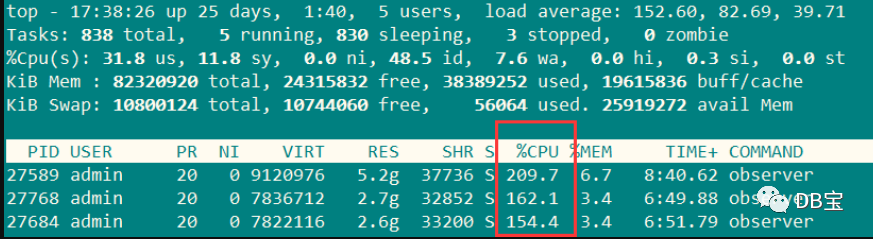
搞不懂,为啥OB的CPU占用率总是这么高:
本实验结束!
