



集群扩容
随着集群部署时间及业务的增长,数据库在运行性能及存储上逐渐会达到瓶颈。此 时,需要通过增加主机来提升集群的性能及存储能力,GaussDB Kernel提供了 gs_expand工具帮助用户进行主机扩容和数据重分布的操作。
前提条件
1、现有集群状态正常,且各实例状态均正常,如有异常请使用gs_replace工具进行修复
2、集群扩容要求整个集群没有被锁定,集群配置文件的配置信息正确并且和当前集 群配置一致。
3、已按照扩容的集群配置文件执行过前置脚本gs_preinstall。
4、新增主机和现有集群之间通信已经建立,网络正常。
5、扩容前需保证集群所有CN可连接,可以在集群用户下执行gs_check -i CheckDBConnection命令检查CN是否可连接。
6、扩容前需做ANALYZE(保证扩容进度准确性时需要执行)。
7、扩容前需保证数据库中无以redis_为前缀的时序表。若其他表、sequence、index 名称以redis_为前缀,且数据库中存在时序表可能会报错,此时需按照报错信息将 表重命名。
8、重分布资源管控对象redisuser,redisrespool,redisclass,redisgrp不能被占用。
9、重分布过程中不能将其他用户绑定到重分布专用的资源池redisrespool上;不能用 gs_cgroup -M等操作破坏当前Cgroups配置。若用户在Cgroups出现问题时使用 gs_cgroup --revert恢复默认配置,则需重启集群才能保证新建立的redisclass和 redisgrp生效。
10、新增主机的操作系统与已有集群主机操作系统在同一个大版本内,支持小版本混搭。
11、两副本集群新增主机数目大于等于2,其它类型集群新增主机数目大于等于3。
12、新增主机的locale、encoding等需要和原有主机上保持一致。
13、在前一次扩容结束后才能再次扩容,扩容节点不能包含ETCD组件,新增节点不能包含主备GTM和主备CM Server。
14、新增节点上的DN必须自行成环,以防破坏原有主备关系。
15、read-only模式的扩容过程中,锁集群后数据库不支持DDL和DCL操作。
16、insert模式的扩容过程中,集群锁定前数据库支持DDL和DCL操作,不支持用户并发事务块中包含Temp表创建使用,扩容完成后到重分布完成前,不支持对database、tablespace进行删除、创 建操作。
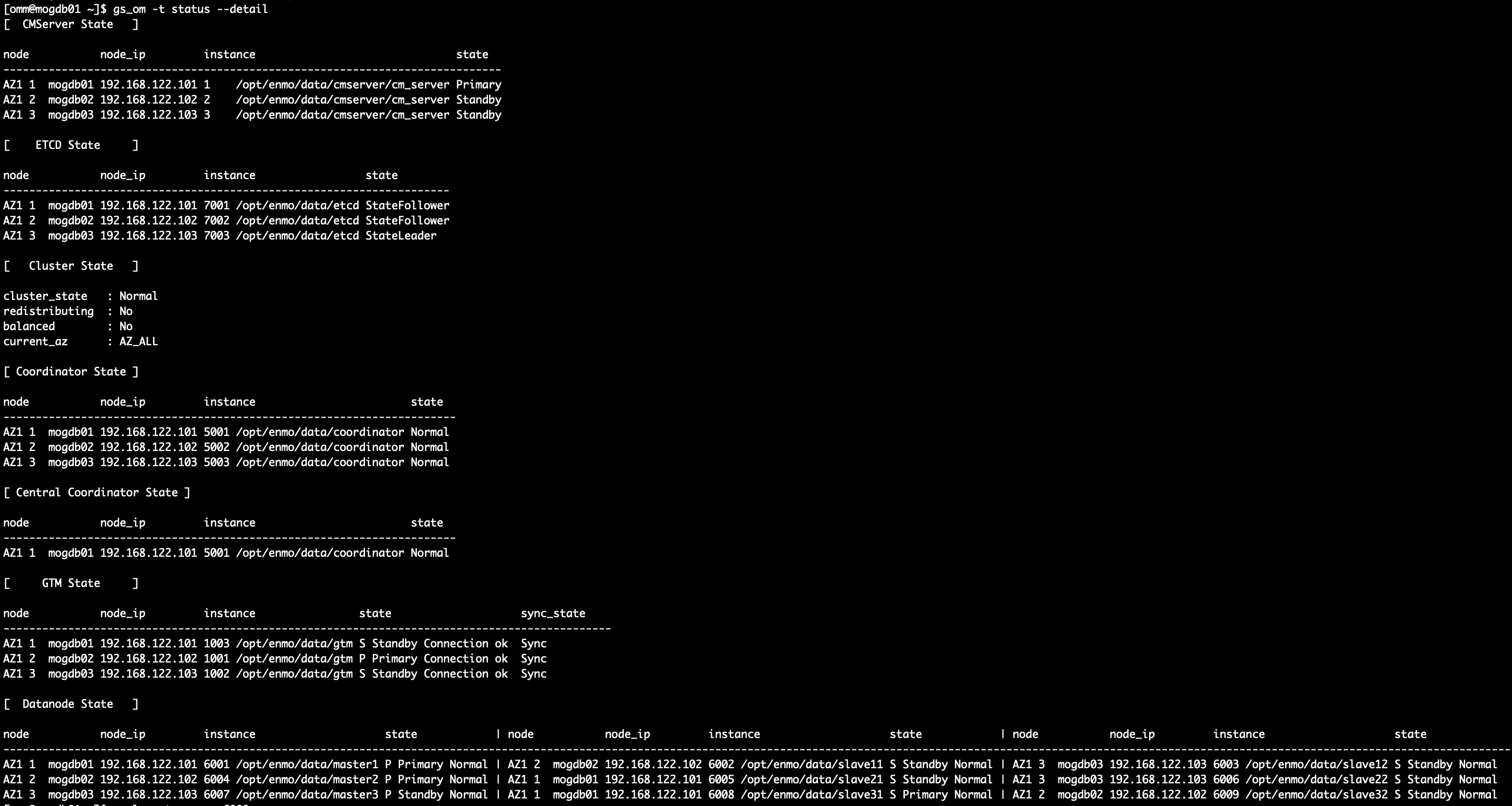
--预防扩容重分布的过程中会出现复制表查询结果为空的情况
gs_guc reload -Z coordinator -N all -I all -c "enable_random_datanode=off"

--修改集群文件
在集群信息的nodeNames字段后面追加所有新增主机的名称,原主机名称顺序保持不变。同时,在sqlExpandNames字段中增加所有新增的主机名称。
<PARAM name="sqlExpandNames" value="mogdb04,mogdb05,mogdb06"/>
预安装
[root@mogdb01 GaussDB_Kernel]# ./script/gs_preinstall -U omm -G dbgrp -X /opt/software/GaussDB_Kernel/clusterconfig.xml --alarm-type=5
Parsing the configuration file.
Successfully parsed the configuration file.
Successfully delete task result file
Installing the tools on the local node.
Successfully installed the tools on the local node.
Are you sure you want to create trust for root (yes/no)? yes
Please enter password for root.
Password:
Creating SSH trust for the root permission user.
Successfully created SSH trust for the root permission user.
Setting HOST_IP env
Successfully set HOST_IP env.
set hotpatch env.
clear hotpatch env.
Distributing package.
Successfully distribute local lib to remote pylib.
Begin to distribute package to tool path.
Successfully distribute package to tool path.
Begin to distribute package to package path.
Successfully distribute package to package path.
Successfully distributed package.
Are you sure you want to create the user[omm] and create trust for it (yes/no)? yes
Please enter password for cluster user.
Password:
Please enter password for cluster user again.
Password:
Generate cluster user password files successfully.

Successfully created [omm] user on all nodes.
Preparing SSH service.
Successfully prepared SSH service.
Installing the tools in the cluster.
Successfully installed the tools in the cluster.
Checking hostname mapping.
Successfully checked hostname mapping.
Creating SSH trust for [omm] user.
Please enter password for current user[omm].
Password:
Checking network information.
All nodes in the network are Normal.
Successfully checked network information.
Creating SSH trust.
Creating the local key file.
Successfully created the local key files.
Appending local ID to authorized_keys.
Successfully appended local ID to authorized_keys.
Updating the known_hosts file.
Successfully updated the known_hosts file.
Appending authorized_key on the remote node.
Successfully appended authorized_key on all remote node.
Checking common authentication file content.
Successfully checked common authentication content.
Distributing SSH trust file to all node.
Successfully distributed SSH trust file to all node.
Verifying SSH trust on all hosts.
Successfully verified SSH trust on all hosts.
Successfully created SSH trust.
Successfully created SSH trust for [omm] user.
Checking OS version.
Successfully checked OS version.
Creating cluster's path.
Successfully created cluster's path.
Setting SCTP service.
Successfully set SCTP service.
Set and check OS parameter.
Setting OS parameters.
Successfully set OS parameters.
Warning: Installation environment contains some warning messages.
Please get more details by "/opt/software/GaussDB_Kernel/script/gs_checkos -i A -h mogdb01,mogdb02,mogdb03,mogdb04,mogdb05,mogdb06".
Set and check OS parameter completed.
Preparing CRON service.
Successfully prepared CRON service.
Setting user environmental variables.
Successfully set user environmental variables.
Configuring alarms on the cluster nodes.
Successfully configured alarms on the cluster nodes.
Setting the dynamic link library.
Successfully set the dynamic link library.
Setting pssh path
Successfully set pssh path.
Setting Cgroup.
Successfully set Cgroup.
Set ARM Optimization.
Successfully set ARM Optimization.
Setting finish flag.
Scene: non-huaweiyun
Successfully set finish flag.
Preinstallation succeeded.
在线扩容
[omm@mogdb01 ~]$ gs_expand -t dilatation -X /opt/software/GaussDB_Kernel/clusterconfig.xml --dilatation-mode insert
Check cluster version consistency.
Successfully checked cluster version.
Distributing cluster dilatation XML file.
Checking static configuration.
Static configuration is matched with the old configuration file.
Checking the cluster status.
Successfully checked the cluster status.
Performing health check.
Health check succeeded.
Backing up parameter files.
Successfully backed up parameter files.
Installing.
Deleting instances from ['mogdb04', 'mogdb05', 'mogdb06'].
Uninstalling applications on ['mogdb04', 'mogdb05', 'mogdb06'].
Successfully uninstalled applications on ['mogdb04', 'mogdb05', 'mogdb06'].
Checking installation environment on all nodes.
resume om hotpatch
Successfully resume om hotpatch
Installing applications on all nodes.
Synchronizing cgroup configuration to new nodes.
Successfully synchronized cgroup configuration to new nodes.
Synchronizing alarmItem configuration to new nodes.
Successfully synchronized alarmItem configuration to new nodes.
Installation is completed.
Configuring.
Configuring new nodes.
Checking node configuration on all nodes.
Initializing instances on all nodes.
Configuring pg_hba on all nodes.
Successfully configured new nodes.
Begin scpCertFile.
Rebuilding new nodes.
Restoring new nodes.
Locking cluster.
Successfully locked cluster.
Successfully restored new nodes.
Successfully rebuild new nodes.
Configuration is completed.
Starting new nodes.
Successfully started new nodes.
Synchronizing.
Updating cluster configuration.
Successfully updated cluster configuration.
Synchronization is completed.
Successfully enable node whiteList.
Update resource control config file result: Not found resource config file on this node..
Starting new cluster.
Waiting for the cluster status to become available.
......
The cluster status is Normal.
Creating new node group.
Successfully created new node group.
Unlocking cluster.
Successfully unlocked cluster.
Waiting for the redistributing status to become yes.
.
The cluster redistributing status is yes.
Successfully started new cluster.
Starting timeseries table redistribute.
Dilatation succeed.
重分布
$ gs_expand -t redistribute --redis-mode=insert
Last time end with Begin redistribute.
Checking the cluster status.
Successfully checked the cluster status.
Redistribution
If you want to check the progress of redistribution, please check the log file on mogdb01: /var/log/mogdb/omm/bin/gs_redis/gs_redis-2022-02-10_104614.log.
Successfully setup resource control.
Successfully clear resource control.
No need to do timeseries redistribute.
Redistribution succeeded.
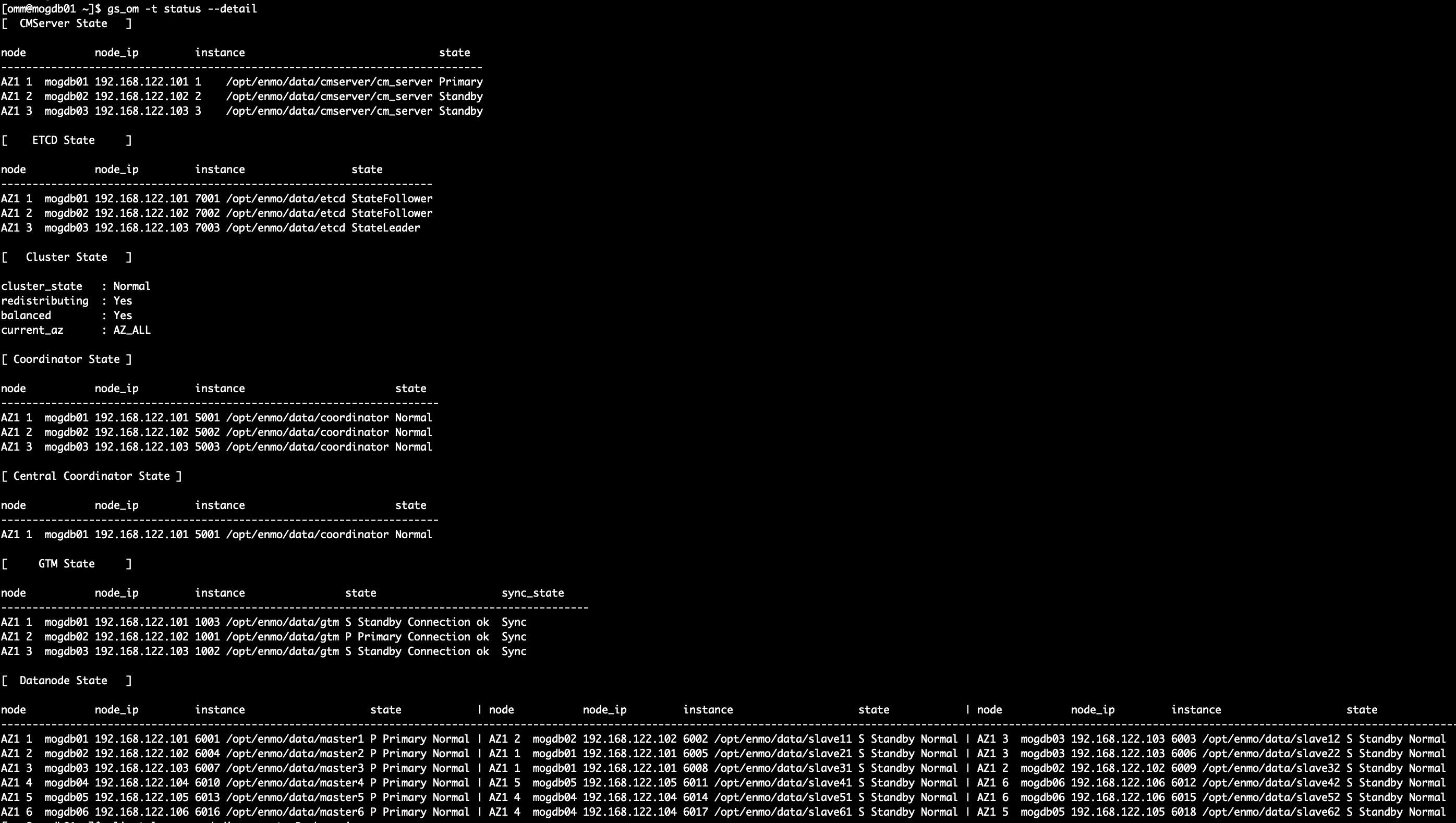
扩容后展示
缩容
随着业务场景和数据量的变化,需要对数据库集群的动态容量管理提出要求,要求数 据库集群具有可扩展性以及可收缩性。GaussDB Kernel提供了集群缩容的工具 gs_shrink,来支持数据库集群的缩容(缩分片及降副本)。
缩分片条件
1、执行cm_ctl query -Cvd命令查询集群状态,集群状态为Normal,重分布状态为 No。
2、整个集群数据库中的业务已全部停止且不能锁定集群。
3、集群配置文件已经生成,配置的信息正确并且和当前集群状态一致。
4、缩容前用户需要确保default_storage_nodegroup参数值为installation。
5、缩容前需退出创建了临时表的客户端连接,因为在缩容过程中及缩容成功后临时 表会失效,操作临时表也会失败。
6、缩容期间不支持DDL和DCL操作。
7、集群按照环的方式配置,比如4个或5个主机组成一个环,这些主机上的DN主节点、备节点和从节点都部署在这个环里, 缩容的最小单元是一个环。
8、缩容不支持包括CN的节点,如果包括CN,先使用增删CN工具,删除CN后再缩 容。
9、缩容的主机不能包含ETCD组件,GTM组件,CM Server组件。
10、缩容过程只支持查询业务。
11、内核版本和om版本不一致时,不支持缩容操作。这里的一致是指,内核代码和 om代码来自同一个软件包。
降副本条件
1、执行cm_ctl query -Cvd命令查询集群状态,集群状态为Normal,重分布状态为 No,balanced状态为Yes。
2、目前只支持单AZ集群,3副本降为2副本。
缩容
[omm@mogdb01 ~]$ gs_shrink -h mogdb04,mogdb05,mogdb06
Creating the backup directory.
Successfully created the backup directory.
Checking the cluster status.
Successfully checked the cluster status.
Checking whether the input hostname is looped.
Checking if the node name is in the physical cluster.
Checking host file.
Successfully checked host file.
Successfully checked if the node name is in the physical cluster.
Checking whether the input hostname is the cluster last ring.
Successfully checked whether the input hostname is the cluster last ring.
Successfully checked whether the input hostname is looped.
Checking contracted nodes.
Successfully checked contracted nodes.
Running: entry1 Percontraction.
Checking node group.
Obtaining information about the current node group.
Successfully obtained the current node group information.
Successfully checked node group.
Backing up parameter files.
Successfully backed up parameter files.
Checking the current node group.
Obtaining information about the current node group.
Successfully obtained the current node group information.
Successfully checked the current node group.
Creating new node group.
Successfully created new node group.
Successfully entry1 Percontraction.
Running : entry2 Redistributre.
Redistributing.
Check if another redistribution process is running and waiting for it to end.
There is no redistribution process running now.
If you want to check the progress of redistribution, please check the log file on mogdb01: /var/log/mogdb/omm/bin/gs_redis/gs_redis-2022-02-10_110847.log.
Successfully setup resource control.
Successfully clear resource control.
Redistribution succeeded.
Successfully running: entry2 Redistributre.
Running : entry3 Postcontraction.
Checking post contraction.
Checking the cluster status.
Successfully checked the cluster status.
Deleting old node group.
Successfully deleted old node group.
Checking node group.
Obtaining information about the current node group.
Successfully obtained the current node group information.
Successfully checked node group.
Successfully checked post contraction.
Backing up files.
Successfully backed up files.
Locking cluster.
Successfully locked cluster.
Updating files on nodeList:['mogdb01', 'mogdb02', 'mogdb03'].
Waiting for the cluster status to become normal.
..
The cluster status is normal.
Successfully updated files.
Unlocking cluster.
Successfully unlocked cluster.
Successfully posted contraction.
Deleting backup files.
Successfully deleted backup files.
Deleting contracted nodes.
Successfully deleted contracted nodes.
Contraction succeeded.
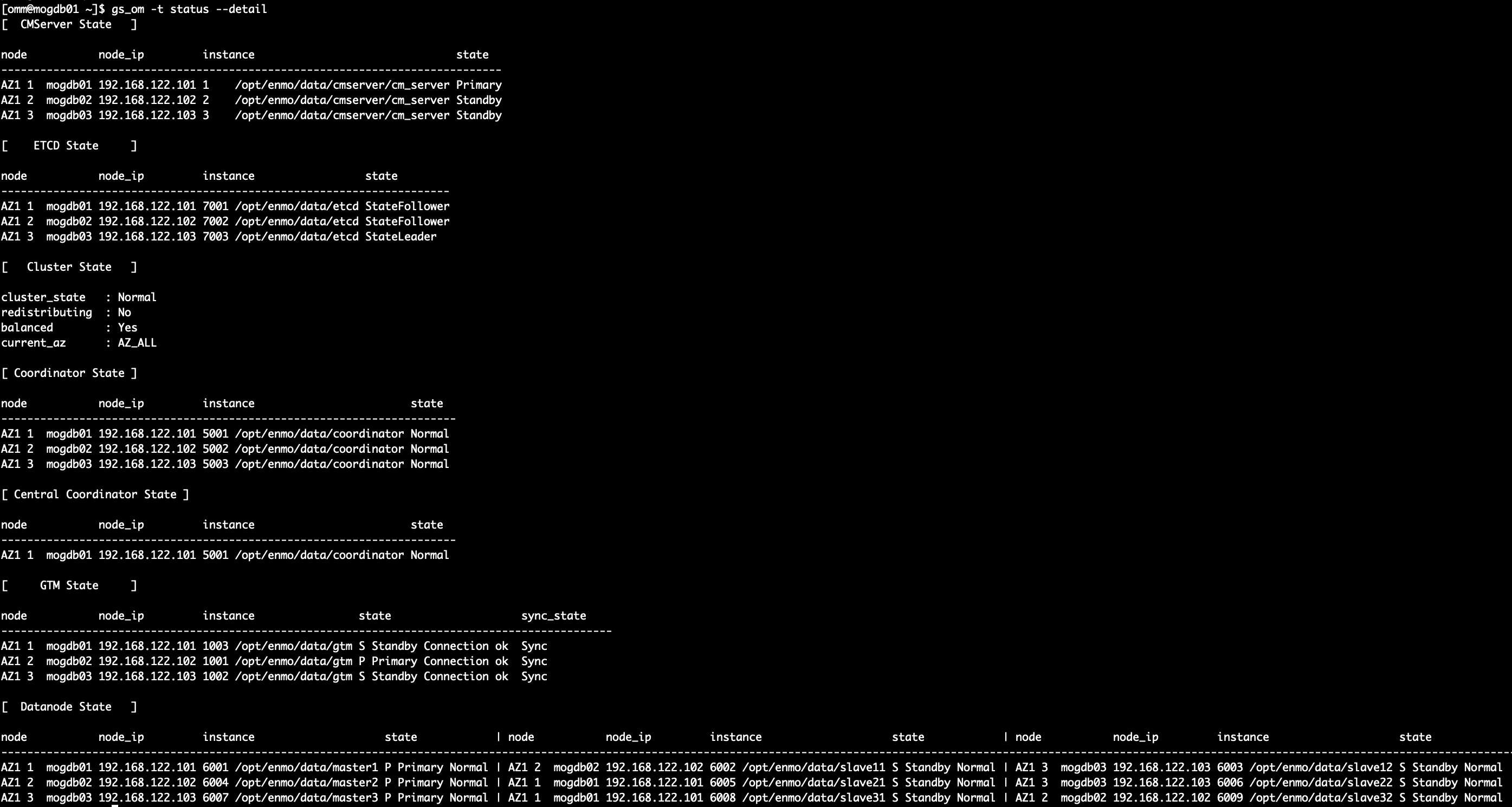
缩副本
[omm@mogdb01 ~]$ gs_shrink -t reduce --offline
{'action': 'reduce', 'online': False}
Start check is need roll back. False
Step file not exist. No need to roll back cluster. Step []
Init global info successfully.
Create step directory successfully.
Start checking the conditions for reduce replication.
Cluster balanced is : Yes
Cluster status is : Normal
Cluster redistributing is : No
Check reduce replica condition successfully.
Successfully backup config file.
Start update pgxc_slice table.
Start check all databses pgxc_slice table.
Successfully query all databses pgxc_slice table.output:{}
No need to update pgxc_slice table.
Start getting all standby datanode.
Master datanode num is : 3
Ready to perform sql: select group_members from pgxc_group;
Ready to perform sql: select group_members from pgxc_group;
 Ready to perform sql: select group_members from pgxc_group;
Execute sql command output result is : 16384 16388 16392
Ready to perform get pgxc oid sql: select oid,* from pgxc_node where oid='16384' or oid='16388' or oid='16392'
Execute sql command output result is : 16385 16389 16392
Ready to perform get pgxc oid sql: select oid,* from pgxc_node where oid='16385' or oid='16389' or oid='16392'
Execute sql command output result is : 16385 16388 16392
Ready to perform get pgxc oid sql: select oid,* from pgxc_node where oid='16385' or oid='16388' or oid='16392'
Get pgxc group relation successfully. [{'dn_6004_6005_6006': '192.168.122.102', 'dn_6001_6002_6003': '192.168.122.101', 'dn_6007_6008_6009': '192.168.122.103'}, {'dn_6004_6005_6006': '192.168.122.102', 'dn_6001_6002_6003': '192.168.122.101', 'dn_6007_6008_6009': '192.168.122.103'}, {'dn_6004_6005_6006': '192.168.122.102', 'dn_6001_6002_6003': '192.168.122.101', 'dn_6007_6008_6009': '192.168.122.103'}]
Peer instances listen IP is [['192.168.122.102'], ['192.168.122.103']]
Clear async standby datanode.[mogdb02]
Peer instances listen IP is [['192.168.122.101'], ['192.168.122.103']]
Clear async standby datanode.[mogdb01]
Peer instances listen IP is [['192.168.122.101'], ['192.168.122.102']]
Clear async standby datanode.[mogdb01]
Generate new XML file successfully.
Start generate new cluster_static_config.
Start generate new static config file and distribute to node.
Update cluster static config file successfully.
Start update postgresql.conf in datanode instance.
Local config perform finish. Start to modify the non-local state.
Update postgresql.conf successfully.
Start update pgxc_node table.
node_name: dn_6004_6005_6006
listenips: ['192.168.122.101']
 hasips:['192.168.122.101']
node_name: dn_6007_6008_6009
listenips: ['192.168.122.101']
 hasips:['192.168.122.101']
node_name: dn_6001_6002_6003
listenips: ['192.168.122.102']
 hasips:['192.168.122.102']
node_name: dn_6004_6005_6006
listenips: ['192.168.122.101']
 hasips:['192.168.122.101']
node_name: dn_6007_6008_6009
listenips: ['192.168.122.101']
 hasips:['192.168.122.101']
node_name: dn_6001_6002_6003
listenips: ['192.168.122.102']
 hasips:['192.168.122.102']
Ready to perform sql: delete from pgxc_node where (node_host='192.168.122.101' and node_name='dn_6004_6005_6006' and node_type='S') or (node_host='192.168.122.101' and node_name='dn_6007_6008_6009' and node_type='S') or (node_host='192.168.122.102' and node_name='dn_6001_6002_6003' and node_type='S');
Ready to perform update pgxc_class sql: update pgxc_class set nodeoids=(select distinct group_members from pgxc_group);
node_name: dn_6004_6005_6006
listenips: ['192.168.122.101']
 hasips:['192.168.122.101']
node_name: dn_6007_6008_6009
listenips: ['192.168.122.101']
 hasips:['192.168.122.101']
node_name: dn_6001_6002_6003
listenips: ['192.168.122.102']
 hasips:['192.168.122.102']
Ready to perform sql: delete from pgxc_node where (node_host='192.168.122.101' and node_name='dn_6004_6005_6006' and node_type='S') or (node_host='192.168.122.101' and node_name='dn_6007_6008_6009' and node_type='S') or (node_host='192.168.122.102' and node_name='dn_6001_6002_6003' and node_type='S');
node_name: dn_6004_6005_6006
listenips: ['192.168.122.101']
 hasips:['192.168.122.101']
node_name: dn_6007_6008_6009
listenips: ['192.168.122.101']
 hasips:['192.168.122.101']
node_name: dn_6001_6002_6003
listenips: ['192.168.122.102']
 hasips:['192.168.122.102']
Ready to perform sql: delete from pgxc_node where (node_host='192.168.122.101' and node_name='dn_6004_6005_6006' and node_type='S') or (node_host='192.168.122.101' and node_name='dn_6007_6008_6009' and node_type='S') or (node_host='192.168.122.102' and node_name='dn_6001_6002_6003' and node_type='S');
Ready to perform update pgxc_class sql: update pgxc_class set nodeoids=(select distinct group_members from pgxc_group);
Ready to perform update pgxc_class sql: update pgxc_class set nodeoids=(select distinct group_members from pgxc_group);
Update pgxc_node table for reduce replica successfully.
Start update pg_hba.conf .
Update pg_hba successfully.
Start update datanode_status in ETCD.
Update datanode_status in ETCD successfully.
Starting new cluster.
Clear dynamic config file in cluster successfully.
Kill cluster manager process successfully.
Restart datanode instance starting.
Restart datanode instance successfully.
Restart coordinator instance starting.
Restart coordinator instance successfully.
..
Start cluster successfully. Cluster already normal.
Restart cluster finish.Reset dynamic config file successfully.
============================
Reduce replica successfully.
['mogdb02', 'mogdb01']
============================
Clean backup file successfully.
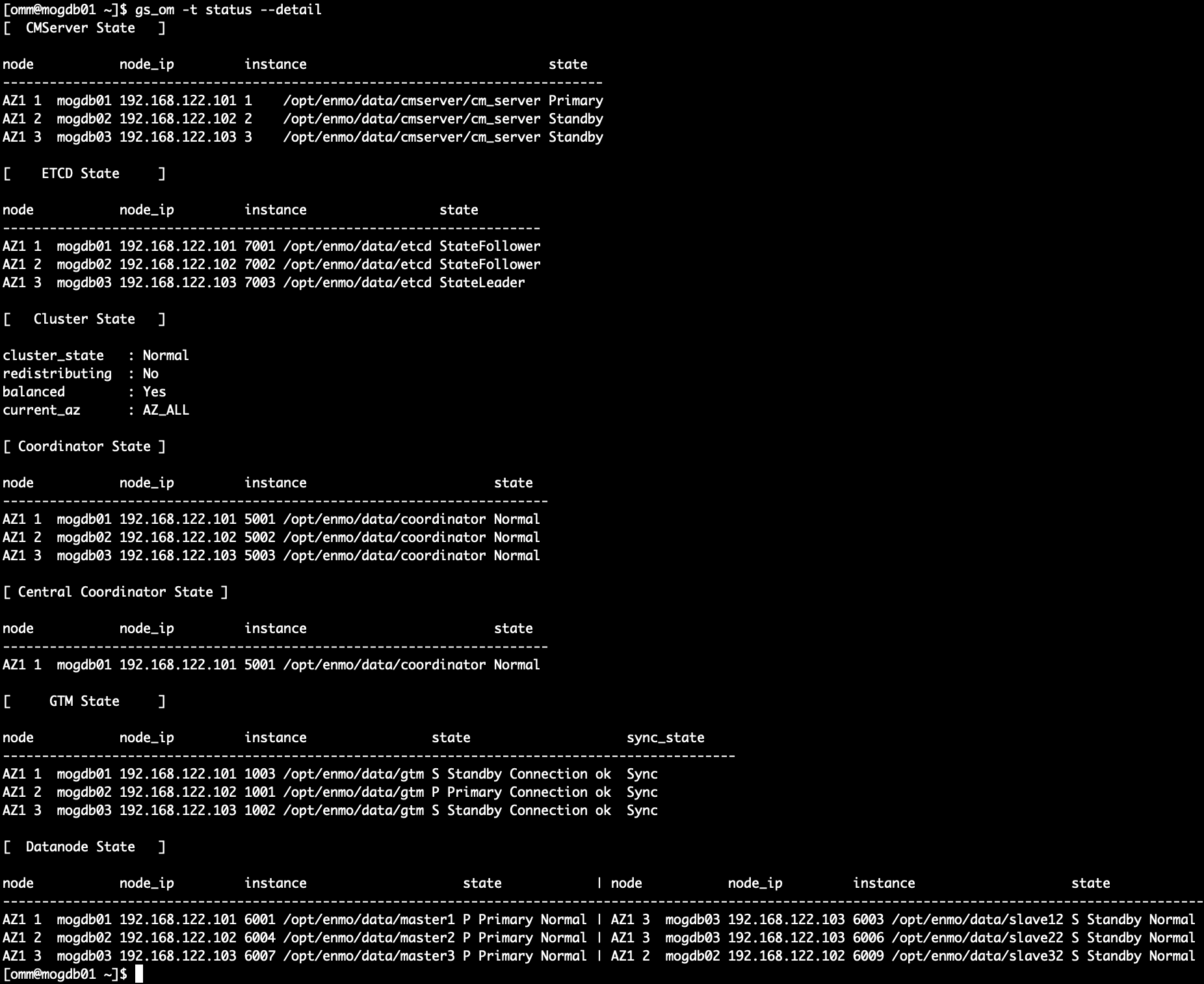
问题汇总
[GAUSS-53203] : The number of ETCD in AZ1 must be greater than 2 and the number of ETCD in AZ2 must be greater than 1. Please set it.

官网给出的错误原因:AGG语法错误。 解决办法:修改查询语句后,再次执行操作。

真正原因是:两副本集群新增主机数目大于等于2,其它类型集群新增主机数目大于等于3,
	  同时对“扩容节点不能包含ETCD组件” 这句话表示怀疑。

------
[GAUSS-51214] : The number of capacity expansion DN nodes cannot be less than three or CN nodes cannot be less than one.

官方给出错误原因:扩容前的节点数不能少于3个。 解决办法:确保扩容前的节点数大于等于三个。

真正原因是:配置文件错误,升级xml与部署xml有差异,需要添加sqlExpandNames

------
[GAUSS-51644] : Failed to set resource control for the cluster. Error:
The resource control objects are not correctly established, detailed information is as follows:
The special user (redisuser) for redistribution does not exist!
The special resource pool (redisrespool) for redistribution does not exist!
The two objects (redisuser and redisrespool) are not correctly associated!
