



最近有个客户希望oracle能够访问sqlserver的数据,上网查了一下,可以通过创建dblink来实现,来实操一下。
一.环境介绍:
测试环境为vmware workstation 12 里面的两台虚拟机,网卡模式都是”自定义NAT模式“
oracle端:
操作系统:Red Hat Enterprise Linux Server release 6.4 (Santiago)
数据库:oracle 11.2.0.4 单实例
IP地址:192.168.59.180
sqlserver端:
操作系统:windows server 2012 Datacenter
数据库:sqlserver 2012
IP地址:192.168.59.121
二.所需软件
透明网关(Transparent Gateway)
p13390677_112040_Linux-x86-64_5of7.zip
网盘链接分享如下:
链接:https://pan.baidu.com/s/1b7lBHmRDZDH0-tcKIMUitg
提取码:1234
如果过期了请联系。
三.安装软件
1.执行安装## 二级标题
[root@11g u01]# su - oracle
[oracle@11g ~]$ cd /u01
[oracle@11g u01]$ unzip p13390677_112040_Linux-x86-64_5of7.zip
然后会出现如下文件夹
Gateways
[oracle@11g u01]$ cd gateways/
[oracle@11g gateways]$ ll
total 56
drwxr-xr-x  4 oracle oinstall  4096 Aug 26  2013 install
drwxr-xr-x  4 oracle oinstall  4096 Aug 26  2013 legacy
-rw-r--r--  1 oracle oinstall 30016 Aug 27  2013 readme.html
drwxr-xr-x  2 oracle oinstall  4096 Aug 26  2013 response
-rwxr-xr-x  1 oracle oinstall  3267 Aug 26  2013 runInstaller
drwxr-xr-x 14 oracle oinstall  4096 Aug 26  2013 stage
-rw-r--r--  1 oracle oinstall   500 Aug 27  2013 welcome.html
[oracle@11g gateways]$ export DISPLAY=192.168.59.1:0.0
[oracle@11g gateways]$ ./runInstaller
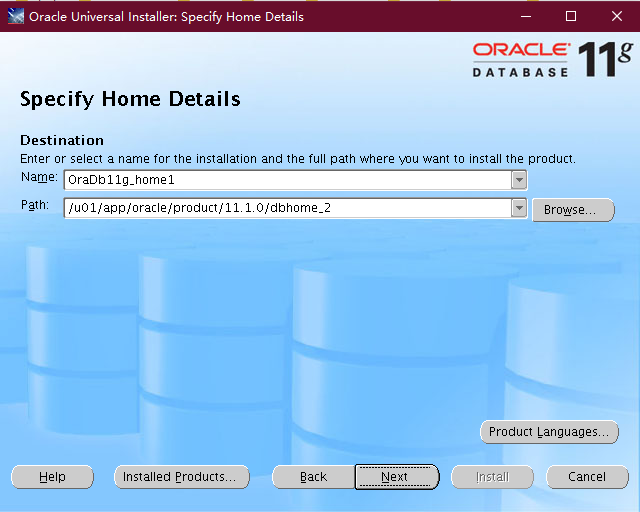
next

这里我是用oracle用户执行安装的,所以路径直接就是读取的环境变量里面的ORACLE_HOME.
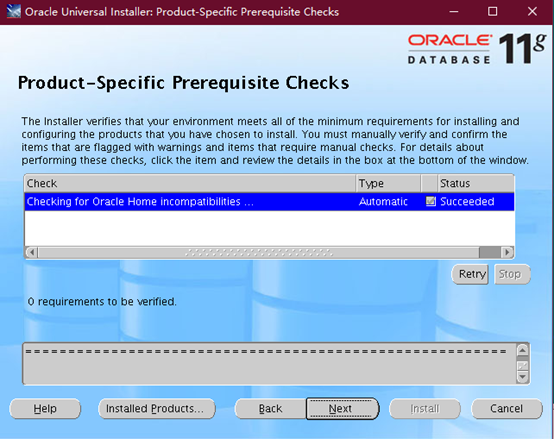

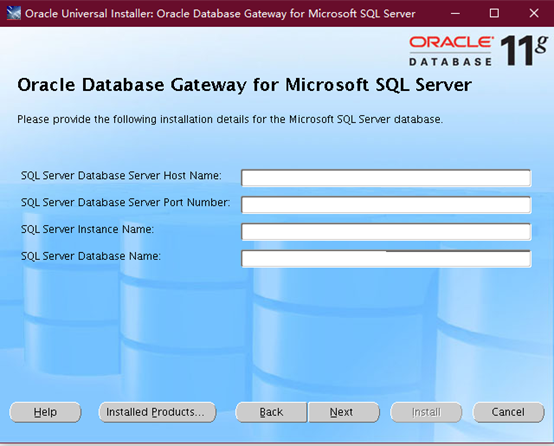
可以看到,需要sqlserver数据库的host name,port number,instance name,database name四个参数。
Host name:sqlserver所在主机的主机名,写ip地址
Port number:打开sql server manager studio,然后打开一个数据库查询,用如下命令获取:
exec sys.sp_readerrorlog 0, 1, ‘listening’
如:
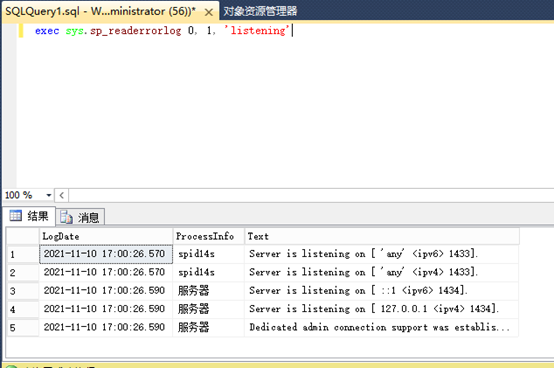
端口为1433
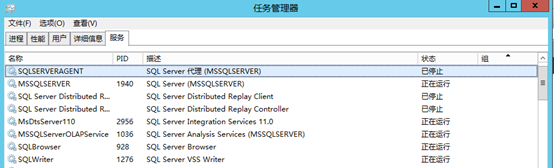
instance name:
操作系统看服务,例如:MSSQLSERVER
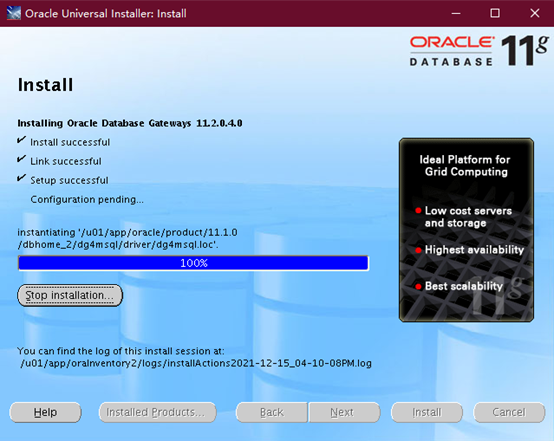
database name:
sql server manager studio里面数据库,填写你想被oracle查询的数据库。



[root@11g ~]# /u01/app/oracle/product/11.1.0/dbhome_2/root.sh
Performing root user operation for Oracle 11g

The following environment variables are set as:
    ORACLE_OWNER= oracle
    ORACLE_HOME=  /u01/app/oracle/product/11.1.0/dbhome_2

Enter the full pathname of the local bin directory: [/usr/local/bin]:
The contents of "dbhome" have not changed. No need to overwrite.
The contents of "oraenv" have not changed. No need to overwrite.
The contents of "coraenv" have not changed. No need to overwrite.

Entries will be added to the /etc/oratab file as needed by
Database Configuration Assistant when a database is created
Finished running generic part of root script.
Now product-specific root actions will be performed.
Finished product-specific root actions.
[root@11g ~]#
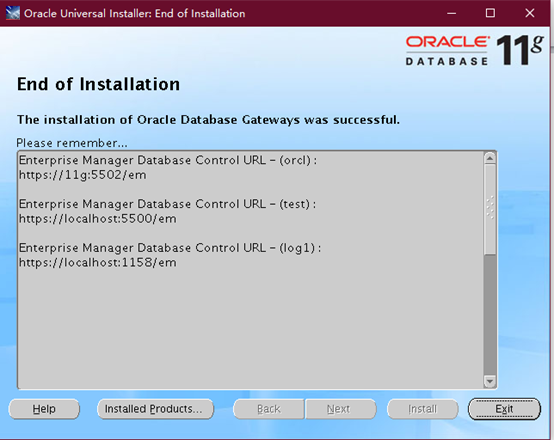
Exit
安装完成
2.安装后修改配置文件
安装完成之后在ORACLE_HOME会生成一个文件夹dg4msql
[oracle@11g ~]$ cd $ORACLE_HOME
[oracle@11g dbhome_2]$ ll dg4msql/
total 20
drwxr-xr-x 2 oracle oinstall 4096 Dec 15 16:30 admin
drwxr-xr-x 2 oracle oinstall 4096 Dec 15 16:30 demo
drwxr-xr-x 4 oracle oinstall 4096 Dec 15 16:30 driver
drwxr-xr-x 2 oracle oinstall 4096 Dec 15 16:30 lib
drwxr-xr-x 2 oracle oinstall 4096 Dec 15 16:30 log
[oracle@11g dbhome_2]$
[oracle@11g dbhome_2]$ cd dg4msql/
[oracle@11g dg4msql]$ cd admin/
[oracle@11g admin]$ ll
total 28
-rw-r--r-- 1 oracle oinstall 10976 Nov 30  2011 dg4msql_cvw.sql
-rw-r--r-- 1 oracle oinstall   746 Jun  8  2007 dg4msql_tx.sql
-rw-r--r-- 1 oracle oinstall   368 Dec 15 16:30 initdg4msql.ora
-rw-r--r-- 1 oracle oinstall   411 Dec 15 16:30 listener.ora.sample
-rw-r--r-- 1 oracle oinstall   244 Dec 15 16:30 tnsnames.ora.sample
```[oracle@11g admin]$ cat initdg4msql.ora
# This is a customized agent init file that contains the HS parameters
# that are needed for the Database Gateway for Microsoft SQL Server

#
# HS init parameters
#
HS_FDS_CONNECT_INFO=[192.168.59.121]:1433//db_test1
# alternate connect format is hostname/serverinstance/databasename
HS_FDS_TRACE_LEVEL=OFF
HS_FDS_RECOVERY_ACCOUNT=RECOVER
HS_FDS_RECOVERY_PWD=RECOVER

[oracle@11g admin]$
可以看到,之前我们在图形化安装的时候输入的信息在这里体现。
但是不知道为什么,instance_name没有体现出来,我们修改为如下:
HS_FDS_CONNECT_INFO=192.168.59.121:1433/MSSQLSERVER/db_test1
[oracle@11g admin]$ cat initdg4msql.ora
# This is a customized agent init file that contains the HS parameters
# that are needed for the Database Gateway for Microsoft SQL Server
#
# HS init parameters
#
#HS_FDS_CONNECT_INFO=[192.168.59.121]:1433//db_test1
# alternate connect format is hostname/serverinstance/databasename
HS_FDS_CONNECT_INFO=192.168.59.121:1433/MSSQLSERVER/db_test1
HS_FDS_TRACE_LEVEL=OFF
HS_FDS_RECOVERY_ACCOUNT=RECOVER
HS_FDS_RECOVERY_PWD=RECOVER
[oracle@11g admin]$
3.修改lintener.ora文件
[oracle@11g admin]$ lsnrctl status

LSNRCTL for Linux: Version 11.2.0.4.0 - Production on 15-DEC-2021 16:46:04

Copyright (c) 1991, 2013, Oracle.  All rights reserved.

Connecting to (DESCRIPTION=(ADDRESS=(PROTOCOL=TCP)(HOST=11g)(PORT=1521)))
STATUS of the LISTENER
------------------------
Alias                     LISTENER
Version                   TNSLSNR for Linux: Version 11.2.0.4.0 - Production
Start Date                15-DEC-2021 16:45:35
Uptime                    0 days 0 hr. 0 min. 28 sec
Trace Level               off
Security                  ON: Local OS Authentication
SNMP                      OFF
Listener Parameter File   /u01/app/oracle/product/11.1.0/dbhome_2/network/admin/listener.ora
Listener Log File         /u01/app/oracle/diag/tnslsnr/11g/listener/alert/log.xml
Listening Endpoints Summary...
  (DESCRIPTION=(ADDRESS=(PROTOCOL=tcp)(HOST=11g)(PORT=1521)))
  (DESCRIPTION=(ADDRESS=(PROTOCOL=ipc)(KEY=EXTPROC1521)))
Services Summary...
Service "orcl" has 1 instance(s).
  Instance "orcl", status READY, has 1 handler(s) for this service...
Service "orclXDB" has 1 instance(s).
  Instance "orcl", status READY, has 1 handler(s) for this service...
The command completed successfully
[oracle@11g admin]$ vi /u01/app/oracle/product/11.1.0/dbhome_2/network/admin/listener.ora
添加如下内容:
SID_LIST_LISTENER=
  (SID_LIST=
      (SID_DESC=
         (SID_NAME=dg4msql)
         (ORACLE_HOME=/u01/app/oracle/product/11.1.0/dbhome_2)
         (PROGRAM=dg4msql)
      )
  )
4.修改tnsnames.ora文件
vi /u01/app/oracle/product/11.1.0/dbhome_2/network/admin/tnsnames.ora

添加如下内容:

dg4msql  =
  (DESCRIPTION=
    (ADDRESS=(PROTOCOL=tcp)(HOST=localhost)(PORT=1521))
    (CONNECT_DATA=(SID=dg4msql))
    (HS=OK)
  )


然后重启监听
[oracle@11g admin]$ lsnrctl status

LSNRCTL for Linux: Version 11.2.0.4.0 - Production on 15-DEC-2021 16:53:12

Copyright (c) 1991, 2013, Oracle.  All rights reserved.

Connecting to (DESCRIPTION=(ADDRESS=(PROTOCOL=TCP)(HOST=11g)(PORT=1521)))
STATUS of the LISTENER
------------------------
Alias                     LISTENER
Version                   TNSLSNR for Linux: Version 11.2.0.4.0 - Production
Start Date                15-DEC-2021 16:52:58
Uptime                    0 days 0 hr. 0 min. 14 sec
Trace Level               off
Security                  ON: Local OS Authentication
SNMP                      OFF
Listener Parameter File   /u01/app/oracle/product/11.1.0/dbhome_2/network/admin/listener.ora
Listener Log File         /u01/app/oracle/diag/tnslsnr/11g/listener/alert/log.xml
Listening Endpoints Summary...
  (DESCRIPTION=(ADDRESS=(PROTOCOL=tcp)(HOST=11g)(PORT=1521)))
  (DESCRIPTION=(ADDRESS=(PROTOCOL=ipc)(KEY=EXTPROC1521)))
Services Summary...
Service "dg4msql" has 1 instance(s).
  Instance "dg4msql", status UNKNOWN, has 1 handler(s) for this service...
Service "orcl" has 1 instance(s).
  Instance "orcl", status READY, has 1 handler(s) for this service...
Service "orclXDB" has 1 instance(s).
  Instance "orcl", status READY, has 1 handler(s) for this service...
The command completed successfully
[oracle@11g admin]$
5.创建dblink
sql server manager studio – 登录名 – sa–属性–重置密码
create PUBLIC database link sqlserver1 connect to "sa" identified by "scott1!"  using 'dg4msql';
SQL> create PUBLIC database link sqlserver1 connect to "sa" identified by "scott1!"  using 'dg4msql';
Database link created.
SQL>
访问数据:
Sqlserver本地访问:
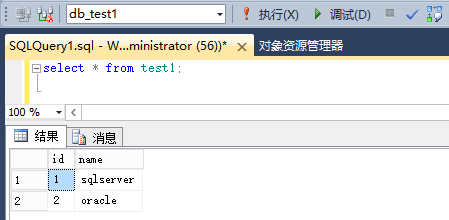
在oracle访问:
SELECT * FROM test1@ sqlserver1;
SQL> SELECT * FROM test1@ sqlserver1;
SELECT * FROM test1@ sqlserver1
                     *
ERROR at line 1:
ORA-28510: heterogeneous database link initialization failed
ORA-28508: invalid value 192.168.59.121:1433/MSSQLSERVER/db_test1 for Heterogeneous Services initialization parameter HS_FDS_CONNECT_INFO
ORA-02063: preceding 2 lines from SQLSERVER1
可能是因为我修改了initdg4msql.ora这个文件导致的,我们注释掉我们的修改如下:
[oracle@11g admin]$ cat initdg4msql.ora
# This is a customized agent init file that contains the HS parameters
# that are needed for the Database Gateway for Microsoft SQL Server

#
# HS init parameters
#
HS_FDS_CONNECT_INFO=[192.168.59.121]:1433//db_test1
# alternate connect format is hostname/serverinstance/databasename
#HS_FDS_CONNECT_INFO=192.168.59.121:1433/MSSQLSERVER/db_test1
HS_FDS_TRACE_LEVEL=OFF
HS_FDS_RECOVERY_ACCOUNT=RECOVER
HS_FDS_RECOVERY_PWD=RECOVER

[oracle@11g admin]$
再次执行查询
SQL> SELECT * FROM test1@sqlserver1;

        id name
---------- --------------------
         1 sqlserver
         2 oracle

SQL>

可以获取到sqlserver端的数据。
四.其他问题
如果要访问其他数据库的信息,配置文件里面可以加多行吗 ?
不可以
如果需要连接多个数据库,需要多个initdg4msql.ora文件,listener.ora里面也需要多个表达式,tnsnames.ora里面也需要多个表达式。
如下:
[oracle@11g admin]$ cp initdg4msql.ora initdg4msql0.ora
[oracle@11g admin]$ cat initdg4msql0.ora
This is a customized agent init file that contains the HS parameters
that are needed for the Database Gateway for Microsoft SQL Server
HS init parameters
HS_FDS_CONNECT_INFO=[192.168.59.121]:1433//db_test2
alternate connect format is hostname/serverinstance/databasename
#HS_FDS_CONNECT_INFO=192.168.59.121:1433/MSSQLSERVER/db_test1
HS_FDS_TRACE_LEVEL=OFF
HS_FDS_RECOVERY_ACCOUNT=RECOVER
HS_FDS_RECOVERY_PWD=RECOVER
Listener.ora
[oracle@11g admin]$ cat listener.ora
listener.ora Network Configuration File: /u01/app/oracle/product/11.1.0/dbhome_2/network/admin/listener.ora
Generated by Oracle configuration tools.
LISTENER =
(DESCRIPTION_LIST =
(DESCRIPTION =
(ADDRESS = (PROTOCOL = TCP)(HOST = 11g)(PORT = 1521))
(ADDRESS = (PROTOCOL = IPC)(KEY = EXTPROC1521))
)
)
SID_LIST_LISTENER=
(SID_LIST=
(SID_DESC=
(SID_NAME=dg4msql)
(ORACLE_HOME=/u01/app/oracle/product/11.1.0/dbhome_2)
(PROGRAM=dg4msql)
)
(SID_DESC=
(SID_NAME=dg4msql0)
(ORACLE_HOME=/u01/app/oracle/product/11.1.0/dbhome_2)
(PROGRAM=dg4msql)
)
)
Tnsnames.ora
[oracle@11g admin]$ cat tnsnames.ora
LISTENER_ORCL =
(DESCRIPTION =
(ADDRESS_LIST =
(ADDRESS = (PROTOCOL = TCP)(HOST = 192.168.6.180)(PORT = 1521))
)
orcl =
(DESCRIPTION =
(ADDRESS = (PROTOCOL = TCP)(HOST = 192.168.6.180)(PORT = 1521))
(CONNECT_DATA =
(SERVER = DEDICATED)
(SERVICE_NAME = orcl)
)
)
orcl_dg =
(DESCRIPTION =
(ADDRESS = (PROTOCOL = TCP)(HOST = 192.168.6.181)(PORT = 1521))
(CONNECT_DATA =
(SERVER = DEDICATED)
(SERVICE_NAME = orcl_dg)
)
)
dg4msql =
(DESCRIPTION=
(ADDRESS=(PROTOCOL=tcp)(HOST=localhost)(PORT=1521))
(CONNECT_DATA=(SID=dg4msql))
(HS=OK)
)
dg4msql0 =
(DESCRIPTION=
(ADDRESS=(PROTOCOL=tcp)(HOST=localhost)(PORT=1521))
(CONNECT_DATA=(SID=dg4msql0))
(HS=OK)
)
[oracle@11g admin]$
创建dblink
重启监听
创建dblink
SQL> create PUBLIC database link sqlserver0 connect to “sa” identified by “scott1!” using ‘dg4msql0’;
Database link created.
SQL> SELECT * FROM test2@sqlserver0;
id name
     1 liang
     2 xue
     3 bai
SQL>
