




ranger大数据领域的一个集中式安全管理框架,它可以对诸如hdfs、hive、kafka、storm等组件进行细粒度的权限控制。本文将介绍部署过程
## 下载rangerwget http://mirror.bit.edu.cn/apache/ranger/1.2.0/apache-ranger-1.2.0.tar.gz## 下载mavenwget http://mirrors.tuna.tsinghua.edu.cn/apache/maven/maven-3/3.6.1/binaries/apache-maven-3.6.1-bin.tar.gz## 安装bc命令yum install bc -y
# 解压ranger及maven包tar -zxvf apache-ranger-1.2.0.tar.gztar -zxvf apache-maven-3.6.1-bin.tar.gz# 将maven相关命令路径配置到环境变量vim /etc/profileexport PATH=/usr/local/maven/bin:$PATH
cd apache-ranger-1.2.0mvn clean# 编译mvn clean compile package assembly:assembly install -DskipTests -Drat.skip=true编译过程中会有如下信息
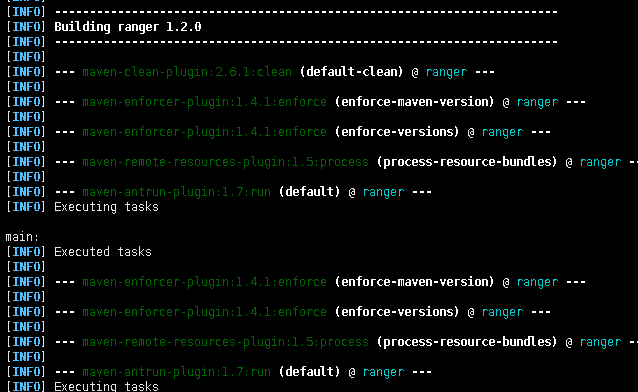
执行过程中会出现很多信息,且编译时间很长,如果出现异常,根据对应的报错信息进行处理,例如Python包不存在时需要手动添加;如果某个jar不存在,可以手动下载放置对应的路径或修改pom地址或文件。
[INFO] Reactor Summary for ranger 1.2.0:[INFO][INFO] ranger ............................................. SUCCESS [ 0.244 s][INFO] Jdbc SQL Connector ................................. SUCCESS [ 0.573 s][INFO] Credential Support ................................. SUCCESS [ 0.391 s][INFO] Audit Component .................................... SUCCESS [ 1.065 s][INFO] Common library for Plugins ......................... SUCCESS [ 1.332 s][INFO] Installer Support Component ........................ SUCCESS [ 0.153 s][INFO] Credential Builder ................................. SUCCESS [ 0.293 s][INFO] Embedded Web Server Invoker ........................ SUCCESS [ 0.345 s][INFO] Key Management Service ............................. SUCCESS [ 0.984 s][INFO] ranger-plugin-classloader .......................... SUCCESS [ 0.209 s][INFO] HBase Security Plugin Shim ......................... SUCCESS [ 0.830 s][INFO] HBase Security Plugin .............................. SUCCESS [ 1.092 s][INFO] Hdfs Security Plugin ............................... SUCCESS [ 0.786 s][INFO] Hive Security Plugin ............................... SUCCESS [ 1.135 s][INFO] Knox Security Plugin Shim .......................... SUCCESS [ 0.524 s][INFO] Knox Security Plugin ............................... SUCCESS [ 0.712 s][INFO] Storm Security Plugin .............................. SUCCESS [ 0.533 s][INFO] YARN Security Plugin ............................... SUCCESS [ 0.398 s][INFO] Ranger Util ........................................ SUCCESS [ 1.099 s][INFO] Unix Authentication Client ......................... SUCCESS [ 0.259 s][INFO] Security Admin Web Application ..................... SUCCESS [ 12.847 s][INFO] KAFKA Security Plugin .............................. SUCCESS [ 0.458 s][INFO] SOLR Security Plugin ............................... SUCCESS [ 1.208 s][INFO] NiFi Security Plugin ............................... SUCCESS [ 0.386 s][INFO] NiFi Registry Security Plugin ...................... SUCCESS [ 0.381 s][INFO] Unix User Group Synchronizer ....................... SUCCESS [ 1.016 s][INFO] Ldap Config Check Tool ............................. SUCCESS [ 0.222 s][INFO] Unix Authentication Service ........................ SUCCESS [ 0.330 s][INFO] KMS Security Plugin ................................ SUCCESS [ 0.490 s][INFO] Tag Synchronizer ................................... SUCCESS [ 1.211 s][INFO] Hdfs Security Plugin Shim .......................... SUCCESS [ 0.311 s][INFO] Hive Security Plugin Shim .......................... SUCCESS [ 0.800 s][INFO] YARN Security Plugin Shim .......................... SUCCESS [ 0.320 s][INFO] Storm Security Plugin shim ......................... SUCCESS [ 0.365 s][INFO] KAFKA Security Plugin Shim ......................... SUCCESS [ 0.313 s][INFO] SOLR Security Plugin Shim .......................... SUCCESS [ 0.701 s][INFO] Atlas Security Plugin Shim ......................... SUCCESS [ 0.398 s][INFO] KMS Security Plugin Shim ........................... SUCCESS [ 0.342 s][INFO] ranger-examples .................................... SUCCESS [ 0.042 s][INFO] Ranger Examples - Conditions and ContextEnrichers .. SUCCESS [ 0.335 s][INFO] Ranger Examples - SampleApp ........................ SUCCESS [ 0.140 s][INFO] Ranger Examples - Ranger Plugin for SampleApp ...... SUCCESS [ 0.322 s][INFO] Ranger Tools ....................................... SUCCESS [ 0.457 s][INFO] Atlas Security Plugin .............................. SUCCESS [ 0.722 s][INFO] Sqoop Security Plugin .............................. SUCCESS [ 0.472 s][INFO] Sqoop Security Plugin Shim ......................... SUCCESS [ 0.293 s][INFO] Kylin Security Plugin .............................. SUCCESS [ 0.410 s][INFO] Kylin Security Plugin Shim ......................... SUCCESS [ 0.315 s][INFO] Unix Native Authenticator .......................... SUCCESS [ 0.491 s][INFO] ------------------------------------------------------------------------[INFO] BUILD SUCCESS[INFO] ------------------------------------------------------------------------[INFO] Total time: 01:24 h[INFO] Finished at: 2019-08-19T09:47:05+08:00[INFO] ------------------------------------------------------------------------
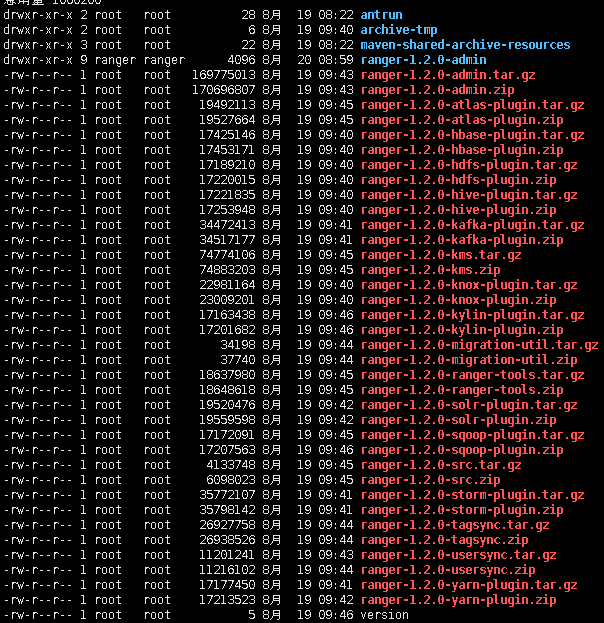
# 进入target目录cd opt/apache-ranger-1.2.0/target/# 解压ranger-1.2.0-admin.tar.gztar -zxvf ranger-1.2.0-admin.tar.gz# 进入ranger-1.2.0-admin目录cd ranger-1.2.0-admin# 修改 install.propertiesvim install.propertiesSQL_CONNECTOR_JAR=/usr/share/java/mysql-connector-java-8.0.17.jar 修改为准备工作中下载的jar包及路径db_root_user=rootdb_root_password=123456db_host=192.168.56.105db_name=rangerdb_user=rangeradmindb_password=rangeradmin# 可以注销如下内容#Source for Audit Store. Currently only solr is supported.# * audit_store is solr## audit_store=solr# * audit_solr_url URL to Solr. E.g. http://<solr_host>:6083/solr/ranger_audits## audit_solr_urls=## audit_solr_user=## audit_solr_password=## audit_solr_zookeepers=
// 注销如下内容## if [ "$?" != "0" ]## then## validateDefaultUsersPassword 'admin' "${rangerAdmin_password}"## validateDefaultUsersPassword 'rangertagsync' "${rangerTagsync_password}"## validateDefaultUsersPassword 'rangerusersync' "${rangerUsersync_password}"## validateDefaultUsersPassword 'keyadmin' "${keyadmin_password}"## fi
./ setup.sh
2019-08-20 08:54:22,460 [I] '/usr/local/java/bin/java' command foundsetup.sh:行325: bc: 未找到命令setup.sh: 第 325 行:[: -eq: 期待一元表达式
2019-08-20 09:00:18,240 [I] --------- Verifying Ranger DB connection ---------2019-08-20 09:00:18,240 [I] Checking connection..geradmin' -p '********' -noheader -trim -c \; -query "SELECT version();"Loading class `com.mysql.jdbc.Driver'. This is deprecated. The new driver class is `com.mysql.cj.jdbc.Driver'. The driver is automatically registered via the SPI and manual loading of the driver class is generally unnecessary.2019-08-20 09:00:18,838 [I] Checking connection passed.2019-08-20 09:00:19,091 [I] DB FLAVOR :MYSQL2019-08-20 09:00:19,092 [I] --------- Verifying Ranger DB connection ---------2019-08-20 09:00:19,092 [I] Checking connection..geradmin' -p '********' -noheader -trim -c \; -query "SELECT version();"Loading class `com.mysql.jdbc.Driver'. This is deprecated. The new driver class is `com.mysql.cj.jdbc.Driver'. The driver is automatically registered via the SPI and manual loading of the driver class is generally unnecessary.2019-08-20 09:00:19,660 [I] Checking connection passed.Installation of Ranger PolicyManager Web Application is completed.
# 进入ews目录cd ews# 启动服务./ranger-admin-services.sh start/** 正常情况下出现如下结果*/Starting Apache Ranger Admin ServiceApache Ranger Admin Service with pid 236275 has started.# 查看是否启动ps -ef|grep ranger或netstat -lntp|grep 6080
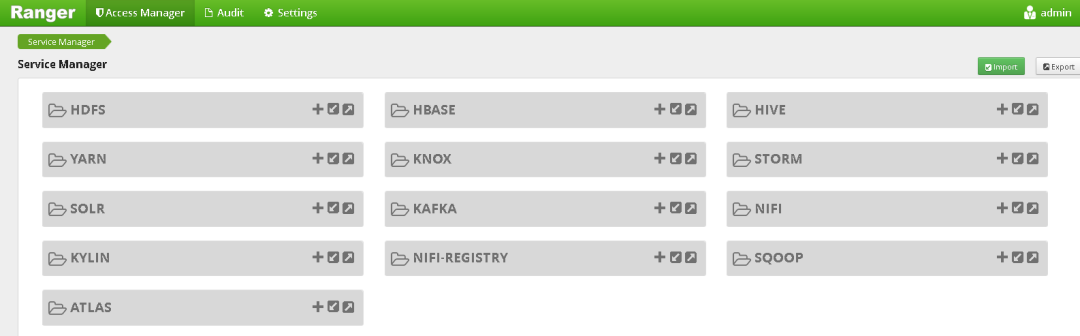
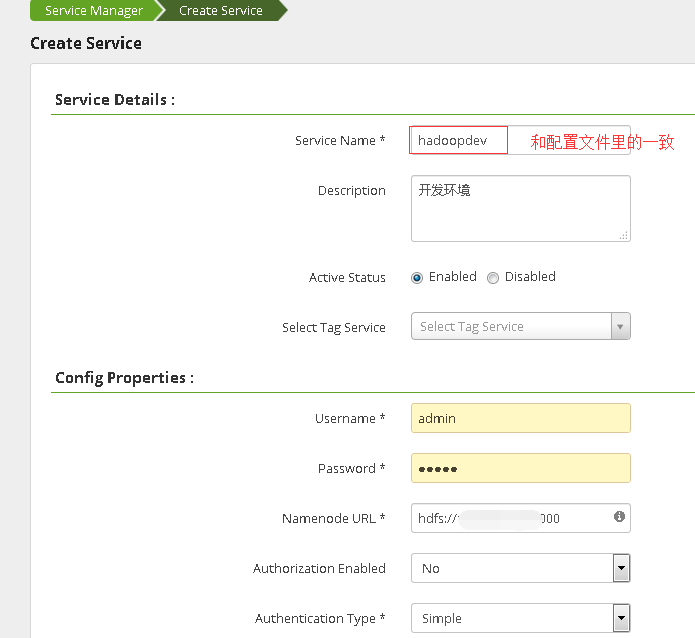
# 解压tar -zxvf ranger-1.2.0-hdfs-plugin.tar.gz# 进入目录cd opt/apache-ranger-1.2.0/target/ranger-1.2.0-hdfs-plugin# 修改install.propertiesvim install.properties/** 主要修改如下内容*/# Example:# POLICY_MGR_URL=http://policymanager.xasecure.net:6080#POLICY_MGR_URL=http://192.168.1.17:6080## This is the repository name created within policy manager## Example:# REPOSITORY_NAME=hadoopdev#REPOSITORY_NAME=hadoopdev## Set hadoop home when hadoop program and Ranger HDFS Plugin are not in the# same path.#COMPONENT_INSTALL_DIR_NAME=/opt/software/hadoop/hadoop-3.2.0
./enable-hdfs-plugin.sh/** 结果如下*/Custom user and group is available, using custom user and group.+ Tue Aug 20 18:04:14 CST 2019 : hadoop: lib folder=/opt/software/hadoop/hadoop-3.2.0/share/hadoop/hdfs/lib conf folder=/opt/software/hadoop/hadoop-3.2.0/etc/hadoop+ Tue Aug 20 18:04:14 CST 2019 : Saving current config file: /opt/software/hadoop/hadoop-3.2.0/etc/hadoop/hdfs-site.xml to /opt/software/hadoop/hadoop-3.2.0/etc/hadoop/.hdfs-site.xml.20190820-180414 ...+ Tue Aug 20 18:04:14 CST 2019 : Saving current config file: /opt/software/hadoop/hadoop-3.2.0/etc/hadoop/ranger-hdfs-audit.xml to /opt/software/hadoop/hadoop-3.2.0/etc/hadoop/.ranger-hdfs-audit.xml.20190820-180414 ...+ Tue Aug 20 18:04:15 CST 2019 : Saving current config file: /opt/software/hadoop/hadoop-3.2.0/etc/hadoop/ranger-hdfs-security.xml to /opt/software/hadoop/hadoop-3.2.0/etc/hadoop/.ranger-hdfs-security.xml.20190820-180414 ...+ Tue Aug 20 18:04:15 CST 2019 : Saving current config file: /opt/software/hadoop/hadoop-3.2.0/etc/hadoop/ranger-policymgr-ssl.xml to /opt/software/hadoop/hadoop-3.2.0/etc/hadoop/.ranger-policymgr-ssl.xml.20190820-180414 ...+ Tue Aug 20 18:04:16 CST 2019 : Saving current JCE file: /etc/ranger/hadoopdev/cred.jceks to /etc/ranger/hadoopdev/.cred.jceks.20190820180416 ...Ranger Plugin for hadoop has been enabled. Please restart hadoop to ensure that changes are effective.

精彩推荐:
1. MySQL不停地自动重启怎么办
2. 升级python,就是这么简单
3. MySQL里trx_mysql_thread_id为0 的事务导致大量锁等待超时该咋整
4. mysql8.0新增用户及加密规则修改的那些事
5.Postgresql部署及简单操作
6.比hive快10倍的大数据查询利器-- presto
最后修改时间:2020-05-26 11:32:46
文章转载自数据库干货铺,如果涉嫌侵权,请发送邮件至:contact@modb.pro进行举报,并提供相关证据,一经查实,墨天轮将立刻删除相关内容。
