



简洁好用的数据库表结构文档生成工具——螺丝钉 screw 1.0.0 正式发布啦!
在企业级开发中、我们经常会有编写数据库表结构文档的时间付出,繁琐麻烦且容易出错,不过有了 screw (螺丝钉)这个插件工具,你只需要在项目中进行集成,配置即可,轻松生成数据库表结构文档。screw (螺丝钉)是个开源工具,支持多种主流数据库,且设计良好,轻量级且方便扩展,支持自定义模板。
螺丝钉 screw 特点
- 简洁、轻量、设计良好
- 多数据库支持
- 多种格式文档
- 灵活扩展
- 支持自定义模板
数据库支持
- MySQL
- MariaDB
- TIDB
- Oracle
- SqlServer
- PostgreSQL
- Phoenix HBase
- H2
- DB2
- HSQL
- SQLLte
- 瀚高
- 达梦
- 虚谷
- 人大金仓
文档生成支持
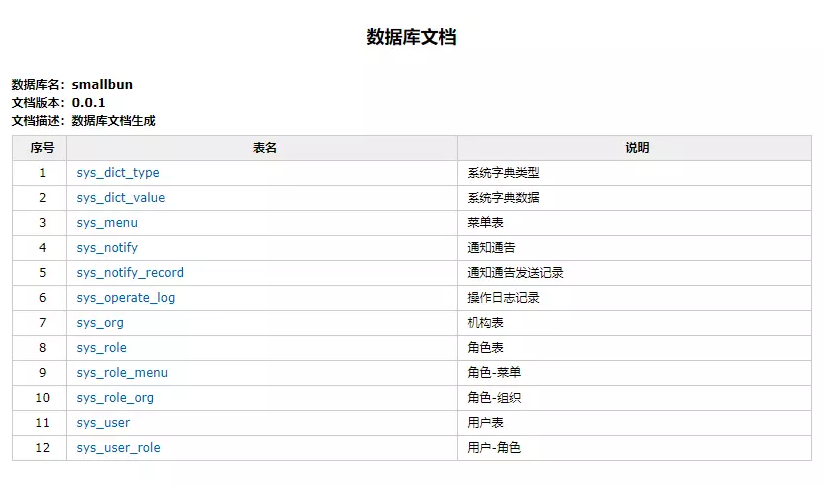
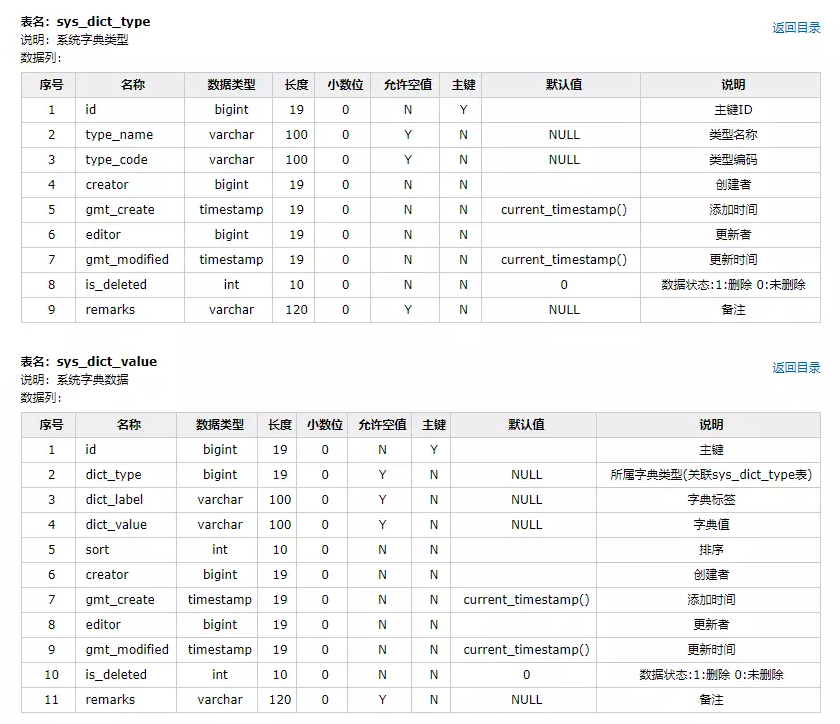
- html
- word
- excel
文档截图:
使用方式
普通方式
- 引入依赖
<dependency>
    <groupId>cn.smallbun.screw</groupId>
    <artifactId>screw-core</artifactId>
    <version>${lastVersion}</version>
</dependency>
- 编写代码
/**
 * 文档生成
 */
void documentGeneration() {
   //数据源
   HikariConfig hikariConfig = new HikariConfig();
   hikariConfig.setDriverClassName("com.mysql.cj.jdbc.Driver");
   hikariConfig.setJdbcUrl("jdbc:mysql://127.0.0.1:3306/database");
   hikariConfig.setUsername("root");
   hikariConfig.setPassword("password");
   //设置可以获取tables remarks信息
   hikariConfig.addDataSourceProperty("useInformationSchema", "true");
   hikariConfig.setMinimumIdle(2);
   hikariConfig.setMaximumPoolSize(5);
   DataSource dataSource = new HikariDataSource(hikariConfig);
   //生成配置
   EngineConfig engineConfig = EngineConfig.builder()
         //生成文件路径
         .fileOutputDir(fileOutputDir)
         //打开目录
         .openOutputDir(true)
         //文件类型
         .fileType(EngineFileType.HTML)
         //生成模板实现
         .produceType(EngineTemplateType.freemarker).build();

   //忽略表
   ArrayList<String> ignoreTableName = new ArrayList<>();
   ignoreTableName.add("test_user");
   ignoreTableName.add("test_group");
   //忽略表前缀
   ArrayList<String> ignorePrefix = new ArrayList<>();
   ignorePrefix.add("test_");
   //忽略表后缀
   ArrayList<String> ignoreSuffix = new ArrayList<>();
   ignoreSuffix.add("_test");
   ProcessConfig processConfig = ProcessConfig.builder()
         //忽略表名
         .ignoreTableName(ignoreTableName)
         //忽略表前缀
         .ignoreTablePrefix(ignorePrefix)
         //忽略表后缀
         .ignoreTableSuffix(ignoreSuffix).build();
   //配置
   Configuration config = Configuration.builder()
         //版本
         .version("1.0.0")
         //描述
         .description("数据库设计文档生成")
         //组织
         .organization("平凡故事")
         //组织URL
         .organizationUrl("https://www.pingfangushi.com")
         //数据源
         .dataSource(dataSource)
         //生成配置
         .engineConfig(engineConfig)
         //生成配置
         .produceConfig(processConfig).build();
   //执行生成
   new DocumentationExecute(config).execute();
}
Maven 插件
<build>
    <plugins>
        <plugin>
            <groupId>cn.smallbun.screw</groupId>
            <artifactId>screw-maven-plugin</artifactId>
            <version>${lastVersion}</version>
            <dependencies>
                <!-- HikariCP -->
                <dependency>
                    <groupId>com.zaxxer</groupId>
                    <artifactId>HikariCP</artifactId>
                    <version>3.4.5</version>
                </dependency>
                <!--mysql driver-->
                <dependency>
                    <groupId>mysql</groupId>
                    <artifactId>mysql-connector-java</artifactId>
                    <version>8.0.20</version>
                </dependency>
            </dependencies>
            <configuration>
                <!--username-->
                <username>root</username>
                <!--password-->
                <password>password</password>
                <!--driver-->
                <driverClassName>com.mysql.cj.jdbc.Driver</driverClassName>
                <!--jdbc url-->
                <jdbcUrl>jdbc:mysql://127.0.0.1:3306/xxxx</jdbcUrl>
                <!--生成文件类型-->
                <fileType>HTML</fileType>
                <!--打开文件输出目录-->
                <openOutputDir>false</openOutputDir>
                <!--生成模板-->
                <produceType>freemarker</produceType>
                <!--描述-->
                <description>数据库文档生成</description>
                <!--版本-->
                <version>${project.version}</version>
                <!--标题-->
                <title>数据库文档</title>
                <!--组织-->
                <organization>平凡故事</organization>
                <!--组织链接-->
                <organizationUrl>https://www.pingfangushi.com</organizationUrl>
            </configuration>
            <executions>
                <execution>
                    <phase>compile</phase>
                    <goals>
                        <goal>run</goal>
                    </goals>
                </execution>
            </executions>
        </plugin>
    </plugins>
</build>
螺丝钉 screw 的由来:
从业以来,待过几家企业,关于数据库表结构文档状态:要么没有、要么有、但都是手写、后期运维开发,需要手动进行维护到文档中,很是繁琐、如果忘记一次维护、就会给以后工作造成很多困扰、无形中制造了很多坑留给自己和后人,于是萌生了要自己写一个插件工具的想法。
从小就学过雷锋的螺丝钉精神,摘自雷锋日记:虽然是细小的螺丝钉,是个细微的小齿轮,然而如果缺了它,那整个的机器就无法运转了,慢说是缺了它,即使是一枚小螺丝钉没拧紧,一个小齿轮略有破损,也要使机器的运转发生故障的…,感觉自己写的这个工具,很有这意味,虽然很小、但是开发中缺了它还不行,于是便起名为 screw(螺丝钉)。
我从2020年的3月中旬开始进行编写,4月上旬完成初版,到了6月份由于工作原因、频繁设计和更改数据库、经常使用自己写的此插件、节省了很多时间,解决了很多问题 ,在仅有且不多的业余时间中、进行开源准备,于2020年6月22日,开源。
欢迎大家使用、建议、参与到screw建设中来,让我们共同完善它,让我们共同成长,帮助更多开发者,解决更多的问题。
螺丝钉screw工具下载:https://gitee.com/leshalv/screw
最后修改时间:2020-06-23 17:20:06
「喜欢这篇文章,您的关注和赞赏是给作者最好的鼓励」
关注作者
【版权声明】本文为墨天轮用户原创内容,转载时必须标注文章的来源(墨天轮),文章链接,文章作者等基本信息,否则作者和墨天轮有权追究责任。如果您发现墨天轮中有涉嫌抄袭或者侵权的内容,欢迎发送邮件至:contact@modb.pro进行举报,并提供相关证据,一经查实,墨天轮将立刻删除相关内容。
