




最近刷短视频经常看到python广告,有句广告词是:你要悄悄学Python,然后惊艳所有人。这几年确实Python大火,它在数据分析、人工智能、自动化运维、网络爬虫等领域都得到了大量的应用。今天我们一起来看看pymysql是怎么操作数据库的,后续也有利于我们开发一些自动化运维的工具和脚本,减轻DBA的工作。
首先下载安装包,python下载网址:
https://www.python.org/。
PyMysql下载地址: https://github.com/PyMySQL/PyMySQL
#编译安装:shell>tar-zxvf Python-3.6.5.tgzshell>cd Python-3.6.5shell>./configureshell>make&& make install
系统原来的python在/usr/bin/python,可以把这个删除,也可以新建一个python3的软链接,只不过执行的时候要python要改成python3,脚本头部声明改成/usr/bin/python3,这里为了方便,我们把之前的python重命名。
#在/usr/bin下设置软连接,我的Python3安装在/usr/local/bin下shell>mv python python.bakshell>ln -s usr/local/bin/python3 usr/bin/python
命令行按下退格键时出现乱码需要安装readline插件。
shell>tar-zxvf PyMySQL-0.9.3.tar.gzshell>cd PyMySQL-0.9.3shell>python setup.py install
打开python命令行输入:import pymysql,没有报错即正常 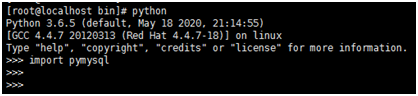
#!/usr/bin/python#-*-coding:utf-8 -*-import pymysqlif__name__=='__main__':#打开数据库连接,参数:1.主机或者ip 2.用户名 3.密码 4.数据库名db=pymysql.connect("localhost","pymysql","pymysql","test")#创建游标对象cursor=db.cursor()#执行SQL查询cursor.execute("select VERSION()")#获取单条结果data=cursor.fetchone()#打印输出print("Mysql version is:%s" %data)#关闭数据库连接db.close()输出:Mysql version is:5.7.26-log
#!/usr/bin/python#-*-coding:utf-8 -*-import pymysqlif__name__=="__main__":#打开数据库连接,参数:1.主机或者ip 2.用户名 3.密码 4.数据库名db=pymysql.connect("localhost","pymysql","pymysql","test")#创建游标对象cursor=db.cursor()#执行SQL查询cursor.execute("drop table if existstest")#使用预处理语句创建表sql="""create table test(id int primary key not null,name varchar(20) not null,age int not null)"""#创建表cursor.execute(sql)#关闭数据库连接db.close()
#!/usr/bin/python#-*-coding:utf-8 -*-import pymysqlif__name__ == "__main__":#打开数据库连接,参数:1.主机或者ip 2.用户名 3.密码 4.数据库名db=pymysql.connect("localhost","pymysql","pymysql","test")#创建游标对象cursor=db.cursor()#使用预处理语句创建表sql="insert into test(name,age)values('%s','%s')" % ('lj',30)try:#插入数据cursor.execute(sql)db.commit()except:db.rollback()#关闭数据库连接db.close()
#!/usr/bin/python#-*-coding:utf-8 -*-import pymysqlif__name__ == "__main__":#打开数据库连接,参数:1.主机或者ip 2.用户名 3.密码 4.数据库名db=pymysql.connect("localhost","pymysql","pymysql","test")#创建游标对象cursor=db.cursor()#数据列表data=[("jack",23),("tom",32),("jim",18),]try:#插入数据cursor.executemany("insert intotest(name,age) values(%s,%s)",data)db.commit()except:db.rollback()#关闭数据库连接db.close()
主要函数:
fetchone() 一次一条数据。
fetchmany() 一次多条数据,括号内填入要读取的数据条数。不填则为1条数据,如果读数超过实际条数,只显示实际条数。
fetchall() 一次读取全部数据,如果管道内没有数据,则返回空元组或空列表。
fetch获取的数据默认是元组,如果需要获取某个字段的值需要通过以下方法获取。
#!/usr/bin/python#-*-coding:utf-8 -*-import pymysqlif__name__ == "__main__":#打开数据库连接,参数:1.主机或者ip 2.用户名 3.密码 4.数据库名db=pymysql.connect("localhost","pymysql","pymysql","test")#创建游标对象cursor=db.cursor()#使用预处理语句创建表sql="select * from test where age>%s" % 20#查询cursor.execute(sql)#获取结果result=cursor.fetchall()#循环遍历for row in result:name=row[1]age=row[2]print("My name is:%s,age is%s!" % (name,age))#关闭数据库连接db.close()
往期推荐
扫描二维码
获取更多精彩
MySQL


文章转载自MySQL数据库技术栈,如果涉嫌侵权,请发送邮件至:contact@modb.pro进行举报,并提供相关证据,一经查实,墨天轮将立刻删除相关内容。
