



Oracle Grid Infrastructure的零影响打补丁可以在不中断数据库运行的情况下进行。
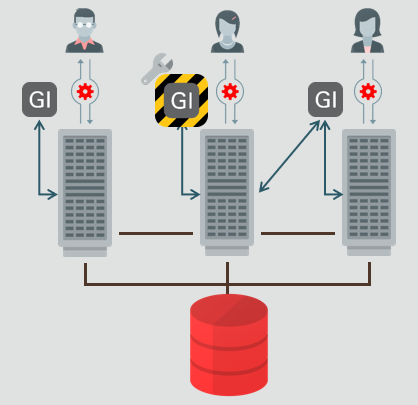
Zero-Downtime Oracle Grid Infrastructure Patching (ZDOGIP). (Doc ID 2635015.1)
APPLIES TO:
Oracle Database - Enterprise Edition - Version 19.6.0.0.0 and later
Information in this document applies to any platform.
GOAL
This document describes a procedure to install patches on Grid Infrastructure Home with Zero downtime.
本文档介绍了在零停机时间内在Grid Infrastructure Home上安装补丁的过程。
SOLUTION
Overview
This document provides procedures to assist with patching grid infrastructure with Zero Impact on Database .
This is a new feature introduced in the 19.6 RU. The minimum source version must be at least 19.6
这是19.6 RU中引入的新功能。最低源端版本必须至少为19.6。
NOTE: This procedure is only valid for systems that are NOT using Grid Infrastructure OS drivers (AFD, ACFS, ADVM). If GI Drivers are in use, the database instance running on the node being updated will need to be stopped and restarted. In this case, you must rely on rolling patch installation.
In general, the following steps are involved:
注意:此过程仅对不使用Grid Infrastructure OS drivers (AFD, ACFS, ADVM)的系统有效。 如果正在使用GI Drivers,则需要在更新的节点上停止并重新启动运行的数据库实例。 在这种情况下,您必须依靠滚动修补程序安装。
1) Installing and Patching the Grid infrastructure (software only)
2) Switching the Grid Infrastructure Home
Existing environment. 现有环境。
Grid Infrastructure 19.6 running on Linux x86-64 with no ACFS/AFD configured.
[oracle@node1 crsconfig]$ opatch lspatches
30655595;TOMCAT RELEASE UPDATE 19.0.0.0.0 (30655595)
30557433;Database Release Update : 19.6.0.0.200114 (30557433)
30489632;ACFS RELEASE UPDATE 19.6.0.0.0 (30489632)
30489227;OCW RELEASE UPDATE 19.6.0.0.0 (30489227)

[oracle@node2 ~]$ crsctl stat res -t
--------------------------------------------------------------------------------
Name           Target  State        Server                   State details
--------------------------------------------------------------------------------
Local Resources
--------------------------------------------------------------------------------
ora.LISTENER.lsnr
               ONLINE  ONLINE       node1            STABLE
               ONLINE  ONLINE       node2            STABLE
ora.chad
               ONLINE  ONLINE       node1            STABLE
               ONLINE  ONLINE       node2            STABLE
ora.helper
               ONLINE  ONLINE       node1            IDLE,STABLE
               ONLINE  ONLINE       node2            IDLE,STABLE
ora.net1.network
               ONLINE  ONLINE       node1            STABLE
               ONLINE  ONLINE       node2            STABLE
ora.ons
               ONLINE  ONLINE       node1            STABLE
               ONLINE  ONLINE       node2            STABLE
ora.proxy_advm
               OFFLINE OFFLINE      node1            STABLE
               OFFLINE OFFLINE      node2            STABLE
--------------------------------------------------------------------------------
Cluster Resources
--------------------------------------------------------------------------------
ora.ASMNET1LSNR_ASM.lsnr(ora.asmgroup)
      1        ONLINE  ONLINE       node1            STABLE
      2        ONLINE  ONLINE       node2            STABLE
      3        ONLINE  OFFLINE                               STABLE
ora.LISTENER_SCAN1.lsnr
      1        ONLINE  ONLINE       node2            STABLE
ora.MGMTLSNR
      1        ONLINE  ONLINE       node2            169.254.15.144 10.64
                                                             .222.238,STABLE
ora.OCRVFDG.dg(ora.asmgroup)
      1        ONLINE  ONLINE       node1            STABLE
      2        ONLINE  ONLINE       node2            STABLE
      3        OFFLINE OFFLINE                               STABLE
ora.asm(ora.asmgroup)
      1        ONLINE  ONLINE       node1            Started,STABLE
      2        ONLINE  ONLINE       node2            Started,STABLE
      3        OFFLINE OFFLINE                               STABLE
ora.asmnet1.asmnetwork(ora.asmgroup)
      1        ONLINE  ONLINE       node1            STABLE
      2        ONLINE  ONLINE       node2            STABLE
      3        OFFLINE OFFLINE                               STABLE
ora.node1.vip
      1        ONLINE  ONLINE       node1            STABLE
ora.node2.vip
      1        ONLINE  ONLINE       node2            STABLE
ora.cvu
      1        ONLINE  ONLINE       node2            STABLE
ora.mgmtdb
      1        ONLINE  ONLINE       node2            Open,STABLE
ora.orcl.db
      1        ONLINE  ONLINE       node1            Open,HOME=/u01/app/o
                                                             racle/product/19c/db
                                                             home_1,STABLE
      2        ONLINE  ONLINE       node2            Open,HOME=/u01/app/o
                                                             racle/product/19c/db
                                                             home_1,STABLE
ora.qosmserver
      1        ONLINE  ONLINE       node2            STABLE
ora.rhpserver
      1        ONLINE  ONLINE       node2            STABLE
ora.scan1.vip
      1        ONLINE  ONLINE       node2            STABLE
----------------------------------------------------------------------

[oracle@node1 crsconfig]$ ps -ef | grep d.bin
root      1257     1  0 11:12 ?        00:04:30 /u01/app/19c/grid/bin/ohasd.bin reboot
root      1607     1  0 11:12 ?        00:02:18 /u01/app/19c/grid/bin/orarootagent.bin
oracle    1752     1  0 11:12 ?        00:02:26 /u01/app/19c/grid/bin/oraagent.bin
oracle    1801     1  0 11:12 ?        00:01:17 /u01/app/19c/grid/bin/mdnsd.bin
oracle    1803     1  0 11:12 ?        00:03:07 /u01/app/19c/grid/bin/evmd.bin
oracle    1897     1  0 11:12 ?        00:01:22 /u01/app/19c/grid/bin/gpnpd.bin
1) Installing and Patching the Grid infrastructure (software only)
Download 19.3. from the OTN Link
https://www.oracle.com/database/technologies/oracle19c-linux-downloads.html
LINUX.X64_193000_grid_home.zip
Download the 19.7 RU
30899722 GI RELEASE UPDATE 19.7.0.0.0
Unzip the software to destination Gridhome on node1
unzip -d LINUX.X64_193000_grid_home.zip /u01/app/19.7.0.0/grid
Ensure the directory “/u01/app/19.7.0.0/grid” is writable on other nodes for gridInfrastructure owner
Apply the patch and configure the software .
/u01/app/19.7.0.0/grid/gridSetup.sh -ApplyRU 3089972

Chose the option "Install Software only" and select all the nodes.
2) Switching the Grid Infrastructure Home
1.Run the gridSetup.sh from the target home
/u01/app/19.7.0.0/grid/gridSetup.sh -SwitchGridhome
It will launch the GUI
During this phase,you should not select the automated root.sh option.We have to run manually with additional option listed below.
在此阶段,不要选择自动执行root.sh的选项。我们必须手动运行下面列出的其他选项。
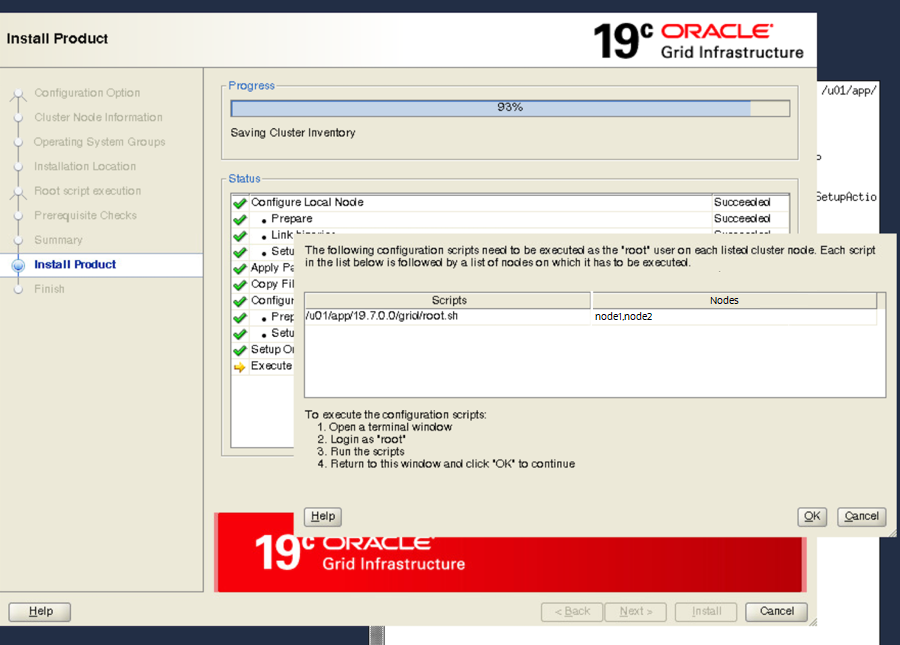
2. When prompted, run “root.sh -transparent -nodriverupdate” instead of root.sh.
出现提示时,运行"root.sh -transparent -nodriverupdate",而不是root.sh。
When a patch contains driver updates, as any RU would for example, indeed –nodriverupdate must be used. With this option the drivers are not updated until later. To have that happen, one needs to run the rootcrs.sh script with the “-updateosfiles” option, which will shut down everything (databases included) to patch the drivers. Note that it’s only needed if the drivers (ACFS/AFD/OKA/OLFS) are used. This feature is recommended for the configurations that do not have (ACFS/AFD/OKA/OLFS).
If you don’t use the “-nodriverupdate” flag, root script would fail with below error
如果您不使用"-nodriverupdate"标志,则root script将失败,并显示以下错误
root@node1 ~]# /u01/app/19.7.0.0/grid/root.sh -transparent
Performing root user operation.

The following environment variables are set as:
    ORACLE_OWNER= oracle
    ORACLE_HOME=  /u01/app/19.7.0.0/grid

Enter the full pathname of the local bin directory: [/usr/local/bin]:
The contents of "dbhome" have not changed. No need to overwrite.
The contents of "oraenv" have not changed. No need to overwrite.
The contents of "coraenv" have not changed. No need to overwrite.

Entries will be added to the /etc/oratab file as needed by
Database Configuration Assistant when a database is created
Finished running generic part of root script.
Now product-specific root actions will be performed.
Relinking oracle with rac_on option
LD_LIBRARY_PATH='/u01/app/19c/grid/lib:/u01/app/19.7.0.0/grid/lib:'
Using configuration parameter file: /u01/app/19.7.0.0/grid/crs/install/crsconfig_params
The log of current session can be found at:
  /u01/app/oracle/crsdata/node1/crsconfig/rootcrs_node1_2020-02-02_07-23-34PM.log
Using configuration parameter file: /u01/app/19.7.0.0/grid/crs/install/crsconfig_params
The log of current session can be found at:
  /u01/app/oracle/crsdata/node1/crsconfig/rootcrs_node1_2020-02-02_07-23-34PM.log
Using configuration parameter file: /u01/app/19.7.0.0/grid/crs/install/crsconfig_params
The log of current session can be found at:
  /u01/app/oracle/crsdata/node1/crsconfig/crs_prepatch_node1_2020-02-02_07-23-35PM.log
Using configuration parameter file: /u01/app/19.7.0.0/grid/crs/install/crsconfig_params
The log of current session can be found at:
  /u01/app/oracle/crsdata/node1/crsconfig/crs_prepatch_node1_2020-02-02_07-23-37PM.log
2020/04/20 19:23:59 CLSRSC-347: Successfully unlock /u01/app/19.7.0.0/grid
2020/04/20 19:24:00 CLSRSC-671: Pre-patch steps for patching GI home successfully completed.
Using configuration parameter file: /u01/app/19.7.0.0/grid/crs/install/crsconfig_params
The log of current session can be found at:
  /u01/app/oracle/crsdata/node1/crsconfig/crs_postpatch_node1_2020-02-02_07-24-01PM.log
2020/04/20 19:24:28 CLSRSC-908: The -nodriverupdate option is required for out-of-place Zero-Downtime Oracle Grid Infrastructure Patching.
Died at /u01/app/19.7.0.0/grid/crs/install/crspatch.pm line 548.
The command '/u01/app/19.7.0.0/grid/perl/bin/perl -I/u01/app/19.7.0.0/grid/perl/lib -I/u01/app/19.7.0.0/grid/crs/install /u01/app/19.7.0.0/grid/crs/install/rootcrs.pl  -transparent -dstcrshome /u01/app/19.7.0.0/grid -postpatch' execution failed
This error is due to the ACFS RU in the target home. The ZIP option will not update the ACFS/AFD/OKSA/OLFS drivers
Using Oracle Zero Downtime Patching with ACFS:
When using Oracle Zero-Downtime Patching, the opatch inventory will display the new patch number, however, only the Oracle Grid Infrastructure user space binaries are actually patched; Oracle Grid Infrastructure OS kernel modules such as ACFS are not updated but will continue to run the pre-patch version.
The updated ACFS drivers will be automatically uploaded if the nodes in the cluster are rebooted (e.g. to install an OS update).
Otherwise to upload the updated ACFS drivers the user must stop the crs stack, run root.sh -updateosfiles, and restart the crs stack - on each node of the cluster; to subsequently verify the installed and running driver versions run ‘crsctl query driver softwareversion’ and ‘crsctl query driver activeversion’’ on each node of the cluster.
Rerun the root.sh with -nodriverupdate.
[root@node1 ~]# /u01/app/19.7.0.0/grid/root.sh -transparent -nodriverupdate
Performing root user operation.

The following environment variables are set as:
    ORACLE_OWNER= oracle
    ORACLE_HOME=  /u01/app/19.7.0.0/grid

Enter the full pathname of the local bin directory: [/usr/local/bin]:
The contents of "dbhome" have not changed. No need to overwrite.
The contents of "oraenv" have not changed. No need to overwrite.
The contents of "coraenv" have not changed. No need to overwrite.

Entries will be added to the /etc/oratab file as needed by
Database Configuration Assistant when a database is created
Finished running generic part of root script.
Now product-specific root actions will be performed.
Relinking oracle with rac_on option
LD_LIBRARY_PATH='/u01/app/19c/grid/lib:/u01/app/19.7.0.0/grid/lib:'
Using configuration parameter file: /u01/app/19.7.0.0/grid/crs/install/crsconfig_params
The log of current session can be found at:
  /u01/app/oracle/crsdata/node1/crsconfig/rootcrs_node1_2020-02-02_07-30-48PM.log
Using configuration parameter file: /u01/app/19.7.0.0/grid/crs/install/crsconfig_params
The log of current session can be found at:
  /u01/app/oracle/crsdata/node1/crsconfig/rootcrs_node1_2020-02-02_07-30-48PM.log
Using configuration parameter file: /u01/app/19.7.0.0/grid/crs/install/crsconfig_params
The log of current session can be found at:
  /u01/app/oracle/crsdata/node1/crsconfig/crs_prepatch_node1_2020-02-02_07-30-49PM.log
2020/04/20 19:30:50 CLSRSC-671: Pre-patch steps for patching GI home successfully completed.
Using configuration parameter file: /u01/app/19.7.0.0/grid/crs/install/crsconfig_params
The log of current session can be found at:
  /u01/app/oracle/crsdata/node1/crsconfig/crs_postpatch_node1_2020-02-02_07-30-51PM.log
Oracle Clusterware active version on the cluster is [19.0.0.0.0]. The cluster upgrade state is [NORMAL]. The cluster active patch level is [3253194715].
2020/04/20 19:31:10 CLSRSC-329: Replacing Clusterware entries in file 'oracle-ohasd_dummy.service'
2020/04/20 19:31:10 CLSRSC-329: Replacing Clusterware entries in file 'oracle-ohasd.service'
Oracle Clusterware active version on the cluster is [19.0.0.0.0]. The cluster upgrade state is [ROLLING PATCH]. The cluster active patch level is [3253194715].
2020/04/20 19:39:11 CLSRSC-4015: Performing install or upgrade action for Oracle Trace File Analyzer (TFA) Collector.
2020/04/20 19:39:12 CLSRSC-672: Post-patch steps for patching GI home successfully completed.
While running “root.sh -transparent -nodriverupdate”, verified the ORCL database stayed up.
运行"root.sh -transparent -nodriverupdate"时,验证ORCL数据库是否处于启动状态。
[oracle@node1 crsconfig]$ ps -ef | grep d.bin
root      1257     1  0 11:12 ?        00:04:30 /u01/app/19c/grid/bin/ohasd.bin reboot
root      1607     1  0 11:12 ?        00:02:18 /u01/app/19c/grid/bin/orarootagent.bin
oracle    1752     1  0 11:12 ?        00:02:26 /u01/app/19c/grid/bin/oraagent.bin
oracle    1801     1  0 11:12 ?        00:01:17 /u01/app/19c/grid/bin/mdnsd.bin
oracle    1803     1  0 11:12 ?        00:03:07 /u01/app/19c/grid/bin/evmd.bin
oracle    1897     1  0 11:12 ?        00:01:22 /u01/app/19c/grid/bin/gpnpd.bin
oracle    1952  1803  0 11:12 ?        00:01:14 /u01/app/19c/grid/bin/evmlogger.bin -o /u01/app/19c/grid/log/[HOSTNAME]/evmd/evmlogger.info -l /u01/app/19c/grid/log/[HOSTNAME]/evmd/evmlogger.log
oracle    1975     1  0 11:12 ?        00:03:12 /u01/app/19c/grid/bin/gipcd.bin
root      2233     1  0 11:12 ?        00:01:31 /u01/app/19c/grid/bin/cssdmonitor
root      2520     1  0 11:12 ?        00:01:32 /u01/app/19c/grid/bin/cssdagent
oracle    2539     1  1 11:12 ?        00:05:08 /u01/app/19c/grid/bin/ocssd.bin
root      2999     1  0 11:13 ?        00:03:16 /u01/app/19c/grid/bin/octssd.bi reboot
root      3106     1  0 11:13 ?        00:03:50 /u01/app/19c/grid/bin/crsd.bin reboot
root      3192     1  1 11:13 ?        00:04:59 /u01/app/19c/grid/bin/orarootagent.bin
oracle    3266     1  1 11:13 ?        00:05:48 /u01/app/19c/grid/bin/oraagent.bin
root     30618 29407  0 19:31 pts/1    00:00:00 /u01/app/19c/grid/bin/crsctl.bin stop crs -tgip -f
oracle   30700  4877  0 19:31 pts/4    00:00:00 grep --color=auto d.bin
[oracle@node1 crsconfig]$ ps -ef | grep pmon
oracle    4688     1  0 11:14 ?        00:00:02 asm_pmon_+ASM1
oracle    4926     1  0 11:14 ?        00:00:02 ora_pmon_ORCL1
oracle   30728  4877  0 19:31 pts/4    00:00:00 grep --color=auto pmon
[oracle@node1 crsconfig]$ ps -ef | grep pmon
oracle    4688     1  0 11:14 ?        00:00:02 asm_pmon_+ASM1
oracle    4926     1  0 11:14 ?        00:00:02 ora_pmon_ORCL1
oracle   30735  4877  0 19:31 pts/4    00:00:00 grep --color=auto pmon
[oracle@node1 crsconfig]$ ps -ef | grep pmon
oracle    4688     1  0 11:14 ?        00:00:02 asm_pmon_+ASM1
oracle    4926     1  0 11:14 ?        00:00:02 ora_pmon_ORCL1
oracle   30740  4877  0 19:31 pts/4    00:00:00 grep --color=auto pmon
[oracle@node1 crsconfig]$ ps -ef | grep pmon
oracle    4926     1  0 11:14 ?        00:00:02 ora_pmon_ORCL1==================>ASM1 instance is down.
oracle   30820  4877  0 19:31 pts/4    00:00:00 grep --color=auto pmon
[oracle@node1 crsconfig]$ ps -ef | grep pmon
oracle    4926     1  0 11:14 ?        00:00:02 ora_pmon_ORCL1==================>Database is up and running.
oracle   30838  4877  0 19:31 pts/4    00:00:00 grep --color=auto pmon

Grid started from new home

oracle@node1 crsconfig]$ ps -ef | grep d.bin
root     30811     1  0 19:31 ?        00:00:00 /u01/app/oracle/crsdata/node1/csswd/oracsswd.bin
root     31170 29407  1 19:32 pts/1    00:00:00 /u01/app/19.7.0.0/grid/bin/crsctl.bin start crs -wait -tgip
root     31188     1 23 19:32 ?        00:00:03 /u01/app/19.7.0.0/grid/bin/ohasd.bin reboot CRS_AUX_DATA=CRS_AUXD_TGIP=yes;_ORA_BLOCKING_STACK_LOCALE=AMERICAN_AMERICA.AL32UTF8
oracle   31273     1  4 19:32 ?        00:00:00 /u01/app/19.7.0.0/grid/bin/oraagent.bin
root     31283     1  4 19:32 ?        00:00:00 /u01/app/19.7.0.0/grid/bin/orarootagent.bin
oracle   31320     1  2 19:32 ?        00:00:00 /u01/app/19.7.0.0/grid/bin/mdnsd.bin
oracle   31323     1  4 19:32 ?        00:00:00 /u01/app/19.7.0.0/grid/bin/evmd.bin
oracle   31324     1  4 19:32 ?        00:00:00 /u01/app/19.7.0.0/grid/bin/gpnpd.bin
oracle   31431     1  9 19:32 ?        00:00:00 /u01/app/19.7.0.0/grid/bin/gipcd.bin
oracle   31505 31323  2 19:32 ?        00:00:00 /u01/app/19.7.0.0/grid/bin/evmlogger.bin -o /u01/app/19.7.0.0/grid/log/[HOSTNAME]/evmd/evmlogger.info -l /u01/app/19.7.0.0/grid/log/[HOSTNAME]/evmd/evmlogger.log
root     31534     1  6 19:32 ?        00:00:00 /u01/app/19.7.0.0/grid/bin/cssdagent
oracle   31552     1 16 19:32 ?        00:00:00 /u01/app/19.7.0.0/grid/bin/ocssd.bin -P
oracle   31618  4877  0 19:32 pts/4    00:00:00 grep --color=auto d.bin
[oracle@node1 crsconfig]$ ps -ef | grep pmon
oracle    4926     1  0 11:14 ?        00:00:02 ora_pmon_ORCL1
oracle   31634  4877  0 19:32 pts/4    00:00:00 grep --color=auto pmon
[oracle@node1 crsconfig]$ ps -ef | grep pmon
oracle    4926     1  0 11:14 ?        00:00:02 ora_pmon_ORCL1
oracle   31961  4877  0 19:32 pts/4    00:00:00 grep --color=auto pmon
[oracle@node1 crsconfig]$ ps -ef | grep pmon

[oracle@node1 crsconfig]$ ps -ef | grep pmon
oracle    4926     1  0 11:14 ?        00:00:02 ora_pmon_ORCL1
oracle   32119     1  0 19:32 ?        00:00:00 asm_pmon_+ASM1
oracle   32227  4877  0 19:32 pts/4    00:00:00 grep --color=auto pmo
oracle    4926     1  0 11:14 ?        00:00:02 ora_pmon_ORCL1
oracle   32034  4877  0 19:32 pts/4    00:00:00 grep --color=auto pmon
[oracle@node1 crsconfig]$ ps -ef | grep pmon
oracle    4926     1  0 11:14 ?        00:00:02 ora_pmon_ORCL1
oracle   32081  4877  0 19:32 pts/4    00:00:00 grep --color=auto pmon
[oracle@node1 crsconfig]$ ps -ef | grep pmon
oracle    4926     1  0 11:14 ?        00:00:02 ora_pmon_ORCL1
oracle   32119     1  0 19:32 ?        00:00:00 asm_pmon_+ASM1
oracle   32195  4877  0 19:32 pts/4    00:00:00 grep --color=auto pmon
[oracle@node2 ~]$ crsctl stat res -t
--------------------------------------------------------------------------------
Name           Target  State        Server                   State details
--------------------------------------------------------------------------------
Local Resources
--------------------------------------------------------------------------------
ora.LISTENER.lsnr
               ONLINE  ONLINE       node1            STABLE
               ONLINE  ONLINE       node2            STABLE


ora.proxy_advm
               OFFLINE OFFLINE      node1            STABLE
               OFFLINE OFFLINE      node2            STABLE
Run the root.sh -transparent -nodriverupdate on other nodes
在其他节点上运行 root.sh -transparent -nodriverupdate
On node2.
[root@node2 ~]# /u01/app/19.7.0.0/grid/root.sh -transparent -nodriverupdate
Performing root user operation.

The following environment variables are set as:
    ORACLE_OWNER= oracle
    ORACLE_HOME=  /u01/app/19.7.0.0/grid

Enter the full pathname of the local bin directory: [/usr/local/bin]:
The contents of "dbhome" have not changed. No need to overwrite.
The contents of "oraenv" have not changed. No need to overwrite.
The contents of "coraenv" have not changed. No need to overwrite.

Entries will be added to the /etc/oratab file as needed by
Database Configuration Assistant when a database is created
Finished running generic part of root script.
Now product-specific root actions will be performed.
Relinking oracle with rac_on option
LD_LIBRARY_PATH='/u01/app/19c/grid/lib:/u01/app/19.7.0.0/grid/lib:'
Using configuration parameter file: /u01/app/19.7.0.0/grid/crs/install/crsconfig_params
The log of current session can be found at:
  /u01/app/oracle/crsdata/node2/crsconfig/rootcrs_node2_2020-02-02_07-42-45PM.log
Using configuration parameter file: /u01/app/19.7.0.0/grid/crs/install/crsconfig_params
The log of current session can be found at:
  /u01/app/oracle/crsdata/node2/crsconfig/rootcrs_node2_2020-02-02_07-42-45PM.log
Using configuration parameter file: /u01/app/19.7.0.0/grid/crs/install/crsconfig_params
The log of current session can be found at:
  /u01/app/oracle/crsdata/node2/crsconfig/crs_prepatch_node2_2020-02-02_07-42-46PM.log
Using configuration parameter file: /u01/app/19.7.0.0/grid/crs/install/crsconfig_params
The log of current session can be found at:
  /u01/app/oracle/crsdata/node2/crsconfig/crs_prepatch_node2_2020-02-02_07-42-48PM.log
2020/04/20 19:43:08 CLSRSC-347: Successfully unlock /u01/app/19.7.0.0/grid
2020/04/20 19:43:10 CLSRSC-671: Pre-patch steps for patching GI home successfully completed.
Using configuration parameter file: /u01/app/19.7.0.0/grid/crs/install/crsconfig_params
The log of current session can be found at:
  /u01/app/oracle/crsdata/node2/crsconfig/crs_postpatch_node2_2020-02-02_07-43-11PM.log
Oracle Clusterware active version on the cluster is [19.0.0.0.0]. The cluster upgrade state is [ROLLING PATCH]. The cluster active patch level is [3253194715].
2020/04/20 19:43:40 CLSRSC-329: Replacing Clusterware entries in file 'oracle-ohasd_dummy.service'
2020/04/20 19:47:08 CLSRSC-329: Replacing Clusterware entries in file 'oracle-ohasd.service'
Oracle Clusterware active version on the cluster is [19.0.0.0.0]. The cluster upgrade state is [NORMAL]. The cluster active patch level is [3633918477]


Validating logfiles...done
Patch 30557433 apply (pdb CDB$ROOT): SUCCESS
  logfile: /u01/app/oracle/cfgtoollogs/sqlpatch/30557433/23305305/30557433_apply__MGMTDB_CDBROOT_2020Feb02_19_53_44.log (no errors)
Patch 30557433 apply (pdb PDB$SEED): SUCCESS
  logfile: /u01/app/oracle/cfgtoollogs/sqlpatch/30557433/23305305/30557433_apply__MGMTDB_PDBSEED_2020Feb02_19_56_03.log (no errors)
Patch 30557433 apply (pdb GIMR_DSCREP_10): SUCCESS
  logfile: /u01/app/oracle/cfgtoollogs/sqlpatch/30557433/23305305/30557433_apply__MGMTDB_GIMR_DSCREP_10_2020Feb02_19_56_02.log (no errors)
SQL Patching tool complete on Sun Feb  2 19:58:43 2020
2020/04/20 20:00:57 CLSRSC-4015: Performing install or upgrade action for Oracle Trace File Analyzer (TFA) Collector.
2020/04/20 20:01:02 CLSRSC-672: Post-patch steps for patching GI home successfully completed.
While running “root.sh -transparent -nodriverupdate” on the second node, verified the ORCL database stayed up.
在第二个节点上运行"root.sh -transparent -nodriverupdate"时,验证ORCL数据库是否处于启动状态。
oracle    4621     1  0 11:07 ?        00:00:02 asm_pmon_+ASM2
oracle    6238     1  0 11:08 ?        00:00:02 ora_pmon_ORCL2
oracle   19278 10010  0 19:46 pts/2    00:00:00 grep --color=auto pmon

[oracle@node2 ~]$ ps -ef | grep pmon
oracle    6238     1  0 11:08 ?        00:00:02 ora_pmon_ORCL2===========>ASM2 down
oracle   20437 10010  0 19:46 pts/2    00:00:00 grep --color=auto pmon


[oracle@node2 ~]$ ps -ef | grep d.bin
root      1252     1  1 11:02 ?        00:06:55 /u01/app/19c/grid/bin/ohasd.bin reboot
root      1603     1  0 11:02 ?        00:02:32 /u01/app/19c/grid/bin/orarootagent.bin
oracle    1749     1  0 11:03 ?        00:03:21 /u01/app/19c/grid/bin/oraagent.bin
root     13335 12134  0 19:43 pts/1    00:00:00 /u01/app/19c/grid/bin/crsctl.bin stop crs -tgip -f
root     20528     1  0 19:47 ?        00:00:00 /u01/app/oracle/crsdata/node2/csswd/oracsswd.bin
oracle   20715 10010  0 19:47 pts/2    00:00:00 grep --color=auto d.bin

[oracle@node2 ~]$ ps -ef | grep pmon
oracle    6238     1  0 11:08 ?        00:00:02 ora_pmon_ORCL2
oracle   20767 10010  0 19:47 pts/2    00:00:00 grep --color=auto pmon
[oracle@node2 ~]$ ps -ef | grep d.bin=================================================================>CRS Down.

oracle   21010 10010  0 19:47 pts/2    00:00:00 grep --color=auto d.bin

[oracle@node2 ~]$ ps -ef | grep d.bin
root     20528     1  0 19:47 ?        00:00:00 /u01/app/oracle/crsdata/node2/csswd/oracsswd.bin
root     21192 12134 10 19:47 pts/1    00:00:00 /u01/app/19.7.0.0/grid/bin/crsctl.bin start crs -wait -tgip
root     21206     1  4 19:47 ?        00:00:00 /u01/app/19.7.0.0/grid/bin/ohasd.bin reboot CRS_AUX_DATA=CRS_AUXD_TGIP=yes;_ORA_BLOCKING_STACK_LOCALE=AMERICAN_AMERICA.AL32UTF8
oracle   21318 10010  0 19:47 pts/2    00:00:00 grep --color=auto d.bin

[oracle@node2 ~]$ ps -ef | grep d.bin
root     20528     1  0 19:47 ?        00:00:00 /u01/app/oracle/crsdata/node2/csswd/oracsswd.bin
root     21192 12134  3 19:47 pts/1    00:00:00 /u01/app/19.7.0.0/grid/bin/crsctl.bin start crs -wait -tgip
root     21206     1 16 19:47 ?        00:00:00 /u01/app/19.7.0.0/grid/bin/ohasd.bin reboot CRS_AUX_DATA=CRS_AUXD_TGIP=yes;_ORA_BLOCKING_STACK_LOCALE=AMERICAN_AMERICA.AL32UTF8
oracle   21447 10010  0 19:47 pts/2    00:00:00 grep --color=auto d.bin

[oracle@node2 ~]$ ps -ef | grep pmon
oracle    6238     1  0 11:08 ?        00:00:02 ora_pmon_ORCL2
oracle   22971     1  0 19:48 ?        00:00:00 asm_pmon_+ASM2
oracle   24169 10010  0 19:48 pts/2    00:00:00 grep --color=auto pmon
[oracle@node2 ~]$
CRS status after patching.
[oracle@node1 crsconfig]$ opatch lspatches
30898856;TOMCAT RELEASE UPDATE 19.0.0.0.0 (30898856)
30894985;OCW RELEASE UPDATE 19.7.0.0.0 (30894985)
30869304;ACFS RELEASE UPDATE 19.7.0.0.0 (30869304)
30869156;Database Release Update : 19.7.0.0.200414 (30869156)

OPatch succeeded.


[oracle@node1 crsconfig]$ crsctl query crs activeversion -f
Oracle Clusterware active version on the cluster is [19.0.0.0.0]. The cluster upgrade state is [NORMAL]. The cluster active patch level is [3633918477].
[oracle@node1 crsconfig]$ ps -ef | grep d.bin
oracle    1958  4877  0 20:15 pts/4    00:00:00 grep --color=auto d.bin
oracle   11147     1  0 19:44 ?        00:00:00 /u01/app/19.7.0.0/grid/bin/tnslsnr LISTENER_SCAN1 -no_crs_notify -inherit
root     31188     1  2 19:32 ?        00:00:59 /u01/app/19.7.0.0/grid/bin/ohasd.bin reboot CRS_AUX_DATA=CRS_AUXD_TGIP=yes;_ORA_BLOCKING_STACK_LOCALE=AMERICAN_AMERICA.AL32UTF8
oracle   31273     1  0 19:32 ?        00:00:14 /u01/app/19.7.0.0/grid/bin/oraagent.bin
