



pbm部署:
本次pbm部署基于之前的副本集:
192.168.56.108 primary192.168.56.109 secondary192.168.56.110 arbiterpbm版本:1.2.0(当前最新)install type:rpm
1.安装pbm:(除arbiter外所有节点执行)
rpm -ivh percona-backup-mongodb-1.2.0-1.el7.x86_64.rpm
安装成功后/usr/bin下会多出三个可执行文件pbm,pbm-agent,pbm-speed-test:

2.创建pbm用户:(在主节点执行)
db.getSiblingDB("admin").createRole({ "role": "pbmAnyAction","privileges": [{ "resource": { "anyResource": true },"actions": [ "anyAction" ]}],"roles": []});db.getSiblingDB("admin").createUser({user: "pbmuser","pwd": "secretpwd","roles" : [{ "db" : "admin", "role" : "readWrite", "collection": "" },{ "db" : "admin", "role" : "backup" },{ "db" : "admin", "role" : "clusterMonitor" },{ "db" : "admin", "role" : "restore" },{ "db" : "admin", "role" : "pbmAnyAction" }]});
3.创建yaml配置文件,指定存储类型(在集群其中一台节点配置即可)
pbm备份的存储类型支持s3存储,远程文件系统服务器,仅单实例或单节点副本集支持本地存储
这里搭建了nfs服务器并挂载了远程目录/var/lib/mongobak
pbm_config.yamlstorage:type: filesystemfilesystem:path: var/lib/mongobak
4.进行初始化配置(在创建yaml配置文件的那个节点执行,需要指定完整的集群连接串)
pbm config --file opt/pbm_config.yaml --mongodb-uri="mongodb://pbmuser:secretpwd@192.168.56.108:27017,192.168.56.109:27017,192.168.56.110:27017/?replicaSet=rs"
5.在每个实例启动pbm-agent代理进程
pbm-agent --mongodb-uri "mongodb://pbmuser:secretpwd@192.168.56.108:27017/" > opt/pbm_agent.log 2>&1 &
到此pbm部署结束。。。
PBM常规操作
#通过pbm list拉取备份列表
pbm list --mongodb-uri "mongodb://pbmuser:secretpwd@192.168.56.108:27017,192.168.56.109:27017/?replicaSet=rs"
Backup history:2020-06-23T09:03:40Z2020-06-23T09:24:53Z
PS:首次执行没有备份信息
#pbm backup备份
单实例的备份不做介绍
副本集的备份指定集群连接串,可以在从节点进行备份(备份任务会根据集群内的节点繁忙程度选择最适合转储的节点)
pbm只支持全量备份恢复,在备份过程中会记录备份时段内的oplog
pbm backup --mongodb-uri "mongodb://pbmuser:secretpwd@192.168.56.108:27017,192.168.56.109:27017/?replicaSet=rs"
#可以通过--compression=指定压缩类型(默认为s2,支持gzip, snappy, lz4, pgzip):
pbm backup --compression=gzip --mongodb-uri "mongodb://pbmuser:secretpwd@192.168.56.108:27017,192.168.56.109:27017/?replicaSet=rs"
#pbm备份底层调用mongodump
pbm agent is listening for the commands2020/06/23 10:45:32 Got command backup [{backup {2020-06-23T02:45:31Z s2} { } 1592880331}]2020/06/23 10:45:32 Backup 2020-06-23T02:45:31Z started on node rs/192.168.56.109:270172020-06-23T10:45:35.187+0800 writing admin.system.users to archive on stdout2020-06-23T10:45:35.189+0800 done dumping admin.system.users (1 document)2020-06-23T10:45:35.189+0800 writing admin.system.version to archive on stdout2020-06-23T10:45:35.190+0800 done dumping admin.system.version (2 documents)2020-06-23T10:45:35.191+0800 writing admin.pbmBackups to archive on stdout2020-06-23T10:45:35.194+0800 done dumping admin.pbmBackups (1 document)2020-06-23T10:45:35.194+0800 writing admin.pbmConfig to archive on stdout2020-06-23T10:45:35.204+0800 done dumping admin.pbmConfig (1 document)2020-06-23T10:45:35.204+0800 writing admin.pbmCmd to archive on stdout2020-06-23T10:45:35.208+0800 done dumping admin.pbmCmd (2 documents)2020-06-23T10:45:35.208+0800 writing admin.pbmLock to archive on stdout2020-06-23T10:45:35.211+0800 done dumping admin.pbmLock (1 document)2020-06-23T10:45:35.212+0800 writing test.test to archive on stdout2020-06-23T10:45:35.215+0800 done dumping test.test (4 documents)2020-06-23T10:45:35.215+0800 writing test.mj to archive on stdout2020-06-23T10:45:35.218+0800 done dumping test.mj (3 documents)2020/06/23 10:45:35 mongodump finished, waiting for the oplog2020/06/23 10:45:39 Backup 2020-06-23T02:45:31Z finished
#pbm restore恢复
restore:集群restore只能在主库恢复,且要保持服务启动
#在恢复时,需要禁止业务写入
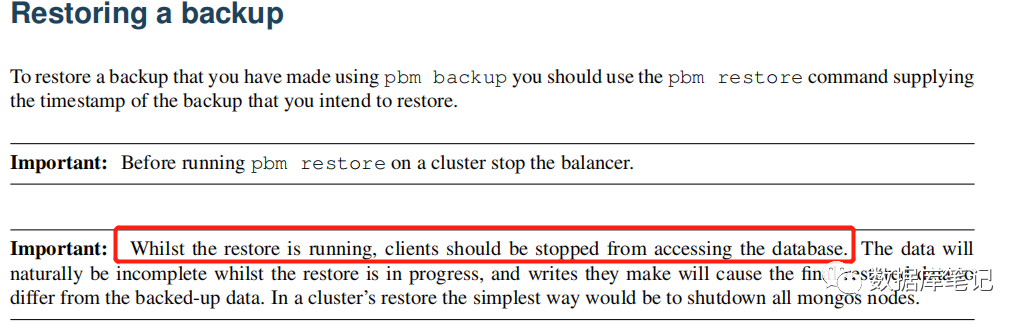
pbm restore 2020-06-23T09:03:40Z --mongodb-uri "mongodb://pbmuser:secretpwd@192.168.56.108:27017,192.168.56.109:27017/?replicaSet=rs"
#pbm恢复底层调用mongorestore
2020/06/23 17:04:28 Got command restore [{restore { } {2020-06-23T09:04:27.816797402Z 2020-06-23T09:03:40Z} 1592903067}]2020/06/23 17:04:28 [INFO] Restore of '2020-06-23T09:03:40Z' started2020-06-23T17:04:31.733+0800 preparing collections to restore from2020-06-23T17:04:31.766+0800 reading metadata for admin.pbmRUsers from archive on stdin2020-06-23T17:04:31.770+0800 restoring admin.pbmRUsers from archive on stdin2020-06-23T17:04:33.737+0800 restoring indexes for collection admin.pbmRUsers from metadata2020-06-23T17:04:33.746+0800 finished restoring admin.pbmRUsers (2 documents, 0 failures)2020-06-23T17:04:33.746+0800 reading metadata for admin.pbmRRoles from archive on stdin2020-06-23T17:04:33.750+0800 restoring admin.pbmRRoles from archive on stdin2020-06-23T17:04:35.732+0800 restoring indexes for collection admin.pbmRRoles from metadata2020-06-23T17:04:35.748+0800 finished restoring admin.pbmRRoles (1 document, 0 failures)2020-06-23T17:04:35.759+0800 reading metadata for test.test from archive on stdin2020-06-23T17:04:35.763+0800 restoring test.test from archive on stdin2020-06-23T17:04:37.848+0800 no indexes to restore2020-06-23T17:04:37.848+0800 finished restoring test.test (4 documents, 0 failures)2020-06-23T17:04:37.851+0800 reading metadata for test.mj from archive on stdin2020-06-23T17:04:37.855+0800 restoring test.mj from archive on stdin2020-06-23T17:04:39.890+0800 no indexes to restore2020-06-23T17:04:39.890+0800 finished restoring test.mj (3 documents, 0 failures)2020/06/23 17:04:39 mongorestore finished2020/06/23 17:04:41 starting the oplog replay2020/06/23 17:04:41 oplog replay finished2020/06/23 17:04:41 restoring users and roles2020/06/23 17:04:41 deleting users2020/06/23 17:04:41 inserting users2020/06/23 17:04:41 inserted user
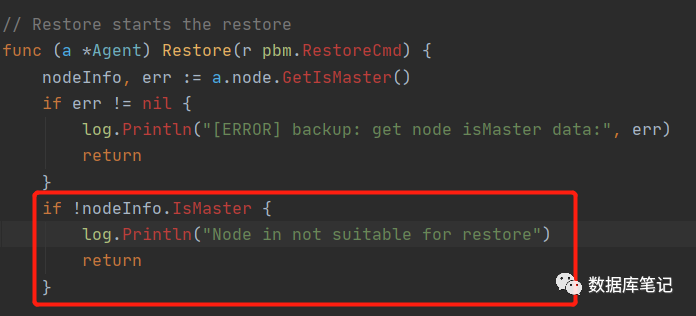
在从库执行恢复命令会提示Node in not suitable for restore,并自动将恢复任务切至主库:
2020/06/23 17:04:28 Got command restore [{restore { } {2020-06-23T09:04:27.816797402Z 2020-06-23T09:03:40Z} 1592903067}]2020/06/23 17:04:28 Node in not suitable for restore
源码中体现为当前节点非主节点,直接return
#备份分片集群:
目前来看,备份分片集群的方式,也是针对每一个shard节点或者shard副本集进行备份,但是官方手册没有说明需要停止业务写入或者关闭balancer。
针对分片集群的恢复,需要提前关闭balancer,最直接的方式是关闭所有mongos节点。
#关于增量备份:
pbm在进行全量备份是会记录一个详细的json:
{"name": "2020-06-23T09:24:53Z","replsets": [{"name": "rs","backup_name": "2020-06-23T09:24:53Z_rs.dump.s2","oplog_name": "2020-06-23T09:24:53Z_rs.oplog.s2","start_ts": 1592904293,"status": "done","last_transition_ts": 1592904299,"last_write_ts": {"T": 1592904295,"I": 1},"conditions": [{"timestamp": 1592904293,"status": "running"},{"timestamp": 1592904296,"status": "dumpDone"},{"timestamp": 1592904299,"status": "done"}]}],"compression": "s2","store": {"type": "filesystem","s3": {"region": "","endpointUrl": "","bucket": "","credentials": {"vault": {}}},"filesystem": {"path": "/var/lib/mongobak"}},"mongodb_version": "4.2.7","start_ts": 1592904293,"last_transition_ts": 1592904300,"last_write_ts": {"T": 1592904295,"I": 1},"hb": {"T": 1592904298,"I": 1},"status": "done","conditions": [{"timestamp": 1592904293,"status": "starting"},{"timestamp": 1592904295,"status": "running"},{"timestamp": 1592904297,"status": "dumpDone"},{"timestamp": 1592904300,"status": "done"}]}
从上json记录中可以获取最终的时间戳:1592904300,作为增量备份的开始时间戳
增量备份可以通过该命令实现基于oplog的增量备份
/mongodb/bin/mongodump -h 192.168.xxx.xxx --port $port -d local -c oplog.rs --query '{ts:{$gte:Timestamp('$paramBakStartDate',1),$lte:Timestamp('$paramBakEndDate',9999)}}' -o $bkdatapath/mongodboplog$bkfilename
END
