本次CKA培训课程,通过线下授课、考题解读、模拟演练等方式,帮助学员快速掌握Kubernetes的理论知识和专业技能,并针对考试做特别强化训练,让学员能从容面对CKA认证考试,使学员既能掌握Kubernetes相关知识,又能通过CKA认证考试,点击下方图片了解详情。

镜像仓库(Harbor )
网络插件 Flannel host-gw (阿里云托管版是 flannel vpc)
日志收集(Filebeat -> Kafka –> Logstash -> Elasticsearch -> Kibana,Filebeat Sidecar 应用的 Pod)
流量接入(Nginx Ingress)
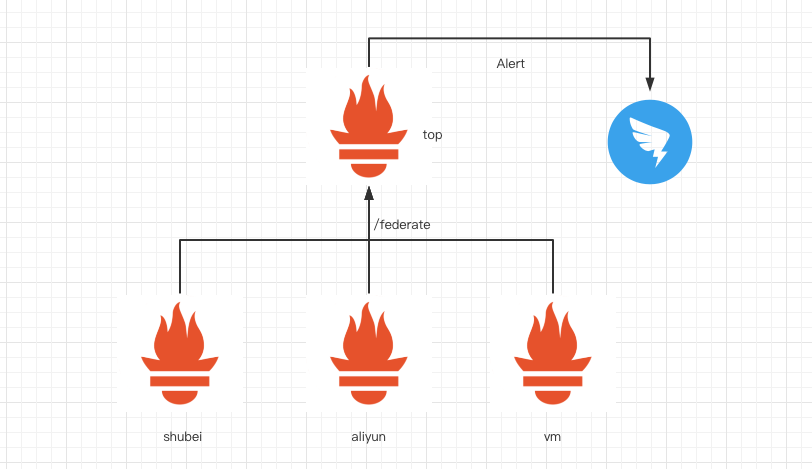
监控(Prometheus+Grafana)
CD(Jenkins Helm)

尽量少的引入复杂度(尽量不自己造轮子)
依赖开源工具
轻量(以后我们想要换别的,可以换的比较轻松)
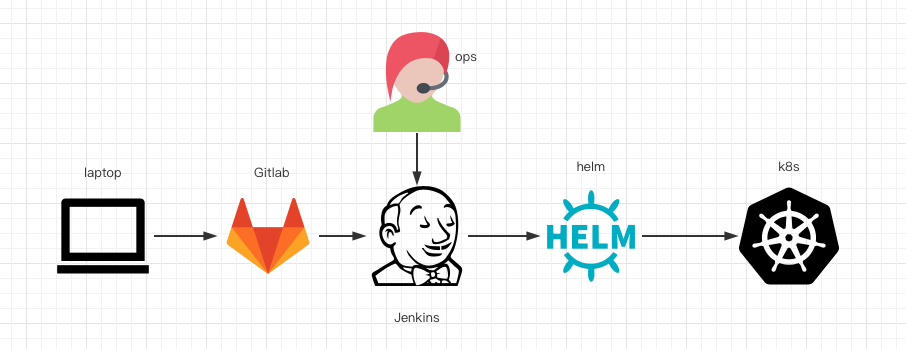
从笔记本的源码库上添加一个应用,然后运行我们自己编写工具脚本生成 Jenkins 的 Job DSL,然后把这些文件都 push 到 GitLab 上面
到了 GitLab 以后,GitLab 会触发 Jenkins 的 webhook
Jenkins 会根据 Job DSL 生成对应的 Job
我们运维会通过这个 Jenkins Job 调用 Helm 部署到 Kubernetes
├── config.yaml
├── generate_dsl.go
├── department1
│   ├── app.groovy
│   └── app2.groovy
├── department2
│   ├── app1.groovy
└── templates
    ├── helm_dsl
    │   └── common.tpl
    └── helm_templates
        └── common
            ├── app.yaml
            ├── filebeat-config.yaml
            ├── flume_config.yaml
            ├── ingress.yaml
            ├── java.yaml
            └── python.yaml
- department_name: department2
  apps:
    - app_name: app1
       image_tpl: jar
      clusters:
        - name: shubei
          replicaCount: 6
          replicaCountMax: 12
        - name: aliyun
          replicaCount: 8
          replicaCountMax: 12
      values:
        java_opts: "-Xms2550m -Xmx2550m -Duser.timezone=Asia/Shanghai"
service:
  port: 8080
        ingress:
          enabled: true
          hosts:
            - host: demo.test.com
              paths:
                - /
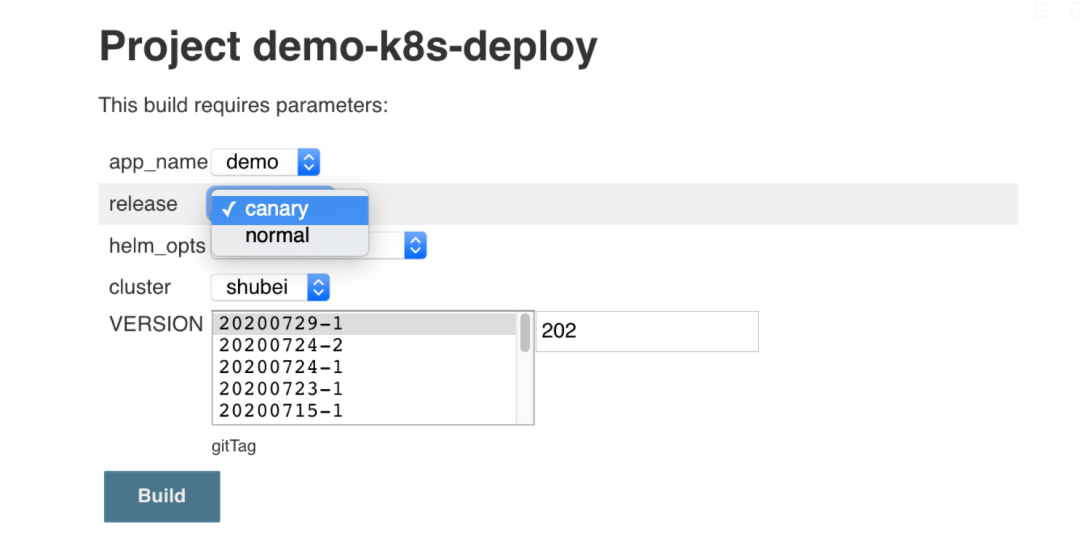
release 是否灰度
helm_opts 是否加上 --dry-run --debug,只看 Helm 的 manifests
cluster 部署到哪个集群
VERSION 从 gitTag 中选择部署的分支
choiceParam("app_name", ["${app_name}"], "")
choiceParam("release", ["canary", "normal"], "")
choiceParam("helm_opts", [" ", " --dry-run --debug "], "")
choiceParam("cluster", [{{- range  .App.Clusters -}} "{{ .Name }}", {{- end -}}], "")
{{- if eq .App.ImageVersion  "gitTag" }}
gitParameter{
name("VERSION")
type("PT_TAG")
sortMode('DESCENDING')
defaultValue('TOP')
selectedValue('TOP')
useRepository(gitUrl)
tagFilter('*')
branch('*')
branchFilter('*')
description('gitTag')
quickFilterEnabled(true)
listSize('5')
}
{{- else }}
stringParam("VERSION", "", "")
{{- end }}
department_name=department2
tag=${VERSION#$app_name-}
mkdir -p helm_app
cd helm_app
cp /ops/k8s_config/$cluster ./$cluster
export KUBECONFIG=$PWD/$cluster
kubens default
mkdir -p templates
rsync -avzP /ops/jenkins-helm-dsl/templates/helm_templates/common/ templates --delete
case $cluster in
    zhaowei)
    replicaCountMax=12
    replicaCount=6
    ;;
    aliyun)
    replicaCountMax=12
    replicaCount=8
    ;;
esac
cat << EOF >  values.yaml
department_name: demo
java_opts: "-Xms2550m -Xmx2550m -Duser.timezone=Asia/Shanghai"
service:
  port: 8080
ingress:
  enabled: true
  hosts:
    - host: demo.test.com
      paths:
        - /
EOF
cat << EOF >  Chart.yaml
apiVersion: v2
name: $app_name
description: A Helm chart for Kubernetes
type: application
version: 0.1.0
appVersion: $tag
EOF
helm_app_name=${app_name}
if [ $release == "canary" ]; then
helm_app_name=${app_name}-canary
fi
helm upgrade --install ${helm_app_name} ./  --set release=$release --set replicaCountMax=$replicaCountMax --set replicaCount=$replicaCount $helm_opts
{{- define "java" }}
---
apiVersion: apps/v1
kind: Deployment
metadata:
  labels:
    app: {{ .Chart.Name }}
    release: {{ .Values.release }}
  name: {{ .Chart.Name }}{{- if eq .Values.release "canary" -}}-canary{{- end }}
spec:
  {{- if eq .Values.release "normal" }}
  replicas: {{ .Values.replicaCount }}
  {{- end }}
  {{- if eq .Values.release "canary" }}
  replicas: 1
  {{- end }}
  selector:
    matchLabels:
      app: {{ .Chart.Name }}
      release: {{ .Values.release }}
  template:
    metadata:
      labels:
        app: {{ .Chart.Name }}
        release: {{ .Values.release }}
    spec:
      initContainers:
        - name: app-jar
          image: harbor.test.com/projects/{{ .Values.department_name }}/{{ .Chart.Name }}:{{ .Chart.AppVersion }}
          command: ["/bin/sh","-c","cp /opt/*.jar /app"]
          volumeMounts:
            - mountPath: /app
              name: app-volume
        - name: logdir-init
          image: busybox
          command: ["/bin/sh","-c","mkdir -p /docker/logs/$HOSTNAME && ln -s /docker/logs/$HOSTNAME /opt/logs"]
          volumeMounts:
            - mountPath: /docker/logs
              name: logs
            - mountPath: /opt/
              name: logdir-init
      containers:
        - name: {{ .Chart.Name }}
          image: harbor.test.com/projects/jar-java8u251:v1
          command:
            - "/bin/sh"
            - "-c"
            - "java  -jar {{ .Values.java_opts }} `ls /app/*jar` -Duser.timezone=Asia/Shanghai --spring.profiles.active=product"
          volumeMounts:
            - mountPath: /docker/logs
              name: logs
            - mountPath: /opt/
              name: logdir-init
            - mountPath: /app
              name: app-volume
      volumes:
        - name: logs
          hostPath:
            path: /opt/logs
            type: DirectoryOrCreate
        - name: app-volume
          emptyDir: {}
        - name: logdir-init
          emptyDir: {}
{{- end }}
tag=${VERSION#$app_name-}
department_name=department2
docker_tag=harbor.test.com/projects/$department_name/$app_name:$tag
cat << EOF >  Dockerfile
FROM busybox
MAINTAINER yw
COPY target/$app_name.jar /opt/
EOF
docker build -t $docker_tag .
docker push $docker_tag
initContainers:
  - name: init-sysctl
    command:
    - /bin/sh
    - -c
    - |-
      mount -o remount rw /proc/sys
      sysctl -w net.core.somaxconn=65535
      sysctl -w net.ipv4.ip_local_port_range="1024 65535"
      sysctl -w fs.file-max=1048576
      sysctl -w fs.inotify.max_user_instances=16384
      sysctl -w fs.inotify.max_user_watches=524288
      sysctl -w fs.inotify.max_queued_events=16384
    image: busybox
    imagePullPolicy: IfNotPresent
    securityContext:
      capabilities:
        add:
        - SYS_ADMIN
        drop:
        - ALL
开发测试环境的发版比较方便
开发测试生产三个环境用的容器镜像实际是一份,只是 tag 不同
生产环境可以根据 tag 很容易定位到对应的源码库版本