



MQ的整体架构

Exchange 交换机接收消息,根据路由键(RoutingKey)转发消息到绑定的队列
4.1、交换机属性:
- name:交换机名称
- Type:交换机类型direct、topic、fanout、headers
- Durability:是否需要持久化,true为持久化
- Auto Delete:当最后一个绑定到exchange上的队列删除后,自动删除该exchange
- Internal:当前exchange是否用于Rabbitmq内部使用,默认false
- Arguments:扩展参数,用于扩展AMQP协议自制定化使用
4.2、交换机类型
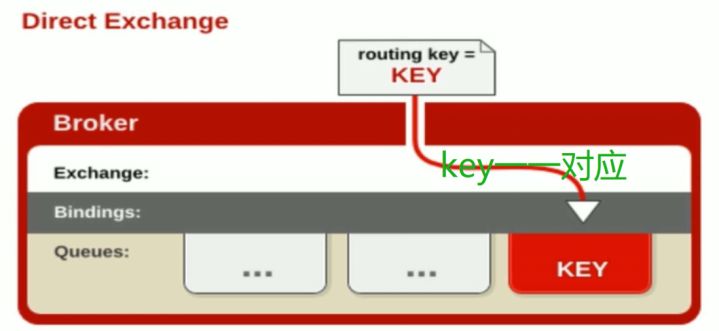
4.2.1、direct Exchange
- 所有发送到direct exchange的消息被转发到RouteKey中指定的Queue。
注意:direct 模式可以使用rabbitmq自带的exchange:default exchange,所以不需要将exchange进行任何绑定操作,消息传递时,RouteKey必须完全匹配才会被队列接收,否则将会被消息抛弃。
4.2.1 代码
生产者:
public class send {
public static void main(String[] args) throws java.io.IOException {
/**
* 创建连接连接到MabbitMQ
*/
ConnectionFactory factory = new ConnectionFactory();
// 设置MabbitMQ所在主机ip或者主机名
factory.setHost(“192.168.60.129”);
factory.setPort(5672);
factory.setUsername(“guest”);
factory.setPassword(“guest”);
// 创建一个连接
Connection connection = factory.newConnection();
// 创建一个管道
Channel channel = connection.createChannel();
//声明
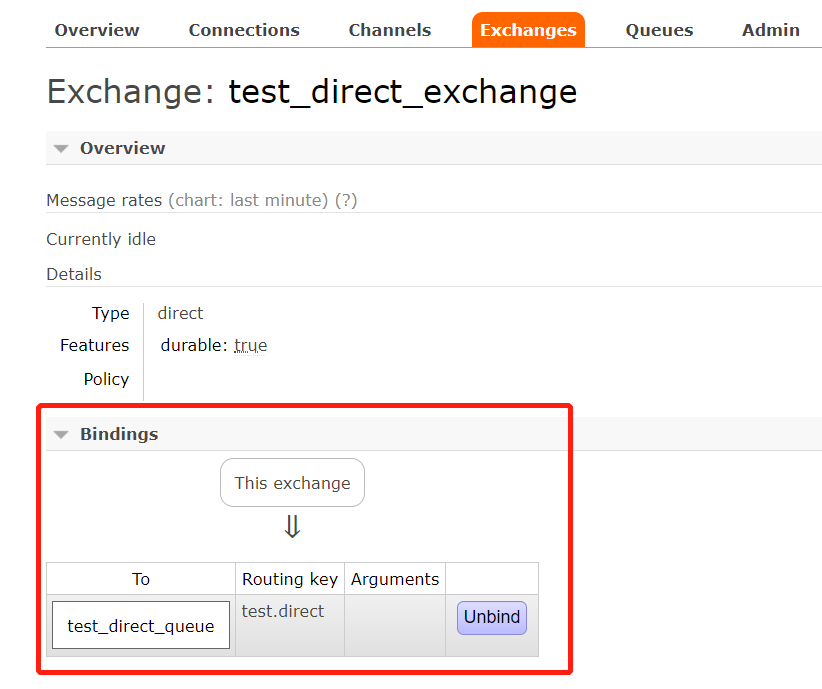
String exchangeName = “test_direct_exchange” ;
String routeKey = “test.direct”;
// 发送的消息
String message = “hello world!”;
// 往队列中发出一条消息
channel.basicPublish(exchangeName, routeKey, null, message.getBytes());
System.out.println(" [x] Sent ‘" + message + "’");
// 关闭频道和连接
channel.close();
connection.close();
}
}
消费者
public class Recv {
public static void main(String[] args) throws java.io.IOException, java.lang.InterruptedException {
     ConnectionFactory factory = new ConnectionFactory();
     factory.setHost("192.168.60.129");
     factory.setPort(5672);
     factory.setUsername("guest");
     factory.setPassword("guest");
        // 打开连接和创建频道,与发送端一样
        Connection connection = factory.newConnection();

        Channel channel = connection.createChannel();

        // 声明
        String exchangeName = "test_direct_exchange"	;
        String exchangeType = "direct";
        String queueName = "test_direct_queue";
        String routeKey = "test.direct";
        //声明了一个交换机
        channel.exchangeDeclare(exchangeName, exchangeType, true, false, false, null);
        //声明一个队列
        channel.queueDeclare(queueName, false, false, false, null);
        //建立一个绑定关系
        channel.queueBind(queueName, exchangeName, routeKey);
        // 是否持久化消息
        QueueingConsumer  consumer = new QueueingConsumer(channel);
        //参数:队列名称、是否自动ACK、consumer
        channel.basicConsume(queueName, true, consumer);
        //循环获取消息
        while(true){
        	//获取消息,如果没有消息,这一步将会阻塞
        	Delivery delivery = consumer.nextDelivery();
        	String msg = new String(delivery.getBody());
        	System.out.println("收到消息:"+ msg);
        }
}
}
控制台看到绑定
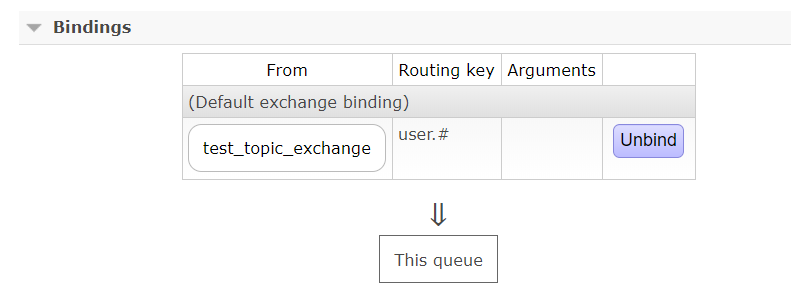
4.2.2、Topic Exchange
-
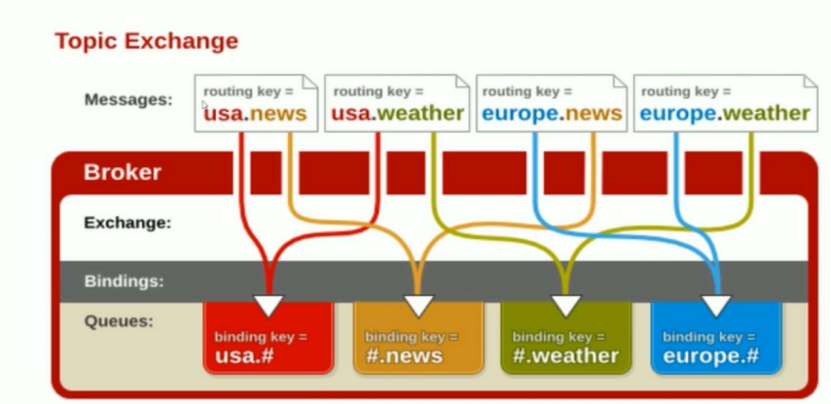
所有发送到Topic Exchange 的消息被转发到所有关心RouteKey中指定Topic的Queue上
-
Exchange将RouteKey和某Topic进行模糊匹配,此时队列需要绑定一个Topic
注意:可以使用通配符进行模糊匹配(* 或者 #)
4.2.2 代码
生产者
public class send {public static void main(String[] args) throws java.io.IOException {
/**
* 创建连接连接到MabbitMQ
*/
ConnectionFactory factory = new ConnectionFactory();
// 设置MabbitMQ所在主机ip或者主机名
factory.setHost(“192.168.60.129”);
factory.setPort(5672);
factory.setUsername(“guest”);
factory.setPassword(“guest”);
// 创建一个连接
Connection connection = factory.newConnection();
// 创建一个管道
Channel channel = connection.createChannel();//声明 String exchangeName = "test_topic_exchange" ; String routeKey1 = "user.save"; String routeKey2 = "user.update"; String routeKey3 = "user.delete.abc"; // 发送的消息 String message = "hello world!-----topic exchange .."; // 往队列中发出一条消息 channel.basicPublish(exchangeName, routeKey1, null, message.getBytes()); channel.basicPublish(exchangeName, routeKey2, null, message.getBytes()); channel.basicPublish(exchangeName, routeKey3, null, message.getBytes()); System.out.println(" [x] Sent '" + message + "'"); // 关闭频道和连接 channel.close(); connection.close(); }
消费者
public class Recv {
public static void main(String[] args) throws java.io.IOException, java.lang.InterruptedException  {

    // TODO Auto-generated method stub
     ConnectionFactory factory = new ConnectionFactory();
     factory.setHost("192.168.60.129");
     factory.setPort(5672);
     factory.setUsername("guest");
     factory.setPassword("guest");
        // 打开连接和创建频道,与发送端一样
        Connection connection = factory.newConnection();

        Channel channel = connection.createChannel();

        // 声明
        String exchangeName = "test_topic_exchange"	;
        String exchangeType = "topic";
        String queueName = "test_topic_queue";

        String routeKey = "user.#";
        //声明了一个交换机
        channel.exchangeDeclare(exchangeName, exchangeType, true, false, false, null);
        //声明一个队列
        channel.queueDeclare(queueName, false, false, false, null);
        //建立一个绑定关系
        channel.queueBind(queueName, exchangeName, routeKey);
        // 是否持久化消息
        QueueingConsumer  consumer = new QueueingConsumer(channel);
        //参数:队列名称、是否自动ACK、consumer
        channel.basicConsume(queueName, true, consumer);
        //循环获取消息
        while(true){
        	//获取消息,如果没有消息,这一步将会阻塞
        	Delivery delivery = consumer.nextDelivery();
        	String msg = new String(delivery.getBody());
        	System.out.println("收到消息:"+ msg);
        }
}
}
查看交换机绑定情况:
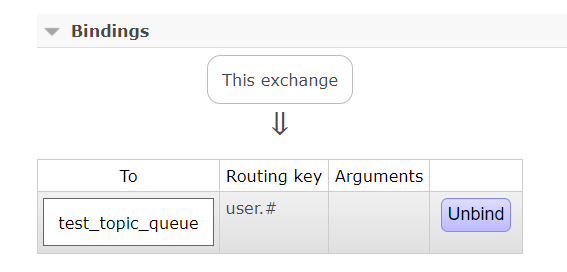
查看队列绑定情况:
4.2.3、Fanout Exchange
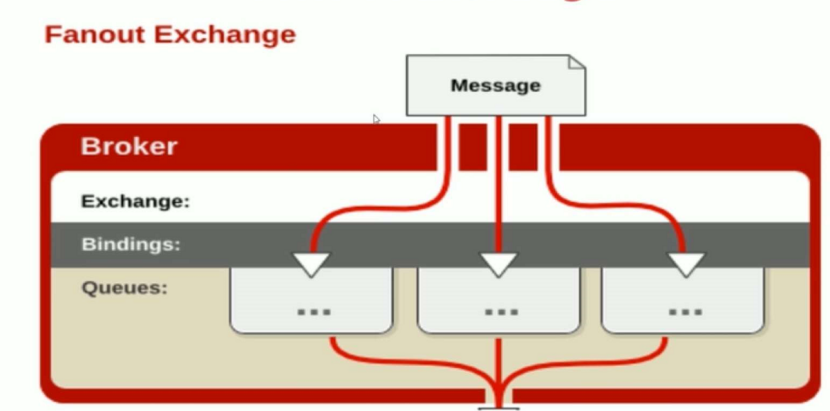
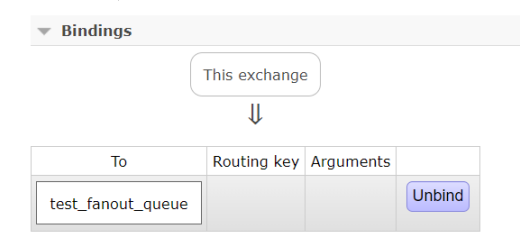
- 不处理路由键,只需要简单将队列绑定到交换机上
- 发送到交换机的消息都会被转发到与该交换机绑定的所有队列上
- Fanout交换机转发消息最快
2.2.3 代码
生产者
public class send {
 public static void main(String[] args) throws java.io.IOException {
       /**
        * 创建连接连接到MabbitMQ
        */
       ConnectionFactory factory = new ConnectionFactory();
       // 设置MabbitMQ所在主机ip或者主机名
       factory.setHost("192.168.60.129");
       factory.setPort(5672);
       factory.setUsername("guest");
       factory.setPassword("guest");
       // 创建一个连接
       Connection connection = factory.newConnection();
       // 创建一个管道
       Channel channel = connection.createChannel();

       //声明
       String exchangeName = "test_fanout_exchange"	;

       // 发送的消息
       for(int i=0;i<10;i++){
           String message = "hello world!-----fanout exchange ..";
           // 往队列中发出一条消息
           channel.basicPublish(exchangeName, "caad ", null, message.getBytes());
       }

       // 关闭频道和连接
       channel.close();
       connection.close();
   }
}
消费者
public class Recv {
public static void main(String[] args) throws java.io.IOException, java.lang.InterruptedException  {

    // TODO Auto-generated method stub
     ConnectionFactory factory = new ConnectionFactory();
     factory.setHost("192.168.60.129");
     factory.setPort(5672);
     factory.setUsername("guest");
     factory.setPassword("guest");
        // 打开连接和创建频道,与发送端一样
        Connection connection = factory.newConnection();

        Channel channel = connection.createChannel();

        // 声明
        String exchangeName = "test_fanout_exchange"	;
        String exchangeType = "fanout";
        String queueName = "test_fanout_queue";
        String routeKey = " ";  //不设置路由键

        //声明了一个交换机
        channel.exchangeDeclare(exchangeName, exchangeType, true, false, false, null);
        //声明一个队列
        channel.queueDeclare(queueName, false, false, false, null);
        //建立一个绑定关系
        channel.queueBind(queueName, exchangeName, routeKey);
        // 是否持久化消息
        QueueingConsumer  consumer = new QueueingConsumer(channel);
        //参数:队列名称、是否自动ACK、consumer
        channel.basicConsume(queueName, true, consumer);
        //循环获取消息
        while(true){
        	//获取消息,如果没有消息,这一步将会阻塞
        	Delivery delivery = consumer.nextDelivery();
        	String msg = new String(delivery.getBody());
        	System.out.println("收到消息:"+ msg);
        }
}
}
查看相关绑定:
4.3、Binding-绑定
- Exchange和Exchange、Queue之间的连接关系
- Binding中可以包含RoutingKey或者参数
- 对于消息发布者而言它只负责把消息发布出去,甚至它也不知道消息是发到哪个queue,消息通过exchange到达queue,exchange的职责非常简单,就是一边接收发布者的消息一边把这些消息推到queue中。而exchange是怎么知道消息应该推到哪个queue呢,这就要通过绑定queue与exchange时的routingkey了,通过代码进行绑定并且指定routingkey
4.4、Queue-消息队列
- 消息队列,实际存储消息数据
- Durability:是否持久化,Durable:是,Transient:否
- Auto delete:如选yes,代表当最后一个监听被移除后,该Queue会自动被删除
- 4.5、Message-消息
- 服务器和应用之间传送的数据
- 本质上就是一段数据,由properties和Payload(body)组成
- 常用属性:delivery、mode、headers(自定义属性)
- 其他属性:content_type、content_encoding、priority
correlation_id、reply_to、expiration、message_id
type、user_id、app_id、cluster_id 、timestamp
给消息添加一些属性:
生产者:
public class send {
 public static void main(String[] args) throws java.io.IOException {
       /**
        * 创建连接连接到MabbitMQ
        */
       ConnectionFactory factory = new ConnectionFactory();
       // 设置MabbitMQ所在主机ip或者主机名
       factory.setHost("192.168.60.129");
       factory.setPort(5672);
       factory.setUsername("guest");
       factory.setPassword("guest");
       // 创建一个连接
       Connection connection = factory.newConnection();
       // 创建一个管道
       Channel channel = connection.createChannel();
//给消息添加一些属性
Map<String,Object> headers = new HashMap<String,Object>();
headers.put(“my1”, “111”);
headers.put(“my2”, “222”);
       //给消息添加一些属性
      AMQP.BasicProperties properties = new AMQP.BasicProperties.Builder()
            .deliveryMode(2)
            .contentEncoding("utf-8")
            .expiration("10000")  //消息10秒没有被消费将被移除
            .headers(headers)  //自定义属性
            .build();

       // 发送的消息
       for(int i=0;i<5;i++){
           String message = "hello world!-----fanout exchange ..";
           // 往队列中发出一条消息
 channel.basicPublish("", "test001", properties, message.getBytes());
       }
       // 关闭频道和连接
       channel.close();
       connection.close();
   }
}
消费者:
public class Recv {
public static void main(String[] args) throws java.io.IOException, java.lang.InterruptedException  {

    // TODO Auto-generated method stub
     ConnectionFactory factory = new ConnectionFactory();
     factory.setHost("192.168.60.129");
     factory.setPort(5672);
     factory.setUsername("guest");
     factory.setPassword("guest");
        // 打开连接和创建频道,与发送端一样
        Connection connection = factory.newConnection();

        Channel channel = connection.createChannel();

        // 声明
        String queueName = "test001";
        //声明一个队列
        channel.queueDeclare(queueName, false, false, false, null);

        // 是否持久化消息
        QueueingConsumer  consumer = new QueueingConsumer(channel);
        //参数:队列名称、是否自动ACK、consumer
        channel.basicConsume(queueName, true, consumer);
        //循环获取消息
        while(true){
        	//获取消息,如果没有消息,这一步将会阻塞
        	Delivery delivery = consumer.nextDelivery();
        	String msg = new String(delivery.getBody());
        	System.out.println("收到消息:"+ msg);
        	//获取消息属性
        	 Map<String,Object> headers = delivery.getProperties().getHeaders();
        	 System.out.println("headers get my1 value: "  + headers.get("my1"));
        }
}
}
4.6、Virtual host -虚拟主机
- 虚拟地址,用于进行逻辑隔离,最上层的消息路由
- 一个虚拟主机可以有若干个Exchange和Queue
- 同一个virtual host里面的Exchange或Queue的名称不能相同
