



概述
MySQL8.0自2016年发布,距今已有四年,经过这四年的迭代更新,新版本的MySQL已经在逐渐向Oracle靠拢,这是一个长期的过程,也是必将是一个明确的结果。
新特性介绍
在MySQL的8.0.17版本中,MySQL首次提供了物理备份的手段,是以plugin方式提供的,该plugin是可选安装的。
clone plugin可以从本地或远程MySQL实例中clone数据。这些clone数据是一个物理快照,其中包含了innodb的schema、tables、tablespace、data dictionary信息。实际上是一个整体的数据目录。
部署
MySQL提供的插件都位于plugin_dir系统变量的目录中,默认位于base_dir/lib/plugin的目录中:
[root@master plugin]# ll -lih|grep mysql_clone.so
  936927 -rwxr-xr-x. 1 mysql mysql 2.6M 9月  20 2019 mysql_clone.so
[root@master plugin]#
安装clone插件的方式非常简单,和半同步复制的插件安装一样,只要进入mysql命令行就可以:
[root@master plugin]# mysql -uroot -pxxxxxx
mysql: [Warning] Using a password on the command line interface can be insecure.
Welcome to the MySQL monitor.  Commands end with ; or \g.
Your MySQL connection id is 25
Server version: 8.0.18 MySQL Community Server - GPL

Copyright (c) 2000, 2019, Oracle and/or its affiliates. All rights reserved.

Oracle is a registered trademark of Oracle Corporation and/or its
affiliates. Other names may be trademarks of their respective
owners.

Type 'help;' or '\h' for help. Type '\c' to clear the current input statement.

mysql> INSTALL PLUGIN clone SONAME 'mysql_clone.so';
Query OK, 0 rows affected (1.57 sec)

mysql>
验证一下是否安装成功并可用:
[root@master plugin]# mysql -uroot -pxxxxxx
mysql: [Warning] Using a password on the command line interface can be insecure.
Welcome to the MySQL monitor.  Commands end with ; or \g.
Your MySQL connection id is 26
Server version: 8.0.18 MySQL Community Server - GPL

Copyright (c) 2000, 2019, Oracle and/or its affiliates. All rights reserved.

Oracle is a registered trademark of Oracle Corporation and/or its
affiliates. Other names may be trademarks of their respective
owners.

Type 'help;' or '\h' for help. Type '\c' to clear the current input statement.

mysql> SELECT PLUGIN_NAME, PLUGIN_STATUS        FROM INFORMATION_SCHEMA.PLUGINS        WHERE PLUGIN_NAME = 'clone';
+-------------+---------------+
| PLUGIN_NAME | PLUGIN_STATUS |
+-------------+---------------+
| clone       | ACTIVE        |
+-------------+---------------+
1 row in set (0.32 sec)

mysql>
使用
clone插件有两种模式:第一种为本地克隆,第二种为远程克隆。我们先来说第一种。
本地克隆
本地克隆就是在一台实例的MySQL上进行克隆备份操作。从实例目录克隆到另一个目录下。
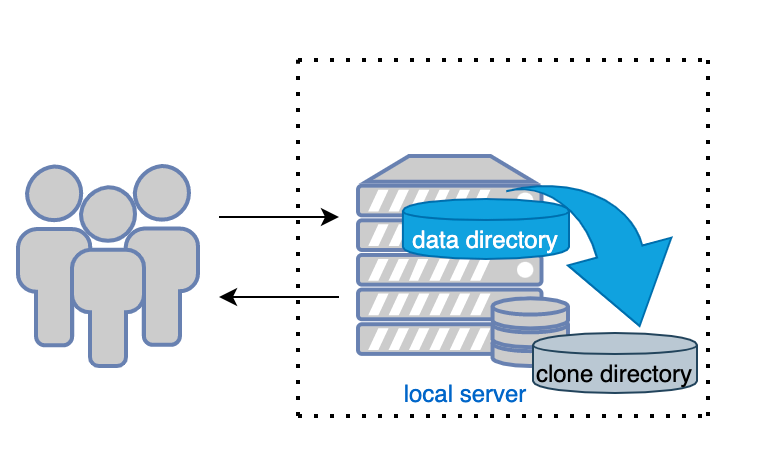
要使用clone插件进行克隆数据,前提是必须要授权一个带有BACKUP_ADMIN权限的账号:
[root@master plugin]# mysql -uroot -pxxxxxx
mysql: [Warning] Using a password on the command line interface can be insecure.
Welcome to the MySQL monitor.  Commands end with ; or \g.
Your MySQL connection id is 27
Server version: 8.0.18 MySQL Community Server - GPL

Copyright (c) 2000, 2019, Oracle and/or its affiliates. All rights reserved.

Oracle is a registered trademark of Oracle Corporation and/or its
affiliates. Other names may be trademarks of their respective
owners.

Type 'help;' or '\h' for help. Type '\c' to clear the current input statement.

mysql> select user,host from mysql.user;
+------------------+--------------+
| user             | host         |
+------------------+--------------+
| root             | 172.16.150.% |
| clone_user       | 172.16.150.% |
| replica          | 172.16.150.% |
| mysql.infoschema | localhost    |
| mysql.session    | localhost    |
| mysql.sys        | localhost    |
| root             | localhost    |
+------------------+--------------+
9 rows in set (0.17 sec)

mysql> show grants for clone_user@'172.16.150.%';
+----------------------------------------------------------------------+
| Grants for clone_user@172.16.150.%                                   |
+----------------------------------------------------------------------+
| GRANT USAGE ON *.* TO `clone_user`@`172.16.150.%`                    |
| GRANT BACKUP_ADMIN ON *.* TO `clone_user`@`172.16.150.%`             |
+----------------------------------------------------------------------+
2 rows in set (0.15 sec)

mysql>
在服务器上新建一个备份目录,并授权给mysql用户(必须):
[root@master ~]# mkdir -p /backup/mysql
[root@master backup]# ll -lih / | grep backup
17451147 drwxr-xr-x.   3 root root   19 8月  26 06:30 backup
[root@master backup]#
[root@master backup]# chown -R mysql:mysql /backup/mysql/
[root@master backup]# ll
总用量 0
drwxr-xr-x. 2 mysql mysql 6 8月  26 06:30 mysql
[root@master backup]#
进入mysql命令行,执行本地克隆命令操作:
[root@master plugin]# mysql -uroot -pxxxxxx
mysql: [Warning] Using a password on the command line interface can be insecure.
Welcome to the MySQL monitor.  Commands end with ; or \g.
Your MySQL connection id is 27
Server version: 8.0.18 MySQL Community Server - GPL

Copyright (c) 2000, 2019, Oracle and/or its affiliates. All rights reserved.

Oracle is a registered trademark of Oracle Corporation and/or its
affiliates. Other names may be trademarks of their respective
owners.

Type 'help;' or '\h' for help. Type '\c' to clear the current input statement.

mysql> CLONE LOCAL DATA DIRECTORY = '/backup/mysql/mysql_backup_2020-08-26';
Query OK, 0 rows affected (1.73 sec)

mysql>
这里要注意的是:克隆目录/backup/mysql/mysql_backup_2020-08-26,mysql_backup_2020-08-26 该目录不能存在,否则会报错:
ERROR 1007 (HY000): Can't create database '/backup/mysql'; database exists
远程克隆
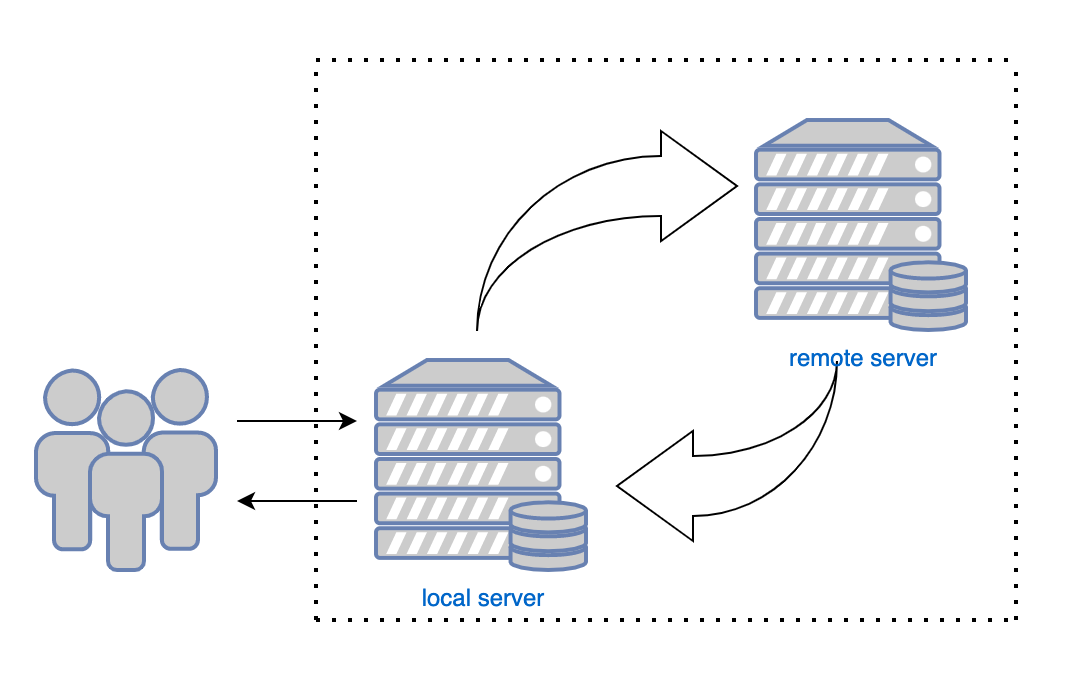
远程克隆,功能是从远程的MySQL实例上用克隆插件克隆数据后,传输到本地的MySQL实例上。
同样的,在进行远程克隆之前,也一样需要有权限克隆的账号,在远程的MySQL上,需要有BACKUP_ADMIN权限的账号。
在接收数据的MySQL上需要有CLONE_ADMIN权限的账号。
上面在本地克隆的操作中已经建立了远程的BACKUP_ADMIN权限的账号。
[root@master plugin]# mysql -uroot -pxxxxxx
mysql: [Warning] Using a password on the command line interface can be insecure.
Welcome to the MySQL monitor.  Commands end with ; or \g.
Your MySQL connection id is 28
Server version: 8.0.18 MySQL Community Server - GPL

Copyright (c) 2000, 2019, Oracle and/or its affiliates. All rights reserved.

Oracle is a registered trademark of Oracle Corporation and/or its
affiliates. Other names may be trademarks of their respective
owners.

Type 'help;' or '\h' for help. Type '\c' to clear the current input statement.

mysql> show grants for clone_user@'172.16.150.%';
+----------------------------------------------------------------------+
| Grants for clone_user@172.16.150.%                                   |
+----------------------------------------------------------------------+
| GRANT USAGE ON *.* TO `clone_user`@`172.16.150.%`                    |
| GRANT CLONE_ADMIN ON *.* TO `clone_user`@`172.16.150.%`              |
+----------------------------------------------------------------------+
2 rows in set (0.14 sec)

mysql>
我们来尝试克隆一次远程MySQL实例的数据:
#先创建好要存放克隆到本地的数据目录
[root@slave ~]# tree /backup/
/backup/

0 directories, 0 files
#这里要先指定远程实例的地址,使用clone_valid_donor_list参数
[root@master plugin]# mysql -uroot -pxxxxxx
mysql: [Warning] Using a password on the command line interface can be insecure.
Welcome to the MySQL monitor.  Commands end with ; or \g.
Your MySQL connection id is 28
Server version: 8.0.18 MySQL Community Server - GPL

Copyright (c) 2000, 2019, Oracle and/or its affiliates. All rights reserved.

Oracle is a registered trademark of Oracle Corporation and/or its
affiliates. Other names may be trademarks of their respective
owners.

Type 'help;' or '\h' for help. Type '\c' to clear the current input statement.

mysql> SET GLOBAL clone_valid_donor_list = '10.211.55.5:12309';

#使用clone_user登陆本机MySQL,开始克隆远程实例上的数据到/backup/mysql/目录下,注意/backup下的mysql目录不能存在,且/backup目录必须要有mysql读取和写入权限。
[root@slave ~]# mysql -uclone_user -p123456 -h10.211.55.6 -P12309
mysql: [Warning] Using a password on the command line interface can be insecure.
Welcome to the MySQL monitor.  Commands end with ; or \g.
Your MySQL connection id is 39
Server version: 8.0.18 MySQL Community Server - GPL

Copyright (c) 2000, 2019, Oracle and/or its affiliates. All rights reserved.

Oracle is a registered trademark of Oracle Corporation and/or its
affiliates. Other names may be trademarks of their respective
owners.

Type 'help;' or '\h' for help. Type '\c' to clear the current input statement.

mysql> CLONE INSTANCE FROM 'clone_user'@'10.211.55.5':12309 IDENTIFIED BY '123456' DATA DIRECTORY = '/backup/mysql';
ERROR 1006 (HY000): Can't create database '/backup/mysql/' (errno: 13 - Permission denied)
mysql> \q
Bye
[root@slave ~]# chown -R mysql:mysql /backup/
[root@slave ~]# mysql -uclone_user -p123456 -h10.211.55.6 -P12309
mysql: [Warning] Using a password on the command line interface can be insecure.
Welcome to the MySQL monitor.  Commands end with ; or \g.
Your MySQL connection id is 40
Server version: 8.0.18 MySQL Community Server - GPL

Copyright (c) 2000, 2019, Oracle and/or its affiliates. All rights reserved.

Oracle is a registered trademark of Oracle Corporation and/or its
affiliates. Other names may be trademarks of their respective
owners.

Type 'help;' or '\h' for help. Type '\c' to clear the current input statement.

mysql> CLONE INSTANCE FROM 'clone_user'@'10.211.55.5':12309 IDENTIFIED BY '123456' DATA DIRECTORY = '/backup/mysql';
Query OK, 0 rows affected (2.13 sec)

mysql> \q
Bye
[root@slave ~]# ls /backup/mysql/
#clone  ib_buffer_pool  ibdata1  ib_logfile0  ib_logfile1  meta  mysql  mysql.ibd  sys  test  undo_001  undo_002
[root@slave ~]#
远程克隆语句的语法:
CLONE INSTANCE FROM 'user'@'host':port
IDENTIFIED BY 'password'
[DATA DIRECTORY [=] 'clone_dir']
[REQUIRE [NO] SSL];
user:远程实例上有克隆权限的用户
host:远程实例的IP或域名
port:远程实例的端口号
password:远程实例上克隆用户的密码
[DATA DIRECTORY [=] 'clone_dir']:可以选择克隆到本地哪个目录,注意克隆到的目录不能存在,路径需要存在。如果不写的话,默认是当前datadir目录。
[REQUIRE [NO] SSL]:是否使用SSL进行传输
相关系统变量
[root@slave mysql]# mysql -uroot -pxxxxxx
mysql: [Warning] Using a password on the command line interface can be insecure.
Welcome to the MySQL monitor.  Commands end with ; or \g.
Your MySQL connection id is 8
Server version: 8.0.18 MySQL Community Server - GPL

Copyright (c) 2000, 2019, Oracle and/or its affiliates. All rights reserved.

Oracle is a registered trademark of Oracle Corporation and/or its
affiliates. Other names may be trademarks of their respective
owners.

Type 'help;' or '\h' for help. Type '\c' to clear the current input statement.

mysql> show variables like 'clone_%';
+-----------------------------+---------+
| Variable_name               | Value   |
+-----------------------------+---------+
| clone_autotune_concurrency  | ON      |
| clone_buffer_size           | 4194304 |
| clone_ddl_timeout           | 300     |
| clone_enable_compression    | OFF     |
| clone_max_concurrency       | 16      |
| clone_max_data_bandwidth    | 0       |
| clone_max_network_bandwidth | 0       |
| clone_ssl_ca                |         |
| clone_ssl_cert              |         |
| clone_ssl_key               |         |
| clone_valid_donor_list      |         |
+-----------------------------+---------+
11 rows in set (0.34 sec)

mysql>
有关clone插件的系统变量都是以clone_开头的变量,下面来简单介绍一下说明:
clone_autotune_concurrency:默认为ON,用于在远程克隆操作时,额外生成动态线程,以优化传输速度。仅适用于接收实例。
clone_max_concurrency:定义远程克隆操作时,动态生成的线程的最大限制。和上面的参数有关。
clone_buffer_size:仅适用于本地克隆操作,定义在数据传输期间使用的缓冲期大小。默认为4M,较大的缓冲区可能会提高性能。
clone_ddl_timeout:定义在克隆操作时,等待备份锁定的超时时间,单位为秒,适用于接收和远程MySQL实例。需要注意的是,克隆操作不能与DDL操作同时进行。且克隆操作会上一个备份锁。设置为0时,如果有同时的DDL操作,那么克隆将会立即失败。
clone_enable_compression:仅适用于接收实例。该参数定义在远程克隆期间是否开启网络层的数据压缩,以节省带宽,提高传输速率。
clone_max_data_bandwidth:定义远程克隆操作的单个线程最大传输速率,以每秒(MB)为单位。如果有4个线程,那么总的传输速率就是每秒4MB。设置为0表示无限制。
clone_max_network_bandwidth:定义远程克隆操作的最大网络传输速率,同样以每秒(MB)为单位。该参数仅适用于接收实例。
clone_valid_donor_list:在远程克隆操作时,定义的远程实例地址,仅在接收实例上设置。
其他均为SSL相关参数。
写在最后
MySQL8.0版本带来了非常多的新特性,但是很多小坑也是新的东西带来的。clone插件可以近似看作一次物理备份,只不过这个备份的限制是比较大的。
首先,备份锁的存在,就决定了在克隆操作时,不能在业务期间做。
其次,需要注意的是克隆路径中,目标目录是一定不能存在的,要mysql自己创建,否则会报错
最后,clone提供了控制网络和IO速率、线程数和设置缓冲区的参数,这一点可能在备份过程中起到非常好的限制效果。
