




2. INSERT 业务
3. DELETE 业务
4. UPDATE 业务
mysql> show tables from information_schema like '%cmp%';+--------------------------------------+| Tables_in_information_schema (%CMP%) |+--------------------------------------+| INNODB_CMP || INNODB_CMPMEM || INNODB_CMPMEM_RESET || INNODB_CMP_PER_INDEX || INNODB_CMP_PER_INDEX_RESET || INNODB_CMP_RESET |+--------------------------------------+6 rows in set (0.01 sec)
1. INNODB_CMP/INNODB_CMP_RESET
先采集 INNODB_CMP 相关数据;
过一小时再次采集表 INNODB_CMP 相关数据;
完后立刻访问 INNODB_CMP_RESET 表;
初始化表 INNODB_CMP。
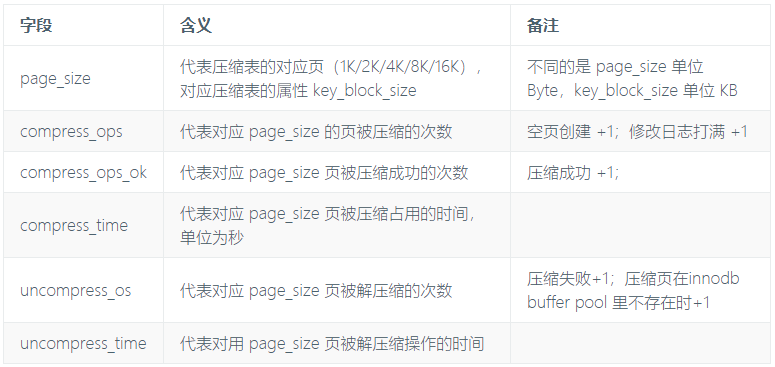
mysql> desc information_schema.innodb_cmp;+-----------------+------+------+-----+---------+-------+| Field | Type | Null | Key | Default | Extra |+-----------------+------+------+-----+---------+-------+| page_size | int | NO | | | || compress_ops | int | NO | | | || compress_ops_ok | int | NO | | | || compress_time | int | NO | | | || uncompress_ops | int | NO | | | || uncompress_time | int | NO | | | |+-----------------+------+------+-----+---------+-------+6 rows in set (0.00 sec)
注意:这两个值的比率(compress_ops_ok/compress_ops)是最直观的数据,可以判断压缩表的健康与否;正常情况下,比率为 0 或者 1 或接近于 1;如果比率长时间不正常,就得考虑压缩表的页大小是否合适或者说压缩表是否应该在这种场景下使用。
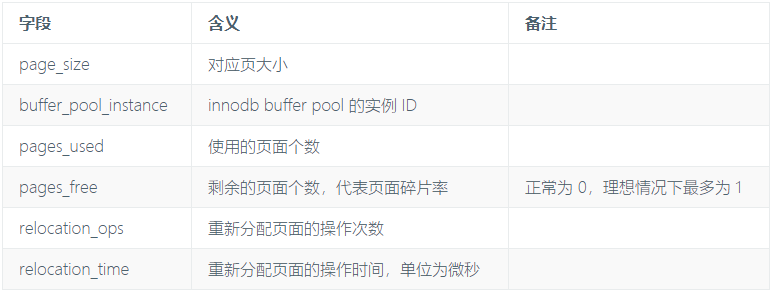
mysql> desc information_schema.innodb_cmpmem;+----------------------+--------+------+-----+---------+-------+| Field | Type | Null | Key | Default | Extra |+----------------------+--------+------+-----+---------+-------+| page_size | int | NO | | | || buffer_pool_instance | int | NO | | | || pages_used | int | NO | | | || pages_free | int | NO | | | || relocation_ops | bigint | NO | | | || relocation_time | int | NO | | | |+----------------------+--------+------+-----+---------+-------+6 rows in set (0.00 sec)
_RESET为历史数据,带
_RESET为瞬时数据。和前两类表不一样,这类表是针对索引的操作记录数据,开销很大,默认不开启。相关参数为:
mysql> select @@innodb_cmp_per_index_enabled;+--------------------------------+| @@innodb_cmp_per_index_enabled |+--------------------------------+| 0 |+--------------------------------+1 row in set (0.00 sec)mysql> set persist innodb_cmp_per_index_enabled = 1;Query OK, 0 rows affected (0.01 sec)
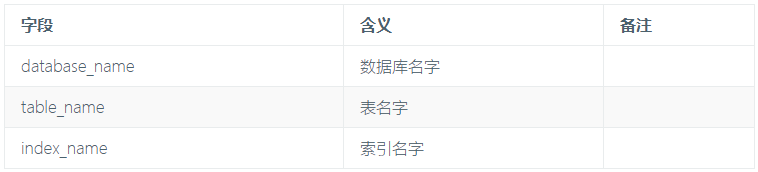
mysql> desc information_schema.innodb_cmp_per_index;+-----------------+--------------+------+-----+---------+-------+| Field | Type | Null | Key | Default | Extra |+-----------------+--------------+------+-----+---------+-------+| database_name | varchar(192) | NO | | | || table_name | varchar(192) | NO | | | || index_name | varchar(192) | NO | | | || compress_ops | int | NO | | | || compress_ops_ok | int | NO | | | || compress_time | int | NO | | | || uncompress_ops | int | NO | | | || uncompress_time | int | NO | | | |+-----------------+--------------+------+-----+---------+-------+8 rows in set (0.01 sec)
接下来看看压缩表的监测的实际用例,使用单表空间建立两张表:
t1 :未压缩表
t2 :page 为 4K 的压缩表
执行建表
mysql> create table t1(id int, r1 text,r2 text,primary key (id)) row_format=dynamic;Query OK, 0 rows affected (2.35 sec)mysql> create table t2 (id int, r1 text,r2 text, primary key (id)) key_block_size=4;Query OK, 0 rows affected (0.06 sec)
root@ytt-pc:/var/lib/mysql/3305/ytt# ls -shil总用量 2.0G3949029 1.6G -rw-r----- 1 mysql mysql 1.6G 3月 31 21:18 t1.ibd3946045 405M -rw-r----- 1 mysql mysql 404M 3月 31 21:42 t2.ibd
1. 查询速度对比
-- SQL 1mysql> select count(*) from t1;+----------+| count(*) |+----------+| 200000 |+----------+1 row in set (4.02 sec)-- SQL 2mysql> select count(*) from t2;+----------+| count(*) |+----------+| 200000 |+----------+1 row in set (2.69 sec)-- SQL 3mysql> select * from t1 where id = 100;...2 rows in set (6.82 sec)-- SQL 4mysql> select * from t1 where id = 100;...2 rows in set (3.60 sec)
_RESET的表。
mysql> delete from t2 where id = 999999;Query OK, 6 rows affected (3.41 sec)
对应的 compress_ops/compress_ops_ok 为 0
表 INNODB_CMP_PER_INDEX 无数据,因为没有重建索引。可以看出 DELETE 操作对于压缩表很适合。
mysql> select * from innodb_cmp where page_size=4096\G*************************** 1. row ***************************page_size: 4096compress_ops: 0compress_ops_ok: 0compress_time: 0uncompress_ops: 0uncompress_time: 01 row in set (0.00 sec)mysql> select * from innodb_cmp_per_index;Empty set (0.00 sec)
3. 更新少量数据
_RESET后缀表清空数据
mysql> update t2 set r1 = '200' where id = 200;Query OK, 2 rows affected (3.41 sec)Rows matched: 2 Changed: 2 Warnings: 0
mysql> select * from innodb_cmp where page_size=4096\G*************************** 1. row ***************************page_size: 4096compress_ops: 2compress_ops_ok: 2compress_time: 0uncompress_ops: 0uncompress_time: 01 row in set (0.01 sec)mysql> select * from innodb_cmp_per_index\G*************************** 1. row ***************************database_name: ytttable_name: t2index_name: PRIMARYcompress_ops: 2compress_ops_ok: 2compress_time: 0uncompress_ops: 0uncompress_time: 01 row in set (0.00 sec)
_RESET的表,清空两张表。
mysql> update t2 set r1 = '20000' where 1;Query OK, 199996 rows affected (26.59 sec)Rows matched: 199996 Changed: 199996 Warnings: 0
mysql> select * from innodb_cmp where page_size=4096\G*************************** 1. row ***************************page_size: 4096compress_ops: 48789compress_ops_ok: 6251compress_time: 4uncompress_ops: 21269uncompress_time: 01 row in set (0.01 sec)mysql> select * from innodb_cmp_per_index\G*************************** 1. row ***************************database_name: ytttable_name: t2index_name: PRIMARYcompress_ops: 48789compress_ops_ok: 6251compress_time: 4uncompress_ops: 21269uncompress_time: 01 row in set (0.00 sec)
下一篇我详细介绍表统计信息计算。
文章推荐:

文章转载自爱可生开源社区,如果涉嫌侵权,请发送邮件至:contact@modb.pro进行举报,并提供相关证据,一经查实,墨天轮将立刻删除相关内容。
