



Hudi 简介与实践
概念
Apache Hudi(发音为“Hudi”取自hadoop update delete increment 的首字母)在DFS的数据集上提供以下流原语
插入更新 (如何改变数据集?)
增量拉取 (如何获取变更的数据?)
在本节中,我们将讨论重要的概念和术语,这些概念和术语有助于理解并有效使用这些原语。
时间轴
在它的核心,Hudi维护一条包含在不同的即时
时间所有对数据集操作的时间轴
,从而提供,从不同时间点出发得到不同的视图下的数据集。Hudi即时包含以下组件
操作类型
: 对数据集执行的操作类型即时时间
: 即时时间通常是一个时间戳(例如:20190117010349),该时间戳按操作开始时间的顺序单调增加。状态
: 即时的状态
Hudi保证在时间轴上执行的操作的原子性和基于即时时间的时间轴一致性。
执行的关键操作包括
COMMITS
- 一次提交表示将一组记录原子写入到数据集中。CLEANS
- 删除数据集中不再需要的旧文件版本的后台活动。DELTA_COMMIT
- 增量提交是指将一批记录原子写入到MergeOnRead存储类型的数据集中,其中一些/所有数据都可以只写到增量日志中。COMPACTION
- 协调Hudi中差异数据结构的后台活动,例如:将更新从基于行的日志文件变成列格式。在内部,压缩表现为时间轴上的特殊提交。ROLLBACK
- 表示提交/增量提交不成功且已回滚,删除在写入过程中产生的所有部分文件。SAVEPOINT
- 将某些文件组标记为"已保存",以便清理程序不会将其删除。在发生灾难/数据恢复的情况下,它有助于将数据集还原到时间轴上的某个点。
任何给定的即时都可以处于以下状态之一
REQUESTED
- 表示已调度但尚未启动的操作。INFLIGHT
- 表示当前正在执行该操作。COMPLETED
- 表示在时间轴上完成了该操作。
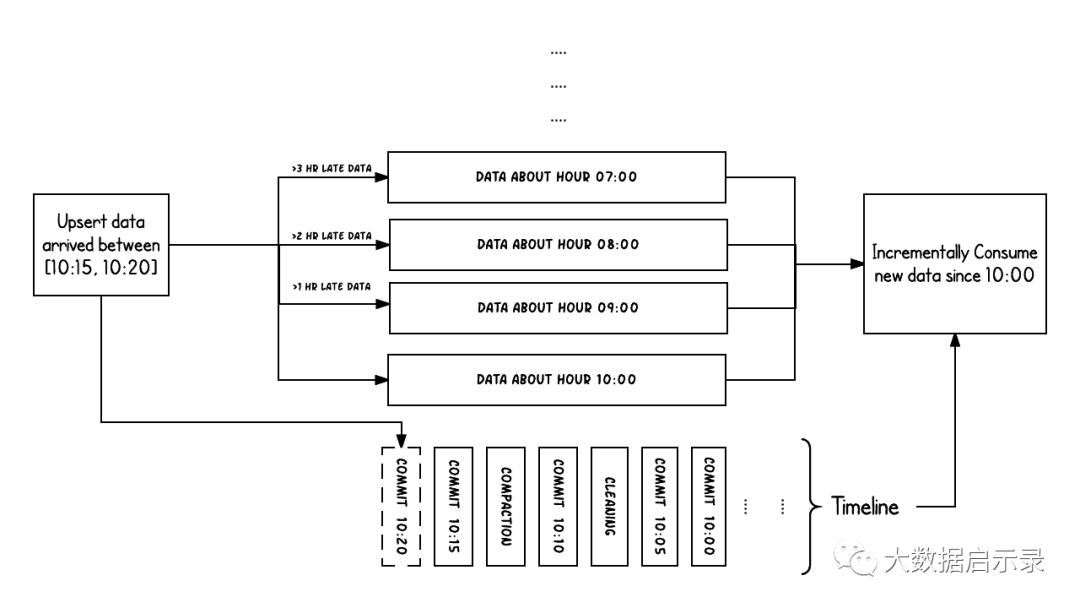
上面的示例显示了在Hudi数据集上大约10:00到10:20之间发生的更新事件,大约每5分钟一次,将提交元数据以及其他后台清理/压缩保留在Hudi时间轴上。观察的关键点是:提交时间指示数据的到达时间
(上午10:20),而实际数据组织则反映了实际时间或事件时间
,即数据所反映的(从07:00开始的每小时时段)。在权衡数据延迟和完整性时,这是两个关键概念。
如果有延迟到达的数据(事件时间为9:00的数据在10:20达到,延迟 >1 小时),我们可以看到upsert将新数据生成到更旧的时间段/文件夹中。在时间轴的帮助下,增量查询可以只提取10:00以后成功提交的新数据,并非常高效地只消费更改过的文件,且无需扫描更大的文件范围,例如07:00后的所有时间段。
文件组织
Hudi将DFS上的数据集组织到基本路径
下的目录结构中。数据集分为多个分区,这些分区是包含该分区的数据文件的文件夹,这与Hive表非常相似。每个分区被相对于基本路径的特定分区路径
区分开来。
在每个分区内,文件被组织为文件组
,由文件id
唯一标识。每个文件组包含多个文件切片
,其中每个切片包含在某个提交/压缩即时时间生成的基本列文件(*.parquet
)以及一组日志文件(*.log*
),该文件包含自生成基本文件以来对基本文件的插入/更新。Hudi采用MVCC设计,其中压缩操作将日志和基本文件合并以产生新的文件片,而清理操作则将未使用的/较旧的文件片删除以回收DFS上的空间。
Hudi通过索引机制将给定的hoodie键(记录键+分区路径)映射到文件组,从而提供了高效的Upsert。一旦将记录的第一个版本写入文件,记录键和文件组/文件id之间的映射就永远不会改变。简而言之,映射的文件组包含一组记录的所有版本。
Hudi底层数据存储
 |
|---|
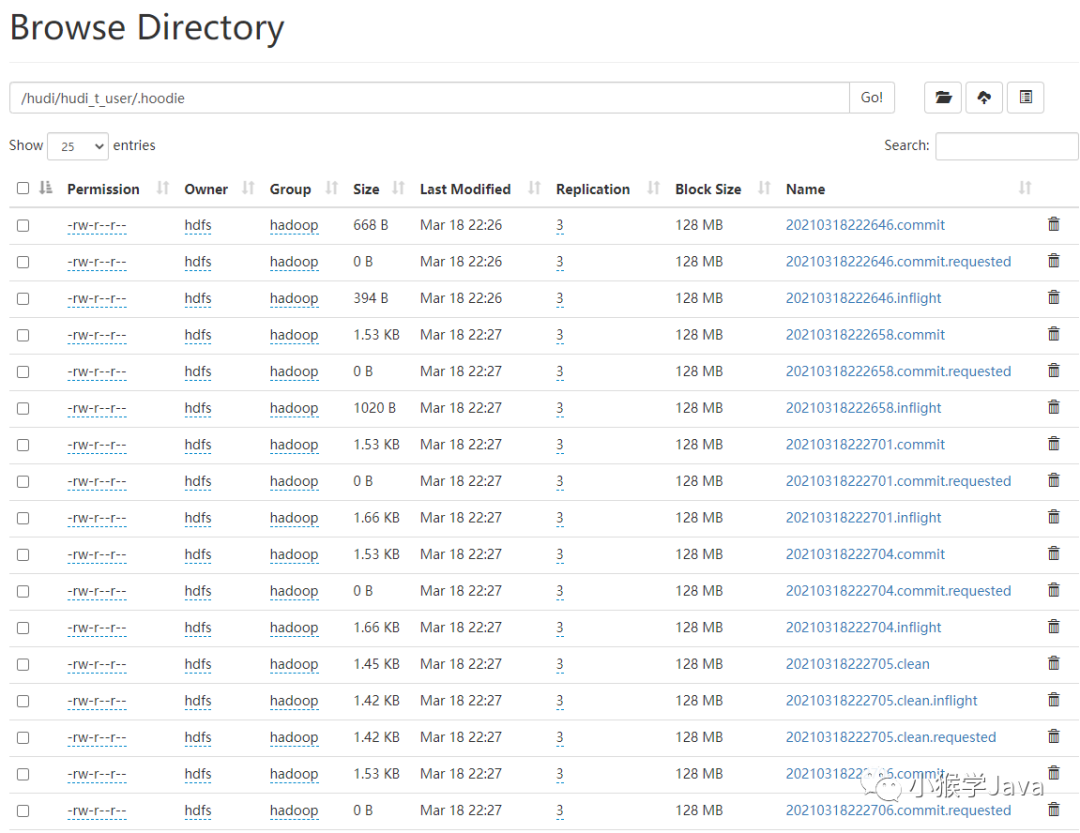
| 在每个Hudi的表中,都有一个.hoodie文件夹,里面包含了每一个Hudi Instant操作信息。 |
可以看到,每个Instant都是一个文件,文件名以InstantTime、Action以及State组成。例如:针对 20210318222704这个Hudi Instant,我们看到了有3个相关文件。
[hive@ha-node1 logs]$ hdfs dfs -ls /hudi/hudi_t_user/.hoodie | grep 20210318222704
-rw-r--r--   3 hdfs hadoop       1569 2021-03-18 22:27 /hudi/hudi_t_user/.hoodie/20210318222704.commit
-rw-r--r--   3 hdfs hadoop          0 2021-03-18 22:27 /hudi/hudi_t_user/.hoodie/20210318222704.commit.requested
-rw-r--r--   3 hdfs hadoop       1701 2021-03-18 22:27 /hudi/hudi_t_user/.hoodie/20210318222704.inflight
文件:20210318222704.commit.requested
[hive@ha-node1 logs]$ hdfs dfs -tail /hudi/hudi_t_user/.hoodie/20210318222704.commit.requested
[hive@ha-node1 logs]$
该文件是一个空的文件,它表示当前阶段是请求调度执行阶段,并没有启动。
文件:20210318222704.inflight
{
  "partitionToWriteStats" : {
    "dt=2021/03/18" : [ {
      "fileId" : "",
      "path" : null,
      "prevCommit" : "null",
      "numWrites" : 0,
      "numDeletes" : 0,
      "numUpdateWrites" : 0,
      "numInserts" : 0,
      "totalWriteBytes" : 0,
      "totalWriteErrors" : 0,
      "tempPath" : null,
      "partitionPath" : null,
      "totalLogRecords" : 0,
      "totalLogFilesCompacted" : 0,
      "totalLogSizeCompacted" : 0,
      "totalUpdatedRecordsCompacted" : 0,
      "totalLogBlocks" : 0,
      "totalCorruptLogBlock" : 0,
      "totalRollbackBlocks" : 0,
      "fileSizeInBytes" : 0
    }, {
      "fileId" : "8ba8507d-b021-4d85-b54a-5b87ed1fd90c-0",
      "path" : null,
      "prevCommit" : "20210318222701",
      "numWrites" : 0,
      "numDeletes" : 0,
      "numUpdateWrites" : 1,
      "numInserts" : 0,
      "totalWriteBytes" : 0,
      "totalWriteErrors" : 0,
      "tempPath" : null,
      "partitionPath" : null,
      "totalLogRecords" : 0,
      "totalLogFilesCompacted" : 0,
      "totalLogSizeCompacted" : 0,
      "totalUpdatedRecordsCompacted" : 0,
      "totalLogBlocks" : 0,
      "totalCorruptLogBlock" : 0,
      "totalRollbackBlocks" : 0,
      "fileSizeInBytes" : 0
    } ]
  },
  "compacted" : false,
  "extraMetadata" : { },
  "operationType" : "UPSERT",
  "totalCompactedRecordsUpdated" : 0,
  "totalCreateTime" : 0,
  "totalLogRecordsCompacted" : 0,
  "fileIdAndRelativePaths" : {
    "" : null,
    "8ba8507d-b021-4d85-b54a-5b87ed1fd90c-0" : null
  },
  "totalUpsertTime" : 0,
  "totalLogFilesSize" : 0,
  "totalLogFilesCompacted" : 0,
  "totalRecordsDeleted" : 0,
  "totalScanTime" : 0
}
可以看到,在commit.inflight表示Hudi Instant正在提交运行。它记录了要写入的分析状态、执行的操作类型等。
文件:20210318222704.commit
{
  "partitionToWriteStats" : {
    "dt=2021/03/18" : [ {
      "fileId" : "8ba8507d-b021-4d85-b54a-5b87ed1fd90c-0",
      "path" : "dt=2021/03/18/8ba8507d-b021-4d85-b54a-5b87ed1fd90c-0_0-113-112_20210318222704.parquet",
      "prevCommit" : "20210318222701",
      "numWrites" : 6,
      "numDeletes" : 0,
      "numUpdateWrites" : 1,
      "numInserts" : 0,
      "totalWriteBytes" : 434393,
      "totalWriteErrors" : 0,
      "tempPath" : null,
      "partitionPath" : "dt=2021/03/18",
      "totalLogRecords" : 0,
      "totalLogFilesCompacted" : 0,
      "totalLogSizeCompacted" : 0,
      "totalUpdatedRecordsCompacted" : 0,
      "totalLogBlocks" : 0,
      "totalCorruptLogBlock" : 0,
      "totalRollbackBlocks" : 0,
      "fileSizeInBytes" : 434393
    } ]
  },
  "compacted" : false,
  "extraMetadata" : {
    "schema" : "{\"type\":\"record\",\"name\":\"hudi_t_user_record\",\"namespace\":\"hoodie.hudi_t_user\",\"fields\":[{\"name\":\"id\",\"type\":[\"string\",\"null\"]},{\"name\":\"name\",\"type\":[\"string\",\"null\"]},{\"name\":\"dt\",\"type\":[\"string\",\"null\"]}]}"
  },
  "operationType" : "UPSERT",
  "totalCompactedRecordsUpdated" : 0,
  "totalCreateTime" : 0,
  "totalLogRecordsCompacted" : 0,
  "fileIdAndRelativePaths" : {
    "8ba8507d-b021-4d85-b54a-5b87ed1fd90c-0" : "dt=2021/03/18/8ba8507d-b021-4d85-b54a-5b87ed1fd90c-0_0-113-112_20210318222704.parquet"
  },
  "totalUpsertTime" : 165,
  "totalLogFilesSize" : 0,
  "totalLogFilesCompacted" : 0,
  "totalRecordsDeleted" : 0,
  "totalScanTime" : 0
}
commit文件表示已提交的Hudi Instant。它记录了本地提交的具体信息,例如:总共写入的字节数量、分区的路径、对应的parquet数据文件、更新写入的数据条数、以及当前提交的Hudi表schema信息、Upsert所消耗的时间等等。
存储类型和视图
Hudi存储类型定义了如何在DFS上对数据进行索引和布局以及如何在这种组织之上实现上述原语和时间轴活动(即如何写入数据)。反过来,视图
定义了基础数据如何暴露给查询(即如何读取数据)。
| 存储类型 | 支持的视图 |
|---|---|
| 写时复制 | 读优化 + 增量 |
| 读时合并 | 读优化 + 增量 + 近实时 |
存储类型
Hudi支持以下存储类型。
COW: 仅使用列文件格式(例如parquet)存储数据。通过在写入过程中执行同步合并以更新版本并重写文件。
MOR : 使用列式(例如parquet)+ 基于行(例如avro)的文件格式组合来存储数据。更新记录到增量文件中,然后进行同步或异步压缩以生成列文件的新版本。
下表总结了这两种存储类型之间的权衡
| 权衡 | 写时复制 | 读时合并 |
|---|---|---|
| 数据延迟 | 更高 | 更低 |
| 更新代价(I/O) | 更高(重写整个parquet文件) | 更低(追加到增量日志) |
| Parquet文件大小 | 更小(高更新代价(I/o)) | 更大(低更新代价) |
| 写放大 | 更高 | 更低(取决于压缩策略) |
视图
Hudi支持以下存储数据的视图
读优化视图 : 在此视图上的查询将查看给定提交或压缩操作中数据集的最新快照。该视图仅将最新文件切片中的基本/列文件暴露给查询,并保证与非Hudi列式数据集相比,具有相同的列式查询性能。
增量视图 : 对该视图的查询只能看到从某个提交/压缩后写入数据集的新数据。该视图有效地提供了更改流,来支持增量数据管道。
实时视图 : 在此视图上的查询将查看某个增量提交操作中数据集的最新快照。该视图通过动态合并最新的基本文件(例如parquet)和增量文件(例如avro)来提供近实时数据集(几分钟的延迟)。
下表总结了不同视图之间的权衡。
| 权衡 | 读优化 | 实时 |
|---|---|---|
| 数据延迟 | 更高 | 更低 |
| 查询延迟 | 更低(原始列式性能) | 更高(合并列式 + 基于行的增量) |
写时复制存储(cow)
[hive@ha-node1 logs]$ hdfs dfs -ls /hudi/hudi_t_user_cow/dt=2021/03/19
/hudi/hudi_t_user_cow/dt=2021/03/19/3abde036-8c0f-4bed-89f1-872422264a21-0_0-128-121_20210319175250.parquet
/hudi/hudi_t_user_cow/dt=2021/03/19/3abde036-8c0f-4bed-89f1-872422264a21-0_0-38-45_20210319175212.parquet
/hudi/hudi_t_user_cow/dt=2021/03/19/3abde036-8c0f-4bed-89f1-872422264a21-0_0-68-71_20210319175217.parquet
/hudi/hudi_t_user_cow/dt=2021/03/19/3abde036-8c0f-4bed-89f1-872422264a21-0_0-98-95_20210319175247.parquet
可以看到,在Hudi分区中,只有parquet文件。
写时复制存储中的文件片仅包含基本/列文件,并且每次提交都会生成新版本的基本文件。换句话说,我们压缩每个提交,从而所有的数据都是以列数据的形式储存。在这种情况下,写入数据非常昂贵(我们需要重写整个列数据文件,即使只有一个字节的新数据被提交),而读取数据的成本则没有增加。这种视图有利于读取繁重的分析工作。
以下内容说明了将数据写入写时复制存储并在其上运行两个查询时,它是如何工作的。
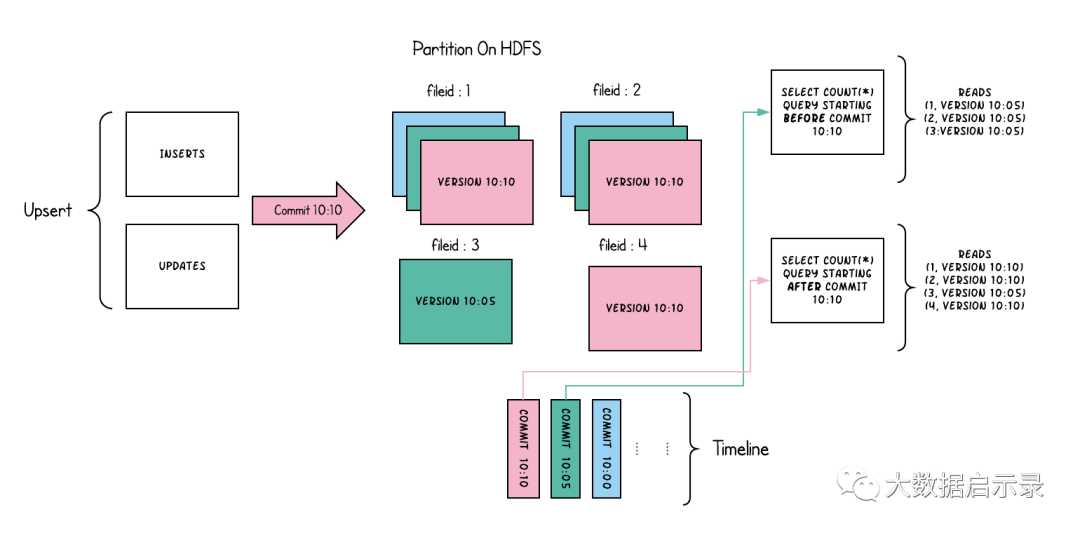
随着数据的写入,对现有文件组的更新将为该文件组生成一个带有提交即时时间标记的新切片,而插入分配一个新文件组并写入该文件组的第一个切片。这些文件切片及其提交即时时间在上面用颜色编码。针对这样的数据集运行SQL查询(例如:select count(*)
统计该分区中的记录数目),首先检查时间轴上的最新提交并过滤每个文件组中除最新文件片以外的所有文件片。如您所见,旧查询不会看到以粉红色标记的当前进行中的提交的文件,但是在该提交后的新查询会获取新数据。因此,查询不受任何写入失败/部分写入的影响,仅运行在已提交数据上。
写时复制存储的目的是从根本上改善当前管理数据集的方式,通过以下方法来实现
优先支持在文件级原子更新数据,而无需重写整个表/分区
能够只读取更新的部分,而不是进行低效的扫描或搜索
严格控制文件大小来保持出色的查询性能(小的文件会严重损害查询性能)。
读时合并存储(MOR)
MOR类型表是COW类型表更高级的实现,其实,对应到源码中,它是COW表的子类。
 |
|---|
| HoodieSparkCopyOnWriteTable > HoodieSparkMergeOnReadTable |
其实它还是提供最新的基本列文件给外部查询。此外,它会将Upsert的操作存储在基于行的增量日志存储中,通过这样方式,MOR表可以用Delta Log来实现快照查询。
大家可以看一下面的测试:
[hive@ha-node1 logs]$ hdfs dfs -ls /hudi/hudi_t_user_mor/dt=2021/03/19
/hudi/hudi_t_user_mor/dt=2021/03/19/.9a423733-573f-4df3-9374-e3fe05cfbf0f-0_20210319173324.log.1_0-68-71
/hudi/hudi_t_user_mor/dt=2021/03/19/.9a423733-573f-4df3-9374-e3fe05cfbf0f-0_20210319173400.log.1_0-142-142
/hudi/hudi_t_user_mor/dt=2021/03/19/9a423733-573f-4df3-9374-e3fe05cfbf0f-0_0-117-116_20210319173400.parquet
/hudi/hudi_t_user_mor/dt=2021/03/19/9a423733-573f-4df3-9374-e3fe05cfbf0f-0_0-38-45_20210319173324.parquet
可以看到,在分区文件夹中,MOR表有parquet文件,也有log文件。其中,每一次新增数据,会产生parquet文件,而执行更新时,会写入到log文件中。
这种类型的表,可以智能地平衡读放大、和写放大,提供近实时的数据。针对MOR类型的表,COMPACTION过程显得很重要,它需要选择Delta Log中哪些数据要合并到基础列式文件中,并保证查询性能。
读时合并存储是写时复制的升级版,从某种意义上说,它仍然可以通过读优化表提供数据集的读取优化视图(写时复制的功能)。此外,它将每个文件组的更新插入存储到基于行的增量日志中,通过文件id,将增量日志和最新版本的基本文件进行合并,从而提供近实时的数据查询。因此,此存储类型智能地平衡了读和写的成本,以提供近乎实时的查询。这里最重要的一点是压缩器,它现在可以仔细挑选需要压缩到其列式基础文件中的增量日志(根据增量日志的文件大小),以保持查询性能(较大的增量日志将会提升近实时的查询时间,并同时需要更长的合并时间)。
以下内容说明了存储的工作方式,并显示了对近实时表和读优化表的查询。
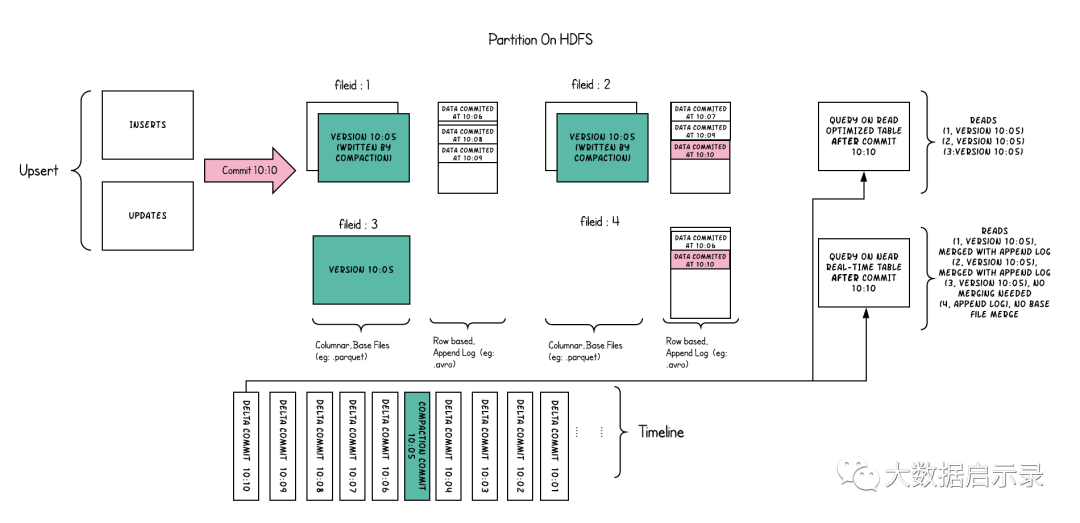
此示例中发生了很多有趣的事情,这些带出了该方法的微妙之处。
现在,我们每1分钟左右就有一次提交,这是其他存储类型无法做到的。
现在,在每个文件id组中,都有一个增量日志,其中包含对基础列文件中记录的更新。在示例中,增量日志包含10:05至10:10的所有数据。与以前一样,基本列式文件仍使用提交进行版本控制。因此,如果只看一眼基本文件,那么存储布局看起来就像是写时复制表的副本。
定期压缩过程会从增量日志中合并这些更改,并生成基础文件的新版本,就像示例中10:05发生的情况一样。
有两种查询同一存储的方式:读优化(RO)表和近实时(RT)表,具体取决于我们选择查询性能还是数据新鲜度。
对于RO表来说,提交数据在何时可用于查询将有些许不同。请注意,以10:10运行的(在RO表上的)此类查询将不会看到10:05之后的数据,而在RT表上的查询总会看到最新的数据。
何时触发压缩以及压缩什么是解决这些难题的关键。通过实施压缩策略,在该策略中,与较旧的分区相比,我们会积极地压缩最新的分区,从而确保RO表能够以一致的方式看到几分钟内发布的数据。
读时合并存储上的目的是直接在DFS上启用近实时处理,而不是将数据复制到专用系统,后者可能无法处理大数据量。该存储还有一些其他方面的好处,例如通过避免数据的同步合并来减少写放大,即批量数据中每1字节数据需要的写入数据量。
表类型与查询
Hudi中表的索引、文件结构、流式原语、时间轴上的操作都是由表类型决定的(如何写入数据)。而查询类型表示了如何把数据提供给查询(如何读取数据)。

可以看到,COW类型的表支持快照查询、以及增量查询。而MOR表支持快照查询、增量查询、读优化查询。
表类型
Hudi中支持两种类型的表,一种是COW,另外一种是MOR。要区分它们很容易,COW是不带日志的、而MOR是带日志的。
COW(Copy-On-Write)只使用一种文件格式存储数据,例如:parquet。写入的时候就会执行数据的合并,更新版本、重写文件。
MOR(Merge-On-Read)
结合列式(Parquet)和行式(Avro)两种格式来存储数据。更新记录到增量文件中,然后执行COMPACTION生成列式文件。
以下是这两种类型的对比:
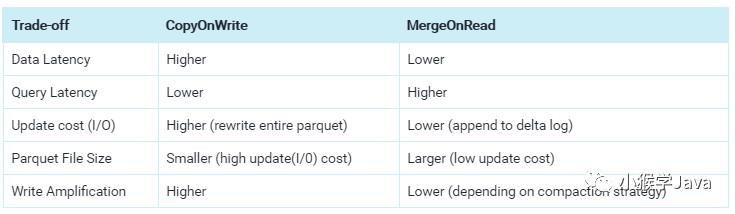
可以看到:COW表的写放大问题严重,而MOR提供了低延迟、更高效地实时写入,但读取的时候需要更高的延迟。
在Hudi表目录的.hoodie文件夹中,有一个hoodie.properties,里面记录了Hudi表的属性。例如:
hoodie.table.name=hudi_t_user
hoodie.archivelog.folder=archived
hoodie.table.type=COPY_ON_WRITE
hoodie.table.version=1
hoodie.timeline.layout.version=1
可以看到,当前Hudi的表名、archivelog目录位置、表的版本、表的类型为COW表、timeline的文件结构版本为1。
查询类型
Snapshot Queries
快照查询能够查询到表的最新快照数据。如果是MOR类型表,会将基本文件和增量文件合并后,再提供数据。(可实现分钟级);对于COW类型表,它会现有的表先进行drop、再进行replace,并提供了Upsert/Delete等功能。
Incremental Queries
增量查询只能查看到写入表的新数据。这种查询能够有效地应对Change Stream,方便对接流式处理引擎。
Read Optimized Queries
读优化查询可以查询到表的最新快照数据,它仅查询最新的基本列文件,可以保证列查询性能。这种方式保证了性能,但数据可能会有延迟。
流式摄取
Frog造数程序
实体类
@Data
public class User {
    // 用户ID
    @JSONField(ordinal = 1)
    private Integer id;
    // 生日
    @JSONField(ordinal = 2, format="yyyy-MM-dd HH:mm:ss")
    private Date birthday;
    // 姓名
    @JSONField(ordinal = 3)
    private String name;
    // 创建日期
    @JSONField(ordinal = 4, format="yyyy-MM-dd HH:mm:ss")
    private Date createTime;
    // 职位
    @JSONField(ordinal = 5)
    private String position;

    public User() {
    }

    public User(Integer id, String name, Date birthday, String position) {
        this.id = id;
        this.birthday = birthday;
        this.name = name;
        this.position = position;
        this.createTime = new Date();
    }

    @Override
    public String toString() {
        return JSON.toJSONString(this);
    }
}
Frog造数接口
/**
 * 实体(数据)生成器
 */
public interface Frog<T> {
    T getOne();
}
UserFrog造数器
public class UserFrog implements Frog<User> {
    private Logger logger;

    private Random r;
    private List<Date> DATE_CACHE;
    private final Integer DATE_MAX_NUM = 100000;             // 日期数量
    private final Integer MAX_DELAY_MILLS = 60 * 1000;       // 最大延迟毫秒数
    private final Integer DELAY_USER_INTERVAL = 10;          // N个User中就会有一个延迟
    private final List<String> NAME_CACHE;                   // 姓名缓存
    private final List<String> POSITION_CACHE;               // 岗位缓存
    private Long genIndex = 0L;                              // 本次实例生成用户个数

    private UserFrog() {
        r = new Random();
        synchronized (UserFrog.class) {
            logger = LogManager.getLogger(UserFrog.class);

            logger.debug("从names.txt中加载姓名缓存...");
            // 加载姓名缓存
            NAME_CACHE = loadResourceFileAsList("names.txt");
            logger.debug(String.format("已加载 %d 个姓名.", NAME_CACHE.size()));

            logger.debug("从positions.txt加载岗位职位缓存...");
            // 加载职位缓存
            POSITION_CACHE = loadResourceFileAsList("positions.txt");
            logger.debug(String.format("已加载 %d 个岗位.", POSITION_CACHE.size()));

            logger.debug("自动生成日期缓存...");
            // 加载日期缓存
            initDateCache();
            logger.debug(String.format("已加载 %d 个日期", DATE_CACHE.size()));
        }
    }

    public static UserFrog build() {
        return new UserFrog();
    }

    /**
     * 加载socket_datagen目录中的资源文件到列表中
     * @param fileName
     */
    private List<String> loadResourceFileAsList(String fileName) {
        try(InputStream resourceAsStream =
                    User.class.getClassLoader().getResourceAsStream("socket_datagen/" + fileName);
            InputStreamReader inputStreamReader =
                    new InputStreamReader(resourceAsStream);
            BufferedReader br = new BufferedReader(inputStreamReader)) {
            return br.lines()
                    .collect(Collectors.toList());
        } catch (IOException e) {
            logger.fatal(e);
        }

        return ListUtils.EMPTY_LIST;
    }

    private void initDateCache() {
        // 生成出生年月缓存
        final Calendar instance = Calendar.getInstance();

        instance.set(Calendar.YEAR, 1970);
        instance.set(Calendar.MONTH, 1);
        instance.set(Calendar.DAY_OF_MONTH, 1);
        Long startTimestamp = instance.getTimeInMillis();

        instance.set(Calendar.YEAR, 2021);
        instance.set(Calendar.MONTH, 3);
        Long endTimestamp = instance.getTimeInMillis();

        DATE_CACHE = LongStream.range(0, DATE_MAX_NUM)
                .map(n -> RandomUtils.nextLong(startTimestamp, endTimestamp))
                .mapToObj(t -> new Date(t))
                .collect(Collectors.toList());
    }

    public User getOne() {
        int userId = r.nextInt(Integer.MAX_VALUE);
        Date birthday = DATE_CACHE.get(r.nextInt(DATE_CACHE.size()));
        String name = NAME_CACHE.get(r.nextInt(NAME_CACHE.size()));
        String position = POSITION_CACHE.get(r.nextInt(POSITION_CACHE.size()));

        final User user = new User(userId, name, birthday, position);
        if(genIndex % DELAY_USER_INTERVAL == 0) {
            final int delayMills = r.nextInt(MAX_DELAY_MILLS);
            logger.debug(String.format("生成延迟数据 - User ID=%d, 延迟: %.1f 秒", userId, delayMills / 1000.0));
            user.setCreateTime(new Date(new Date().getTime() - delayMills));
        }
        ++genIndex;

        return user;
    }

    public static void main(String[] args) {
        final UserFrog userBuilder = UserFrog.build();
        IntStream.range(0, 1000)
            .forEach(n -> {
                System.out.println(userBuilder.getOne().toString());
            });
    }
}
Socket造数程序
/**
 * Socket方式的数据生成器
 */
public class SocketProducer implements Runnable {

    private static Logger logger = LogManager.getLogger(SocketProducer.class);
    private static Short LSTN_PORT = 9999;
    private static Short PRODUCE_INTEVAL = 1;           // 生成消息的时间间隔
    private static Short MAX_CONNECTIONS = 10;          // 最大10个连接
    private static Frog userFrog = UserFrog.build();

    private ServerSocket server;

    public SocketProducer(ServerSocket srv) {
        this.server = srv;
    }

    @Override
    public void run() {
        // 数据总条数、耗时
        long totalNum = 0;
        long startMillseconds = 0;

        try {
            final Socket client = server.accept();
            String clientInfo = String.format("主机名:%s, IP:%s"
                    , client.getInetAddress().getHostName()
                    , client.getInetAddress().getHostAddress());

            // 设置线程元数据
            Thread.currentThread().setName(clientInfo);

            logger.info(String.format("客户端[%s]已经连接到服务器.", clientInfo));

            OutputStream outputStream = client.getOutputStream();
            OutputStreamWriter outputStreamWriter = new OutputStreamWriter(outputStream);
            BufferedWriter writer = new BufferedWriter(outputStreamWriter);

            startMillseconds = System.currentTimeMillis();

            // 发送消息
            while(true) {
                String msg = userFrog.getOne().toString();
                logger.debug(msg);
                writer.write(msg);
                writer.newLine();
                writer.flush();
                totalNum++;

                try {
                    TimeUnit.MILLISECONDS.sleep(PRODUCE_INTEVAL);
                } catch (InterruptedException e) {
                    logger.warn(e);
                    logger.warn(String.format("客户端[%s]断开", clientInfo));
                    break;
                }
            }
        } catch (IOException e) {
            logger.fatal(e);
        }

        if(startMillseconds == -1) {
            logger.warn("统计耗时失败!客户端连接异常断开!");
        }
        else {
            long endMillseconds = System.currentTimeMillis();
            // 耗时
            double elapsedInSeconds = (endMillseconds - startMillseconds) / 1000.0;
            double rate = totalNum / elapsedInSeconds;
            logger.info(String.format("共计生成数据:%d条, 耗时:%.1f秒, 速率:%.1f条/s"
                    , totalNum
                    , elapsedInSeconds
                    , rate));
        }
    }

    public static void main(String[] args) {
        try {
            logger.debug(String.format("Socket服务器配置:\n"
                            + "-----------------------\n"
                            + "监听端口号:%d \n"
                            + "生成消息事件间隔: %d(毫秒)\n"
                            + "最大连接数: %d \n"
                            + "-----------------------"
                                , LSTN_PORT
                                , PRODUCE_INTEVAL
                                , MAX_CONNECTIONS));

            ServerSocket serverSocket = new ServerSocket(LSTN_PORT);
            logger.info(String.format("启动服务器,监听端口: %d", LSTN_PORT));
            ExecutorService executorService = Executors.newFixedThreadPool(MAX_CONNECTIONS);

            IntStream.range(0, MAX_CONNECTIONS)
                .forEach(n -> {
                    executorService.submit(new SocketProducer(serverSocket));
                });

            while(true) {
                if(executorService.isShutdown() || executorService.isTerminated()) {
                    IntStream.range(0, MAX_CONNECTIONS)
                        .forEach(n -> {
                            executorService.submit(new SocketProducer(serverSocket));
                        });
                }
            }
        } catch (IOException e) {
            logger.fatal(e);
        }
    }
}
Structured Streaming
构建开发环境
导入Spark、Hudi依赖。
<properties>
  <spark.scope>compile</spark.scope>
  <maven.compiler.source>8</maven.compiler.source>
  <maven.compiler.target>8</maven.compiler.target>
  <scala.version>2.12</scala.version>
  <spark.version>3.1.1</spark.version>
  <commons-cli.version>1.4</commons-cli.version>
  <maven-scala-plugin.version>2.15.2</maven-scala-plugin.version>
  <maven-shade-plugin.version>2.3</maven-shade-plugin.version>
  <commons-lang3.version>3.8.1</commons-lang3.version>
  <junit.version>4.12</junit.version>
  <hudi.version>0.7.0</hudi.version>
  <build-helper-maven-plugin.version>1.8</build-helper-maven-plugin.version>
  <hive.version>2.3.8</hive.version>
  <hadoop.version>3.2.1</hadoop.version>
  <guava.version>24.0-jre</guava.version>
</properties>

<dependencies>
  <dependency>
    <groupId>org.apache.spark</groupId>
    <artifactId>spark-core_${scala.version}</artifactId>
    <version>${spark.version}</version>
  </dependency>
  <dependency>
    <groupId>org.apache.spark</groupId>
    <artifactId>spark-sql_${scala.version}</artifactId>
    <version>${spark.version}</version>
  </dependency>
  <dependency>
    <groupId>org.apache.commons</groupId>
    <artifactId>commons-lang3</artifactId>
    <version>${commons-lang3.version}</version>
  </dependency>
  <dependency>
    <groupId>junit</groupId>
    <artifactId>junit</artifactId>
    <version>${junit.version}</version>
  </dependency>
  <dependency>
    <groupId>commons-cli</groupId>
    <artifactId>commons-cli</artifactId>
    <version>${commons-cli.version}</version>
  </dependency>
  <dependency>
    <groupId>org.apache.hudi</groupId>
    <artifactId>hudi-spark-bundle_${scala.version}</artifactId>
    <version>${hudi.version}</version>
  </dependency>
  <dependency>
    <groupId>org.apache.spark</groupId>
    <artifactId>spark-avro_${scala.version}</artifactId>
    <version>${spark.version}</version>
  </dependency>
  <dependency>
    <groupId>org.apache.spark</groupId>
    <artifactId>spark-hive_${scala.version}</artifactId>
    <version>${spark.version}</version>
  </dependency>
  <dependency>
    <groupId>org.apache.hive</groupId>
    <artifactId>hive-common</artifactId>
    <version>${hive.version}</version>
  </dependency>
  <dependency>
    <groupId>org.apache.hive</groupId>
    <artifactId>hive-jdbc</artifactId>
    <version>${hive.version}</version>
  </dependency>
  <dependency>
    <groupId>org.apache.hadoop</groupId>
    <artifactId>hadoop-common</artifactId>
    <version>${hadoop.version}</version>
  </dependency>
  <dependency>
    <groupId>com.google.guava</groupId>
    <artifactId>guava</artifactId>
    <version>${guava.version}</version>
  </dependency>
</dependencies>
构建Strcutured Streaming入口
def sparkSession(appName: String) = {
  val conf = new SparkConf()

  conf.set("spark.serializer", "org.apache.spark.serializer.KryoSerializer")
  conf.set("spark.sql.streaming.checkpointLocation", "/meta/streaming_checkpoint")

  SparkSession
  .builder
  .appName(appName)
  .master("local[*]")
  .config(conf)
  .getOrCreate()
}
实体类
case class User(id :Integer
                , birthday : String
                , name :String
                , createTime :String
                , position :String)

object User {
    def apply(json: String) = {
        val jsonObject = JSON.parseObject(json)

        val id = jsonObject.getInteger("id")
        val birthday = jsonObject.getString("birthday");
        val name = jsonObject.getString("name")

        val createTime = jsonObject.getString("createTime");
        val position = jsonObject.getString("position")

        new User(id
            , birthday
            , name
            , createTime
            , position)
    }
}
Hudi分区提取器
/**
 * 从Hudi分区路径中获取分区字段
 */
public class DayPartitionValueExtractor implements PartitionValueExtractor {

    @Override
    public List<String> extractPartitionValuesInPath(String partitionPath) {
        final String[] dateField = partitionPath.split("-");

        if(dateField != null && dateField.length >= 3) {
            return Collections.singletonList(IntStream.range(0, 3)
                    .mapToObj(idx -> dateField[idx])
                    .collect(Collectors.joining("-")));
        }

        return ListUtils.EMPTY_LIST;
    }
}
Hudi数据Upsert
/**
 * Hudi小文件测试
 */
object SmallFilesTestApp {
    def main(args: Array[String]): Unit = {
        // 加载Spark SQL上下文
        val spark = SparkEnv.sparkSession("Streaming Hudi API MOR Test")
        // 设置日志级别
        spark.sparkContext.setLogLevel("WARN")

        import spark.implicits._

        val userStrDataFrame = spark.readStream
            .format("socket")
            .option("host", "localhost")
            .option("port", 9999)
            .option("includeTimestamp", false)
            .option("numPartitions", 5)
            .load()

        // 解析JSON串
        val userDF = userStrDataFrame.as[String]
            .map(User(_))
            // 添加分区字段
            .withColumn("dt", $"createTime".substr(0, 10))

         userDF.writeStream
             .format("console")
             .outputMode("append")
             .option("truncate", false)
             .option("numRows", 100)
             .start()

        // 写入到Hudi
        val hudiTableName = "hudi_t_user_mor";
        val hiveDatabaseName = "hudi_datalake"
        val hiveTableName = "hudi_ods_user_mor"

        userDF.writeStream
            .outputMode(OutputMode.Append())
            .format("hudi")
            .option("hoodie.table.name", hudiTableName)
            .option("hoodie.bootstrap.base.path", "/hudi")
            .option("hoodie.datasource.write.table.name", hudiTableName)
            .option("hoodie.datasource.write.operation", "upsert")
            .option("hoodie.datasource.write.table.type", "MERGE_ON_READ")
            .option("hoodie.datasource.write.precombine.field", "dt")
            .option("hoodie.datasource.write.recordkey.field", "id")
            .option("hoodie.datasource.write.partitionpath.field", "dt")
            .option("hoodie.datasource.write.hive_style_partitioning", false)
            .option("hoodie.datasource.hive_sync.enable", true)
            .option("hoodie.datasource.hive_sync.database", hiveDatabaseName)
            .option("hoodie.datasource.hive_sync.table", hiveTableName)
            .option("hoodie.datasource.hive_sync.username", "hive")
            .option("hoodie.datasource.hive_sync.password", "hive")
            .option("hoodie.datasource.hive_sync.jdbcurl", "jdbc:hive2://ha-node1:10000")
            .option("hoodie.datasource.hive_sync.partition_extractor_class", "cn.pin.streaming.tools.DayPartitionValueExtractor")
            .option("hoodie.datasource.hive_sync.partition_fields", "dt")
            .option("hoodie.datasource.hive_sync.use_jdbc", true)
            .option("hoodie.datasource.hive_sync.auto_create_database", true)
            .option("hoodie.datasource.hive_sync.skip_ro_suffix", false)
            .option("hoodie.datasource.hive_sync.support_timestamp", false)
            .option("hoodie.bootstrap.parallelism", 5)
            .option("hoodie.bulkinsert.shuffle.parallelism", 5)
            .option("hoodie.insert.shuffle.parallelism", 5)
            .option("hoodie.delete.shuffle.parallelism", 5)
            .option("hoodie.upsert.shuffle.parallelism", 5)
            .start(s"/hudi/${hudiTableName}")
            .awaitTermination()
    }
}
运行
启动HDFS集群 启动Hive MetaStore和HiveServer2 启动造数程序
湖仓一体(Hudi + Hive)
COW表
Structured Streaming运行时,会自动在Hive中创建外部表。
+-----------------------+
|       tab_name        |
+-----------------------+
| hudi_ods_user_cow     |
+-----------------------+
查看表结构
查看cow表信息。
0: jdbc:hive2://ha-node1:10000> desc hudi_ods_user_cow;
+--------------------------+------------+----------+
|         col_name         | data_type  | comment  |
+--------------------------+------------+----------+
| _hoodie_commit_time      | string     |          |
| _hoodie_commit_seqno     | string     |          |
| _hoodie_record_key       | string     |          |
| _hoodie_partition_path   | string     |          |
| _hoodie_file_name        | string     |          |
| id                       | string     |          |
| name                     | string     |          |
| dt                       | string     |          |
|                          | NULL       | NULL     |
| # Partition Information  | NULL       | NULL     |
| # col_name               | data_type  | comment  |
| dt                       | string     |          |
+--------------------------+------------+----------+
12 rows selected (0.336 seconds)
Hive中的表中包含了id、name以及分区字段dt。除此之外,还有hudi的相关列。
_hoodie_commit_time   # 提交的时间(对应Hudi Instant)
_hoodie_commit_seqno   # 提交的序号
_hoodie_record_key   # 主键
_hoodie_partition_path  # Hudi分区的路径
_hoodie_file_name    # 记录对应的文件名
查看建表信息
0: jdbc:hive2://ha-node1:10000> show create table hudi_ods_user_cow;
+----------------------------------------------------+
|                   createtab_stmt                   |
+----------------------------------------------------+
| CREATE EXTERNAL TABLE `hudi_ods_user_cow`(         |
|   `_hoodie_commit_time` string,                    |
|   `_hoodie_commit_seqno` string,                   |
|   `_hoodie_record_key` string,                     |
|   `_hoodie_partition_path` string,                 |
|   `_hoodie_file_name` string,                      |
|   `id` string,                                     |
|   `name` string)                                   |
| PARTITIONED BY (                                   |
|   `dt` string)                                     |
| ROW FORMAT SERDE                                   |
|   'org.apache.hadoop.hive.ql.io.parquet.serde.ParquetHiveSerDe'  |
| STORED AS INPUTFORMAT                              |
|   'org.apache.hudi.hadoop.HoodieParquetInputFormat'  |
| OUTPUTFORMAT                                       |
|   'org.apache.hadoop.hive.ql.io.parquet.MapredParquetOutputFormat' |
| LOCATION                                           |
|   'hdfs://hadoop-ha:8020/hudi/hudi_t_user_cow'     |
| TBLPROPERTIES (                                    |
|   'bucketing_version'='2',                         |
|   'last_commit_time_sync'='20210319175250',        |
|   'transient_lastDdlTime'='1616147536')            |
+----------------------------------------------------+
可以看到,Hive中对应的是一张外部表、使用HoodieParquetInputFormat方式来存储表的。
MOR表
查看表结构
Structured Streaming在运行时,MOR类型表会自动创建两个表:
+-----------------------+
|       tab_name        |
+-----------------------+
| hudi_ods_user_mor_ro  |
| hudi_ods_user_mor_rt  |
+-----------------------+
分别以ro、和rt结尾。从Hive的schema来看,两个表的结构和COW表一模一样,没有任何区别。
查看建表信息
但通过show create table查看建表语句,发现这两个表的INPUTFORMAT是不一样的:
ro表使用的是:
org.apache.hudi.hadoop.HoodieParquetInputFormat
这与COW表使用的是相同InputFormat。ro对应的是:Read Optimized(读优化),这种方式只会查询出来parquet数据文件中的内容。
而rt表使用是:
org.apache.hudi.hadoop.realtime.HoodieParquetRealtimeInputFormat
这种方式是能够实时读出来写入的数据,也就是Merge On Write,会将基于Parquet的基础列式文件、和基于行的Avro日志文件合并在一起呈现给用户。
例如:
查询ro表。
+-----+---------+-------------+
| id  |  name   |     dt      |
+-----+---------+-------------+
| 3   | book    | 2021-03-19  |
| 4   | wuwu    | 2021-03-19  |
| 5   | build5  | 2021-03-19  | # 其实数据已经被更新为build6
| 2   | spark   | 2021-03-19  |
| 6   | keep    | 2021-03-19  |
| 1   | hadoop  | 2021-03-19  |
+-----+---------+-------------+
2 rows selected (0.294 seconds)
这种方式的读取不会导致读放大,直接将所有parquet文件读取出来。但如果期间数据有更新,这种方式是查询不到的。
查询rt表。
+-----+---------+-------------+
| id  |  name   |     dt      |
+-----+---------+-------------+
| 3   | book    | 2021-03-19  |
| 4   | wuwu    | 2021-03-19  |
| 5   | build6  | 2021-03-19  |
| 2   | spark   | 2021-03-19  |
| 6   | keep    | 2021-03-19  |
| 1   | hadoop  | 2021-03-19  |
+-----+---------+-------------+
6 rows selected (0.244 seconds)
rt表总是能够查询出来最新的数据,但它会导致读放大。因为它会将parquet文件和log文件合并后再展示出来。虽然保证了数据的新鲜度,但性能是有所下降的。
Hive查询
set hive.fetch.task.conversion=more;
表映射
Hudi整合了Hive后,会自动在Hive中创建表。
分区
在每个Hudi的分区目录中,都有一个.hoodie_partition_metadata文件,该文件与分区相关的元数据。
commitTime=20210318211853
partitionDepth=3
可以看到它表明该分区是在2021年3月18日21点18分提交的,并且分区的深度为3。
Spark SQL查询
配置Hive
下载hudi-hadoop-mr-bundle-0.7.0.jar包
放置到/opt/hive/lib文件夹中
放置到 /opt/hadoop/share/hadoop/hdfs目录中,并分发。
scp hudi-hadoop-mr-bundle-0.7.0.jar ha-node2:/opt/hadoop/share/hadoop/hdfs; \
scp hudi-hadoop-mr-bundle-0.7.0.jar ha-node3:/opt/hadoop/share/hadoop/hdfs; \
scp hudi-hadoop-mr-bundle-0.7.0.jar ha-node4:/opt/hadoop/share/hadoop/hdfs; \
scp hudi-hadoop-mr-bundle-0.7.0.jar ha-node5:/opt/hadoop/share/hadoop/hdfs
在hive-site.xml中添加
<property>
    <name>hive.metastore.schema.verification</name>
    <value>false</value>
</property>
重启Hadoop、重启Hive
配置spark sql
下载hudi-hadoop-mr-bundle-0.7.0.jar包
放置到/opt/spark/jar文件夹中
设置set spark.sql.hive.convertMetastoreParquet=false; 强制使用Hive SerDe来读取数据,但执行计划仍然使用的是Spark引擎。
查询Hudi表数据
select * from hudi_ods_user;
Thrift Server数据无法更新同步问题
需要手动执行:
refresh table hudi_datalake.hudi_ods_user;
源码地址为:
https://github.com/apache/hudi/blob/master/hudi-hadoop-mr/src/main/java/org/apache/hudi/hadoop/HoodieParquetInputFormat.java
小文件测试
在本地做了一个简单的测试。
数据:
{"id":1011050465,"birthday":"1985-11-08 19:30:25","name":"西门璇子","createTime":"2021-03-23 18:08:28","position":"生产或工厂工程师"}
共计生成数据:474041, 耗时:1041.7秒
Meta文件数量:
190
数据文件数量:
14
Strcutured Streaming MOR写入执行计划与源码
Job Web UI
进入到Spark的Web UI中,可以看到,Structured Streaming生成了很多的Job。我们来看看这些是什么样的JOB。
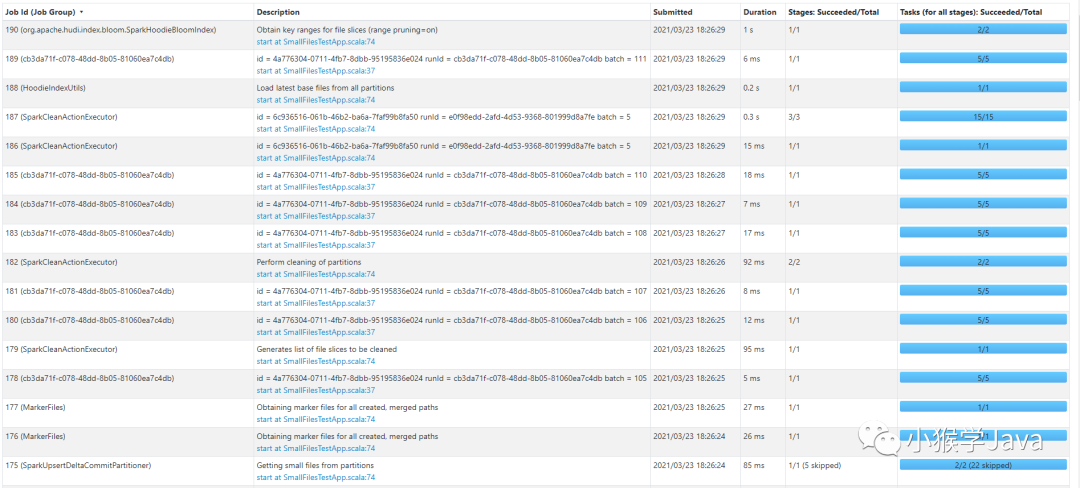
为了方便Job容易被观察,我为每一个Stream Query设置一个容易识别的名称。也推荐大家在生产上给每一个Query设置容易识别的名称。
userDF.writeStream
 .queryName("Hudi增量输出同步Hive元数据")

userDF.writeStream
 .queryName("Socket明细数据控制台输出")
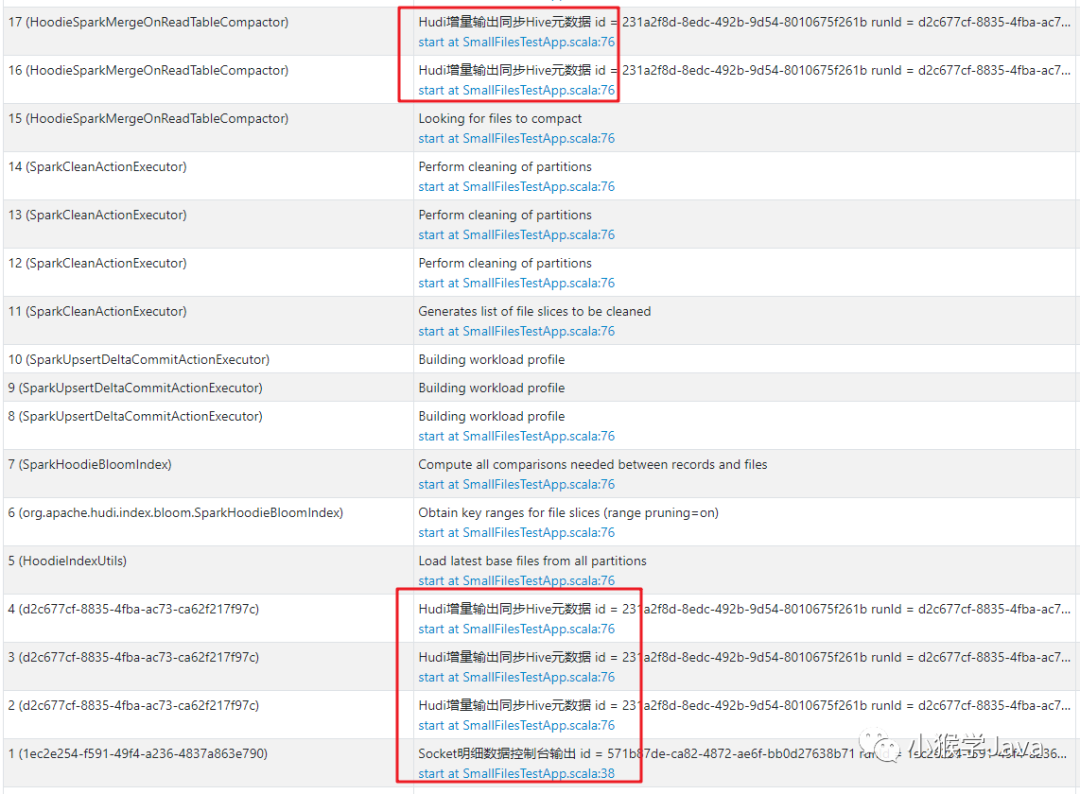 |
|---|
| 带上JOB名称,一眼就能识别出来哪些JOB是我们的、哪些是Hudi生成的。 |
Structured Streaming业务作业
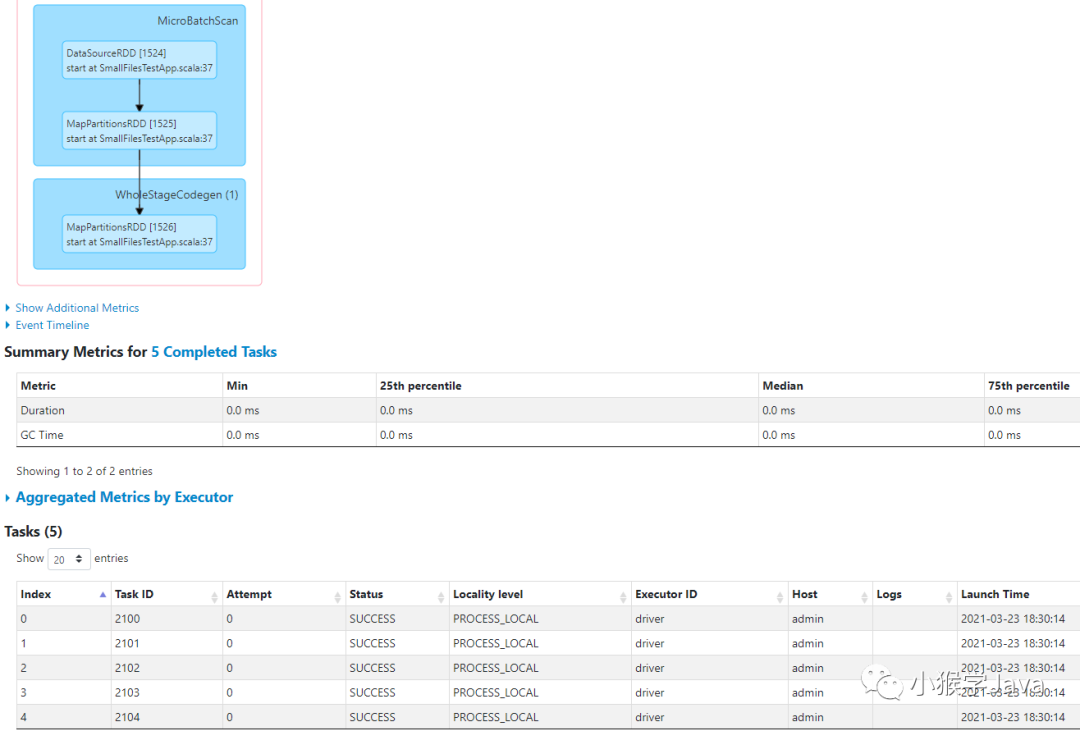
可以看到,描述信息为:id = 4a776304-0711-4fb7-8dbb-95195836e024 runId = cb3da71f-c078-48dd-8b05-81060ea7c4db batch = 249的JOB是一个读取Stream源的JOB。它只有一个Stage,分别是加载数据源、执行Map算子、并输出。
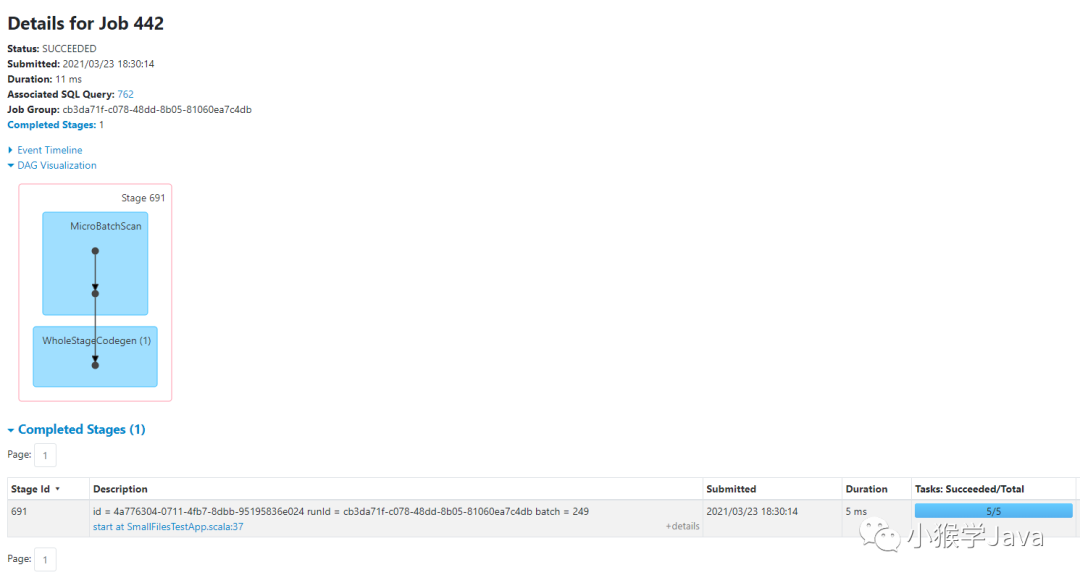 |
|---|
 |
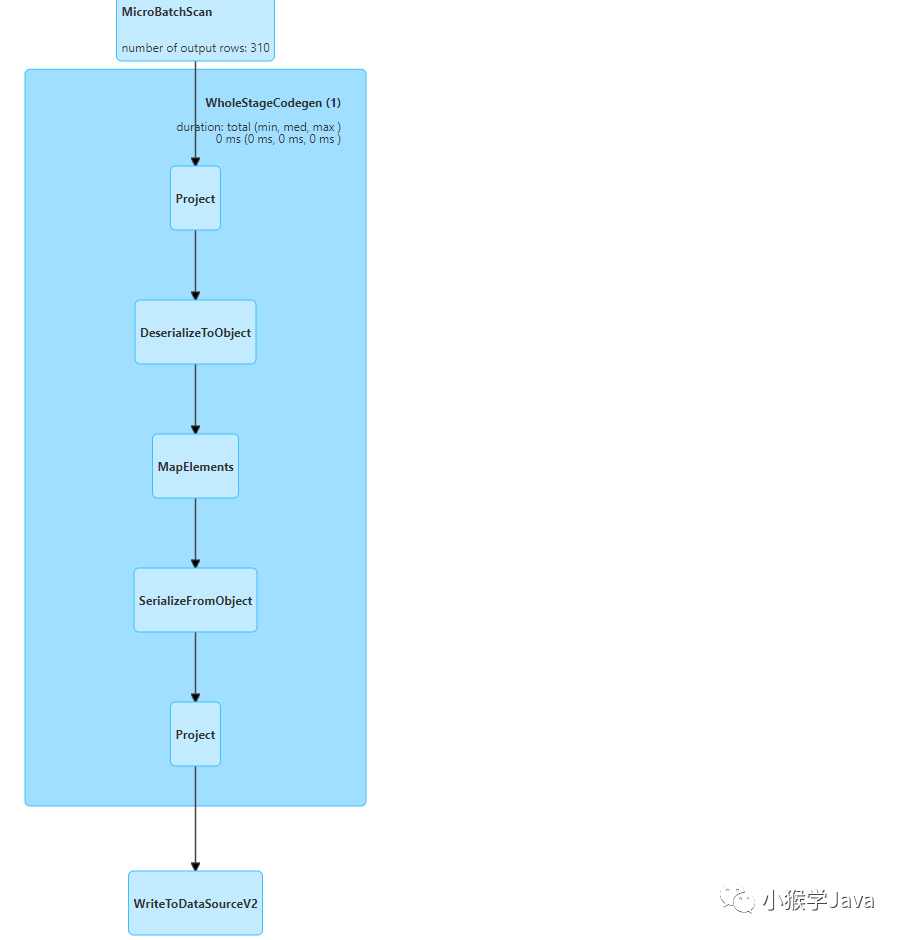 |
我们可以来看看它的物理执行计划:
== Physical Plan ==
WriteToDataSourceV2 (7)
+- * Project (6)
   +- * SerializeFromObject (5)
      +- * MapElements (4)
         +- * DeserializeToObject (3)
            +- * Project (2)
               +- MicroBatchScan (1)

# 从Socket中读取数据源(微批方式读取数据)
(1) MicroBatchScan
Output [1]: [value#0]
class org.apache.spark.sql.execution.streaming.sources.TextSocketTable$$anon$1

# 执行列选择操作
(2) Project [codegen id : 1]
Output [1]: [value#0]
Input [1]: [value#0]

# 执行反序列化(将接受到的数据调用toString,转换为String)
(3) DeserializeToObject [codegen id : 1]
Input [1]: [value#0]
Arguments: value#0.toString, obj#10: java.lang.String

# 执行Map操作,将String转换为User对象
(4) MapElements [codegen id : 1]
Input [1]: [obj#10]
Arguments: cn.pin.streaming.app.SmallFilesTestApp$$$Lambda$1147/1076250141@292ff26f, obj#11: cn.pin.streaming.entity.User

# 将对象序列化(Spark SQL自己序列化,放入内存)
(5) SerializeFromObject [codegen id : 1]
Input [1]: [obj#11]
Arguments: [knownnotnull(assertnotnull(input[0, cn.pin.streaming.entity.User, true])).id.intValue AS id#12, staticinvoke(class org.apache.spark.unsafe.types.UTF8String, StringType, fromString, knownnotnull(assertnotnull(input[0, cn.pin.streaming.entity.User, true])).birthday, true, false) AS birthday#13, staticinvoke(class org.apache.spark.unsafe.types.UTF8String, StringType, fromString, knownnotnull(assertnotnull(input[0, cn.pin.streaming.entity.User, true])).name, true, false) AS name#14, staticinvoke(class org.apache.spark.unsafe.types.UTF8String, StringType, fromString, knownnotnull(assertnotnull(input[0, cn.pin.streaming.entity.User, true])).createTime, true, false) AS createTime#15, staticinvoke(class org.apache.spark.unsafe.types.UTF8String, StringType, fromString, knownnotnull(assertnotnull(input[0, cn.pin.streaming.entity.User, true])).position, true, false) AS position#16]

# 选择4个列执行查询
(6) Project [codegen id : 1]
Output [6]: [id#12, birthday#13, name#14, createTime#15, position#16, substring(createTime#15, 0, 10) AS dt#23]
Input [5]: [id#12, birthday#13, name#14, createTime#15, position#16]

# 执行写入操作
(7) WriteToDataSourceV2
Input [6]: [id#12, birthday#13, name#14, createTime#15, position#16, dt#23]
Arguments: org.apache.spark.sql.execution.streaming.sources.MicroBatchWrite@ff75118
这个执行计划,可以看到,针对Structured Streaming的代码,将数据读取再到打印输出。这个Job是与Hudi无关的。
对应的代码是:
val userStrDataFrame = spark.readStream
  .format("socket")
  .option("host", "localhost")
  .option("port", 9999)
  .option("includeTimestamp", false)
  .option("numPartitions", 5)
  .load()

// 解析JSON串
val userDF = userStrDataFrame.as[String]
  .map(User(_))
  // 添加分区字段
  .withColumn("dt", $"createTime".substr(0, 10))

userDF.writeStream
  .format("console")
  .outputMode("append")
  .option("truncate", false)
  .option("numRows", 100)
  .start()
Hudi Load latest base files from all partitions作业
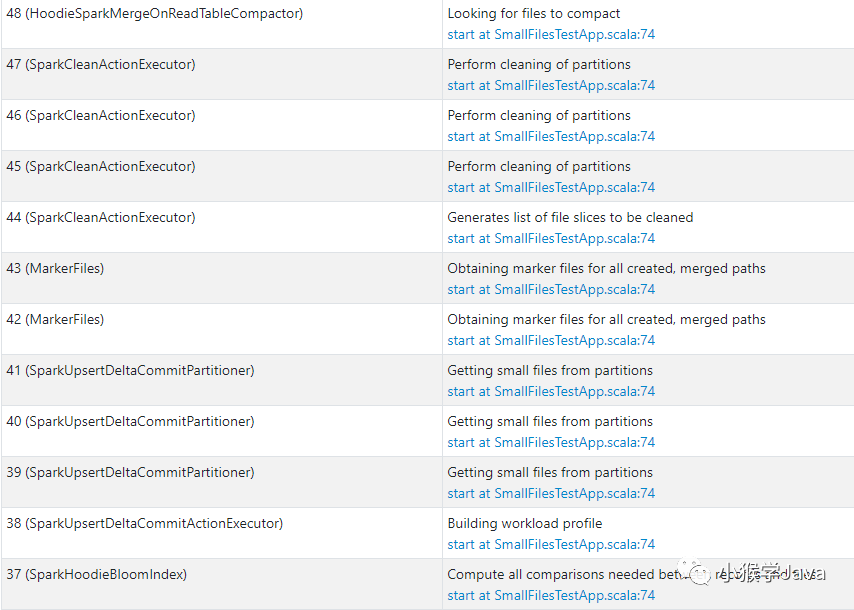
与Hudi有关的作业,都是在writeStream.format("hudi").start代码生成的。
 |
|---|
| 所有与Hudi相关的Job都在第74行生成的JOB。 |
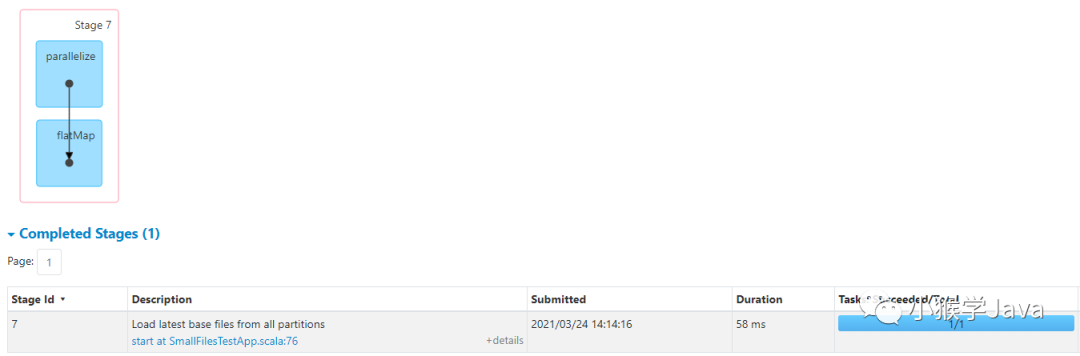
 |
|---|
| 从所有的分区加载最新的Hudi基本数据文件。 |
 |
以下是源码,我已经加上了注释:
  public static List<Pair<String, HoodieBaseFile>> getLatestBaseFilesForAllPartitions(final List<String> partitions,
                                                                                      final HoodieEngineContext context,
                                                                                      final HoodieTable hoodieTable) {
    context.setJobStatus(HoodieIndexUtils.class.getSimpleName(), "Load latest base files from all partitions");
    return context.flatMap(partitions, partitionPath -> {
      // 获取对应Hoodie表提交的时间线,并过滤出来所有已完成的Instant,然后取最后一个
      Option<HoodieInstant> latestCommitTime = hoodieTable.getMetaClient().getCommitsTimeline()
          .filterCompletedInstants().lastInstant();
      List<Pair<String, HoodieBaseFile>> filteredFiles = new ArrayList<>();
      if (latestCommitTime.isPresent()) {
        // 获取最近一次commit之前的所有基础文件
        filteredFiles = hoodieTable.getBaseFileOnlyView()
            .getLatestBaseFilesBeforeOrOn(partitionPath, latestCommitTime.get().getTimestamp())
            .map(f -> Pair.of(partitionPath, f))
            .collect(toList());
      }
      return filteredFiles.stream();
    }, Math.max(partitions.size(), 1));
  }
Hudi Obtain key ranges for file slices (range pruning=on)作业
 |
|---|
| 为每一个文件片,获取key的范围 |
代码如下:
  List<Tuple2<String, BloomIndexFileInfo>> loadInvolvedFiles(List<String> partitions, final HoodieEngineContext context,
                                                             final HoodieTable hoodieTable) {

    // 获取所有分区对应的最新基础数据文件
    List<Pair<String, String>> partitionPathFileIDList = getLatestBaseFilesForAllPartitions(partitions, context, hoodieTable).stream()
        .map(pair -> Pair.of(pair.getKey(), pair.getValue().getFileId()))
        .collect(toList());

    // 判断hoodie.bloom.index.prune.by.ranges是否开启,默认是开启的
    if (config.getBloomIndexPruneByRanges()) {
      // also obtain file ranges, if range pruning is enabled
      context.setJobStatus(this.getClass().getName(), "Obtain key ranges for file slices (range pruning=on)");
      // 对所有最新数据文件执行map操作
      return context.map(partitionPathFileIDList, pf -> {
        try {
          // 从基础文件中读取出对应的最大key、和最小的key
          HoodieRangeInfoHandle rangeInfoHandle = new HoodieRangeInfoHandle(config, hoodieTable, pf);
          String[] minMaxKeys = rangeInfoHandle.getMinMaxKeys();
          // 为每个文件创建布隆过滤器文件
          return new Tuple2<>(pf.getKey(), new BloomIndexFileInfo(pf.getValue(), minMaxKeys[0], minMaxKeys[1]));
        } catch (MetadataNotFoundException me) {
          LOG.warn("Unable to find range metadata in file :" + pf);
          return new Tuple2<>(pf.getKey(), new BloomIndexFileInfo(pf.getValue()));
        }
      }, Math.max(partitionPathFileIDList.size(), 1));
    } else {
      return partitionPathFileIDList.stream()
          .map(pf -> new Tuple2<>(pf.getKey(), new BloomIndexFileInfo(pf.getValue()))).collect(toList());
    }
  }
 |
|---|
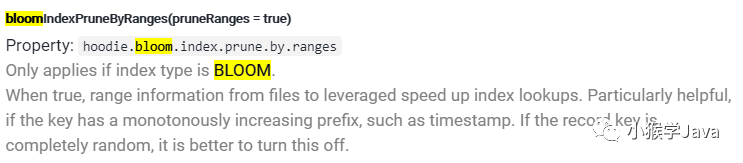
| 这项配置仅对BLOOM类型的索引有效。 |
Hudi还告诉我们,如果key值是随机的,应该把该配置关闭。如果密钥是单调递增的,例如:时间戳,这个就比较有帮助了。借助BloomFilter,可以快速判断某个key是否在一个文件中。
Hudi Compute all comparisons needed between records and files作业
 |
|---|
| 统计每个BloomFilter文件进行key过滤所需的计算量 |
源代码如下:
  /**
   * Compute the estimated number of bloom filter comparisons to be performed on each file group.
   * 计算在每个文件组需要执行BloomFilter的计算量(按照基础文件的每个HoodieKey来计算)
   * 因为每个HFile的min key和max key是不一样的,所以要评估出来针对每个BloomFilter文件对应的key有多少
   */
  private Map<String, Long> computeComparisonsPerFileGroup(final Map<String, Long> recordsPerPartition,
                                                           final Map<String, List<BloomIndexFileInfo>> partitionToFileInfo,
                                                           final JavaRDD<Tuple2<String, HoodieKey>> fileComparisonsRDD,
                                                           final HoodieEngineContext context) {
    Map<String, Long> fileToComparisons;
    if (config.getBloomIndexPruneByRanges()) {
      // we will just try exploding the input and then count to determine comparisons
      // FIX(vc): Only do sampling here and extrapolate?
      context.setJobStatus(this.getClass().getSimpleName(), "Compute all comparisons needed between records and files");
      fileToComparisons = fileComparisonsRDD.mapToPair(t -> t).countByKey();
    } else {
      fileToComparisons = new HashMap<>();
      partitionToFileInfo.forEach((key, value) -> {
        for (BloomIndexFileInfo fileInfo : value) {
          // each file needs to be compared against all the records coming into the partition
          fileToComparisons.put(fileInfo.getFileId(), recordsPerPartition.get(key));
        }
      });
    }
    return fileToComparisons;
  }
Hudi Building workload profile作业
 |
|---|
| 构建workload profile文件 |
其实在这个Job中,Structured Streaming已经开始更新Instant、写入数据了,如果配置了自动提交会直接更新索引、提交数据。创建索引会参考Index相关配置,Hudi中可以使用HBase索引或者默认存储在parquet中的布隆过滤器作为索引。索引的类型有以下几种:
BLOOM FILTER HBASE Index SIMPLE INDEX(缓存在Spark Cache中)
代码如下:
  /**
   * 执行HoodieRecord记录写入、并更新索引,自动提交(默认)
   * @param inputRecordsRDD
   * @return
   */
  @Override
  public HoodieWriteMetadata<JavaRDD<WriteStatus>> execute(JavaRDD<HoodieRecord<T>> inputRecordsRDD) {
    HoodieWriteMetadata<JavaRDD<WriteStatus>> result = new HoodieWriteMetadata<>();
    // Cache the tagged records, so we don't end up computing both
    // TODO: Consistent contract in HoodieWriteClient regarding preppedRecord storage level handling
    if (inputRecordsRDD.getStorageLevel() == StorageLevel.NONE()) {
      inputRecordsRDD.persist(StorageLevel.MEMORY_AND_DISK_SER());
    } else {
      LOG.info("RDD PreppedRecords was persisted at: " + inputRecordsRDD.getStorageLevel());
    }

    WorkloadProfile profile = null;
    if (isWorkloadProfileNeeded()) {
      context.setJobStatus(this.getClass().getSimpleName(), "Building workload profile");
      profile = new WorkloadProfile(buildProfile(inputRecordsRDD));
      LOG.info("Workload profile :" + profile);
      // 将workload的信息写入到metadatabase中,此处写入的是inflight文件
      saveWorkloadProfileMetadataToInflight(profile, instantTime);
    }

    // handle records update with clustering
    // 小文件聚类后是否更新文件组
    JavaRDD<HoodieRecord<T>> inputRecordsRDDWithClusteringUpdate = clusteringHandleUpdate(inputRecordsRDD);

    // partition using the insert partitioner
    // 根据要更新的记录、元数据设置分区
    final Partitioner partitioner = getPartitioner(profile);
    JavaRDD<HoodieRecord<T>> partitionedRecords = partition(inputRecordsRDDWithClusteringUpdate, partitioner);
    // 生成待更新的RDD
    JavaRDD<WriteStatus> writeStatusRDD = partitionedRecords.mapPartitionsWithIndex((partition, recordItr) -> {
      if (WriteOperationType.isChangingRecords(operationType)) {
        // 执行Upsert分区操作(写入数据)
        return handleUpsertPartition(instantTime, partition, recordItr, partitioner);
      } else {
        // 执行Insert分区写入
        return handleInsertPartition(instantTime, partition, recordItr, partitioner);
      }
    }, true).flatMap(List::iterator);

    // 如果设置了hoodie.auto.commit(默认为true),会更新索引并提交
    updateIndexAndCommitIfNeeded(writeStatusRDD, result);
    return result;
  }
Hudi Getting Small files from partition作业
 |
|---|
| 获取分区中的小文件 |
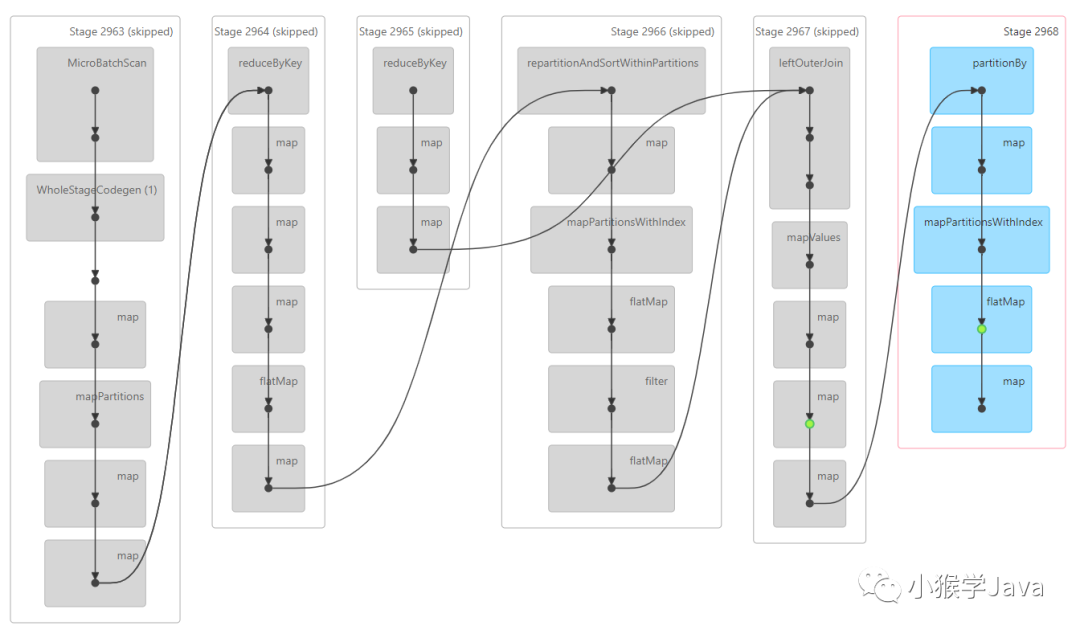 |
源代码如下:
  @Override
  protected List<SmallFile> getSmallFiles(String partitionPath) {

    // smallFiles only for partitionPath
    List<SmallFile> smallFileLocations = new ArrayList<>();

    // Init here since this class (and member variables) might not have been initialized
    HoodieTimeline commitTimeline = table.getCompletedCommitsTimeline();

    // Find out all eligible small file slices
    if (!commitTimeline.empty()) {
      HoodieInstant latestCommitTime = commitTimeline.lastInstant().get();
      // find smallest file in partition and append to it
      List<FileSlice> allSmallFileSlices = new ArrayList<>();
      // If we cannot index log files, then we choose the smallest parquet file in the partition and add inserts to
      // it. Doing this overtime for a partition, we ensure that we handle small file issues
      // 如果找不到log文件,那么会找到符合配置的所有parquet小文件
      if (!table.getIndex().canIndexLogFiles()) {
        // TODO : choose last N small files since there can be multiple small files written to a single partition
        // by different spark partitions in a single batch
        Option<FileSlice> smallFileSlice = Option.fromJavaOptional(table.getSliceView()
            .getLatestFileSlicesBeforeOrOn(partitionPath, latestCommitTime.getTimestamp(), false)
            .filter(
                // 根据文件大小、配置获取小文件
                fileSlice -> fileSlice.getLogFiles().count() < 1 && fileSlice.getBaseFile().get().getFileSize() < config
                    .getParquetSmallFileLimit())
            .min((FileSlice left, FileSlice right) ->
                left.getBaseFile().get().getFileSize() < right.getBaseFile().get().getFileSize() ? -1 : 1));
        if (smallFileSlice.isPresent()) {
          allSmallFileSlices.add(smallFileSlice.get());
        }
      } else {
        // If we can index log files, we can add more inserts to log files for fileIds including those under
        // pending compaction.
        // 如果找到log文件,那么就会把更多的inserts操作添加到log文件中,这种是针对MOR表
        List<FileSlice> allFileSlices =
            table.getSliceView().getLatestFileSlicesBeforeOrOn(partitionPath, latestCommitTime.getTimestamp(), true)
                .collect(Collectors.toList());
        for (FileSlice fileSlice : allFileSlices) {
          if (isSmallFile(fileSlice)) {
            allSmallFileSlices.add(fileSlice);
          }
        }
      }
      // Create SmallFiles from the eligible file slices
      // 为每一个文件片(包含文件和log)生成位置、大小信息
      for (FileSlice smallFileSlice : allSmallFileSlices) {
        SmallFile sf = new SmallFile();
        if (smallFileSlice.getBaseFile().isPresent()) {
          // TODO : Move logic of file name, file id, base commit time handling inside file slice
          String filename = smallFileSlice.getBaseFile().get().getFileName();
          sf.location = new HoodieRecordLocation(FSUtils.getCommitTime(filename), FSUtils.getFileId(filename));
          sf.sizeBytes = getTotalFileSize(smallFileSlice);
          smallFileLocations.add(sf);
        } else {
          HoodieLogFile logFile = smallFileSlice.getLogFiles().findFirst().get();
          sf.location = new HoodieRecordLocation(FSUtils.getBaseCommitTimeFromLogPath(logFile.getPath()),
              FSUtils.getFileIdFromLogPath(logFile.getPath()));
          sf.sizeBytes = getTotalFileSize(smallFileSlice);
          smallFileLocations.add(sf);
        }
      }
    }
    return smallFileLocations;
  }
可以看到,Hudi会合并parquet基本文件和log文件。因为parquet和log文件的合并方式是不一样的。
配置hoodie.parquet.small.file.limit,可以指定小文件的阈值。默认小于100MB认为就是小文件,需要进行合并。
Hudi Obtaining marker files for all created, merged paths作业
 |
|---|
| 获取要创建、合并的路径标记的文件 |
源码如下:
  public Set<String> createdAndMergedDataPaths(HoodieEngineContext context, int parallelism) throws IOException {
    Set<String> dataFiles = new HashSet<>();

    // 获取标记的DFS目录路径
    FileStatus[] topLevelStatuses = fs.listStatus(markerDirPath);
    List<String> subDirectories = new ArrayList<>();
    for (FileStatus topLevelStatus: topLevelStatuses) {
      if (topLevelStatus.isFile()) {
        String pathStr = topLevelStatus.getPath().toString();
        // 获取带合并的数据文件
        if (pathStr.contains(HoodieTableMetaClient.MARKER_EXTN) && !pathStr.endsWith(IOType.APPEND.name())) {
          dataFiles.add(translateMarkerToDataPath(pathStr));
        }
      } else {
        // 获取子目录
        subDirectories.add(topLevelStatus.getPath().toString());
      }
    }

    if (subDirectories.size() > 0) {
      // 获取子目录的数量设置并行度
      parallelism = Math.min(subDirectories.size(), parallelism);
      // 获取序列化配置
      SerializableConfiguration serializedConf = new SerializableConfiguration(fs.getConf());
      // 设置作业信息
      context.setJobStatus(this.getClass().getSimpleName(), "Obtaining marker files for all created, merged paths");
      // 将子目录中的带合并的文件添加到数据文件列表
      dataFiles.addAll(context.flatMap(subDirectories, directory -> {
        Path path = new Path(directory);
        FileSystem fileSystem = path.getFileSystem(serializedConf.get());
        RemoteIterator<LocatedFileStatus> itr = fileSystem.listFiles(path, true);
        List<String> result = new ArrayList<>();
        while (itr.hasNext()) {
          FileStatus status = itr.next();
          String pathStr = status.getPath().toString();
          // 过滤出来后缀为.marker、以及部位APPEND的名字
          if (pathStr.contains(HoodieTableMetaClient.MARKER_EXTN) && !pathStr.endsWith(IOType.APPEND.name())) {
            result.add(translateMarkerToDataPath(pathStr));
          }
        }
        return result.stream();
      }, parallelism));
    }

    return dataFiles;
  }
大概意思就是,获取到所有的.marker且不以APPEND结尾的数据文件。
Hudi Generates list of file slices to be cleaned作业
 |
|---|
| 生成清理文件分片的列表 |
源码如下:
  /**
   * Generates List of files to be cleaned.
   * 生成要清理的文件列表
   *
   * @param context HoodieEngineContext
   * @return Cleaner Plan
   */
  HoodieCleanerPlan requestClean(HoodieEngineContext context) {
    try {
      CleanPlanner<T, I, K, O> planner = new CleanPlanner<>(context, table, config);
      // 获取比hoodie.cleaner.commits.retaine(默认为:24)更早的HoodieInstant,默认为24次提交
      Option<HoodieInstant> earliestInstant = planner.getEarliestCommitToRetain();
      // 根据清理策略hoodie.cleaner.policy(默认为:KEEP_LATEST_COMMITS,保持最后的提交)获取要清理的分区
      List<String> partitionsToClean = planner.getPartitionPathsToClean(earliestInstant);

      if (partitionsToClean.isEmpty()) {
        LOG.info("Nothing to clean here.");
        return HoodieCleanerPlan.newBuilder().setPolicy(HoodieCleaningPolicy.KEEP_LATEST_COMMITS.name()).build();
      }
      // 根据配置或者分区数量设置并行度
      LOG.info("Total Partitions to clean : " + partitionsToClean.size() + ", with policy " + config.getCleanerPolicy());
      int cleanerParallelism = Math.min(partitionsToClean.size(), config.getCleanerParallelism());
      LOG.info("Using cleanerParallelism: " + cleanerParallelism);

      context.setJobStatus(this.getClass().getSimpleName(), "Generates list of file slices to be cleaned");

      Map<String, List<HoodieCleanFileInfo>> cleanOps = context
          .map(partitionsToClean, partitionPathToClean -> Pair.of(partitionPathToClean, planner.getDeletePaths(partitionPathToClean)), cleanerParallelism)
          .stream()
          .collect(Collectors.toMap(Pair::getKey, y -> CleanerUtils.convertToHoodieCleanFileInfoList(y.getValue())));

      // 生成清理计划
      return new HoodieCleanerPlan(earliestInstant
          .map(x -> new HoodieActionInstant(x.getTimestamp(), x.getAction(), x.getState().name())).orElse(null),
          config.getCleanerPolicy().name(), CollectionUtils.createImmutableMap(),
          CleanPlanner.LATEST_CLEAN_PLAN_VERSION, cleanOps);
    } catch (IOException e) {
      throw new HoodieIOException("Failed to schedule clean operation", e);
    }
  }
根据清理策略清理超过提交次数的HUDI INSTANT。
Hudi Perform cleaning of partitions作业
 |
|---|
| 执行清理。 |
源码如下:
  /**
   * 执行过期的commit清理
   * @param context
   * @param cleanerPlan
   * @return
   */
  @Override
  List<HoodieCleanStat> clean(HoodieEngineContext context, HoodieCleanerPlan cleanerPlan) {
    JavaSparkContext jsc = HoodieSparkEngineContext.getSparkContext(context);
    // 获取每个分区下待清理的文件
    int cleanerParallelism = Math.min(
        (int) (cleanerPlan.getFilePathsToBeDeletedPerPartition().values().stream().mapToInt(List::size).count()),
        config.getCleanerParallelism());
    LOG.info("Using cleanerParallelism: " + cleanerParallelism);

    // 设置job状态
    context.setJobStatus(this.getClass().getSimpleName(), "Perform cleaning of partitions");
    // 转换路径与要清理的文件信息
    List<Tuple2<String, PartitionCleanStat>> partitionCleanStats = jsc
        .parallelize(cleanerPlan.getFilePathsToBeDeletedPerPartition().entrySet().stream()
            .flatMap(x -> x.getValue().stream().map(y -> new Tuple2<>(x.getKey(),
                new CleanFileInfo(y.getFilePath(), y.getIsBootstrapBaseFile()))))
            .collect(Collectors.toList()), cleanerParallelism)
        .mapPartitionsToPair(deleteFilesFunc(table))
        .reduceByKey(PartitionCleanStat::merge).collect();

    Map<String, PartitionCleanStat> partitionCleanStatsMap = partitionCleanStats.stream()
        .collect(Collectors.toMap(Tuple2::_1, Tuple2::_2));

    // Return PartitionCleanStat for each partition passed.
    // 执行清理,并返回清理状态
    return cleanerPlan.getFilePathsToBeDeletedPerPartition().keySet().stream().map(partitionPath -> {
      PartitionCleanStat partitionCleanStat = partitionCleanStatsMap.containsKey(partitionPath)
          ? partitionCleanStatsMap.get(partitionPath)
          : new PartitionCleanStat(partitionPath);
      HoodieActionInstant actionInstant = cleanerPlan.getEarliestInstantToRetain();
      return HoodieCleanStat.newBuilder().withPolicy(config.getCleanerPolicy()).withPartitionPath(partitionPath)
          .withEarliestCommitRetained(Option.ofNullable(
              actionInstant != null
                  ? new HoodieInstant(HoodieInstant.State.valueOf(actionInstant.getState()),
                  actionInstant.getAction(), actionInstant.getTimestamp())
                  : null))
          .withDeletePathPattern(partitionCleanStat.deletePathPatterns())
          .withSuccessfulDeletes(partitionCleanStat.successDeleteFiles())
          .withFailedDeletes(partitionCleanStat.failedDeleteFiles())
          .withDeleteBootstrapBasePathPatterns(partitionCleanStat.getDeleteBootstrapBasePathPatterns())
          .withSuccessfulDeleteBootstrapBaseFiles(partitionCleanStat.getSuccessfulDeleteBootstrapBaseFiles())
          .withFailedDeleteBootstrapBaseFiles(partitionCleanStat.getFailedDeleteBootstrapBaseFiles())
          .build();
    }).collect(Collectors.toList());
  }
Hudi Looking for files to compact作业
该作业是由format类型为hudi的writeStream触发。
 |
|---|
| 查询MOR要合并的文件 |
源码如下:
  /**
   * 生成MOR合并计划(Parquet与Avro log合并)
   * @param context
   * @param hoodieTable
   * @param config
   * @param compactionCommitTime
   * @param fgIdsInPendingCompactionAndClustering
   * @return
   * @throws IOException
   */
  @Override
  public HoodieCompactionPlan generateCompactionPlan(HoodieEngineContext context,
                                                     HoodieTable<T, JavaRDD<HoodieRecord<T>>, JavaRDD<HoodieKey>, JavaRDD<WriteStatus>> hoodieTable,
                                                     HoodieWriteConfig config, String compactionCommitTime,
                                                     Set<HoodieFileGroupId> fgIdsInPendingCompactionAndClustering)
      throws IOException {
    JavaSparkContext jsc = HoodieSparkEngineContext.getSparkContext(context);
    // 注册日志文件、parquet文件计数器
    totalLogFiles = new LongAccumulator();
    totalFileSlices = new LongAccumulator();
    jsc.sc().register(totalLogFiles);
    jsc.sc().register(totalFileSlices);

    // 校验是否为MOR类型表
    ValidationUtils.checkArgument(hoodieTable.getMetaClient().getTableType() == HoodieTableType.MERGE_ON_READ,
        "Can only compact table of type " + HoodieTableType.MERGE_ON_READ + " and not "
            + hoodieTable.getMetaClient().getTableType().name());

    // TODO : check if maxMemory is not greater than JVM or spark.executor memory
    // TODO - rollback any compactions in flight
    HoodieTableMetaClient metaClient = hoodieTable.getMetaClient();
    LOG.info("Compacting " + metaClient.getBasePath() + " with commit " + compactionCommitTime);
    List<String> partitionPaths = FSUtils.getAllPartitionPaths(context, config.getMetadataConfig(), metaClient.getBasePath());

    // filter the partition paths if needed to reduce list status
    // 获取合并策略hoodie.compaction.strategy(默认为:LogFileSizeBasedCompactionStrategy)
    partitionPaths = config.getCompactionStrategy().filterPartitionPaths(config, partitionPaths);

    if (partitionPaths.isEmpty()) {
      // In case no partitions could be picked, return no compaction plan
      return null;
    }

    SliceView fileSystemView = hoodieTable.getSliceView();
    LOG.info("Compaction looking for files to compact in " + partitionPaths + " partitions");
    context.setJobStatus(this.getClass().getSimpleName(), "Looking for files to compact");

    List<HoodieCompactionOperation> operations = context.flatMap(partitionPaths, partitionPath -> {
      return fileSystemView
          // 获取分区最新的文件分片
          .getLatestFileSlices(partitionPath)
          // 过滤掉等待合并或者小文件聚类的文件组
          .filter(slice -> !fgIdsInPendingCompactionAndClustering.contains(slice.getFileGroupId()))
          .map(s -> {
            // 计数要合并的日志文件
            List<HoodieLogFile> logFiles =
                s.getLogFiles().sorted(HoodieLogFile.getLogFileComparator()).collect(Collectors.toList());
            totalLogFiles.add((long) logFiles.size());
            totalFileSlices.add(1L);
            // Avro generated classes are not inheriting Serializable. Using CompactionOperation POJO
            // for spark Map operations and collecting them finally in Avro generated classes for storing
            // into meta files.
            // 获取分片对应的Base文件(parquet文件)
            // 创建一个Base文件与log文件合并任务操作
            Option<HoodieBaseFile> dataFile = s.getBaseFile();
            return new CompactionOperation(dataFile, partitionPath, logFiles,
                config.getCompactionStrategy().captureMetrics(config, s));
          })
          .filter(c -> !c.getDeltaFileNames().isEmpty());
          // 构建操作(设置必要参数)
    }, partitionPaths.size()).stream().map(CompactionUtils::buildHoodieCompactionOperation).collect(toList());

    LOG.info("Total of " + operations.size() + " compactions are retrieved");
    LOG.info("Total number of latest files slices " + totalFileSlices.value());
    LOG.info("Total number of log files " + totalLogFiles.value());
    LOG.info("Total number of file slices " + totalFileSlices.value());
    // Filter the compactions with the passed in filter. This lets us choose most effective
    // compactions only
    // 创建计划
    HoodieCompactionPlan compactionPlan = config.getCompactionStrategy().generateCompactionPlan(config, operations,
        CompactionUtils.getAllPendingCompactionPlans(metaClient).stream().map(Pair::getValue).collect(toList()));
    ValidationUtils.checkArgument(
        compactionPlan.getOperations().stream().noneMatch(
            op -> fgIdsInPendingCompactionAndClustering.contains(new HoodieFileGroupId(op.getPartitionPath(), op.getFileId()))),
        "Bad Compaction Plan. FileId MUST NOT have multiple pending compactions. "
            + "Please fix your strategy implementation. FileIdsWithPendingCompactions :" + fgIdsInPendingCompactionAndClustering
            + ", Selected workload :" + compactionPlan);
    if (compactionPlan.getOperations().isEmpty()) {
      LOG.warn("After filtering, Nothing to compact for " + metaClient.getBasePath());
    }
    return compactionPlan;
  }
该JOB用于生成合并parquet文件和avro文件计划。
Hudi配置一览
关于Hudi的配置,大家可以在github中找到:
hudi/hudi-client/hudi-client-common/src/main/java/org/apache/hudi/config/
这里的配置肯定是最新的,因为文档往往会滞后于源码,有些配置在文档中没有。
通用配置文件
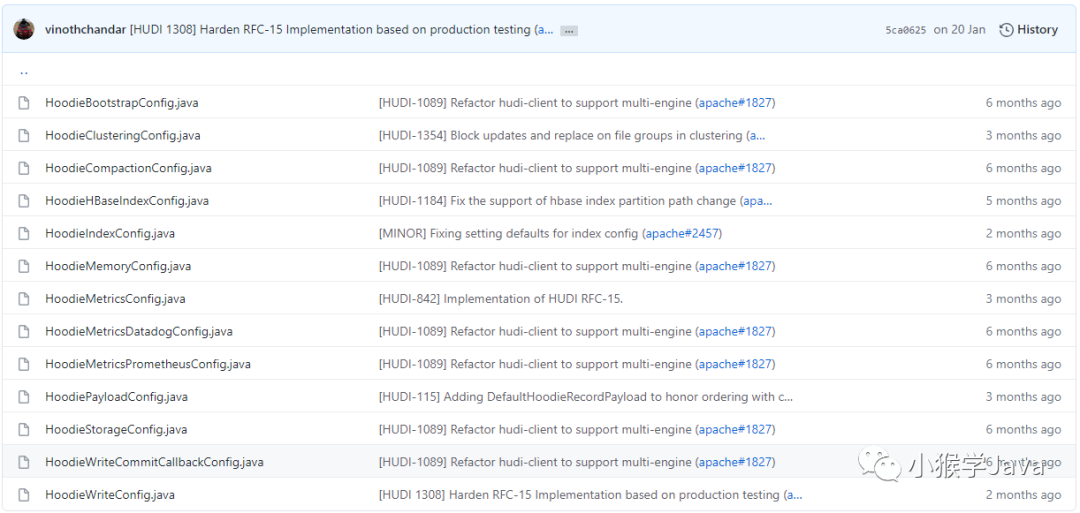
Hudi中的配置文件还是蛮多的。
 |
|---|
| 一共有13类配置 |
以下是简单说明:
HoodieBootstrapConfig:控制bootstrap引导程序,无需等待所有数据加载到Hudi,就可以使用Hudi。 HoodieClusteringConfig:控制小文件合并 HoodieCompactionConfig:控制Parquet和Avro合并、以及cleaner相关配置 HoodieHBaseIndexConfig:控制HBase索引相关配置 HoodieIndexConfig:控制Hudi索引相关配置 HoodieMemoryConfig:控制操作Hudi的内存配置 HoodieMetricsConfig:Hudi的相关监控指标配置 HoodieMetricsDatadogConfig:DataLog指标配置 HoodieMetricsPrometheusConfig:Prometheus指标配置 HoodiePayloadConfig:控制Hudi负载相关指标配置。 HoodieStorageConfig:控制Hudi存储相关指标配置。 HoodieWriteCommitCallbackConfig:控制Hudi提交写入回调行为配置。 HoodieWriteConfig:控制Hudi写入相关配置。
Spark相关配置
与Spark相关配置在这:
hudi/hudi-spark-datasource/hudi-spark-common/src/main/scala/org/apache/hudi/DataSourceOptions.scala
配置项请参考:http://hudi.apache.org/docs/configurations.html#read-options
spark读取hudi schema变更demo
2.2.1 schema配置
第一次插入时的schema如下
{
"type":"record",
"name":"Person",
"fields":[{
"name": "name",
"type": "string"
}, {
"name": "age",
"type": "int"
}, {
"name": "ts",
"type": "string"
}, {
"name": "location",
"type": "string"
}
]}
第二次更新时的schema如下(新增了sex列)
{
"type":"record",
"name":"Person",
"fields":[{
"name": "name",
"type": "string"
}, {
"name": "age",
"type": "int"
}, {
"name": "ts",
"type": "string"
}, {
"name": "location",
"type": "string"
}, {
"name": "sex",
"type": "string"
}
]}
Hudi使用MOR模式。
2.2.2 插入/更新核心配置
写记录核心配置如下
df.write().format("org.apache.hudi").
        option(DataSourceWriteOptions.STORAGE_TYPE_OPT_KEY(), "MERGE_ON_READ").
        option("hoodie.insert.shuffle.parallelism", "10").
        option("hoodie.upsert.shuffle.parallelism", "10").
        option("hoodie.delete.shuffle.parallelism", "10").
        option("hoodie.bulkinsert.shuffle.parallelism", "10").
        option("hoodie.datasource.write.recordkey.field", "name").
        option("hoodie.datasource.write.partitionpath.field", "location").
        option("hoodie.datasource.write.precombine.field", "ts").
        option("hoodie.table.name", "hudi_mor_table").

        mode(Overwrite).
        save("D:/hudi_mor_table");
更新记录核心配置如下
df.write().format("org.apache.hudi").
          option(DataSourceWriteOptions.STORAGE_TYPE_OPT_KEY(), "MERGE_ON_READ").
          option("hoodie.insert.shuffle.parallelism", "10").
          option("hoodie.upsert.shuffle.parallelism", "10").
          option("hoodie.delete.shuffle.parallelism", "10").
          option("hoodie.bulkinsert.shuffle.parallelism", "10").
          option("hoodie.datasource.write.recordkey.field", "name").
          option("hoodie.datasource.write.partitionpath.field", "location").
          option("hoodie.datasource.write.precombine.field", "ts").
          option("hoodie.keep.max.commits", "5").
          option("hoodie.keep.min.commits", "4").
          option("hoodie.cleaner.commits.retained", "3").
          option("hoodie.table.name", "hudi_mor_table").
          mode(Append).
          save("D:/hudi_mor_table");
2.2.3 插入/更新实际数据设置
第一次插入实际数据为 {\"name\":\"yuan1", \"ts\": \"1574297893837\", \"age\": 1, \"location\": \"beijing\"}
当第二次更新实际数据为 {\"name\":\"yuan1", \"ts\": \"1574297893837\", \"age\": 1, \"location\": \"beijing\", \"sex\": \"male\"}
即第二次会更新一次写入的数据,那么使用如下代码显示数据时
spark.sqlContext().read().format("org.apache.hudi").load("D:/hudi_mor_table"+ "/*").show();
那么会发现结果包含了新增的sex列,未更新的值为null。
当第二次更新实际数据为 {\"name\":\"yuan1", \"ts\": \"1574297893837\", \"age\": 1, \"location\": \"beijing1\", \"sex\": \"male\
即第二次会写入不同的分区,即不会更新第一次写入的数据,那么查询数据时,会发现查询的结果不会出现新增的sex列。
当使用如下代码显示数据时,设置合并schema参数,即会合并多个分区下的最新的parquet的schema。
spark.sqlContext().read().format("org.apache.hudi").option("mergeSchema", "true").load("D:/hudi_mor_table"+ "/*").show();
会发现查询的结果出现了新增的sex列。
3. 总结
当使用Spark查询Hudi数据集时,当数据的schema新增时,会获取单个分区的parquet文件来推导出schema,若变更schema后未更新该分区数据,那么新增的列是不会显示,否则会显示该新增的列;若未更新该分区的记录时,那么新增的列也不会显示,可通过 mergeSchema来控制合并不同分区下parquet文件的schema,从而可达到显示新增列的目的。
基于oracle cdc 到kafka同步到hudi
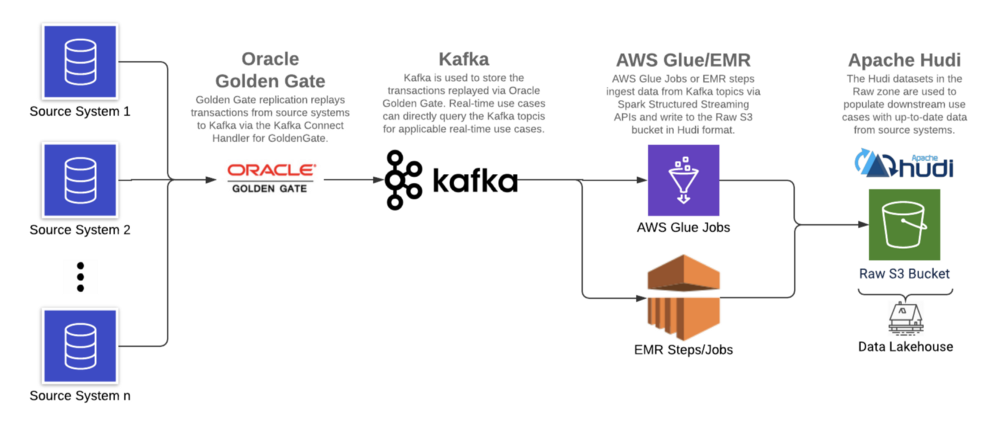
使用基于日志的CDC工具(Oracle GoldenGate),Apache Kafka和增量数据处理框架(在AWS上运行的Apache Hudi),我们在AWS S3上构建了数据湖,以减少延迟,改善数据质量并支持ACID事务。
6.1 架构
6.2 环境
•Oracle大数据Oracle GoldenGate[2]:19c•Confluent Kafka[3]:5.5.0•Apache Spark(Glue)[4]:2.4.3•ABRiS[5]:3.2•Apache Hudi[6]:0.5.3
由于客户现有的Oracle GoldenGate产品系列,Oracle GoldenGate被用作基于日志的CDC工具从源系统日志中提取数据,日志实时地复制到Kafka,从中读取消息并以Hudi格式写入数据湖。
Apache Hudi与AWS EMR和Athena集成,是增量数据处理框架的理想选择。
6.3 实施步骤
6.3.1 使用Oracle GoldenGate复制源数据
如前所述,基于日志的CDC是最佳解决方案,因为它可以同时处理批量和流式案例。对于批处理和流式源,不再需要具有单独的摄取模式。传统上批处理工作负载是利用一条SQL语句,并以所需频率运行该SQL语句。相反,基于日志的CDC可以捕获任何更改,然后将其重播到目的端(即Kafka)。摄取与消费的解耦引入了灵活性,可根据需要在Lakehouse内更新数据的频率来提取增量数据。这样可以最大程度地降低成本,因为可以在定义的保留期内从Kafka检索数据。
Oracle GoldenGate是一种数据复制工具,用于从源系统捕获事务并将其复制到目标(例如Kafka主题或另一个数据库)中。它利用数据库事务日志来工作,该日志记录了数据库中发生的所有操作,OGG将读取事务并将其推送到指定的目的端, GoldenGate支持多个关系数据库,包括Oracle,MySQL,DB2,SQL Server和Teradata。
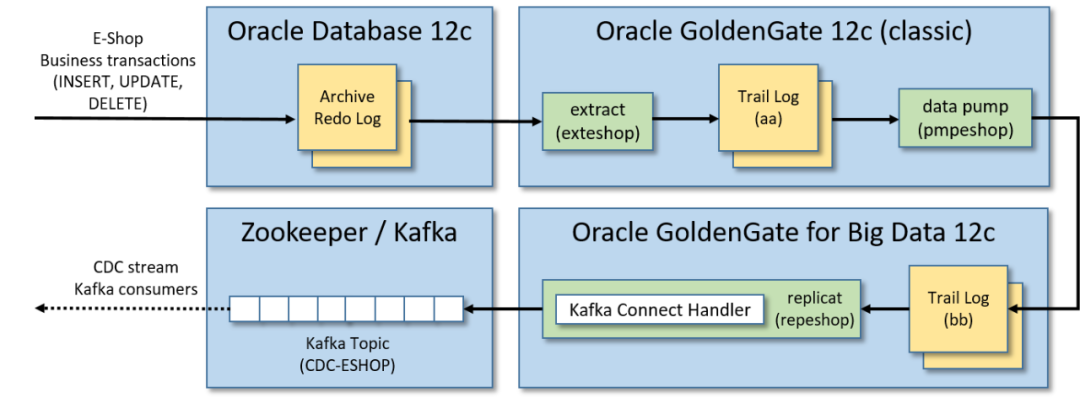
此解决方案中使用Oracle GoldenGate将变更从源数据库流式传输到Kafka过程分为三个步骤:
•通过Oracle GoldenGate 12c(经典版本)从源数据库跟踪日志中提取数据:源数据库发生的事务以中间日志格式(跟踪日志)存储被实时提取。•将跟踪日志送到辅助远程跟踪日志:将提取的跟踪日志送到另一个跟踪日志(由Oracle GoldenGate for Big Data 12c实例管理)。•使用Kafka Connect处理程序,通过Oracle GoldenGate for Big Data 12c将跟踪日志复制到Kafka:接收提取的事务并将其复制到Kafka消息中,在发布到Kafka之前,此过程将序列化(带有或不带有Schema Registry)Kafka消息,并对从事务日志重播的消息执行类型转换(如果需要)。
注意:默认情况下更新的记录仅包含通过GoldenGate复制时更新的列,为了确保增量记录可以以最小的转换合并到数据湖中(即复制具有所有列的整个记录),必须启用补充日志记录[7],这将包括每个记录的"before"和"after"图像。
GoldenGate复制包含一个"op_type"字段,该字段指示源跟踪文件中数据库操作的类型:I表示插入,U表示更新,D表示删除。该字段对于确定如何在数据湖库中增加/删除记录很有帮助。
以下是样本插入记录:
{"table": "GG.TCUSTORD","op_type": "I","op_ts": "2013-06-02 22:14:36.000000","current_ts": "2015-09-18T10:17:49.570000","pos": "00000000000000001444","primary_keys": ["CUST_CODE","ORDER_DATE","PRODUCT_CODE","ORDER_ID"],"tokens": {"R": "AADPkvAAEAAEqL2AAA"},"before": null,"after": {"CUST_CODE": "WILL","CUST_CODE_isMissing": false,"ORDER_DATE": "1994-09-30:15:33:00","ORDER_DATE_isMissing": false,"PRODUCT_CODE": "CAR","PRODUCT_CODE_isMissing": false,"ORDER_ID": "144","ORDER_ID_isMissing": false,"PRODUCT_PRICE": 17520,"PRODUCT_PRICE_isMissing": false,"PRODUCT_AMOUNT": 3,"PRODUCT_AMOUNT_isMissing": false,"TRANSACTION_ID": "100","TRANSACTION_ID_isMissing": false}}
注意:GoldenGate记录在"before"包含一个空值,在"after"包含一个非空值。
样本更新记录[8]
注意:GoldenGate更新记录包含映像前非空和映像后非空。
样本删除记录[9]
注意:GoldenGate删除记录在映像之前包含非null,在映像之后包含null。
6.3.2 在Kafka中捕获复制的数据
GoldenGate 复制的目标是 Kafka。由于 GoldenGate for BigData 将通过 Kafka Connect 处理程序将记录复制到 Kafka,因此支持模式演变和通过Schema Registry提供的其他功能[10]。
为什么选择Kafka充当CDC工具和数据湖库之间的中间层,主要有两个原因。
•第一个原因是GoldenGate无法以Apache Hudi格式将CDC数据直接从源数据库复制到 Lakehouse 。Kafka 和 Spark Structured Streaming 之间现有集成使Kafka成为暂存增量记录的理想选择,然后可以以Hudi格式对其进行处理和写入。•第二个原因是解决需要近实时延迟的消费者,例如基于一组事务来检测并避免用户的服务丢失。
6.3.3 从Kafka读取数据并以Hudi格式写入S3
Spark Structured Streaming 作业执行以下操作:
1. 读取kafka记录
TOPIC_NAME = "topic_name"KAFKA_BOOTSTRAP_SERVERS = "host1:port1,host2:port2"# read data from Kafkadf = (spark.readStream.format("kafka").option("kafka.bootstrap.servers", KAFKA_BOOTSTRAP_SERVERS).option("subscribe", TOPIC_NAME).load())
2. 使用Schema Registry反序列化记录
注意:使用 Confluent Avro 格式序列化的 Kafka 主题中的任何数据都无法使用 Spark API 在本地进行反序列化,从而阻止了对数据的任何下游处理。使用 GoldenGate 复制的记录就是这种情况。ABRiS 是一个 Spark 库,可以根据 Schema Registry 中的模式对Confluent Avro 格式的 Kafka 记录进行反序列化。该解决方案中使用的ABRiS版本为3.2。
from pyspark import SparkContextfrom pyspark.sql.column import Column, _to_java_columnfrom pyspark.sql.functions import col# instantiates a Scala Map containing configurations for communicating with Schema Regsitry APIsdef get_schema_registry_conf_map(spark, schema_registry_url, topic_name):sc = spark.SparkContextjvm_gateway = sc._gateway.jvmschema_registry_config_dict = {"schema.registry.url": schema_registry_url,"schema.registry.topic": topic_name,"value.schema.id": "latest","value.schema.naming.strategy": "topic.name"}conf_map = getattr(getattr(jvm_gateway.scala.collection.immutable.Map, "EmptyMap$"), "MODULE$")for k, v in schema_registry_config_dict.items():conf_map = getattr(conf_map, "$plus")(jvm_gateway.scala.Tuple2(k, v))return conf_map# returns deserialized column (using Schema Registry)def from_avro(col, conf_map):jvm_gateway = SparkContext._active_spark_context._gateway.jvmabris_avro = jvm_gateway.za.co.absa.abris.avroreturn Column(abris_avro.functions.from_confluent_avro(_to_java_column(col), conf_map))TOPIC_NAME = "topic_name"SCHEMA_REGISTRY_URL = "host1:port1,host2:port2"# instantiate Scala Map for communicating with Schema Regsitry APIsconf_map = get_schema_registry_conf_map(spark, SCHEMA_REGISTRY_URL, TOPIC_NAME)# deserialize column containing data (using Schema Registry) and select pertinent columns for processing anddeserialized_df = df.select(col("key").cast("string"),col("partition"),col("offset"),col("timestamp"),col("timestampType"),from_avro(df.value, conf_map).alias("value"))
3. 根据Oracle GoldenGate "op_type"提取所需的前后映像,并将记录以Hudi格式写入数据湖
Spark代码使用GoldenGate记录中的"op_type"字段将传入记录的批次分为两组:一组包含插入/更新,第二组包含删除。这样做是为了可以相应地设置Hudi写操作配置。随后进一步转换之前或之后的映像。最后一步是设置下面提到的适当的Hudi属性,然后以流或批处理方式通过foreachBatch Spark Structured Streaming API将Hudi格式的upserts和deletes写入S3中。
import copy# write to a path using the Hudi formatdef hudi_write(df, schema, table, path, mode, hudi_options):hudi_options = {"hoodie.datasource.write.recordkey.field": "recordkey","hoodie.datasource.write.precombine.field": "precombine_field","hoodie.datasource.write.partitionpath.field": "partitionpath_field","hoodie.datasource.write.operation": "write_operaion","hoodie.datasource.write.table.type": "table_type","hoodie.table.name": TABLE,"hoodie.datasource.write.table.name": TABLE,"hoodie.bloom.index.update.partition.path": True,"hoodie.index.type": "GLOBAL_BLOOM","hoodie.consistency.check.enabled": True,# Set Glue Data Catalog related Hudi configs"hoodie.datasource.hive_sync.enable": True,"hoodie.datasource.hive_sync.use_jdbc": False,"hoodie.datasource.hive_sync.database": SCHEMA,"hoodie.datasource.hive_sync.table": TABLE,}if (hudi_options.get("hoodie.datasource.write.partitionpath.field")and hudi_options.get("hoodie.datasource.write.partitionpath.field") != ""):hudi_options.setdefault("hoodie.datasource.write.keygenerator.class","org.apache.hudi.keygen.ComplexKeyGenerator",)hudi_options.setdefault("hoodie.datasource.hive_sync.partition_extractor_class","org.apache.hudi.hive.MultiPartKeysValueExtractor",)hudi_options.setdefault("hoodie.datasource.hive_sync.partition_fields",hudi_options.get("hoodie.datasource.write.partitionpath.field"),)hudi_options.setdefault("hoodie.datasource.write.hive_style_partitioning", True)else:hudi_options["hoodie.datasource.write.keygenerator.class"] = "org.apache.hudi.keygen.NonpartitionedKeyGenerator"hudi_options.setdefault("hoodie.datasource.hive_sync.partition_extractor_class","org.apache.hudi.hive.NonPartitionedExtractor",)df.write.format("hudi").options(**hudi_options).mode(mode).save(path)# parse the OGG records and write upserts/deletes to S3 by calling the hudi_write functiondef write_to_s3(df, path):# select the pertitent fields from the dfflattened_df = df.select("value.*", "key", "partition", "offset", "timestamp", "timestampType")# filter for only the inserts and updatesdf_w_upserts = flattened_df.filter('op_type in ("I", "U")').select("after.*","key","partition","offset","timestamp","timestampType","op_type","op_ts","current_ts","pos",)# filter for only the deletesdf_w_deletes = flattened_df.filter('op_type in ("D")').select("before.*","key","partition","offset","timestamp","timestampType","op_type","op_ts","current_ts","pos",)# invoke hudi_write function for upsertsif df_w_upserts and df_w_upserts.count() > 0:hudi_write(df=df_w_upserts,schema="schema_name",table="table_name",path=path,mode="append",hudi_options=hudi_options)# invoke hudi_write function for deletesif df_w_deletes and df_w_deletes.count() > 0:hudi_options_copy = copy.deepcopy(hudi_options)hudi_options_copy["hoodie.datasource.write.operation"] = "delete"hudi_options_copy["hoodie.bloom.index.update.partition.path"] = Falsehudi_write(df=df_w_deletes,schema="schema_name",table="table_name",path=path,mode="append",hudi_options=hudi_options_copy)TABLE = "table_name"SCHEMA = "schema_name"CHECKPOINT_LOCATION = "s3://bucket/checkpoint_path/"TARGET_PATH="s3://bucket/target_path/"STREAMING = True# instantiate writeStream objectquery = deserialized_df.writeStream# add attribute to writeStream object for batch writesif not STREAMING:query = query.trigger(once=True)# write to a path using the Hudi formatwrite_to_s3_hudi = query.foreachBatch(lambda batch_df, batch_id: write_to_s3(df=batch_df, path=TARGET_PATH)).start(checkpointLocation=CHECKPOINT_LOCATION)# await termination of the write operationwrite_to_s3_hudi.awaitTermination()
4. 重要的Hudi配置项
hoodie.datasource.write.precombine.field:表的precombine字段是必填配置,并且字段不能为空(即对于记录不存在)。如果数据源不满足此要求,则可能有必要为这些表实现自定义重复数据删除逻辑。
hoodie.datasource.write.keygenerator.class:对于包含复合键或被多个列分区的表,请将此值设置为org.apache.hudi.keygen.ComplexKeyGenerator。对于非分区表,将此值设置为org.apache.hudi.keygen.NonpartitionedKeyGenerator。
hoodie.datasource.hive_sync.partition_extractor_class:将此值设置为org.apache.hudi.hive.MultiPartKeysValueExtractor以创建由多个列组成分区字段的Hive表。将此值设置为org.apache.hudi.hive.NonPartitionedExtractor以创建无分区的Hive表。
hoodie.index.type:默认情况下,它设置为BLOOM,它将仅在单个分区内强制键的唯一性。使用GLOBAL_BLOOM在所有分区上保证唯一性。Hudi会将传入记录与整个数据集中的文件进行比较,以确保recordKey仅出现在单个分区中。非常大的数据集会有延迟。
hoodie.bloom.index.update.partition.path:对于删除操作,请确保将其设置为False(如果使用GLOBAL_BLOOM索引)。
hoodie.datasource.hive_sync.use_jdbc:将此值设置为False可将表同步到Glue Data Catalog(如果需要)。
有关配置的完整列表,请参阅Apache Hudi配置页面[11];有关其他任何查询,请参阅Apache Hudi FAQ页面[12]。
注意(Apache Hudi与AWS Glue一起使用)
Maven[13]上提供的hudi-spark-bundle_2.11-0.5.3.jar不能与AWS Glue一起使用。需要通过更改原始pom.xml来创建自定义jar。
1.下载并更新pom.xml[14]的内容。a)从
<include>org.apache.httpcomponents:httpclient</include>
b)将以下行添加到
<relocation><pattern>org.eclipse.jetty.</pattern><shadedPattern>org.apache.hudi.org.eclipse.jetty.</shadedPattern></relocation>
1.构建JAR:
mvn clean package -DskipTests -DskipITs
然后可以使用上面的命令(位于"target / hudi-spark-bundle_2.11-0.5.3.jar"目录)构建的JAR作为Glue作业参数传递[15]。
完成上述步骤后即可使用Lakehouse。使用上面提到的Apache Hudi API可用的一种查询方法,可以从Raw S3存储桶中使用数据。
7. 结论
该方案成功解决了传统数据湖所面临的挑战:
•基于日志的CDC是用于捕获数据库事务/事件的更可靠的机制。•Apache Hudi负责(以前由数据平台所有者所有)通过管理大规模Lakehouse所需的索引和相关元数据来更新数据湖库中的目标数据。•ACID事务的支持消除了并发操作的麻烦,因为Apache Hudi API支持并发读写,而不会产生不一致的结果。
随着越来越多的企业采用数据平台并增强其数据分析/机器学习功能,必须为服务于数据的基础CDC工具和管道的重要性不断发展以应对一些最普遍面临的挑战。数据延迟和交付给下游消费者的数据的整体质量的改善表明Data Lakehouse范式是下一代数据平台。这将成为企业从其数据中获得更大价值和洞察力的基础。
Clustering配置相关demo
使用Spark可以轻松设置内联Clustering,参考如下示例
import org.apache.hudi.QuickstartUtils._import scala.collection.JavaConversions._import org.apache.spark.sql.SaveMode._import org.apache.hudi.DataSourceReadOptions._import org.apache.hudi.DataSourceWriteOptions._import org.apache.hudi.config.HoodieWriteConfig._val df = //generate data framedf.write.format("org.apache.hudi").options(getQuickstartWriteConfigs).option(PRECOMBINE_FIELD_OPT_KEY, "ts").option(RECORDKEY_FIELD_OPT_KEY, "uuid").option(PARTITIONPATH_FIELD_OPT_KEY, "partitionpath").option(TABLE_NAME, "tableName").option("hoodie.parquet.small.file.limit", "0").option("hoodie.clustering.inline", "true").option("hoodie.clustering.inline.max.commits", "4").option("hoodie.clustering.plan.strategy.target.file.max.bytes", "1073741824").option("hoodie.clustering.plan.strategy.small.file.limit", "629145600").option("hoodie.clustering.plan.strategy.sort.columns", "column1,column2"). //optional, if sorting is needed as part of rewriting datamode(Append).save("dfs://location");
对于设置更高级的异步Clustering管道,参考此处示例。
