



简介
前提条件
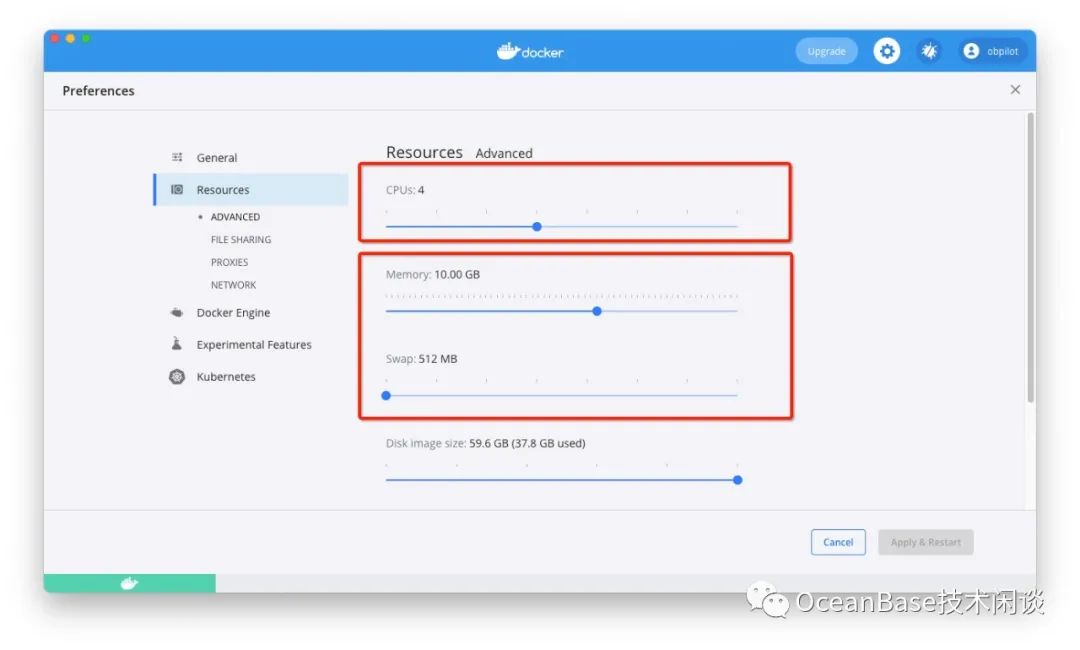
逻辑 CPU 不少于4个
可用内存不少于 10G,并且 docker 容器内存限制不少于10G
空间不少于10G
安装
下载镜像和启动容器
https://hub.docker.com/repository/docker/obpilot/oceanbase-ce网站的网速。
docker pull obpilot/oceanbase-ce:latest

docker images
REPOSITORY                                            TAG                     IMAGE ID            CREATED             SIZE
obpilot/oceanbase-ce                                  latest                  0017baaa9d87        23 minutes ago      2.24GB

docker run -itd -m 10G --name oceanbase-ce  obpilot/oceanbase-ce:latest

docker ps
CONTAINER ID        IMAGE                         COMMAND                  CREATED             STATUS              PORTS                                                                     NAMES
e5dd6da0aa8d        obpilot/oceanbase-ce:latest   "/bin/bash"              40 minutes ago      Up 40 minutes                                                                                 oceanbase-ce
/data,可以加上
-v /data:/data 参数。
登录容器,启动 OB 集群
docker exec -it oceanbase-ce bash

obd cluster list

obd cluster start obdemo
[admin@e5dd6da0aa8d ~]$ obd cluster list
+------------------------------------------------------------+
|                        Cluster List                        |
+--------+---------------------------------+-----------------+
| Name   | Configuration Path              | Status (Cached) |
+--------+---------------------------------+-----------------+
| obdemo | /home/admin/.obd/cluster/obdemo | deployed        |
+--------+---------------------------------+-----------------+
[admin@e5dd6da0aa8d ~]$ obd cluster start obdemo
Get local repositories and plugins ok
Open ssh connection ok
Cluster param config check ok
Check before start observer ok
Check before start obproxy ok
Start observer ok
observer program health check ok
Connect to observer ok
Initialize cluster
Cluster bootstrap ok
Wait for observer init ok
+---------------------------------------------+
|                   observer                  |
+-----------+---------+------+-------+--------+
| ip        | version | port | zone  | status |
+-----------+---------+------+-------+--------+
| 127.0.0.1 | 3.1.0   | 2881 | zone1 | active |
+-----------+---------+------+-------+--------+

Start obproxy ok
obproxy program health check ok
Connect to obproxy ok
Initialize cluster
+---------------------------------------------+
|                   obproxy                   |
+-----------+------+-----------------+--------+
| ip        | port | prometheus_port | status |
+-----------+------+-----------------+--------+
| 127.0.0.1 | 2883 | 2884            | active |
+-----------+------+-----------------+--------+
obdemo running
adminPWD123. 您可以使用 sudo yum 安装软件包。
创建 OB 实例(租户)
obclient -h127.1 -uroot@sys#obdemo -P2883 -prootPWD123 -c -A oceanbase

alter resource unit sys_unit_config min_cpu=5;
-- 创建资源单元规格
CREATE resource unit S4C1G max_cpu=4, min_cpu=4, max_memory='1G', min_memory='1G', max_iops=10000, min_iops=1000, max_session_num=1000000, max_disk_size='1024G';

-- 创建资源池(分配资源)
CREATE resource pool my_pool unit = 'S4C1G', unit_num = 1;

-- 创建实例(mysql类型)
create tenant obmysql resource_pool_list=('my_pool'), primary_zone='RANDOM',comment 'mysql tenant/instance', charset='utf8' set ob_tcp_invited_nodes='%', ob_compatibility_mode='mysql';

exit;
登录使用 OB 实例
obclient -h 127.1 -uroot@obmysql#obdemo -P2883 -p -c -A test

empty password.

show databases;

source bmsql.sql
MySQL [tpccdb]> show tables;
+------------------+
| Tables_in_tpccdb |
+------------------+
| bmsql_config     |
| bmsql_customer   |
| bmsql_district   |
| bmsql_history    |
| bmsql_item       |
| bmsql_new_order  |
| bmsql_oorder     |
| bmsql_order_line |
| bmsql_stock      |
| bmsql_warehouse  |
+------------------+
10 rows in set (0.003 sec)

MySQL [tpccdb]> show tablegroups;
+-----------------+------------------+---------------+
| Tablegroup_name | Table_name       | Database_name |
+-----------------+------------------+---------------+
| oceanbase       | NULL             | NULL          |
| tpcc_group      | bmsql_customer   | tpccdb        |
| tpcc_group      | bmsql_district   | tpccdb        |
| tpcc_group      | bmsql_history    | tpccdb        |
| tpcc_group      | bmsql_new_order  | tpccdb        |
| tpcc_group      | bmsql_oorder     | tpccdb        |
| tpcc_group      | bmsql_order_line | tpccdb        |
| tpcc_group      | bmsql_stock      | tpccdb        |
| tpcc_group      | bmsql_warehouse  | tpccdb        |
+-----------------+------------------+---------------+
9 rows in set (0.008 sec)
附录1:Docker 镜像制作方法
cat Dockerfile

FROM centos:latest
MAINTAINER obpilot
COPY ./obdemo.yaml /tmp/

VOLUME ["/data"]

RUN yum -y install tree net-tools vim sudo passwd \
	&& yum -y install mariadb-connector-c \
	&& yum install -y yum-utils \
	&& yum-config-manager --add-repo https://mirrors.aliyun.com/oceanbase/OceanBase.repo \
	&& yum install -y ob-deploy obclient \
	&& useradd admin && echo 'admin:adminPWD123' | chpasswd \
	&& sed -i '$a\admin    ALL=(ALL)	ALL' /etc/sudoers \
	&& mkdir -p /data/1 /data/log1  \
	&& chown -R admin.admin /data/ /tmp/ \
	&& su admin -c  "obd cluster deploy obdemo -c /tmp/obdemo.yaml"

USER admin
WORKDIR /home/admin
COPY ./bmsql.sql /home/admin/
COPY ./readme.md /home/admin/
附录2: OBD 集群初始化配置文件
https://github.com/oceanbase/obdeploy/tree/master/example)提供了几个配置模板文件。这里是修改后的配置文件。部署的是单机版 OB,监听本地 IP。
## Only need to configure when remote login is required
# user:
#   username: your username
#   password: your password if need
#   key_file: your ssh-key file path if need
#   port: your ssh port, default 22
#   timeout: ssh connection timeout (second), default 30
oceanbase-ce:
  servers:
    # Please don't use hostname, only IP can be supported
    - 127.0.0.1
  global:
    #  The working directory for OceanBase Database. OceanBase Database is started under this directory. This is a required field.
    home_path: /home/admin/oceanbase-ce
    # The directory for data storage. The default value is $home_path/store.
    # data_dir: /data/1
    # The directory for clog, ilog, and slog. The default value is the same as the data_dir value.
    redo_dir: /data/log1
    # Please set devname as the network adaptor's name whose ip is  in the setting of severs.
    # if set severs as "127.0.0.1", please set devname as "lo"
    # if current ip is 192.168.1.10, and the ip's network adaptor's name is "eth0", please use "eth0"
    devname: lo
    mysql_port: 2881 # External port for OceanBase Database. The default value is 2881.
    rpc_port: 2882 # Internal port for OceanBase Database. The default value is 2882.
    zone: zone1
    cluster_id: 1
    # please set memory limit to a suitable value which is matching resource.
    memory_limit: 8G # The maximum running memory for an observer
    system_memory: 4G # The reserved system memory. system_memory is reserved for general tenants. The default value is 30G.
    stack_size: 512K
    cpu_count: 16
    cache_wash_threshold: 1G
    __min_full_resource_pool_memory: 268435456
    workers_per_cpu_quota: 10
    schema_history_expire_time: 1d
    # The value of net_thread_count had better be same as cpu's core number.
    net_thread_count: 4
    major_freeze_duty_time: Disable
    minor_freeze_times: 10
    enable_separate_sys_clog: 0
    enable_merge_by_turn: FALSE
    #datafile_disk_percentage: 20 # The percentage of the data_dir space to the total disk space. This value takes effect only when datafile_size is 0. The default value is 90.
    datafile_size: 5G
    syslog_level: ERROR # System log level. The default value is INFO.
    enable_syslog_wf: false # Print system logs whose levels are higher than WARNING to a separate log file. The default value is true.
    enable_syslog_recycle: true # Enable auto system log recycling or not. The default value is false.
    max_syslog_file_count: 4 # The maximum number of reserved log files before enabling auto recycling. The default value is 0.
    # observer cluster name, consistent with obproxy's cluster_name
    appname: obdemo
    root_password: rootPWD123 # root user password, can be empty
    proxyro_password:  proxyROPWD123 # proxyro user pasword, consistent with obproxy's observer_sys_password, can be empty
obproxy:
  servers:
    - 127.0.0.1
  global:
    listen_port: 2883 # External port. The default value is 2883.
    prometheus_listen_port: 2884 # The Prometheus port. The default value is 2884.
    home_path: /home/admin/obproxy
    # oceanbase root server list
    # format: ip:mysql_port,ip:mysql_port
    rs_list: 127.0.0.1:2881
    enable_cluster_checkout: false
    # observer cluster name, consistent with oceanbase-ce's appname
    cluster_name: obdemo
    obproxy_sys_password:  proxySYSPWD123 # obproxy sys user password, can be empty
    observer_sys_password: proxyROPWD123 # proxyro user pasword, consistent with oceanbase-ce's proxyro_password, can be empty
    automatic_match_work_thread: false
    work_thread_num: 12
    xflush_log_level: ERROR
    monitor_log_level: ERROR
    syslog_level: ERROR
    log_dir_size_threshold: 1G
    enable_compression_protocol: false
datafile_size写的很小(
5G)。如果你磁盘空间很大,可以后期对 OB集群里数据文件扩容。
其他参考
https://open.oceanbase.com/answer) ,或者 OB社区版钉钉群直接跟开发和其他用户沟通交流。
https://github.com/oceanbase/obdeploy
https://open.oceanbase.com/answer


文章转载自数据库技术闲谈,如果涉嫌侵权,请发送邮件至:contact@modb.pro进行举报,并提供相关证据,一经查实,墨天轮将立刻删除相关内容。
