



在oracle linux上手动部署oceanbase 三副本集群
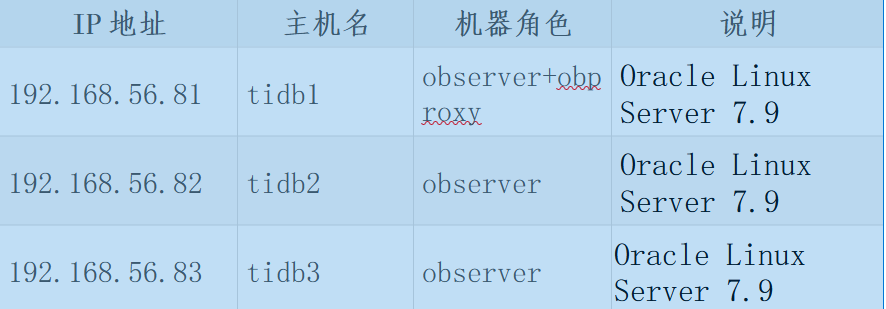
1、三台机器的IP,HOSTNAME,角色如下
1.2验证操作系统版本
[root@tidb1 tmp]# cat /etc/os-release
NAME=“Oracle Linux Server”
VERSION=“7.9”
ID=“ol”
#ID=“centos”
ID_LIKE=“fedora”
VARIANT=“Server”
VARIANT_ID=“server”
VERSION_ID=“7.9”
PRETTY_NAME=“Oracle Linux Server 7.9”
ANSI_COLOR=“0;31”
CPE_NAME=“cpe:/o:oracle:linux:7:9:server”
HOME_URL=“https://linux.oracle.com/”
BUG_REPORT_URL=“https://bugzilla.oracle.com/”
ORACLE_BUGZILLA_PRODUCT=“Oracle Linux 7”
ORACLE_BUGZILLA_PRODUCT_VERSION=7.9
ORACLE_SUPPORT_PRODUCT=“Oracle Linux”
ORACLE_SUPPORT_PRODUCT_VERSION=7.9
内核版本,大于官方推荐的3.10.0
[root@tidb1 tmp]# uname -r
5.4.17-2136.302.6.1.el7uek.x86_64
硬盘分区情况
[root@localhost ~]# df -hT
Filesystem Type Size Used Avail Use% Mounted on
devtmpfs devtmpfs 3.7G 0 3.7G 0% /dev
tmpfs tmpfs 3.7G 0 3.7G 0% /dev/shm
tmpfs tmpfs 3.7G 8.7M 3.7G 1% /run
tmpfs tmpfs 3.7G 0 3.7G 0% /sys/fs/cgroup
/dev/mapper/openeuler-root ext4 70G 14G 52G 22% /
tmpfs tmpfs 3.7G 0 3.7G 0% /tmp
/dev/sda1 ext4 976M 126M 784M 14% /boot
tmpfs tmpfs 746M 0 746M 0% /run/user/0
2、上传安装包到/tmp
[root@tidb1 tmp]# ll *.rpm
-rw-r–r-- 1 root root 658620 Feb 11 19:20 libobclient-2.0.0-2.el7.x86_64.rpm
-rw-r–r-- 1 root root 41916564 Feb 11 19:20 obclient-2.0.0-2.el7.x86_64.rpm
-rw-r–r-- 1 root root 8179432 Feb 11 19:20 obproxy-3.2.0-1.el7.x86_64.rpm
-rw-r–r-- 1 root root 48708456 Feb 11 19:20 oceanbase-ce-3.1.2-10000392021123010.el7.x86_64.rpm
-rw-r–r-- 1 root root 158948 Feb 11 19:20 oceanbase-ce-libs-3.1.2-10000392021123010.el7.x86_64.rpm
-rw-r–r-- 1 root root 48687968 Feb 11 19:20 oceanbase-ce-utils-3.1.2-10000392021123010.el7.x86_64.rpm
查看oceanbase使用admin用户
[root@localhost ~]# id admin
uid=1001(admin) gid=1001(admin) groups=1001(admin)
3、在192.168.56.81/82/83上,安装ob
[root@tidb2 tmp]# rpm -ivh oceanbase-ce-3.1.2-10000392021123010.el7.x86_64.rpm oceanbase-ce-libs-3.1.2-10000392021123010.el7.x86_64.rpm
warning: oceanbase-ce-3.1.2-10000392021123010.el7.x86_64.rpm: Header V4 RSA/SHA1 Signature, key ID e9b4a7aa: NOKEY
Preparing...                          ################################# [100%]
Updating / installing...
  1:oceanbase-ce-libs-3.1.2-100003920################################# [ 50%]
  2:oceanbase-ce-3.1.2-10000392021123################################# [100%]
准备数据存放目录,三台机器都做
[root@tidb3 ~]# mkdir /redo
[root@tidb3 ~]# chown -R admin:admin /data
[root@tidb3 ~]# chown -R admin:admin /redo
[root@tidb3 ~]# su - admin
Last login: Fri Feb 11 19:24:51 CST 2022 on pts/0

[admin@tidb3 ~]$ mkdir -p /home/admin/oceanbase/store/obcluster  /data/obcluster/{sstable,etc3} /redo/obcluster/{clog,ilog,slog,etc2}
[admin@tidb3 ~]$ for f in {clog,ilog,slog,etc2}; do ln -s /redo/obcluster/$f /home/admin/oceanbase/store/obcluster/$f ; done
[admin@tidb3 ~]$ for f in {sstable,etc3}; do ln -s /data/obcluster/$f /home/admin/oceanbase/store/obcluster/$f; done
准备完的目录结构
[root@tidb3 admin]# tree
.
└── oceanbase
    ├── bin
    │   ├── import_time_zone_info.py
    │   └── observer
    ├── etc
    │   ├── oceanbase_upgrade_dep.yml
    │   ├── priv_checker.py
    │   ├── timezone_V1.log
    │   ├── upgrade_checker.py
    │   ├── upgrade_cluster_health_checker.py
    │   ├── upgrade_post_checker.py
    │   ├── upgrade_post.py
    │   ├── upgrade_pre.py
    │   ├── upgrade_rolling_post.py
    │   └── upgrade_rolling_pre.py
    ├── lib
    │   ├── libaio.so -> libaio.so.1.0.1
    │   ├── libaio.so.1 -> libaio.so.1.0.1
    │   ├── libaio.so.1.0.1
    │   ├── libmariadb.so -> libmariadb.so.3
    │   └── libmariadb.so.3
    └── store
        └── obcluster
            ├── clog -> /redo/obcluster/clog
            ├── etc2 -> /redo/obcluster/etc2
            ├── etc3 -> /data/obcluster/etc3
            ├── ilog -> /redo/obcluster/ilog
            ├── slog -> /redo/obcluster/slog
            └── sstable -> /data/obcluster/sstable

12 directories, 17 files
加载库路径到用户环境
节点1手动启动
cd /home/admin/oceanbase && bin/observer -i enp0s8 -p 2881 -P 2882 -z zone1 -d /home/admin/oceanbase/store/obcluster -r '192.168.56.81:2882:2881;192.168.56.82:2882:2881;192.168.56.83:2882:2881' -c 16384 -n obcluster -o "memory_limit=8G,cache_wash_threshold=1G,__min_full_resource_pool_memory=268435456,system_memory=3G,memory_chunk_cache_size=128M,cpu_count=16,net_thread_count=8,datafile_size=10G,stack_size=1536K,config_additional_dir=/data/obcluster/etc3;/redo/obcluster/etc2" -d /home/admin/oceanbase/store/obcluster
[admin@tidb1 oceanbase]$ ps -ef|grep observer
admin     9009     1 95 19:45 ?        00:00:16 bin/observer -i enp0s8 -p 2881 -P 2882 -z zone1 -d /home/admin/oceanbase/store/obcluster -r 192.168.56.81:2882:2881;192.168.56.82:2882:2881;192.168.56.83:2882:2881 -c 16384 -n obcluster -o memory_limit=8G,cache_wash_threshold=1G,__min_full_resource_pool_memory=268435456,system_memory=3G,memory_chunk_cache_size=128M,cpu_count=16,net_thread_count=8,datafile_size=10G,stack_size=1536K,config_additional_dir=/data/obcluster/etc3;/redo/obcluster/etc2 -d /home/admin/oceanbase/store/obcluster
节点2手动启动
cd /home/admin/oceanbase && bin/observer -i enp0s8 -p 2881 -P 2882 -z zone2 -d /home/admin/oceanbase/store/obcluster -r '192.168.56.81:2882:2881;192.168.56.82:2882:2881;192.168.56.83:2882:2881' -c 16384 -n obcluster -o "memory_limit=8G,cache_wash_threshold=1G,__min_full_resource_pool_memory=268435456,system_memory=3G,memory_chunk_cache_size=128M,cpu_count=16,net_thread_count=8,datafile_size=10G,stack_size=1536K,config_additional_dir=/data/obcluster/etc3;/redo/obcluster/etc2" -d /home/admin/oceanbase/store/obcluster
[admin@tidb1 oceanbase]$ ps -ef|grep observer
admin     9009     1 95 19:45 ?        00:00:16 bin/observer -i enp0s8 -p 2881 -P 2882 -z zone2 -d /home/admin/oceanbase/store/obcluster -r 192.168.56.81:2882:2881;192.168.56.82:2882:2881;192.168.56.83:2882:2881 -c 16384 -n obcluster -o memory_limit=8G,cache_wash_threshold=1G,__min_full_resource_pool_memory=268435456,system_memory=3G,memory_chunk_cache_size=128M,cpu_count=16,net_thread_count=8,datafile_size=10G,stack_size=1536K,config_additional_dir=/data/obcluster/etc3;/redo/obcluster/etc2 -d /home/admin/oceanbase/store/obcluster
节点3手动启动
cd /home/admin/oceanbase && bin/observer -i enp0s8 -p 2881 -P 2882 -z zone3 -d /home/admin/oceanbase/store/obcluster -r '192.168.56.81:2882:2881;192.168.56.82:2882:2881;192.168.56.83:2882:2881' -c 16384 -n obcluster -o "memory_limit=8G,cache_wash_threshold=1G,__min_full_resource_pool_memory=268435456,system_memory=3G,memory_chunk_cache_size=128M,cpu_count=16,net_thread_count=8,datafile_size=10G,stack_size=1536K,config_additional_dir=/data/obcluster/etc3;/redo/obcluster/etc2" -d /home/admin/oceanbase/store/obcluster
[admin@tidb1 oceanbase]$ ps -ef|grep observer
admin     9009     1 95 19:45 ?        00:00:16 bin/observer -i enp0s8 -p 2881 -P 2882 -z zone3 -d /home/admin/oceanbase/store/obcluster -r 192.168.56.81:2882:2881;192.168.56.82:2882:2881;192.168.56.83:2882:2881 -c 16384 -n obcluster -o memory_limit=8G,cache_wash_threshold=1G,__min_full_resource_pool_memory=268435456,system_memory=3G,memory_chunk_cache_size=128M,cpu_count=16,net_thread_count=8,datafile_size=10G,stack_size=1536K,config_additional_dir=/data/obcluster/etc3;/redo/obcluster/etc2 -d /home/admin/oceanbase/store/obcluster
初始化集群
[root@tidb1 ~]# obclient -h 192.168.56.81 -u root -P 2881 -p -c -A
Enter password:
Welcome to the OceanBase.  Commands end with ; or \g.
Your MySQL connection id is 3221225472
Server version: 5.7.25 OceanBase 3.1.2 (r10000392021123010-d4ace121deae5b81d8f0b40afbc4c02705b7fc1d) (Built Dec 30 2021 02:47:29)

Copyright (c) 2000, 2018, Oracle, MariaDB Corporation Ab and others.

Type 'help;' or '\h' for help. Type '\c' to clear the current input statement.
MySQL [(none)]> set session ob_query_timeout=1000000000;alter system bootstrap ZONE 'zone1' SERVER '192.168.56.81:2882', ZONE 'zone2' SERVER '192.168.56.82:2882', ZONE 'zone3' SERVER '192.168.56.83:2882';
Query OK, 0 rows affected (0.000 sec)

Query OK, 0 rows affected (29.592 sec)
初始化完成后,root密码为空
用root@sys用户登录数据库并设置密码:
obclient -h 127.0.0.1 -u root@sys -P 2881 -c -A
alter user root identified by 'obproxy123';
在192.168.56.81上测试连接
[root@localhost ~]# obclient -h 192.168.56.81 -P2881 -uroot@sys -c -A -pobproxy123
Welcome to the OceanBase.  Commands end with ; or \g.
Your MySQL connection id is 3221494982
Server version: 5.7.25 OceanBase 3.1.2 (r10000392021123010-d4ace121deae5b81d8f0b40afbc4c02705b7fc1d) (Built Dec 30 2021 02:47:29)

Copyright (c) 2000, 2018, Oracle, MariaDB Corporation Ab and others.

Type 'help;' or '\h' for help. Type '\c' to clear the current input statement.

MySQL [(none)]> show databases;
+--------------------+
| Database           |
+--------------------+
| oceanbase          |
| information_schema |
| mysql              |
| SYS                |
| LBACSYS            |
| ORAAUDITOR         |
| test               |
+--------------------+
7 rows in set (0.003 sec)
在81上安装obproxy
rpm -ivh obproxy-3.2.0-1.el7.x86_64.rpm
warning: obproxy-3.2.0-1.el7.x86_64.rpm: Header V4 RSA/SHA1 Signature, key ID e9b4a7aa: NOKEY
Preparing...                          ################################# [100%]
Updating / installing...
   1:obproxy-3.2.0-1.el7              ################################# [100%]
启动obproxy
cd /home/admin/obproxy-3.2.0 && bin/obproxy -r "192.168.56.81:2881;192.168.56.82:2881;192.168.56.83:2881" -p 2883 -o "enable_strict_kernel_release=false,enable_cluster_checkout=false,enable_metadb_used=false" -c obcluster
验证启动进程
[root@localhost obproxy-3.2.0]# ps -ef|grep obproxy
root       22952       1  5 21:20 ?        00:00:14 bin/obproxy -r 192.168.56.81:2881;192.168.56.82:2881;192.168.56.83:2881 -p 2883 -o enable_strict_kernel_release=false,enable_cluster_checkout=false,enable_metadb_used=false -c obcluster
建立proxyro用户并授权
MySQL [oceanbase]> create user proxyro identified by 'obproxy123';
Query OK, 0 rows affected (0.032 sec)

MySQL [oceanbase]> grant select on *.* to proxyro;
Query OK, 0 rows affected (0.024 sec)
设置管理obproxy的root用户密码
MySQL [(none)]> alter proxyconfig set obproxy_sys_password = 'root123' ;
Query OK, 0 rows affected (0.001 sec)
设置与observer连接的用户的密码
MySQL [(none)]> alter proxyconfig set observer_sys_password = 'root123'
    -> ;
Query OK, 0 rows affected (0.001 sec)
直接连接到系统租户
[root@localhost obproxy-3.2.0]# obclient -h 192.168.56.81 -u root@sys -P 2881 -c -A -pobproxy123 -D oceanbase
Welcome to the OceanBase.  Commands end with ; or \g.
Your MySQL connection id is 3221508918
Server version: 5.7.25 OceanBase 3.1.2 (r10000392021123010-d4ace121deae5b81d8f0b40afbc4c02705b7fc1d) (Built Dec 30 2021 02:47:29)

Copyright (c) 2000, 2018, Oracle, MariaDB Corporation Ab and others.

Type 'help;' or '\h' for help. Type '\c' to clear the current input statement.
MySQL [oceanbase]> select user_id,user_name from __all_user;
+---------------+------------+
| user_id       | user_name  |
+---------------+------------+
| 1099511627777 | root       |
| 1099511627781 | ORAAUDITOR |
| 1099511628777 | proxyro    |
+---------------+------------+
3 rows in set (0.016 sec)
通过obproxy连接
[root@tidb1 tmp]# obclient  -h 192.168.56.81 -P2883 -uroot@proxysys#obcluster -c -A -proot123
Welcome to the OceanBase.  Commands end with ; or \g.
Your MySQL connection id is 50
Server version: 5.6.25

Copyright (c) 2000, 2018, Oracle, MariaDB Corporation Ab and others.

Type 'help;' or '\h' for help. Type '\c' to clear the current input statement.

MySQL [(none)]>
部署完成。
