



在Zabbix 5.x上给一台SQL Server 2008 R2数据库服务器添加Zabbix template for Microsoft SQL Server监控模板时遇到了一些问题,下面简单介绍一下这个问题,以及对应的解决方案。
数据库的环境:
操作系统 :Windows Server 2008 R2 Standard
数据库版本 :SQL Server 2008R2 SP3
由于数据库服务器的操作系统为Windows Server 2008 R2 Standard,所以对应的PowerShell的版本为2.0:
PS C:\Windows\system32> $psversiontable

Name                           Value
----                           -----
CLRVersion                     2.0.50727.4984
BuildVersion                   6.1.7600.16385
PSVersion                      2.0
WSManStackVersion              2.0
PSCompatibleVersions           {1.0, 2.0}
SerializationVersion           1.1.0.1
PSRemotingProtocolVersion      2.1
此时执行Zabbix template for Microsoft SQL Server模板的一些PowerShell脚本执行时就会遇到下面错误:
Invalid discovery rule value: cannot parse as a valid JSON object: invalid object format, expected opening character '{' or '[' at: 'null'
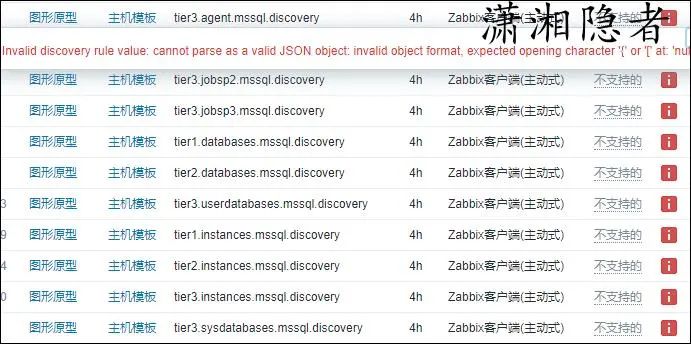
进一步检查、分析日志,发现是因为一些PowerShell脚本使用函数ConvertTo-Json引起的,如下这个脚本所示,脚本将结果转化成Json格式数据,而这个函数ConvertTo-Json是Powershell 3.0才有的。
$obj = [PSCustomObject] @{
    data = @((get-itemproperty 'HKLM:\SOFTWARE\Microsoft\Microsoft SQL Server').InstalledInstances | % {
        [PSCustomObject] @{
            '{#SQLAGENTNAME}' = $_
   '{#SQLINSTANCENAME}' = $_
            '{#SQLAGENT}' = if($_ -eq 'MSSQLSERVER') { "SQLAgent" } else { "SQLAgent`$$_" }
            '{#SQLAGENTSERVICE}' = if($_ -eq 'MSSQLSERVER') { "SQLSERVERAGENT" } else { "SQLAgent`$$_" }
        }
    })
}
Write-Host $($obj | ConvertTo-Json)
而当前环境PowerShell 2.0中是没有ConvertTo-Json这个函数的,所以执行脚本时报错,Zabbix无法得到正确的Json格式数据。那么要解决这个问题,要么升级PowerShell的版本到3.0或更高版本,要么实现一个和Powershell 3.0中函数ConvertTo-Json相同功能的函数。而升级PowerShell的版本比较麻烦,要求操作系统的版本为Windows Server 2008 R2 SP1,而且要求安装Microsoft .NET Framework 4.0,这个要求系统管理员协助处理,升级补丁相当比较麻烦。所以解决方案变成实现一个和Powershell 3.0中函数ConvertTo-Json相同功能的函数。刚好github上ConvertTo-JSON[1]上就有这样一个现成的函数。如下所示:
function Escape-JSONString($str){
 if ($str -eq $null) {return ""}
 $str = $str.ToString().Replace('"','\"').Replace('\','\\').Replace("`n",'\n').Replace("`r",'\r').Replace("`t",'\t')
 return $str;
}

function ConvertTo-JSON($maxDepth = 4,$forceArray = $false) {
 begin {
  $data = @()
 }
 process{
  $data += $_
 }

 end{

  if ($data.length -eq 1 -and $forceArray -eq $false) {
   $value = $data[0]
  } else {
   $value = $data
  }

  if ($value -eq $null) {
   return "null"
  }


  $dataType = $value.GetType().Name

  switch -regex ($dataType) {
             'String'  {
     return  "`"{0}`"" -f (Escape-JSONString $value )
    }
             '(System\.)?DateTime'  {return  "`"{0:yyyy-MM-dd}T{0:HH:mm:ss}`"" -f $value}
             'Int32|Double' {return  "$value"}
    'Boolean' {return  "$value".ToLower()}
             '(System\.)?Object\[\]' { # array

     if ($maxDepth -le 0){return "`"$value`""}

     $jsonResult = ''
     foreach($elem in $value){
      #if ($elem -eq $null) {continue}
      if ($jsonResult.Length -gt 0) {$jsonResult +=', '}
      $jsonResult += ($elem | ConvertTo-JSON -maxDepth ($maxDepth -1))
     }
     return "[" + $jsonResult + "]"
             }
    '(System\.)?Hashtable' { # hashtable
     $jsonResult = ''
     foreach($key in $value.Keys){
      if ($jsonResult.Length -gt 0) {$jsonResult +=', '}
      $jsonResult +=
@"
 "{0}": {1}
"@ -f $key , ($value[$key] | ConvertTo-JSON -maxDepth ($maxDepth -1) )
     }
     return "{" + $jsonResult + "}"
    }
             default { #object
     if ($maxDepth -le 0){return  "`"{0}`"" -f (Escape-JSONString $value)}

     return "{" +
      (($value | Get-Member -MemberType *property | % {
@"
 "{0}": {1}
"@ -f $_.Name , ($value.($_.Name) | ConvertTo-JSON -maxDepth ($maxDepth -1) )

     }) -join ', ') + "}"
       }
  }
 }
}
将这个函数放入需要ConvertTo-Json函数的ps1脚本中,问题完美解决。
参考资料
ConvertTo-JSON: https://gist.github.com/mdnmdn/6936714
