



点击上方“IT那活儿”,关注后了解更多内容,不管什么活儿,干就完了!!!

01
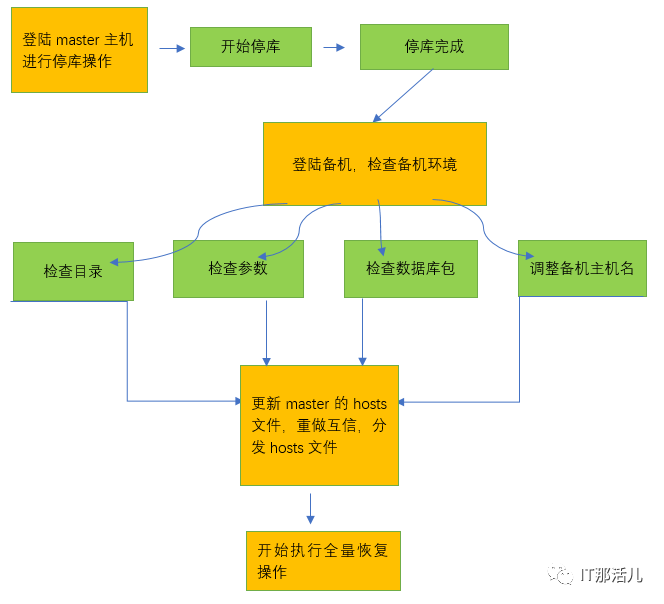
备机替换流程图
02
登陆master
psql -Atc "select * from gp_segment_configuration where status='d'"
psql -Atc "select b.content,b.hostname, a. fselocation from pg_filespace_entry a , gp_segment_configuration b where a.fsedbid =b.dbid and b.hostname = 'hostname' ;"
2.3 提取master 主机参数,md5 值与后续备机做比较。
1) md5sum /etc/sysctl.conf2) md5sum /etc/security/limits.conf3) md5sum /etc/security/limits.d/?0-nproc.conf 问号代表主机品牌不同,数字不同4) md5sum /etc/selinux/config
03
登陆备机,检查备机环境
[root@danji ~]#hostrname -i[root@danji ~]#hostrname[root@danji ~]#whoami
mkdir -p /data{1,2}/{primary,mirror}/{gpfs,default}
3.2.3 为创建的目录赋权。
chown-R gpadmin:gpadmin /data*
scp ***.***.3.96:/etc/sysctl.conf :/etc/sysctl.conf
cd /usr/localrm -f greenplum-dbln -f greenplum-* greenplum-db
ls -rtl /usr/local
cp /etc/sysconfig/network /etc/sysconfig/network. `date '+%Y%m%d'`Vi /etc/sysconfig/networkNETWORKING=yesHOSTNAME=gp2
04
重做互信,分发hosts文件
cp /etc/hosts /etc/hosts. `date '+%Y%m%d'`[root@mdw~]# vi /etc/hosts***.***.3.99 gp2 ====》 ***.***.3.95 gp2 #gp2被替换,IP改成备机ip,主机名不变
source/usr/local/greenplum-db/greenplum_path.sh
[root@master~]# gpssh-exkeys -f ~/all_hosts
4.4 分发
gpscp-f ~/all_hosts /etc/hosts =:/etc/hosts
[root@mdw~]# gpssh -f ~/all_hosts=>cat /etc/hosts |grep gp2
05
执行全量恢复
psql -c “chekpoint”gpstop -M fast
gpstart -mgprecoverseg -F

本文作者:晏鹏宇
本文来源:IT那活儿(上海新炬王翦团队)

文章转载自IT那活儿,如果涉嫌侵权,请发送邮件至:contact@modb.pro进行举报,并提供相关证据,一经查实,墨天轮将立刻删除相关内容。
