



系统:CentOS7.9
数据库:Oracle 11.2.0.4
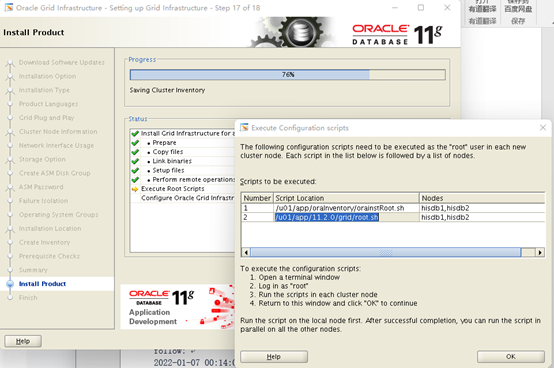
安装GI在运行脚本步骤时,节点1直接运行root.sh脚本,会出现如下报错:
**Adding Clusterware entries to inittab**

**ohasd failed to start**

**Failed to start the Clusterware. Last 20 lines of the alert log follow:**

**2022-01-07 00:14:00.117:**

**\[client(39969)\]CRS-2101:The OLR was formatted using version 3.**
原因:CentOS 7.9使用systemd而不是initd运行进程和重启进程,而root.sh是通过传统的initd运行ohasd进程,此为Linux 7安装11204版本,执行root.sh时存在的BUG.
以下为解决过程:
- 方案1:
在运行脚本root.sh前,在CentOS 7.9 中ohasd设置一个服务:
\# touch /usr/lib/systemd/system/ohas.service

\# chmod 777 /usr/lib/systemd/system/ohas.service

\# vi /usr/lib/systemd/system/ohas.service
添加以下内容:
\[Unit\]

Description=Oracle High Availability Services

After=syslog.target

\[Service\]

ExecStart=/etc/init.d/init.ohasd run >/dev/null 2>&1 Type=simple

Restart=always

\[Install\]

WantedBy=multi-user.target
\# systemctl daemon-reload

\# systemctl enable ohas.service

Created symlink from /etc/systemd/system/multi-user.target.wants/ohas.service to /usr/lib/systemd/system/ohas.service.

\# systemctl start ohas.service

\# systemctl status ohas.service
● ohas.service - Oracle High Availability Services
Loaded: loaded (/usr/lib/systemd/system/ohas.service; enabled; vendor preset: disabled)
Active: failed (Result: start-limit) since Sat 2022-01-08 14:30:24 CST; 17s ago
Process: 19603 ExecStart=/etc/init.d/init.ohasd run >/dev/null 2>&1 Type=simple (code=exited, status=203/EXEC)
Main PID: 19603 (code=exited, status=203/EXEC)
Jan 08 14:30:24 hisdb1 systemd[1]: Unit ohas.service entered failed state.
Jan 08 14:30:24 hisdb1 systemd[1]: ohas.service failed.
Jan 08 14:30:24 hisdb1 systemd[1]: ohas.service holdoff time over, scheduling restart.
Jan 08 14:30:24 hisdb1 systemd[1]: Stopped Oracle High Availability Services.
Jan 08 14:30:24 hisdb1 systemd[1]: start request repeated too quickly for ohas.service
Jan 08 14:30:24 hisdb1 systemd[1]: Failed to start Oracle High Availability Services.
Jan 08 14:30:24 hisdb1 systemd[1]: Unit ohas.service entered failed state.
Jan 08 14:30:24 hisdb1 systemd[1]: ohas.service failed.
说明:此时状态为failed,原因是现在还没有/etc/init.d/init.ohasd文件.
解决:运行root.sh脚本,另外开启一个会话一直刷新/etc/init.d,直到出现init.ohasd文件,然后马上手动开启ohas.service服务,语句:systemctl start ohas.service
\# /u01/app/11.2.0/grid/root.sh

Performing root user operation for Oracle 11g

The following environment variables are set as:

    ORACLE\_OWNER= grid

    ORACLE\_HOME=  /u01/app/11.2.0/grid

Enter the full pathname of the local bin directory: \[/usr/local/bin\]:

   Copying dbhome to /usr/local/bin ...

   Copying oraenv to /usr/local/bin ...

   Copying coraenv to /usr/local/bin ...

Creating /etc/oratab file...

Entries will be added to the /etc/oratab file as needed by

Database Configuration Assistant when a database is created

Finished running generic part of root script.

Now product-specific root actions will be performed.

Using configuration parameter file: /u01/app/11.2.0/grid/crs/install/crsconfig\_params

Creating trace directory

User ignored Prerequisites during installation

Installing Trace File Analyzer

OLR initialization - successful

  root wallet

  root wallet cert

  root cert export

  peer wallet

  profile reader wallet

  pa wallet

  peer wallet keys

  pa wallet keys

  peer cert request

  pa cert request

  peer cert

  pa cert

  peer root cert TP

  profile reader root cert TP

  pa root cert TP

  peer pa cert TP

  pa peer cert TP

  profile reader pa cert TP

  profile reader peer cert TP

  peer user cert

  pa user cert

Adding Clusterware entries to inittab

CRS-2672: Attempting to start 'ora.mdnsd' on 'hisdb1'

CRS-2676: Start of 'ora.mdnsd' on 'hisdb1' succeeded

CRS-2672: Attempting to start 'ora.gpnpd' on 'hisdb1'

CRS-2676: Start of 'ora.gpnpd' on 'hisdb1' succeeded

CRS-2672: Attempting to start 'ora.cssdmonitor' on 'hisdb1'

CRS-2672: Attempting to start 'ora.gipcd' on 'hisdb1'

CRS-2676: Start of 'ora.cssdmonitor' on 'hisdb1' succeeded

CRS-2676: Start of 'ora.gipcd' on 'hisdb1' succeeded

CRS-2672: Attempting to start 'ora.cssd' on 'hisdb1'

CRS-2672: Attempting to start 'ora.diskmon' on 'hisdb1'

CRS-2676: Start of 'ora.diskmon' on 'hisdb1' succeeded

CRS-2676: Start of 'ora.cssd' on 'hisdb1' succeeded

ASM created and started successfully.

Disk Group ocr\_vote created successfully.

clscfg: -install mode specified

Successfully accumulated necessary OCR keys.

Creating OCR keys for user 'root', privgrp 'root'..

Operation successful.

CRS-4256: Updating the profile

Successful addition of voting disk 73fe02a30e3d4fa9bfab2df50c5a5f75.

Successfully replaced voting disk group with +ocr\_vote.

CRS-4256: Updating the profile

CRS-4266: Voting file(s) successfully replaced

##  STATE    File Universal Id                File Name Disk group
– ----- ----------------- --------- ---------
1. ONLINE 73fe02a30e3d4fa9bfab2df50c5a5f75 (/dev/asm-diskb) [OCR_VOTE]
Located 1 voting disk(s).
CRS-2672: Attempting to start ‘ora.asm’ on ‘hisdb1’
CRS-2676: Start of ‘ora.asm’ on ‘hisdb1’ succeeded
CRS-2672: Attempting to start ‘ora.OCR_VOTE.dg’ on ‘hisdb1’
CRS-2676: Start of ‘ora.OCR_VOTE.dg’ on ‘hisdb1’ succeeded
Configure Oracle Grid Infrastructure for a Cluster … succeeded
说明:节点1成功跑完root.sh脚本.
- 方案2:
在执行root.sh前安装补丁18370031修复
18370031补丁安装(双节点执行)
上传补丁包
p18370031\_112040\_Linux-x86-64.zip
解压补丁包
cd /soft

unzip -q p18370031\_112040\_Linux-x86-64.zip
授权补丁包
chown -R grid:oinstall /soft/18370031
在grid用户下安装补丁
opatch napply -oh $ORACLE\_HOME -local /soft/18370031 –silent
开始执行root脚本(双节点执行)
root用户下执行
/u01/app/oraInventory/orainstRoot.sh

/u01/app/11.2.0/grid/root.sh
说明:推荐使用方案2解决此问题.
