



1、引言
1.1 关于此文档
本文档主要介绍在 RHEL 8.5 环境中,掌握从 MySQL 向 OceanBase 迁移数据的基本方法:mysqldump、datax 、canal 等。
1.2 参考资料
- 社区版官网-文档-学习中心-入门教程:4.2 如何使用 mysqldump 迁移 MySQL 表 OceanBase 。
- 社区版官网-博客-入门实战:4.2:如何使用 mysqldump 迁移 MySQL 表 OceanBase
2、数据准备
2.1 下载并编译tpcc-mysql
下载地址:https://github.com/Percona-Lab/tpcc-mysql
# 解压并编译
[root@obce01 ~]# unzip tpcc-mysql-master.zip
[root@obce01 ~]# cd tpcc-mysql-master/src/
[root@obce01 src]# make
cc -w -O3 -g -I. `mysql_config --include`  -c load.c
cc -w -O3 -g -I. `mysql_config --include`  -c support.c
cc load.o support.o `mysql_config --libs_r` -lrt -o ../tpcc_load
cc -w -O3 -g -I. `mysql_config --include`  -c main.c
cc -w -O3 -g -I. `mysql_config --include`  -c spt_proc.c
cc -w -O3 -g -I. `mysql_config --include`  -c driver.c
cc -w -O3 -g -I. `mysql_config --include`  -c sequence.c
cc -w -O3 -g -I. `mysql_config --include`  -c rthist.c
cc -w -O3 -g -I. `mysql_config --include`  -c sb_percentile.c
cc -w -O3 -g -I. `mysql_config --include`  -c neword.c
cc -w -O3 -g -I. `mysql_config --include`  -c payment.c
cc -w -O3 -g -I. `mysql_config --include`  -c ordstat.c
cc -w -O3 -g -I. `mysql_config --include`  -c delivery.c
cc -w -O3 -g -I. `mysql_config --include`  -c slev.c
cc main.o spt_proc.o driver.o support.o sequence.o rthist.o sb_percentile.o neword.o payment.o ordstat.o delivery.o slev.o `mysql_config --libs_r` -lrt -o ../tpcc_start

# 查看编译出的文件
[root@obce01 src]# cd ..
[root@obce01 tpcc-mysql-master]# ls -l tpcc_*
-rwxr-xr-x 1 root root  90904 Mar  3 22:05 tpcc_load
-rwxr-xr-x 1 root root 217072 Mar  3 22:05 tpcc_start
2.2 初始化tpcc-mysql数据
创建数据库及表
[root@obce01 tpcc-mysql-master]# mysql
Welcome to the MySQL monitor.  Commands end with ; or \g.
Your MySQL connection id is 5
Server version: 5.7.34 MySQL Community Server (GPL)

Copyright (c) 2000, 2021, Oracle and/or its affiliates.

Oracle is a registered trademark of Oracle Corporation and/or its
affiliates. Other names may be trademarks of their respective
owners.

Type 'help;' or '\h' for help. Type '\c' to clear the current input statement.

mysql> create database tpcc default character set utf8;
Query OK, 1 row affected (0.00 sec)

mysql> use tpcc
Database changed
mysql> source create_table.sql
Query OK, 0 rows affected (0.00 sec)

Query OK, 0 rows affected (0.00 sec)

Query OK, 0 rows affected, 1 warning (0.00 sec)

Query OK, 0 rows affected (0.01 sec)

Query OK, 0 rows affected, 1 warning (0.00 sec)

Query OK, 0 rows affected (0.01 sec)

Query OK, 0 rows affected, 1 warning (0.00 sec)

Query OK, 0 rows affected (0.01 sec)

Query OK, 0 rows affected, 1 warning (0.00 sec)

Query OK, 0 rows affected (0.01 sec)

Query OK, 0 rows affected, 1 warning (0.00 sec)

Query OK, 0 rows affected (0.01 sec)

Query OK, 0 rows affected, 1 warning (0.00 sec)

Query OK, 0 rows affected (0.01 sec)

Query OK, 0 rows affected, 1 warning (0.00 sec)

Query OK, 0 rows affected (0.01 sec)

Query OK, 0 rows affected, 1 warning (0.00 sec)

Query OK, 0 rows affected (0.02 sec)

Query OK, 0 rows affected, 1 warning (0.00 sec)

Query OK, 0 rows affected (0.01 sec)

Query OK, 0 rows affected (0.00 sec)

Query OK, 0 rows affected (0.00 sec)

mysql>
导入数据
[root@obce01 tpcc-mysql-master]# ./tpcc_load -h 127.0.0.1 -P 3306 -d tpcc -u root -p "" -w 1
*************************************
*** TPCC-mysql Data Loader        ***
*************************************
option h with value '127.0.0.1'
option P with value '3306'
option d with value 'tpcc'
option u with value 'root'
option p with value ''
option w with value '1'
<Parameters>
     [server]: 127.0.0.1
     [port]: 3306
     [DBname]: tpcc
       [user]: root
       [pass]:
  [warehouse]: 1
TPCC Data Load Started...
Loading Item
.................................................. 5000
.................................................. 10000
.................................................. 15000
.................................................. 20000
.................................................. 25000
.................................................. 30000
.................................................. 35000
.................................................. 40000
.................................................. 45000
.................................................. 50000
.................................................. 55000
.................................................. 60000
.................................................. 65000
.................................................. 70000
.................................................. 75000
.................................................. 80000
.................................................. 85000
.................................................. 90000
.................................................. 95000
.................................................. 100000
Item Done.
Loading Warehouse
Loading Stock Wid=1
.................................................. 5000
.................................................. 10000
.................................................. 15000
.................................................. 20000
.................................................. 25000
.................................................. 30000
.................................................. 35000
.................................................. 40000
.................................................. 45000
.................................................. 50000
.................................................. 55000
.................................................. 60000
.................................................. 65000
.................................................. 70000
.................................................. 75000
.................................................. 80000
.................................................. 85000
.................................................. 90000
.................................................. 95000
.................................................. 100000
 Stock Done.
Loading District
Loading Customer for DID=1, WID=1
.......... 1000
.......... 2000
.......... 3000
Customer Done.
Loading Customer for DID=2, WID=1
.......... 1000
.......... 2000
.......... 3000
Customer Done.
Loading Customer for DID=3, WID=1
.......... 1000
.......... 2000
.......... 3000
Customer Done.
Loading Customer for DID=4, WID=1
.......... 1000
.......... 2000
.......... 3000
Customer Done.
Loading Customer for DID=5, WID=1
.......... 1000
.......... 2000
.......... 3000
Customer Done.
Loading Customer for DID=6, WID=1
.......... 1000
.......... 2000
.......... 3000
Customer Done.
Loading Customer for DID=7, WID=1
.......... 1000
.......... 2000
.......... 3000
Customer Done.
Loading Customer for DID=8, WID=1
.......... 1000
.......... 2000
.......... 3000
Customer Done.
Loading Customer for DID=9, WID=1
.......... 1000
.......... 2000
.......... 3000
Customer Done.
Loading Customer for DID=10, WID=1
.......... 1000
.......... 2000
.......... 3000
Customer Done.
Loading Orders for D=1, W= 1
.......... 1000
.......... 2000
.......... 3000
Orders Done.
Loading Orders for D=2, W= 1
.......... 1000
.......... 2000
.......... 3000
Orders Done.
Loading Orders for D=3, W= 1
.......... 1000
.......... 2000
.......... 3000
Orders Done.
Loading Orders for D=4, W= 1
.......... 1000
.......... 2000
.......... 3000
Orders Done.
Loading Orders for D=5, W= 1
.......... 1000
.......... 2000
.......... 3000
Orders Done.
Loading Orders for D=6, W= 1
.......... 1000
.......... 2000
.......... 3000
Orders Done.
Loading Orders for D=7, W= 1
.......... 1000
.......... 2000
.......... 3000
Orders Done.
Loading Orders for D=8, W= 1
.......... 1000
.......... 2000
.......... 3000
Orders Done.
Loading Orders for D=9, W= 1
.......... 1000
.......... 2000
.......... 3000
Orders Done.
Loading Orders for D=10, W= 1
.......... 1000
.......... 2000
.......... 3000
Orders Done.

...DATA LOADING COMPLETED SUCCESSFULLY.
[root@obce01 tpcc-mysql-master]#
查看记录数
[root@obce01 tpcc-mysql-master]# mysql
Welcome to the MySQL monitor.  Commands end with ; or \g.
Your MySQL connection id is 6
Server version: 5.7.34 MySQL Community Server (GPL)

Copyright (c) 2000, 2021, Oracle and/or its affiliates.

Oracle is a registered trademark of Oracle Corporation and/or its
affiliates. Other names may be trademarks of their respective
owners.

Type 'help;' or '\h' for help. Type '\c' to clear the current input statement.

mysql> select 'customer' as tbl_name, count(*) as num from customer union all
    -> select 'district' as tbl_name, count(*) as num from district union all
    -> select 'history' as tbl_name, count(*) as num from history union all
    -> select 'item' as tbl_name, count(*) as num from item union all
    -> select 'new_orders' as tbl_name, count(*) as num from new_orders union all
    -> select 'order_line' as tbl_name, count(*) as num from order_line union all
    -> select 'orders' as tbl_name, count(*) as num from orders union all
    -> select 'stock' as tbl_name, count(*) as num from stock union all
    -> select 'warehouse' as tbl_name, count(*) as num from warehouse;
+------------+--------+
| tbl_name   | num    |
+------------+--------+
| customer   |  30000 |
| district   |     10 |
| history    |  30000 |
| item       | 100000 |
| new_orders |   9000 |
| order_line | 300706 |
| orders     |  30000 |
| stock      | 100000 |
| warehouse  |      1 |
+------------+--------+
9 rows in set (1.06 sec)

mysql>
3、数据迁移
3.1 使用 mysqldump 迁移 MySQL 表到 OceanBase
3.1.1 导出指定数据库的表结构(不包括数据)
[root@obce01 expdata]# mysqldump -h 127.1 -uroot -P3306 -p  -d tpcc --compact > tpcc_ddl.sql
Enter password:
[root@obce01 expdata]# ls -l
total 8
-rw-r--r-- 1 root root 5703 Mar  3 22:53 tpcc_ddl.sql
[root@obce01 expdata]#
3.1.2 检查文件中是否存在特殊语法|变量等
一些特别的语法 OceanBase MYSQL 会不支持,但是不影响,需要替换掉其中部分。比如说变量 SQL_NOTES,DEFINER 语句,MAX_ROWS= 的设置等。
[root@obce01 expdata]# grep -Ei "SQL_NOTES|DEFINER|MAX_ROWS" tpcc_ddl.sql
[root@obce01 expdata]#
3.1.3 导出指定数据库的表数据(不包括结构)
[root@obce01 expdata]# mysqldump -h 127.1 -uroot -P3306 -p -t tpcc  > tpcc_data.sql
Enter password:
[root@obce01 expdata]# ls -l tpcc_data.sql
-rw-r--r-- 1 root root 83986297 Mar  3 22:56 tpcc_data.sql
[root@obce01 expdata]#
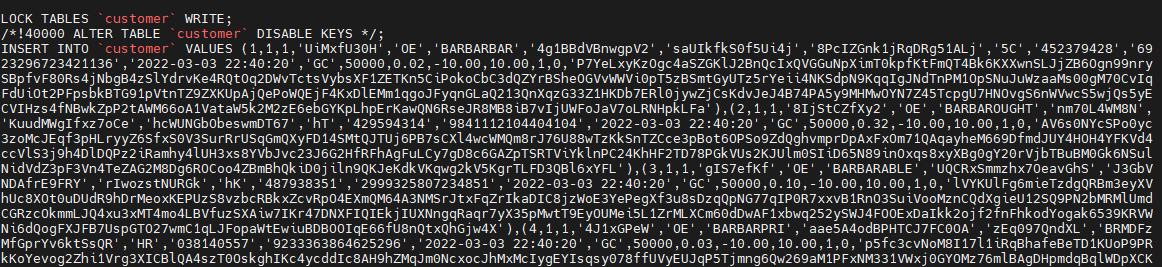
mysqldump 导出的数据初始化 SQL 里会首先将表 LOCK 住,禁止其他会话写。然后使用 insert 写入数据。每个 insert 后面的 value 里会有很多值。这是批量 insert 。
3.1.4 数据同步到Oceanbase MySQL租户
1、登录MySQL租户创建数据库及表
[root@obce01 ~]# obclient -h 10.10.10.112 -uroot@my_mysql_tenant -P2881 oceanbase -A -padmin123
Welcome to the OceanBase.  Commands end with ; or \g.
Your MySQL connection id is 3221487796
Server version: 5.7.25 OceanBase 3.1.2 (r10000392021123010-d4ace121deae5b81d8f0b40afbc4c02705b7fc1d) (Built Dec 30 2021 02:47:32)

Copyright (c) 2000, 2018, Oracle, MariaDB Corporation Ab and others.

Type 'help;' or '\h' for help. Type '\c' to clear the current input statement.

MySQL [oceanbase]> create database tpcc;
Query OK, 1 row affected (0.042 sec)

MySQL [oceanbase]> use tpcc
Database changed
MySQL [tpcc]> source expdata/tpcc_ddl.sql
Query OK, 0 rows affected (0.004 sec)

Query OK, 0 rows affected (0.002 sec)

Query OK, 0 rows affected, 1 warning (0.146 sec)

Query OK, 0 rows affected (0.007 sec)

Query OK, 0 rows affected (0.001 sec)

Query OK, 0 rows affected (0.001 sec)

Query OK, 0 rows affected, 1 warning (0.100 sec)

....
2、导入数据
[root@obce01 ~]# obclient -h 10.10.10.112 -uroot@my_mysql_tenant -P2881 tpcc -A -padmin123
Welcome to the OceanBase.  Commands end with ; or \g.
Your MySQL connection id is 3221487867
Server version: 5.7.25 OceanBase 3.1.2 (r10000392021123010-d4ace121deae5b81d8f0b40afbc4c02705b7fc1d) (Built Dec 30 2021 02:47:32)

Copyright (c) 2000, 2018, Oracle, MariaDB Corporation Ab and others.

Type 'help;' or '\h' for help. Type '\c' to clear the current input statement.

MySQL [tpcc]> source expdata/tpcc_data.sql
Query OK, 0 rows affected (0.001 sec)

Query OK, 0 rows affected (0.001 sec)

Query OK, 0 rows affected (0.002 sec)

Query OK, 0 rows affected (0.002 sec)

Query OK, 0 rows affected (0.001 sec)

Query OK, 0 rows affected (0.001 sec)

...
导入过程中存在如下错误信息,但是不影响数据导入。

3、比对数据
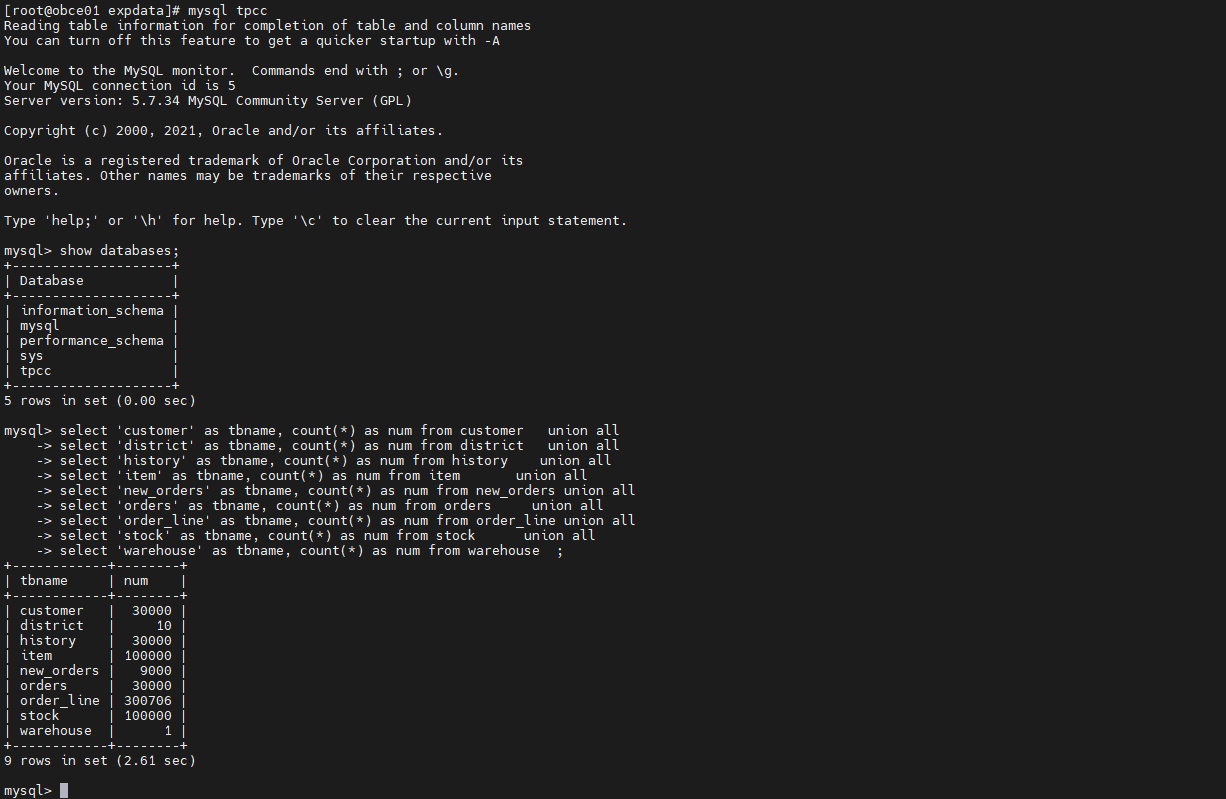
MySQL数据量
Oceanbase MySQL租户数据量
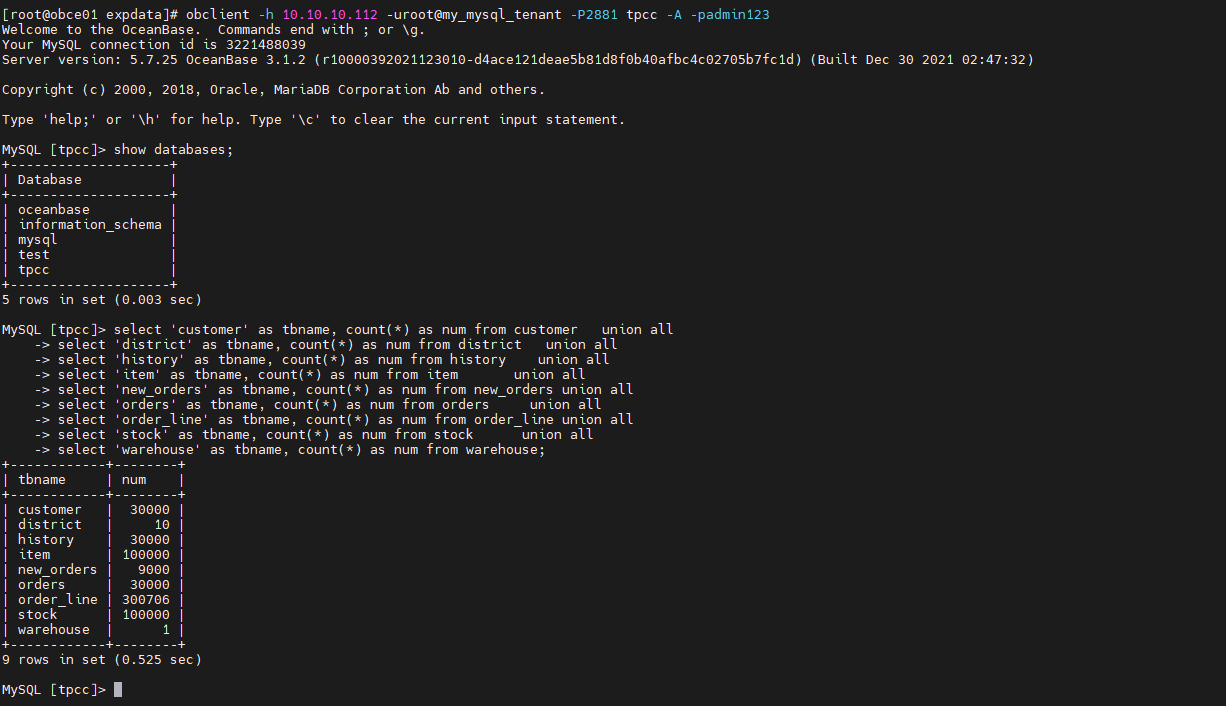
通过上面查询可知,MySQL数据库与导入Oceanbase MySQL租户数据量一致。
3.2 使用 datax 迁移 MySQL 表到 OceanBase
使用 datax 配置至少一个表的 MySQL 到 OceanBase 的 MySQL 租户的离线同步。
3.2.1 安装配置datax
下载地址 http://datax-opensource.oss-cn-hangzhou.aliyuncs.com/datax.tar.gz

安装配置
# 解压即安装
[admin@obce01 ~]$ tar xvf datax.tar.gz

# 删除datax中的隐藏文件
find ./datax -type f -name ".*" | xargs rm -f

# 生成配置文件
[admin@obce01 ~]$ python2 ./datax/bin/datax.py -r mysqlreader -w oceanbasev10writer  > mysql_to_oceanbase.json
修改datax配置文件
{
    "job": {
        "content": [
            {
                "reader": {
                    "name": "mysqlreader",
                    "parameter": {
                        "column": ["*"],
                        "connection": [
                            {
                                "jdbcUrl": ["jdbc:mysql://10.10.10.112:3306/tpcc"],
                                "table": ["item"]
                            }
                        ],
                        "password": "admin123",
                        "username": "root",
                        "where": ""
                    }
                },
                "writer": {
                    "name": "oceanbasev10writer",
                    "parameter": {
                        "column": ["*"],
                        "connection": [
                            {
                                "jdbcUrl": "||_dsc_ob10_dsc_||obcetest:my_mysql_tenant||_dsc_ob10_dsc_||jdbc:mysql://10.10.10.112:2883/tpcc?useUnicode=true&characterEncoding=utf-8",
                                "table": ["datax_mysql_to_ob_item"]
                            }
                        ],
                        "obWriteMode": "replace",
                        "password": "admin123",
                        "username": "root"
                    }
                }
            }
        ],
        "setting": {
            "speed": {
                "channel": "2"
            }
        }
    }
}
3.2.2 迁移数据至OceanBase
[admin@obce01 ~]$ python2 ./datax/bin/datax.py mysql_to_oceanbase.json

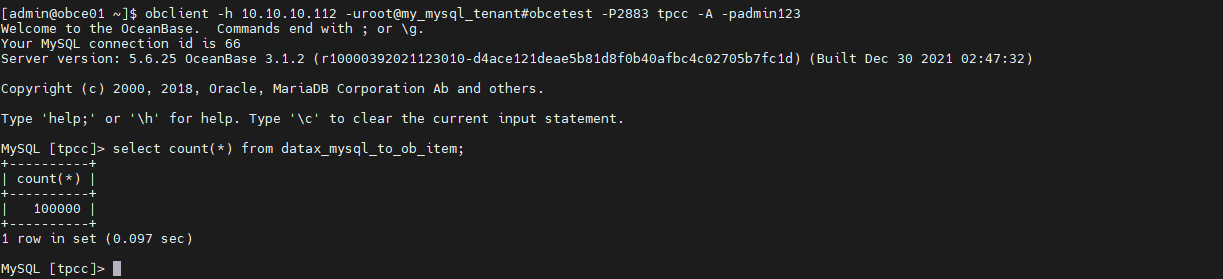
查看导入数据
最后修改时间:2022-03-05 08:16:46
「喜欢这篇文章,您的关注和赞赏是给作者最好的鼓励」
关注作者
【版权声明】本文为墨天轮用户原创内容,转载时必须标注文章的来源(墨天轮),文章链接,文章作者等基本信息,否则作者和墨天轮有权追究责任。如果您发现墨天轮中有涉嫌抄袭或者侵权的内容,欢迎发送邮件至:contact@modb.pro进行举报,并提供相关证据,一经查实,墨天轮将立刻删除相关内容。
