



原文地址:https://blog.dbi-services.com/migrating-a-centos-7-ami-to-rocky-linux-8/
原文作者:Daniel Westermann
前段时间我写过关于 将 CentOS 8 机器迁移到 Red Hat 8 的文章,因为 CentOS 8 已于去年 12 月终止。因此我们为该客户的所有 CentOS 8 系统都做了迁移,并且都作为虚拟机运行。同一位客户在 CentOS 7 上运行了许多 EC2 实例,从 CentOS 7 迁移是接下来要完成的任务之一,因为 CentOS 7 将在 2024 年结束生命周期。为此,您基本上有两种方式(如果您想要留在 Red Hat 系列中):
- 您可以从现有 AMI 部署目标发行版(Rocky Linux、Alma Linux、Oracle Linux 或 Red Hat Enterprise Linux),然后重新安装所需的一切并恢复数据;
- 另一种选择是直接从 CentOS 7 升级到任何基于 Red Hat 的 Linux 版本 8。
我们将在本文中选择第二种方式。
在我们正式开始之前:当然你需要在执行此操作之前备份您的 EC2 实例!并且在升级后测试你的应用程序,因为很多包和内核都会改变。
您可能想知道这将如何运作,因为没有支持从 CentOS 7 到 CentOS 8 的迁移路径。为此 Alma Linux 研发介入其中并创建了一个名为 Elevate 的项目来支持这些迁移。您可以使用该工具从 CentOS 7 迁移到 AlmaLinux 8、Rock Linux 8 和 Oracle Linux 8。
本文是基于最新 CentOS 7 AMI 的全新 EC2 实例:
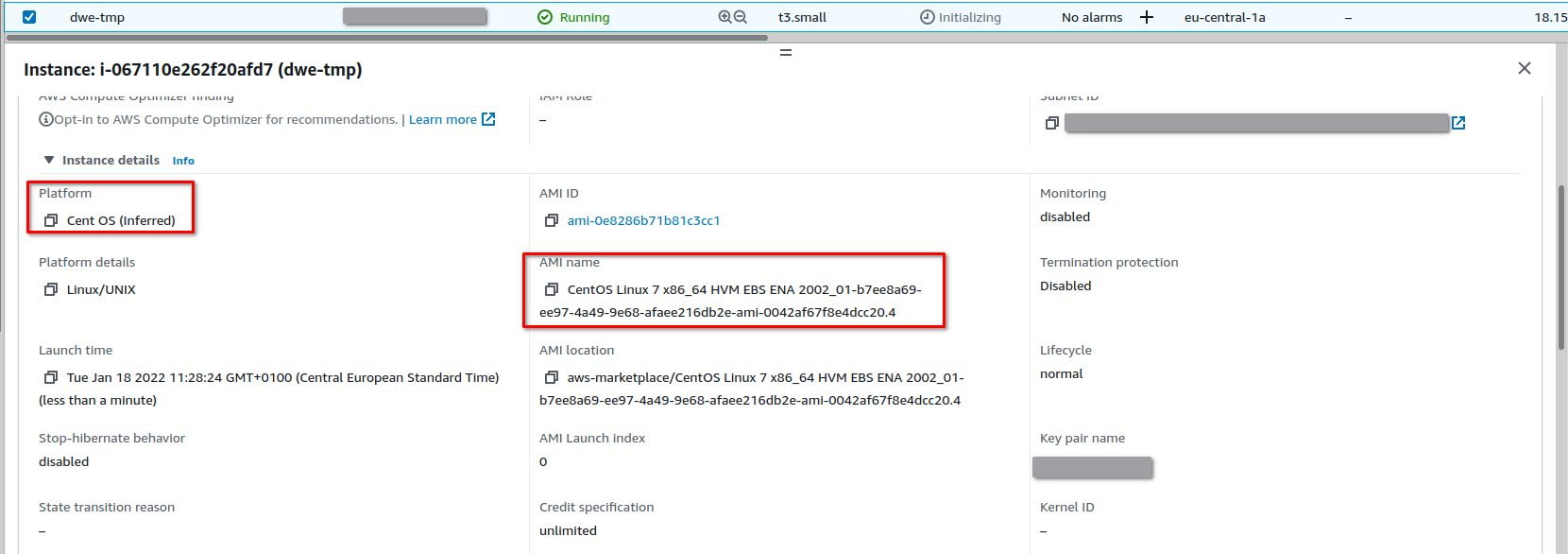
[centos@ip-10-0-1-100 ~]$ cat /etc/centos-release
CentOS Linux release 7.7.1908 (Core)
[centos@ip-10-0-1-100 ~]$ uname -a
Linux ip-10-0-1-100.eu-central-1.compute.internal 3.10.0-1062.12.1.el7.x86_64 #1 SMP Tue Feb 4 23:02:59 UTC 2020 x86_64 x86_64 x86_64 GNU/Linux
首先要做的事情:将系统更新到最新版本并重新启动:
[centos@ip-10-0-1-100 ~]$ sudo yum update -y
Loaded plugins: fastestmirror
Determining fastest mirrors
 * base: download.cf.centos.org
 * extras: download.cf.centos.org
 * updates: download.cf.centos.org
base                                                                                                                                                                                                                                                   | 3.6 kB  00:00:00
extras                                                                                                                                                                                                                                                 | 2.9 kB  00:00:00
updates                                                                                                                                                                                                                                                | 2.9 kB  00:00:00
(1/4): base/7/x86_64/group_gz                                                                                                                                                                                                                          | 153 kB  00:00:00
(2/4): extras/7/x86_64/primary_db                                                                                                                                                                                                                      | 243 kB  00:00:00
(3/4): updates/7/x86_64/primary_db                                                                                                                                                                                                                     |  13 MB  00:00:00
(4/4): base/7/x86_64/primary_db                                                                                                                                                                                                                        | 6.1 MB  00:00:00
Resolving Dependencies
--> Running transaction check
---> Package acl.x86_64 0:2.2.51-14.el7 will be updated
---> Package acl.x86_64 0:2.2.51-15.el7 will be an update
...
  sg3_utils-libs.x86_64 1:1.37-19.el7                   shared-mime-info.x86_64 0:1.8-5.el7                     sudo.x86_64 0:1.8.23-10.el7_9.2                         systemd.x86_64 0:219-78.el7_9.5                      systemd-libs.x86_64 0:219-78.el7_9.5
  systemd-sysv.x86_64 0:219-78.el7_9.5                  teamd.x86_64 0:1.29-3.el7                               tuned.noarch 0:2.11.0-11.el7_9                          tzdata.noarch 0:2021e-1.el7                          util-linux.x86_64 0:2.23.2-65.el7_9.1
  vim-minimal.x86_64 2:7.4.629-8.el7_9                  virt-what.x86_64 0:1.18-4.el7_9.1                       wpa_supplicant.x86_64 1:2.6-12.el7_9.2                  xfsprogs.x86_64 0:4.5.0-22.el7                       yum.noarch 0:3.4.3-168.el7.centos
  yum-plugin-fastestmirror.noarch 0:1.1.31-54.el7_8     yum-utils.noarch 0:1.1.31-54.el7_8                      zlib.x86_64 0:1.2.7-19.el7_9

Replaced:
  iwl7265-firmware.noarch 0:22.0.7.0-72.el7

Complete!
[centos@ip-10-0-1-100 ~]$ sudo reboot
...
[centos@ip-10-0-1-100 ~]$ cat /etc/centos-release
CentOS Linux release 7.9.2009 (Core)
[centos@ip-10-0-1-100 ~]$ uname -a
Linux ip-10-0-1-100.eu-central-1.compute.internal 3.10.0-1160.49.1.el7.x86_64 #1 SMP Tue Nov 30 15:51:32 UTC 2021 x86_64 x86_64 x86_64 GNU/Linux
安装提升存储库:
[centos@ip-10-0-1-100 ~]$ sudo yum install -y http://repo.almalinux.org/elevate/elevate-release-latest-el7.noarch.rpm
Loaded plugins: fastestmirror
elevate-release-latest-el7.noarch.rpm                                                                                                                                                                                                                  | 6.9 kB  00:00:00
Examining /var/tmp/yum-root-NQPt77/elevate-release-latest-el7.noarch.rpm: elevate-release-1.0-1.el7.noarch
Marking /var/tmp/yum-root-NQPt77/elevate-release-latest-el7.noarch.rpm to be installed
Resolving Dependencies
--> Running transaction check
---> Package elevate-release.noarch 0:1.0-1.el7 will be installed
--> Finished Dependency Resolution

Dependencies Resolved

==============================================================================================================================================================================================================================================================================
 Package                                                         Arch                                                   Version                                                      Repository                                                                          Size
==============================================================================================================================================================================================================================================================================
Installing:
 elevate-release                                                 noarch                                                 1.0-1.el7                                                    /elevate-release-latest-el7.noarch                                                 3.4 k

Transaction Summary
==============================================================================================================================================================================================================================================================================
Install  1 Package

Total size: 3.4 k
Installed size: 3.4 k
Downloading packages:
Running transaction check
Running transaction test
Transaction test succeeded
Running transaction
  Installing : elevate-release-1.0-1.el7.noarch                                                                                                                                                                                                                           1/1
  Verifying  : elevate-release-1.0-1.el7.noarch                                                                                                                                                                                                                           1/1

Installed:
  elevate-release.noarch 0:1.0-1.el7

Complete!
Elevate 在后台使用 Leapp,所以我们需要安装相应的包:
[centos@ip-10-0-1-100 ~]$  sudo yum install -y leapp-upgrade leapp-data-rocky
Loaded plugins: fastestmirror
Loading mirror speeds from cached hostfile
 * base: download.cf.centos.org
 * extras: download.cf.centos.org
 * updates: download.cf.centos.org
elevate                                                                                                                                                                                                                                                | 3.0 kB  00:00:00
elevate/x86_64/primary_db                                                                                                                                                                                                                              | 6.7 kB  00:00:00
Resolving Dependencies
--> Running transaction check
---> Package leapp-data-rocky.noarch 0:0.1-2.el7 will be installed
---> Package leapp-upgrade-el7toel8.noarch 0:0.14.0-100.202109271224Z.b7ebfca.master.el7.elevate will be installed
--> Processing Dependency: leapp-repository-dependencies = 6 for package: leapp-upgrade-el7toel8-0.14.0-100.202109271224Z.b7ebfca.master.el7.elevate.noarch
--> Processing Dependency: leapp-framework < 3 for package: leapp-upgrade-el7toel8-0.14.0-100.202109271224Z.b7ebfca.master.el7.elevate.noarch
...
Dependency Installed:
  deltarpm.x86_64 0:3.6-3.el7                                                     dnf.noarch 0:4.0.9.2-2.el7_9                                                            dnf-data.noarch 0:4.0.9.2-2.el7_9
  leapp.noarch 0:0.12.1-100.20210924142320684911.master.28.g1f03432.el7           leapp-deps.noarch 0:0.12.1-100.20210924142320684911.master.28.g1f03432.el7              leapp-upgrade-el7toel8-deps.noarch 0:0.14.0-100.202109271224Z.b7ebfca.master.el7.elevate
  libcomps.x86_64 0:0.1.8-14.el7                                                  libdnf.x86_64 0:0.22.5-2.el7_9                                                          libmodulemd.x86_64 0:1.6.3-1.el7
  librepo.x86_64 0:1.8.1-8.el7_9                                                  libreport-filesystem.x86_64 0:2.1.11-53.el7.centos                                      libsolv.x86_64 0:0.6.34-4.el7
  pciutils.x86_64 0:3.5.1-3.el7                                                   python-enum34.noarch 0:1.0.4-1.el7                                                      python2-dnf.noarch 0:4.0.9.2-2.el7_9
  python2-hawkey.x86_64 0:0.22.5-2.el7_9                                          python2-leapp.noarch 0:0.12.1-100.20210924142320684911.master.28.g1f03432.el7           python2-libcomps.x86_64 0:0.1.8-14.el7
  python2-libdnf.x86_64 0:0.22.5-2.el7_9

Complete!
如果您想迁移到其他发行版之一,请将“leapp-data-rocky”包替换为以下之一:
- leapp-data-almalinux
- leapp-data-oraclelinux
- leapp-data-rocky
升级前检查:
[centos@ip-10-0-1-100 ~]$ sudo leapp preupgrade
==> Processing phase `configuration_phase`
====> * ipu_workflow_config
        IPU workflow config actor
==> Processing phase `FactsCollection`
====> * firewalld_facts_actor
        Provide data about firewalld
====> * source_boot_loader_scanner
        Scans the boot loader configuration on the source system.
====> * repository_mapping
        Produces message containing repository mapping based on provided file.
====> * read_openssh_config
        Collect information about the OpenSSH configuration.
====> * scandasd
        In case of s390x architecture, check whether DASD is used.
====> * rpm_scanner
        Provides data about installed RPM Packages.
...
====> * target_userspace_creator
        Initializes a directory to be populated as a minimal environment to run binaries from the target system.
Rocky Linux 8 - PowerTools                      6.8 MB/s | 2.5 MB     00:00
Rocky Linux 8 - Extras                           42 kB/s |  10 kB     00:00
Rocky Linux 8 - AppStream                       7.4 MB/s | 8.7 MB     00:01
Rocky Linux 8 - BaseOS                          4.2 MB/s | 4.6 MB     00:01
Rocky Linux 8 - HighAvailability                743 kB/s | 545 kB     00:00
Dependencies resolved.
================================================================================
 Package                     Arch   Version              Repository        Size
================================================================================
Installing:
 dnf                         noarch 4.7.0-4.el8          rocky8-baseos    543 k
 dnf-plugins-core            noarch 4.0.21-3.el8         rocky8-baseos     69 k
...
Check completed.
====> * tmp_actor_to_satisfy_sanity_checks
        The actor does NOTHING but satisfy static sanity checks
====> * check_initramfs_tasks
        Inhibit the upgrade if conflicting "initramfs" tasks are detected
==> Processing phase `Reports`
====> * verify_check_results
        Check all dialogs and notify that user needs to make some choices.
====> * verify_check_results
        Check all generated results messages and notify user about them.

============================================================
                     UPGRADE INHIBITED
============================================================

Upgrade has been inhibited due to the following problems:
    1. Inhibitor: Missing required answers in the answer file
Consult the pre-upgrade report for details and possible remediation.

============================================================
                     UPGRADE INHIBITED
============================================================


Debug output written to /var/log/leapp/leapp-preupgrade.log

============================================================
                           REPORT
============================================================

A report has been generated at /var/log/leapp/leapp-report.json
A report has been generated at /var/log/leapp/leapp-report.txt

============================================================
                       END OF REPORT
============================================================

Answerfile has been generated at /var/log/leapp/answerfile
查看生成的响应文件和报告,内容提到了您需要解决的任何问题。这是我必须做的:
[centos@ip-10-0-1-100 ~]$ echo PermitRootLogin yes | sudo tee -a /etc/ssh/sshd_config
PermitRootLogin yes
[centos@ip-10-0-1-100 ~]$ sudo leapp answer --section remove_pam_pkcs11_module_check.confirm=True
完成后,开始迁移:
[centos@ip-10-0-1-100 ~]$ sudo leapp upgrade
==> Processing phase `configuration_phase`
====> * ipu_workflow_config
        IPU workflow config actor
==> Processing phase `FactsCollection`
====> * firewalld_facts_actor
        Provide data about firewalld
...
The downloaded packages were saved in cache until the next successful transaction.
You can remove cached packages by executing 'dnf clean packages'.
==> Processing phase `InterimPreparation`
====> * efi_interim_fix
        Adjust EFI boot entry for first reboot
====> * upgrade_initramfs_generator
        Creates the upgrade initramfs
====> * add_upgrade_boot_entry
        Add new boot entry for Leapp provided initramfs.
A reboot is required to continue. Please reboot your system.


Debug output written to /var/log/leapp/leapp-upgrade.log

============================================================
                           REPORT
============================================================

A report has been generated at /var/log/leapp/leapp-report.json
A report has been generated at /var/log/leapp/leapp-report.txt

============================================================
                       END OF REPORT
============================================================

Answerfile has been generated at /var/log/leapp/answerfile
看起来一切都很好,最后一步是重新启动:
[centos@ip-10-0-1-100 ~]$ sudo reboot
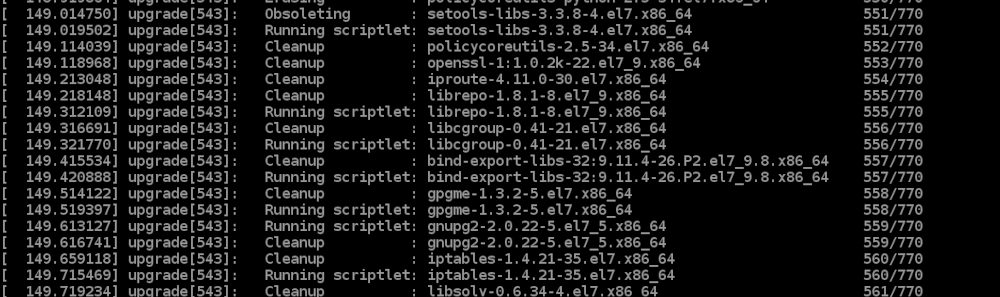
不要惊慌,这次重启需要一些时间。如果您使用的是 AWS EC2,您可以使用 控制台 检查发生了什么:
几分钟后,EC2 实例应该会输出结果:
[centos@ip-10-0-1-100 ~]$ cat /etc/rocky-release
Rocky Linux release 8.5 (Green Obsidian)
[centos@ip-10-0-1-100 ~]$ uname -a
Linux ip-10-0-1-100.eu-central-1.compute.internal 4.18.0-348.7.1.el8_5.x86_64 #1 SMP Tue Dec 21 19:02:23 UTC 2021 x86_64 x86_64 x86_64 GNU/Linux
非常简单直接,但这是一个没有任何用户数据、修改系统或第三方应用程序的安装。
