



OceanBase借助OBD三节点集群部署+集群扩容+租户扩缩容
使用OBD 为 OceanBase 集群扩容
本文将通过示例介绍如何借助 OBD 把 1-1-1 的集群扩容成 2-2-2 的集群。

前提条件
我们本次示例操作共用到三台机器,其中三台机器用来组成集群,IP 分别为172.20.2.120:2881;172.20.2.121:2881;172.20.2.122:2881;由于空间有限另外三台机器以增加ob2目录方式新加入集群,用来扩容,IP 分别为 172.20.2.120:3881;172.20.2.121:3881;172.20.2.122:3881。
oceanbase部署请查看历史文章
https://www.modb.pro/db/324460 使用OBD自动部署三节点OceanBase文档
https://www.modb.pro/db/328171 OceanBase手动部署三节点OBserver文档
https://www.modb.pro/db/322997 OceanBase 单节点手动部署OB文档
https://www.modb.pro/db/250245 Docker单节点自动化部署OB集群
机器信息
| 机器类型 | 主机配置 | 备注 |
|---|---|---|
| OS | Centos 7.4 | |
| 中控机 /OBD | CPU:8C | 内存:16G |
| 目标机器 /OBserver | CPU:8C | 内存:32G |
| 系统盘 / | dev/vda 50G | LVS分区、文件系统:EXT4 |
| 数据盘 /data | dev/vdb 100G | GPT分区、文件系统:xfs |
| 事务日志盘 /redo | dev/vdc 100G | GPT分区、文件系统:xfs |
机器划分
| 角色 | 机器IP | 备注 |
|---|---|---|
| OBD | 172.20.2.131 | 中控机 |
| OBserver | 172.20.2.120 | {2881,2882}, {3881,3882} zone1 |
| 172.20.2.121 | {2881,2882}, {3881,3882} zone2 | |
| 172.20.2.122 | {2881,2882}, {3881,3882} zone3 | |
| OBproxy | 172.20.2.120 | {2883,2884} 反向代理 |
| 172.20.2.121 | {2883,2884} 反向代理 | |
| 172.20.2.122 | {2883,2884} 反向代理 | |
| OBclient | 172.20.2.131 | OB命令行客户端 |
安装部署版本
| oceanbase-ce | 3.1.2.el7.x86_64 |
|---|---|
| obproxy | 3.2.0-1.el7.x86_64 |
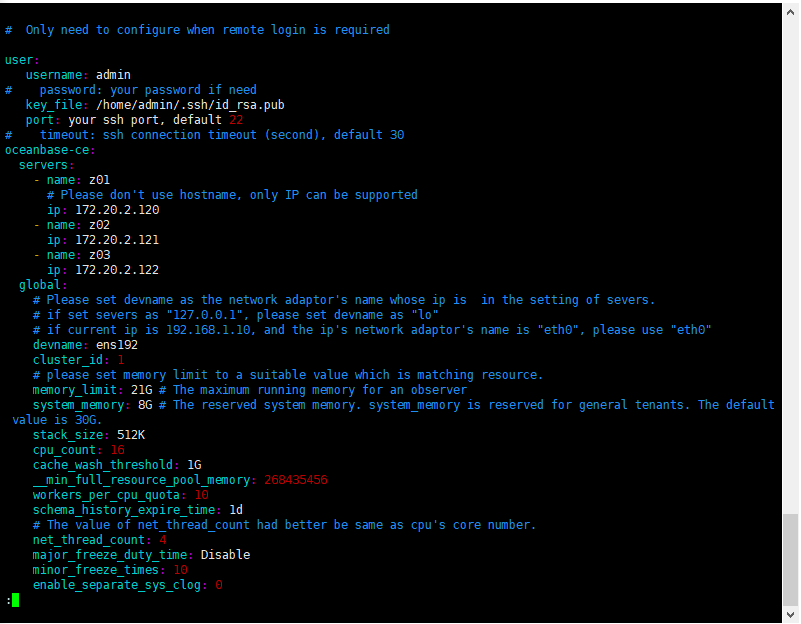
一、编辑 OBD 配置文件
[admin@CAIP131 ~]$ vim obce-3zones.yaml


#  Only need to configure when remote login is required

user:
   username: admin
#    password: your password if need
   key_file: /home/admin/.ssh/id_rsa.pub
   port: your ssh port, default 22
#    timeout: ssh connection timeout (second), default 30
oceanbase-ce:
  servers:
    - name: z01
      # Please don't use hostname, only IP can be supported
      ip: 172.20.2.120
    - name: z02
      ip: 172.20.2.121
    - name: z03
      ip: 172.20.2.122
  global:
    # Please set devname as the network adaptor's name whose ip is  in the setting of severs.
    # if set severs as "127.0.0.1", please set devname as "lo"
    # if current ip is 192.168.1.10, and the ip's network adaptor's name is "eth0", please use "eth0"
    devname: ens192
    cluster_id: 1
    # please set memory limit to a suitable value which is matching resource.
    memory_limit: 21G # The maximum running memory for an observer
    system_memory: 8G # The reserved system memory. system_memory is reserved for general tenants. The default value is 30G.
    stack_size: 512K
    cpu_count: 16
    cache_wash_threshold: 1G
    __min_full_resource_pool_memory: 268435456
    workers_per_cpu_quota: 10
    schema_history_expire_time: 1d
    # The value of net_thread_count had better be same as cpu's core number.
    net_thread_count: 4
    major_freeze_duty_time: Disable
    minor_freeze_times: 10
    enable_separate_sys_clog: 0
    enable_merge_by_turn: FALSE
    #datafile_disk_percentage: 20 # The percentage of the data_dir space to the total disk space. This value takes effect only when datafile_size is 0. The default value is 90.
    datafile_size: 50G
    syslog_level: WARN # System log level. The default value is INFO.
    enable_syslog_wf: false # Print system logs whose levels are higher than WARNING to a separate log file. The default value is true.
    enable_syslog_recycle: true # Enable auto system log recycling or not. The default value is false.
    max_syslog_file_count: 10 # The maximum number of reserved log files before enabling auto recycling. The default value is 0.
    # observer cluster name, consistent with obproxy's cluster_name
    appname: obce-3zones
    root_password: Pwd2022# # root user password, can be empty
    proxyro_password: Pwd2022# # proxyro user pasword, consistent with obproxy's observer_sys_password, can be empty
  z01:
    mysql_port: 2881 # External port for OceanBase Database. The default value is 2881.
    rpc_port: 2882 # Internal port for OceanBase Database. The default value is 2882.
    #  The working directory for OceanBase Database. OceanBase Database is started under this directory. This is a required field.
    home_path: /home/admin/oceanbase-ce
    # The directory for data storage. The default value is $home_path/store.
    data_dir: /data
    # The directory for clog, ilog, and slog. The default value is the same as the data_dir value.
    redo_dir: /redo
    zone: zone1
  z02:
    mysql_port: 2881 # External port for OceanBase Database. The default value is 2881.
    rpc_port: 2882 # Internal port for OceanBase Database. The default value is 2882.
    #  The working directory for OceanBase Database. OceanBase Database is started under this directory. This is a required field.
    home_path: /home/admin/oceanbase-ce
    # The directory for data storage. The default value is $home_path/store.
    data_dir: /data
    # The directory for clog, ilog, and slog. The default value is the same as the data_dir value.
    redo_dir: /redo
    zone: zone2
  z03:
    mysql_port: 2881 # External port for OceanBase Database. The default value is 2881.
    rpc_port: 2882 # Internal port for OceanBase Database. The default value is 2882.
    #  The working directory for OceanBase Database. OceanBase Database is started under this directory. This is a required field.
    home_path: /home/admin/oceanbase-ce
    # The directory for data storage. The default value is $home_path/store.
    data_dir: /data
    # The directory for clog, ilog, and slog. The default value is the same as the data_dir value.
    redo_dir: /redo
    zone: zone3
obproxy:
  servers:
    - 172.20.2.120
    - 172.20.2.121
    - 172.20.2.122
  # Set dependent components for the component.
  # When the associated configurations are not done, OBD will automatically get the these configurations from the dependent components.
  depends:
    - oceanbase-ce
  global:
    listen_port: 2883 # External port. The default value is 2883.
    prometheus_listen_port: 2884 # The Prometheus port. The default value is 2884.
    home_path: /home/admin/obproxy
    # oceanbase root server list
    # format: ip:mysql_port;ip:mysql_port
    rs_list: 172.20.2.120:2881;172.20.2.121:2881;172.20.2.122:2881
    enable_cluster_checkout: false
    # observer cluster name, consistent with oceanbase-ce's appname
    cluster_name: obce-3zones
    obproxy_sys_password: Pwd2022# # obproxy sys user password, can be empty
    observer_sys_password: Pwd2022# # proxyro user pasword, consistent with oceanbase-ce's proxyro_password, can be empty

二、OBD 开始部署集群
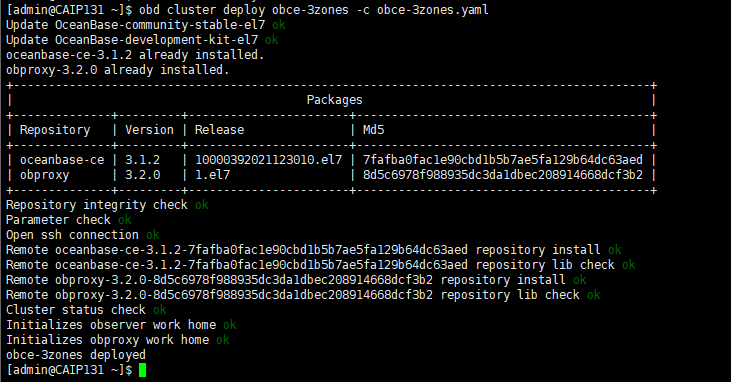
1、部署OBD(obce-3zones)
obd cluster deploy [集群名] -c 集群配置文件 。 集群名可以跟配置文件中的集群名一样,也可以跟文件名一样
[admin@CAIP131 ~]$ obd cluster deploy obce-3zones -c obce-3zones.yaml

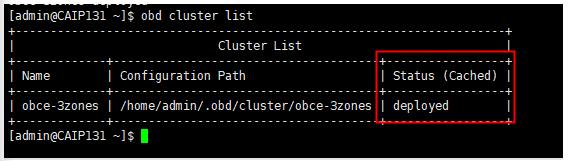
检查集群部署状态
[admin@CAIP131 ~]$ obd cluster list

2、OBD 启动和初始化集群bootstrap
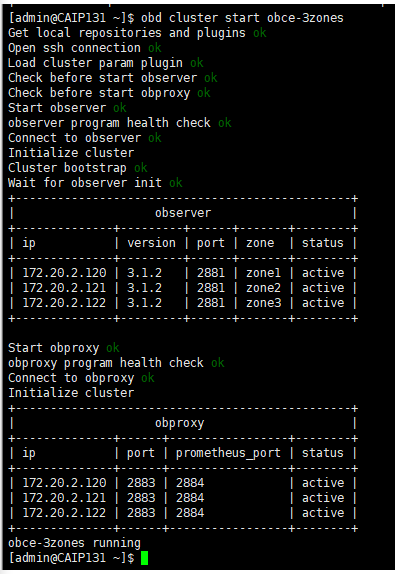
上面 deploy 操作只是安装了软件和准备初始化目录,您还需使用命令 obd cluster start 启动集群节点并初始化集群。
[admin@CAIP131 ~]$ obd cluster start obce-3zones

查看启动后的集群状态
[admin@CAIP131 ~]$ obd cluster list

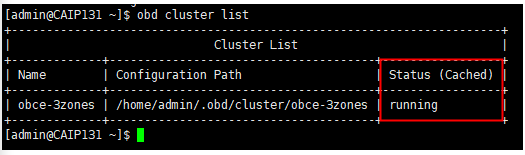
状态running已经运行
3、查看集群信息
连接 OceanBase 数据库
obclient -h 172.20.2.120 -uroot@sys -P2881 -A -c
[admin@CAIP131 ~]$ mysql -h 172.20.2.120 -uroot@sys#obce-3zones -P2881 -pPwd2022# -c -A oceanbase
[admin@CAIP131 ~]$ obclient -h 172.20.2.120 -uroot@sys -P2881 -A -c


查看机器列表(需要先进入oceanbase数据库)
MySQL [(none)]> use oceanbase;
MySQL [oceanbase]> select svr_ip,id,zone,status from __all_server;

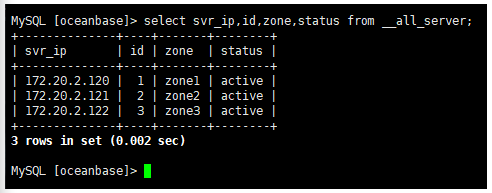
通过此命令返回结果,您可以看到此时有 3 台机器。
三、集群扩容
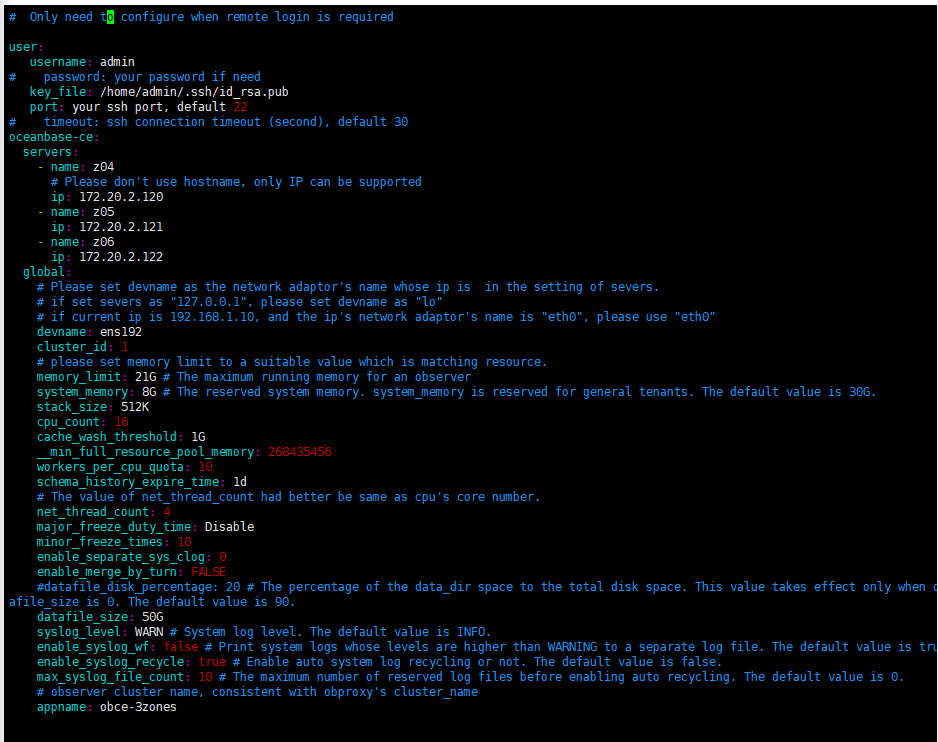
1、写一份新的配置文件,使用 OBD 进行部署(obce-3zones2)
[admin@CAIP131 ~]$ vim obce-3zones2.yaml


#  Only need to configure when remote login is required

user:
   username: admin
#    password: your password if need
   key_file: /home/admin/.ssh/id_rsa.pub
   port: your ssh port, default 22
#    timeout: ssh connection timeout (second), default 30
oceanbase-ce:
  servers:
    - name: z04
      # Please don't use hostname, only IP can be supported
      ip: 172.20.2.120
    - name: z05
      ip: 172.20.2.121
    - name: z06
      ip: 172.20.2.122
  global:
    # Please set devname as the network adaptor's name whose ip is  in the setting of severs.
    # if set severs as "127.0.0.1", please set devname as "lo"
    # if current ip is 192.168.1.10, and the ip's network adaptor's name is "eth0", please use "eth0"
    devname: ens192
    cluster_id: 1
    # please set memory limit to a suitable value which is matching resource.
    memory_limit: 21G # The maximum running memory for an observer
    system_memory: 8G # The reserved system memory. system_memory is reserved for general tenants. The default value is 30G.
    stack_size: 512K
    cpu_count: 16
    cache_wash_threshold: 1G
    __min_full_resource_pool_memory: 268435456
    workers_per_cpu_quota: 10
    schema_history_expire_time: 1d
    # The value of net_thread_count had better be same as cpu's core number.
    net_thread_count: 4
    major_freeze_duty_time: Disable
    minor_freeze_times: 10
    enable_separate_sys_clog: 0
    enable_merge_by_turn: FALSE
    #datafile_disk_percentage: 20 # The percentage of the data_dir space to the total disk space. This value takes effect only when datafile_size is 0. The default value is 90.
    datafile_size: 50G
    syslog_level: WARN # System log level. The default value is INFO.
    enable_syslog_wf: false # Print system logs whose levels are higher than WARNING to a separate log file. The default value is true.
    enable_syslog_recycle: true # Enable auto system log recycling or not. The default value is false.
    max_syslog_file_count: 10 # The maximum number of reserved log files before enabling auto recycling. The default value is 0.
    # observer cluster name, consistent with obproxy's cluster_name
    appname: obce-3zones
    root_password: Pwd2022# # root user password, can be empty
    proxyro_password: Pwd2022# # proxyro user pasword, consistent with obproxy's observer_sys_password, can be empty
  z04:
    mysql_port: 3881 # External port for OceanBase Database. The default value is 2881.
    rpc_port: 3882 # Internal port for OceanBase Database. The default value is 2882.
    #  The working directory for OceanBase Database. OceanBase Database is started under this directory. This is a required field.
    home_path: /home/admin/oceanbase-ce
    # The directory for data storage. The default value is $home_path/store.
    data_dir: /data/ob2
    # The directory for clog, ilog, and slog. The default value is the same as the data_dir value.
    redo_dir: /redo/ob2
    zone: zone1
  z05:
    mysql_port: 3881 # External port for OceanBase Database. The default value is 2881.
    rpc_port: 3882 # Internal port for OceanBase Database. The default value is 2882.
    #  The working directory for OceanBase Database. OceanBase Database is started under this directory. This is a required field.
    home_path: /home/admin/oceanbase-ce
    # The directory for data storage. The default value is $home_path/store.
    data_dir: /data/ob2
    # The directory for clog, ilog, and slog. The default value is the same as the data_dir value.
    redo_dir: /redo/ob2
    zone: zone2
  z06:
    mysql_port: 3881 # External port for OceanBase Database. The default value is 2881.
    rpc_port: 3882 # Internal port for OceanBase Database. The default value is 2882.
    #  The working directory for OceanBase Database. OceanBase Database is started under this directory. This is a required field.
    home_path: /home/admin/oceanbase-ce
    # The directory for data storage. The default value is $home_path/store.
    data_dir: /data/ob2
    # The directory for clog, ilog, and slog. The default value is the same as the data_dir value.
    redo_dir: /redo/ob2
    zone: zone3
[admin@CAIP131 ~]$ obd cluster deploy obce-3zones2 -c obce-3zones2.yaml

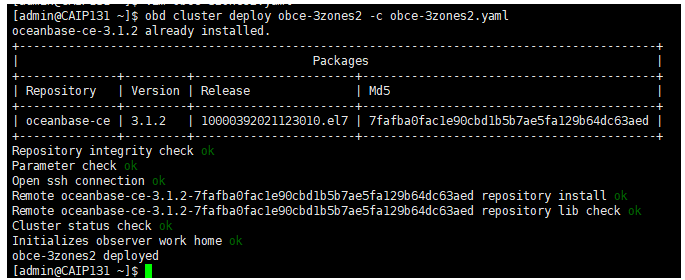
2、把新的配置文件复制一份到原本配置文件中
查看配置路径
[admin@CAIP131 ~]$ obd cluster list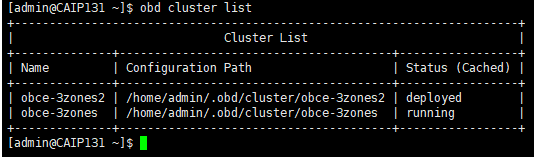

打开原配置文件obce-3zones,将新配置文件的内容复制到原本配置文件中
[admin@CAIP131 ~]$ vim .obd/cluster/obce-3zones/config.yaml

新配置文件的内容需放在原本配置文件对应内容之后。
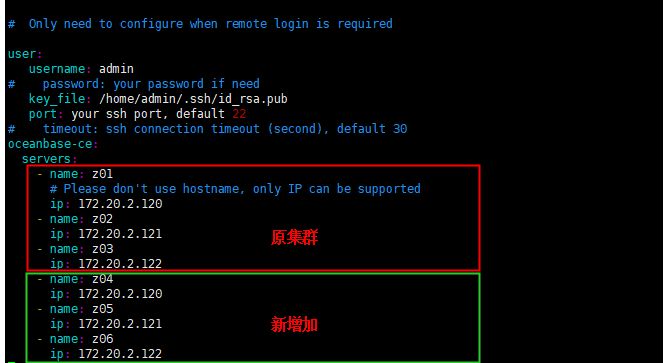
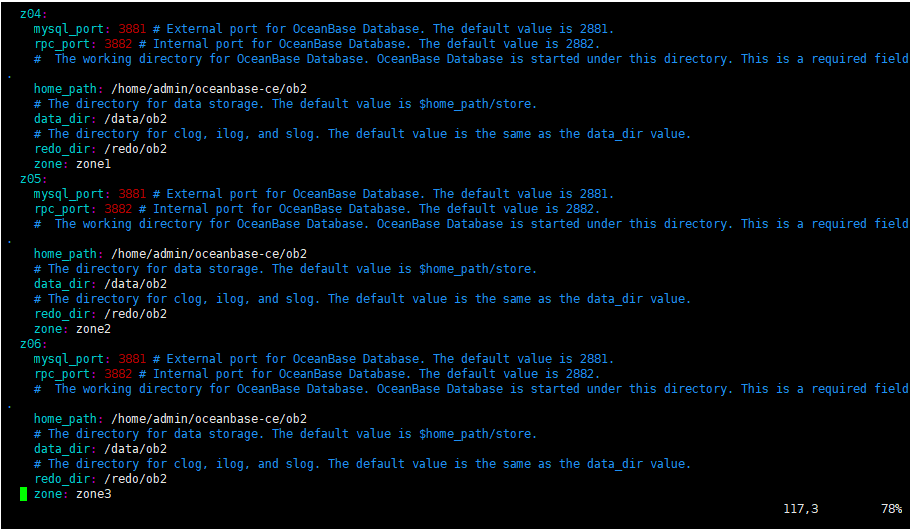
3、再次启动集群(原集群obce-3zones)
[admin@CAIP131 ~]$ obd cluster start obce-3zones

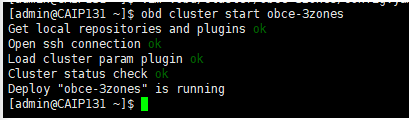
4、重新连接 OceanBase 数据库查看扩容前集群3zone
[admin@CAIP131 ~]$ obclient -h 172.20.2.120 -uroot@sys -P2881 -A -c

5、添加新的进程
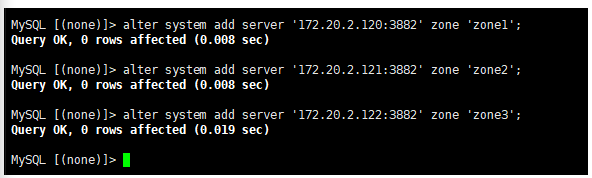
MySQL [(none)]> alter system add server '172.20.2.120:3882' zone 'zone1';
MySQL [(none)]> alter system add server '172.20.2.121:3882' zone 'zone2';
MySQL [(none)]> alter system add server '172.20.2.122:3882' zone 'zone3';
6、查看扩容结果
MySQL [(none)]> use oceanbase;
MySQL [oceanbase]> select svr_ip,id,zone,status from __all_server;
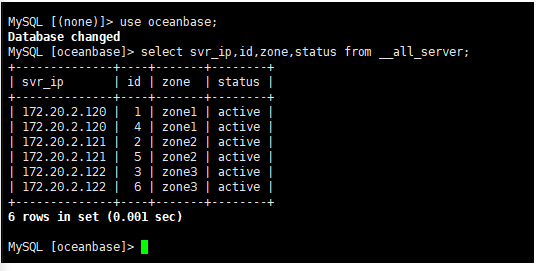
返回结果中可以看到每个 ZONE 都有两个进程,则表示扩容成功。
四、租户扩缩容
连接 OceanBase 数据库
obclient -h 172.20.2.1 -uroot@sys -P2881 -A -c
创建资源单元
MySQL [(none)]> CREATE RESOURCE UNIT S1 max_cpu=2, min_cpu=2, max_memory='2G', min_memory='2G',max_iops=1000, min_iops=1000, max_session_num=10000, max_disk_size='20G';
创建资源池
MySQL [(none)]> CREATE RESOURCE POOL pool1 unit=S1, unit_num=1;
创建租户
MySQL [(none)]> create tenant test_tenant resource_pool_list=('pool1');
MySQL [(none)]> ALTER TENANT test_tenant SET VARIABLES ob_tcp_invited_nodes='%';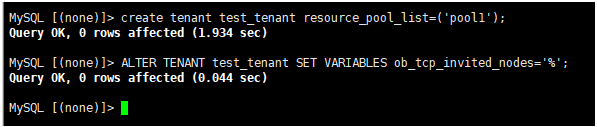
查看租户是否创建成功
MySQL [(none)]> SELECT * FROM oceanbase.gv$tenant;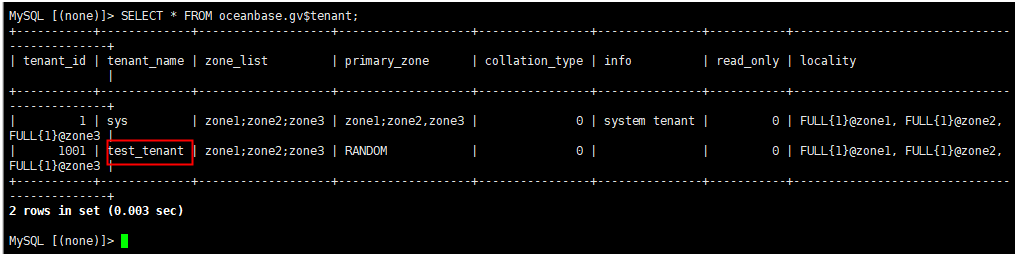
查看机器列表
MySQL [oceanbase]> select svr_ip,id,zone,status from __all_server;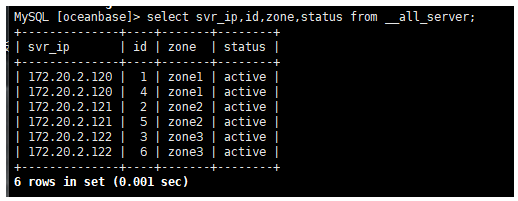
为业务租户,扩容unit_num数量改为2
MySQL [(none)]> alter resource pool pool1 unit_num=2;
租户缩容,unit_num数量改为1
MySQL [oceanbase]> alter resource pool pool1 unit_num=1;
最后修改时间:2022-03-09 00:52:24
「喜欢这篇文章,您的关注和赞赏是给作者最好的鼓励」
关注作者
【版权声明】本文为墨天轮用户原创内容,转载时必须标注文章的来源(墨天轮),文章链接,文章作者等基本信息,否则作者和墨天轮有权追究责任。如果您发现墨天轮中有涉嫌抄袭或者侵权的内容,欢迎发送邮件至:contact@modb.pro进行举报,并提供相关证据,一经查实,墨天轮将立刻删除相关内容。
