



一直在学习关于鸿蒙官方文档,主要是学习基于 JS 扩展的类 web 开发范式,而随着开发文档的不断更新,SDK 也更新到了 8,随着 TS 的不断广泛应用,于是我就接触了基于 TS 扩展的类 web 开发范式,也就是 ArkUI。

本文主要是基于 ArkUI 实现的一个小项目,也可以说是一个 demo,主要是通过 ETS 的语法完成一些关于界面相关的、简单的数据通信以及交互。
效果展示:
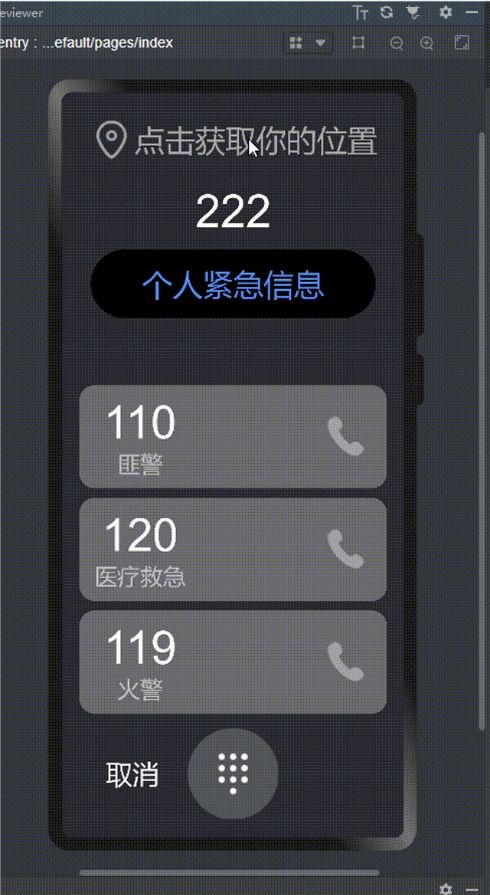
创建项目
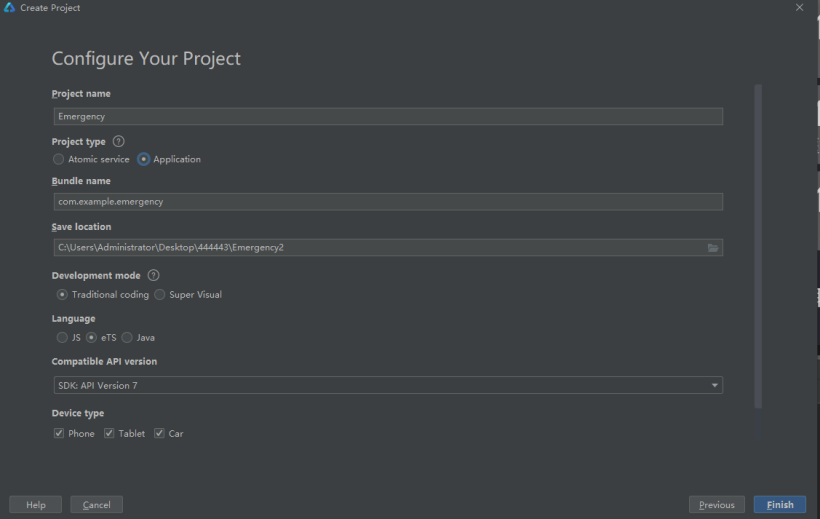
首先打开 DevEco Studio 编辑器,左上角找到 File–>New–>New project,然后来到下面这个页面。
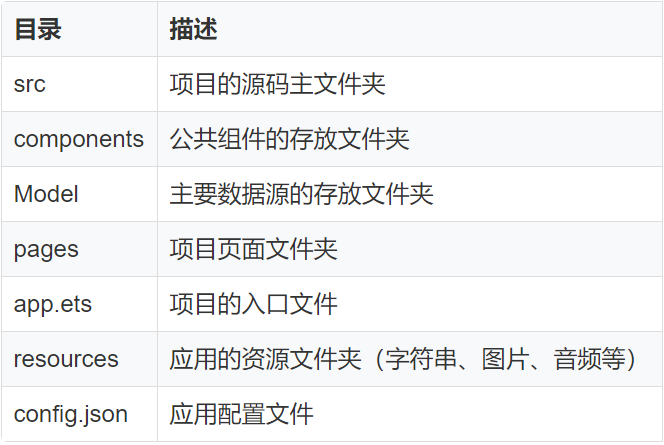
项目架构
如下图:
数据模型构建
①定义一个接口来约束 urgentDialList:
// 这里使用TS中的interface来约束接口
interface UrgentDialList {
  id: number,
  EmergencyNumber: number,
  type: string
}

const urgentDialList: UrgentDialList[] = [
  {
    id: 1,
    EmergencyNumber: 110,
    type: "匪警"
  },
  {
    id: 2,
    EmergencyNumber: 120,
    type: "医疗救急"
  },
  {
    id: 3,
    EmergencyNumber: 119,
    type: "火警"
  }
]
②构建 initializeOnStartup 方法来对页面数据进行初始化处理:
export function initializeOnStartup(): Array<UrgentListData> {
  let urgentDialListArray: Array<UrgentListData> = []
  urgentDialList.forEach(item => {
    urgentDialListArray.push(new UrgentListData(item.id, item.EmergencyNumber, item.type))
  })
  return urgentDialListArray
}
主要涉及到的状态变量装饰器:
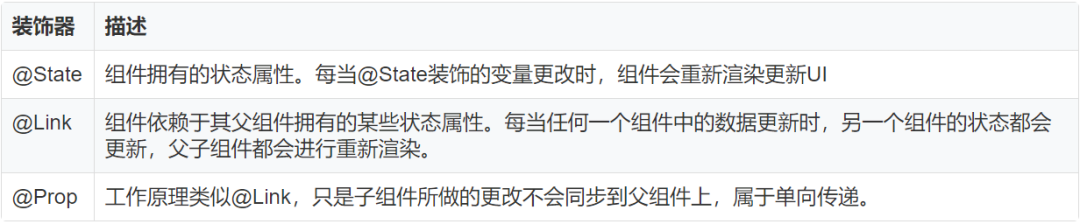
主要涉及功能点:
打开弹框获取地理位置
紧急拨号页面的跳转
拨号键盘的呼入与呼出
手势事件滑动呼叫紧急号码
主要工具函数类
作用:主要用来展示弹框,这里需要引入鸿蒙里一个包(import prompt from ‘@system.prompt’😉
async function showToast(message: string,duration:number = 5000) {
  await prompt.showToast({
    message,
    duration
  })
}
作用:主要用来进行页面跳转,这里需要引入鸿蒙里一个包(import routerfrom ‘@system.router’😉
async function routerPage(path) {
  let option = {
    uri: `pages/${path}`
  }
  try {
    await router.push(option)
  } catch (err) {
    console.log(`fail callback, code: ${err.code}, msg: ${err.msg}`)
  }
}
组件封装
①keyword 组件
但是要注意一点,Text 组件只能用来展示字符串,因此如果是想展示数字的话得需要通过 toString() 转换一下,这是我之前遇到的一个小问题。
@Component
export default struct Keyword {
  @State keySign: (string | number)[] = [1, 2, 3, 4, 5, 6, 7, 8, 9, "*", 0, "#"]
  @State key: number | string= ""
  @Link inputNumber: string

  build() {
    Column({ space: 5 }) {
      Grid() {
        ForEach(this.keySign, key => {
          GridItem() {
            Text(key.toString())
              .fontSize(52)
              .fontColor("#fff")
              .fontWeight(500)
              .width('100%')
              .height('100%')
              .textAlign(TextAlign.Center)
              .onClick(() => {
                console.log(key);
                this.key = this.inputNumber
              })
          }
        })
      }
       // 这里使用到了grid中的columnsTemplate以及rowsTemplate属性,他会对元素进行区域分割
      .columnsTemplate('1fr 1fr 1fr')
      .rowsTemplate('1fr 1fr 1fr 1fr')
      .columnsGap(10)
      .rowsGap(10)
      .width('90%')
      .height(360)
    }
  }
}
②urgentList 组件
该组件主要用来渲染紧急拨号列表,在 ArkUI 中,主要使用 forEach 来遍历数据,进行页面展示。
import urgentListItem from "./urgentListItem.ets"
import {UrgentListData} from "../Model/urgentListData.ets"
import {initializeOnStartup} from "../Model/urgentListModel.ets"

@Component
export default struct UrgentList {
  private urgentItems: UrgentListData[]= initializeOnStartup()

  build() {
    List() {
      ForEach(this.urgentItems, item => {
        ListItem() {
          urgentListItem({ urgentItems: item })
        }
      }, item => item.id.toString())
    }
    .width("90%")
  }
}
③urgentListItem 组件
首先会使用到手势事件,通过判断手势滑动的偏移量 offsetX 来控制滑动后颜色改变:
gesture():gesture: GestureType,mask?: GestureMask
鸿蒙系统提供如下 Gesture 类型:
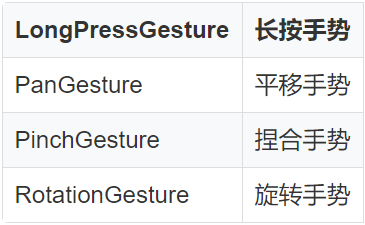
响应手势事件:组件通过 gesture 方法绑定手势对象,可以通过手势对象提供的事件相应响应手势操作。如通过 TapGesture 对象的 onAction 事件响应点击事件。
//手势事件
      .gesture(
      PanGesture()
        .onActionStart((event: GestureEvent) => {
          console.info('Pan start')
        })
        .onActionUpdate((event: GestureEvent) => {
          //          console.log(typeof `${this.offsetX}`);
        })
        .onActionEnd((event: GestureEvent) => {
          console.info('Pan end')
          this.offsetX = event.offsetX
          console.log(`${this.offsetX}`);
          if (Number(this.offsetX) > 60) {
            this.bgc = "#d94838"
            this.isSlide = true
             // 使用定时器来关闭滑动后的状态
            this.closeISettimeOut();
          }
        })
      )
当响应事件结束后,关闭定时器来关闭滑动,重置效果。
//关闭定时器
  closeISettimeOut() {
    if (this.timer) {
      clearTimeout(this.timer)
    }
    this.timer = setTimeout(() => {
      this.isSlide = false;
      this.bgc = "rgba(255,255,255,0.30)"
    }, 2000)
  }
④positionInfoDialog 组件
功能点:询问是否自动获取地理位置,若继续,则显示当前地理位置,若取消则关闭弹框,显示初始值。
@Component
export default struct PositionInfoDialog {
 //  这里的@Link主要用来组件之间传递数据
  @Link isShowDialog: boolean
  @Link userPosition: string

  build() {
    Flex({ direction: FlexDirection.Column, alignItems: ItemAlign.Center }) {
      Column() {
        Text("自动获取位置信息服务")
          .height(100)
          .fontSize(28)
          .fontWeight(500)
          .width("100%")
      }

      Column() {
        Text("为帮助您更好地发起求助,进入紧急呼叫时,系统将自动获取您的位置信息,并显示在洁面顶部。点击位置信息可跳转至第三方地图应用。")
          .fontSize(16)
          .lineHeight(28)
          .letterSpacing(2)
          .margin({ bottom: 10 })
          .fontColor("rgba(0,0,0,0.90)")
        Text("本服务需联网并调用您的位置权限。在紧急呼叫状态中,相关权限将维持打开状态。是否继续?")
          .fontSize(16)
          .lineHeight(28)
          .letterSpacing(2)
          .fontColor("rgba(0,0,0,0.90)")
      }.height(220)

      Row() {
        Button('取消', { type: ButtonType.Normal, stateEffect: true })
          .width(150)
          .backgroundColor("#fff")
          .fontColor("#0a59f7")
          .fontSize(30)
          .onClick(() => {
            this.isShowDialog = false
          })

        Button('继续', { type: ButtonType.Normal, stateEffect: true })
          .width(150)
          .backgroundColor("#fff")
          .fontColor("#0a59f7")
          .fontSize(30)
          .onClick(() => {
            if (this.userPosition) {
              this.userPosition="广东省深圳市"
              this.isShowDialog = false
            }
          })
      }
    }
    .padding({ left: 14, right: 14, bottom: 20 })
    .margin({ bottom: 40 })
    .width("96%")
    .height(360)
    .backgroundColor("#fff")
    .borderRadius(24)
  }
}
总结
项目源码:
https://gitee.com/chen_longjia/ark-ui-emergency
代码SHOW出你的爱,扫码参加

👇 扫码报名下周三的鸿蒙直播课 👇


求分享
求点赞
求在看
