



大家最近看冬奥会了吗,运动员在冰天雪地里驰骋,在赛场上勇夺名次,还有冬奥萌物冰墩墩、雪容融也深受大家的喜爱。

虽然不能给大家真的冰墩墩,但可以带大家学习用 JS 写一个简单的拼图游戏,用拼图的方式重现运动员们的帅气英姿,拼出完整的冰墩墩。
新建工程
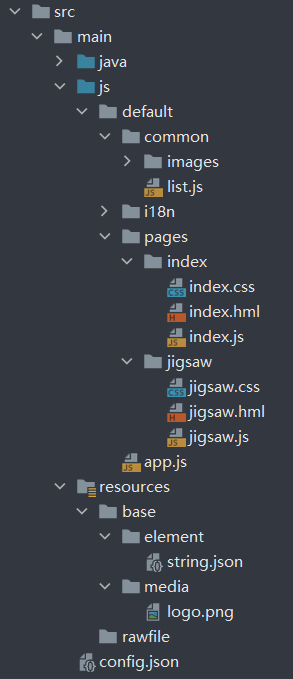
在 DevEco Studio 中点击File→New Project→Empty Ability→Next,Project type 选择 Application,Language 选择 JS 语言,API 版本这里用的是 6,最后点击 Finish 完成项目创建。
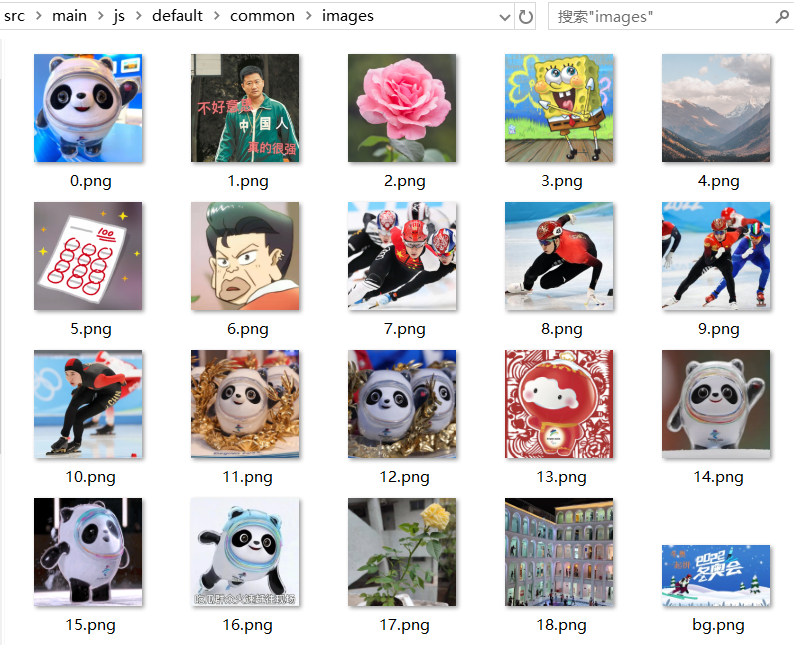
项目结构如下:
页面构建
首页:

设置背景图片:使用通用样式 background-image 进行背景图片设置。
.container {
    display: flex;
    flex-direction: column;
    width: 100%;
    height: 100%;
    background-image: url('/common/images/bg.png');
    background-size: cover;
}
添加两个游戏模式入口按钮:跳转进入游戏页面,根据传值不同拼图格式也不同。
<div class="container">
    <input class="btn" type="button" value="4 × 4" onclick="playgame(4)"></input>
    <input class="btn" type="button" value="5 × 5" onclick="playgame(5)"></input>
</div>
游戏页面:
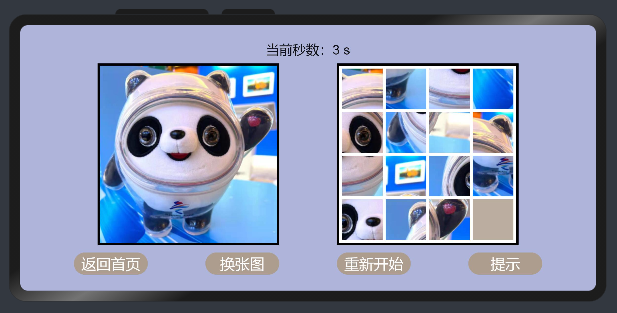
顶部计时器:用于显示游戏用时。
<text class="time">当前秒数:{{ mytime }} s</text>
中间两个画布:左边是参照用的原图;右边是打乱后的拼图和默认隐藏的弹窗。分别用两个 canvas 组件显示原图和 n×n 的拼图,使用 stack 布局方便设置游戏完成时显示的弹窗。
    <div>
        <stack class="stack">
            <canvas class="canvas" ref="canvas0" onswipe="slide"></canvas>
        </stack>
        <stack class="stack">
            <canvas class="canvas" ref="canvas" onswipe="slide"></canvas>
            <div class="popup" show="{{isShow}}">
                <text class="gameover">游戏成功</text>
            </div>
        </stack>
    </div>
底部功能按钮:分别用于返回首页,切换图片,重新开始和开关提示。
    <div>
        <input type="button" class="btn" value="返回首页" onclick="quit"></input>
        <input type="button" class="btn" value="换张图" onclick="changeimage"></input>
        <input type="button" class="btn" value="重新开始" onclick="restartGame"></input>
        <input type="button" class="btn" value="提示" onclick="gethelp"></input>
    </div>
游戏逻辑
首页游戏模式传值跳转,选择游戏模式 4×4 或 5×5:
    playgame(num) {
        router.replace({
            uri: "pages/jigsaw/jigsaw",
            params: {
                block: num,
            },
        })
    }
游戏页面网格格式计算:根据页面路由的传值,计算拼图网格的大小及间隙,再进行绘制。
    //网格初始化
    onInit() {
        CUT_SID = 360 / this.block - (this.block + 1);
        SIDELEN = 240 / this.block - (this.block + 1);
        MARGIN = this.block;
        this.img.src = list[this.index % list.length].src;
    },

    //页面显示
    onShow() {
        if(4 == this.block) {
            grids=[[1, 2, 3, 4],
            [5, 6, 7, 8],
            [9, 10, 11, 12],
            [13, 14, 15, 0]];
        }
        else {
            grids=[[1, 2, 3, 4, 5],
            [6, 7, 8, 9, 10],
            [11, 12, 13, 14, 15],
            [16, 17, 18, 19, 20],
            [21, 22, 23, 24, 0]];
        }
        timer = null;
        this.initGrids();
        this.drawGrids();
        timer = setInterval(()=> {
            this.mytime += 1;
        }, 1000);
        this.refer();       //参照画布,可替换
    },
游戏页面网格绘制:使用 canvas 组件的 drawImage 方法裁切源图像绘制网格。
    //画网格
    drawGrids() {
        context = this.$refs.canvas.getContext('2d');
        for (let row = 0; row < this.block; row++) {
            for (let column = 0; column < this.block; column++) {
                let order = grids[row][column].toString();
                context.fillStyle = "#BBADA0";
                let leftTopX = column * (MARGIN + SIDELEN) + MARGIN;
                let leftTopY = row * (MARGIN + SIDELEN) + MARGIN;
                context.fillRect(leftTopX, leftTopY, SIDELEN, SIDELEN);
                context.font = "28px";
                if (order != "0") {
                    context.fillStyle = "#000000";
                    let offsetX = (3 - order.length) * (SIDELEN / 8);
                    let offsetY = (SIDELEN - 14);
                    context.drawImage(this.img,
                        (CUT_SID + MARGIN) * ((grids[row][column] - 1) % this.block) + MARGIN, //原图img的X轴裁剪起点
                        (CUT_SID + MARGIN) * (Math.floor((grids[row][column] - 1) / this.block)) + MARGIN, //原图img的Y轴裁剪起点
                        CUT_SID, CUT_SID, //原图X轴,Y轴方向的裁剪长度
                        leftTopX, leftTopY, //画布X轴,Y轴画图的起点
                        SIDELEN, SIDELEN); //画布X轴,Y轴画图的长度
//                    console.info(JSON.stringify(this.img));
//                    console.info("拼图——宽:" + this.img.width + ",高:" + this.img.height);
                    if(true == this.tip) {
                        context.fillText(order, leftTopX + offsetX, leftTopY + offsetY);
                    }
                    else {
                        context.fillText("", leftTopX + offsetX, leftTopY + offsetY);
                    }
                }
                else {
                    if(true == this.isShow) {
                        context.drawImage(this.img,
                            (CUT_SID + MARGIN) * ((Math.pow(this.block, 2) - 1) % this.block) + MARGIN, //原图img的X轴裁剪起点
                            (CUT_SID + MARGIN) * (Math.floor((Math.pow(this.block, 2) - 1) / this.block)) + MARGIN, //原图img的Y轴裁剪起点
                            CUT_SID, CUT_SID, //原图X轴,Y轴方向的裁剪长度
                            leftTopX, leftTopY, //画布X轴,Y轴画图的起点
                            SIDELEN, SIDELEN); //画布X轴,Y轴画图的长度
                    }
                    else {
                        context.drawImage(this.img, 0, 0, 0, 0, 0, 0, SIDELEN, SIDELEN);
                    }
                }
            }
        }
    },
随机打乱拼图:进行一千次上、下、左、右随机滑动,打乱拼图。
    //随机上下左右打乱1000次
    initGrids() {
        let array=["up","down","left","right"];
        for (let i = 0; i < 1000; i++){
            let randomIndex = Math.floor(Math.random() * this.block);
            let direction = array[randomIndex];
            this.changeGrids(direction);
        }
    },
监听滑动事件:根据玩家的滑动方向交换拼图灰块与邻格的位置。
    //滑动网格
    slide(event) {
        this.changeGrids(event.direction);
        if(this.gameover()){
            clearInterval(timer);
            this.isShow = true;
            this.tip = false;
        }
        this.drawGrids();
    },

    //滑动操作
    changeGrids(direction) {
        let x;
        let y;
        for (let row = 0; row < this.block; row++) {
            for (let column = 0; column < this.block; column++) {
                if (grids[row][column] == 0) {
                    x = row;
                    y = column;
                    break;
                }
            }
        }
        let temp;
        if(this.isShow==false){
            if (direction == 'up' && (x + 1) < this.block) {
                temp = grids[x + 1][y];
                grids[x + 1][y] = grids[x][y];
                grids[x][y] = temp;
            } else if (direction == 'down' && (x - 1) > -1) {
                temp = grids[x - 1][y];
                grids[x - 1][y] = grids[x][y];
                grids[x][y] = temp;
            } else if (direction == 'left' && (y + 1) < this.block) {
                temp = grids[x][y + 1];
                grids[x][y + 1] = grids[x][y];
                grids[x][y] = temp;
            } else if (direction == 'right' && (y - 1) > -1) {
                temp = grids[x][y - 1];
                grids[x][y - 1] = grids[x][y];
                grids[x][y] = temp;
            }
        }
    },
拼图数字提示:设置提示标识符,为 true 时开启数字提示。
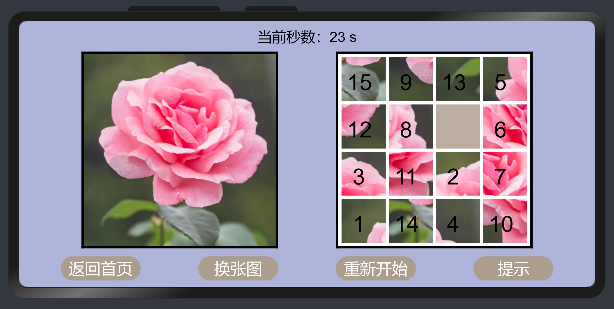
    //数字提示开关
    gethelp() {
        this.tip = !this.tip;
        this.drawGrids();
    },
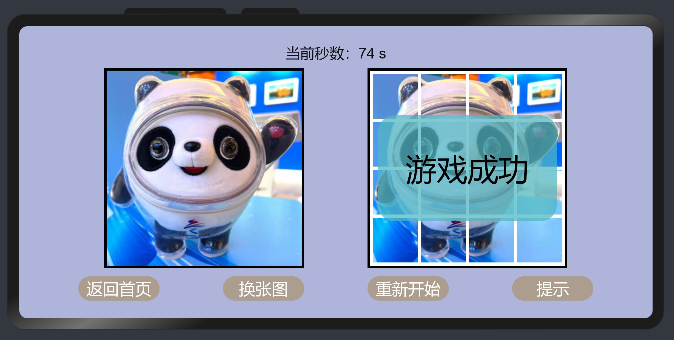
    //游戏结束判断
    gameover(){
        let originalgrids;
        if(4 == this.block) {
            originalgrids=[[1, 2, 3, 4],
            [5, 6, 7, 8],
            [9, 10, 11, 12],
            [13, 14, 15, 0]];
        }
        else {
            originalgrids=[[1, 2, 3, 4, 5],
            [6, 7, 8, 9, 10],
            [11, 12, 13, 14, 15],
            [16, 17, 18, 19, 20],
            [21, 22, 23, 24, 0]];
        }
        for (let row = 0; row < this.block; row++) {
            for (let column = 0; column < this.block; column++) {
                if (grids[row][column] != originalgrids[row][column]){
                    return false;
                }
            }
        }
        return true;
    },
图片切换:改变当前图片序号,用该序号与图片清单长度作求余,循环改变图片的资源路径。
    //换张图
    changeimage() {
        this.index += 1;
        this.img.src = list[this.index % list.length].src;
        this.restartGame();
    },
图片导入:尺寸要求(360×360 像素),将图片放入 images 文件夹,并在 list.js 中录入图片信息。
图片清单格式如下:
export let list =  [
    {
        index: 0,
        src: "common/images/0.png",
    },

    //省略中间的若干数据

    {
        index: 18,
        src: "common/images/18.png",
    },
]

export default list;
结语

元宵佳节
正月十五,灯谜串烧,扫码参与
👇👇👇

👇扫码报名明晚的鸿蒙直播课👇


求分享
求点赞
求在看
文章转载自鸿蒙技术社区,如果涉嫌侵权,请发送邮件至:contact@modb.pro进行举报,并提供相关证据,一经查实,墨天轮将立刻删除相关内容。
