



当今国际社会普遍倡导低碳环保的理念,垃圾分类绿色环保的意识也逐渐深入人心。今天就教大家写一个简单的垃圾分类小游戏,寓教于乐,空闲时玩一玩,娱乐放松的同时学习垃圾分类的常识,何乐而不为呢?
垃圾可以分为四大类:可回收垃圾、厨余垃圾、有害垃圾、其他垃圾。垃圾图片随机出现,玩家点击对应的分类图标进行归类,得分高者获胜。
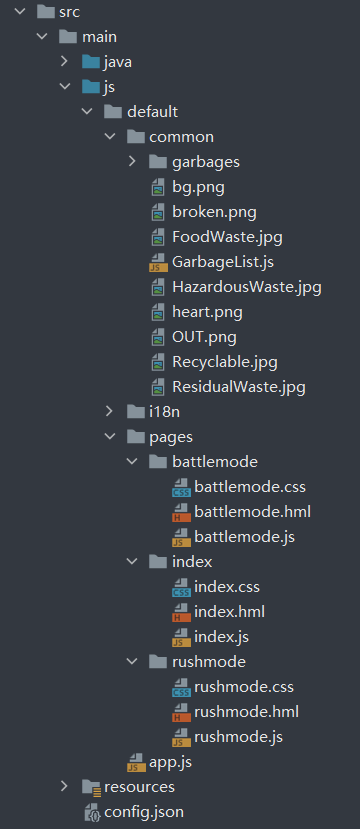
项目结构如下图:
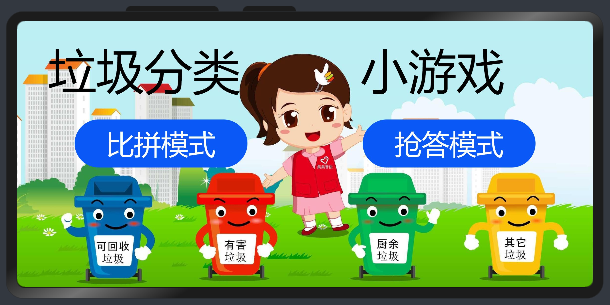
游戏首页
首页是背景图片,游戏标题和 2 个游戏模式按钮。
背景图片设置方式:
.container {
    display: flex;
    flex-direction: column;
    justify-content: center;
    align-items: center;
    left: 0px;
    top: 0px;
    width: 100%;
    height: 100%;
    background-image: url("/common/bg.png");
    background-size: cover;
}
简单的页面路由:
    tobattlemode() {
        router.replace({
            uri: "pages/battlemode/battlemode"
        })
    },

    torushmode() {
        router.replace({
            uri: "pages/rushmode/rushmode"
        })
    }
比拼模式
①页面设计
游戏界面分为左右两边,两名玩家分别操作左右两边,对随机出现的垃圾进行分类,答对加分,答错扣一颗心,答错 3 次后出局,双方都出局后最终得分高者获胜。
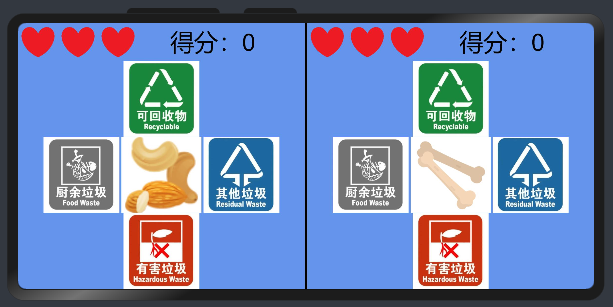
状态栏:显示血量(容错次数)和当前得分。
                <div class="state">
                    <image class="HP" src="{{ player_1.HP1 }}"></image>
                    <image class="HP" src="{{ player_1.HP2 }}"></image>
                    <image class="HP" src="{{ player_1.HP3 }}"></image>
                    <text style="margin-left: 70px;">得分:{{ player_1.score }}</text>
                </div>
操作区:上下左右分别是可回收垃圾、有害垃圾、厨余垃圾、其他垃圾的垃圾图标,中间是随机出现的垃圾。
                <div style="flex-direction: column; align-items: center;">
                    <image class="GarbageType" src="common/Recyclable.jpg" onclick="typeclick({{player_1}}, 1)"></image>
                    <div>
                        <image class="GarbageType" src="common/FoodWaste.jpg" onclick="typeclick({{player_1}}, 2)"></image>
                        <image class="garbage" src="{{player_1.garbage.src}}"></image>
                        <image class="GarbageType" src="common/ResidualWaste.jpg" onclick="typeclick({{player_1}}, 3)"></image>
                    </div>
                    <image class="GarbageType" src="common/HazardousWaste.jpg" onclick="typeclick({{player_1}}, 4)"></image>
                </div>
玩家属性:初始化玩家容错次数、血量图片、默认初始垃圾、得分及出局标识符等。
        player_1: {
            HP: 3,      //剩余容错次数
            HP1: "common/heart.png",
            HP2: "common/heart.png",
            HP3: "common/heart.png",
            garbage: {
                name: "卫生卷纸",       //垃圾名称
                type: 3,        //垃圾类型
                src: "common/garbages/LJ000.png",       //图片资源路径
            },
            score: 0,       //得分
            disabled: false,        //出局标识符
        },
游戏初始化:给两名玩家的垃圾随机赋值。
    onInit() {
        this.player_1.garbage = GarbageList[Math.floor(Math.random()*GarbageList.length)];
        this.player_2.garbage = GarbageList[Math.floor(Math.random()*GarbageList.length)];
    },
得分判断:打印垃圾的正确分类,玩家分类符合正确答案则加10分,否则扣除一次容错次数,再给垃圾随机赋值。
    typeclick(role, choosetype) {
        console.info(role.garbage.name + "——" + role.garbage.type);
        if(choosetype == role.garbage.type) {
            role.score += 10;
        }
        else {
            role.HP -= 1;
            this.HPChange(role);
        }
        role.garbage = GarbageList[Math.floor(Math.random()*GarbageList.length)];
    },

血量变化:
    HPChange(role) {
        if(3 == role.HP) {
            role.HP1 = role.HP2 = role.HP3 = "common/heart.png";
        }
        if(2 == role.HP) {
            role.HP3 = "common/broken.png";
        }
        if(1 == role.HP) {
            role.HP2 = "common/broken.png";
        }
        if(0 == role.HP) {
            role.HP1 = "common/broken.png";
            role.disabled = true;
        }
    },
结束弹窗:初始化游戏结束标识符为false,游戏结果为空。当双方都出局后根据得分高低赋值结果文本,出现游戏结束弹窗。
        if((this.player_1.HP == 0) && (this.player_2.HP == 0)) {
            if(this.player_1.score > this.player_2.score) {
                this.ScoreResult = "玩家1获胜";
            }
            else if(this.player_1.score < this.player_2.score) {
                this.ScoreResult = "玩家2获胜";
            }
            else {
                this.ScoreResult = "平局";
            }
            var timeoutID = setTimeout(()=> {
                this.GameOver = true;
            }, 1000);
        }
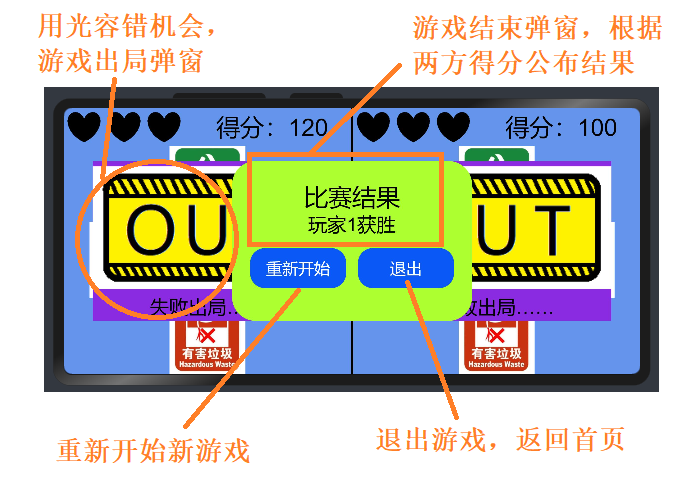
    <div class="gameover" show="{{GameOver}}">
        <text style="font-size: 30px;">比赛结果</text>
        <text style="font-size: 24px;">{{ScoreResult}}</text>
        <div style="height: 40%; align-items: center;">
            <button class="btn" onclick="GameRestart">重新开始</button>
            <button class="btn" style="margin-left: 5%;" onclick="GameExit">退出</button>
        </div>
    </div>
重新开始:将玩家数据全部初始化为默认值。
    GameRestart() {
        this.player_1.HP = 3;
        this.HPChange(this.player_1);
        this.player_2.HP = 3;
        this.HPChange(this.player_2);
        this.player_1.score = 0;
        this.player_2.score = 0;
        this.GameOver = false;
        this.player_1.garbage = GarbageList[Math.floor(Math.random()*GarbageList.length)];
        this.player_2.garbage = GarbageList[Math.floor(Math.random()*GarbageList.length)];
        this.player_1.disabled = false;
        this.player_2.disabled = false;
    },
退出游戏:页面路由到首页。
    GameExit() {
        router.replace({
            uri: "pages/index/index"
        })
    },
抢答模式
①页面构建
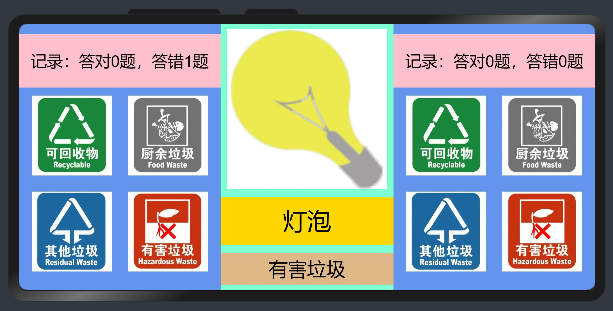
玩家操作区:顶部显示答题记录,下方则是 4 个不同的可点击的垃圾分类图标。
        <div class="player">
            <text class="state-title">记录:答对{{player1.theCorrect}}题,答错{{player1.theWrong}}题</text>
            <div>
                <image class="garbage-type" src="common/Recyclable.jpg"
                       disabled="{{btndis}}" onclick="typeclick({{player1}}, 1)"></image>
                <image class="garbage-type" src="common/FoodWaste.jpg"
                       disabled="{{btndis}}" onclick="typeclick({{player1}}, 2)"></image>
            </div>
            <div>
                <image class="garbage-type" src="common/ResidualWaste.jpg"
                       disabled="{{btndis}}" onclick="typeclick({{player1}}, 3)"></image>
                <image class="garbage-type" src="common/HazardousWaste.jpg"
                       disabled="{{btndis}}" onclick="typeclick({{player1}}, 4)"></image>
            </div>
        </div>
出题面板:从上往下分别是垃圾图片、垃圾名称及其正确分类(默认隐藏,答题后显示)。
        <div class="question">
            <div>
                <image class="garbage" src="{{garbage.src}}"></image>
            </div>
            <div class="garbage-name">
                <text>{{garbage.name}}</text>
            </div>
            <div class="tip">
                <text show="{{tipshow}}">{{tiptitle}}</text>
            </div>
        </div>
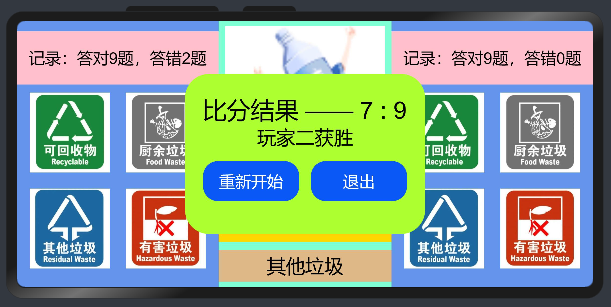
结束弹窗:根据(答对题数-答错题数)计算最终得分,根据双方比分高低赋值结果文本并显示。
    <div class="gameover" show="{{popup}}">
        <text style="font-size: 30px;">比分结果 —— {{player1.theCorrect - player1.theWrong}} : {{player2.theCorrect - player2.theWrong}}</text>
        <text style="font-size: 24px;">{{result}}</text>
        <div style="height: 40%; align-items: center;">
            <button class="btn" onclick="GameRestart">重新开始</button>
            <button class="btn" style="margin-left: 5%;" onclick="GameExit">退出</button>
        </div>
    </div>
②游戏逻辑
游戏数据声明:初始化当前回合数、各类标识符、玩家答题记录和随机垃圾数据等。
    data: {
        theround: 0,        //当前回合数
        tipshow: false,     //提示标识符
        btndis: false,      //按钮不可点击状态
        popup: false,       //弹窗标识符
        tiptitle: "",       //提示文本
        result: "",     //游戏结果文本
        player1: {
            theCorrect: 0,      //答对题数
            theWrong: 0,        //答错题数
        },
        player2: {
            theCorrect: 0,
            theWrong: 0,
        },
        garbage: {
            name: "随机垃圾",
            type: 3,
            src: "common/garbages/LJ000.png",
        },
    },
提示文本赋值:获取当前垃圾的类型并给文本对应赋值。
        switch(this.garbage.type) {
            case 1:
                this.tiptitle = "可回收垃圾";
                break;
            case 2:
                this.tiptitle = "厨余垃圾";
                break;
            case 3:
                this.tiptitle = "其他垃圾";
                break;
            case 4:
                this.tiptitle = "有害垃圾";
                break;
            default:
                console.info("垃圾类型出错!");
                break;
        }
关闭交互,显示提示:将分类图标的 disabled 属性由 false 变为 true,使之不可点击,暂停玩家的操作。将提示文本的 show 属性由 false 变为 true,使之显示。
        this.tipshow = true;        //显示提示
        this.btndis = true;     //关闭交互
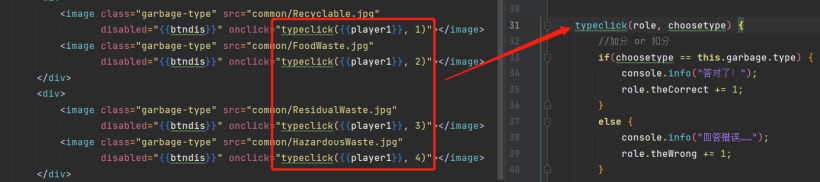
得分判断:将玩家选择分类与垃圾正确分类做对比,该玩家的答对或答错记录加一。
        //加分 or 扣分
        if(choosetype == this.garbage.type) {
            console.info("答对了!");
            role.theCorrect += 1;
        }
        else {
            console.info("回答错误……");
            role.theWrong += 1;
        }
        var ticktock = setTimeout(()=> {
            this.tipshow = false;       //关闭提示
        }, 3000);

        var thechange = setTimeout(()=> {
            //随机更换垃圾
            this.garbage = GarbageList[Math.floor(Math.random()*GarbageList.length)];
            this.btndis =false;     //重启交互
        }, 4000);
        this.theround += 1;
        if(20 == this.theround) {
            var score1 = this.player1.theCorrect - this.player1.theWrong;
            var score2 = this.player2.theCorrect - this.player2.theWrong;
            console.info("比分 ———— " + score1 + " : " + score2);
            if(score1 > score2) {
                this.result = "玩家一获胜";
            }
            else if(score1 < score2) {
                this.result = "玩家二获胜";
            }
            else {
                this.result = "双方打平";
            }
            this.popup = true;
            return;
        }
    GameRestart() {
        this.player1.theCorrect = 0;
        this.player1.theWrong = 0;
        this.player2.theCorrect = 0;
        this.player2.theWrong = 0;
        this.theround = 0;
        this.popup = false;
        this.result = "";
        this.tipshow = false;
        this.garbage = GarbageList[Math.floor(Math.random()*GarbageList.length)];
        this.btndis = false;
    },
    GameExit() {
        router.replace({
            uri: "pages/index/index"
        })
    },
③垃圾清单
垃圾清单格式:
export let GarbageList =  [
    {
        name: "卫生卷纸",       //垃圾名称
        type: 3,        //垃圾类型
        src: "common/garbages/LJ000.png"        //图片资源路径
    },

    //省略中间的若干数据……

    {
        name: "遥控器",
        type: 1,
        src: "common/garbages/LJ116.png"
    },
]

export default GarbageList;
导入垃圾清单:
import GarbageList from "../../common/GarbageList.js";
随机抽取垃圾数据做题:
this.garbage = GarbageList[Math.floor(Math.random()*GarbageList.length)];
其他一些细节:
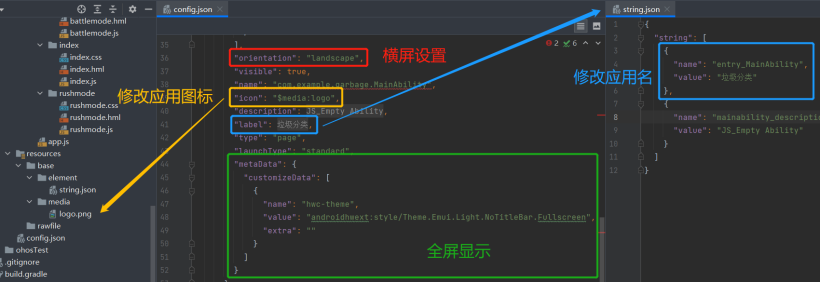
横屏设置:在 config.json 文件中设置 orientation 属性为 landscape
修改应用名:在 resources->base->element->string.json 文件中修改 entry_MainAbility 的值
更换应用图标:修改 config.json 文件中 icon 的资源路径指向
全屏显示:在 config.json 文件中添加如下语句
结语
👇扫码报名下周三的鸿蒙直播课👇


求分享
求点赞
求在看
文章转载自鸿蒙技术社区,如果涉嫌侵权,请发送邮件至:contact@modb.pro进行举报,并提供相关证据,一经查实,墨天轮将立刻删除相关内容。
