



鸿蒙这次 API7 更新除了新增 TS 声明式开发之外,还有 JS 开发也增加了很多 API,JS 开发自定义组件越来越方便了。

本项目基于 ArkUI 中 JS 扩展的类 Web 开发范式,关于语法和概念直接看官网。
https://developer.harmonyos.com/cn/docs/documentation/doc-guides/ui-js-overview-0000000000500376
https://developer.harmonyos.com/cn/docs/documentation/doc-references/js-framework-file-0000000000611396
本文介绍最新出的插槽用法,实现侧滑菜单、支持两种风格、支持快速滑动打开关闭。
效果演示如下图:
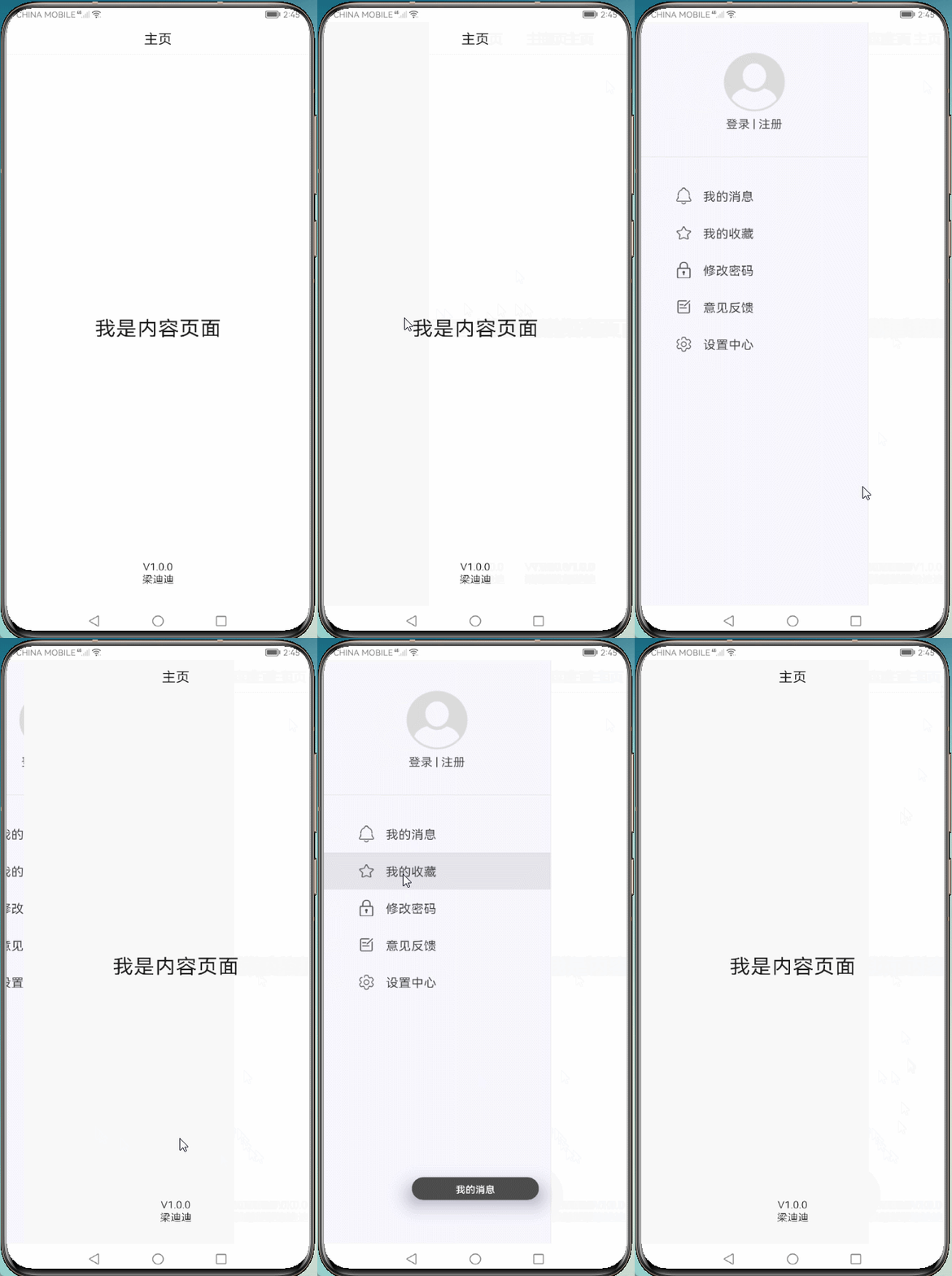
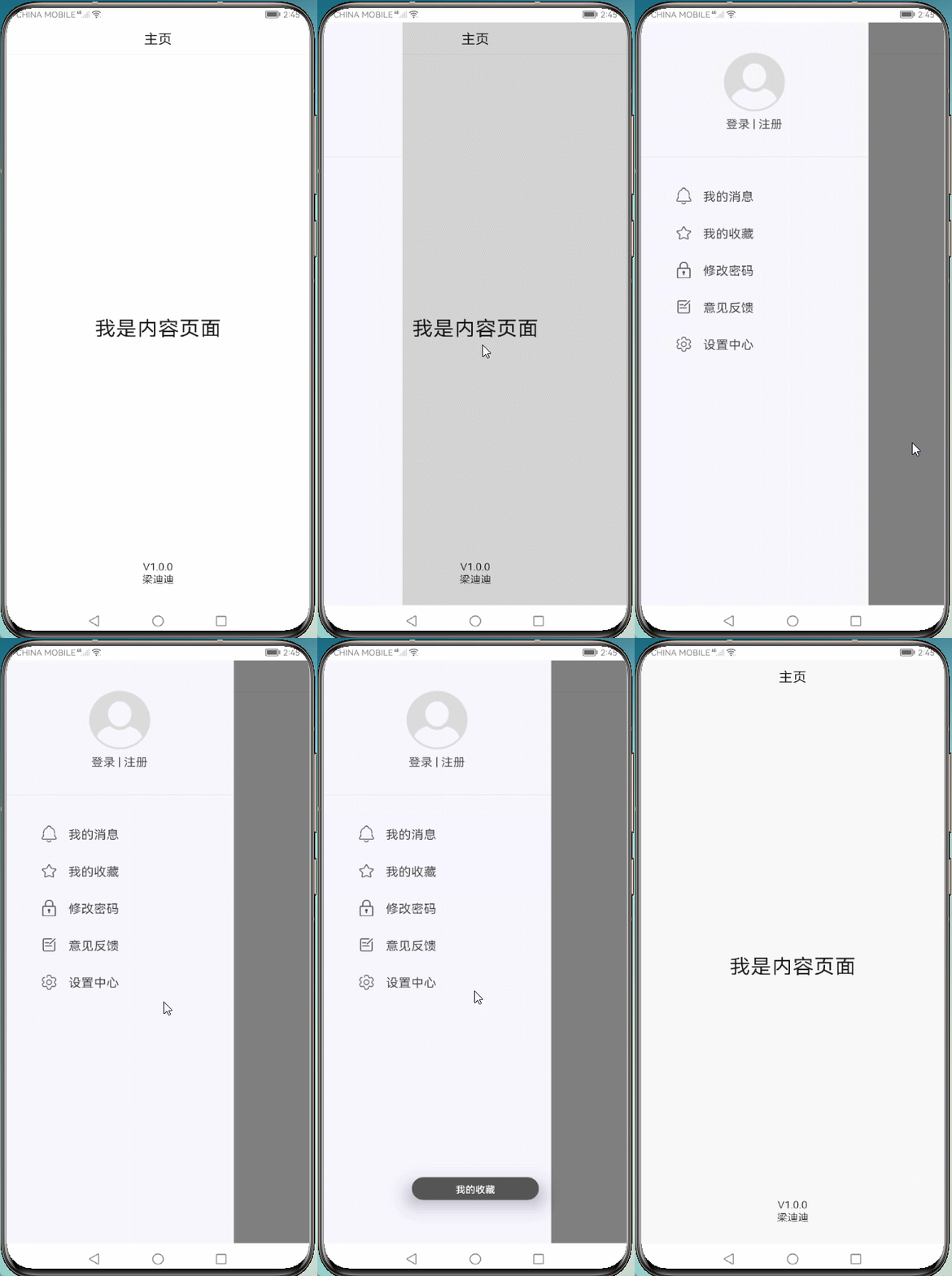
风格二:内容页在菜单下面
主要知识点
https://developer.harmonyos.com/cn/docs/documentation/doc-references/js-components-common-events-0000001051151132
https://developer.harmonyos.com/cn/docs/documentation/doc-references/js-components-custom-props-0000000000611785
https://developer.harmonyos.com/cn/docs/documentation/doc-references/js-components-custom-slot-0000001074155864
实现思路
entry/js/default/pages/drawer
主要使用 onTouch 相关事件,滑动改变菜单布局或内容布局的 left 偏移量,手指抬起使用动画完成偏移量。
①onTouch 相关事件
    /**
     * 触摸按下
     */
    onTouchStart(event) {
        // 记录首次按下的x坐标
        this.pressX = event.touches[0].localX
        // 记录上次的x坐标
        this.lastX = this.pressX
        .....
    },
    /**
     * 触摸移动
     */
    onTouchMove(event) {
        // 当前x坐标
        let localX = event.touches[0].localX
        // 计算与上次的x坐标的偏移量
        let offsetX = this.lastX - localX;
        // 记录上次的x坐标
        this.lastX = localX
        // 累计偏移量
        this.offsetLeft -= offsetX

        // 设置偏移量的范围
        .....
    }

    /**
     * 触摸抬起
     */
    onTouchEnd(event) {

        ......

        // 手指抬起,根据情况,判断toX的值,也就是判断关闭或开启菜单的情况
        // 当移动偏移量大于菜单一半宽度,完全打开菜单,否则反之
        if (this.offsetLeft > this.menuWidth / 2) {
            toX = this.menuWidth
        } else {
            toX = 0
        }

        ......

        // 开启动画
           this.startAnimator(toX)

    }
    /**
     * 开启动画
     */
    startAnimator(toX) {
        // 设置动画参数
        let options = {
            duration: ANIMATOR_DURATION, // 持续时长
            fill: 'forwards', // 启停模式:保留在动画结束状态
            begin: this.offsetLeft, // 起始值
            end: toX // 结束值
        };
        // 更新动画参数
        this.animator.update(options)
        // 监听动画值变化事件
        this.animator.onframe = (value) => {
            this.offsetLeft = value
            this.changeMenuOffsetLeft()
        }
        // 开启动画
        this.animator.play()
    },
②showStyle
第一种样式下,解决设置 z-index 之后菜单界面在内容下面,但点击事件却还在内容上面的问题。初始化设置 left 偏移量,动画结束,判断菜单是否关闭,关闭直接设置菜单偏移量为负的菜单宽度。
注意:目前使用插槽之后,预览器不走生命周期方法:onShow。
代码如下:
    export default {
        // 使用外部传入
        props: ['showStyle'],// 显示样式:0菜单在下面,1菜单在上面
        ......
    }
    /**
     * 界面显示
     */
    onShow() {
        .....
        // 设置菜单偏移量为负的菜单宽度,为了解决z-index设置后,菜单界面到内容下面,
        // 事件还停留到内容上面,导致点击菜单区域,响应的还是菜单点击事件
        this.menuOffsetLeft = -this.menuWidth
    }
③使用具名插槽封装
<div id="drawer-container" class="drawer-container" on:touchstart="onTouchStart"
     on:touchmove="onTouchMove" on:touchend="onTouchEnd">

    <div class="drawer-content" style="left : {{ showStyle == 0 ? offsetLeft : 0 }} px;
            z-index : {{ zIndexContent }};" on:click="closeMenu">

    <!--具名插槽,根据名称加入对应的插槽中-->
        <slot name="content"></slot>

    </div>

    <stack class="drawer-menu" style="z-index : {{ zIndexMenu }};">
        <div class="drawer-menu-background" style="opacity : {{ menuBgOpacity }};"></div>
        <div style="width : {{ menuWidth }} px; height : 100%;
                left : {{ menuOffsetLeft }} px;" on:click="clickMenu">

        <!--具名插槽,根据名称加入对应的插槽中-->
            <slot name="menu"></slot>

        </div>
    </stack>

</div>
④index 页面使用
代码如下:
<!--引入自定义组件-->
<element name='drawer' src='../drawer/drawer.hml'></element>
<div class="container">
    <!--通过传值设置样式-->
    <drawer show-style="0">
        <!--根据名称加入对应的插槽中-->
        <div slot='content' class="content-layout">
            <div class="title-bar">
                <text>主页</text>
            </div>
            <div class="mainpage-content">
                <text class="content1">我是内容页面</text>
                <text class="content2">V1.0.0</text>
                <text class="content2">梁迪迪</text>
            </div>
        </div>

        <div slot='menu' class="menu-layout">
            <div class="my-info">
                <image src="common/images/head_photo.png"></image>
                <text>登录 | 注册</text>
            </div>
            <div class="menu-content">
                <div for="{{ listMenu }}" tid="{{ $item.id }}" on:click="menuSkip({{ $item.name }})">
                    <image src="{{ $item.icon }}"></image>
                    <text>{{ $item.name }}</text>
                </div>
            </div>
        </div>
    </drawer>
</div>
结尾
https://gitee.com/liangdidi/DrawerContainer
👇👇👇


求分享
求点赞
求在看
文章转载自鸿蒙技术社区,如果涉嫌侵权,请发送邮件至:contact@modb.pro进行举报,并提供相关证据,一经查实,墨天轮将立刻删除相关内容。
