



新世界的大门已打开,关也关不住!《华为开发者大会 2021》推出了方舟开发框架(ArkUI),官方解释:方舟开发框架是一种跨设备的高性能 UI 开发框架,支持声明式编程和跨设备多态 UI。

本项目就是基于 ArkUI 中的声明式编程开发,语言 ETS(Extended Type Script),代码都在 ets 文件中编写,这个文件用于描述 UI 布局、样式、事件交互和页面逻辑。
官方文档地址如下:
基于 TS 扩展的声明式开发范式 1:
https://developer.harmonyos.com/cn/docs/documentation/doc-guides/ui-ts-overview-0000001192705715
https://developer.harmonyos.com/cn/docs/documentation/doc-references/ts-framework-directory-0000001111581264
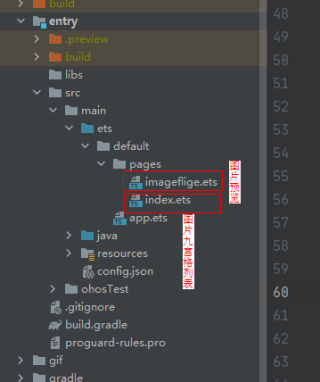
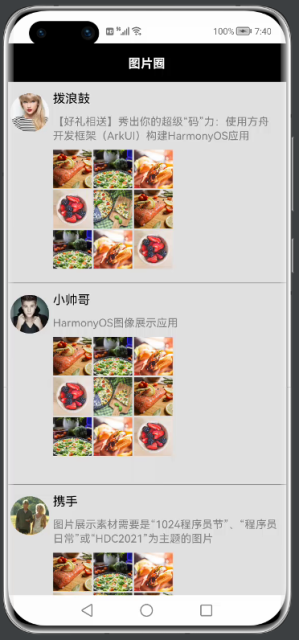
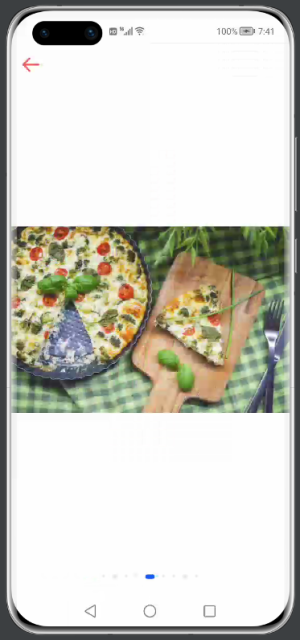
本文介绍仿微信朋友圈就列表展示,九宫格小图图片展示,点击图片进行图片预览,图片左右滑动切换。

项目类说明:
主要知识点
https://developer.harmonyos.com/cn/docs/documentation/doc-references/ts-container-grid-0000001158261259
https://developer.harmonyos.com/cn/docs/documentation/doc-references/ts-container-swiper-0000001111421434
③循环渲染迭代数组:渲染组件(ForEach)
https://developer.harmonyos.com/cn/docs/documentation/doc-references/ts-rending-control-syntax-foreach-0000001149978669
PS:目前第二个参数中 itemGenerator: (item: any, index?: number) => void index 不能使用。
https://developer.harmonyos.com/cn/docs/documentation/doc-references/ts-basic-components-image-0000001111581276

https://developer.harmonyos.com/cn/docs/documentation/doc-references/ts-basic-components-text-0000001111581280

https://developer.harmonyos.com/cn/docs/documentation/doc-references/ts-basic-components-button-0000001158141265
https://developer.harmonyos.com/cn/docs/documentation/doc-references/ts-container-column-0000001111421414

https://developer.harmonyos.com/cn/docs/documentation/doc-references/ts-container-row-0000001158141273

https://developer.harmonyos.com/cn/docs/documentation/doc-references/ts-container-stack-0000001158261249
代码解析
①朋友圈列表展示
 List({ initialIndex: 0 }) {
    ForEach(this.listItems, item => {
      ListItem() {
        Row() {
          Column() {
            Image(item.bigImg)
              .width(50)
              .height(50)
              .borderRadius(30)
              .margin(5)
              .onClick(() => {
              })

            Blank()
          }.height("100%")

          Column() {
            Text(item.name)
              .fontSize(16)
              .margin({ left: 0})
              .width("100%")

            Row() {
              Text(item.content)
                .fontSize(14)
                .margin({ top: 10 })
                .fontColor(Color.Grey)
                .width("80%")
                .textAlign(TextAlign.Start)

              Blank()
            }

            Column() {
              Grid() {
                ForEach(this.imageDataArray, item => {
                  GridItem() {
                    Image(item.smallImg).width(50).height(50)

                  }.sharedTransition("0", { duration: 100, curve: Curve.Linear })
                  .onClick(()=>{
                    console.log("item.id==="+item.id)
                    router.push({
                      uri: 'pages/imageflige',
                      params: {
                        imageIndex: item.id, // 当前图片位置
                      }
                    })
                  })
                }, item => item.name)
              }
              .width(155)
              .columnsTemplate('1fr 1fr 1fr')
              .rowsGap(2)
              .columnsGap(2)
            }
            .width('100%')
            .height(200)
            .alignItems(HorizontalAlign.Start)
            .margin({ top: 10 })
          }.height("100%")
        }
        .height("100%")
      }
      .height(250)
      .margin({ top: 10 })
    }, item => item.name)
  }
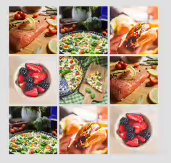
②九宫格展示
主要是网格容器 Grid 组件和渲染组件 ForEach。
核心代码示例:
  Column() {
    Grid() {
      ForEach(this.imageDataArray, item => {
        GridItem() {
          Image(item.smallImg).width(50).height(50)

        }.sharedTransition("0", { duration: 100, curve: Curve.Linear })
        .onClick(()=>{
          console.log("item.id==="+item.id)
          router.push({
            uri: 'pages/imageflige',
            params: {
              imageIndex: item.id, // 当前图片位置
            }
          })
        })
      }, item => item.name)
    }
    .width(155)
    .columnsTemplate('1fr 1fr 1fr')
    .rowsGap(2)
    .columnsGap(2)
  }
  .width('100%')
  .height(200)
  .alignItems(HorizontalAlign.Start)
  .margin({ top: 10 })
③大图预览
使用滑动容器组件 Swiper,通过传递点击的当前下标定位到指定位置。
核心代码示例:
import router from '@system.router';

@Entry
@Component
struct Imageflige {
 @State private listPicture: Array<Resource> = [
   $r("app.media.food1"), $r("app.media.food2"), $r("app.media.food3"),
   $r("app.media.food4"), $r("app.media.food5"), $r("app.media.food1"),
   $r("app.media.food2"), $r("app.media.food3"), $r("app.media.food4")
 ]
 @State imageIndex: number = 0

 build() {
   Column() {
     Stack({ alignContent: Alignment.Top }) {
       // 切换页面
       Swiper() {
         ForEach(this.listPicture, item => {
           // 图片
           Image(item)
             .width('100%')
             .height('100%')
             .objectFit(ImageFit.Contain) //缩放类型

         }, item => item.toString())
       }
       .width('100%')
       .height('100%')
       .index(this.imageIndex) // 设置当前索引
       .indicator(true) // 不显示指示器
       .loop(true) // 关闭循环
       .sharedTransition("0", { duration: 100, curve: Curve.Linear })
       .onChange((index: number) => { // 索引变化监听
         // 更新索引值
         this.imageIndex = index
       })

       Image($r("app.media.back"))
         .width(35)
         .height(35)
         .margin(10)
         .backgroundColor(Color.White)
         .onClick(() => {
           router.back()
         })
     }
     .height("100%")
     .width("100%")
     .alignContent(Alignment.TopStart)
   }
 }

 private aboutToAppear() {
   this.imageIndex = router.getParams().imageIndex
 }
}
项目地址(需要登录才能看到演示图):
https://gitee.com/dot_happydz_admin/ark-ui.git
👇👇👇


求分享
求点赞
求在看
文章转载自鸿蒙技术社区,如果涉嫌侵权,请发送邮件至:contact@modb.pro进行举报,并提供相关证据,一经查实,墨天轮将立刻删除相关内容。
