



通知(Notification)旨在让用户以合适的方式及时获得有用的新消息,帮助用户高效地处理任务。
系统为开发者提供了不同种类的通知样式模板可以使用,开发者也可以根据自己需要自定义通知样式。
HarmonyOS 通知相关类
与通知相关的主要逻辑在 NotificationSlot、NotificationRequest 和 NotificationHelper 这三个类中,那这三个类都有什么作用呢?下面为大家逐一介绍。
①NotificationSlot
这是一个定义通知的主题类,它可以设置通知的特征集合,包括通知到来时的提示音调、振动、锁屏显示以及设置通知的重要级别等。
一般可以在应用的 AbilityPackage 里设置,用以统一整个应用的通知主题特征,一个应用也可以关联多个不同 NotificationSlot。
重点说下 NotificationSlot 的几个重要级别,也可以查看官方 API 文档:
LEVEL_NONE:表示通知不发布。
LEVEL_MIN:表示通知可以发布,但是不显示在通知栏,不自动弹出,无提示音;该级别不适用于前台服务的场景。
LEVEL_LOW:表示通知可以发布且显示在通知栏,不自动弹出,无提示音。
LEVEL_DEFAULT:表示通知发布后可在通知栏显示,不自动弹出,触发提示音。
LEVEL_HIGH:表示通知发布后可在通知栏显示,自动弹出,触发提示音。
代码示例:
// 创建notificationSlot对象
NotificationSlot slot = new NotificationSlot(id, "testSlot", NotificationSlot.LEVEL_HIGH);
slot.setDescription("create notificationSlot description");
slot.setLevel(NotificationSlot.LEVEL_HIGH);
// 设置振动提醒
slot.setEnableVibration(true);
// 设置锁屏模式
slot.setLockscreenVisibleness(NotificationRequest.VISIBLENESS_TYPE_PUBLIC);
// 设置开启呼吸灯提醒
slot.setEnableLight(true);
// 设置呼吸灯的提醒颜色
slot.setLedLightColor(Color.RED.getValue());
slot.enableBypassDnd(true);
slot.enableBadge(true);
try {
    NotificationHelper.addNotificationSlot(slot);
} catch (RemoteException e) {
    e.printStackTrace();
}
②NotificationRequest
普通文本 NotificationNormalContent
长文本 NotificationLongTextContent
图片 NotificationPictureContent
多行 NotificationMultiLineContent
社交 NotificationConversationalContent
媒体 NotificationMediaContent
小图标,使用 setLittleIcon() 方法设置。
标题,使用 setTitle() 方法设置。
文本内容,使用 setText() 方法设置。
Intent intent = new Intent();
// 指定要启动的Ability的BundleName和AbilityName字段
// 将Operation对象设置到Intent中
Operation operation = new Intent.OperationBuilder()
        .withDeviceId("")
        .withBundleName(getBundleName())
        .withAbilityName(OtherAbility.class.getName())
        .build();
intent.setOperation(operation);
List<Intent> intentList = new ArrayList<>();
intentList.add(intent);
// 定义请求码
int requestCode = 200;
// 设置flags
List<IntentAgentConstant.Flags> flags = new ArrayList<>();
flags.add(IntentAgentConstant.Flags.UPDATE_PRESENT_FLAG);
// 指定启动一个有页面的Ability
IntentAgentInfo paramsInfo = new IntentAgentInfo(requestCode,
        IntentAgentConstant.OperationType.START_ABILITY, flags, intentList, null);
// 获取IntentAgent实例
IntentAgent agent = IntentAgentHelper.getIntentAgent(this, paramsInfo);
setIntentAgent(agent);
具体 API 就不一一介绍了,可以参考官方:
https://developer.harmonyos.com/cn/docs/documentation/doc-references/notificationrequest-0000001054518854
③NotificationHelper
publishNotification(NotificationRequest request),发布通知,当 NotificationRequest 被设置后,通过该接口去发布通知。
cancelNotification(int notificationId),取消通知,每个 NotificationRequest 创建时都必须有一个 notificationId,可以通过这个接口取消创建的通知。
cancelAllNotifications(),取消之前发布的所有通知。
addNotificationSlot(NotificationSlot slot),创建一个 NotificationSlot。
setNotificationBadgeNum(int num),设置通知的角标。
HarmonyOS 通知样式
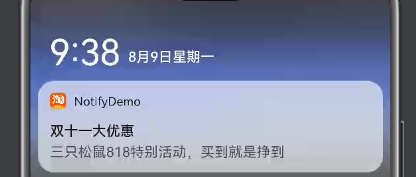
①普通文本 NotificationNormalContent
NotificationRequest.setLittleIcon()
NotificationNormalContent.setTitle()
NotificationNormalContent.setText()
效果图:
代码示例:
int notificationId = 1;
NotificationRequest request = new NotificationRequest(notificationId);
request.setSlotId(slotId);
request.setLittleIcon(littleIcon);

// 普通文本
NotificationRequest.NotificationNormalContent content = new NotificationRequest.NotificationNormalContent();
content.setTitle(title)
       .setText(countent);
NotificationRequest.NotificationContent notificationContent = new NotificationRequest.NotificationContent(content);
// 设置通知的内容
request.setContent(notificationContent);
request.setIntentAgent(intentAgent);
try {
    NotificationHelper.publishNotification(request);
} catch (RemoteException e) {
    e.printStackTrace();
}
/**
 * 图片转换工具方法
 *
 * @param drawableId
 * @return
 */
private PixelMap getPixelMap(int drawableId) {
    InputStream drawableInputStream = null;
    try {
        drawableInputStream = context.getResourceManager().getResource(drawableId);
        ImageSource.SourceOptions sourceOptions = new ImageSource.SourceOptions();
        ImageSource imageSource = ImageSource.create(drawableInputStream, sourceOptions);
        ImageSource.DecodingOptions decodingOptions = new ImageSource.DecodingOptions();
        decodingOptions.desiredPixelFormat = PixelFormat.ARGB_8888;
        return imageSource.createPixelmap(decodingOptions);
    } catch (IOException | NotExistException e) {
        e.getMessage();
    } finally {
        if (drawableInputStream != null) {
        try {
            drawableInputStream.close();
        } catch (IOException e) {
            e.getMessage();
        }
    }
}
return null;
}
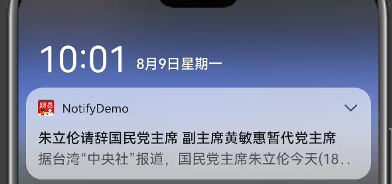
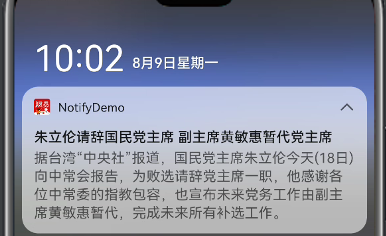
②长文本 NotificationLongTextContent
效果图:
代码示例:
int notificationId = 2;
NotificationRequest request = new NotificationRequest(notificationId);
request.setSlotId(slotId);
request.setLittleIcon(littleIcon);
// request.setBigIcon(bigIcon);

// 长文本
NotificationRequest.NotificationLongTextContent contentLong = new NotificationRequest.NotificationLongTextContent();
contentLong.setTitle(title)
           .setLongText(longText);
NotificationRequest.NotificationContent notificationContent = new NotificationRequest.NotificationContent(contentLong);
// 设置通知的内容
request.setContent(notificationContent);
request.setIntentAgent(intentAgent);
try {
    NotificationHelper.publishNotification(request);
} catch (RemoteException e) {
    e.printStackTrace();
}
③图片 NotificationPictureContent
效果图:
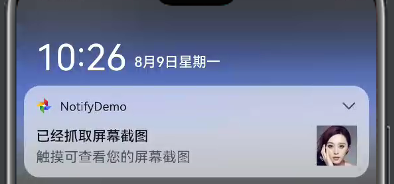
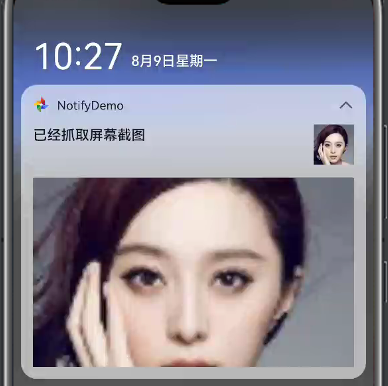
代码示例:
int notificationId = 4;
NotificationRequest request = new NotificationRequest(notificationId);
request.setSlotId(slotId);
request.setLittleIcon(littleIcon);
request.setBigIcon(icon);

// 图片通知
NotificationRequest.NotificationPictureContent contentLong = new NotificationRequest.NotificationPictureContent();
contentLong.setTitle(title)
           .setBigPicture(icon)
           .setExpandedTitle(title)
           .setText(context);
NotificationRequest.NotificationContent notificationContent = new NotificationRequest.NotificationContent(contentLong);
// 设置通知的内容
request.setContent(notificationContent);
request.setIntentAgent(intentAgent);
try {
    NotificationHelper.publishNotification(request);
} catch (RemoteException e) {
    e.printStackTrace();
}
④多行 NotificationMultiLineContent
效果图:
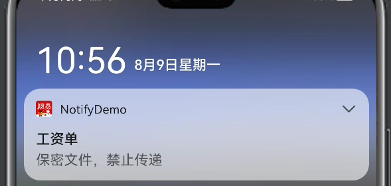
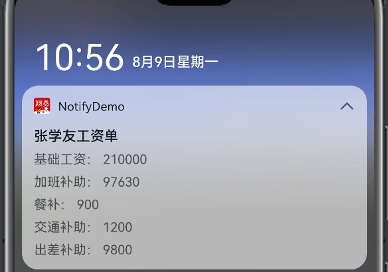
代码示例:
int notificationId = 5;
NotificationRequest request = new NotificationRequest(notificationId);
request.setSlotId(slot.getId());
request.setLittleIcon(littleIcon);

// 多行文本
NotificationRequest.NotificationMultiLineContent multiLineContent = new NotificationRequest.NotificationMultiLineContent();
multiLineContent.setTitle("工资单")
                .setText("保密文件,禁止传递")
                .addSingleLine("基础工资:210000")
                .addSingleLine("加班补助:97630")
                .addSingleLine("餐补:900")
                .addSingleLine("交通补助:1200")
                .addSingleLine("出差补助:9800")
                .setExpandedTitle("张学友工资单");
NotificationRequest.NotificationContent notificationContent = new NotificationRequest.NotificationContent(multiLineContent);
// 设置通知的内容
request.setContent(notificationContent);
request.setIntentAgent(intentAgent);
try {
    NotificationHelper.publishNotification(request);
} catch (RemoteException e) {
    e.printStackTrace();
}
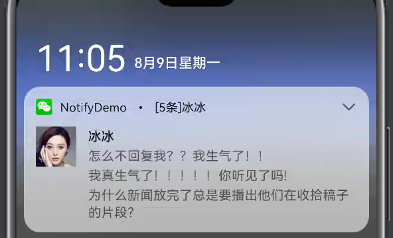
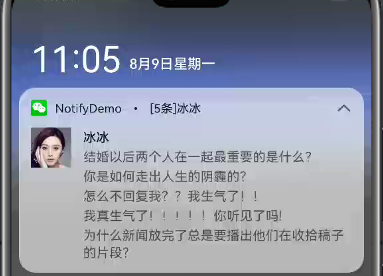
⑤社交 NotificationConversationalContent
效果图:
代码示例:
ArrayList<String> arrayListStr = new ArrayList<>();
arrayListStr.add("结婚以后两个人在一起最重要的是什么?");
arrayListStr.add("你是如何走出人生的阴霾的?");
arrayListStr.add("怎么不回复我??我生气了!!");
arrayListStr.add("我真生气了!!!!!你听见了吗!");
arrayListStr.add("为什么新闻放完了总是要播出他们在收拾稿子的片段?");

MessageUser messageUser = new MessageUser();
messageUser.setName(name);
messageUser.setPixelMap(icon);

int notificationId = 3;
NotificationRequest request = new NotificationRequest(notificationId);
request.setSlotId(slot.getId());
request.setLittleIcon(littleIcon);
request.addMessageUser(messageUser);

// 社交
NotificationRequest.NotificationConversationalContent content = new NotificationRequest.NotificationConversationalContent(messageUser);
content.setConversationTitle("[" + arrayListStr.size() + "条]" + name)
       .setConversationGroup(true);
for (int i = 0; i < arrayListStr.size(); i++) {
    content.addConversationalMessage(arrayListStr.get(i), 1, messageUser);
}

NotificationRequest.NotificationContent notificationContent = new NotificationRequest.NotificationContent(content);
// 设置通知的内容
request.setContent(notificationContent);
request.setIntentAgent(intentAgent);
try {
    NotificationHelper.publishNotification(request);
} catch (RemoteException e) {
    e.printStackTrace();
}
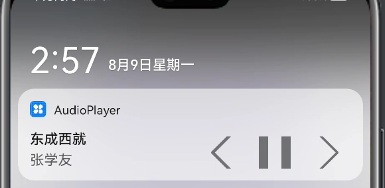
⑥媒体 NotificationMediaContent
https://developer.harmonyos.com/cn/docs/documentation/doc-guides/media-session-guidelines-0000001050712556
效果图:
代码示例:
// 按钮文字设置无效,图标颜色也不生效,默认都是灰色
NotificationActionButton.Builder builder = new NotificationActionButton.Builder(pixelMap1, "btn1", null);
NotificationActionButton.Builder builder1 = new NotificationActionButton.Builder(pixelMap2, "btn2", null);
NotificationActionButton.Builder builder2 = new NotificationActionButton.Builder(pixelMap3, "btn3", null);

int notificationId = 1;
NotificationRequest request = new NotificationRequest(notificationId);
request.setSlotId(slot.getId());
request.setLittleIcon(littleIcon);
request.addActionButton(builder.build());
request.addActionButton(builder1.build());
request.addActionButton(builder2.build());

int[] a = {0, 1, 2};
// 普通文本
// setAVToken 将指定的AVToken附加,连接AVToken后,此通知可以与关联的AVSession交互,以便用户可以在此通知中控制媒体播放
NotificationRequest.NotificationMediaContent mediaContent = new NotificationRequest.NotificationMediaContent();
mediaContent.setTitle(title)
            .setText(conStr)
            .setAVToken(avBrowser.getAVToken())
            .setShownActions(a);
NotificationRequest.NotificationContent notificationContent = new NotificationRequest.NotificationContent(mediaContent);
// 设置通知的内容
request.setContent(notificationContent);
try {
    NotificationHelper.publishNotification(request);
} catch (RemoteException e) {
    e.printStackTrace();
}
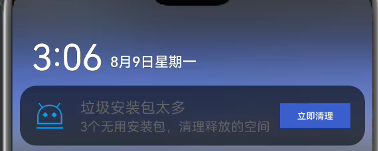
⑦自定义通知样式
效果图:
代码示例:
NotificationRequest request = new NotificationRequest(context, 5);
request.setSlotId(slot.getId());
request.setLittleIcon(littleIcon);

String title = "";
String text = "";
NotificationRequest.NotificationNormalContent content = new NotificationRequest.NotificationNormalContent();
content.setTitle(title).setText(text);
NotificationRequest.NotificationContent notificationContent = new NotificationRequest.NotificationContent(content);
request.setContent(notificationContent);

// layoutId就是自己定义的xml布局,需要在xml的父布局中设置一个卡片属性“ohos:remote="true"”,否则自定义效果无法出现
ComponentProvider componentProvider = new ComponentProvider(layoutId, context); // 创建ComponentProvider对象
// componentProvider.setString(ResourceTable.Id_ongoing_card_text, "setText", "TextContent"); // 设置布局中的文本内容
request.setCustomView(componentProvider);
request.setIntentAgent(intentAgent);

try {
    NotificationHelper.publishNotification(request);
} catch (RemoteException e) {
    e.printStackTrace();
}
👇点击关注鸿蒙技术社区👇
了解鸿蒙一手资讯

点“阅读原文”了解更多
