



任正非:现在华为必须全面靠自己打造产品,要敢于将鸿蒙推入竞争,星光不问赶路人,时光不负有心人。

01
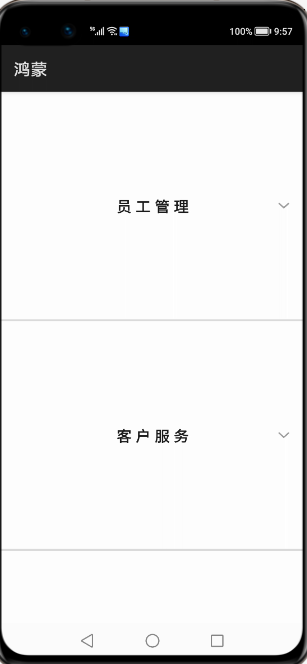
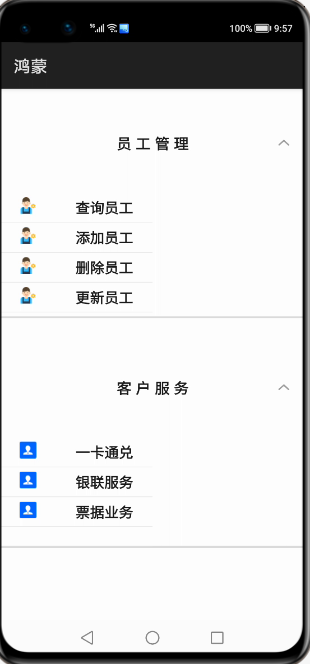
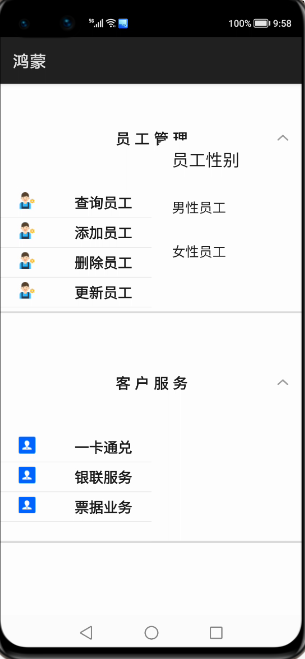
鸿蒙视图效果
02
js 业务数据和事件
import prompt from '@system.prompt';
import router from '@system.router';
export default {
    data: {
        title: 'World',
        fundatas:[{"fathermenu":"员工管理","childmenu":[{"icon":"/common/emp.png","text":"查询员工"},{"icon":"/common/emp.png","text":"添加员工"},{"icon":"/common/emp.png","text":"删除员工"},{"icon":"/common/emp.png","text":"更新员工"}]},
                  {"fathermenu":"客户服务","childmenu":[{"icon":"/common/customer.png","text":"一卡通兑"},{"icon":"/common/customer.png","text":"银联服务"},{"icon":"/common/customer.png","text":"票据业务"}]},
                  {"fathermenu":"内部管理","childmenu":[{"icon":"","text":""},{"icon":"","text":""},{"icon":"","text":""}]},
                  {"fathermenu":"合同管理","childmenu":[{"icon":"","text":""},{"icon":"","text":""},{"icon":"","text":""}]},
                  {"fathermenu":"资产管理","childmenu":[{"icon":"","text":""},{"icon":"","text":""},{"icon":"","text":""}]},
                  {"fathermenu":"绩效管理","childmenu":[{"icon":"","text":""},{"icon":"","text":""},{"icon":"","text":""}]},
        ]
    },
    clickitem(itemvalue)
    {

        if(itemvalue=="查询员工")
        {
            this.$element("menu").show({
                x: 360,
                y: 120
            });
            //this.$element("menu").show();

        }
        prompt.showToast({
            message:"点击了菜单"+itemvalue

        })
    },
    menuSelected(e) {
        prompt.showToast({
            message:"你选择查询的值是:"+e.value
        })

        router.push({
            uri:"pages/index/index"

        })


    }
}
03
页面视图代码
<div class="container">

    <list  class="listview">
       <block  for="{{fundatas}}">
           <list-item-group  class="groupview">
               <list-item class="listitem">
                   <text  class="tv1">{{$item.fathermenu}}</text>
               </list-item>
               <block  for="{{ (index,value)  in $item.childmenu}}">
                 <list-item class="listitemone" onclick="clickitem({{value.text}})">
                    <image  class="cimg"  src="{{value.icon}}"></image>
                    <text class="tv2">{{value.text}}</text>
                 </list-item>
               </block>
           </list-item-group>

       </block>


    </list>


    <menu id="menu"  title="员工性别"  onselected="menuSelected">
        <option value="男性员工">
            男性员工
        </option>
        <option value="女性员工">
            女性员工
        </option>

    </menu>
</div>
.container {
    width: 100%;
    height: 1200px;
}
.listview{
    width: 100%;
    height: 100%;
}
.groupview{
    width: 100%;
    height: 46%;
    border-bottom: 5px solid  #DCDCDC;
}
.listitem{
    width: 100%;
    height: 20%;
    display: flex;
    justify-content: space-around;
}
.listitemone {
    width: 50%;
    height: 6%;
    border-bottom: 1px  solid  #DCDCDC;
    display: flex;
    justify-content: space-around;
}

.cimg{
    width: 40px;
    height: 40px;
}
.tv1{
    font-size: 35px;
    font-weight: bold;
    font-family: sans-serif;
    letter-spacing: 10px;
}
.tv2{
    font-size: 34px;
    font-weight: bold;
    font-family: sans-serif;
}
04
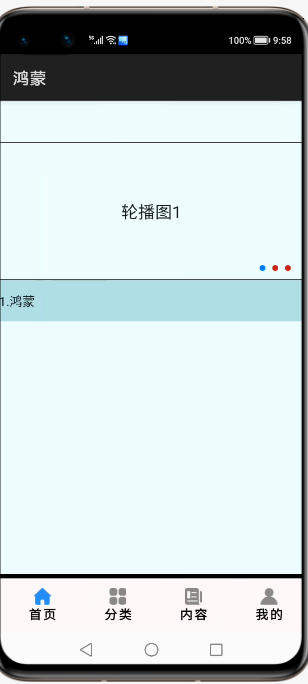
跳转页面后的视图层
<div  class="pageview">
    <swiper  class="swiperview"   id="swiper" index="0" >
        <div class ="sw1">
            <swiper class="swiper1" id="swiper1" autoplay="true" index="0" indicator="true"  loop="true" digital="false">
                <div class = "swiperContent1" >
                    <text class = "text" value="轮播图1"></text>
                </div>
                <div class = "swiperContent1">
                    <text class = "text" value="轮播图2"></text>
                </div>
                <div class = "swiperContent1">
                    <text class = "text" value="轮播图3"></text>
                </div>
            </swiper>

            <swiper class="swiper2" loop="true" vertical="true" indicator="false" autoplay="true">
                     <div class="lineview">
                       <text>1.鸿蒙</text>
                     </div>
                     <div class="lineview">
                         <text>2.苹果</text>
                     </div>
                     <div class="lineview">
                         <text>3.安卓</text>
                     </div>
            </swiper>
        </div>

        <div class ="sw2">
            <list class="todo-wraper">
                <list-item for="{{todolist}}" class="todo-item">
                    <text class="todo-title">{{$item.title}}</text>
                    <text class="todo-title">{{$item.date}}</text>
                </list-item>
            </list>
        </div>
        <div class ="sw3">
            <tabs class = "tabs" index="0" vertical="false" onchange="change">
                <tab-bar class="tab-bar" mode="fixed">
                    <text class="tab-text">推荐</text>
                    <text class="tab-text">视频</text>
                    <text class="tab-text">本地</text>
                    <text class="tab-text">内容</text>
                </tab-bar>
                <tab-content class="tabcontent" scrollable="true">
                    <div class="item-content" >
                        <div class="currentview">
                                <div  class="leftview"><text class="infot1">{{weatherInfo.city}}</text></div>
                                 <div class="rightview1">
                                    <div  class="cell"><text>{{winfo.info}}</text></div>
                                     <div class="cell"><text>{{winfo.direct}}</text></div>
                                     <div class="cell"><text>{{winfo.power}}</text></div>
                                 </div>

                        </div>
                        <div class="nextview">


                        </div>

                    </div>
                    <div class="item-content" >
                        <text class="item-title">第二个</text>
                    </div>
                    <div class="item-content" >
                        <text class="item-title">第三个</text>
                    </div>
                    <div class="item-content" >
                        <text class="item-title">第四个</text>
                    </div>
                </tab-content>
            </tabs>
        </div>

        <div class ="sw4">
            <text>第四幅</text>
        </div>

    </swiper>
    <div  class="bottommenu">
        <div  for="{{menus}}"  class="menubox"  onclick="changemenu({{$idx}})">
            <image  src="{{currentdata==$idx?$item.path:$item.path1}}" class="cimg"></image>
           <text  class="menutitle">{{$item.menu}}</text>
        </div>
    </div>
</div>
05
js 业务逻辑部分
import   fetch  from '@system.fetch';
export default {
    data: {

        weatherInfo:{},
        winfo:{},
        nextInfo:[],
        currentdata:0,
        title: "",
        menus:[{menu:"首页","path":"./common/ones.png","path1":"./common/oneu.png"},
               {menu:"分类","path":"./common/cs.png","path1":"./common/cu.png"},
               {menu:"内容","path":"./common/cons.png","path1":"./common/conu.png"},
               {menu:"我的","path":"./common/mys.png","path1":"./common/myu.png"}],
       todolist: [{
      title: '刷leetcode',
      date: '2020-06-25 10:00:00',
    }, {
      title: '看电影',
      date: '2020-06-27 20:00:00',
    },
                  {
                      title: '刷leetcode',
                      date: '2020-06-25 10:00:00',
                  }, {
                      title: '看电影',
                      date: '2020-06-27 20:00:00',
                  },{
                      title: '刷leetcode',
                      date: '2020-06-25 10:00:00',
                  }, {
                      title: '看电影',
                      date: '2020-06-27 20:00:00',
                  },{
                      title: '刷leetcode',
                      date: '2020-06-25 10:00:00',
                  }, {
                      title: '看电影',
                      date: '2020-06-27 20:00:00',
                  },
                  {
                      title: '刷leetcode',
                      date: '2020-06-25 10:00:00',
                  }, {
                      title: '看电影',
                      date: '2020-06-27 20:00:00',
                  },
                  {
                      title: '刷leetcode',
                      date: '2020-06-25 10:00:00',
                  }, {
                      title: '看电影',
                      date: '2020-06-27 20:00:00',
                  },{
                      title: '刷leetcode',
                      date: '2020-06-25 10:00:00',
                  }, {
                      title: '看电影',
                      date: '2020-06-27 20:00:00',
                  },{
                      title: '刷leetcode',
                      date: '2020-06-25 10:00:00',
                  }, {
                      title: '看电影',
                      date: '2020-06-27 20:00:00',
                  },{
                      title: '刷leetcode',
                      date: '2020-06-25 10:00:00',
                  }, {
                      title: '看电影',
                      date: '2020-06-27 20:00:00',
                  },
                  {
                      title: '刷leetcode',
                      date: '2020-06-25 10:00:00',
                  }, {
                      title: '看电影',
                      date: '2020-06-27 20:00:00',
                  },{
                      title: '刷leetcode',
                      date: '2020-06-25 10:00:00',
                  }, {
                      title: '看电影',
                      date: '2020-06-27 20:00:00',
                  },{
                      title: '刷leetcode',
                      date: '2020-06-25 10:00:00',
                  }, {
                      title: '看电影',
                      date: '2020-06-27 20:00:00',
                  }

       ]
    },
    onInit() {
       // this.title = this.$t('strings.world');

        let  that  =this;
        fetch.fetch({
            url:"http://apis.juhe.cn/simpleWeather/query?city=南京&key=3dc98f3428c44424088015738a070554",
            responseType:"json",
            success:function(resp)
            {
                let  currentValue=JSON.parse(resp.data);
                that.weatherInfo=currentValue.result;
                that.winfo=currentValue.result.realtime;
               // that.nextInfo=currentValue.future;
            }

        })
    },
    changemenu(index)
    {
        this.currentdata=index;
        this.$element('swiper').swipeTo({index: index});

    }
}
.pageview{
    width: 100%;
    height: 1600px;
    background-color: azure;
}
.bottommenu{
    width: 100%;
    height: 140px;
    background-color: snow;
    border-top: 10px  solid  black;
    z-index:999;
    position: fixed;
    left: 0px;
    bottom: 0px;
    display: flex;
    justify-content: center;
    align-items: center;
}
.menubox{

    width: 22%;
    height: 90%;
    /**border:9px  solid  #ccff6a;**/
    margin-left: 20px;
    display: flex;
    flex-direction: column;
    justify-content: center;
    align-items: center;
}
.menutitle{
    color: black;
    font-weight: bold;
    letter-spacing: 4px;
}
.cimg{
    width: 40px;
    height: 40px;
}
.swiperview{
    width: 100%;
    height: 100%;
}
.sw1{
    width: 100%;
    height: 100%;
    display: flex;
    flex-direction: column;
}
.sw2{
    width: 100%;
    height: 100%;
    background-color: cornflowerblue;
}
.sw3{
    width: 100%;
    height: 100%;
    background-color: #ccff6a;
}
.sw4{
    width: 100%;
    height: 100%;
    background-color: #009865;
}
.swiper1 {

    width: 100%;
    height: 330px;
    border: 1px solid #000000;
    indicator-color: #cf2411;
    indicator-size: 14px;
    indicator-bottom: 20px;
    indicator-right: 30px;
    margin-top: 100px;
}
.swiperContent1 {
    width: 800px;
    height: 100%;
    justify-content: center;
}
.button {
    width: 70%;
    margin: 10px;
}
.text {
    font-size: 40px;
}
.swiper2{
    width: 100%;
    height: 100px;
    background-color: powderblue;
}
.lineview{
    width: 100%;
    height: 100%;
}
.todo-wraper {
    width: 100%;
    height: 100%;
}
.todo-item {
    width: 100%;
    height: 80px;
    flex-direction: row;
    display: flex;
}
.todo-title {
    width: 454px;
    height: 40px;
    text-align: center;
}
.tabs {
    width: 100%;
}
.tab-bar {
    margin: 10px;
    height: 60px;
    border-color: #007dff;
    border-width: 1px;
}
.tab-text {
    width: 300px;
    text-align: center;
}
.tabcontent {
    width: 100%;
    height: 80%;
    justify-content: center;
}
.item-content {
    height: 100%;
    justify-content: center;
    display: flex;
    flex-direction: column;


}
.item-title {
    font-size: 60px;
}
.currentview{
    width: 100%;
    height: 30%;
    border-bottom: 4px  solid  peru;
    display: flex;
}
.nextview{
    width: 100%;
    height: 70%;
}
.leftview{
    width: 30%;
    height: 100%;
    border-right: 2px  solid  paleturquoise;
    border-bottom: 2px  solid  paleturquoise;
    display: flex;
    justify-content: center;
    align-items: center;
}
.rightview1{
    width: 70%;
    height: 100%;
    display: flex;
    flex-direction: column;
}
.infot1{
    font-family: 楷体;
    font-size: 80px;
    color: snow;
    font-weight: bold;
    letter-spacing: 5px;
}
.cell{
    width: 100%;
    height: 30%;
    border:1px  solid  red;
}
👇扫码关注鸿蒙技术社区👇
专注开源技术,共建鸿蒙生态

点“阅读原文”了解更多
文章转载自鸿蒙技术社区,如果涉嫌侵权,请发送邮件至:contact@modb.pro进行举报,并提供相关证据,一经查实,墨天轮将立刻删除相关内容。
