



哈喽大家好!我是波哥! 最近做了一个简约版互联网行业新闻小程序. 有兴趣的可以点击下方链接或者微信搜索: IT路边社
上网方式及理论网速
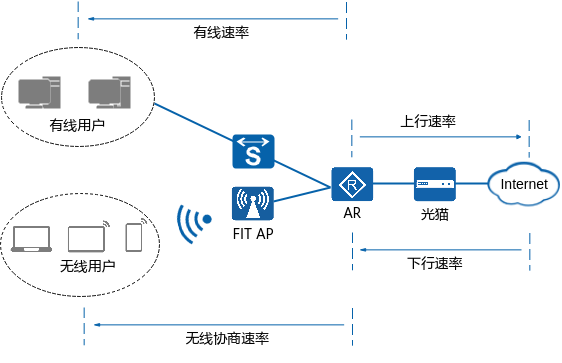
如何测网速
使用网站测速。各大运营商网站都提供了测速功能,例如中国电信宽带测速网,不同区域网址不一样,例如上海;也可以用一些专门的测速网站来测,例如测速网。 使用测速工具测速。在应用商店下载并安装测量网速的工具进行测速,例如网速测试、网络测速大师、测网速大师等。
了解网速慢故障场景
单上行出口上网慢
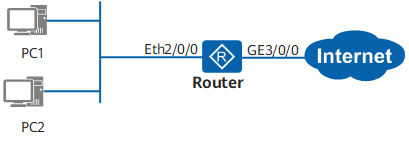 图1-2 单上行出口上网场景组网示例
双上行/多上行出口上网慢
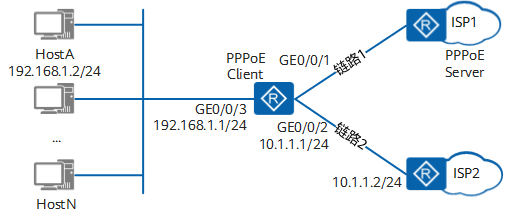
为什么网速慢,原因在这里
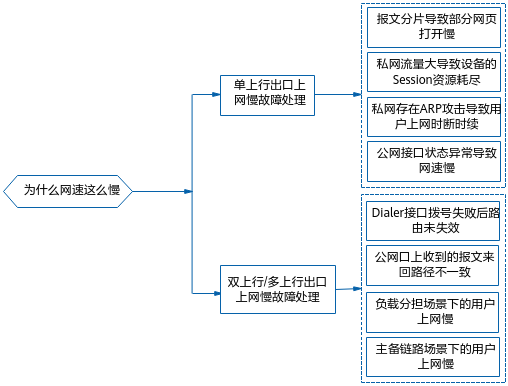
单上行出口上网慢故障处理
报文分片导致部分网页打开慢
<Huawei> display ip interface brief*down: administratively down^down: standby(l): loopback(s): spoofing(E): E-Trunk downThe number of interface that is UP in Physical is 2The number of interface that is DOWN in Physical is 3The number of interface that is UP in Protocol is 2The number of interface that is DOWN in Protocol is 3Interface IP Address/Mask Physical ProtocolAtm0/0/0 unassigned down downBridge-if10 unassigned down downMFR0/0/1 unassigned down downNULL0 unassigned up up(s)GE0/0/1 x.x.x.x/24 up upGE0/0/2 x.x.x.x/24 up up
<Huawei> system-view[Huawei] interface GigabitEthernet 0/0/1[Huawei-GigabitEthernet0/0/1] tcp adjust-mss 1200
[Huawei] interface Dialer 0[Huawei-Dialer0] tcp adjust-mss 1200[Huawei-Dialer0] mtu 1492[Huawei-Dialer0] restart
<Huawei> system-view[Huawei] interface GigabitEthernet 0/0/2[Huawei-GigabitEthernet0/0/2] tcp adjust-mss 1200
私网流量大导致设备的Session资源耗尽
<Huawei> display logbufferLogging buffer configuration and contents: enabledAllowed max buffer size: 1024Actual buffer size: 512Channel number: 4, Channel name: logbufferDropped messages: 0Overwritten messages: 167Current messages: 512Mar 5 2021 15:47:25+08:00 Huawei %%01FORWARD/4/SESSION-RES-LACK(l)[135]:The device session resources were overloaded.(Usage = 94%)Mar 5 2021 16:29:25+08:00 Huawei %%01FORWARD/4/CAP-BLOCK-RES-LACK(l)[259]:The block memory resources were overloaded.(Usage = 97%)Mar 5 2021 16:34:25+08:00 Huawei %%01FORWARD/4/SESSION-RES-LACK(l)[261]:The device session resources were overloaded.(Usage = 92%)Mar 5 2021 16:43:25+08:00 Huawei %%01FORWARD/4/CAP-BLOCK-RES-LACK(l)[273]:The block memory resources were overloaded.(Usage = 96%)
[Huawei] diagnose[Huawei-diagnose] display session statistics top 10 order-by source-ipSession statistic top 10 (Condition: Source IP, Service: SESSION, Items: 10, Total Sessions: 25768)-------------------------------------------------------------------------------------------------TOP-N IP/Port Counts Percentage(%)-------------------------------------------------------------------------------------------------1 192.168.1.99 19714 76.5057442 192.168.1.88 5988 23.2381253 192.168.1.165 9 0.034927
[Huawei-diagnose] display session statistics top 10 order-by destination-portSession statistic top 10 (Condition: Destination Port, Service: SESSION, Items: 10, Total Sessions: 25768)-------------------------------------------------------------------------------------------------TOP-N IP/Port Counts Percentage(%)-------------------------------------------------------------------------------------------------1 445 15486 60.0977962 1433 9565 37.1196833 3389 648 2.514747[Huawei-diagnose] quit[Huawei] interface GigabitEthernet 0/0/0[Huawei-GigabitEthernet0/0/0] display this#ip address 192.168.1.255 255.255.255.0
[Huawei] acl 3000[Huawei-acl-adv-3000] rule 20 permit tcp destination-port eq 445[Huawei-acl-adv-3000] rule 25 permit tcp destination-port eq 1433[Huawei-acl-adv-3000] quit[Huawei] traffic classifier virus operator or[Huawei-classifier-virus] if-match acl 3000[Huawei-classifier-virus] quit[Huawei] traffic behavior virus[Huawei-behavior-virus] deny[Huawei-behavior-virus] quit[Huawei] traffic policy virus[Huawei-trafficpolicy-virus] classifier virus behavior virus[Huawei-trafficpolicy-virus] quit[Huawei] interface GigabitEthernet 0/0/0[Huawei-GigabitEthernet0/0/0] traffic-policy virus outbound[Huawei-GigabitEthernet0/0/0] traffic-policy virus inbound
私网存在ARP攻击导致用户上网时断时续
<Huawei> display logbufferSep 9 2021 16:01:55+00:00 Huawei %%01SECE/4/PORT_ATTACK(l)[0]:Port attack occurred.(Slot=MPU, SourceAttackInterface=GigabitEthernet0/0/0, OuterVlan/InnerVlan=0/0, AttackPackets=64 packets per second)Sep 9 2021 16:01:54+00:00 Huawei %%01DEFD/4/CPCAR_DROP_MPU(l)[1]:Some packets are dropped by cpcar on the MPU. (Packet-type=arp-miss, Drop-Count=770)Sep 9 2021 16:01:54+00:00 Huawei %%01DEFD/4/CPCAR_DROP_MPU(l)[2]:Some packets are dropped by cpcar on the MPU. (Packet-type=arp-request, Drop-Count=3458)
<Huawei> system-view[Huawei] cpu-defend policy 1[Huawei-cpu-defend-policy-1] auto-defend enable[Huawei-cpu-defend-policy-1] auto-defend threshold 40 //可适当调整建议不要太小[Huawei-cpu-defend-policy-1] auto-defend attack-packet sample 5[Huawei-cpu-defend-policy-1] auto-defend protocol all[Huawei-cpu-defend-policy-1] auto-defend trace-type source-ip source-mac source-portvlan[Huawei-cpu-defend-policy-1] auto-defend alarm enable[Huawei-cpu-defend-policy-1] quit[Huawei] cpu-defend-policy 1[Huawei] cpu-defend-policy 1 global
[Huawei] display auto-defend attack-sourceAttack Source User Table:-------------------------------------------------------------------------MacAddress InterfaceName Vlan:Outer/Inner TOTAL-------------------------------------------------------------------------xxxx-xxxx-xxxx GigabitEthernet0/0/1 0 368yyyy-yyyy-yyyy GigabitEthernet0/0/0 0 7152-------------------------------------------------------------------------Total: 2Attack Source Port Table:-----------------------------------------------------InterfaceName Vlan:Outer/Inner TOTAL-----------------------------------------------------GigabitEthernet0/0/1 0 368GigabitEthernet0/0/0 0 23472-----------------------------------------------------Total: 2Attack Source IP Table:-------------------------------------IPAddress TOTAL Packets-------------------------------------x.x.x.x 368y.y.y.y 7152-------------------------------------Total: 2
[Huawei] acl number 4444[Huawei-acl-L2-4444] rule 5 deny l2-protocol arp source-mac yyyy-yyyy-yyyy[Huawei] interface gigabitethernet 0/0/0[Huawei-GigabitEthernet0/0/0] traffic-filter inbound acl 4444[Huawei-GigabitEthernet0/0/0] quit[Huawei] quit
公网接口状态异常导致网速慢
<Huawei> display interface GigabitEthernet 0/0/1GigabitEthernet0/0/1 current state : UPLine protocol current state : UPLast line protocol up time : 2021-10-08 09:00:00Description:HUAWEI, AR Series, GigabitEthernet0/0/1 InterfaceRoute Port,The Maximum Transmit Unit is 1500Internet Address is 120.44.5.15/24IP Sending Frames' Format is PKTFMT_ETHNT_2, Hardware address is 60d7-55f0-42c1Last physical up time : 2021-10-08 09:00:00Last physical down time : 2021-10-08 08:58:09Current system time: 2021-10-22 06:14:56Port Mode: COMMON COPPERSpeed : 100, Loopback: NONEDuplex: FULL, Negotiation: ENABLEMdi : AUTO, Clock : -Last 300 seconds input rate 99992 bits/sec, 50 packets/secLast 300 seconds output rate 192 bits/sec, 0 packets/secInput peak rate 223880 bits/sec,Record time: 2021-10-13 14:13:56Output peak rate 18464 bits/sec,Record time: 2021-10-20 07:27:05Input: 55586497 packets, 13516267464 bytesUnicast: 10526, Multicast: 195548Broadcast: 55380423, Jumbo: -Discard: 0, Total Error: 0CRC: 0, Giants: 0Jabbers: 0, Throttles: 0Runts: 0, Symbols: 0Ignoreds: 0, Frames: 0Output: 9237 packets, 590811 bytesUnicast: 9227, Multicast: 0Broadcast: 10, Jumbo: -Discard: 0, Total Error: 0Collisions: 0, ExcessiveCollisions: 0Late Collisions: 0, Deferreds: 0Input bandwidth utilization threshold : 100.00%Output bandwidth utilization threshold: 100.00%Input bandwidth utilization : 0.11%Output bandwidth utilization : 0.01%
<Huawei> system-view[Huawei] interface GigabitEthernet 0/0/1[Huawei-GigabitEthernet0/0/1] undo negotiation auto[Huawei-GigabitEthernet0/0/1] speed 100
<Huawei> system-view[Huawei] interface GigabitEthernet 0/0/1[Huawei-GigabitEthernet0/0/1] duplex full[Huawei-GigabitEthernet0/0/1] quit[Huawei] quit
双上行出口/多上行出口上网慢故障处理
Dialer接口拨号失败后路由未失效
<Huawei> display ip interface brief*down: administratively down^down: standby(l): loopback(s): spoofing(E): E-Trunk downThe number of interface that is UP in Physical is 2The number of interface that is DOWN in Physical is 3The number of interface that is UP in Protocol is 2The number of interface that is DOWN in Protocol is 3Interface IP Address/Mask Physical ProtocolDialer1 unassigned up up(s)Dialer2 100.64.40.165/32 up up(s)
<Huawei> display ip routing-tableRoute Flags: R - relay, D - download to fib, T - to vpn-instance------------------------------------------------------------------------------Routing Tables: PublicDestinations : 31 Routes : 32Destination/Mask Proto Pre Cost Flags NextHop Interface0.0.0.0/0 Static 60 0 D 0.0.0.0 Dialer1Static 60 0 D 100.64.40.165 Dialer
<Huawei> system-view[Huawei] interface dialer 1[Huawei-Dialer1] dialer number 1 autodial[Huawei-Dialer1] quit[Huawei] quit
公网口上收到的报文来回路径不一致
<Huawei> system-view[Huawei] acl 3000[Huawei-acl-adv-3000] rule 5 permit tcp source 172.168.1.254 0.0.0.0 source-port eq 65532[Huawei-acl-adv-3000] quit[Huawei] interface GigabitEthernet 0/0/2[Huawei-GigabitEthernet0/0/2] traffic-filter inbound acl 3000[Huawei-GigabitEthernet0/0/2] quit
[Huawei] display acl allTotal quantity of nonempty ACL number is 1Advanced ACL 3000, 1 ruleAcl's step is 5rule 5 permit tcp source 172.168.1.254 0 source-port eq 65532 (2 matches)
负载分担场景下的用户上网慢
<Huawei> display ip routing-table protocol staticRoute Flags: R - relay, D - download to fib, T - to vpn-instance------------------------------------------------------------------------------Public routing table : StaticDestinations : 1 Routes : 2 Configured Routes : 2Static routing table status : <Active>Destinations : 0 Routes : 0Static routing table status : <Inactive>Destinations : 1 Routes : 2Destination/Mask Proto Pre Cost Flags NextHop Interface0.0.0.0/0 Static 60 0 172.16.1.2 Unknown0.0.0.0/0 Static 60 0 10.1.1.2 Unknown
<Huawei> system-view[Huawei] ip load-balance hash src-ip //配置基于源IP地址进行负载分担
[Router] ip route-static 0.0.0.0 0 10.1.1.2 preference 100
主备链路场景下的用户上网慢
<Huawei> display nat session all verboseNAT Session Table Information:Protocol : TCP(6)SrcAddr Port Vpn : 10.200.200.200 65532DestAddr Port Vpn : 10.100.100.100 1024Time To Live : 60 sNAT-InfoNew SrcAddr : 10.10.10.10New SrcPort : 10240New DestAddr : 10.30.30.30New DestPort : 21Protocol : UDP(6)SrcAddr Port Vpn : 10.200.200.200 65532DestAddr Port Vpn : 10.100.100.100 1024Time To Live : 60 sNAT-InfoNew SrcAddr : 10.10.10.10New SrcPort : 10240New DestAddr : 10.30.30.3New DestPort : 21Total : 2
收集上网慢故障信息
<Huawei> display diagnostic-information dia-info.txtThis operation will take several minutes, please wait...........................................................................................Info: The diagnostic information was saved to the device successfully.
<Huawei> save logfileInfo: It may take several seconds,please wait...Save log file successfully.
end
文章转载自波哥的IT人生,如果涉嫌侵权,请发送邮件至:contact@modb.pro进行举报,并提供相关证据,一经查实,墨天轮将立刻删除相关内容。
