




-----正文-----

环境说明
一、逻辑导入导出方式
1.1、创建测试表:
SQL> create table t1 (id int);beginfor i in 1..10000 loopinsert into t1 values (i);commit;end loop;end;/
1.2、导出表t1:
[dmdba@localhost bin]$ ./dexp SYSDBA/Dameng123 file=/dm8/backup/t1.dmp tables=t1
1.3、删除表t1:
SQL>drop table t1;
1.4、创建分区表:
SQL> create table t1 (id int)partition by range (id)interval(2000)(partition p1 values less than (2000),partition p2 values less than (4000),partition p3 values less than (6000),partition p4 values less than (8000),partition p5 values less than (10000),partition p6 values less than (12000));
1.5、导入数据至分区表中:
[dmdba@localhost bin]$ ./dimp SYSDBA/Dameng123 file=/dm8/backup/t1.dmp tables=t1 rows=y ignore=y
二、分区交换方式
2.1、创建测试表
SQL> create table t1 (id int);beginfor i in 1..10000 loopinsert into t1 values (i);commit;end loop;end;/
2.2、创建分区表
SQL> create table t2 (id int)partition by range (id)(partition p1 values less than (2000),partition p2 values less than (4000),partition pn values less than (maxvalue));
2.3、交换分区
将普通表t1的数据交换到分区表t2的 pn分区,执行之前需要取消主键,删除索引,交换完成后进行重建。
SQL> alter table t2 exchange partition pn with table t1;
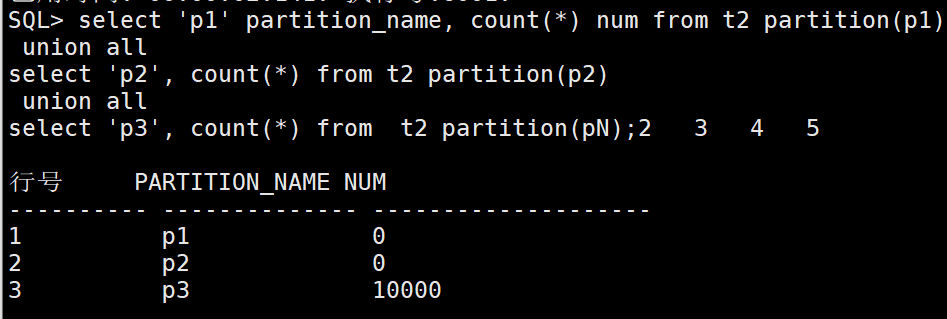
2.4、查询分区表的数据
交换分区后,数据并不进行校验,数据都会进入该分区。
SQL> select 'p1' partition_name, count(*) num from t2 partition(p1)union allselect 'p2', count(*) from t2 partition(p2)union allselect 'p3', count(*) from t2 partition(pn);
2.5、分区拆分
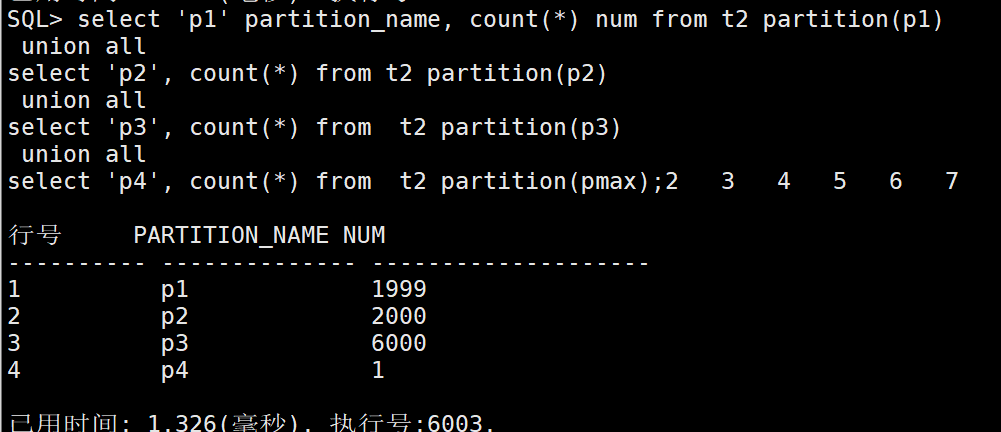
上述数据交换后,所有数据都在一个分区,可以使用分区拆分,分区拆分会对分区中的数据进行重组。
SQL> alter table t2 split partition pn at (10000) into (partition p3, partition pmax);
2.6、查询拆分后的分区
SQL> select 'p1' partition_name, count(*) num from t2 partition(p1)union allselect 'p2', count(*) from t2 partition(p2)union allselect 'p3', count(*) from t2 partition(p3)union allselect 'p4', count(*) from t2 partition(pmax);
注意:
(1)分区交换仅支持范围和列表分区,不支持HASH分区。
(2)分区交换时不会进行数据校验,如果交换表的数据不符合分区范围,数据仍然会进入该分区。此时如果是范围分区可以使用split拆分分区,系统会自动对数据进行重组。
(3)在生产环境中,为保证数据安全,建议对源表的数据备份后再做分区交换。
>>> THE END <<<
相关推荐
文章转载自达梦E学,如果涉嫌侵权,请发送邮件至:contact@modb.pro进行举报,并提供相关证据,一经查实,墨天轮将立刻删除相关内容。
