



GoldenGate
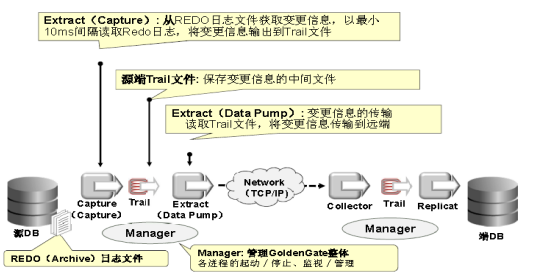
1、GoldenGate技术架构
2、GoldenGate进程及文件详解
2.1 Manager进程
Manager进程是Goldegate的控制进程。如果把所有的Oracle进程比喻为军队,那么Manager就相当于司令。Manager进程运行在源端和目标端上,它主要作用有以下几个方面:启动、监控、重启GoldenGate的Extract,Data Pump,Replicat等进程,报告错误及事件,分配数据存储空间,发布阀值报告等。在 Extract、Data Pump、Replicat 进程启动之前,Manager 进程必须先要在源端和目标端启动。
每个源端或者目标端有且只能存在一个Manager进程。其运行状态有两种 RUNNING(正在运行)和STOPPED(已经停止)。
在Windows系统上,Manager进程是作为一个服务来启动的,而在类Unix系统 中,Manager则是一个操作系统进程。
2.2 Extract 进程
Extract运行在数据库源端,负责从源端数据表或者日志中捕获数据。在早 期的GoldenGate版本中,它通常被称为Collect进程。按照其所处的阶段不同, Extract的作用可以按照时间来来划分:
初始数据装载阶段:在初始数据装载阶段,Extract进程直接从源端的数据表中抽取数据。
同步变化捕获阶段:保持源数据与其它数据集的同步。初始数据同步完成以后,Extract进程负责捕获源端数据的变化(DML和DDL)。
Extract进程利用其内在的checkpoint机制,周期性地检查并记录其读写的位置,通常是写入到一个本地的trail文件。这种机制是为了保证如果Extract 进程终止或者操作系统宕机,我们重新启动Extract进程后,GoldenGate能够恢复到以前的状态,从上一个断点处继续往下运行,而不会有任何数据损失。
Extract进程的状态包括STOPPED(正常停止)、STARTING(正在启动)、RUNNING (正在运行)、ABENDED(Abnomal End的缩写,表示异常结束)。
2.3 Data Pump进程
Pump进程运行在数据库源端,其作用非常简单。如果源端使用了本地的trail文件,那么Pump进程就会把trail以数据块的形式通过TCP/IP协议发送到目标端, 这通常也是推荐的方式。Pump进程本质是Extract进程的一种特殊形式,Data Pump 是一个可选组件,如果不使用Data Pump抽取到trails文件,那么就是Extract进程在抽取完数据以后,直接投递到目标端。
使用 Data Pump 的好处是:
(1)如果目标端或者网络失败,源端的Extract 进程不会意外终止;
(2)需要在不同的阶段实现数据的过滤或者转换;
(3)多个源数据库复制到数据中心;
(4)数据需要复制到多个目标数据库。
与Pump 进程相对应的叫Server Collector进程,这个进程不需要引起我们的关注,因为在实际操作过程中无需我们对其进行任何配置,所以对我们来说它是透明的。它运行在目标端,其任务就是把Extract/Pump 投递过来的数据块重新组装成trail文件,我们称之为远程trail文件。
2.4 Collector进程
Collector 是运行在目标端的一个后台进程。
接收从 TCP/IP 网络传输过来的数据库变化,并写到 Trail 文件里。
动态 collector:由管理进程自动启动的 collector 叫做动态 collector,用户不能与动态 collector 交互。
静态 collector:可以配置成手工运行 collector,这个 collector 就称之为静态collector。
2.5 trails文件
为了更有效、更安全的把数据库事务信息从源端投递到目标端。GoldenGate 引进trail文件的概念。前面提到Extract抽取完数据以后GoldenGate会将抽取的事务信息转化为一种GoldenGate专有格式的文件。然后Pump负责把源端的trail 文件投递到目标端,所以源、目标两端都会存在这种文件,源端存放的trail文件叫本地trail文件,目标端存放的trail文件叫远程trail文件。trail文件存在的目的旨在了防止单点故障,将事务信息持久化,并且使用checkpoint机制来记录其读写位置,如果故障发生,则数据可以根据checkpoint记录的位置来重传。
值得一提的是,trail文件并不是总是必须的。我们可以在配置Extract进程的时候通过TCP/IP协议直接把日志的信息投递到目标端。但通常并不推荐这么做,因为一旦发生系统宕机或者网络故障,则有可能造成数据的丢失。
2.6 Relicat进程
Replicat进程,通常我们也把它叫做应用进程。运行在目标端,是数据传递的最后一站,负责读取目标端trail文件中的内容,并将其解析为DML或DDL语句, 然后应用到目标数据库中。
和Extract进程一样,Replicat也有其内部的checkpoint机制,进程重启启动后可以从上次记录的位置开始恢复而无数据损失的风险。
它的运行状态和 Extract进程一致,包括 STOPPED,STARTING,RUNNING,ABENDED。
2.7 GGSCI命令
GGSCI是GoldenGate Software Command Interface的缩写,它提供了十分丰富的命令来对GoldenGate进行各种操作,如果如创建、修改、监控GoldenGate 进程等等。
绝大部分的操作都是通过它来完成的。当然如果您需要GUI方式的图形界面来管理,则需要购买GoldenGate Director。
2.8 Data source
当处理事务的变更数据时,Extract 进程可以从数据库(Oracle,DB2,SQL Server,MySQL等)的事务日志中直接获取。
或从 GoldenGate VAM中获取。通过VAM,数据库厂商将提供所需的组件,用于 Extract 进程抽取数据的变更。
2.9 Groups
为了区分一个系统上的多个Extract和Replicat进程,我们可以定义进程组。
例如:要并行复制不同的数据集,我们可以创建两个Replicat组。
一个进程组由一个进程组成(Extract 进程或者Replicat进程),一个相应的参数文件,一个 Checkpoint 文件,以及其它与之相关的文件。
如果处理组中的进程是 Replicat 进程,那么处理组还要包含一个Checkpoint 表。
2.10 checkpoint
checkpoint用于抽取或复制失败后(如系统宕机、网络故障灯),抽取、复制进程重新定位抽取或者复制的起点。在高级的同步配置中,可以通过配置checkpoint另多个extract或者replicat进程读取同个trail文件集。
extract进程在数据源和trail文件中都会标识checkpoint,Replicat只会在trail文件中标示checkpoint。
在批处理模式中,extract和replicat进程都不会记录checkpoint。如果批处理失败,则整个批处理会重新进行。
checkpoint信息会默认存储在goldengate的子目录dirchk中。在目标端除了checkpoint文件外,我们也可以通过配置通过额外checkpoint table来存储replicat的checkpoint信息。
2.11 GoldenGate 工作目录
(1)、dirchk:用来存放检查点(Checkpoint)文件
(2)、dirdat:用来存放Trail文件,以后详述;
(3)、dirdef:用来存放通过DEFGEN工具生成的源或目标端数据定义文件;
(4)、dirpcs:用来存放进程状态文件
(5)、dirprm:用来存放配置参数文件
(6)、dirrpt:用来存放进程报告文件
(7)、dirsql:用来存放SQL脚本文件
(8)、dirtmp:当事务所需要的内存超过已分配内存时,缺省存储在这个目录。
3、GoldenGate 的复制模式
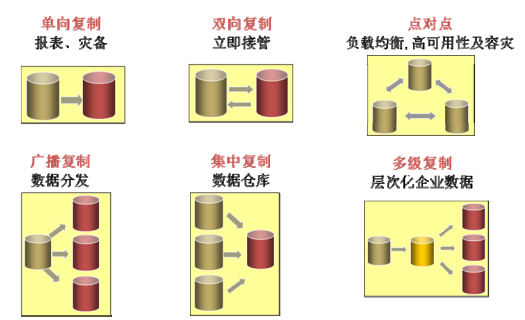
GoldenGate的模式包括上图中描述的几种,其中“一对一”是GoldenGate 最简单的一种模式,也是最常用的模式。
这种模式的一种典型应用就是用于数据容灾,通常源端数据库为生产端,目标端数据库为容灾端。
另外一种应用场景是把源端的OLTP系统产生的交易日志传送到目标端使用BI数据仓库或者是OLAP。
4、支持的Oracle数据类型
4.1 Numeric data types --数值型数据类型
(1) NUMBER up to the maximum sizepermitted by Oracle
--Oracle允许的最大大小的数字
(2)BINARY FLOAT
--二进制浮点数
(3)BINARY DOUBLE
注意:支持的局限性
The support of range and precision for floating-point numbers depends on the host machine. Ingeneral, the precision is accurate to 16 significant digits, but you should review the database documentation to determine the expected approximations.Oracle GoldenGate rounds or truncates values that exceed the supported precision.
对浮点数的范围和精度的支持取决于主机。总的来说,精度可以精确到16位有效数字,但是您应该查看数据库文档来确定预期的近似值。Oracle GoldenGate对超过支持精度的值进行轮取或截断。 |
4.2 Character data types --字符串数据类型
(1)CHAR
(2)VARCHAR2
(3)LONG
(4)NCHAR
(5)NVARCHAR2
4.3 Multi-byte character types --多字节字符串类型
(1) NCHAR and NVARCHAR2 multi-bytecharacter data types
-- NCHAR和NVARCHAR2多字符数据类型
(2) Multi-byte data stored in CHAR andVARCHAR2 columns
--存储在CHAR和varchar2列中的多字节数据
注意:支持的局限性
(1) For Oracle GoldenGate to support multi-byte character data, the source and target databases must be identical. Transformation, filtering, and other manipulation are not supported.
(2) Multi-byte characters can be used with limitations in MAP and TABLE parameter statements such as string-based conversion functions and WHERE clauses. The code point fora multi-byte character must be represented within an escape sequence, for example“\u20ac.”
(3) Multi-byte data is supported whether the length semantics are in bytes or characters. Ifthe semantics setting of the source database is BYTE and the setting of thetarget is CHAR, use the Replicat parameter SOURCEDEFS in your configuration,and place a DEFGEN generated definitions file on the target. These steps are required to support the difference in semantics, whether or not the source and target data definitions are identical. Replicat refers to the definitions fileto determine the upper size limit for fixed-size character columns.
(4) If the database has an NLS_NCHAR_CHARACTERSET value other than AL16UTF16, use the VARWIDTHNCHAR parameter to force NCHAR data to be written to the trail with 2-byte length in formation.
(1)对于支持多字节字符数据的OracleGoldenGate,源数据库和目标数据库必须相同。不支持转换、过滤和其他操作。 (2)在MAP和表参数语句(如基于字符串的转换函数和WHERE子句)中,multi -bytecharacter可以在有限制的情况下使用。多字节字符的代码点必须在转义序列中表示,例如“\u20ac”。 (3)支持多字节数据,无论长度语义是字节还是字符。如果源数据库的语义设置是byte,而目标的设置是CHAR,那么在配置中使用Replicat参数SOURCEDEFS,并在目标上放置一个DEFGEN生成的定义文件。这些步骤是为了支持语义上的差异,无论源和目标数据定义是否相同。Replicat引用definitions文件来确定固定大小的字符列的上限大小。 (4)如果数据库有一个非AL16UTF16的NLS_NCHAR_CHARACTERSET值,那么使用varwidthnchar_parameter强制以2字节长度形式将NCHAR数据写入trail。 |
4.4 Binary data types --二进制数据类型
(1) RAW
(2) LONG RAW
4.5 Date and timestamp data types --日期和时间戳数据类型
(1) DATE
(2) TIMESTAMP (see Limitations ofsupport)
注意:支持的局限性
(1) By default,only TIMESTAMP WITH TIME ZONE specified as a UTC offset is supported. To support TIMESTAMP WITH TIME ZONE specified as TZR (Region ID), you must use the Extract parameter TRANLOGOPTIONS with either the INCLUDEREGIONID or INCLUDEREGIONIDWITHOFFSET option. Without TRANLOGOPTIONS, Extract abends on this data type.
(2) TIMESTAMPWITH TIME ZONE as TZR is not supported by Oracle GoldenGate for initial loads, foruse with the SQLEXEC feature, or for operations where the column must be fetched from the database. In these cases, the region ID is converted to a time offset by the Oracle database engine when the column is selected. Replicat will replicate the column data as date and time data with a time offset value.
(3)Because of the way that the Oracle database normalizes TIMESTAMP WITH LOCAL TIME ZONE to the local time zone of the database, the timestamps do not transfer correctly between databases that are in different time zones. Timestamps will transfer correctly between databases in the same time zone if you set the time zone ofthe Replicat session to the timezone of the database. Include the following parameter statement in the Replicat parameter file, placing it after the USERID parameter, but before the first MAP statement:
SQLEXEC"ALTER SESSION SET TIME_ZONE =
(4) OracleGoldenGate does not support negative dates.
(1)默认情况下,只支持指定时区为UTC偏移量的时间戳。要支持时区指定为TZR(区域ID)的时间戳,必须使用Extractparameter TRANLOGOPTIONS和INCLUDEREGIONID或INCLUDEREGIONIDWITHOFFSEToption。如果没有TRANLOGOPTIONS,则提取此数据类型上的abend。 (2)对于初始加载、SQLEXEC特性或必须从数据库提取列的操作,Oracle GoldenGate不支持时区为TZR的时间戳。在这些情况下,选择列时,区域ID由Oracle数据库引擎转换为时间偏移量。Replicat将列数据复制为带有时间偏移值的日期和时间数据。 (3)由于Oracle数据库使用本地时区将时间戳规范化到数据库的本地时区,因此时间戳不能在不同时区的数据库之间正确传输。如果将Replicat session的时区设置为数据库的时区,那么时间戳将在同一时区的数据库之间正确传输。在Replicat参数文件中包含以下参数语句,将其放在USERID parameter之后,但在第一个MAP语句之前: SQLEXEC"ALTER SESSION SET TIME_ZONE = (4) OracleGoldenGate不支持否定日期。 |
4.6 Large object data types --大对象数据类型
(1) CLOB
(2) NCLOB
(3) BLOB
注意:支持的局限性
(1) SECUREFILE and BASICFILE are bothsupported.
(2) Store large objects out of row if possible.
(3) LOB capture differs between earlier and later versions of Oracle:
(1)支持SECUREFILE和BASICFILE。 (2)尽可能在行外存储大对象。 (3)Oracle早期版本和晚期版本之间的LOB捕获有所不同: |
Oracle versions earlier than 10g:
In-row LOBs are captured from the redo log, but outof-row LOBs are fetched from the database. If a value gets deleted before a fetch occurs, Extract writes a null to the trail. If a value gets updated before the fetch occurs, Extract writes the updated value. Toprevent these inaccuracies, try to keep Extract latency low. The Oracle GoldenGate documentation provides guidelines for tuning process performance.
In-rows的情况从redo log captured,out of-row从lobsegments里进行fetch。
Oracle 10g and later,BASICFILE LOBs:
All BASICFILELOBs are captured from the redo log, whether stored in-row or out-of row. However,Extract will continue to fetch LOBs under the following conditions, for which it will issue a warning:
Oracle10g以前: In-row LOBS是从重做日志中捕获的,而outof- rowlob是从数据库中获取的。如果在进行提取之前删除了一个值,Extract就会将一个null写入到跟踪中。如果在取值之前更新了值,Extract将写入更新后的值。为了避免这些错误,尽量保持较低的提取延迟。Oracle GoldenGate文档提供了调优流程性能的指导原则。 In-rows的情况从redo log captured,out of-row从lobsegments里进行fetch。 ORACLE 10g及以后版本,BASICFILE LOBS: 所有的BASICFILELOBs都从重做日志中捕获,无论存储在行内还是行外。但是,Extract将在以下条件下继续获取LOBS,注意: --对于BASICFILE LOBs,不管是in-row 还是out-ofrow都是从redo log 里进行captured,但是在以下情况下会从LOBs里进行fetch: |
① Extract determines that a LOB instance is invalid.
② The LOB data is missing from the redolog. This can occur if the BASICFILE LOB is created with the no_logging option.
③The LOB is created with the CACHE attribute.
④ A LOB is only partially updated. Oracle GoldenGate does not support partial column data.Extract assumes LOB data to be incomplete if the LOB data does not start with a LOB reset record or does not start at the first byte and does not end at thelast byte, according to the new LOB length. Partial updates can be generated bythe following OCI calls: OCILOBWrite(), OCILobAppend(), OCiLobCopy(), OCILobLoadFromFile(),OCILobTrim(), and by updated made through procedures in the dbms_lob package.
⑤ Extract detects an anomaly in the LOB data, such as a missing page number, missing END MARKER, or a mismatch between the size that was captured and the expected size.
①Extract一个LOB实例是无效的。 ②在redolog中无法查找到LOB数据。如果使用no_logging选项创建了BASICFILE LOB,就会发生这种情况。 ③LOB创建缓存属性。 ④LOB如果只是部分更新。Oracle GoldenGate不支持部分列数据。根据新的LOB长度,如果LOB数据不是从aLOB重置记录开始,或者不是从第一个字节开始,也不是从最后一个字节结束,那么提取假设LOB数据是不完整的。可以通过以下OCI调用生成部分更新:OCILOBWrite()、OCILobAppend()、OCiLobCopy()、OCILobLoadFromFile()、OCILobTrim(),以及通过dbms_lob包中的过程进行更新。 ⑤LOB数据提取检测异常,如缺少页码,缺少结束标记,或不匹配被捕和预期的大小的大小。 |
Oracle 10g and later,SECUREFILE LOBs:
Oracle introduced SECUREFILE LOBs in 11g Release 1. SECUREFILE LOBs are captured from the redo logs only when the update is complete and the LOB is not transformed(the column is not compressed or encrypted or deduplicated) and stored out-of-row.
ORACLE 10g及以后版本,SECUREFILE LOBS: SECUREFILE LOBs是11gR1里推出来的,当update完成,并且这个LOB 没有进行compress 或者encrypted 或者deduplicated,且数据存在lobsegment里。满足这种情况才从redo log里进行captured。 |
Extract will fetch SECUREFILE LOBs under the following circumstances:
① The LOB is stored in-row.
--注意这里,in-row 的情况下是进行fetch操作。
②The LOB is transformed either with compression or encryption.
③The LOB is created with the CACHE attribute.
④Extract determines that a LOB instance is invalid.
⑤LOB data is missing from the redo log. This can occur if the LOB is created with any of following options:deduplicate, no_logging, filesystem_like_logging.
--redo log里LOB data 丢失的情况下也会进行fetch。
⑥The LOB is updated using OCILOBWrite(), OCILobAppend(),OCiLobCopy(), OCILobLoadFromFile(), OCILobTrim(), or through procedures in thedbms_lob package.
⑦Any other anomalies as detected by Extract in terms of a missing page number, a missing END MARKER, or a mismatch between the size that wascaptured and the expected size.
(4) When changing a SECUREFILE LOB from one storage to another (such as from ENCRYPT to DECRYPT), Oracle updates the whole table, and Extract captures those updates from the log. Therefore, it will appear as though Oracle updated all of the data blocks that are associated with the table. This also can happen when an ALTER TABLE command sets a DEFAULT value to a column that has null values.
(5) If CLOB columns can store binary data, set the NLS_LANG system environment variable and the NLS_LANGUAGE database parameter to the same value.
(6) When the size of a large object exceeds 4K, Oracle GoldenGate stores the data in segments within the Oracle GoldenGate trail. The first 4K is stored in the base segment, and the rest is stored in a series of 2K segments. Oracle GoldenGate does not support the filtering, column mapping, or manipulation of large objects of this size. Full Oracle GoldenGate functionality can be used for objects that are 4K or smaller.
(4)在将SECUREFILE LOB从一个存储更改为另一个存储时(比如从加密到解密),Oracle会更新整个表,Extract会从日志中捕获这些更新。因此,看起来好像Oracle更新了与表关联的所有数据块。当ALTER TABLE命令将默认值设置为具有空值的列时,也会发生这种情况。 (5)如果CLOB列可以存储二进制数据,则将NLS_LANG系统环境变量和NLS_LANGUAGE数据库参数设置为相同的值。 (6)当大对象的大小超过4K时,Oracle GoldenGate在Oracle GoldenGate trail中分段存储数据。第一个4K存储在基本段中,其余的存储在2K段中。Oracle GoldenGate不支持对这种大小的大对象进行筛选、列映射或操作。完整的Oracle GoldenGate功能可以用于4K或更小的对象。 |
4.7 XML data types
XML Type is supported.
注意:支持的局限性
(1)The source and target objects that contain the XML must be identical. Filtering and manipulation are not supported. However, you can map the XML representation of an object to a character column by means of a COLMAP clause in a TABLE or MAP statement.
(2) Oracle GoldenGate treats XML Type data as a LOB. There is no size limitation, but see “Large object data types”on page 10 for additional support and limitations.
(3) A table that contains XML Type columns must have one of the following: a primary key, column(s) with a unique constraint, or a unique index.
(1)包含XML的源对象和目标对象必须相同。不支持筛选和操作。但是,可以通过表中的COLMAP子句或map语句将对象的XML表示映射到字符列。 (2)Oracle GoldenGate将XML类型数据视为LOB。没有大小限制,但是请参阅 “大对象数据类型”以获得更多的支持和限制。 (3)包含XML类型列的表必须有下列之一:主键、具有唯一约束的列或唯一索引。 |
4.8 User defined types
Oracle GoldenGate supports user defined types (UDT) when the source and target object shave the same structure. The schema names can be different.
--GG 支持用户自定义类型
4.8.1 General limitations of support --支持限制
(1) Extract must fetch UDTs (except for object tables) from the database, so you should configure and use a snapshot for data consistency. Because a UDT must be fetched, a table that contains one must have one of the following: a primary key, column(s) with a unique constraint, or a unique index.
--UDT 必须从database 进行fetch
(2) OracleGoldenGate does not support UDTs with the following embedded scalar types: CLOB,CFILE, BFILE, or INTERVAL_YM, INTERVAL_DS, and OPAQUE (with the exception of XML Type, which is supported).
--UDT 不支持的类型
(3) Object or relational tables where the key contains a UDT, or where a UDT is the only column, are not supported.
(4) The RMTTASK parameter does not support user-defined types (UDT).
(5) CHAR and VARCHAR attributes that contain binary or unprintable characters are not supported.
(6) UDTs, including values inside object columns or rows, cannot be used within filtering criteria in TABLE or MAP statements, or as input or output for the Oracle GoldenGate column-conversion functions, SQLEXEC, or other built-in data-manipulation tools. Support is onlyprovided for like-to-like Oracle source and targets.
(7) Oracle GoldenGate does not support REF types.
4.8.2 Limitations for collection types
(1) When data in a nested table is updated, the row that contains the nested table must be updated at the same time.
(2) When VARRAYS and nested tables are fetched, the entire contents of the column are fetchedeach time, not just the changes.
集合类型的限制 (1)当更新嵌套表中的数据时,包含嵌套表的行必须同时更新。 (2)当VARRAYS和嵌套表被提取时,每一次提取列的全部内容,而不仅仅是更改。 |
4.8.3 Limitations for object tables
(1) Oracle GoldenGate supports object tables in uni-directional and active-active configurations for Oracle 10g and later. Object tables are captured from the redo log,but certain data types that are fetched from the database when in regular relational tables, such as LOBs and collection types, will also be fetched when in object tables. Similarly, current limitations that apply to collection types when in regular tables also apply to these types when in object tables.
(2) An Oracle object table can be mapped to a non-Oracle object table in a supported target database.
(3) A primary key must be defined on the root-level object attributes of the object table,and cannot include leaf-level attributes. If no key is defined, Oracle GoldenGate will use all viable columns as a pseudo-key.
(4)Oracle GoldenGate does not support the replication of DDL operations for an object table.This limitation includes the database object versioning that is associated with ALTERs of object tables.
(5) Synonyms are not supported for object tables or relational tables that contain object tables.
(1) Oracle GoldenGate支持Oracle 10g及更高版本的单向和双活复制的对象表。对象表是从redo log中捕获的,但是在常规关系表中从数据库获取的某些数据类型(如LOB和集合类型),也将在对象表中获取。类似地,在常规表中应用于集合类型的当前限制在对象表中也适用于这些类型。 (2) Oracle对象表可以映射到支持的目标数据库中的非Oracle对象表。 (3)主键必须在对象表的根节点级别对象属性上定义,不能包含叶子节点级别属性。如果没有定义键,Oracle GoldenGate将使用所有可用列作为伪键。 (4)Oracle GoldenGate不支持对对象表复制DDL操作。这一限制包括与对象表更改相关联的数据库对象版本控制。 (5)对于包含对象表的对象表或关系表不支持同义词。 |
4.8.4 Limitations for spatial types --空间类型的限制
Oracle GoldenGate supports SDO_GEOMETRY, SDO_TOPO_GEOMETRY, and SDO_GEORASTER (raster tables) for Oracle 10g and later.
4.9 Other supported data types
(1) ROWID
(2) VARRAY
(3) INTERVAL DAY and INTERVAL YEAR ifthe size of the target column is equal to, or greater than, that of the source.
5、 Non-supported Oracle data types
(1) ANYDATA
(2) ANYDATASET
(3) ANYTYPE
(4) BFILE
(5) BINARY_INTEGER
(6) MLSLABEL
(7) ORDDICOM
(8) PLS_INTEGER
(9) TIMEZONE_ABBR
(10) URITYPE
(11) UROWID
6、 Supported objects and operations for Oracle DML
6.1 Tables, views, and materialized views
Oracle GoldenGate supports the following DML operations made to regular tables, index organized tables (created with the ORGANIZATION INDEX clause of CREATE TABLE), clustered tables,and materialized views.
(1) INSERT
(2) UPDATE
(3) DELETE
(4) Associated transaction control operations
6.1.1 Limitations of support for regular tables
(1) Oracle GoldenGate supports tables that contain any number of rows up to 2 MB in length. Each character LOB/LONG column contributes up to 4 KB to this limit, and each binary LOB column contributes up to 8 KB. This row-size limitation mostly affects update operations on columns that are being used as a row identifier. This identifier can be a primary or unique key, a key defined within the Oracle GoldenGate parameter file, or all of the columns if no key is defined. If a row identifieris updated, the 2 MB length must include not only the after image, but also the full before image, which is required to find the correct key on the target for the update.
(2) LOB columns are supported in their full size.
(3) Oracle GoldenGate supports the maximum number of columns per table that is
supported by the database.
(4) Oracle GoldenGate supports the maximum column size that is supported by the
database. Oracle GoldenGate supports tables that contain only one column, except when the column contains one of the following data types:
--GG 支持只有一列的表,但是该列不能为以下类型
① LOB
② LONG
③ Nested table
④ User defineddata type
⑤ VARRAY
⑥ XML
(5) Oracle GoldenGate supports tables with unused columns, but the support is disabled by default, and Extract abends on them. You can use the DBOPTIONS parameter with the ALLOWUNUSEDCOLUMN option to force Extract to generate a warning and continue processing. When using ALLOWUNUSEDCOLUMN, either the same unused column must exist in the target table, or a source definitions file must be created for Replicat with the DEFGEN utility. You can include the appropriate ALTER TABLE...SET UNUSED statements in a DDL replication configuration.
--GG 支持unused 列,但是该功能默认是禁用的。可以通过DBOPTIONS参数的ALLOWUNUSEDCOLUMN 选项来强制extract 生成warning.
(6) Oracle GoldenGate supports tables with interval partitioning. Make certain that the WILDCARDRESOLVE parameter remains at its default of DYNAMIC.
--GG 支持interval partitioning。
(7) Oracle GoldenGate supports tables with virtual columns, but does not capture change data for these columns,because the database does not write it to the transaction log. You can use the FETCHCOLS option of the TABLE parameter to fetch the value of a virtual column.Replicat does not apply DML to a virtual column, even if the data for that column is in the trail, because the database does not permit DML on that type of column.Data from a source virtual column when fetched can be applied to a target column that is not a virtual column.
--GG 支持virtual columns,但是不会capture virtual columns上的数据变化,因为数据库不会将virtual columns上的的信息写入log。 我们可以使用FETCHCOLS 选项来fetch 到virtualcolumn上的信息,但是Replicat 进程不会应用这些信息到virtual columns上,即使这些信息存在trail里,但是可以将这些fetch 的信息target database上的非virtual column上。
(8) In an initial load, all of the data is selected directly from the source tables, not the transaction log.Therefore, in an initial load, data values for all columns, including virtualcolumns, gets written to the trail or sent to the target, depending on the method that is being used. As when applying change data, however, Replicat does not apply initial load data to virtual columns, because the database does not permit DML on that type of column.
--在初始化装载的时候,所有数据是直接从source table上获取,而不是从事务日志里。 因此在initialload 时,所有列的值,包含virtual columns,都会写入trail 文件或者发送到target。 但在target端apply时,Replicat 不会应用data 到virtual columns,因为数据库进制virtual column上的DML 操作。
(9) Oracle GoldenGate does not permit a virtual column to be used in a KEYCOLS clause in a TABLE or MAP statement.
(10) If a unique key includes a virtual column, and Oracle GoldenGate must use that key, the virtual column will be ignored. This might affect data integrity if the remaining columns do not enforce uniqueness. Fetching only provides an after value, and Oracle GoldenGate requires before and after values of keys.
(11) If a unique index is defined onany virtual columns, it will not be used.
(12) If a unique key or index containsa virtual column and is the only unique identifier on a table, Oracle GoldenGate must use all of the columns as an identifier to find target rows.Because a virtual column cannot be used in this identifier, it is possible that Replicat could apply operations containing this identifier to the wrong target rows.
(13) Tables created as EXTERNAL are not supported.
(14) A key cannot contain a column that is part of an invisible index.
(15) Tables created with table compression or OLTP table compression are not supported. Oracle GoldenGate supports delivery to Oracle Exadata with EHCC compression enabled for insert operations. In order for Replicat to apply data so that it is compressed with EHCC, you must use the INSERTAPPEND parameter for Replicat, which causes Replicat to use an APPEND hint for inserts.
(16) Oracle GoldenGate supports Transparent Data Encryption (TDE) applied at the column and tablespace level. Column-level encryption is supported for all versions of Oracle 10.2.0.5, 11.1, and 11.2. Tablespace-level encryption is supported for all versions of Oracle 10.2.0.5 and 11.1.0.2.
(17) Oracle GoldenGate supports the synchronization of TRUNCATE statements as part of the full DDL synchronization feature or as standalone functionality that is independent of full DDL synchronization. The standalone TRUNCATE feature supports the replication of TRUNCATETABLE, but no other TRUNCATE options. The full DDL feature supports TRUNCATE TABLE,ALTER TABLE TRUNCATE PARTITION, and other DDL. To avoid errors from duplicate operations,only one of these features can be active at the same time. The GETTRUNCATES parameter controls the standalone TRUNCATE feature.
(18) Oracle GoldenGate supports the capture of direct-load INSERTs for Oracle versions 9iR2, 10gR1, and 10gR2 and later. Supplemental logging must be enabled, and the database must be in archive log mode. The affected tables cannot contain LOBs if the database is9iR2 or 10gR1, but LOBs are supported for later versions. The following direct-load methods are supported.
① *+ APPEND */ hint
②/*+ PARALLEL */ hint (Non-RAC only)
③ SQLLDR with DIRECT=TRUE
6.1.2 Limitations of support for views
(1) Oracle GoldenGate can replicate to a view as long as it is inherently updatable.
(2) Oracle GoldenGate supports capture from a table in the source database to an inherently updatable view in the target database.
(3) The structures of the table and the view must be identical.
(4) A key must be defined on the unique columns in the view. This is done by means of a KEYCOLS clause in the MAP statements.
6.1.3 Limitations of support for materialized views
(1) Materialized views created WITHROWID are not supported.
(2) The materialized view log can be created WITH ROWID.
(3) The source table must have a primary key.
(4) Truncates of materialized views are not supported. You can use a DELETE FROM statement.
(5) Some Oracle GoldenGate initial-load methods do not support LOBs in a materialized view.
(6) For Replicat, the materialized view must be updateable.
(7) DML (but not DDL) from a full refresh of a materialized view is supported for Oracle 10g and later. If DDL support for this feature is required, open an Oracle GoldenGate support case.
6.1.4 Limitations of support for index-organized tables
(1) IOTs are supported for Oracleversions 10.2 and later.
(2) Oracle GoldenGate supports IOTs that are created with the MAPPING TABLE option, but it only captures changes made to the base IOT, not changes made to the mapping table. However, Oracle will maintain the mapping table on the target, if one is being used.
(3) IOTs that are stored in a compressed format are not supported (for example, in a
compressed tablespace).
NOTE:
A compressed IOT is different from an IOT that has key compression defined with the COMPRESS option. IOTs with key compression are supported.
(4) Because an IOT does not have a rowid, Oracle GoldenGate must fetch certain data types in an IOT from the database. The fetch uses the key value as the row identifier, which increases the potential for “row not found” errors. Oracle GoldenGate provides the FETCHOPTIONS parameter to handle these errors. Data types that are fetched are:
① BLOB
② CLOB
③ NCLOB
④ XML Type
⑥UDT
⑦Nested table
⑦ VARRAY
(5) (Oracle 10g and later) TRUNCATES of an IOT where one partition is empty will not be captured.
6.1.5 Limitations of support for clustered tables
(1) Indexed and hash clusters are both supported.
(2) Encrypted and compressed clustered tables are not supported.
6.2 Sequences
Oracle GoldenGate supports the replication of sequence values by means of the SEQUENCE parameter. Oracle GoldenGate ensures that the target sequence values will always be higher than those of the source (or equal to them, if the cache is0).
NOTE:
DDL support for sequences (CREATE, ALTER, DROP, RENAME) is compatible with, but not required for, replicating sequence values. To replicate just sequence values, you do not need to install the Oracle GoldenGate DDL support environment. You can just usethe SEQUENCE parameter.
Limitations of support for sequences
(1) The cache size and the increment interval of the source and target sequences must be identical.
(2) The cache can be any size,including 0 (NOCACHE).
(3) The sequence can be set to cycle or not cycle, but the source and target databases must be set the same way.
(4) To add SEQUENCE to a configuration in which DDL support is enabled, you must reinstall the Oracle GoldenGate DDL objects in INITIALSETUP mode.
7、 Non-supported objects and operations for Oracle DML
(1) REF
(2) Table spaces and tables created or altered with COMPRESS
(3) Synonyms
(4) Database Replay
(5) Distributed transactions
(6) XA distributed transactions
(7) Transparent Application Failover
8、Supported objects and operations forOracle DDL
All Oracle GoldenGatet opology configurations are supported for Oracle DDL replication. Active-active(bi-directional) replication of Oracle DDL is supported between two (and only two)databases that contain identical metadata.
Oracle GoldenGate supports DDL operations of up to 2 MB in size on the following objects:
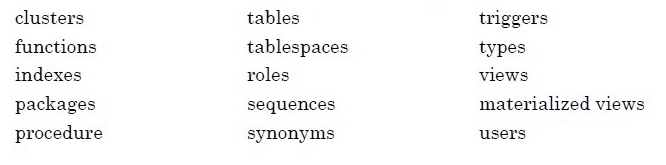
The 2 MB size limitation includes packages,procedures, and functions.
NOTE:
The actual size limit of the DDL support is approximate, because the size will not only include the statement text but also Oracle GoldenGate maintenance overhead that depends on the length of the object name, the DDL type, and other characteristics of keeping a DDL record internally.
9、Non-supported objects and operations forOracle DDL
9.1 Oracle-reserved schemas
The following schema names are considered Oracle-reserved and must be excluded from the Oracle GoldenGate DDL configuration. Oracle GoldenGate will ignore these schemas.
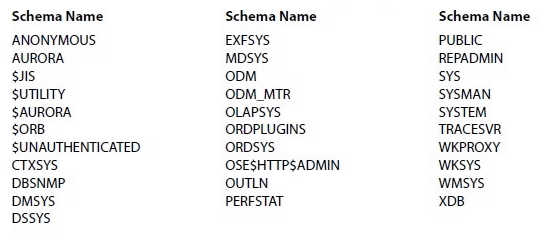
9.2 Oracle recycle bin
Because of a known issue in Oracle 10g, the Oracle recycle bin must be turned off to support Oracle GoldenGate DDL replication. If the recycle bin is enabled, the Oracle GoldenGate DDL trigger session receives implicit recycle bin DDL operations that cause the trigger to fail.
To turn off the recyclebin:
(1) Oracle 10g Release 2 and later:Set the RECYCLEBIN initialization parameter to OFF.
(2) Oracle 10g Release 1: Set the_RECYCLEBIN initialization parameter to FALSE. Consult the Oracle 10g database documentation for the correct syntax.
9.3 Other non-supported DDL
Oracle GoldenGate does not support the following:
(1) ALTER TABLE ... MOVE TABLESPACE
(2) DDL on nested tables.
(3) DDL that involves password-based column encryption, such as:
①CREATE TABLE t1 ( a number, bvarchar2(32) ENCRYPT IDENTIFIED BY my_password);
②ALTER TABLE t1 ADD COLUMN cvarchar2(64) ENCRYPT IDENTIFIED BY my_password;
(4) ALTER DATABASE and ALTER SYSTEM(these are not considered to be DDL)
10、 Supported and non-supported object namesand case
The following will help you verify whether the name of a supported object qualifies or disqualifiesit for inclusion in an Oracle GoldenGate configuration.
Object names and owners
Source and target object names must be fully qualified in Oracle GoldenGate parameter files,as in fin.emp. Oracle GoldenGate supports character case as follows.
10.1 Case sensitivity
The following are general guidelines for the case-sensitivity of object names as it relatesto Oracle GoldenGate. These guidelines may or may not apply to your databases,depending on whether the database or the underlying operating system supports case-sensitivity.
Keep in mind that case-sensitivity (or lack thereof) may apply to the source database but notthe target, or to the target but not the source.
(1) If the system or database is case-sensitive, Oracle GoldenGate supports the case sensitivity of database names, owner and schema names, object names, column names, and usernames.
(2) If the system or database is case-insensitive (or is configured for case-insensitivity), Oracle GoldenGate converts all names to upper case. The exception is Oracle 11g, where case-sensitive passwords are supported in Oracle GoldenGate input that requires passwords.
To preserve case-sensitivity in an Oracle GoldenGate configuration:
In Oracle GoldenGate parameter files, specify case-sensitive names exactly as they appear in the database. In TABLE and MAP parameters, enclose case-sensitive names indouble quotes if the other database (the source or target of the case-sensitive objects) is not case sensitive.
If replicatingfrom a case-insensitive source to a case-sensitive target, enter the source namesin upper case in the Replicat MAP statements, to reflect the fact that Extractwrites them to the trail as uppercase.
For example:
MAP SALES.CUSTOMER, TARGET"Sales.Account";
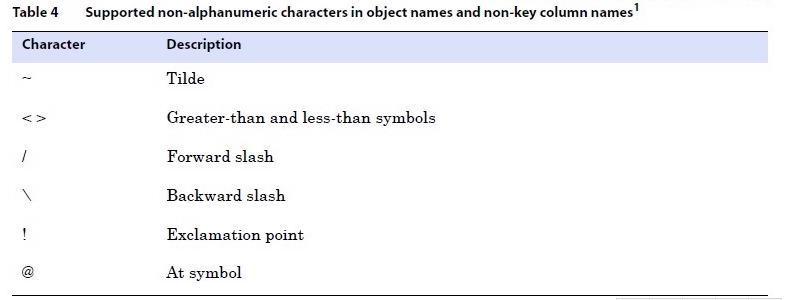
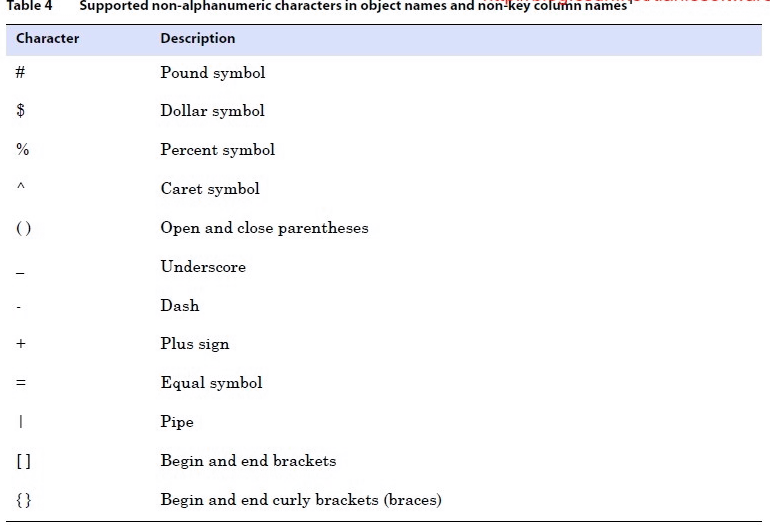
10.2 Supported characters
Oracle GoldenGate supports alphanumeric characters in object names and in the names ofkey columns and non-key columns. Oracle GoldenGate also supports the following non alphanumeric characters in columns that are not being used by Oracle GoldenGate as a key.
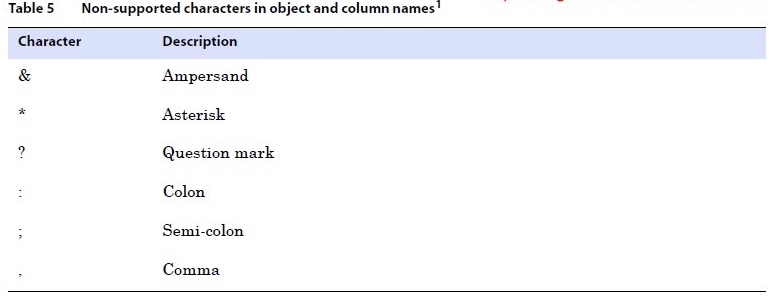
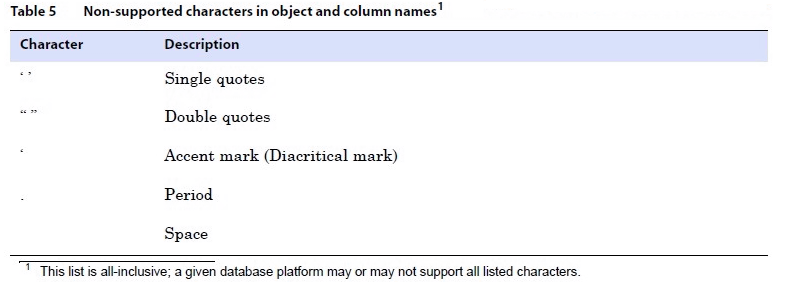
10.3 Non-supported characters
Oracle GoldenGate does not support the following characters in object or column names.
部分转自:https://blog.csdn.net/tianlesoftware/article/details/6933969
