



概述
在MogDB 和 openGauss 数据库的2.1.0版本增加了闪回特性,可以通过回收站功能恢复误删除(非purge)的表,也可以利用MVCC机制将表恢复指定时间点或者CSN(commit sequence number),但在生产中不建议直接对DML误操作表直接闪回恢复,而是通过“闪回查询”将历史快照保存到另一张表中,人工干预恢复。
在2.1版本中,回收站功能只能用在astore(Append Update)存储方式误删除的表,而对于查看DML误操作数据只能用在ustore(In-place Update)存储方式的表,数据库表默认的存储方式是astore,但在3.0版本中,回收站功能取消了对astore表的支持。
ustore存储方式也是2.1.0版本新增的特性,像oracle一样,Ustore存储引擎将最新版本的“有效数据”和历史版本的“垃圾数据”分离存储。将最新版本的“有效数据”存储在数据页面上,并单独开辟一段UNDO空间,用于统一管理历史版本的“垃圾数据”,因此数据空间不会由于频繁更新而膨胀,“垃圾数据”集中回收效率更高。而我们所说的闪回,也就是在undo表空间中将历史数据重新检索出来。
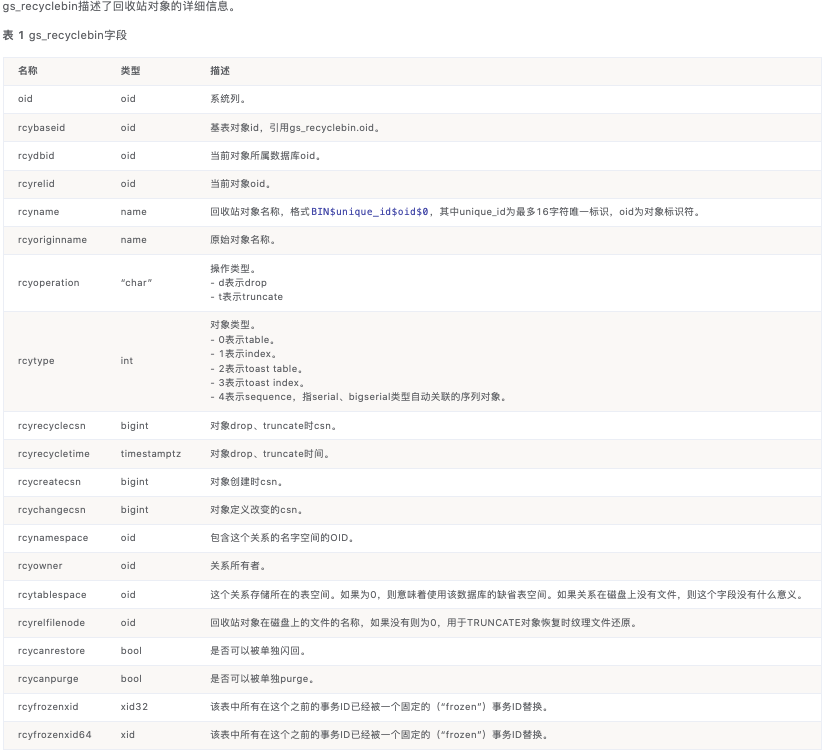
当我们在truncate(非purge)或drop(非purge)表的同时,会在回收站创建一个以BIN开头的表,我们也可以在系统表gs_recyclebin中查看到对应关系,回收站详细信息如下:
使用闪回特性,我们还需要依赖几个数据库参数:
undo_zone_count=16384           --内存中可分配的undo zone数量,0代表禁用undo和Ustore表,建议取值为max_connections*4,修改此参数需要重启数据库
enable_default_ustore_table=on  --开启默认支持Ustore存储引擎
version_retention_age=10000     --旧版本保留的事务数,超过该事务数的旧版本将被回收清理(3.0版本弃用)
enable_recyclebin=on            --打开回收站
recyclebin_retention_time=15min --设置回收站对象保留时间,超过该时间的回收站对象将被自动清理
闪回语法
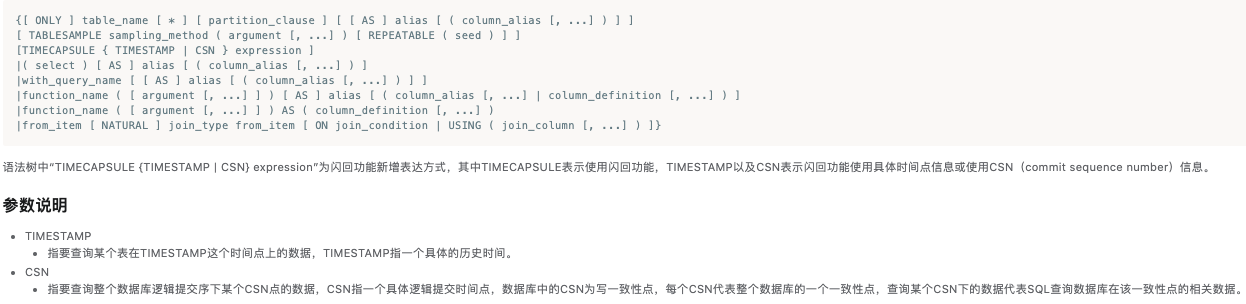
闪回查询
闪回表
--恢复到指定时间点或者CSN(只支持ustore)
TIMECAPSULE TABLE table_name TO { TIMESTAMP | CSN } expression

--恢复到drop前(2.1版本只支持astore,3.0版本只支持ustore)
TIMECAPSULE TABLE { table_name } TO BEFORE DROP [RENAME TO new_tablename]

--恢复到truncate前(2.1版本只支持astore,3.0版本只支持ustore)
TIMECAPSULE TABLE { table_name } TO BEFORE TRUNCATE
环境准备
# create table t_astore(id int,col1 varchar(8)) with (storage_type=astore);
CREATE TABLE
# create table t_ustore(id int,col1 varchar(8));
CREATE TABLE
# \dt+
                                                List of relations
 Schema |   Name   | Type  | Owner |  Size   |                       Storage                        | Description
--------+----------+-------+-------+---------+------------------------------------------------------+-------------
 public | t_astore | table | o3m   | 0 bytes | {orientation=row,storage_type=astore,compression=no} |
 public | t_ustore | table | o3m   | 0 bytes | {orientation=row,compression=no,storage_type=USTORE} |
(2 rows)
ustore表
openGauss=# insert into t_ustore values(1,'u1'),(2,'u2');
INSERT 0 2
openGauss=# select now();
              now
-------------------------------
 2022-03-20 23:33:41.442001+08
(1 row)

openGauss=# update t_ustore set col1='uu' where id=2;
UPDATE 1
openGauss=# select now();
              now
-------------------------------
 2022-03-20 23:34:04.102349+08
(1 row)

openGauss=# delete from t_ustore;
DELETE 2
openGauss=# select now();
              now
-------------------------------
 2022-03-20 23:34:12.450033+08
(1 row)

openGauss=# select * from t_ustore ;
 id | col1
----+------
(0 rows)

openGauss=#
astore表
openGauss=# insert into t_astore values(1,'a1'),(2,'a2');
INSERT 0 2
openGauss=# select now();
              now
-------------------------------
 2022-03-20 23:34:23.785888+08
(1 row)

openGauss=# update t_astore set col1='au' where id=2;
UPDATE 1
openGauss=# select now();
             now
-----------------------------
 2022-03-20 23:34:34.8255+08
(1 row)

openGauss=# select * from t_astore;
 id | col1
----+------
  1 | a1
  2 | au
(2 rows)
闪回查询
DML误操作操作有两种方式查看历史数据,一个是基于时间的,一个是基于CSN的。准确的时间点如果没有记住的话,可以通过gs_xlogdump工具去xlog日志中查询,而CSN可以去gs_txn_snapshot表中查询,但查询CSN也要基于时间,暂时还不明白这个CSN的作用。
基于时间
openGauss=# select * from t_ustore timecapsule timestamp to_timestamp('2022-03-20 23:33:41','YYYY-MM-DD HH24:MI:SS.FF');
 id | col1
----+------
  1 | u1
  2 | u2
(2 rows)

openGauss=# select * from t_ustore timecapsule timestamp to_timestamp('2022-03-20 23:34:04','YYYY-MM-DD HH24:MI:SS.FF');
 id | col1
----+------
  1 | u1
  2 | uu
(2 rows)

PS: astore表不支持DML的历史数据查看,所以即使astore表数据变更的时间比ustore表晚,依然会提示Restore point too old

openGauss=# select * from t_astore timecapsule timestamp to_timestamp('2022-03-20 23:34:23','YYYY-MM-DD HH24:MI:SS.FF');
ERROR:  Restore point too old
openGauss=# select * from t_astore timecapsule timestamp to_timestamp('2022-03-20 23:34:34','YYYY-MM-DD HH24:MI:SS.FF');
ERROR:  Restore point too old
基于CSN
需要通过时间区间来查看CSN,通过select now() 获取的时间与表中记录的不一定完全准确
--查看CSN
openGauss=# select snptime,snpcsn from gs_txn_snapshot where snptime>='2022-03-20 23:33:40' and snptime<='2022-03-20 23:34:34';
            snptime            | snpcsn
-------------------------------+--------
 2022-03-20 23:33:40.349962+08 |   3698
 2022-03-20 23:33:43.373007+08 |   3700
 2022-03-20 23:33:46.396391+08 |   3702
 2022-03-20 23:33:49.419893+08 |   3704
 2022-03-20 23:33:52.442851+08 |   3706
 2022-03-20 23:33:55.466295+08 |   3708
 2022-03-20 23:33:58.489744+08 |   3710
 2022-03-20 23:34:01.512586+08 |   3713
 2022-03-20 23:34:04.536088+08 |   3715
 2022-03-20 23:34:07.559386+08 |   3717
 2022-03-20 23:34:10.582615+08 |   3719
 2022-03-20 23:34:13.603701+08 |   3722
 2022-03-20 23:34:16.626773+08 |   3724
 2022-03-20 23:34:19.648223+08 |   3726
 2022-03-20 23:34:22.669206+08 |   3729
 2022-03-20 23:34:25.692428+08 |   3731
 2022-03-20 23:34:28.71559+08  |   3733
 2022-03-20 23:34:31.739034+08 |   3735

openGauss=# select * from t_ustore timecapsule csn 3700;
 id | col1
----+------
  1 | u1
  2 | u2
(2 rows)

openGauss=# select * from t_ustore timecapsule csn 3715;
 id | col1
----+------
  1 | u1
  2 | uu
(2 rows)


PS: t_ustore表中的数据是在2022-03-20 23:34:12之前删除的,在CSN 3719 和 3722之间,我们来看一下:
openGauss=# select * from t_ustore timecapsule csn 3719;
 id | col1
----+------
  1 | u1
  2 | uu
(2 rows)

openGauss=# select * from t_ustore timecapsule csn 3722;
 id | col1
----+------
(0 rows)

PS: astore表依然不支持通过CSN查看历史数据
openGauss=# select * from t_astore timecapsule csn 3735;
ERROR:  Restore point too old
闪回查询数据保存
为了防止undo空间中的旧事务版本被清除,当我们找到我们需要的数据,可以直接通过查询建表的方式将历史数据保留下来,然后需要人工介入,将错误数据恢复到原表。
openGauss=# select * into t from t_ustore timecapsule timestamp to_timestamp('2022-03-20 23:34:04','YYYY-MM-DD HH24:MI:SS.FF');
INSERT 0 2
openGauss=# select * from t;
 id | col1
----+------
  1 | u1
  2 | uu
(2 rows)
闪回表
闪回表分两种,一种是dml误操作闪回,另一种是drop/truncate闪回。
DML闪回
openGauss=# select * from t_ustore;
 id | col1
----+------
(0 rows)

openGauss=# select * from t_ustore as t timecapsule timestamp to_timestamp('2022-03-20 23:34:04','YYYY-MM-DD HH24:MI:SS.FF');
 id | col1
----+------
  1 | u1
  2 | uu
(2 rows)

openGauss=# TIMECAPSULE TABLE t_ustore to timestamp to_timestamp('2022-03-20 23:34:04','YYYY-MM-DD HH24:MI:SS.FF');
TimeCapsule Table
openGauss=#
openGauss=# select * from t_ustore;
 id | col1
----+------
  1 | u1
  2 | uu
(2 rows)
drop/truncate闪回
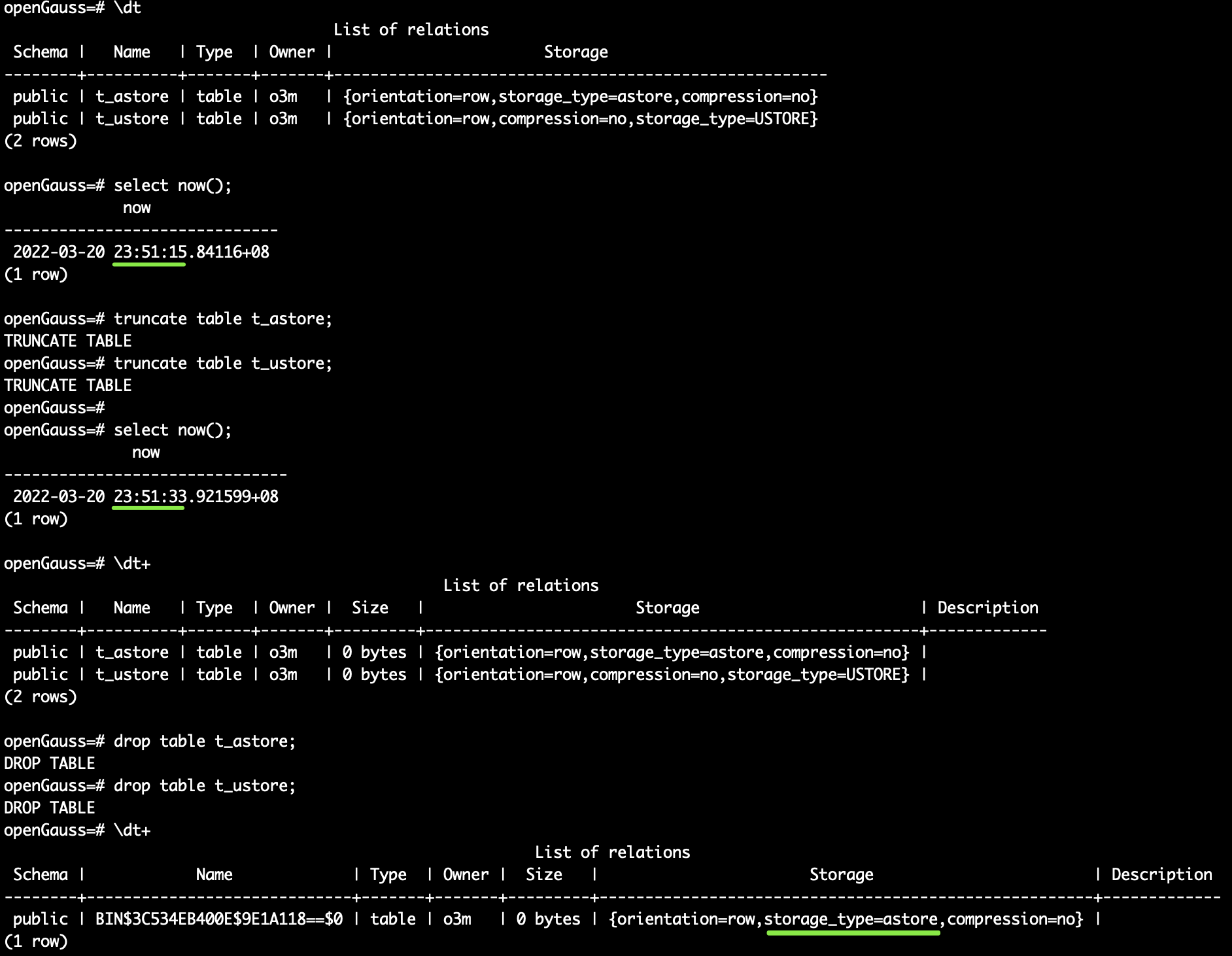
2.1版本
3.0版本
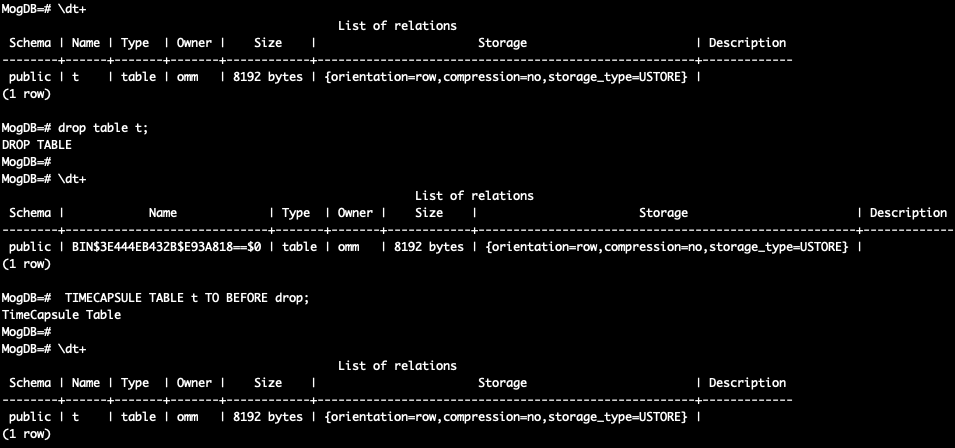
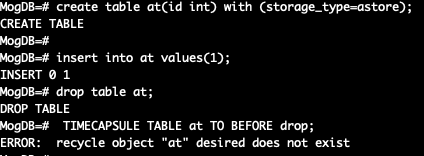
我们开启回收站的功能后,对astore和ustore表做了相同操作,发现2.1版本中astore的表还存在,3.0版本中ustore的表还存在,虽然名字已经变了,但我们可以通过系统表gs_recyclebin来查看对应关系。
openGauss=# SELECT rcyname,rcyoriginname,rcytablespace FROM GS_RECYCLEBIN;
           rcyname           | rcyoriginname | rcytablespace
-----------------------------+---------------+---------------
 BIN$3C534EB400E$9E1A118==$0 | t_astore      |             0
(1 rows)
如果我们先做了truncate然后做了drop操作,这时如果想直接恢复到truncate之前,会有报错提示,需要我们先恢复drop操作,然后再找回truncate之前的数据,以2.1版本为例:
openGauss=# timecapsule table t_astore to before truncate;
ERROR:  relation "t_astore" does not exist
openGauss=# timecapsule table t_astore to before drop rename to astorebak;
TimeCapsule Table
openGauss=# select * from astorebak;
 id | col1
----+------
(0 rows)
openGauss=# timecapsule table t_astore to before truncate;
TimeCapsule Table
openGauss=# \dt+
                                                  List of relations
 Schema |   Name    | Type  | Owner |    Size    |                       Storage                        | Description
--------+-----------+-------+-------+------------+------------------------------------------------------+-------------
 public | astorebak | table | o3m   | 8192 bytes | {orientation=row,storage_type=astore,compression=no} |
(1 row)

openGauss=# select * from astorebak;
 id | col1
----+------
  1 | a1
  2 | au
(2 rows)
对于带purge的drop 或 truncate 操作的表是不可恢复的,如
drop table t purge;
truncate t purge;
清空回收站
openGauss=# select * from gs_recyclebin;
 rcybaseid | rcydbid | rcyrelid |           rcyname           | rcyoriginname | rcyoperation | rcytype | rcyrecyclecsn |        rcyrecycletime         | rcycreatecsn | rcychangecsn |
rcynamespace | rcyowner | rcytablespace | rcyrelfilenode | rcycanrestore | rcycanpurge | rcyfrozenxid | rcyfrozenxid64
-----------+---------+----------+-----------------------------+---------------+--------------+---------+---------------+-------------------------------+--------------+--------------+-
-------------+----------+---------------+----------------+---------------+-------------+--------------+----------------
     16404 |   15443 |    16398 | BIN$3C534EB400E$9E612D8==$0 | astorebak     | t            |       0 |          4838 | 2022-03-21 00:02:00.923583+08 |         3678 |         3678 |
        2200 |       10 |             0 |          16405 | t             | t           | 0            | 27487790694400
(1 row)

openGauss=# purge recyclebin;
PURGE RECYCLEBIN
openGauss=# select * from gs_recyclebin;
 rcybaseid | rcydbid | rcyrelid | rcyname | rcyoriginname | rcyoperation | rcytype | rcyrecyclecsn | rcyrecycletime | rcycreatecsn | rcychangecsn | rcynamespace | rcyowner | rcytables
pace | rcyrelfilenode | rcycanrestore | rcycanpurge | rcyfrozenxid | rcyfrozenxid64
-----------+---------+----------+---------+---------------+--------------+---------+---------------+----------------+--------------+--------------+--------------+----------+----------
-----+----------------+---------------+-------------+--------------+----------------
(0 rows)
