暂无图片
暂无图片
3
暂无图片
暂无图片
暂无图片

Oracle 11g profile的使用详解

DBA小记 2020-10-30
4316

一、目的

Oracle系统中的profile可以用来对用户所能使用的数据库资源和口令机制进行限制,使用Create Profile命令创建一个Profile,实现对数据库资源的限制使用和口令机制的制定。如果把该profile分配给用户,则该用户所能使用的数据库资源和口令机制都在该profile的限制之内。
profile文件可以控制:CPU的时间 、I/O的使用 、IDLE TIME(空闲时间) 、CONNECT TIME(连接时间) 、并发会话数量 、口令机制。

二、DEFAULT PROFILE

1、所有的用户创建时都会被指定这个PROFILE,通过dba_profiles查看(default)。
2、DEFAULT PROFILE的内容为空,无限制。

三、PROFILE的划分

1、语句级别限制:
当该语句资源使用溢出时:
A、该语句终止
B、事物回退
C、SESSION连接保持
2、会话级别限制:
对象是整个会话过程,溢出时:
连接终止

四、管理一个PROFILE

1、CREATE PROFILE 。创建profile必须要有CREATE PROFILE的系统权限。
2、创建用户时候制定,或分配给一个用户。

五、资源限制条件

为用户指定资源限制,必须:
1、动态地使用alter system或使用初始化参数resource_limit使资源限制生效。该改变对密码资源无效,密码资源总是可用。

    SQL> show parameter resource_limit
    NAME TYPE VALUE
    ------------------------------------ ----------- ------------------------------
    resource_limit boolean FALSE
    SQL> alter system set resource_limit=true;
    系统已更改。
    SQL> show parameter resource_limit;
    NAME TYPE VALUE
    ------------------------------------ ----------- ------------------------------
    resource_limit boolean TRUE
    2、使用create profile创建一个定义对数据库资源进行限制的profile。
    3、使用create user 或alter user命令把profile分配给用户。

    六、语法

      CREATE PROFILE profile LIMIT { resource_parameters | password_parameters }[ resource_parameters | password_parameters ]... ;
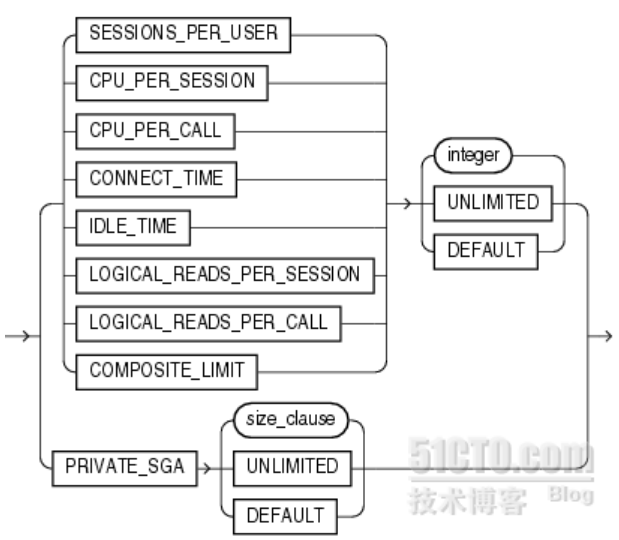
      resource_parameters:{{ SESSIONS_PER_USER | CPU_PER_SESSION | CPU_PER_CALL | CONNECT_TIME | IDLE_TIME | LOGICAL_READS_PER_SESSION | LOGICAL_READS_PER_CALL | COMPOSITE_LIMIT } { integer | UNLIMITED | DEFAULT }| PRIVATE_SGA { integer [ K | M ] | UNLIMITED | DEFAULT }}
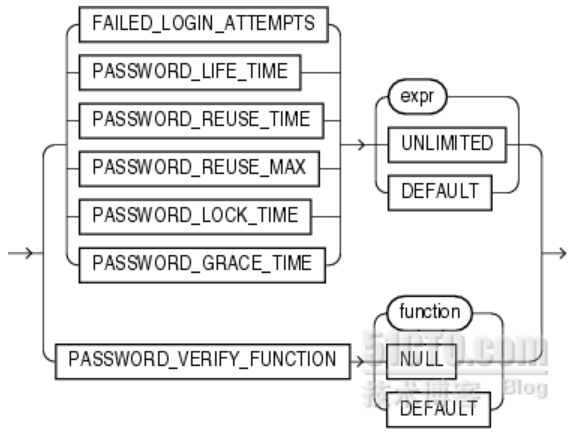
      password_parameters :{{ FAILED_LOGIN_ATTEMPTS | PASSWORD_LIFE_TIME | PASSWORD_REUSE_TIME | PASSWORD_REUSE_MAX | PASSWORD_LOCK_TIME | PASSWORD_GRACE_TIME } { expr | UNLIMITED | DEFAULT }| PASSWORD_VERIFY_FUNCTION { function | NULL | DEFAULT }}

      七、语法解释
      Oracle数据库以以下方式强迫资源限制:
      1、如果用户超过了connect_time或idle_time的会话资源限制,数据库就回滚当前事务,并结束会话。用户再次执行命令,数据库则返回一个错误,
      2、如果用户试图执行超过其他的会话资源限制的操作,数据库放弃操作,回滚当前事务并立即返回错误。用户之后可以提交或回滚当前事务,必须结束会话。
      提示:可以将一条分成多个段,如1小时(1/24天)来限制时间,可以为用户指定资源限制,但是数据库只有在参数生效后才会执行限制。
      unlimited:分配该profile的用户对资源使用无限制,当使用密码参数时,unlimited意味着没有对参数加限制。
      default:指定为default意味着忽略对profile中的一些资源限制,Default profile初始定义对资源不限制,可以通过alter profile命令来改变。
      resource_parameter部分: 

      (1)session_per_user:指定限制用户的并发session的数目, 如果达到了最大session后会报ORA-02391: exceeded simultaneous SESSIONS_PER_USER limit错误。
      (2)cpu_per_session:指定会话的CPU时间限制,单位为1/100秒,如果超过后会报下面的错误ORA-02392: exceeded session limit on CPU usage, you are being logged off。
      (3)cpu_per_call:指定一次调用(解析、执行和提取)的CPU时间限制,单位为1/100秒,如果超过后会报ORA-02393: exceeded call limit on CPU usage。
      (4)connect_time:指定会话的总的连接时间,以分钟为单位,超过最大值会报ORA-02399: exceeded maximum connect time, you are being logged off。
      (5)idle_time:指定会话允许连续不活动的总的时间,以分钟为单位,超过该时间,会话将断开。但是长时间运行查询和其他操作的不受此限制,如果超过最大值会报ORA-02396: exceeded maximum idle time, please connect again。
      (6)logical_reads_per_session:指定一个session允许读的logical数据块的数目,包括从内存和磁盘读的所有数据块。
      (7)logical_read_per_call:指定一次执行SQL(解析、执行和提取)调用所允许读的logical数据块的最大数目, 如果超过最大值会报ORA-02395: exceeded call limit on IO usage。
      (8)private_sga:指定一个session可以在共享池(SGA)中所允许分配的最大空间,以字节为单位。(该限制只在使用共享服务器结构时才有效,会话在SGA中的私有空间包括私有的SQL和PL/SQL,但不包括共享的SQL和PL/SQL)。
      (9)composite_limit:指定一个session总的资源消耗,以service units单位表示。Oracle数据库以有利的方式计算cpu_per_session,connect_time,logical_reads_per_session和private-sga总的service units     
      password_parameter部分:

      (1)failed_login_attempts:指定在帐户被锁定之前所允许尝试登陆的的最大次数,默认是十次。
      (2)password_life_time:指定同一密码所允许使用的天数。如果同时指定了password_grace_time参数,如果在grace period内没有改变密码,则密码会失效,连接数据库被拒绝。如果没有设置password_grace_time参数,默认值unlimited将引发一个数据库警告,但是允许用户继续连接。如果设置password_grace_time的值为7,则7天内必须修改密码,否则7天后锁定。
      (3)password_reuse_time和password_reuse_max:这两个参数必须互相关联设置,password_reuse_time指定了密码不能重用前的天数,而password_reuse_max则指定了当前密码被重用之前密码改变的次数,即多少次之内不许设置重复密码。两个参数都必须被设置为整数。
      1) 如果为这两个参数指定了整数,则用户不能重用密码直到密码被改变了password_reuse_max指定的次数以后在password_reuse_time指定的时间内。
      如:password_reuse_time=30,password_reuse_max=10,用户可以在30天以后重用该密码,要求密码必须被改变超过10次。
      2) 如果指定了其中的一个为整数,而另一个为unlimited,则用户永远不能重用一个密码。
      3) 如果指定了其中的一个为default,Oracle数据库使用定义在profile中的默认值,默认情况下,所有的参数在profile中都被设置为unlimited,如果没有改变profile默认值,数据库对该值总是默认为unlimited。
      4) 如果两个参数都设置为unlimited,则数据库忽略他们。
      (4) password_lock_time:指定登陆尝试失败次数到达后帐户的锁定时间,默认为1天。
      (5)password_grace_time:指定宽限天数,数据库发出警告到登陆失效前的天数。如果数据库密码在这中间没有被修改,则过期会失效。
      (6)password_verify_function:该字段允许将复杂的PL/SQL密码验证脚本做为参数传递到create profile语句。Oracle数据库提供了一个默认的脚本,但是自己可以创建自己的验证规则或使用第三方软件验证。对Function名称,指定的是密码验证规则的名称,指定为Null则意味着不使用密码验证功能。如果为密码参数指定表达式,则该表达式可以是任意格式,除了数据库标量子查询。
      (7)密码复杂度函数创建(可查看sql脚本自定义密码复杂度):
      @?/rdbms/admin/utlpwdmg.sql,包含verify_function_11g和verify_function两个函数,可单独摘取执行函数创建。脚本详见附录。

      八、举例

      1、运行Oracle11g数据库提供的默认密码复杂度函数脚本
      对于运行中数据库,最好注释掉脚本更改默认default profile的语句,也可直接摘选所需函数创建(verify_function_11G或verify_function),避免对原有用户影响:
        -- ALTER PROFILE DEFAULT LIMIT                 
        -- PASSWORD_LIFE_TIME 180
        -- PASSWORD_GRACE_TIME 7
        -- PASSWORD_REUSE_TIME UNLIMITED
        -- PASSWORD_REUSE_MAX UNLIMITED
        -- FAILED_LOGIN_ATTEMPTS 10
        -- PASSWORD_LOCK_TIME 1
        -- PASSWORD_VERIFY_FUNCTION verify_function_11G;
          SQL> @?/rdbms/admin/utlpwdmg.sql
          函数已创建。
          配置文件已更改
          函数已创建。
          2、创建一个profile:

            CREATE PROFILE wlc_profile LIMIT 
            SESSIONS_PER_USER UNLIMITED
            CPU_PER_SESSION UNLIMITED
            CPU_PER_CALL UNLIMITED
            CONNECT_TIME UNLIMITED
            IDLE_TIME 600
            LOGICAL_READS_PER_SESSION UNLIMITED
            LOGICAL_READS_PER_CALL UNLIMITED
            COMPOSITE_LIMIT UNLIMITED
            PRIVATE_SGA UNLIMITED
            FAILED_LOGIN_ATTEMPTS 10
            PASSWORD_LIFE_TIME 180
            PASSWORD_REUSE_TIME 30
            PASSWORD_REUSE_MAX 10
            PASSWORD_LOCK_TIME 1
            PASSWORD_GRACE_TIME 10
            PASSWORD_VERIFY_FUNCTION verify_function;
            3、将配置文件分配给用户:

              SQL> alter user test profile wlc_profile;         
              SQL> alter user test profile default;
              4、修改profile的内容:

                SQL> alter profile wlc_profile limit 参数 新值; (对于当前连接修改不生效)
                alter profile wlc_profile limit PASSWORD_LIFE_TIME UNLIMITED;
                alter profile wlc_profile limit PASSWORD_GRACE_TIME UNLIMITED;
                alter profile wlc_profile limit PASSWORD_VERIFY_FUNCTION NULL;
                5、删除一个PROFILE :

                  SQL> drop profile wlc_profile (cascade);
                  注意事项:
                  A、一旦PROFILE被删除,用户被自动加载DEFAULT PROFILE
                  B、对于当前连接无影响
                  C、DEFAULT PROFILE不可以被删除
                  6、查看用户使用的profile:

                    SQL> select profile from dba_users where username='TEST';
                    7、查看profile的内容:
                      SQL> select * from SYS.DBA_PROFILES;
                      SQL> select * from SYS.USER_RESOURCE_LIMITS;
                      8、测试创建用户和更改用户密码

                        SQL> create user test identified by test profile reader_profile;
                        create user test identified by test profile reader_profile
                        *
                        ERROR at line 1:
                        ORA-28003: password verification for the specified password failed
                        ORA-20001: Password same as or similar to user
                        SQL> create user test identified by test1234 profile reader_profile;
                        create user test identified by test1234 profile reader_profile
                        *
                        ERROR at line 1:
                        ORA-28003: password verification for the specified password failed
                        ORA-20003: Password should contain at least one \
                        digit, one character and one punctuation
                        SQL> create user test identified by "test_123!" profile reader_profile;
                        User created.
                        SQL> select username,profile from dba_users where username='TEST';
                        USERNAME                   PROFILE
                        ------------------------------ ------------------------------
                        TEST READER_PROFILE
                        SQL> alter user test identified by "test";
                        alter user test identified by "test"
                        *
                        ERROR at line 1:
                        ORA-28003: password verification for the specified password failed
                        ORA-20001: Password same as or similar to user
                        附录:
                        密码规则函数位置:

                        $ORACLE_HOME/rdbms/admin/utlpwdmg.sql:

                          Rem
                          Rem $Header: utlpwdmg.sql 02-aug-2006.08:18:05 asurpur Exp $
                          Rem
                          Rem utlpwdmg.sql
                          Rem
                          Rem Copyright (c) 2006, Oracle. All rights reserved.
                          Rem
                          Rem NAME
                          Rem utlpwdmg.sql - script for Default Password Resource Limits
                          Rem
                          Rem DESCRIPTION
                          Rem This is a script for enabling the password management features
                          Rem by setting the default password resource limits.
                          Rem
                          Rem NOTES
                          Rem This file contains a function for minimum checking of password
                          Rem complexity. This is more of a sample function that the customer
                          Rem can use to develop the function for actual complexity checks that the
                          Rem customer wants to make on the new password.
                          Rem
                          Rem MODIFIED (MM/DD/YY)
                          Rem asurpur 05/30/06 - fix - 5246666 beef up password complexity check
                          Rem nireland 08/31/00 - Improve check for username=password. #1390553
                          Rem nireland 06/28/00 - Fix null old password test. #1341892
                          Rem asurpur 04/17/97 - Fix for bug479763
                          Rem asurpur 12/12/96 - Changing the name of password_verify_function
                          Rem asurpur 05/30/96 - New script for default password management
                          Rem asurpur 05/30/96 - Created
                          Rem
                          -- This script sets the default password resource parameters
                          -- This script needs to be run to enable the password features.
                          -- However the default resource parameters can be changed based
                          -- on the need.
                          -- A default password complexity function is also provided.
                          -- This function makes the minimum complexity checks like
                          -- the minimum length of the password, password not same as the
                          -- username, etc. The user may enhance this function according to
                          -- the need.
                          -- This function must be created in SYS schema.
                          -- connect sys/as sysdba before running the script
                          CREATE OR REPLACE FUNCTION verify_function_11G
                          (username varchar2,
                          password varchar2,
                          old_password varchar2)
                          RETURN boolean IS
                          n boolean;
                          m integer;
                          differ integer;
                          isdigit boolean;
                          ischar boolean;
                          ispunct boolean;
                          db_name varchar2(40);
                          digitarray varchar2(20);
                          punctarray varchar2(25);
                          chararray varchar2(52);
                          i_char varchar2(10);
                          simple_password varchar2(10);
                          reverse_user varchar2(32);
                          BEGIN
                          digitarray:= '0123456789';
                          chararray:= 'abcdefghijklmnopqrstuvwxyzABCDEFGHIJKLMNOPQRSTUVWXYZ';
                             -- Check for the minimum length of the password
                          IF length(password) < 8 THEN
                          raise_application_error(-20001, 'Password length less than 8');
                          END IF;
                             -- Check if the password is same as the username or username(1-100)
                          IF NLS_LOWER(password) = NLS_LOWER(username) THEN
                          raise_application_error(-20002, 'Password same as or similar to user');
                          END IF;
                          FOR i IN 1..100 LOOP
                          i_char := to_char(i);
                          if NLS_LOWER(username)|| i_char = NLS_LOWER(password) THEN
                          raise_application_error(-20005, 'Password same as or similar to user name ');
                          END IF;
                          END LOOP;
                             -- Check if the password is same as the username reversed
                               FOR i in REVERSE 1..length(username) LOOP
                          reverse_user := reverse_user || substr(username, i, 1);
                          END LOOP;
                          IF NLS_LOWER(password) = NLS_LOWER(reverse_user) THEN
                          raise_application_error(-20003, 'Password same as username reversed');
                          END IF;
                             -- Check if the password is the same as server name and or servername(1-100)
                          select name into db_name from sys.v$database;
                          if NLS_LOWER(db_name) = NLS_LOWER(password) THEN
                          raise_application_error(-20004, 'Password same as or similar to server name');
                          END IF;
                          FOR i IN 1..100 LOOP
                          i_char := to_char(i);
                          if NLS_LOWER(db_name)|| i_char = NLS_LOWER(password) THEN
                          raise_application_error(-20005, 'Password same as or similar to server name ');
                          END IF;
                          END LOOP;
                             -- Check if the password is too simple. A dictionary of words may be
                          -- maintained and a check may be made so as not to allow the words
                          -- that are too simple for the password.
                          IF NLS_LOWER(password) IN ('welcome1', 'database1', 'account1', 'user1234', 'password1', 'oracle123', 'computer1', 'abcdefg1', 'change_on_install') THEN
                          raise_application_error(-20006, 'Password too simple');
                          END IF;
                             -- Check if the password is the same as oracle (1-100)
                          simple_password := 'oracle';
                          FOR i IN 1..100 LOOP
                          i_char := to_char(i);
                          if simple_password || i_char = NLS_LOWER(password) THEN
                          raise_application_error(-20007, 'Password too simple ');
                          END IF;
                          END LOOP;
                             -- Check if the password contains at least one letter, one digit
                          -- 1. Check for the digit
                          isdigit:=FALSE;
                          m := length(password);
                          FOR i IN 1..10 LOOP
                          FOR j IN 1..m LOOP
                          IF substr(password,j,1) = substr(digitarray,i,1) THEN
                          isdigit:=TRUE;
                          GOTO findchar;
                          END IF;
                          END LOOP;
                          END LOOP;
                             IF isdigit = FALSE THEN
                          raise_application_error(-20008, 'Password must contain at least one digit, one character');
                          END IF;
                          -- 2. Check for the character
                          <>
                          ischar:=FALSE;
                          FOR i IN 1..length(chararray) LOOP
                          FOR j IN 1..m LOOP
                          IF substr(password,j,1) = substr(chararray,i,1) THEN
                          ischar:=TRUE;
                          GOTO endsearch;
                          END IF;
                          END LOOP;
                          END LOOP;
                          IF ischar = FALSE THEN
                          raise_application_error(-20009, 'Password must contain at least one \
                          digit, and one character');
                          END IF;
                             <>
                          -- Check if the password differs from the previous password by at least
                          -- 3 letters
                          IF old_password IS NOT NULL THEN
                          differ := length(old_password) - length(password);
                               differ := abs(differ);
                          IF differ < 3 THEN
                          IF length(password) < length(old_password) THEN
                          m := length(password);
                          ELSE
                          m := length(old_password);
                          END IF;
                                 FOR i IN 1..m LOOP
                          IF substr(password,i,1) != substr(old_password,i,1) THEN
                          differ := differ + 1;
                          END IF;
                          END LOOP;
                                 IF differ < 3 THEN
                          raise_application_error(-20011, 'Password should differ from the \
                          old password by at least 3 characters');
                          END IF;
                          END IF;
                          END IF;
                          -- Everything is fine; return TRUE ;
                          RETURN(TRUE);
                          END;
                          /
                          -- This script alters the default parameters for Password Management
                          -- This means that all the users on the system have Password Management
                          -- enabled and set to the following values unless another profile is
                          -- created with parameter values set to different value or UNLIMITED
                          -- is created and assigned to the user.
                          -- ALTER PROFILE DEFAULT LIMIT
                          -- PASSWORD_LIFE_TIME 180
                          -- PASSWORD_GRACE_TIME 7
                          -- PASSWORD_REUSE_TIME UNLIMITED
                          -- PASSWORD_REUSE_MAX UNLIMITED
                          -- FAILED_LOGIN_ATTEMPTS 10
                          -- PASSWORD_LOCK_TIME 1
                          -- PASSWORD_VERIFY_FUNCTION verify_function_11G;
                          -- Below is the older version of the script
                          -- This script sets the default password resource parameters
                          -- This script needs to be run to enable the password features.
                          -- However the default resource parameters can be changed based
                          -- on the need.
                          -- A default password complexity function is also provided.
                          -- This function makes the minimum complexity checks like
                          -- the minimum length of the password, password not same as the
                          -- username, etc. The user may enhance this function according to
                          -- the need.
                          -- This function must be created in SYS schema.
                          -- connect sys/as sysdba before running the script
                          CREATE OR REPLACE FUNCTION verify_function
                          (username varchar2,
                          password varchar2,
                          old_password varchar2)
                          RETURN boolean IS
                          n boolean;
                          m integer;
                          differ integer;
                          isdigit boolean;
                          ischar boolean;
                          ispunct boolean;
                          digitarray varchar2(20);
                          punctarray varchar2(25);
                          chararray varchar2(52);
                          BEGIN
                          digitarray:= '0123456789';
                          chararray:= 'abcdefghijklmnopqrstuvwxyzABCDEFGHIJKLMNOPQRSTUVWXYZ';
                          punctarray:='!"#$%&()``*+,-/:;<=>?_';
                             -- Check if the password is same as the username
                          IF NLS_LOWER(password) = NLS_LOWER(username) THEN
                          raise_application_error(-20001, 'Password same as or similar to user');
                          END IF;
                             -- Check for the minimum length of the password
                          IF length(password) < 4 THEN
                          raise_application_error(-20002, 'Password length less than 4');
                          END IF;
                             -- Check if the password is too simple. A dictionary of words may be
                          -- maintained and a check may be made so as not to allow the words
                          -- that are too simple for the password.
                          IF NLS_LOWER(password) IN ('welcome', 'database', 'account', 'user', 'password', 'oracle', 'computer', 'abcd') THEN
                          raise_application_error(-20002, 'Password too simple');
                          END IF;
                             -- Check if the password contains at least one letter, one digit and one
                          -- punctuation mark.
                          -- 1. Check for the digit
                          isdigit:=FALSE;
                          m := length(password);
                          FOR i IN 1..10 LOOP
                          FOR j IN 1..m LOOP
                          IF substr(password,j,1) = substr(digitarray,i,1) THEN
                          isdigit:=TRUE;
                          GOTO findchar;
                          END IF;
                          END LOOP;
                          END LOOP;
                          IF isdigit = FALSE THEN
                          raise_application_error(-20003, 'Password should contain at least one digit, one character and one punctuation');
                          END IF;
                          -- 2. Check for the character
                          <>
                          ischar:=FALSE;
                          FOR i IN 1..length(chararray) LOOP
                          FOR j IN 1..m LOOP
                          IF substr(password,j,1) = substr(chararray,i,1) THEN
                          ischar:=TRUE;
                          GOTO findpunct;
                          END IF;
                          END LOOP;
                          END LOOP;
                          IF ischar = FALSE THEN
                          raise_application_error(-20003, 'Password should contain at least one \
                          digit, one character and one punctuation');
                          END IF;
                          -- 3. Check for the punctuation
                          <>
                          ispunct:=FALSE;
                          FOR i IN 1..length(punctarray) LOOP
                          FOR j IN 1..m LOOP
                          IF substr(password,j,1) = substr(punctarray,i,1) THEN
                          ispunct:=TRUE;
                          GOTO endsearch;
                          END IF;
                          END LOOP;
                          END LOOP;
                          IF ispunct = FALSE THEN
                          raise_application_error(-20003, 'Password should contain at least one \
                          digit, one character and one punctuation');
                          END IF;
                             <>
                          -- Check if the password differs from the previous password by at least
                          -- 3 letters
                          IF old_password IS NOT NULL THEN
                          differ := length(old_password) - length(password);
                               IF abs(differ) < 3 THEN
                          IF length(password) < length(old_password) THEN
                          m := length(password);
                          ELSE
                          m := length(old_password);
                          END IF;
                                 differ := abs(differ);
                          FOR i IN 1..m LOOP
                          IF substr(password,i,1) != substr(old_password,i,1) THEN
                          differ := differ + 1;
                          END IF;
                          END LOOP;
                                 IF differ < 3 THEN
                          raise_application_error(-20004, 'Password should differ by at \
                          least 3 characters');
                          END IF;
                          END IF;
                          END IF;
                          -- Everything is fine; return TRUE ;
                          RETURN(TRUE);
                          END;
                          /
                          -- This script alters the default parameters for Password Management
                          -- This means that all the users on the system have Password Management
                          -- enabled and set to the following values unless another profile is
                          -- created with parameter values set to different value or UNLIMITED
                          -- is created and assigned to the user.
                          -- Enable this if you want older version of the Password Profile parameters
                          -- ALTER PROFILE DEFAULT LIMIT
                          -- PASSWORD_LIFE_TIME 60
                          -- PASSWORD_GRACE_TIME 10
                          -- PASSWORD_REUSE_TIME 1800
                          -- PASSWORD_REUSE_MAX UNLIMITED
                          -- FAILED_LOGIN_ATTEMPTS 3
                          -- PASSWORD_LOCK_TIME 1/1440
                          -- PASSWORD_VERIFY_FUNCTION verify_function;

                          文章转载自DBA小记,如果涉嫌侵权,请发送邮件至:contact@modb.pro进行举报,并提供相关证据,一经查实,墨天轮将立刻删除相关内容。

                          评论