



这是一个比较常见的问题:集群存储空间不足。如今,存储很便宜,我们可以即时添加存储,并且(通常)我们会监控存储空间,以免发生这种情况。
那如果是真正发生了这个问题,我们如何应该处理?
为了模拟这样的问题,我创建了一个虚拟主机,并创建了一个大的空文件来几乎填满文件系统。然后,插入很多行,直到磁盘空间不足为止。
总体思维导图
这是解决问题的思维导图:
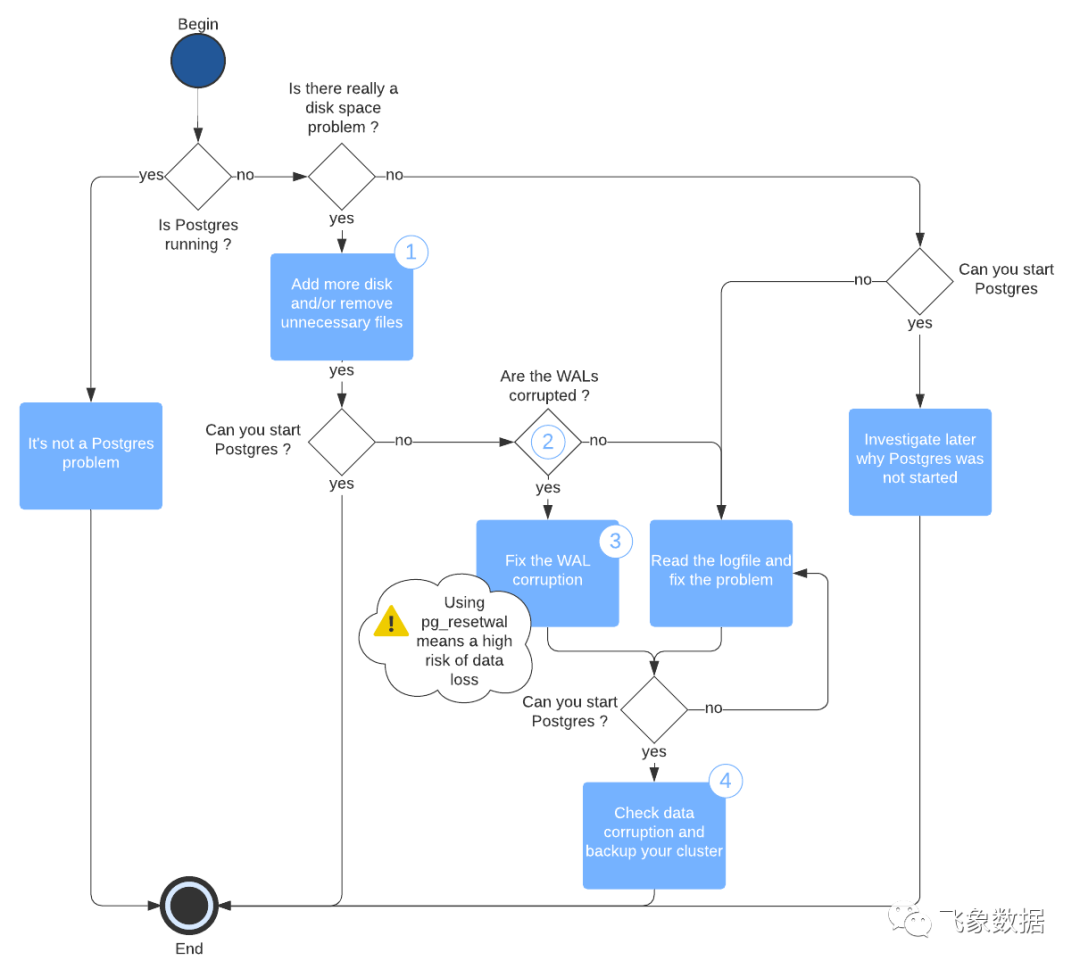
导图中一些步骤的详细信息:
1.Add more disk and/or remove unnecessary files
无论您做什么,都不要处理$PGDATA
中的任何内容。如果$PGDATA
包含指向其他目录的链接,也不要处理它们。特别是,切勿处理名为pg_xlog
或pg_wal
的目录,切勿处理由24个十六进制数字组成的文件。
有一个例外,Postgres日志文件被存储在$PGDATA中。在这种情况下,如果日志文件很多,可以删除一些旧的日志文件。强烈建议您在将来正确设置日志。
强烈建议移动要删除的文件,而不是简单地删除它们。
2. Are the WALs corrupted?
一些日志消息会提醒您:WAL日志文件已经损坏。
以下是一个列表:
LOG: incorrect resource manager data checksum in record at 0/2000040
LOG: invalid primary checkpoint record
PANIC: could not locate a valid checkpoint record
3.Fix the WAL corruption
修复WAL日志损坏的最佳方法是将WAL日志的拷贝流式传输到一个备库或者使用备份工具(如果备份工具可以流式传输WAL日志)。
但是您可能不会流式传输WAL文件,或者它们也可能已损坏。在这种情况下,强烈建议您在尝试pg_resetwal
工具之前先阅读文档。此外,在使用WAL目录之前,应将其安全地复制到另一个位置。
4.Check data corruption
Postgres可以在所有数据页上启用校验和。遗憾的是,此模式默认情况下不处于活动状态,因此在集群中不是这种情况的可能性非常高。
无论如何,您应该启用校验和,使用pg_checksums
以检查数据是否损坏(请参阅文档)。
如果在集群上禁用了校验和,请尝试使用pg_dumpall
(或几个 pg_dump
)强制Postgres读取所有数据并检查是否有损坏。如果您有太多数据无法存储生成的文件,请将输出重定向到/dev/null
。
Ubuntu下的示例
这就是我在Ubuntu下的操作方式:
root@elinor:/var/lib# pg_lsclustersVer Cluster Port Status Owner Data directory Log file13 main 5432 down postgres var/lib/postgresql/13/main var/log/postgresql/postgresql-13-main.log
我的Postgres没有运行。
root@elinor:/var/lib# df -hFilesystem Size Used Avail Use% Mounted onudev 480M 0 480M 0% devtmpfs 99M 11M 89M 11% run/dev/sda1 9.7G 9.7G 0 100% /tmpfs 493M 0 493M 0% /dev/shmtmpfs 5.0M 0 5.0M 0% /run/locktmpfs 493M 0 493M 0% /sys/fs/cgrouptmpfs 99M 0 99M 0% /run/user/1000root@elinor:/var/lib# ll -htotal 8.1Gdrwxr-xr-x 38 root root 4.0K Mar 8 14:39 ./drwxr-xr-x 13 root root 4.0K Sep 30 15:52 ../drwxr-xr-x 4 root root 4.0K Sep 30 15:50 AccountsService/drwxr-xr-x 2 root root 4.0K Mar 21 13:58 VBoxGuestAdditions/drwxr-xr-x 5 root root 4.0K Mar 9 03:40 apt/drwxr-xr-x 8 root root 4.0K Mar 21 13:58 cloud/drwxr-xr-x 2 root root 4.0K May 5 2018 command-not-found/drwxr-xr-x 2 root root 4.0K Mar 8 14:06 dbus/drwxr-xr-x 2 root root 4.0K Apr 16 2018 dhcp/drwxr-xr-x 2 root root 4.0K Mar 8 14:06 dkms/drwxr-xr-x 7 root root 4.0K Mar 8 14:30 dpkg/drwxr-xr-x 2 root root 4.0K Apr 20 2020 git/drwxr-xr-x 3 root root 4.0K Sep 30 15:51 grub/drwxr-xr-x 2 root root 4.0K Sep 30 15:51 initramfs-tools/drwxr-xr-x 2 landscape landscape 4.0K Sep 30 15:51 landscape/drwxr-xr-x 2 root root 4.0K Mar 9 06:25 logrotate/drwxr-xr-x 2 root root 0 Mar 21 14:36 lxcfs/drwxr-xr-x 2 lxd nogroup 4.0K Mar 21 13:58 lxd/drwxr-xr-x 2 root root 4.0K Sep 30 15:51 man-db/drwxr-xr-x 2 root root 4.0K Apr 24 2018 misc/drwxr-xr-x 2 root root 4.0K Mar 9 06:25 mlocate/drwxr-xr-x 2 root root 4.0K Mar 6 2017 os-prober/drwxr-xr-x 2 root root 4.0K Sep 30 15:50 pam/drwxr-xr-x 2 root root 4.0K Apr 4 2019 plymouth/drwx------ 3 root root 4.0K Sep 30 15:49 polkit-1/drwxr-xr-x 3 postgres postgres 4.0K Mar 8 14:30 postgresql/drwxr-xr-x 2 root root 4.0K Sep 30 15:49 python/drwxr-xr-x 18 root root 4.0K Mar 21 14:04 snapd/drwxr-xr-x 3 root root 4.0K Sep 30 15:49 sudo/drwxr-xr-x 6 root root 4.0K Mar 8 14:06 systemd/-rw-r--r-- 1 root root 8.0G Mar 8 14:39 testdrwxr-xr-x 2 root root 4.0K Mar 8 14:06 ubuntu-release-upgrader/drwxr-xr-x 3 root root 4.0K Mar 8 14:30 ucf/drwxr-xr-x 2 root root 4.0K Feb 17 2020 unattended-upgrades/drwxr-xr-x 2 root root 4.0K Mar 8 14:06 update-manager/drwxr-xr-x 4 root root 4.0K Mar 21 13:59 update-notifier/drwxr-xr-x 3 root root 4.0K Sep 30 15:50 ureadahead/drwxr-xr-x 2 root root 4.0K Sep 30 15:50 usbutils/drwxr-xr-x 3 root root 4.0K Sep 30 15:49 vim/
/
文件系统已满100%。有一个名为8GB文件test
在/var/lib
下。
root@elinor:/var/lib# tail /var/log/postgresql/postgresql-13-main.log2021-03-08 14:45:08.919 UTC [22579] FATAL: could not write to file "pg_wal/xlogtemp.22579": No space left on device
再检查一下,设备上空间不足是Postgres停止的根本原因。
root@elinor:/var/lib# rm -f testroot@elinor:/var/lib# du -sh .243M
我删除了`test`文件。
root@elinor:/var/lib# pg_ctlcluster 13 main startroot@elinor:/var/lib# tail /var/log/postgresql/postgresql-13-main.log2021-03-21 14:38:49.859 UTC [2414] LOG: starting PostgreSQL 13.2 (Ubuntu 13.2-1.pgdg18.04+1) on x86_64-pc-linux-gnu, compiled by gcc (Ubuntu 7.5.0-3ubuntu1~18.04) 7.5.0, 64-bit2021-03-21 14:38:49.860 UTC [2414] LOG: listening on IPv4 address "127.0.0.1", port 54322021-03-21 14:38:49.861 UTC [2414] LOG: listening on Unix socket "/var/run/postgresql/.s.PGSQL.5432"2021-03-21 14:38:49.887 UTC [2420] LOG: database system was shut down at 2021-03-08 14:45:08 UTC2021-03-21 14:38:49.963 UTC [2414] LOG: database system is ready to accept connections.
一旦能够在设备上再次写入,Postgres就可以很好地启动。
当这种事情发生时,你只要保持冷静,就会解决它。
