
作者 | JiekeXu
来源 | JiekeXu之路(ID: JiekeXu_IT)
转载请联系授权 | (微信ID:xxq1426321293)
大家好,我是 JiekeXu,很高兴又和大家见面了,今天分享一篇 Oracle 11gR2 RAC ADG 并没有高可用的案例。本文首发于微信公众号【JiekeXu之路】,欢迎点击上方蓝字关注我,标星或置顶,更多干货第一时间到达!
摘 要:上个月中的一次主机超过运行天数重启主机时发现 Oracle 11gR2 RAC ADG 并没有高可用,Linux 下 11204 的物理备库由于节点一主机关闭导致节点二异常关闭。
因 ADG 灾备环境在上个月时主机超过运行天数需要重启主机 RAC1 即节点一,便直接关闭了 GI 集群,理所当然本节点的数据库将正常关闭,但是却发现另一个节点数据库状态是 Mounted 的,这就有点奇怪了,下面来一起看看。
--检查集群状态全为 ONLINE,数据库为 Open,ReadonlyJiekeXu-rac1:/home/grid$crsctl stat res -t--------------------------------------------------------------------------------NAME TARGET STATE SERVER STATE_DETAILS--------------------------------------------------------------------------------Local Resources--------------------------------------------------------------------------------ora.ARCH.dgONLINE ONLINE JiekeXu-rac1ONLINE ONLINE JiekeXu-rac2ora.DATA.dgONLINE ONLINE JiekeXu-rac1ONLINE ONLINE JiekeXu-rac2ora.LISTENER.lsnrONLINE ONLINE JiekeXu-rac1ONLINE ONLINE JiekeXu-rac2ora.OCR.dgONLINE ONLINE JiekeXu-rac1ONLINE ONLINE JiekeXu-rac2ora.asmONLINE ONLINE JiekeXu-rac1 StartedONLINE ONLINE JiekeXu-rac2 Startedora.gsdOFFLINE OFFLINE JiekeXu-rac1OFFLINE OFFLINE JiekeXu-rac2ora.net1.networkONLINE ONLINE JiekeXu-rac1ONLINE ONLINE JiekeXu-rac2ora.onsONLINE ONLINE JiekeXu-rac1ONLINE ONLINE JiekeXu-rac2ora.registry.acfsONLINE ONLINE JiekeXu-rac1ONLINE ONLINE JiekeXu-rac2--------------------------------------------------------------------------------Cluster Resources--------------------------------------------------------------------------------ora.LISTENER_SCAN1.lsnr1 ONLINE ONLINE JiekeXu-rac1ora.cvu1 ONLINE ONLINE JiekeXu-rac1ora.JiekeXuadg.db1 ONLINE ONLINE JiekeXu-rac1 Open,Readonly2 ONLINE ONLINE JiekeXu-rac2 Open,Readonlyora.JiekeXu-rac1.vip1 ONLINE ONLINE JiekeXu-rac1ora.JiekeXu-rac2.vip1 ONLINE ONLINE JiekeXu-rac2ora.oc4j1 ONLINE ONLINE JiekeXu-rac1ora.scan1.vip1 ONLINE ONLINE JiekeXu-rac1JiekeXu-rac1:/home/grid$JiekeXu-rac1:/home/grid$exitJiekeXu-rac1:/home/oracle$sqlplus as sysdbaSQL*Plus: Release 11.2.0.4.0 Production on Fri Oct 16 21:39:51 2020Copyright (c) 1982, 2013, Oracle. All rights reserved.Connected to:Oracle Database 11g Enterprise Edition Release 11.2.0.4.0 - 64bit ProductionWith the Partitioning, Real Application Clusters, Automatic Storage Management, OLAP,Data Mining and Real Application Testing optionsSQL> set linesize 600;col NAME for a20;col PCT_FREE for a30;select GROUP_NUMBER,NAME,TYPE,STATE,total_mb/1024 total_gb,free_mb/1024 free_gb,round((free_mb/total_mb)*100,2)||'%' pct_free from v$asm_diskgroup;SQL> SQL> SQL>GROUP_NUMBER NAME TYPE STATE TOTAL_GB FREE_GB PCT_FREE------------ -------------------- ------ ----------- ---------- ---------- ------------------------------1 OCR NORMAL MOUNTED 3 2.09570313 69.86%2 ARCH EXTERN CONNECTED 100 21.8701172 21.87%3 DATA EXTERN CONNECTED 200 12.4785156 6.24%--检查数据库磁盘使用率,主备同步情况SQL> set linesize 150;set pagesize 20;column name format a13;column value format a20;column unit format a30;column TIME_COMPUTED format a30;select name,value,unit,time_computed from v$dataguard_stats where name in ('transport lag','apply lag');SQL> SQL> SQL> SQL> SQL> SQL>NAME VALUE UNIT TIME_COMPUTED------------- -------------------- ------------------------------ ------------------------------transport lag +00 00:00:00 day(2) to second(0) interval 10/16/2020 21:39:58apply lag +00 00:00:00 day(2) to second(0) interval 10/16/2020 21:39:58SQL> set line 345col instance_name for a15col host_name for a30select inst_id,INSTANCE_NAME,HOST_name,status,version,STARTUP_TIME from gv$instance;SQL> SQL> SQL>INST_ID INSTANCE_NAME HOST_NAME STATUS VERSION STARTUP_TIME---------- --------------- ------------------------------ ------------ ----------------- -------------------1 JiekeXuadg1 JiekeXu-rac1 OPEN 11.2.0.4.0 2020-08-16 03:36:592 JiekeXuadg2 JiekeXu-rac2 OPEN 11.2.0.4.0 2020-08-16 02:01:57--检查数据库主机名,状态,启动时间,打开模式等等SQL> select name,DATABASE_ROLE,OPEN_MODE,DB_UNIQUE_NAME,GUARD_STATUS,CREATED from gv$database;NAME DATABASE_ROLE OPEN_MODE DB_UNIQUE_NAME GUARD_S CREATED------------- ---------------- -------------------- ------------------------------ ------- -------------------JiekeXu PHYSICAL STANDBY READ ONLY WITH APPLY JiekeXuadg NONE 2018-10-09 09:48:19JiekeXu PHYSICAL STANDBY READ ONLY WITH APPLY JiekeXuadg NONE 2018-10-09 09:48:19--检查 MRP0 进程应用日志情况SQL> SELECT PROCESS, STATUS,SEQUENCE#,thread# FROM V$MANAGED_STANDBY;PROCESS STATUS SEQUENCE# THREAD#--------- ------------ ---------- ----------ARCH CLOSING 4450 2ARCH CLOSING 4471 2ARCH CONNECTED 0 0ARCH CLOSING 4477 2ARCH CLOSING 4508 2ARCH CLOSING 4477 1ARCH CLOSING 4475 1ARCH CLOSING 4446 2ARCH CLOSING 4476 1ARCH CLOSING 4476 2MRP0 APPLYING_LOG 4513 2RFS IDLE 0 0RFS IDLE 0 013 rows selected.SQL> exit
查看应用连接,直接停止集群,然后 reboot
JiekeXu-rac1:/home/oracle$exitJiekeXu-rac1:~ # cd app/product/11.2.0/grid/binJiekeXu-rac1:/app/product/11.2.0/grid/bin # ps -ef | grep LOCAL=NO | grep -v grep | awk '{print $2}' | wc -l2JiekeXu-rac1:/app/product/11.2.0/grid/bin # ./crsctl stop crsCRS-2791: Starting shutdown of Oracle High Availability Services-managed resources on 'JiekeXu-rac1'CRS-2673: Attempting to stop 'ora.crsd' on 'JiekeXu-rac1'CRS-2790: Starting shutdown of Cluster Ready Services-managed resources on 'JiekeXu-rac1'CRS-2673: Attempting to stop 'ora.ARCH.dg' on 'JiekeXu-rac1'CRS-2673: Attempting to stop 'ora.OCR.dg' on 'JiekeXu-rac1'CRS-2673: Attempting to stop 'ora.registry.acfs' on 'JiekeXu-rac1'CRS-2673: Attempting to stop 'ora.JiekeXuadg.db' on 'JiekeXu-rac1'CRS-2673: Attempting to stop 'ora.oc4j' on 'JiekeXu-rac1'CRS-2673: Attempting to stop 'ora.cvu' on 'JiekeXu-rac1'CRS-2673: Attempting to stop 'ora.LISTENER_SCAN1.lsnr' on 'JiekeXu-rac1'CRS-2673: Attempting to stop 'ora.LISTENER.lsnr' on 'JiekeXu-rac1'CRS-2677: Stop of 'ora.cvu' on 'JiekeXu-rac1' succeededCRS-2672: Attempting to start 'ora.cvu' on 'JiekeXu-rac2'CRS-2677: Stop of 'ora.LISTENER_SCAN1.lsnr' on 'JiekeXu-rac1' succeededCRS-2673: Attempting to stop 'ora.scan1.vip' on 'JiekeXu-rac1'CRS-2677: Stop of 'ora.LISTENER.lsnr' on 'JiekeXu-rac1' succeededCRS-2673: Attempting to stop 'ora.JiekeXu-rac1.vip' on 'JiekeXu-rac1'CRS-2676: Start of 'ora.cvu' on 'JiekeXu-rac2' succeededCRS-2677: Stop of 'ora.ARCH.dg' on 'JiekeXu-rac1' succeededCRS-2677: Stop of 'ora.registry.acfs' on 'JiekeXu-rac1' succeededCRS-2677: Stop of 'ora.scan1.vip' on 'JiekeXu-rac1' succeededCRS-2672: Attempting to start 'ora.scan1.vip' on 'JiekeXu-rac2'CRS-2677: Stop of 'ora.JiekeXu-rac1.vip' on 'JiekeXu-rac1' succeededCRS-2672: Attempting to start 'ora.JiekeXu-rac1.vip' on 'JiekeXu-rac2'CRS-2676: Start of 'ora.scan1.vip' on 'JiekeXu-rac2' succeededCRS-2672: Attempting to start 'ora.LISTENER_SCAN1.lsnr' on 'JiekeXu-rac2'CRS-2676: Start of 'ora.JiekeXu-rac1.vip' on 'JiekeXu-rac2' succeededCRS-2677: Stop of 'ora.oc4j' on 'JiekeXu-rac1' succeededCRS-2672: Attempting to start 'ora.oc4j' on 'JiekeXu-rac2'CRS-2676: Start of 'ora.LISTENER_SCAN1.lsnr' on 'JiekeXu-rac2' succeededCRS-2677: Stop of 'ora.JiekeXuadg.db' on 'JiekeXu-rac1' succeededCRS-2673: Attempting to stop 'ora.DATA.dg' on 'JiekeXu-rac1'CRS-2677: Stop of 'ora.DATA.dg' on 'JiekeXu-rac1' succeededCRS-2677: Stop of 'ora.OCR.dg' on 'JiekeXu-rac1' succeededCRS-2673: Attempting to stop 'ora.asm' on 'JiekeXu-rac1'CRS-2677: Stop of 'ora.asm' on 'JiekeXu-rac1' succeededCRS-2676: Start of 'ora.oc4j' on 'JiekeXu-rac2' succeededCRS-2673: Attempting to stop 'ora.ons' on 'JiekeXu-rac1'CRS-2677: Stop of 'ora.ons' on 'JiekeXu-rac1' succeededCRS-2673: Attempting to stop 'ora.net1.network' on 'JiekeXu-rac1'CRS-2677: Stop of 'ora.net1.network' on 'JiekeXu-rac1' succeededCRS-2792: Shutdown of Cluster Ready Services-managed resources on 'JiekeXu-rac1' has completedCRS-2677: Stop of 'ora.crsd' on 'JiekeXu-rac1' succeededCRS-2673: Attempting to stop 'ora.mdnsd' on 'JiekeXu-rac1'CRS-2673: Attempting to stop 'ora.ctssd' on 'JiekeXu-rac1'CRS-2673: Attempting to stop 'ora.evmd' on 'JiekeXu-rac1'CRS-2673: Attempting to stop 'ora.asm' on 'JiekeXu-rac1'CRS-2673: Attempting to stop 'ora.drivers.acfs' on 'JiekeXu-rac1'CRS-2677: Stop of 'ora.ctssd' on 'JiekeXu-rac1' succeededCRS-2677: Stop of 'ora.evmd' on 'JiekeXu-rac1' succeededCRS-2677: Stop of 'ora.mdnsd' on 'JiekeXu-rac1' succeededCRS-2677: Stop of 'ora.drivers.acfs' on 'JiekeXu-rac1' succeededCRS-2677: Stop of 'ora.asm' on 'JiekeXu-rac1' succeededCRS-2673: Attempting to stop 'ora.cluster_interconnect.haip' on 'JiekeXu-rac1'CRS-2677: Stop of 'ora.cluster_interconnect.haip' on 'JiekeXu-rac1' succeededCRS-2673: Attempting to stop 'ora.cssd' on 'JiekeXu-rac1'CRS-2677: Stop of 'ora.cssd' on 'JiekeXu-rac1' succeededCRS-2673: Attempting to stop 'ora.crf' on 'JiekeXu-rac1'CRS-2677: Stop of 'ora.crf' on 'JiekeXu-rac1' succeededCRS-2673: Attempting to stop 'ora.gipcd' on 'JiekeXu-rac1'CRS-2677: Stop of 'ora.gipcd' on 'JiekeXu-rac1' succeededCRS-2673: Attempting to stop 'ora.gpnpd' on 'JiekeXu-rac1'CRS-2677: Stop of 'ora.gpnpd' on 'JiekeXu-rac1' succeededCRS-2793: Shutdown of Oracle High Availability Services-managed resources on 'JiekeXu-rac1' has completedCRS-4133: Oracle High Availability Services has been stopped.JiekeXu-rac1:/app/product/11.2.0/grid/bin #Broadcast message from root (pts/0) (Fri Oct 16 21:45:46 2020):The system is going down for reboot NOW!Connection to 192.16.11X.1XX closed by remote host.Connection to 192.16.11X.1XX closed.bye
重启主机后检查集群状态
JiekeXu-rac1:/home/grid$crsctl stat res -t--------------------------------------------------------------------------------NAME TARGET STATE SERVER STATE_DETAILS--------------------------------------------------------------------------------Local Resources--------------------------------------------------------------------------------ora.ARCH.dgONLINE ONLINE JiekeXu-rac1ONLINE ONLINE JiekeXu-rac2ora.DATA.dgONLINE ONLINE JiekeXu-rac1ONLINE ONLINE JiekeXu-rac2ora.LISTENER.lsnrONLINE ONLINE JiekeXu-rac1ONLINE ONLINE JiekeXu-rac2ora.OCR.dgONLINE ONLINE JiekeXu-rac1ONLINE ONLINE JiekeXu-rac2ora.asmONLINE ONLINE JiekeXu-rac1 StartedONLINE ONLINE JiekeXu-rac2 Startedora.gsdOFFLINE OFFLINE JiekeXu-rac1OFFLINE OFFLINE JiekeXu-rac2ora.net1.networkONLINE ONLINE JiekeXu-rac1ONLINE ONLINE JiekeXu-rac2ora.onsONLINE ONLINE JiekeXu-rac1ONLINE ONLINE JiekeXu-rac2ora.registry.acfsONLINE ONLINE JiekeXu-rac1ONLINE ONLINE JiekeXu-rac2--------------------------------------------------------------------------------Cluster Resources--------------------------------------------------------------------------------ora.LISTENER_SCAN1.lsnr1 ONLINE ONLINE JiekeXu-rac2ora.cvu1 ONLINE ONLINE JiekeXu-rac2ora.JiekeXuadg.db1 ONLINE OFFLINE Instance Shutdown2 ONLINE INTERMEDIATE JiekeXu-rac2 Mounted (Closed)ora.JiekeXu-rac1.vip1 ONLINE ONLINE JiekeXu-rac1ora.JiekeXu-rac2.vip1 ONLINE ONLINE JiekeXu-rac2ora.oc4j1 ONLINE ONLINE JiekeXu-rac2ora.scan1.vip1 ONLINE ONLINE JiekeXu-rac2
启动节点一数据库,应用 MRP0 进程检查同步情况
JiekeXu-rac1:/home/grid$exitlogoutJiekeXu-rac1:~ # su - oracleJiekeXu-rac1:/home/oracle$JiekeXu-rac1:/home/oracle$sqlplus as sysdbaSQL*Plus: Release 11.2.0.4.0 Production on Fri Oct 16 22:13:25 2020Copyright (c) 1982, 2013, Oracle. All rights reserved.Connected to an idle instance.SQL> startupORACLE instance started.Total System Global Area 7516033024 bytesFixed Size 2267872 bytesVariable Size 1996490016 bytesDatabase Buffers 5502926848 bytesRedo Buffers 14348288 bytesDatabase mounted.Database opened.SQL> set linesize 150;set pagesize 20;column name format a13;column value format a20;column unit format a30;column TIME_COMPUTED format a30;select name,value,unit,time_computed from v$dataguard_stats where name in ('transport lag','apply lag');SQL> SQL> SQL> SQL> SQL> SQL>NAME VALUE UNIT TIME_COMPUTED------------- -------------------- ------------------------------ ------------------------------transport lag +00 00:00:00 day(2) to second(0) interval 10/16/2020 22:13:58apply lag day(2) to second(0) interval 10/16/2020 22:13:58SQL> alter database recover managed standby database using current logfile disconnect from session;Database altered.SQL> select name,value,unit,time_computed from v$dataguard_stats where name in ('transport lag','apply lag');NAME VALUE UNIT TIME_COMPUTED------------- -------------------- ------------------------------ ------------------------------transport lag +00 00:00:00 day(2) to second(0) interval 10/16/2020 22:14:31apply lag day(2) to second(0) interval 10/16/2020 22:14:31SQL> SELECT PROCESS, STATUS,SEQUENCE#,thread# FROM V$MANAGED_STANDBY;PROCESS STATUS SEQUENCE# THREAD#--------- ------------ ---------- ----------ARCH CONNECTED 0 0ARCH CONNECTED 0 0ARCH CONNECTED 0 0ARCH CONNECTED 0 0ARCH CONNECTED 0 0ARCH CONNECTED 0 0ARCH CONNECTED 0 0ARCH CONNECTED 0 0ARCH CONNECTED 0 0ARCH CONNECTED 0 0RFS IDLE 0 0RFS IDLE 4516 1RFS IDLE 4516 2RFS IDLE 0 0MRP0 APPLYING_LOG 4516 215 rows selected.SQL> select name,value,unit,time_computed from v$dataguard_stats where name in ('transport lag','apply lag');NAME VALUE UNIT TIME_COMPUTED------------- -------------------- ------------------------------ ------------------------------transport lag +00 00:00:00 day(2) to second(0) interval 10/16/2020 22:14:39apply lag +00 00:00:00 day(2) to second(0) interval 10/16/2020 22:14:39SQL>SQL> exitDisconnected from Oracle Database 11g Enterprise Edition Release 11.2.0.4.0 - 64bit ProductionWith the Partitioning, Real Application Clusters, Automatic Storage Management, OLAP,Data Mining and Real Application Testing options
登陆节点二查看数据库状态也是变成了 MOUNTED 这里并没有做任何操作,实在是奇怪吧。
JiekeXu-rac1:/home/oracle$ssh JiekeXu-rac2Last login: Sun Aug 16 02:34:33 2020 from JiekeXu-rac1JiekeXu-rac2:/home/oracle$sqlplus / as sysdbaSQL*Plus: Release 11.2.0.4.0 Production on Fri Oct 16 21:56:04 2020Copyright (c) 1982, 2013, Oracle. All rights reserved.Connected to:Oracle Database 11g Enterprise Edition Release 11.2.0.4.0 - 64bit ProductionWith the Partitioning, Real Application Clusters, Automatic Storage Management, OLAP,Data Mining and Real Application Testing optionsSQL> set line 345col instance_name for a15col host_name for a30select inst_id,INSTANCE_NAME,HOST_name,status,version,STARTUP_TIME from gv$instance;SQL> SQL> SQL>INST_ID INSTANCE_NAME HOST_NAME STATUS VERSION STARTUP_TIME---------- --------------- ------------------------------ ------------ ----------------- -------------------2 JiekeXuadg2 JiekeXu-rac2 MOUNTED 11.2.0.4.0 2020-08-16 02:01:571 JiekeXuadg1 JiekeXu-rac1 OPEN 11.2.0.4.0 2020-10-16 22:13:29--这里数据库是 MOUNTED 由之前的 open 直接变成了 MOUNTED。--故在这里说一句,众所周知数据库启动过程为started、mounted、open 三阶段,--那么关闭过程是对应有三阶段的过程 close 到 MOUNTED,dismount 到 STARTED 然后 shutdown 关闭实例。--如下所示,单点数据库实例关闭过程SYS@JiekeXu>col HOST_NAME for a18SYS@JiekeXu>select INSTANCE_NAME,HOST_NAME,VERSION,STATUS from v$instance;INSTANCE_NAME HOST_NAME VERSION STATUS---------------- ------------------ ----------------- ------------JiekeXu JiekeXu 11.2.0.4.0 OPENSYS@JiekeXu>alter database close;Database altered.SYS@JiekeXu>select INSTANCE_NAME,HOST_NAME,VERSION,STATUS from v$instance;INSTANCE_NAME HOST_NAME VERSION STATUS---------------- ------------------ ----------------- ------------JiekeXu JiekeXu 11.2.0.4.0 MOUNTEDSYS@JiekeXu>alter database dismount;Database altered.SYS@JiekeXu>select INSTANCE_NAME,HOST_NAME,VERSION,STATUS from v$instance;INSTANCE_NAME HOST_NAME VERSION STATUS---------------- ------------------ ----------------- ------------JiekeXu JiekeXu 11.2.0.4.0 STARTEDSYS@JiekeXu>shutdown;ORA-01507: database not mountedORACLE instance shut down.SYS@JiekeXu>
这里节点二直接 open 数据库检查同步情况
SQL> alter database open;Database altered.SQL> set line 345col instance_name for a15col host_name for a30select inst_id,INSTANCE_NAME,HOST_name,status,version,STARTUP_TIME from gv$instance;SQL> SQL> SQL>INST_ID INSTANCE_NAME HOST_NAME STATUS VERSION STARTUP_TIME---------- --------------- ------------------------------ ------------ ----------------- -------------------2 JiekeXuadg2 JiekeXu-rac2 OPEN 11.2.0.4.0 2020-08-16 02:01:571 JiekeXuadg1 JiekeXu-rac1 OPEN 11.2.0.4.0 2020-10-16 22:13:29SQL> set linesize 150;set pagesize 20;column name format a13;column value format a20;column unit format a30;column TIME_COMPUTED format a30;select name,value,unit,time_computed from v$dataguard_stats where name in ('transport lag','apply lag');SQL> SQL> SQL> SQL> SQL> SQL>NAME VALUE UNIT TIME_COMPUTED------------- -------------------- ------------------------------ ------------------------------transport lag +00 00:00:00 day(2) to second(0) interval 10/17/2020 00:52:52apply lag +00 00:00:00 day(2) to second(0) interval 10/17/2020 00:52:52--查看数据库补丁 PSU 11.2.0.4.180717SQL> set line 150SQL> col ACTION_TIME for a30SQL> col ACTION for a8col NAMESPACE for a8col VERSION for a10col BUNDLE_SERIES for a5col COMMENTS for a20select * from dba_registry_history;ACTION_TIME ACTION NAMESPAC VERSION ID BUNDL COMMENTS------------------------------ -------- -------- ---------- ---------- ----- --------------------24-AUG-13 12.03.45.119862 PM APPLY SERVER 11.2.0.4 0 PSU Patchset 11.2.0.2.009-OCT-18 09.49.44.442749 AM APPLY SERVER 11.2.0.4 180717 PSU PSU 11.2.0.4.180717
下面则通过 alert 日志查看问题
--节点 2 的 alert 日志Fri Oct 16 21:41:17 2020Reconfiguration started (old inc 12, new inc 14)List of instances:2 (myinst: 2)Global Resource Directory frozen* dead instance detected - domain 0 invalid = TRUECommunication channels reestablishedMaster broadcasted resource hash value bitmapsNon-local Process blocks cleaned outFri Oct 16 21:41:17 2020LMS 0: 0 GCS shadows cancelled, 0 closed, 0 Xw survivedLMS 1: 0 GCS shadows cancelled, 0 closed, 0 Xw survivedSet master node infoSubmitted all remote-enqueue requestsDwn-cvts replayed, VALBLKs dubiousAll grantable enqueues grantedPost SMON to start 1st pass IRSubmitted all GCS remote-cache requestsPost SMON to start 1st pass IRFix write in gcs resourcesReconfiguration complete--集群重配完成后实例直接 crashFri Oct 16 21:41:18 2020Recovery session aborted due to instance crashClose the database due to aborted recovery sessionSMON: disabling tx recoveryAll dispatchers and shared servers shutdownCLOSE: killing server sessions.CLOSE: all sessions shutdown successfully.SMON: disabling tx recoverySMON: disabling cache recoveryFri Oct 16 21:41:29 2020RFS[4]: Possible network disconnect with primary databaseFri Oct 16 21:41:32 2020idle dispatcher 'D000' terminated, pid = (27, 1)Fri Oct 16 21:41:50 2020RFS[5]: Possible network disconnect with primary databaseFri Oct 16 21:42:17 2020Decreasing number of real time LMS from 2 to 0Fri Oct 16 21:47:00 2020Primary database is in MAXIMUM PERFORMANCE modeRFS[8]: Assigned to RFS process 27227RFS[8]: Selected log 5 for thread 1 sequence 4514 dbid 1813902435 branch 989056101Fri Oct 16 21:47:01 2020Primary database is in MAXIMUM PERFORMANCE modeRFS[9]: Assigned to RFS process 27236RFS[9]: Selected log 9 for thread 2 sequence 4514 dbid 1813902435 branch 989056101Fri Oct 16 21:47:01 2020RFS[10]: Assigned to RFS process 27264RFS[10]: Selected log 8 for thread 2 sequence 4513 dbid 1813902435 branch 989056101Fri Oct 16 21:47:02 2020Archived Log entry 5708 added for thread 2 sequence 4513 ID 0x6fa9692f dest 1:Fri Oct 16 21:47:54 2020Archived Log entry 5709 added for thread 1 sequence 4514 ID 0x6fa9692f dest 1:Fri Oct 16 21:47:54 2020RFS[8]: Selected log 5 for thread 1 sequence 4515 dbid 1813902435 branch 989056101Fri Oct 16 21:47:55 2020RFS[9]: Selected log 8 for thread 2 sequence 4515 dbid 1813902435 branch 989056101Fri Oct 16 21:47:55 2020Archived Log entry 5710 added for thread 2 sequence 4514 ID 0x6fa9692f dest 1:Fri Oct 16 21:52:25 2020Reconfiguration started (old inc 14, new inc 16)List of instances:1 2 (myinst: 2)Global Resource Directory frozenCommunication channels reestablishedFri Oct 16 21:52:25 2020* domain 0 valid = 0 according to instance 1Master broadcasted resource hash value bitmapsNon-local Process blocks cleaned outFri Oct 16 21:52:25 2020LMS 0: 0 GCS shadows cancelled, 0 closed, 0 Xw survivedFri Oct 16 21:52:25 2020LMS 1: 0 GCS shadows cancelled, 0 closed, 0 Xw survivedSet master node infoSubmitted all remote-enqueue requestsDwn-cvts replayed, VALBLKs dubiousAll grantable enqueues grantedPost SMON to start 1st pass IRSubmitted all GCS remote-cache requestsPost SMON to start 1st pass IRFix write in gcs resourcesReconfiguration completeFri Oct 16 21:52:32 2020Managed Standby Recovery starting Real Time ApplyFri Oct 16 21:53:25 2020Increasing number of real time LMS from 0 to 2Reconfiguration started (old inc 16, new inc 18)List of instances:2 (myinst: 2)Global Resource Directory frozen* dead instance detected - domain 0 invalid = TRUECommunication channels reestablishedMaster broadcasted resource hash value bitmapsNon-local Process blocks cleaned outFri Oct 16 21:53:34 2020Fri Oct 16 21:53:34 2020LMS 1: 0 GCS shadows cancelled, 0 closed, 0 Xw survivedLMS 0: 0 GCS shadows cancelled, 0 closed, 0 Xw survivedSet master node infoSubmitted all remote-enqueue requestsDwn-cvts replayed, VALBLKs dubiousAll grantable enqueues grantedPost SMON to start 1st pass IRSubmitted all GCS remote-cache requestsPost SMON to start 1st pass IRFix write in gcs resourcesReconfiguration completeFri Oct 16 21:53:51 2020RFS[11]: Assigned to RFS process 30085RFS[11]: Selected log 6 for thread 1 sequence 4513 dbid 1813902435 branch 989056101Fri Oct 16 21:53:53 2020Archived Log entry 5711 added for thread 1 sequence 4513 ID 0x6fa9692f dest 1:Fri Oct 16 21:54:35 2020Decreasing number of real time LMS from 2 to 0Reconfiguration started (old inc 18, new inc 20)List of instances:1 2 (myinst: 2)Global Resource Directory frozenCommunication channels reestablishedFri Oct 16 21:54:44 2020* domain 0 valid = 0 according to instance 1Master broadcasted resource hash value bitmapsNon-local Process blocks cleaned outFri Oct 16 21:54:44 2020LMS 0: 0 GCS shadows cancelled, 0 closed, 0 Xw survivedFri Oct 16 21:54:44 2020LMS 1: 0 GCS shadows cancelled, 0 closed, 0 Xw survivedSet master node infoSubmitted all remote-enqueue requestsDwn-cvts replayed, VALBLKs dubiousAll grantable enqueues grantedPost SMON to start 1st pass IRSubmitted all GCS remote-cache requestsPost SMON to start 1st pass IRFix write in gcs resourcesReconfiguration completeFri Oct 16 21:54:51 2020Managed Standby Recovery starting Real Time ApplyFri Oct 16 21:54:54 2020Archived Log entry 5712 added for thread 1 sequence 4515 ID 0x6fa9692f dest 1:Fri Oct 16 21:54:55 2020Archived Log entry 5713 added for thread 2 sequence 4515 ID 0x6fa9692f dest 1:Fri Oct 16 21:55:33 2020Managed Standby Recovery starting Real Time ApplyFri Oct 16 21:55:33 2020Reconfiguration started (old inc 20, new inc 22)List of instances:1 2 (myinst: 2)Global Resource Directory frozenCommunication channels reestablishedFri Oct 16 21:55:33 2020* domain 0 valid = 1 according to instance 1Master broadcasted resource hash value bitmapsNon-local Process blocks cleaned outFri Oct 16 21:55:33 2020LMS 0: 0 GCS shadows cancelled, 0 closed, 0 Xw survivedFri Oct 16 21:55:33 2020LMS 1: 0 GCS shadows cancelled, 0 closed, 0 Xw survivedSet master node infoSubmitted all remote-enqueue requestsDwn-cvts replayed, VALBLKs dubiousAll grantable enqueues grantedSubmitted all GCS remote-cache requestsFix write in gcs resourcesReconfiguration completeFri Oct 16 21:56:23 2020alter database openPicked Lamport scheme to generate SCNsFri Oct 16 21:56:23 2020SMON: enabling cache recoveryNo Resource Manager plan activePhysical standby database opened for read only access.Completed: alter database openFri Oct 16 21:56:34 2020Increasing number of real time LMS from 0 to 2Fri Oct 16 23:58:42 2020
从日志中发现 "Close the database due to aborted recovery session" 节点二数据库 close 是因为节点一 recover session 终止了,下面查看节点一的日志直接 abort 了,没有相信的日志信息。
节点 1 的 alert 日志--21:41:16 节点一直接 abort 没有相信日志信息,相当于异常断电Fri Oct 16 21:41:16 2020Shutting down instance (abort)License high water mark = 13USER (ospid: 26959): terminating the instanceInstance terminated by USER, pid = 26959Fri Oct 16 21:41:18 2020Instance shutdown complete-- 22:11:08 数据库再一次启动,大页相关配置信息,可见这里并没有配置,不过后面有推荐设置 3601Fri Oct 16 22:11:08 2020Starting ORACLE instance (normal)************************ Large Pages Information *******************Per process system memlock (soft) limit = UNLIMITEDTotal Shared Global Region in Large Pages = 0 KB (0%)Large Pages used by this instance: 0 (0 KB)Large Pages unused system wide = 0 (0 KB)Large Pages configured system wide = 0 (0 KB)Large Page size = 2048 KBRECOMMENDATION:Total System Global Area size is 7202 MB. For optimal performance,prior to the next instance restart:1. Increase the number of unused large pages byat least 3601 (page size 2048 KB, total size 7202 MB) system wide toget 100% of the System Global Area allocated with large pages********************************************************************LICENSE_MAX_SESSION = 0LICENSE_SESSIONS_WARNING = 0Initial number of CPU is 4Private Interface 'eth1:1' configured from GPnP for use as a private interconnect.[name='eth1:1', type=1, ip=169.254.111.0, mac=00-50-56-b9-xx-xx, net=10.xx.xx.0/16, mask=255.255.0.0, use=haip:cluster_interconnect/62]Public Interface 'eth0' configured from GPnP for use as a public interface.[name='eth0', type=1, ip=10.xx.xx.8, mac=fa-16-3e-77-xx-xx, net=10.xx.xx.0/24, mask=255.255.255.0, use=public/1]Public Interface 'eth0:1' configured from GPnP for use as a public interface.[name='eth0:1', type=1, ip=10.xx.xx.1, mac=fa-16-3e-77-xx-xx, net=10.xx.xx.0/24, mask=255.255.255.0, use=public/1]Picked latch-free SCN scheme 3--这里全部都是数据库参数相关设置Autotune of undo retention is turned on.LICENSE_MAX_USERS = 0SYS auditing is disabledStarting up:Oracle Database 11g Enterprise Edition Release 11.2.0.4.0 - 64bit ProductionWith the Partitioning, Real Application Clusters, OLAP, Data Miningand Real Application Testing options.ORACLE_HOME = app/product/11.2.0/dbSystem name: LinuxNode name: JiekeXu-rac1Release: 3.0.76-0.11-defaultVersion: #1 SMP Fri Jun 14 08:21:43 UTC 2013 (ccab990)Machine: x86_64VM name: VMWare Version: 6Using parameter settings in server-side pfile app/product/11.2.0/db/dbs/initJiekeXuadg1.oraSystem parameters with non-default values:processes = 2000sessions = 3024event = "28401 TRACE NAME CONTEXT FOREVER, LEVEL 1"event = "10949 TRACE NAME CONTEXT FOREVER"spfile = "+DATA/JiekeXuadg/parameterfile/spfile.256.1046662725"sga_target = 7200Mcontrol_files = "+DATA/JiekeXuadg/controlfile/current.257.995197687"db_file_name_convert = "+DATA"db_file_name_convert = "+DATA"log_file_name_convert = "+DATA"log_file_name_convert = "+DATA"db_block_size = 8192compatible = "11.2.0.4.0"log_archive_dest_1 = "location=+ARCH valid_for=(all_logfiles,all_roles) db_unique_name=JiekeXuadg"log_archive_dest_2 = "service=JiekeXu LGWR ASYNC valid_for=(online_logfiles,primary_role) db_unique_name=JiekeXu"log_archive_dest_state_1 = "enable"log_archive_dest_state_2 = "enable"fal_client = "JiekeXuadg"fal_server = "JiekeXu"log_archive_config = "dg_config=(JiekeXuadg,JiekeXu)"log_archive_format = "%t_%s_%r.dbf"log_archive_max_processes= 10db_files = 1024cluster_database = TRUEdb_create_file_dest = "+DATA"db_recovery_file_dest = ""db_recovery_file_dest_size= 30Gstandby_file_management = "AUTO"thread = 1undo_tablespace = "UNDOTBS1"undo_retention = 1440instance_number = 1remote_login_passwordfile= "EXCLUSIVE"db_domain = ""service_names = "JiekeXu"dispatchers = "(PROTOCOL=TCP) (SERVICE=JiekeXuXDB)"remote_listener = "db-cluster-scan:1521"session_cached_cursors = 100job_queue_processes = 15audit_file_dest = "/app/oracle/admin/JiekeXu/adump"audit_trail = "NONE"db_name = "JiekeXu"db_unique_name = "JiekeXuadg"open_cursors = 500pga_aggregate_target = 2397Mdeferred_segment_creation= TRUEenable_ddl_logging = TRUEdiagnostic_dest = "/app/oracle"Cluster communication is configured to use the following interface(s) for this instance169.254.111.0cluster interconnect IPC version:Oracle UDP/IP (generic)IPC Vendor 1 proto 2Fri Oct 16 22:11:16 2020PMON started with pid=2, OS id=8557Fri Oct 16 22:11:16 2020PSP0 started with pid=3, OS id=8559Fri Oct 16 22:11:17 2020VKTM started with pid=4, OS id=8748 at elevated priorityVKTM running at (1)millisec precision with DBRM quantum (100)ms
这种情况还真是比较少见的,于是只能通过搜索引擎来查看相关问题了。MOS 中 Doc ID 1357597.1 给出了明确解释:
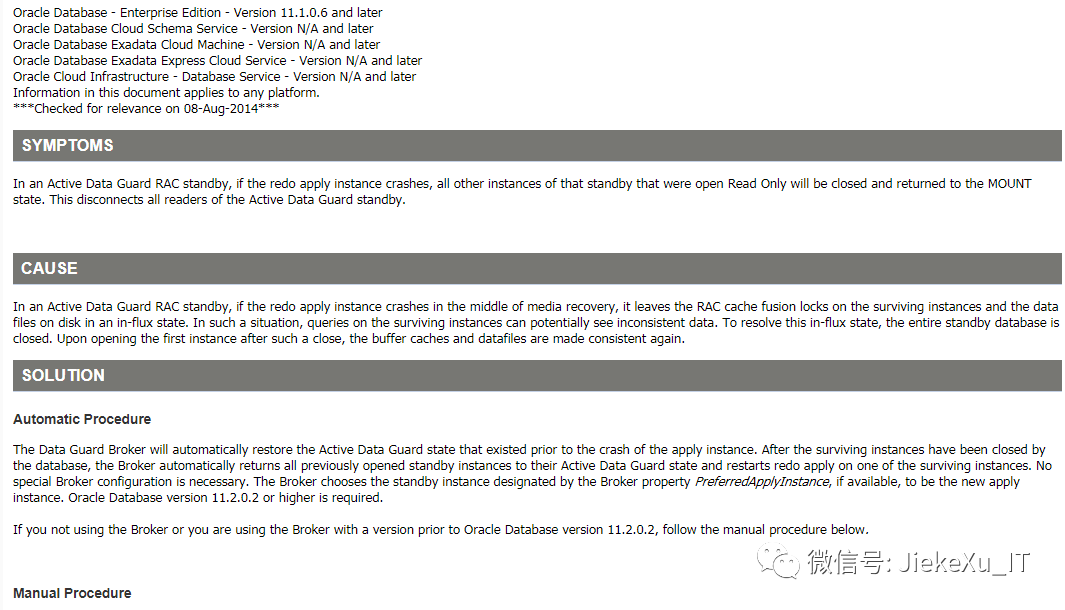
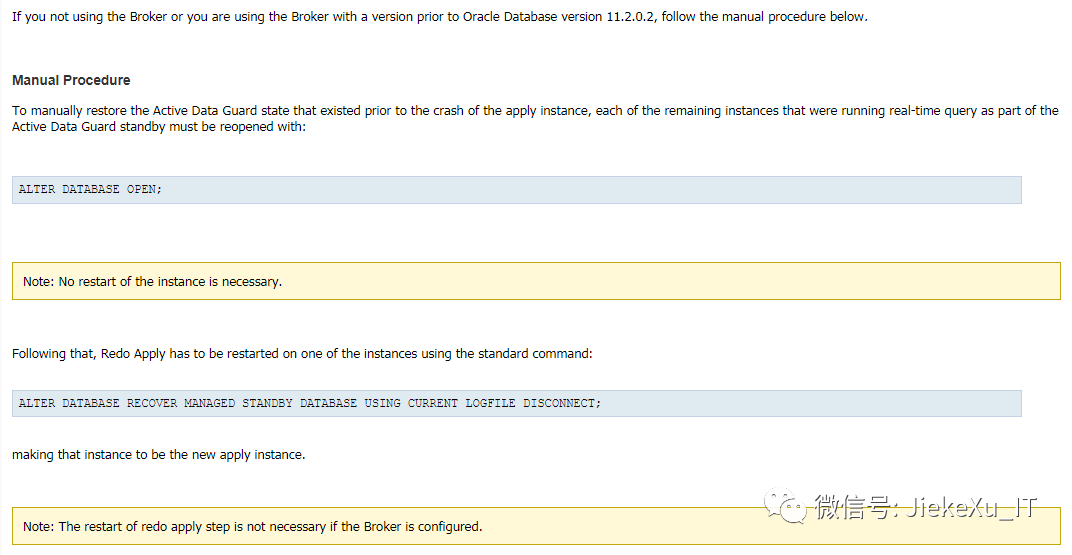
In an Active Data Guard RAC standby, if the redo apply instance crashes in the middle of media recovery, it leaves the RAC cache fusion locks on the surviving instancesand the data files on disk in an in-flux state. In such a situation, queries on the surviving instances can potentially see inconsistent data. To resolve this in-flux state, the entire standby database is closed.Upon opening the first instance after such a close, the buffer caches and datafiles are made consistent again.翻译下来就是:在 Active Data Guard RAC 备库中,如果 redo apply 实例在恢复过程中崩溃,它会使幸存实例和磁盘上的数据文件上的 RAC 缓存融合锁定处于通量状态。在这种情况下,对幸存实例的查询可能会看到不一致的数据。要解决此处于流动状态,将关闭整个备用数据库。在关闭后打开第一个实例时,缓冲区缓存和数据文件再次保持一致。
大概意思就是说,如果 apply redo 应用日志的实例进程异常终止后,其它所有OPEN READ ONLY 的实例会 close, 因为在 RAC ADG 环境中,如果实例在应用日志过程中中断 crash, 会把CACHE FUSION 的锁留到残留幸存的实例中,会导致数据查询不一致,因次需要关闭数据库,重新打开来保证 buffer cache 和 datafile 的一致状态。如果配置了 DG Broker 这个操作可以自动完成, 版本大于11.2.0.2,如果没有配置 DG broker,手动方式直接 open 就可以了,接着手动执行应用日志命令,不需要重启实例,继续在幸存的节点上应用日志。
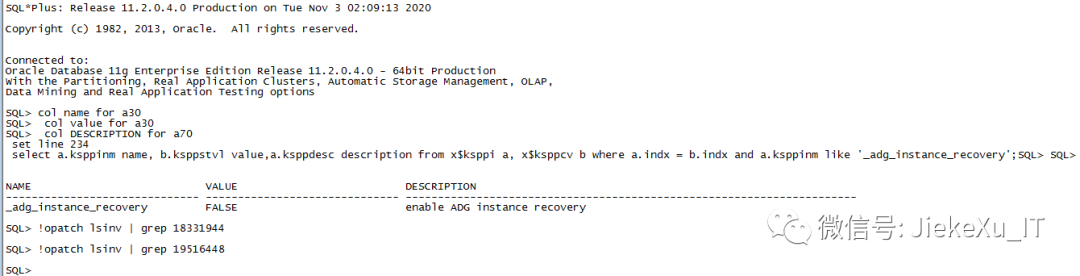
在墨天轮中,Anbob 大神写到从 12.1 版本引入了新特性 ”ADG instance recovery” ,解决的是当 redo apply instance crash 时,影响其它实例也 close 问题,从 12.1 以后保存下来的 ADG 实例会自动做 adg instance recovery ,保证数据一致性。11204 中要安装了较新的 PSU,修复了 bug 18331944 和 19516448,同时再配置隐藏参数””_adg_instance_recovery=TRUE””。关于隐含参数介绍可查看我之前的一篇文章:
Oracle 隐含参数查看 https://www.modb.pro/db/24621
SQL> col name for a30SQL> col value for a30SQL> col DESCRIPTION for a70SQL> set line 234SQL> select a.ksppinm name, b.ksppstvl value,a.ksppdesc description from x$ksppi a, x$ksppcv b where a.indx = b.indx and a.ksppinm like '_adg_instance_recovery';NAME VALUE DESCRIPTION------------------------------ ------------------------------ ----------------------------------------------------------------------_adg_instance_recovery FALSE enable ADG instance recovery
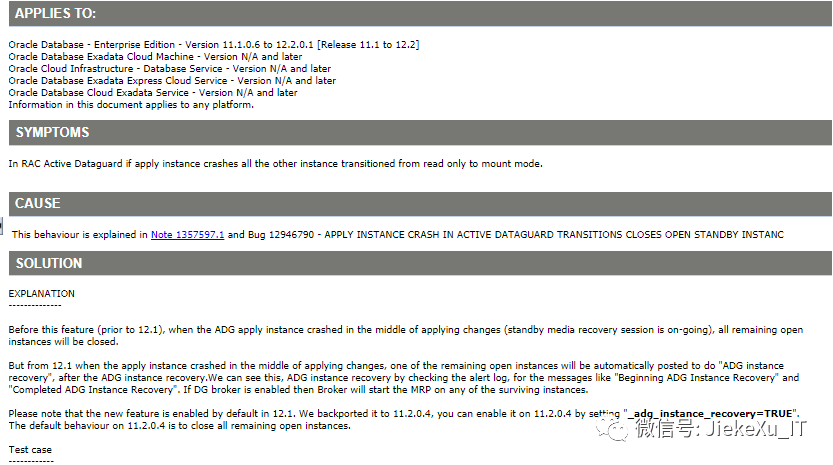
EXPLANATION--------------Before this feature (prior to 12.1), when the ADG apply instance crashed in the middle of applying changes (standby media recovery session is on-going), all remaining open instances will be closed.But from 12.1 when the apply instance crashed in the middle of applying changes, one of the remaining open instances will be automatically posted to do "ADG instance recovery", after the ADG instance recovery.We can see this,ADG instance recovery by checking the alert log, for the messages like "Beginning ADG Instance Recovery" and "Completed ADG Instance Recovery".If DG broker is enabled then Broker will start the MRP on any of the surviving instances.Please note that the new feature is enabled by default in 12.1. We backported it to 11.2.0.4, you can enable it on 11.2.0.4 by setting "_adg_instance_recovery=TRUE".The default behaviour on 11.2.0.4 is to close all remaining open instances翻译:在此特性之前(12.1之前),当 ADG apply 实例在应用更改的过程中崩溃(备用媒体恢复会话正在进行)时,所有剩余的打开实例将被关闭。但是从 12.1 开始,当应用实例在应用更改的过程中崩溃时,在 ADG 实例恢复之后,剩余的一个打开的实例将被自动提交去做“ADG实例恢复”。我们可以通过查看警报日志看到 ADG 实例恢复,对于“开始ADG实例恢复”和“完成ADG实例恢复”这样的消息。如果 DG broker 是启用的,那么 broker 将在任何存活的实例上启动 MRP。请注意,12.1 中的新特性是默认启用的。我们将它向后移植到 11.2.0.4,您可以通过设置 “_adg_instance_recovery=TRUE” 在 11.2.0.4 上启用它。11.2.0.4 的默认行为是关闭所有其余打开的实例。
下面是一个 MOS 上测试案例分享一下:
Test case------------I have 2 node primary and 3 node physical standby(instance number 2,4 and 5).MRP running on instance 2 and other instances are in open read only.1. On instance 2,SQL> select d.open_mode,i.instance_number from v$database d, v$instance i;OPEN_MODE INSTANCE_NUMBER-------------------- ---------------READ ONLY WITH APPLY 2SQL> select process,status,sequence#,thread# from v$managed_standby where process like '%MRP%';PROCESS STATUS SEQUENCE# THREAD#--------- ------------ ---------- ----------MRP0 WAIT_FOR_LOG 22 1SQL> show parameter _adgNAME TYPE VALUE------------------------------------ ----------- ------------------------------_adg_instance_recovery boolean TRUE2. On instance 4,SQL> select process,status,sequence#,thread# from v$managed_standby where process like '%MRP%';no rows selectedSQL> show parameter _adgNAME TYPE VALUE------------------------------------ ----------- ------------------------------_adg_instance_recovery boolean TRUE3. Shut abort instance 2.SQL> shut abortORACLE instance shut down.SQL> exit4. Instance 4 still open_read only.SQL> select d.open_mode,i.instance_number from v$database d, v$instance i;OPEN_MODE INSTANCE_NUMBER-------------------- ---------------READ ONLY 4NOTE :1. As said before if DG broker configured then Broker will start MRP on any one of the available instances.2. If you want to use ADG instance recovery feature on 11.2.0.4 (including 11.2.0.4 BP or PSUs), please make sure the following patches for following fixes are present. The ADG instance recovery feature is not usable without those fixes.- Bug fix for 18331944.- Bug fix for 19516448.
当然,我的生产灾备环境是没有相关补丁和参数设置的,PSU 11.2.0.4.180717 过旧,故会产生此类问题。
参考链接:
https://www.modb.pro/db/32021
Active Data Guard RAC Standby – Apply Instance Node Failure Impact (Doc ID 1357597.1)
Behavior of Active Dataguard(ADG) When Apply Node Aborts/Crash (Doc ID 1613719.1)
今天的分享就到这里了,如果本文对您有一丁点儿帮助,请多支持“在看”与转发,不求小费了哪怕是一个小小的赞,您的鼓励都将是我熬夜写文章最大的动力,让我有一直写下去的动力,最后一起加油,奥利给!

Oracle 12c 及以上版本补丁更新说明及下载方法(收藏版)
Oracle 11.2.0.4 RAC 最新补丁下载(11.2.0.4.200714)
案例分享|Oracle 11g RAC 数据库连接数过高处理办法
11g RAC 在线存储迁移实现 OCR 磁盘组完美替换
如何通过 Shell 监控异常等待事件和活跃会话
我的 OCM 之路|书写无悔青春追梦永不止步
Oracle 19c 之多租户 PDB 连接与访问(三)
案例:RMAN 备份控制文件报错 ORA-00230
Oracle 12C 最新补丁下载与安装操作指北
DBA 常用的软件工具有哪些(分享篇)?
Oracle 11g 临时表空间管理
Oracle 每日一题系列合集