



Redis简介
Redis是一个数据以key-value形式存储的NoSQL数据库,是基于内存的存储中间件,可用来做缓存、消息队列等。由于Redis是基于内存的,因此它的效率较高,若把它当缓存可以减轻数据库压力,提高查询效率。

传统的查询
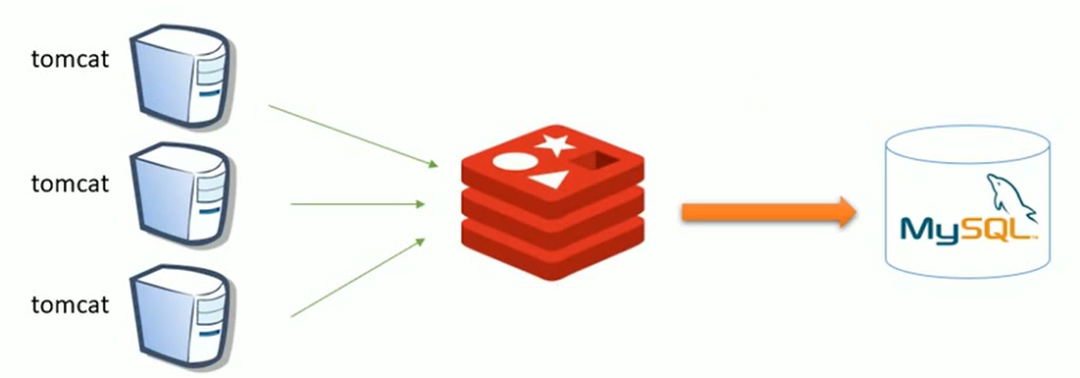
加了Redis的查询
请求的时候先经过Redis查看是否存在数据,若不存在则去MySQL中获取,获取到数据则存储在Redis中,下次直接在Redis中获取。
开始前的说明
由于Spring是个成熟的框架,它为开发者提供了缓存的支持,因此使用起来及其方便,使用@Cacheable注解就可以实现。
Spring中提供了自己的缓存,但如果要使用Redis,则需要实现Spring的Cache接口才能使用,好在Spring中提供了实现了该接口的Redis实现类RedisCache,只需要做好相应的配置即可使用,甚至不用自己实现。
环境搭建
首先安装Reids,只在自己的服务器上用Docker创建Redis容器即可,当然也可以不用Docker,看个人习惯。
# 拉取 Redis 镜像docker pull redis# 创建 Redis 容器docker run -d --name=redis -p 6379:6379 redis
Redis环境搞定,接下来加项目代码中配置,先导入依赖
<dependency><groupId>org.springframework.data</groupId><artifactId>spring-data-redis</artifactId><version>1.8.6.RELEASE</version></dependency><!-- Jedis --><dependency><groupId>redis.clients</groupId><artifactId>jedis</artifactId><version>2.9.0</version></dependency>
完事后创建一个redis-config.properties文件,写入Redis相关配置
# server IPredis.host=你的IP# server portredis.port=6379# server passredis.pass=你的密码# use dbIndexredis.database=0# 控制一个pool最多有多少个状态为idle(空闲的)的jedis实例redis.maxIdle=300# 表示当borrow(引入)一个jedis实例时,最大的等待时间,如果超过等待时间(毫秒),则直接抛出JedisConnectionException;redis.maxWait=3000# 在borrow一个jedis实例时,是否提前进行validate操作;如果为true,则得到的jedis实例均是可用的redis.testOnBorrow=true
然后创建一个spring-redis.xml文件,写入如下配置(写好别忘了在web.xml中加载该文件)
<?xml version="1.0" encoding="UTF-8"?><beans xmlns="http://www.springframework.org/schema/beans"xmlns:xsi="http://www.w3.org/2001/XMLSchema-instance" xmlns:p="http://www.springframework.org/schema/p"xmlns:context="http://www.springframework.org/schema/context"xmlns:cache="http://www.springframework.org/schema/cache"xsi:schemaLocation="http://www.springframework.org/schema/beanshttp://www.springframework.org/schema/beans/spring-beans-4.2.xsdhttp://www.springframework.org/schema/contexthttp://www.springframework.org/schema/context/spring-context-4.2.xsdhttp://www.springframework.org/schema/cachehttp://www.springframework.org/schema/cache/spring-cache-4.2.xsd"><context:property-placeholder location="classpath:redis-config.properties" ><cache:annotation-driven cache-manager="cacheManager" key-generator="workingKeyGenerator"/><!-- redis 相关配置 --><bean id="poolConfig" class="redis.clients.jedis.JedisPoolConfig"><property name="maxIdle" value="${redis.maxIdle}" ><property name="maxWaitMillis" value="${redis.maxWait}" ><property name="testOnBorrow" value="${redis.testOnBorrow}" ></bean><bean id="jedisConnectionFactory" class="org.springframework.data.redis.connection.jedis.JedisConnectionFactory"p:host-name="${redis.host}" p:port="${redis.port}" p:password="${redis.pass}" p:pool-config-ref="poolConfig"/><bean id="redisTemplate" class="org.springframework.data.redis.core.RedisTemplate"><property name="connectionFactory" ref="jedisConnectionFactory" /></bean><bean id="cacheManager" class="org.springframework.cache.support.SimpleCacheManager"><property name="caches"><set><!-- RedisCache构造方法中的四个参数,name:缓存的名字,与注解中的属性有关 --><!-- redisOperations:redis相关操作 --><!-- expiration:缓存存活时间,以秒计 --><bean class="org.springframework.data.redis.cache.RedisCache"><constructor-arg index="0" name="name" value="common"/><constructor-arg index="1"><null/></constructor-arg><constructor-arg index="2" name="redisOperations" ref="redisTemplate"/><constructor-arg index="3" name="expiration" value="300"/></bean></set></property></bean><!-- key生成器 --><bean id="workingKeyGenerator" class="org.springframework.cache.interceptor.SimpleKeyGenerator"/></beans>
这样就配置好了,接下来只需要在Service层的方法上加@Cacheable注解
/*** value需要和配置文件里的一致* key:key的生成策略,getMethodName():方法名,#pageNum:参数的值* 方法中两个参数是用于PageHelper,我用AOP切入了因此没有其他代码*/@Cacheable(value = "common", key = "getMethodName()+'_'+#pageNum")public Object findGoods(int pageNum, int pageSize){return goodsDao.findGoods();}
运行结果
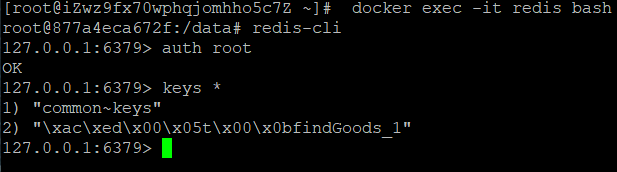
运行后可以看到Redis中已经存入了数据,那些符号是因为序列化的原因,但看第二个key的后面,与注解中定义的key一致,说明成功了。
文章转载自大数据的奇妙冒险,如果涉嫌侵权,请发送邮件至:contact@modb.pro进行举报,并提供相关证据,一经查实,墨天轮将立刻删除相关内容。
