在docker hub(https://hub.docker.com/r/rancher/rancher/tags)上没有发现mac arm架构的docker镜像,其实linux arm版本的镜像,通过简单的配置修改也可以在mac m1使用,本文使用的是
docker pull rancher/rancher:v2.6-67229511aeacd882ccb97e185826d664951c795c-linux-arm64
按照官方的步骤启动rancher是有问题的
docker run -d --restart=unless-stopped -p 8088:80 -p 8443:443 \-v ~/docker_volume/rancher_home/rancher:/var/lib/rancher \-v ~/docker_volume/rancher_home/auditlog:/var/log/auditlog \--name rancher_arm rancher/rancher:v2.6-67229511aeacd882ccb97e185826d664951c795c-linux-arm64
% docker container lsCONTAINER ID IMAGE COMMAND CREATED STATUS PORTS NAMES300f374aa735 rancher/rancher:v2.6-67229511aeacd882ccb97e185826d664951c795c-linux-arm64 "entrypoint.sh" About a minute ago Restarting (1) 37 seconds ago rancher_arm
发现一直在重启,查看日志发现需要特权模式
% docker logs c37ce8264cf3ERROR: Rancher must be ran with the --privileged flag when running outside of Kubernetes
加上--privileged参数后查看日志
% docker logs dc944a185a322021/11/18 07:15:57 [ERROR] error syncing 'rancher-partner-charts': handler helm-clusterrepo-ensure: git -C var/lib/rancher-data/local-catalogs/v2/rancher-partner-charts/8f17acdce9bffd6e05a58a3798840e408c4ea71783381ecd2e9af30baad65974 fetch origin 8d8156d70a6cd31e78c01f127fb2f24363942453 error: exit status 128, detail: error: Server does not allow request for unadvertised object 8d8156d70a6cd31e78c01f127fb2f24363942453, requeuing
% kubectl get ns^@^@^@^@Error from server (InternalError): an error on the server ("") has prevented the request from succeeding
一顿操作,最终发现,本地开了HTTPS代理
export HTTPS_PROXY=""
问题解决
curl http://0.0.0.0:8088
竟然404,lsof发现端口冲突了,修改端口
docker run -d --restart=unless-stopped -p 7071:80 -p 7443:443 \-v ~/docker_volume/rancher_home/rancher:/var/lib/rancher \-v ~/docker_volume/rancher_home/auditlog:/var/log/auditlog \--privileged \--name rancher_arm rancher/rancher:v2.6-67229511aeacd882ccb97e185826d664951c795c-linux-arm64
然后测试下:
% curl http://0.0.0.0:7071<a href="https://0.0.0.0:7443/">Found</a>.% curl http://0.0.0.0:7443Client sent an HTTP request to an HTTPS server.% curl https://0.0.0.0:7443curl: (60) SSL certificate problem: unable to get local issuer certificate
浏览器信任非安全连接就可以了。在浏览器打开https://0.0.0.0:7443
进入到登陆页面,但是我们没有设置过用户名和密码呀,rancher提供了重置密码工具
% docker exec -it f2149a1f379d reset-passwordNew password for default admin user (user-z64h7):L9QkCDe6eJNrsoTl7o8P
我们得到用户名:admin 密码:L9QkCDe6eJNrsoTl7o8P
然后我们根据提示,导入本地的k8s集群
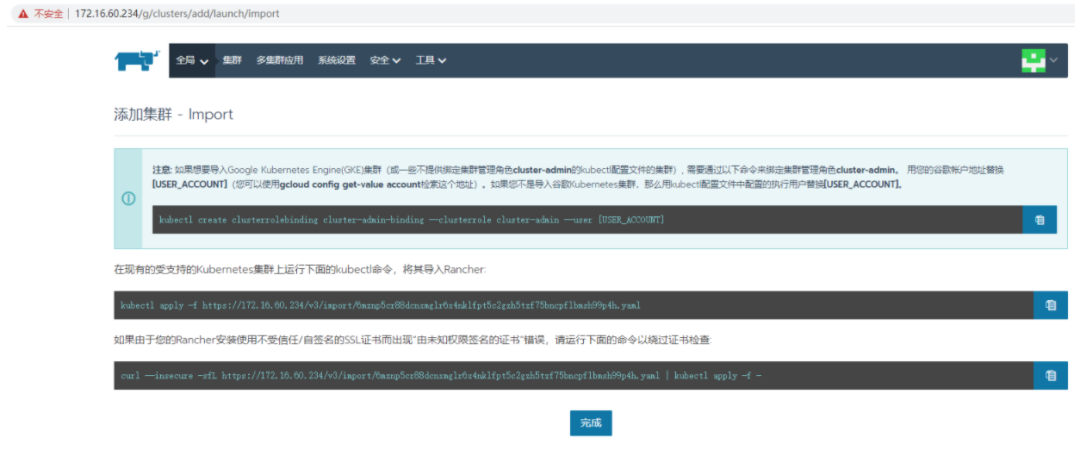
kubectl apply -f https://172.17.0.3:7443/v3/import/htfjdmgnhjlzt69fzdknvjjwqrj62kvr72cz2b4fv4qwqp2r8nbcw9_c-m-dgdvgfs7.yamlUnable to connect to the server: dial tcp 172.17.0.3:7443: i/o timeout
报错了,这里有个神奇的ip 172.17.0.3,是哪里的呢?
我们发现端口和我们起的rancher 容器很像,验证下我们的想法:
% docker inspect --format '{{ .NetworkSettings.IPAddress }}' rancher_arm172.17.0.3
这是容器内部的ip,在宿主机很显然访问不了,应该用宿主机的ip
kubectl apply -f https://127.0.0.1:7443/v3/import/htfjdmgnhjlzt69fzdknvjjwqrj62kvr72cz2b4fv4qwqp2r8nbcw9_c-m-dgdvgfs7.yamlUnable to connect to the server: x509: certificate signed by unknown authority
然后根据rancher的提示操作
curl --insecure -sfL https://127.0.0.1:7443/v3/import/htfjdmgnhjlzt69fzdknvjjwqrj62kvr72cz2b4fv4qwqp2r8nbcw9_c-m-dgdvgfs7.yaml | kubectl apply -f -clusterrole.rbac.authorization.k8s.io/proxy-clusterrole-kubeapiserver createdclusterrolebinding.rbac.authorization.k8s.io/proxy-role-binding-kubernetes-master creatednamespace/cattle-system createdserviceaccount/cattle createdclusterrolebinding.rbac.authorization.k8s.io/cattle-admin-binding createdsecret/cattle-credentials-674e7b5 createdclusterrole.rbac.authorization.k8s.io/cattle-admin createddeployment.apps/cattle-cluster-agent createdservice/cattle-cluster-agent created
其实就是从rancher里面下载一个yaml,然后apply到我们的k8s集群,我们可以仔细观察下这个yaml的内容
curl --insecure -sfL https://127.0.0.1:7443/v3/import/htfjdmgnhjlzt69fzdknvjjwqrj62kvr72cz2b4fv4qwqp2r8nbcw9_c-m-dgdvgfs7.yaml---apiVersion: rbac.authorization.k8s.io/v1kind: ClusterRolemetadata:name: proxy-clusterrole-kubeapiserverrules:- apiGroups: [""]resources:- nodes/metrics- nodes/proxy- nodes/stats- nodes/log- nodes/specverbs: ["get", "list", "watch", "create"]---apiVersion: rbac.authorization.k8s.io/v1kind: ClusterRoleBindingmetadata:name: proxy-role-binding-kubernetes-masterroleRef:apiGroup: rbac.authorization.k8s.iokind: ClusterRolename: proxy-clusterrole-kubeapiserversubjects:- apiGroup: rbac.authorization.k8s.iokind: Username: kube-apiserver---apiVersion: v1kind: Namespacemetadata:name: cattle-system---apiVersion: v1kind: ServiceAccountmetadata:name: cattlenamespace: cattle-system---apiVersion: rbac.authorization.k8s.io/v1kind: ClusterRoleBindingmetadata:name: cattle-admin-bindingnamespace: cattle-systemlabels:cattle.io/creator: "norman"subjects:- kind: ServiceAccountname: cattlenamespace: cattle-systemroleRef:kind: ClusterRolename: cattle-adminapiGroup: rbac.authorization.k8s.io---apiVersion: v1kind: Secretmetadata:name: cattle-credentials-1db23e4namespace: cattle-systemtype: Opaquedata:url: "aHR0cHM6Ly8xMjcuMC4wLjE6NzQ0Mw=="token: "ZmRjYnFndGRkZjlnbWRjNXZoeHdud25sZnpzMnI1eHoyZGo3cWh2Yjk0ajdta2ZmZ2N2Ynhr"namespace: ""---apiVersion: rbac.authorization.k8s.io/v1kind: ClusterRolemetadata:name: cattle-adminlabels:cattle.io/creator: "norman"rules:- apiGroups:- '*'resources:- '*'verbs:- '*'- nonResourceURLs:- '*'verbs:- '*'---apiVersion: apps/v1kind: Deploymentmetadata:name: cattle-cluster-agentnamespace: cattle-systemannotations:management.cattle.io/scale-available: "2"spec:selector:matchLabels:app: cattle-cluster-agenttemplate:metadata:labels:app: cattle-cluster-agentspec:affinity:podAntiAffinity:preferredDuringSchedulingIgnoredDuringExecution:- weight: 100podAffinityTerm:labelSelector:matchExpressions:- key: appoperator: Invalues:- cattle-cluster-agenttopologyKey: kubernetes.io/hostnamenodeAffinity:requiredDuringSchedulingIgnoredDuringExecution:nodeSelectorTerms:- matchExpressions:- key: beta.kubernetes.io/osoperator: NotInvalues:- windowspreferredDuringSchedulingIgnoredDuringExecution:- preference:matchExpressions:- key: node-role.kubernetes.io/controlplaneoperator: Invalues:- "true"weight: 100- preference:matchExpressions:- key: node-role.kubernetes.io/control-planeoperator: Invalues:- "true"weight: 100- preference:matchExpressions:- key: node-role.kubernetes.io/masteroperator: Invalues:- "true"weight: 100- preference:matchExpressions:- key: cattle.io/cluster-agentoperator: Invalues:- "true"weight: 1serviceAccountName: cattletolerations:# No taints or no controlplane nodes found, added defaults- effect: NoSchedulekey: node-role.kubernetes.io/controlplanevalue: "true"- effect: NoSchedulekey: "node-role.kubernetes.io/control-plane"operator: "Exists"- effect: NoSchedulekey: "node-role.kubernetes.io/master"operator: "Exists"containers:- name: cluster-registerimagePullPolicy: IfNotPresentenv:- name: CATTLE_IS_RKEvalue: "false"- name: CATTLE_SERVERvalue: "https://127.0.0.1:7443"- name: CATTLE_CA_CHECKSUMvalue: "a2f5ce583180431175ce0a08b283ef216eee183de4edee930ce414ae719b039e"- name: CATTLE_CLUSTERvalue: "true"- name: CATTLE_K8S_MANAGEDvalue: "true"- name: CATTLE_CLUSTER_REGISTRYvalue: ""- name: CATTLE_SERVER_VERSIONvalue: v2.6-67229511aeacd882ccb97e185826d664951c795c-head- name: CATTLE_INSTALL_UUIDvalue: 2b4a4913-a091-48e9-9138-95501d8bf1dc- name: CATTLE_INGRESS_IP_DOMAINvalue: sslip.ioimage: rancher/rancher-agent:v2.6-67229511aeacd882ccb97e185826d664951c795c-headvolumeMounts:- name: cattle-credentialsmountPath: /cattle-credentialsreadOnly: truevolumes:- name: cattle-credentialssecret:secretName: cattle-credentials-1db23e4defaultMode: 320strategy:type: RollingUpdaterollingUpdate:maxUnavailable: 0maxSurge: 1---apiVersion: v1kind: Servicemetadata:name: cattle-cluster-agentnamespace: cattle-systemspec:ports:- port: 80targetPort: 80protocol: TCPname: http- port: 443targetPort: 444protocol: TCPname: https-internalselector:app: cattle-cluster-agent
可以看到,这里其实就是简单地创建了角色和角色绑定,然后创建了一个deployment,启动了一个cattle-cluster-agent服务。注意用到了一个镜像
image: rancher/rancher-agent:v2.6-67229511aeacd882ccb97e185826d664951c795c-head
这个镜像在dockerhub上没有搜到,导致状态一直是ImagePullBackOff
% kubectl get pods -n cattle-systemNAME READY STATUS RESTARTS AGEcattle-cluster-agent-86d999777-vjwm2 0/1 ImagePullBackOff 0 18m
我们去dockerhub上https://hub.docker.com/r/rancher/rancher-agent下载同一个commitid的镜像
docker pull rancher/rancher-agent:v2.6-67229511aeacd882ccb97e185826d664951c795c-linux-arm64
重新打tag
docker tag rancher/rancher-agent:v2.6-67229511aeacd882ccb97e185826d664951c795c-linux-arm64 rancher/rancher-agent:v2.6-67229511aeacd882ccb97e185826d664951c795c-head
查看下pod的状态
% kubectl get pods -n cattle-systemNAME READY STATUS RESTARTS AGEcattle-cluster-agent-86d999777-vjwm2 0/1 Error 2 55m
竟然报错了,我们看看日志,原来
% kubectl logs cattle-cluster-agent-86d999777-vjwm2 -n cattle-systemINFO: Environment: CATTLE_ADDRESS=10.1.0.204 CATTLE_CA_CHECKSUM=a2f5ce583180431175ce0a08b283ef216eee183de4edee930ce414ae719b039e CATTLE_CLUSTER=true CATTLE_CLUSTER_AGENT_PORT=tcp://10.108.3.16:80 CATTLE_CLUSTER_AGENT_PORT_443_TCP=tcp://10.108.3.16:443 CATTLE_CLUSTER_AGENT_PORT_443_TCP_ADDR=10.108.3.16 CATTLE_CLUSTER_AGENT_PORT_443_TCP_PORT=443 CATTLE_CLUSTER_AGENT_PORT_443_TCP_PROTO=tcp CATTLE_CLUSTER_AGENT_PORT_80_TCP=tcp://10.108.3.16:80 CATTLE_CLUSTER_AGENT_PORT_80_TCP_ADDR=10.108.3.16 CATTLE_CLUSTER_AGENT_PORT_80_TCP_PORT=80 CATTLE_CLUSTER_AGENT_PORT_80_TCP_PROTO=tcp CATTLE_CLUSTER_AGENT_SERVICE_HOST=10.108.3.16 CATTLE_CLUSTER_AGENT_SERVICE_PORT=80 CATTLE_CLUSTER_AGENT_SERVICE_PORT_HTTP=80 CATTLE_CLUSTER_AGENT_SERVICE_PORT_HTTPS_INTERNAL=443 CATTLE_CLUSTER_REGISTRY= CATTLE_INGRESS_IP_DOMAIN=sslip.io CATTLE_INSTALL_UUID=2b4a4913-a091-48e9-9138-95501d8bf1dc CATTLE_INTERNAL_ADDRESS= CATTLE_IS_RKE=false CATTLE_K8S_MANAGED=true CATTLE_NODE_NAME=cattle-cluster-agent-86d999777-vjwm2 CATTLE_SERVER=https://172.17.0.3:7443 CATTLE_SERVER_VERSION=v2.6-67229511aeacd882ccb97e185826d664951c795c-headINFO: Using resolv.conf: nameserver 10.96.0.10 search cattle-system.svc.cluster.local svc.cluster.local cluster.local options ndots:5ERROR: https://172.17.0.3:7443/ping is not accessible (Failed to connect to 172.17.0.3 port 7443: Connection refused)
https://172.17.0.3:7443这个地址连不上,在另外一个docker上,ip是docker内部ip,端口是宿主机ip,当然连不上,我们该下deployment,改成127.0.0.1,总可以了吧,很遗憾,仍然不行。是时候回去学习一些基础知识了。

Rancher Server 管控 Rancher 部署的 Kubernetes 集群(RKE 集群)和托管的 Kubernetes 集群的(EKS)集群的流程。以用户下发指令为例,指令的流动路径如下:
首先,用户通过 Rancher UI(即 Rancher 控制台) Rancher 命令行工具(Rancher CLI)输入指令;直接调用 Rancher API 接口也可以达到相同的效果。用户通过 Rancher 的代理认证后,指令会进一步下发到 Rancher Server 。与此同时,Rancher Server 也会执行容灾备份,将数据备份到 etcd 节点。
然后 Rancher Server 把指令传递给集群控制器。集群控制器把指令传递到下游集群的 Agent,最终通过 Agent 把指令下发到指定的集群中。
在执行集群操作时,cattle-node-agent用于和Rancher 部署的 Kubernetes 集群中的节点进行交互。集群操作的示例包括升级 Kubernetes 版本、创建 etcd 快照和恢复 etcd 快照。cattle-node-agent通过 DaemonSet 的方式部署,以确保其在每个节点上运行。当cattle-cluster-agent不可用时,cattle-node-agent 将作为备选方案连接到Rancher 部署的 Kubernetes 集群中的 Kubernetes API。
cattle-node-agent部署在我们的k8s机群里,它连不上宿主的rancher,那为啥127.0.0.1:7443连接不上呢?
在使用Docker时,要注意平台之间实现的差异性,如Docker For Mac的实现和标准Docker规范有区别,Docker For Mac的Docker Daemon是运行于虚拟机(xhyve)中的, 而不是像Linux上那样作为进程运行于宿主机,因此Docker For Mac没有docker0网桥,不能实现host网络模式,host模式会使Container复用Daemon的网络栈(在xhyve虚拟机中),而不是与Host主机网络栈,这样虽然其它容器仍然可通过xhyve网络栈进行交互,但却不是用的Host上的端口(在Host上无法访问)。bridge网络模式 -p 参数不受此影响,它能正常打开Host上的端口并映射到Container的对应Port。
Mac OS 宿主机和 Docker 中的容器通过 var/run/docker.sock 这种 socket 文件来通信,所以在 Mac OS 中 ping 容器的 IP,在容器中 ping 宿主机的 IP 就不通。容器内访问宿主机,在 Docker 18.03 过后推荐使用 特殊的 DNS 记录 host.docker.internal 访问宿主机。但是注意,这个只是在 Docker Desktop for Mac 中作为开发时有效。 网关的 DNS 记录: gateway.docker.internal。而docker for mac上的DNS是个特殊值:
docker.for.mac.host.internal
有了上述理论做支撑,我们去rancher上改下全局配置:
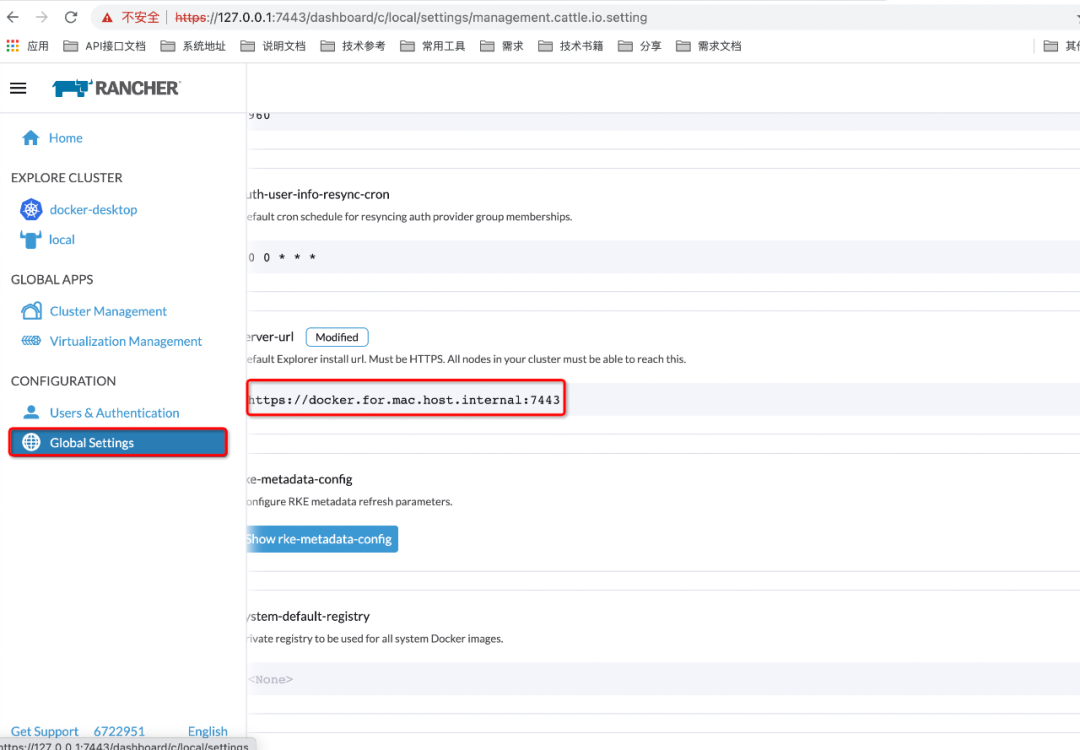
然后我们重复上述部署流程
% curl --insecure -sfL https://docker.for.mac.host.internal:7443/v3/import/n9s6rlt79759vw6nf5djv7r9zpsdnvtn8sxpzfzx4dh55cqgkjclc8_c-m-r7xmtmss.yaml | kubectl apply -f -error: no objects passed to apply
注意这个DNS在宿主机是不能被识别的,改成localhost
% curl --insecure -sfL https://localhost:7443/v3/import/n9s6rlt79759vw6nf5djv7r9zpsdnvtn8sxpzfzx4dh55cqgkjclc8_c-m-r7xmtmss.yaml | kubectl apply -f -
可以看到已经成功了,可以管理我们的机群:
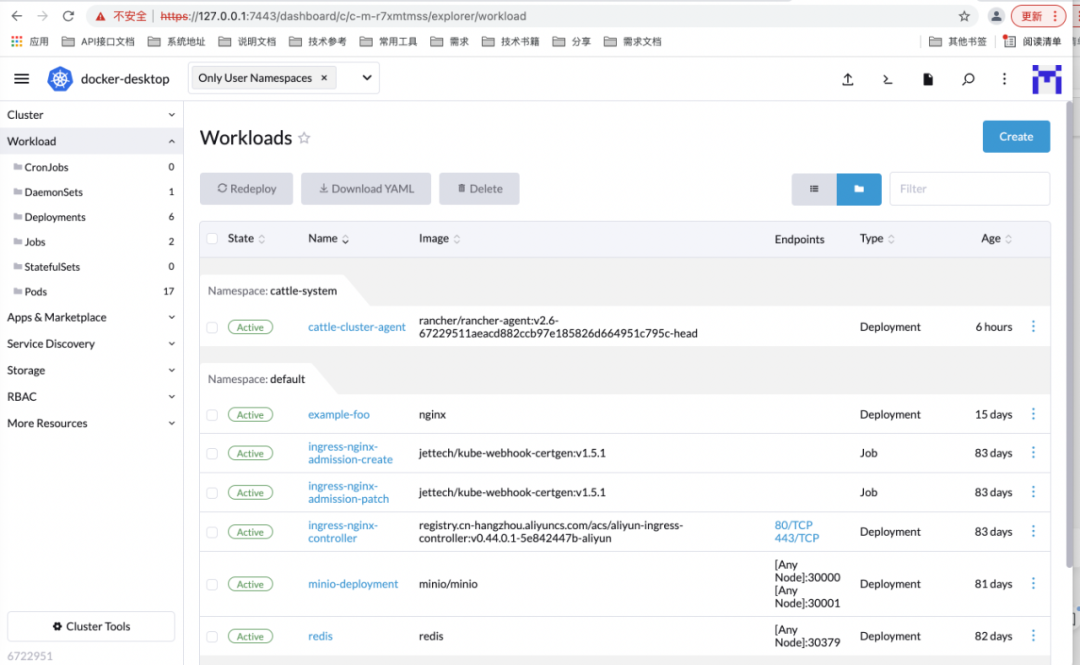
操作pod:
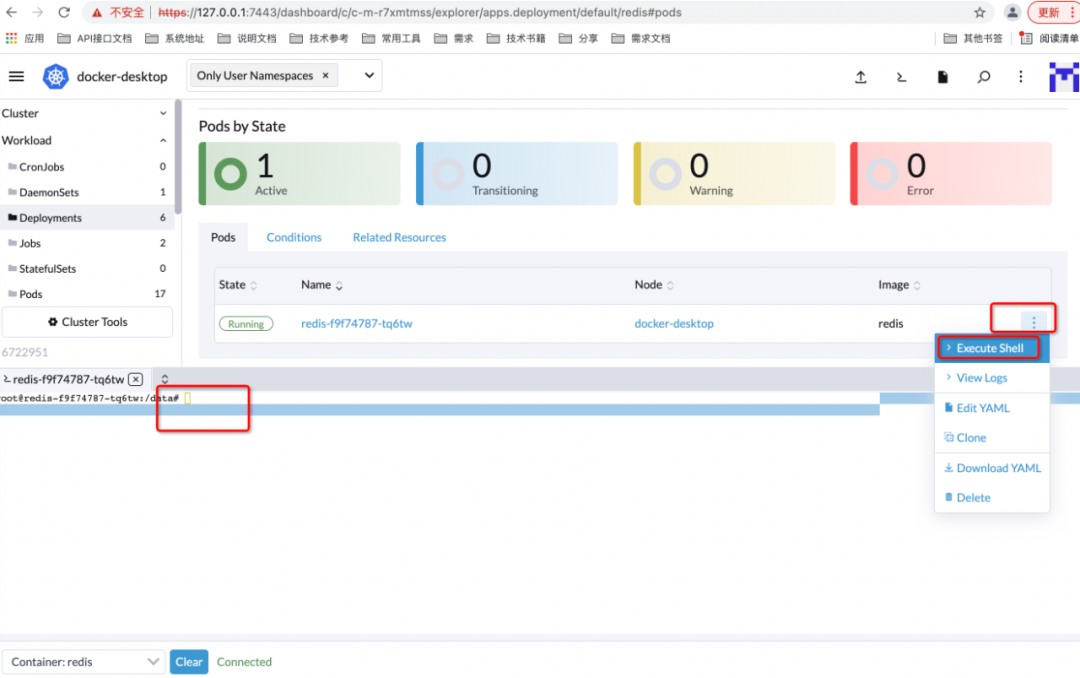
需要注意的是,我这里演示用的是v2.6,和我们常用的v2.4皮肤不太一样,功能是一样的。