



在梳理服务器的IP访问关系时,我们需要长时间观察网络会话信息,并通过会话记录来描述主机间的访问关系。
网络会话的结构,类似 netstat 的输出
源IP:源端口 目的IP:目的端口 会话状态192.168.10.23:81 10.1.1.2:59757 ESTABLISHED
作为服务器端口,访问关系是一对多;如果是服务器主动访问外部,访问关系可能是一对一。我们使用 python 字典来存储这种访问关系,源IP:端口 作为字典的 key,而访问者的IP集合作为这个 key 的 value。
单条访问关系如下:
{'192.168.10.23:80': {'172.18.52.235','192.168.23.5','172.18.19.102'}}
如果调用 netstat 来收集会话信息,这个效率会比较低。我们选择直接解析 /proc/net/tcp 文件,因为文件不大,读取信息效率比较高。
对 /proc/net/tcp 文件解析之后,可以得到
源IP
源端口
目的IP
目的端口
会话状态
过滤掉本机‘0.0.0.0' 和 '127.0.0.1' 的本地IP之后,我们对访问关系进行梳理,最终执行效果如下:
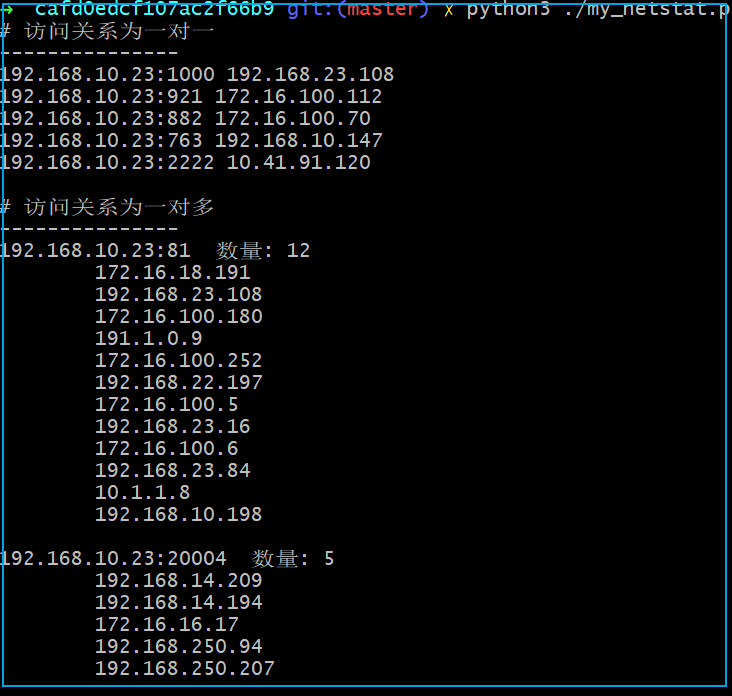
程序中加了控制参数,用来调整 /proc/net/tcp 文件的读取次数,以及每次读取间隔。这样可以控制时长和更新频率,对于长时间监控网络会话,可以每3秒读取一次,一天就是 3600x24/3 = 28800 次,程序执行条件为:
python3 ./my_netstat.py 28800 3
在程序的当前目录下会生成一个同名 *_tmp.log 的日志文件,日志文件会实时刷新当前的IP访问关系。
cat my_netstat_tmp.log
程序使用了 python 集合对重复目的IP去重,只保留新出现的目的IP。我们关注目的IP,主要目的是长时间监控网络会话,发现可能的入侵主机。
程序提供了默认参数,当不传参时,将使用默认参数。默认每次更新IP集合的等待时间为0,如果不做长时间监控,则类似 netstat 单次查询的效果。
程序代码如下:
#!python3import timeimport sysPROC_TCP = "/proc/net/tcp"STATE = {'01':'ESTABLISHED','02':'SYN_SENT','03':'SYN_RECV','04':'FIN_WAIT1','05':'FIN_WAIT2','06':'TIME_WAIT','07':'CLOSE','08':'CLOSE_WAIT','09':'LAST_ACK','0A':'LISTEN','0B':'CLOSING'}def _load():''' Read the table of tcp connections & remove header '''with open(PROC_TCP,'r') as f:content = f.readlines()content.pop(0)return contentdef _hex2dec(s):return str(int(s,16))def _ip(s):ip = [(_hex2dec(s[6:8])),(_hex2dec(s[4:6])),(_hex2dec(s[2:4])),(_hex2dec(s[0:2]))]return '.'.join(ip)def _remove_empty(array):return [x for x in array if x !='']def _convert_ip_port(array):host,port = array.split(':')return _ip(host),_hex2dec(port)def netstat():'''Function to return a list with status of tcp connections at linux systems'''content=_load()result = []for line in content:line_array = _remove_empty(line.split(' ')) # Split lines and remove empty spaces.l_host,l_port = _convert_ip_port(line_array[1]) # Convert ipaddress and port from hex to decimal.r_host,r_port = _convert_ip_port(line_array[2])state = STATE[line_array[3]]if l_host == '0.0.0.0' or l_host == '127.0.0.1':continuenline = [l_host, l_port, r_host, r_port, state]result.append(nline)return resultdef my_print(n, f=sys.stdout):d = nsingle = []multi = []for key in d.keys():if len(d[key]) == 0:continueif len(d[key]) == 1:single.append([key, list(d[key])[0]])else:multi.append([key, list(d[key])])f.write('# 访问关系为一对一\n')f.write('-'*15)f.write('\n')for i in single:f.write(i[0] + " " + i[1])f.write('\n')f.write('\n')f.write('# 访问关系为一对多\n')f.write('-'*15)f.write('\n')for i in multi:f.write("%s 数量: %d\n" %(i[0], len(i[1])))for j in i[1]:f.write('\t' + j)f.write('\n')f.write('\n')if __name__ == '__main__':'''用法:python3 ./my_netstat.py 30 1参数1: 读取 proc/net/tcp 的次数参数2: 每次读取 proc/net/tcp 文件后等待的时间 (秒)当不提供参数时,使用默认值 python3 ./my_netstat.py 30 0'''# 默认读取 30 次br = 30if len(sys.argv) < 2:passelse:br = int(sys.argv[1])# 默认等待时间delay = 0if len(sys.argv) == 3:delay = int(sys.argv[2])d = {}n = 0while True:for conn in netstat():key = conn[0]+':'+conn[1]if key not in d:d[key] = set()else:d[key].add(conn[2])with open(sys.argv[0].replace('.py', '_tmp.log'), mode='w') as f:my_print(d, f)time.sleep(delay)n += 1if n == br:breakmy_print(d)
参考:
https://gist.github.com/cafd0edcf107ac2f66b9.git
文章转载自生有可恋,如果涉嫌侵权,请发送邮件至:contact@modb.pro进行举报,并提供相关证据,一经查实,墨天轮将立刻删除相关内容。
